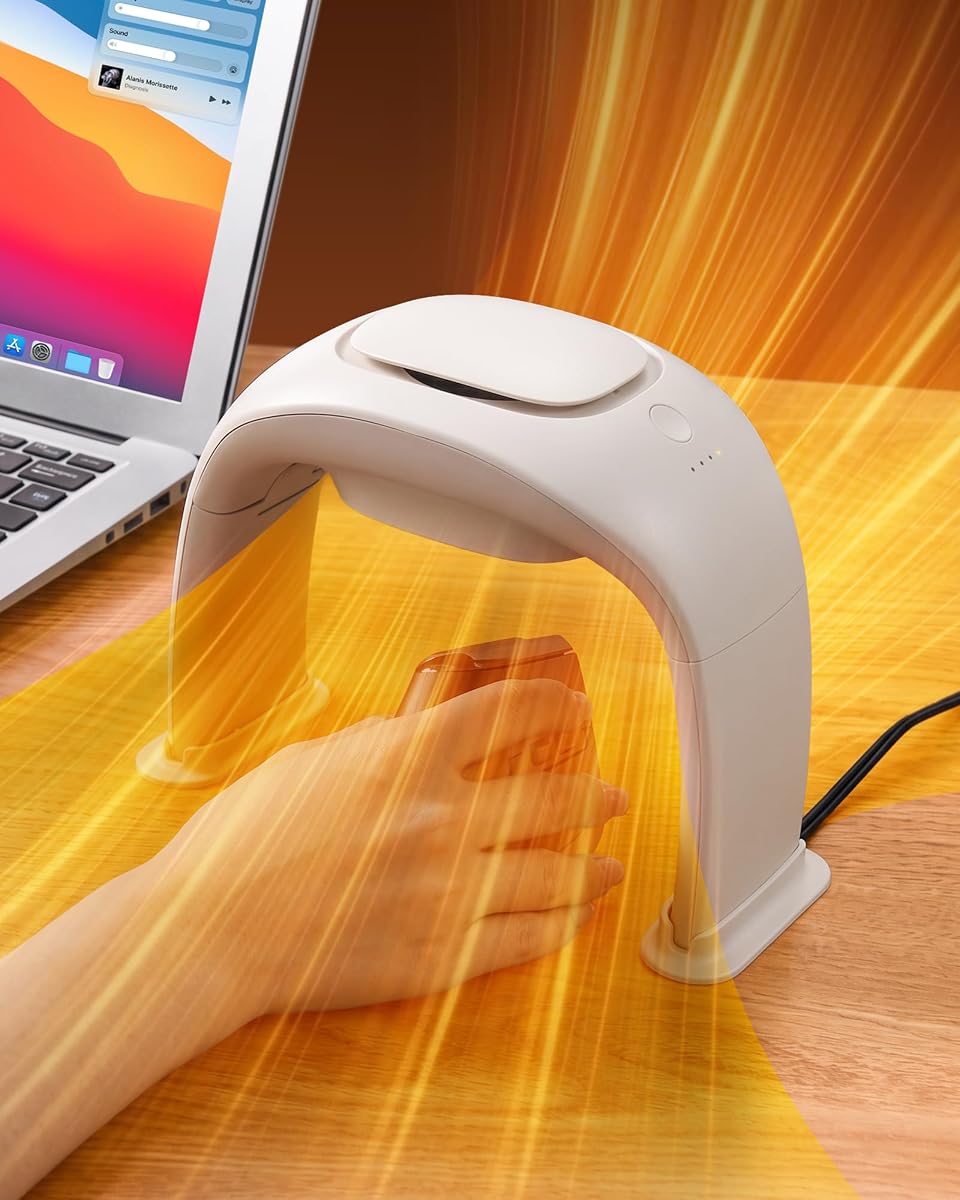
Desk Hand Warmer Over Mouse, Super Quiet 100w Office Heater -White
4.5Editor score
100W ceramic heating
Super quiet operation
Free mouse movement
Foldable design
This guide compares the top 10 hand warmer mouse pads for 2026, evaluating heating technology, safety features, comfort designs, and value to help you choose
Cold hands can severely impact productivity and comfort during long work or gaming sessions. A hand warmer mouse pad provides consistent warmth to keep your fingers and wrists at a comfortable temperature, reducing stiffness and fatigue. These devices range from simple USB heated pads to advanced ceramic heaters with ergonomic designs.
We evaluated ten leading models based on heating speed, temperature control, safety features, and build quality. Each product was analyzed for its ability to integrate seamlessly into existing desk setups without compromising mouse movement or workspace organization. Our research highlights the most reliable options for various user needs.
Each review showcases key specifications, pros and cons, and real-world usability insights to help you make an informed decision. Prices and availability may change, so please check the current listings before purchasing. We aim to provide clear, actionable information to find the perfect solution for your cold desk environment.
4.5Editor score

4.2Editor score

4.5Editor score
The following comparison table provides a side-by-side overview of all ten hand warmer mouse pads, highlighting their primary heating methods, temperature ranges, safety mechanisms, and unique design features to help you quickly identify the model that best suits your specific workspace requirements.


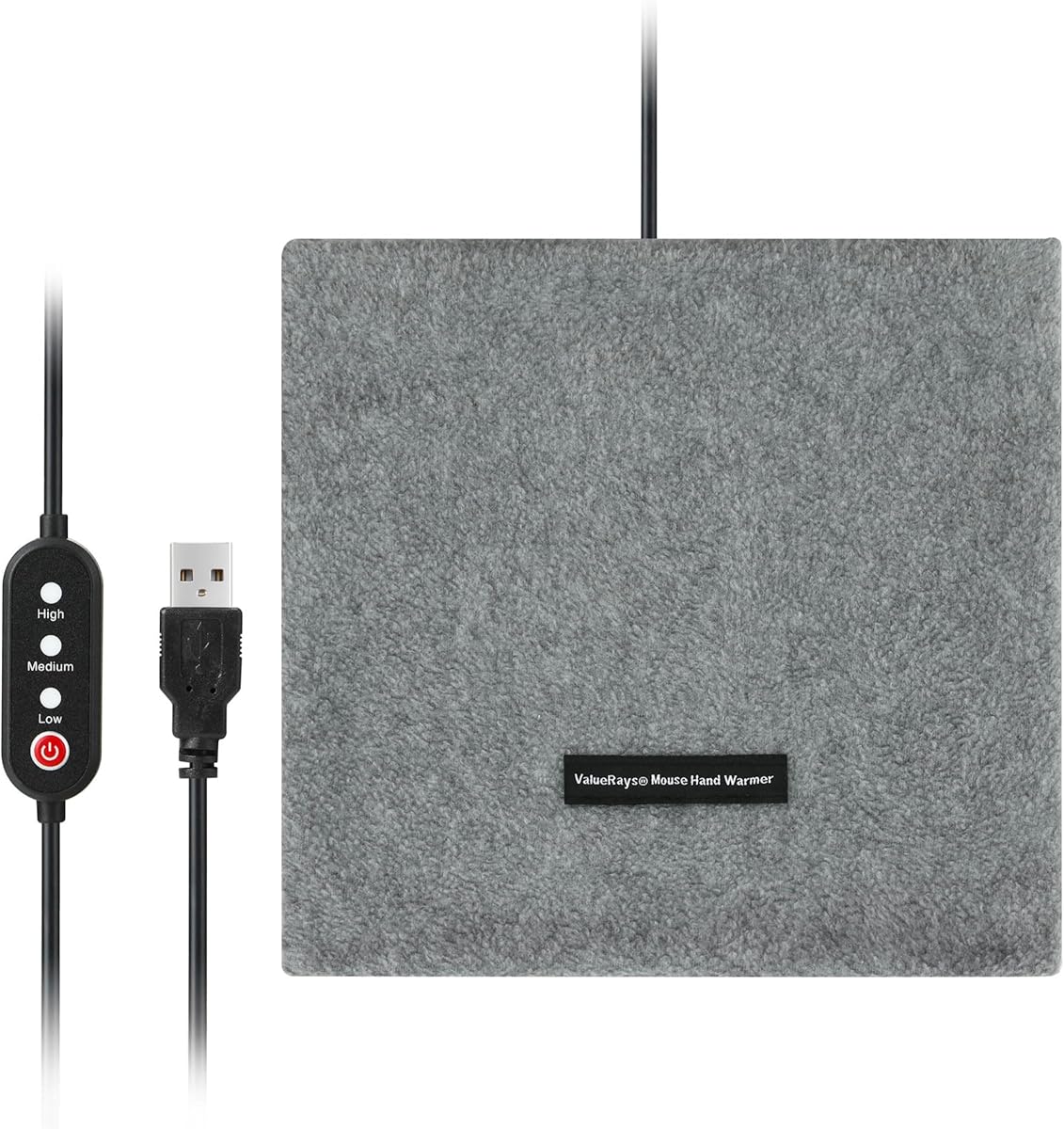
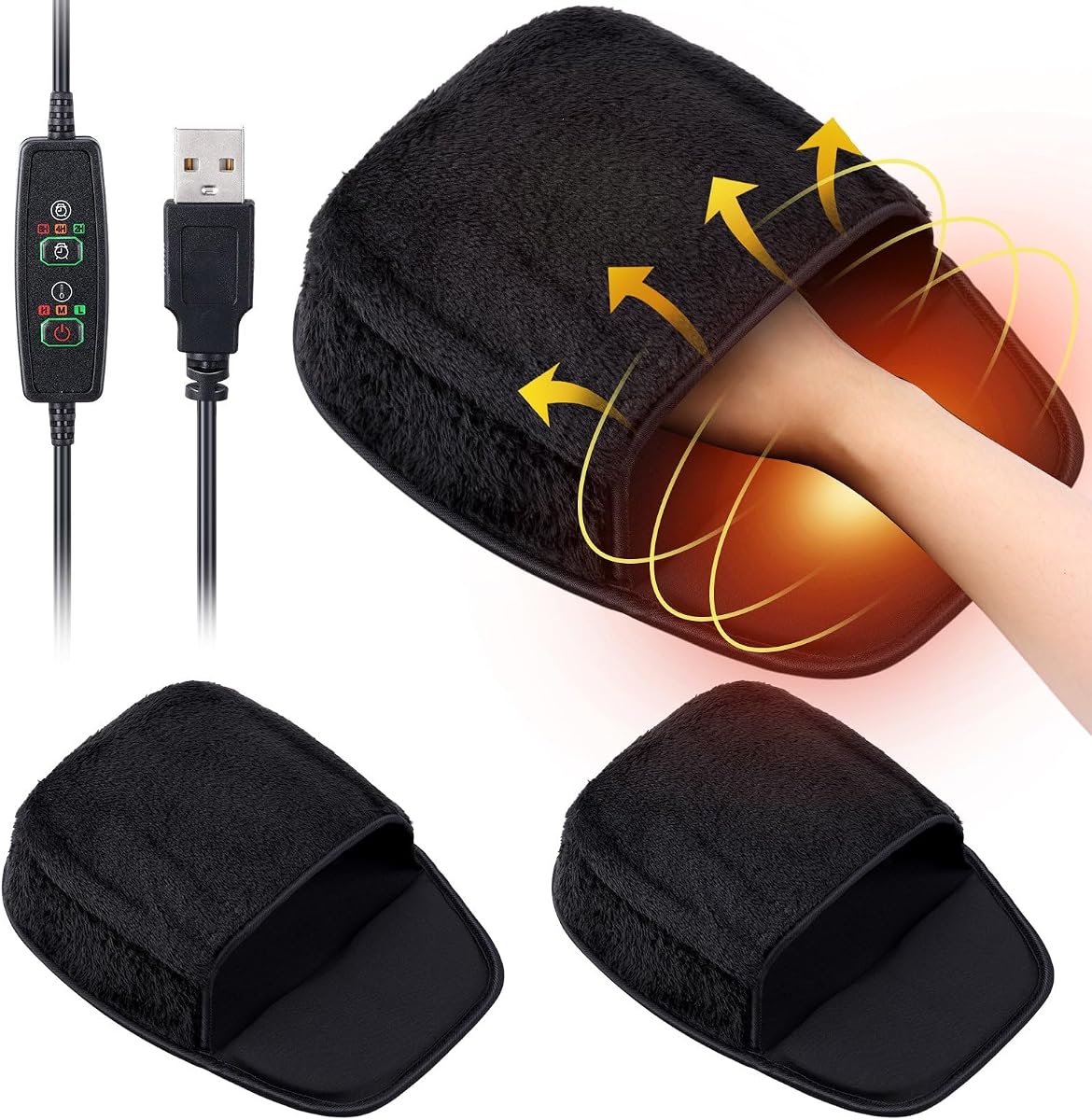

This hand warmer mouse pad stands out with its enclosed cocoon design that wraps your entire hand in warmth, distinguishing it from standard flat heated mats. Rated 4.2 stars by users, it delivers consistent heat across three temperature levels, making it ideal for cold home offices or winter work environments. The inclusion of a controller allows precise adjustments to ensure comfort without overheating.
We may earn a commission when you buy through this link, at no additional cost to you.
The neoprene shell isolates heat effectively, ensuring your fingers, knuckles, and palm stay warm simultaneously. Its PTC heating element distributes warmth evenly and safely, meeting UKCA and CE certifications. The built-in ergonomic wrist rest supports your hand in a neutral position, reducing strain during extended gaming or typing sessions.
While the design is bulkier than a typical mouse pad, the removable heating element allows for easy cleaning of the neoprene top. The non-slip rubber base keeps the unit stable during use. Users may find the cable length of 1.5 meters limits placement flexibility slightly, but the lightweight 400g build aids portability between desks.
Ideal for remote workers, students, or anyone with Raynaud's, this pad offers a thoughtful gift option. The combination of safety timers, ergonomic support, and reliable heating makes it a top recommendation for those seeking comprehensive hand warmth without compromising desk space significantly.
Unlike flat mats that only warm the wrist, the cocoon design encloses your hand, ensuring consistent warmth across all fingers and the palm during cold weather.
With three auto shut-off timers and a built-in wrist rest, this product prioritizes safety and ergonomic health for users working long hours at a computer.
We may earn a commission when you buy through this link, at no additional cost to you.
This desk hand warmer offers a premium heating experience with a 100W ceramic element that provides powerful, rapid warmth. Rated 4.5 stars, it is designed to be super quiet, operating below 20dB, making it perfect for focused office environments or quiet reading sessions. The wide-angle air guide ensures heat is distributed efficiently across the workspace.
We may earn a commission when you buy through this link, at no additional cost to you.
Its design allows for free mouse operation, with a 8.1-inch diameter space that accommodates any mouse type without restriction. Unlike slipper-style pads, this unit delivers 360-degree warmth, ensuring your hand remains warm from all sides. Safety features include tipping auto shut-off and over-temperature protection for peace of mind.
The foldable design ensures it does not consume excessive desk space when not in use, enhancing its utility for smaller workstations. However, it requires a standard 110V plug rather than USB power, which may limit placement options near computers without nearby outlets. The white aesthetic blends well with modern office decor.
For users prioritizing performance and silence, this model is a top-tier choice. It combines high wattage heating with energy-saving chips that maintain constant temperatures. It serves as an excellent practical gift for anyone needing reliable warmth during winter months without noise distractions.
Advanced ceramic heating ensures the device operates at nearly silent levels, maintaining a peaceful workspace for productivity without thermal noise.
Built-in smart chips automatically reduce power consumption when target temperatures are reached, balancing performance with energy efficiency for long-term use.
We may earn a commission when you buy through this link, at no additional cost to you.
This heated desk pad offers exceptional value with its large 31.5 x 13 inch surface, covering both keyboard and mouse areas for comprehensive warmth. Rated 4.5 stars, it features a durable PU leather surface that is easy to clean and protects your desk. The three heating levels allow customization for quick warm-ups or all-day comfort.
We may earn a commission when you buy through this link, at no additional cost to you.
Its multifunctional design means it serves as a standard mouse pad, keyboard mat, or even a foot warmer when not heating. The control box is conveniently located in the corner, making it simple to adjust settings without moving the unit. Safety certifications like UL and FCC ensure reliable performance in home or office settings.
While the unit requires a 110V plug and is heavier than basic mouse pads, the stability provided by its weight ensures it stays in place during intense use. The 4-hour auto shut-off feature adds safety for users who might forget to turn it off. It is an ideal solution for colder environments.
Best for users needing wide coverage without investing in multiple devices, this pad combines utility with cost-effectiveness. Whether used as a desk protector or a warming mat, it provides consistent heat. It is a versatile choice for winter productivity, offering warmth to hands and arms simultaneously.
With a width of 31.5 inches, this mat covers the entire workspace, ensuring both keyboard and mouse areas remain warm for consistent comfort.
PU leather construction ensures durability and easy maintenance while UL certification guarantees electrical safety for daily use in various environments.
We may earn a commission when you buy through this link, at no additional cost to you.
This electric hand heater features MCH technology and PTC ceramic heating to maintain warmth during winter work sessions. Rated 4.3 stars, it offers three temperature options between 100 and 150 degrees Fahrenheit, allowing users to select their preferred level of heat. The single-button operation simplifies adjustments for quick comfort.
We may earn a commission when you buy through this link, at no additional cost to you.
Safety is a priority with built-in tip-over protection that disconnects power if the unit falls, and overheat protection that cuts power above 170 degrees. The anti-skid silicone base ensures stability on desks. Additionally, its foldable design makes it easy to store away when not in use, saving valuable desk space.
The unit operates quietly at just 15 decibels, ensuring it does not interfere with concentration. However, it lacks a dedicated wrist rest, focusing solely on hand warmth. The heating area is smaller than full desk mats, targeting the hand directly. This makes it suitable for users with limited workspace.
For those seeking a compact, safe, and efficient hand warmer, this model performs well. It balances safety features with effective heating technology. Its portability and quiet operation make it a practical choice for home offices or study areas where noise must be minimized.
The foldable structure allows the heater to be stored compactly, making it ideal for users with limited desk space or frequent travelers.
Integrated tip-over and overheat protection ensure safe operation, automatically disconnecting power to prevent accidents or damage.
We may earn a commission when you buy through this link, at no additional cost to you.
This set includes two USB heated mouse pads with plush wrist rests, providing warmth for both work and home setups. Rated 3.6 stars, it measures 11 x 9 inches, offering enough space for flexible mouse movement. The heating element connects via USB, making it convenient to plug into computers or power banks.
We may earn a commission when you buy through this link, at no additional cost to you.
The plush material offers skin-friendly comfort, while the separate heater design allows users to detach the heating pad if not needed. This flexibility helps in cleaning or extending the lifespan of the mouse pad. However, users must disconnect power after extended use to avoid potential overheating or burns.
While the rating is lower than premium models, the value of receiving two pads is a significant advantage. It caters to budget-conscious users needing a basic solution for cold hands. The absence of automated temperature controls means manual monitoring is required to ensure safe operation during long sessions.
Ideal for families or offices sharing space, this pack provides versatile warmth options. The wrist rests add ergonomic value. For simple, no-fuss warming needs, it delivers effective results, though users should exercise caution with extended heating periods.
Including two units provides flexibility for multiple workstations or backup options, making it a practical choice for home and office use.
The soft plush material enhances tactile comfort, ensuring that users remain warm and comfortable without sacrificing touch sensitivity.
We may earn a commission when you buy through this link, at no additional cost to you.
This set offers two plush mouse pads with detachable heating elements, ensuring a safe and stable warmth environment. Rated 3.8 stars, the thick plush material is comfortable and skin-friendly. The internal space measures 11 x 9 inches, allowing flexible mouse usage without taking up excessive space on the desk.
We may earn a commission when you buy through this link, at no additional cost to you.
The detachable heating pad simplifies cleaning and maintenance, potentially extending the product's service life. USB connectivity makes setup straightforward. However, durability concerns noted in the description suggest users should unplug the plug after use to maximize lifespan. This is a practical solution for cold days.
Lacking automatic shut-off features, users need to remember to disconnect the power when not in use. Despite this, the generous internal space and soft texture make it suitable for long gaming or work sessions. It serves well as a thoughtful gift for family members needing desk warmth.
Best for budget shoppers seeking comfort, this model provides reliable warmth without complexity. The two-pack ensures one for home and one for office. While not automated, its simplicity makes it accessible for users seeking a straightforward warming option for cold weather.
The detachable heating pad allows for easy cleaning and replacement, ensuring hygiene and longevity of the product over time.
The thick plush material provides a soft, skin-friendly surface that enhances comfort during prolonged periods of use at a desk.
We may earn a commission when you buy through this link, at no additional cost to you.
This xuenair hand warmer utilizes upgraded double ball bearings and advanced PTC ceramic heating for rapid, low-noise operation. Rated 4.3 stars, it operates at a mere 20dB, ensuring a quiet environment. The 100W power output provides efficient warmth for wrists, fingers, or full hands during desktop work or gaming.
We may earn a commission when you buy through this link, at no additional cost to you.
The wide 8.1 by 6.3 inch activity space supports flexible left or right-hand use. Built-in intelligent energy-saving chips adjust power to maintain constant temperatures safely. Over-heating and tip-over protections add layers of security. Its foldable legs allow for easy storage when not in use.
Weighing only 14oz, it is highly portable for travel or moving between rooms. However, it requires a wall outlet rather than USB power, limiting placement options. The white design fits seamlessly into modern decor. Users appreciate the comprehensive warmth it provides without restricting mouse movements.
Best for users prioritizing quiet operation and efficiency, this model delivers reliable performance. It is an ideal companion for winter work sessions, ensuring hands remain warm without distraction. Its safety and portability make it a practical choice for diverse environments.
Smart chips automatically adjust power consumption to maintain constant temperatures, ensuring efficiency and safety during prolonged usage periods.
At just 14 ounces, the lightweight construction allows easy transport, making it perfect for office, dorm, or travel use.
We may earn a commission when you buy through this link, at no additional cost to you.
This hand warmer utilizes infrared heating technology to provide gentle warmth through a manual control switch. Rated 3.8 stars, it offers a straightforward solution for cold hands. The USB power source ensures easy connection to computers. Its standard design fits typical desktop layouts without requiring significant rearrangement.
We may earn a commission when you buy through this link, at no additional cost to you.
The manual switch allows simple on-off control, though it lacks multiple temperature settings found in other models. It functions primarily as a basic warming mat, maintaining a steady heat level. Users can plug it directly into a computer or power bank for consistent warmth during winter work sessions.
While simple, the lack of adjustable heat or auto shut-off features may limit its safety for extended use. However, the infrared technology ensures even heat distribution. It serves well as an entry-level option for those wanting minimal complexity in their desk setup.
Best for users seeking a no-fuss heating solution, this pad provides effective warmth. Its simplicity makes it easy to use, though those needing temperature control might prefer more advanced models. It remains a valid choice for basic winter desk comfort.
Infrared technology ensures consistent and even heat distribution, providing reliable warmth without the complexity of multiple control settings.
A basic manual switch allows for easy on and off control, making it accessible for users preferring straightforward device interactions.
We may earn a commission when you buy through this link, at no additional cost to you.
This set includes two hand warmer mouse pads with three temperature modes and built-in wrist cushions. Rated 3.4 stars, it offers constant warmth via USB power, ideal for long work sessions. The non-slip rubber base keeps the pad firmly in place, ensuring stable mouse control even during precise movements.
We may earn a commission when you buy through this link, at no additional cost to you.
The built-in wrist cushion fits the natural curve of the wrist, reducing strain during extended use. With three temperature levels and timed auto-off features, it provides customizable comfort. However, the lower rating suggests some users may find it less durable or comfortable than premium models.
The lightweight, foldable design makes it easy to take to school, office, or travel. It serves as a thoughtful gift for anyone battling cold hands. Users should note the auto-off timers range from 2 to 8 hours, allowing for flexible usage without worrying about overheating or wasting power.
Best for value seekers needing ergonomic support, this pad combines warmth with wrist protection. The dual-pack ensures utility across multiple locations. While not a top-tier performer, its balance of features makes it a viable option for those prioritizing comfort and budget.
The built-in wrist cushion aligns with the natural curve of the wrist, reducing strain and enhancing comfort during long desk sessions.
A thick rubber base prevents sliding, ensuring the pad remains stable and secure even during rapid mouse movements or typing.
We may earn a commission when you buy through this link, at no additional cost to you.
This multi-function desk pad offers a large 31.5 by 13 inch surface with three adjustable temperature settings. Rated N/A as it is a newer model, it combines elegance with utility. Made from premium PU leather, it provides durability and ease of cleaning. The non-slip bottom ensures stability during use.
We may earn a commission when you buy through this link, at no additional cost to you.
Its versatile design allows use as a desktop, keyboard, mouse, or under-desk foot warmer. The control switch cycles through three heating levels and power-off states easily. This flexibility makes it an ideal solution for cold months, ensuring warmth for hands and feet throughout the day.
With a standard plug-in connection, it requires access to a power outlet. The large size ensures full desk coverage, protecting the surface while providing heat. Users appreciate the smooth surface for mouse movement when heating is off. It is a practical addition for those needing comprehensive workspace warmth.
Best for users needing versatile functionality, this pad delivers warmth across multiple areas. Its durable build and wide surface make it suitable for home or office use. It provides a practical and stylish solution for maintaining comfort in cold environments.
Designed to serve as a desk, keyboard, or foot warmer, it offers versatile utility for different needs and environments.
The high-quality PU leather ensures durability and easy cleaning, keeping the workspace pristine while offering a smooth surface for typing.
We may earn a commission when you buy through this link, at no additional cost to you.
Selecting the right hand warmer mouse pad involves evaluating several critical factors to ensure comfort, safety, and compatibility with your workspace setup.
Different models use varying heating technologies such as PTC ceramic, infrared, or simple resistive heating. PTC ceramic is generally preferred for its rapid heat-up and stable temperature control. Check the power wattage (USB vs. 110V) to determine compatibility with your power sources. Higher wattage typically provides faster and more intense warmth, suitable for extremely cold environments.
Always verify the power source—USB ports limit wattage, whereas wall outlets offer higher power for robust heating. For portable use, USB is ideal, but fixed desks may benefit from higher-wattage plug-in units.
Adjustable temperature settings allow customization based on personal comfort levels. Look for models with auto shut-off timers (e.g., 2, 4, 8 hours) to prevent overheating and save energy. Safety certifications like UL, FCC, or CE ensure the product meets electrical safety standards. Tip-over protection is vital for units that can be physically knocked over.
Prioritize units with auto shut-off to avoid leaving the device running unattended. This feature ensures safety and energy efficiency during busy workdays or overnight storage.
Consider the physical dimensions relative to your desk space. Large desk pads (31+ inches) cover keyboards and mice, while smaller mouse pads focus on hand warmth. Ergonomic wrist rests can reduce strain during long sessions. Ensure the design allows free mouse movement without obstruction. A non-slip base is essential to prevent shifting during active use.
Choose a size that accommodates your peripherals without cluttering your workspace. Ergonomic features enhance long-term comfort and reduce repetitive strain risks.
Materials range from neoprene and plush to PU leather. Neoprene and plush offer softness and insulation but may require cleaning. PU leather is durable and easy to wipe down. Check if the heating element is removable for washing, which extends the product's lifespan. Read user reviews regarding durability and heat consistency over time.
Select materials that balance comfort with ease of cleaning. Removable elements add significant value by allowing thorough maintenance and hygiene.
If you move between rooms or offices, look for lightweight and foldable designs. Some models feature foldable legs or compact structures for easy storage. Weight matters for travel; 400g or less is ideal for portability. For fixed desks, stability and weight can be advantages to prevent sliding.
For travelers or mobile workers, prioritize foldable designs. Fixed stations can benefit from heavier units that stay firmly in place.
While most heaters are silent, some fans or electronics can produce noise. For office or quiet environments, look for models rated below 20 decibels. Silence ensures the device does not interrupt focus during calls or creative work. Check product descriptions for 'silent' or 'quiet' claims.
Silent operation is critical for shared offices or quiet study spaces. Avoid noisy fans unless high power is necessary for extreme cold.
Compare the price against features. 2-packs offer better value for homes needing multiple units. Premium models may cost more but include ergonomic rests or advanced safety. Basic pads are affordable but may lack customization. Budget for what you need rather than paying for unnecessary features.
Assess the cost per unit in multi-packs. Often, buying two basic units is cheaper than one complex premium model.
Ensure the pad does not interfere with wireless mouse signals. Most do not, but check for electromagnetic interference issues. If using a mechanical keyboard, ensure the pad does not vibrate. Compatibility with power banks is useful for travel scenarios. Standard USB ports work with most modern devices.
Test compatibility with your specific mouse and keyboard setup before committing. Interference can affect performance negatively.
To begin using your hand warmer mouse pad, connect the USB cable or plug the adapter into a power outlet. Ensure the unit is placed on a flat, stable surface away from flammable materials. Check the control switch or dial to select your preferred temperature setting. Allow the unit a few minutes to reach the target temperature before placing your hands inside.
For safety, never leave the device running unattended for extended periods. Use the auto shut-off timers if available to prevent overheating. If the pad gets warm on the exterior, adjust the setting lower or unplug it temporarily. Always unplug the device when not in use to save energy and prolong the heating element's life.
Regular maintenance ensures longevity. Clean the surface regularly according to the manufacturer's instructions—wipe PU leather with a damp cloth, and wash neoprene covers if removable. Do not submerge electronic components in water. Store the unit in a dry place when not in use to prevent mold or damage to the heating elements.
Yes, many models operate on USB power and can be used with compatible power banks or laptop USB ports. However, check the wattage requirements. Some 100W ceramic heaters require a wall outlet and will not work with standard USB ports. Always verify the power specifications before purchase to ensure compatibility with your power sources.
While many models have auto shut-off timers, it is generally recommended to unplug the device when not in use. Leaving it on unattended increases the risk of overheating if sensors fail. Safety certifications like UL and FCC help mitigate risks, but user vigilance is the best practice for fire safety and energy conservation.
Yes, most heated pads do not interfere with wireless mouse signals. The materials and electronics are designed to avoid electromagnetic interference. However, for optimal performance, ensure the pad is placed flat and not folded over the sensor area. Some thicker covers may require slight adjustments for sensor sensitivity.
Heating times vary by model, ranging from 2 to 5 minutes for most PTC ceramic heaters. Higher wattage units heat up faster. Check product descriptions for specific warm-up times. Generally, they reach comfort levels quickly enough for immediate use during cold mornings or late-night work sessions.
No, the heating element itself should not be washed. However, many models feature removable covers that can be hand washed. Always disconnect the power and remove the heating part before cleaning the fabric. Follow the manufacturer's care instructions to prevent damage to the electrical components.
USB models draw power from computers or power banks and are more portable but usually lower wattage. 110V models plug into wall outlets, offering higher power for faster and more intense heat. Choose USB for travel and 110V for fixed desk setups where power is readily available.
We have reviewed ten hand warmer mouse pads, highlighting the Wolvio enclosed design as the top overall choice for its ergonomic coverage and safety features. The xuenair 100W model stands out for premium quiet performance, while the large Heated Desk Pad offers excellent value for wide workspace coverage.
When choosing, prioritize safety features like auto shut-off and certifications to ensure reliable operation. Match the power source—USB versus wall plug—to your desk setup. Consider ergonomics like wrist rests if you work long hours, and select materials that suit your cleaning and maintenance preferences.
Prices and availability may change frequently on Amazon. Always verify current specifications before purchasing to ensure the model meets your needs. These accessories provide a practical solution for cold hands, enhancing comfort and productivity during winter months.