
Canon MegaTank G3270
4.1Editor score
Two years ink included
Six thousand black pages
Simple wireless setup
Finding a reliable printer often means dealing with expensive cartridges. Ink tank printers solve this by offering refillable systems that drastically lower costs per page for high volume tasks.
We evaluated ten leading models based on performance and value. Our analysis covers print quality speed connectivity options and the total cost of ownership over several years of use.
Each pick highlights key strengths and potential limitations for buyers. Note that availability and pricing can change frequently so verify details before making your final purchase decision today.
4.1Editor score

4.2Editor score

4.1Editor score
As an Amazon Associate we earn from qualifying purchases.
This side-by-side comparison helps you weigh key specifications across all ten models. We highlight print speeds page yields and unique features to guide your selection process effectively.




The Canon MegaTank G3270 stands out as a top value option for home users. With a solid 4.1 rating it delivers reliable performance and significant ink savings. Its all-in-one design covers printing scanning and copying efficiently.
We may earn a commission when you buy through this link, at no additional cost to you.
This model includes enough ink for up to two years or six thousand black pages. The wireless connectivity allows seamless printing from smart devices. The simple LCD interface makes navigation straightforward for all users.
While it lacks automatic duplex printing it keeps the unit compact and affordable. The manual double-sided option is manageable for occasional use. This trade-off supports a lower initial purchase price.
Ideal for households needing reliable color output without high costs. Buy this if you prioritize long-term savings and simplicity. It remains a strong choice for everyday document and photo needs.
Refillable tanks reduce per-page costs dramatically compared to cartridges.
Wireless features enable printing directly from phones and laptops easily.
We may earn a commission when you buy through this link, at no additional cost to you.
The Epson EcoTank ET-2803 offers impressive savings with its cartridge-free design. Rated 4.2 it produces sharp text and vivid color photos. Users appreciate the included ink supply that lasts up to two years.
We may earn a commission when you buy through this link, at no additional cost to you.
Its unique Micro Piezo technology ensures high-quality prints on various papers. The built-in scanner and copier add versatility for home offices. Wireless and voice activation features simplify daily tasks.
Print speeds are modest compared to higher-end models which might slow large jobs. Manual double-sided printing is required which adds a step. These limitations fit its budget-friendly positioning well.
Great for families or students needing reliable photo and text output. Choose this model for its environmental benefits and cost efficiency. It balances performance and price effectively for general use.
Zero cartridge waste helps reduce plastic going into landfills significantly.
Produces sharp text and impressive color graphics on any paper.
We may earn a commission when you buy through this link, at no additional cost to you.
The HP Smart Tank 5003 delivers premium features with up to three years of ink. Its 4.1 rating reflects robust reliability and high-quality outputs. Users value the mess-free refill system that prevents spills.
We may earn a commission when you buy through this link, at no additional cost to you.
AI capabilities allow smarter print management and mobile connectivity options. Borderless printing enhances photo quality for creative projects. The setup is straightforward ensuring quick integration into home networks.
The initial investment is higher than basic models but offsets long costs costs. Some users find reliance on apps slightly limiting offline use. These factors are acceptable for the added convenience provided.
Best for tech-savvy users wanting advanced features and maximum ink capacity. Select this for seamless wireless integration and top-tier photo results. It sets a standard for modern ink tank reliability.
Three years of included ink minimizes ongoing supply expenses significantly.
AI features optimize printing processes for better efficiency.
We may earn a commission when you buy through this link, at no additional cost to you.
The Epson EcoTank ET-2903 offers faster print speeds suitable for busy homes. Rated 4.2 it delivers exceptional photographic quality and text sharpness. The 1.44-inch color screen aids easy navigation.
We may earn a commission when you buy through this link, at no additional cost to you.
EcoFit bottles simplify refilling without mess or mix-ups. Its permanent printhead promises reliability over the printer life. The included ink lasts up to three years for continuous use.
While the screen is compact it provides necessary navigation functions. Some media options are restricted to standard paper sizes. These constraints are minor given the speed and quality gains.
Perfect for home offices needing quick document turnaround. Choose this model for its speed and durable build. It balances productivity features with cost-effective ink usage well.
Print speeds up to 11 ppm ensure quick document completion.
Permanent printhead design enhances long-term durability.
We may earn a commission when you buy through this link, at no additional cost to you.
The Canon Megatank G3290 stands out with auto duplex printing capabilities. Its 4.2 rating highlights user satisfaction with print quality and ease. The 2.7-inch touchscreen offers intuitive control.
We may earn a commission when you buy through this link, at no additional cost to you.
Ink capacity supports up to 7700 color pages per set. Wireless scanning enhances document workflow for remote users. The design integrates well into modern home office spaces.
It requires more desk space than smaller models which may limit placement. Setup can involve multiple steps for optimal configuration. These issues are manageable for users needing higher throughput.
Ideal for users who prioritize automation and large color volumes. Buy this for convenience and professional output. It serves small businesses effectively without high operational costs.
Automatic double-sided printing reduces paper usage and effort.
Massive color ink yield supports extensive creative projects.
We may earn a commission when you buy through this link, at no additional cost to you.
The Epson EcoTank ET-4800 provides reliable standard printing with high-capacity tanks. Its 3.8 rating indicates solid functionality though mixed user feedback. The built-in scanner supports document copying needs.
We may earn a commission when you buy through this link, at no additional cost to you.
High capacity tanks allow significant print volume before refills. The EcoFit bottles make refilling easy and mess-free. Users value the zero waste approach to environmental concerns.
Connectivity options might be limited compared to newer models. Lower ratings suggest potential issues with software or setup. These drawbacks are offset by basic functional reliability.
Suitable for users needing basic functionality without advanced features. Choose this for consistent output and eco-friendly operation. It remains a practical choice for light home use.
High capacity tanks support heavy printing demands effectively.
Eliminates cartridge waste to reduce landfill impact.
We may earn a commission when you buy through this link, at no additional cost to you.
The Epson EcoTank ET-2980 delivers high yield performance with three years ink. Rated 4.0 it balances affordability with significant volume capabilities. The Smart Panel app enhances mobile printing control.
We may earn a commission when you buy through this link, at no additional cost to you.
Unique EcoFit bottles prevent mix-ups during refilling. Users appreciate the straightforward setup and consistent color output. The design remains compact for standard home desks.
Basic design lacks advanced customization features found in premium models. App reliance may inconvenience offline users. These trade-offs support a competitive price point.
Best for households needing consistent volume without complex setups. Choose this for reliable long-term supply and ease. It serves general printing needs effectively.
Three years of included ink ensures uninterrupted printing.
Smart app allows remote management and scanning.
We may earn a commission when you buy through this link, at no additional cost to you.
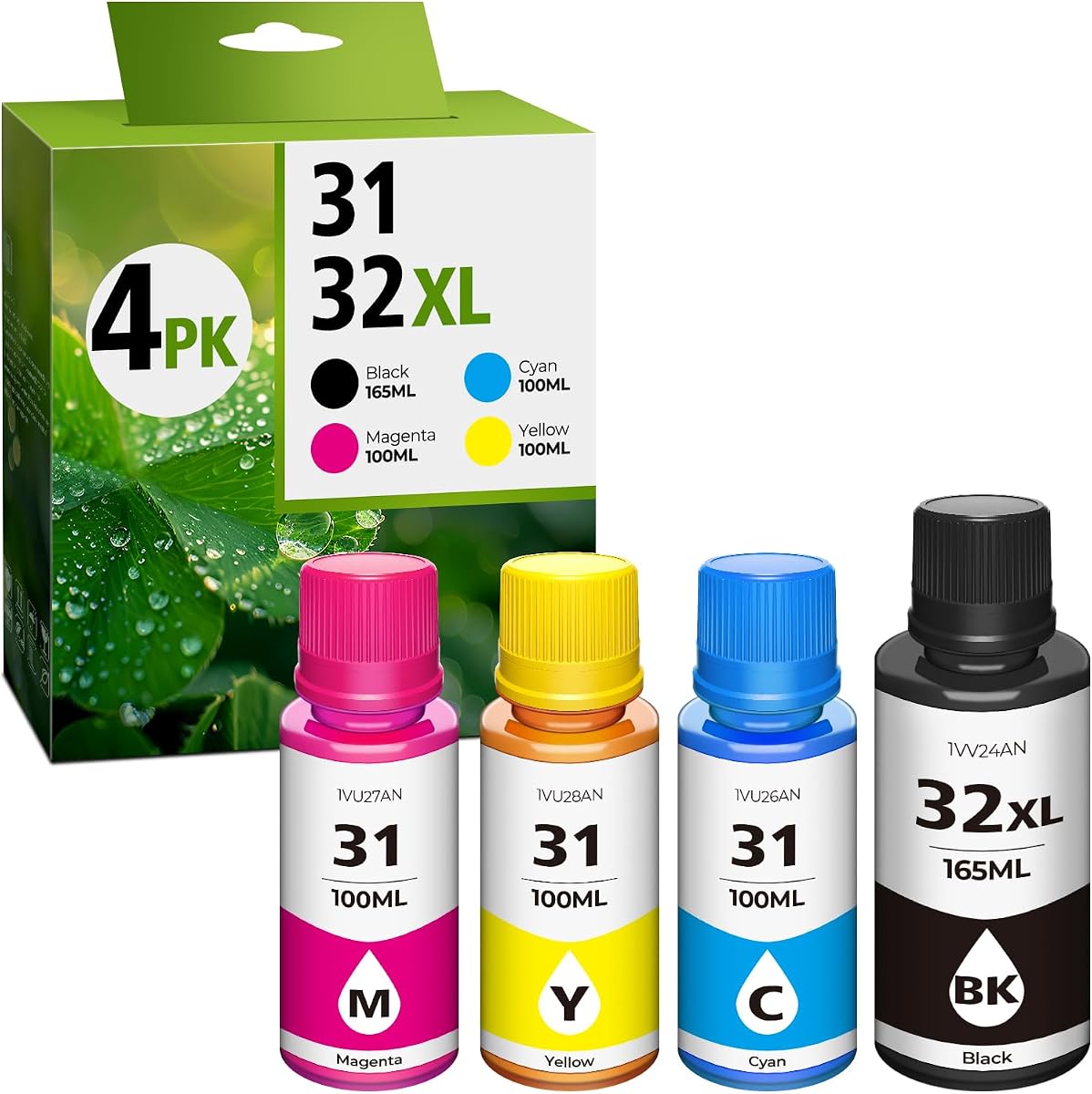
This 31 Ink 32XL Black set offers high yield refills at low cost. With 4.4 rating users find it compatible with multiple HP Smart Tank models. The 9500 page yield provides exceptional value.
We may earn a commission when you buy through this link, at no additional cost to you.
Refilling is simple with minimal effort or leakage. Professional quality text and vibrant colors match original performance. Compatible with Smart Tank 5101 and 7602 series printers.
It uses dye ink which differs from OEM pigment ink for black. Users should clean print heads to avoid mixing incompatibilities. This is standard for third-party options.
Ideal for users seeking affordable replacements for existing tanks. Buy this to save money without sacrificing quality. It extends printer life efficiently.
Up to 9500 pages per black bottle reduces frequency.
Significantly lower cost per page than branded replacements.
We may earn a commission when you buy through this link, at no additional cost to you.
This alternative HP Smart Tank 5003 delivers similar features with slight variations. Rated 3.8 it still offers three years of ink and borderless printing. Wireless and mobile capabilities remain standard.
We may earn a commission when you buy through this link, at no additional cost to you.
The mess-free refill system ensures clean operations. Users appreciate the straightforward design and reliable output. It integrates well into modern home networks.
Feedback suggests occasional software or connectivity inconsistencies. Support resources may be less comprehensive than other brands. These issues vary by user experience.
Suitable for users prioritizing HP features at competitive price. Choose this for consistent high volume. It offers a practical solution for basic needs.
Three years of included ink minimizes supply management.
Wireless mobile printing enables easy access from devices.
We may earn a commission when you buy through this link, at no additional cost to you.
The renewed Epson EcoTank ET-2988 offers fast speeds and duplex printing. Rated 3.9 it delivers exceptional quality with three years of included ink. Mobile features remain fully functional.
We may earn a commission when you buy through this link, at no additional cost to you.
15 black ppm ensures quick document completion. The color screen aids navigation and printing. Wireless and scan capabilities match new units.
Renewed status may carry limited warranty coverage compared to new. Users should verify seller policies before purchase. These limits apply generally to refurbished items.
Best for budget-conscious buyers wanting high-end features. Buy this for performance without the new price tag. It is a practical value choice.
15 ppm black speed keeps workflows fast.
Renewed units provide high specs at lower costs.
We may earn a commission when you buy through this link, at no additional cost to you.
Selecting the right printer depends on specific needs and usage habits. We highlight key factors to help you find the perfect match.
Page yield indicates how many pages a set of ink can produce. Models vary from 4500 to over 9500 pages per refill. High yield reduces frequency and cost.
Look for models with three-year ink supplies for maximum savings.
Print speed measured in pages per minute affects workflow efficiency. Faster models handle larger documents with less waiting time. Consider average job sizes when selecting speed.
Choose faster units for high-volume or office environments.
Wireless and mobile capabilities enable remote printing. Features like voice activation simplify tasks for tech-savvy users. Ensure your devices match supported protocols.
Prioritize wireless and app support for home offices.
Resolution and technology impact text sharpness and photo vibrancy. Technologies like Micro Piezo ensure consistent results. High DPI ratings support professional output.
Select models with high DPI for graphics and photos.
Automatic duplex printing saves paper and simplifies double-sided jobs. Manual options are cheaper but require more effort. Decide if automation is essential for your tasks.
Auto duplex is valuable for eco-friendly offices.
Displays and touchscreens ease navigation and settings. Larger screens simplify scanning and copying. Compact interfaces fit smaller spaces.
Consider screen size for ease of use.
Mess-free refill systems reduce user error and cleanup. Some models require specific cleaning before third-party ink use. Evaluate maintenance ease before buying.
Look for mess-free designs to save time.
Total cost includes purchase price plus ink. High initial cost may offset by lower per-page rates. Calculate long-term expenses carefully.
Balance upfront price with long-term savings.
Begin setup by placing the printer on a flat stable surface. Follow the manufacturer guide to connect power and Wi-Fi. Ensure the included ink is properly primed.
Refill tanks only when low ink warnings appear. Align bottles correctly to avoid spills or mixing. Clean spills immediately to maintain performance.
Run regular print head cleaning to prevent clogging. Use official ink or compatible refills as advised. Store the printer in a cool dry place.
Yes because refillable bottles cost far less than cartridges. A single set can last months or years. This reduces per-page costs significantly.
Most include enough for two to three years. Actual duration depends on printing volume. High usage may require earlier refills.
Third-party ink is available but check compatibility. Some require head cleaning before use. Using non-OEM ink may affect warranties.
They can dry if unused for long periods. Keep the printer active or primed. Regular maintenance prevents head clogging.
EcoFit ensures bottles fit specific printers easily. Keyed designs prevent misalignment or mix-ups. This simplifies refilling for users.
Wireless allows printing from smart devices. Apps like Epson Panel or AirPrint support this. Ensure Wi-Fi connectivity is active.
Our top picks offer distinct benefits for varied users. The Epson ET-2803 leads in value while Canon G3270 balances simplicity. HP 5003 adds premium smart features.
Prioritize ink capacity and speed based on your needs. Connectivity matters for modern workflows. Balance cost with required features.
Always verify current pricing and availability before purchase. Prices change frequently so check official listings. Your ideal model awaits based on these factors.