
CENMATE Aluminum 4 Bay
4.3Editor score
Aluminum alloy construction
USB A and C ports
Active cooling fan included
Finding the right storage solution is essential for modern data management. A Jbod Enclosure allows you to connect multiple drives directly to your computer without complex RAID setups. This flexibility makes it ideal for backups and media libraries.
We evaluated ten top models based on connectivity speed build quality and compatibility. Each product was reviewed for its ability to handle large capacities and maintain stable performance. Our list covers desktop and rackmount options for various needs.
Each pick highlights specific strengths like hot swap capabilities or hardware RAID support. These details help you choose the right enclosure for your workflow. Please note that prices and availability change frequently so verify current details.
4.3Editor score

4.2Editor score
4.1Editor score
As an Amazon Associate we earn from qualifying purchases.
This table provides a side-by-side comparison of the ten featured enclosures highlighting their core specifications and key capabilities for easy selection.




The TERRAMASTER D4-320 is a powerful direct-attached storage unit that offers high-speed data transmission without complex configuration. It holds up to four drives and delivers impressive read write speeds suitable for large file transfers. Its rating reflects strong performance and reliability for desktop users needing accessible storage.
We may earn a commission when you buy through this link, at no additional cost to you.
Its USB 3.2 Gen2 connection ensures data moves quickly between drives and your computer. The drive trays are designed for easy installation without tools which saves time during setup. Temperature control is managed by an intelligent fan that helps keep drives cool during extended use.
While it lacks hardware RAID capabilities this unit focuses on pure speed and capacity expansion. Users should be aware that fan noise can increase when drives are under heavy load. However in standby the unit is remarkably quiet which makes it suitable for office environments.
This enclosure is ideal for professionals who need a simple way to expand storage capacity. It works seamlessly with Windows Mac and Linux systems without needing extra drivers. For anyone prioritizing transfer speed and ease of use this model is a top recommendation.
The USB 3.2 Gen2 protocol enables read speeds up to 1016 MB/s with multiple drives connected. This ensures that large video files or backup sets move quickly without bottlenecks.
The tool-free tray design with Push-lock mechanisms lets you insert and remove drives securely without screws. This simplifies maintenance and allows for quick drive replacements or upgrades.
We may earn a commission when you buy through this link, at no additional cost to you.
The CENMATE Aluminum 4 Bay enclosure offers a cost-effective solution for expanding storage without sacrificing build quality. It supports both SATA HDDs and SSDs and includes a cooling fan to manage heat. Its rating suggests it is a reliable choice for budget-conscious users.
We may earn a commission when you buy through this link, at no additional cost to you.
The aluminum alloy construction provides durability and helps dissipate heat effectively. With USB 3.0 interfaces you get versatile connectivity options for different devices. The enclosure supports up to 80TB total capacity which is sufficient for most personal or small business needs.
A potential downside is the fan noise level which may be noticeable in quiet rooms. Additionally the USB 3.0 speed limit means transfers are slower than Gen2 options. Despite this the value proposition remains strong for those prioritizing capacity over maximum speed.
This enclosure works well for users needing basic external storage expansion. It fits both 2.5 and 3.5 inch drives and requires no drivers to function. If you need an affordable and sturdy option this model is a solid starting point.
Equipped with both USB A and USB C ports this unit fits older and newer computers without adapters. This ensures you can connect it to almost any system immediately.
The aluminum casing protects internal components from physical damage and aids thermal management. This durability helps extend the lifespan of the enclosure and connected drives.
We may earn a commission when you buy through this link, at no additional cost to you.
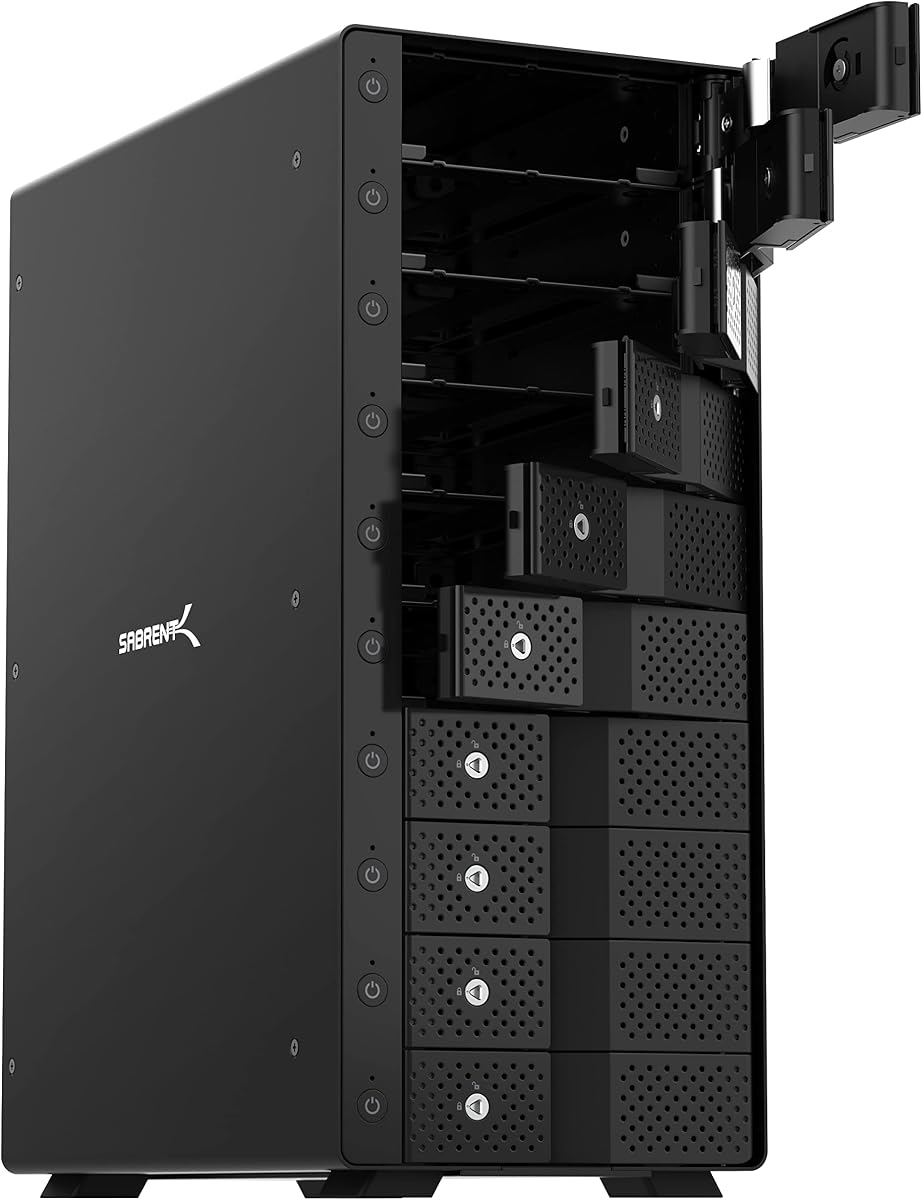
The SABRENT 10-Bay enclosure is a high-capacity workstation designed for serious data management needs. It accommodates up to ten 3.5 inch drives and delivers fast USB-C speeds. Its premium rating reflects its robust build and professional-grade features.
We may earn a commission when you buy through this link, at no additional cost to you.
Each drive bay has its own switch allowing you to power only the drives you need. This feature improves energy efficiency and reduces noise. The USB-C connection supports up to 10Gbps transfer speeds which is essential for large media libraries.
The price is higher than standard units but justified by the capacity and control options. The physical size is large so it requires significant desk space. Also drives must be mounted without trays which might be less convenient for some users.
This unit is best for IT professionals or creatives managing extensive media assets. It allows flexible drive configurations and secure storage. If you need maximum capacity and control this enclosure is a top-tier choice.
Supporting up to 20TB per drive this dock offers a total of 200TB storage space. This makes it ideal for archiving large projects or running local media servers.
Individual drive switches let you turn off unused bays to save power and reduce heat. This flexibility is valuable for environments where only part of the storage is needed daily.
We may earn a commission when you buy through this link, at no additional cost to you.
The IO CREST 8-Bay enclosure provides a mid-range option for users needing more than four drives. It supports both 2.5 and 3.5 inch drives with a smart cooling system. Its performance is solid for standard storage expansion tasks.
We may earn a commission when you buy through this link, at no additional cost to you.
The smart fan function adjusts speed based on thermal input keeping temperatures in check. Independent switches allow you to power specific drives which adds flexibility. The steel housing ensures durability against physical impacts or daily wear.
A limitation is the USB 3.0 interface which caps speed at 5Gbps. Also it does not support RAID functionality so data redundancy must be handled by software. For users needing simplicity and high capacity this works well.
This unit fits well in home offices or small workgroups needing extra storage. It connects easily via USB and requires no complex setup. If you need eight bays without enterprise features this is a practical pick.
Built-in thermal sensors regulate fan speed to maintain safe operating temperatures. This helps prevent drive throttling during long transfers or heavy workloads.
Supporting both 2.5 and 3.5 inch drives allows you to mix SSDs and HDDs. This mix can optimize for speed and capacity depending on your data needs.
We may earn a commission when you buy through this link, at no additional cost to you.
The QNAP TR-004 is a unique enclosure that combines direct storage with hardware RAID options. It connects via USB Type-C and supports up to four 3.5 inch drives. Its performance is strong for users integrating it into a QNAP ecosystem.
We may earn a commission when you buy through this link, at no additional cost to you.
Hardware RAID allows you to set up redundancy without a full NAS setup. The USB Type-C port ensures modern connectivity and fast data transfer. It also integrates with QNAP NAS systems to expand existing storage pools.
Users should note it does not support all older NAS models and cannot run NAS apps itself. This means it functions purely as external storage. For QNAP users needing quick expansion this offers significant value.
This unit is best for those already invested in QNAP hardware. It provides flexibility for backup and expansion without complex networking. If you need RAID support in a simple box this is a reliable choice.
Supporting RAID 0 1 5 and JBOD lets you choose between speed or redundancy. This hardware-level support simplifies data protection without software overhead.
It expands existing QNAP NAS capacity by connecting via USB-C. This allows you to grow storage on the fly without migrating data.
We may earn a commission when you buy through this link, at no additional cost to you.
The QNAP TL-R1200C-RP is a rackmount enclosure designed for server environments. It holds twelve drives and includes a redundant power supply for uptime. Its rating reflects its enterprise focus and robust build quality.
We may earn a commission when you buy through this link, at no additional cost to you.
USB 3.2 Gen 2 connectivity provides fast access to stored data. The redundant power supply ensures continuous operation even if one power unit fails. This makes it ideal for servers needing constant availability.
The physical size requires a rack and proper cooling which may not suit home offices. Also the cost is significantly higher than desktop units. For professional setups this investment is justified by reliability.
This enclosure is best for businesses needing scalable and reliable storage. It connects to computers and servers easily. If you need enterprise features in a simple enclosure this fits the role perfectly.
The redundant power supply minimizes downtime risks by ensuring continuous power. This is critical for servers managing important business data or user resources.
With twelve bays in a rackmount chassis it maximizes storage in limited space. This density is useful for data centers or server closets.
We may earn a commission when you buy through this link, at no additional cost to you.
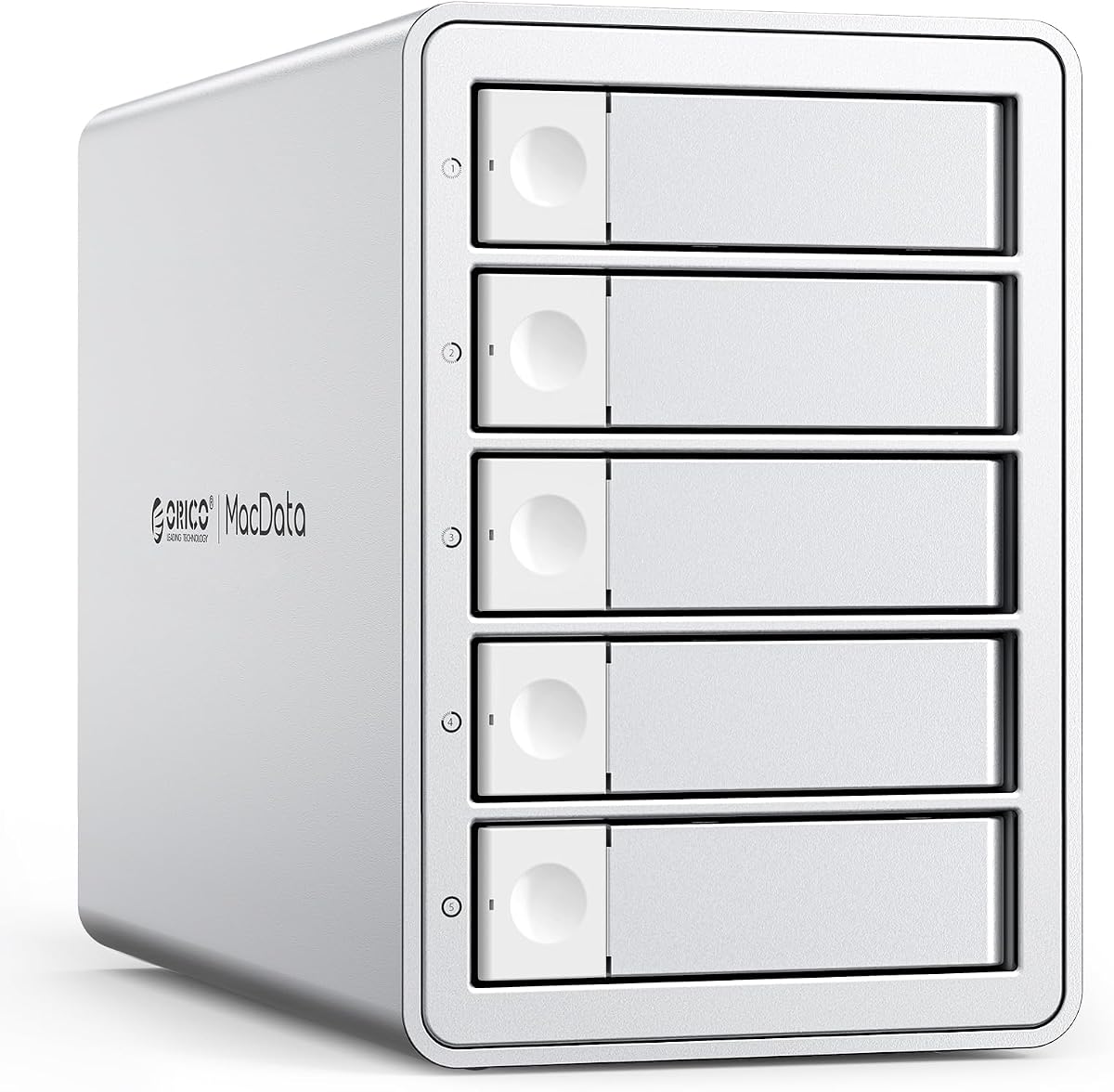
The ORICO 5 Bay RAID enclosure offers extensive configuration options for storage management. It supports eight different RAID modes and includes a built-in power supply. Its high rating indicates strong user satisfaction with reliability and performance.
We may earn a commission when you buy through this link, at no additional cost to you.
The built-in power supply eliminates the need for external adapters making setup cleaner. RAID options allow you to balance speed and safety as needed. The aluminum build ensures good heat dissipation during heavy use.
However USB 3.0 speeds may limit large file transfers compared to newer standards. Setting up complex RAID modes requires some technical knowledge. For users wanting flexibility this unit delivers strong value.
This enclosure suits professionals needing robust storage features. It handles large capacity needs up to 130TB. If you need RAID support in a desktop box this is a top contender.
With eight modes including RAID 5 and 10 you can tailor storage to your workflow. This flexibility supports both performance and redundancy needs.
The built-in 150W power supply keeps the desk tidy without extra cables. This simplifies installation and reduces clutter around your workspace.
We may earn a commission when you buy through this link, at no additional cost to you.
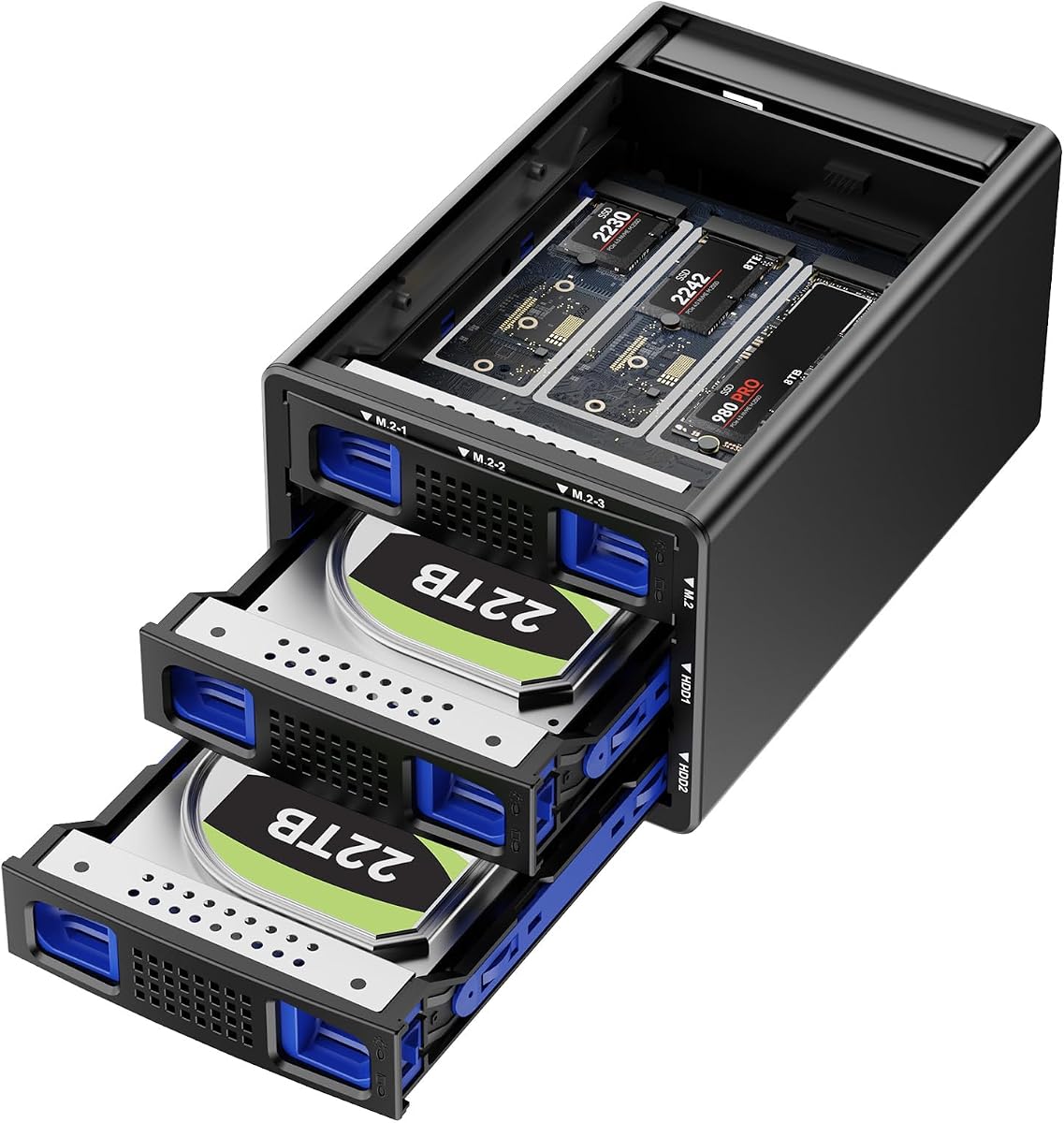
This hybrid enclosure uniquely supports both SATA drives and NVMe SSDs in one unit. It allows mixing storage types for speed and capacity. Its high rating reflects the novelty and utility of this design.
We may earn a commission when you buy through this link, at no additional cost to you.
USB 3.2 Gen 2 ensures fast transfers especially with NVMe drives installed. The cooling fan keeps the internal temperature stable even with multiple drives. Tool-free installation simplifies changing drives as your needs grow.
The fan can be noticeable in quiet rooms which may affect sensitive environments. Also NVMe support is limited to specific form factors. Despite these trade-offs the innovation is valuable.
This unit is ideal for users wanting to mix SSD speed with HDD capacity. It connects easily to modern systems. If you need a hybrid solution this enclosure offers a rare option.
Mixing SATA HDDs with NVMe SSDs lets you balance bulk storage and speed. This setup is efficient for systems needing both large archives and fast apps.
USB 3.2 Gen 2 Type-C ensures fast data flow to modern computers. This reduces bottlenecks when moving large files between drives.
We may earn a commission when you buy through this link, at no additional cost to you.
The ORICO 4 Bay Raid enclosure focuses on efficient storage expansion with RAID support. It includes a built-in power supply and supports up to 88TB. Its rating suggests solid reliability for users needing redundancy.
We may earn a commission when you buy through this link, at no additional cost to you.
The aluminum alloy design ensures good heat dissipation and durability. RAID modes provide flexibility for backup or speed depending on your needs. The safety locks prevent accidental ejection of drives.
USB 3.0 speed limits may be a drawback for very large transfers. Some users might need drivers for certain operating systems. For standard backups this remains a strong option.
This unit fits well for home or office users needing RAID. It connects simply and handles large capacity. If you want reliable expansion with redundancy this is a good pick.
Eight RAID modes allow you to choose the right configuration for your data. This versatility supports both redundancy and performance setups.
Safety locks and tray-less design ensure drives stay secure during transport. This feature protects your data from accidental removal or damage.
We may earn a commission when you buy through this link, at no additional cost to you.
The OWC Mercury Elite Pro Quad is a compact enclosure designed for fast data access. It supports universal bays for different drive sizes and connects via USB-C. Its lower rating suggests some users may find limitations in features.
We may earn a commission when you buy through this link, at no additional cost to you.
The USB-C interface delivers up to 10Gb/s which is excellent for performance. Universal bays simplify drive choices since you are not locked to one type. It fits easily on a desk without taking too much space.
Software RAID is not included which limits redundancy options without third party tools. Users may find setup more complex without guidance. For those needing speed this remains a strong option.
This unit is best for creatives needing fast storage. It handles both SSDs and HDDs effectively. If you prioritize speed and compact size this enclosure is a solid pick.
USB 3.2 10Gb/s bandwidth ensures quick data transfers for video editing. This speed helps maintain smooth workflows without storage bottlenecks.
The small form factor fits neatly on workspaces. This allows you to add storage without cluttering your desk setup.
We may earn a commission when you buy through this link, at no additional cost to you.
Selecting the right enclosure involves assessing your storage needs and system compatibility. Consider key factors like speed capacity and features before buying.
Determine how many drives you need and the total storage space required. Enclosures range from 4-bay to 12-bay units supporting different volumes.
Choose a model that meets your current needs while leaving room for future growth.
Look for USB 3.2 Gen 2 or higher for faster transfer speeds. Older USB 3.0 connections may bottleneck large file transfers.
Ensure your computer has compatible ports to utilize the full speed of the enclosure.
Decide if you need hardware RAID for redundancy or simple JBOD for flexibility. JBOD treats each drive independently while RAID combines them.
JBOD is better for users needing separate drive access without complex setups.
Effective cooling prevents drive throttling during long transfers. Enclosures with fans or aluminum casings manage heat better.
Select a unit with silent fans if you work in a quiet environment.
Hot swap allows replacing drives without powering off the enclosure. This feature is vital for minimizing downtime in busy workflows.
Check if the unit supports hot swapping before purchase if this is a priority.
Materials like aluminum or steel protect internal components from damage. Solid builds last longer under daily use.
Invest in a robust enclosure to protect your expensive drives.
Ensure the enclosure works with your OS without extra drivers. Most models support Windows Mac and Linux natively.
Check compatibility notes to avoid connectivity issues on your system.
Built-in power supplies simplify setup by removing external adapters. This keeps your desk tidy and reduces cable clutter.
Look for built-in options if you prefer a cleaner workspace.
First connect the enclosure to your computer using the recommended cable. Power on the unit and wait for the drives to initialize before accessing files.
Regularly monitor drive health using software tools to ensure stability. Clean dust from vents to maintain effective cooling over time.
Avoid moving the enclosure while drives are active to prevent data loss. Eject drives safely via the OS before powering down the unit.
A Jbod Enclosure allows you to connect multiple hard drives directly to your computer as individual volumes. It is used for expanding storage capacity without complex RAID setups. Each drive operates independently giving you flexible storage access.
Many enclosures come with built-in power supplies but some require external adapters. Check the product specs to confirm power requirements before buying. Built-in supplies reduce cable clutter for a cleaner setup.
Yes most enclosures support both 2.5 and 3.5 inch drives. You can mix HDDs and SSDs to balance speed and capacity. This flexibility helps you customize storage to your needs.
Not all enclosures offer RAID support as some are JBOD only. Models with hardware RAID allow redundancy without extra software. Check the features list if you need data protection.
Use enclosures with built-in fans or aluminum casings for better heat dissipation. Ensure vents are not blocked by dust or objects. Proper cooling extends the lifespan of your drives.
Modern enclosures often support up to 20TB per drive. Total capacity depends on the number of bays available. Always verify the maximum drive size limit with the manufacturer.
Most enclosures work plug-and-play without additional drivers on Windows Mac and Linux. However check compatibility notes for your specific OS version. Drivers are rarely needed for basic functionality.
Many enclosures support hot swapping allowing drive changes without powering down. This feature is useful for minimizing downtime during maintenance. Always follow safe removal protocols to protect data.
The top picks include the TERRAMASTER D4-320 for performance and CENMATE for value. The SABRENT 10-Bay leads for high capacity needs. Each model offers unique strengths for different users.
Prioritize speed and capacity based on your workflow requirements. Consider cooling and build quality to ensure longevity for your setup. Matching these factors to your needs ensures satisfaction.
Always check current pricing and availability before purchasing. Prices fluctuate and new models may appear over time. Verify specs to confirm the enclosure meets your specific needs.