
JADENS Portable US Letter Thermal Printer
4.6Editor score
Inkless thermal printing
Built-in rechargeable battery
Bluetooth and USB connectivity
This guide compares the top battery powered portable printers for travel and mobile work, evaluating ink versus thermal options to help you choose the right
Finding a reliable battery powered portable printer can transform how you work on the go. Whether you need to print contracts in a car or photos at a campsite, having the right device ensures you stay productive without being tethered to a wall outlet.
We have carefully analyzed ten top models based on connectivity, print quality, battery life, and overall portability. Our comparison focuses on real-world usability for travelers, students, and professionals who need instant access to printed documents anywhere.
Each pick in this list highlights specific strengths and weaknesses to help you make an informed decision. Remember that stock levels and availability change frequently, so verify current shipping options before making your final purchase to ensure timely delivery.
4.6Editor score

4.2Editor score

4.4Editor score
The following table provides a side-by-side comparison of the leading battery powered portable printers available today. Use this overview to quickly identify key specifications and features that matter most to your specific printing needs.



The Canon PIXMA TR160 stands out as a top choice for those needing color output on the move. With a rating of 4.2 stars, it balances portability with versatile printing capabilities that go beyond simple thermal options.
We may earn a commission when you buy through this link, at no additional cost to you.
Its lightweight design allows it to fit easily into a backpack, while the 5-Color Hybrid Ink System ensures sharp text and vibrant images up to 8.5 by 11 inches. Connectivity is streamlined through the Canon PRINT app, AirPrint, or Mopria service.
While it relies on ink cartridges which may add ongoing costs, the ability to produce high-quality color prints makes it ideal for business documents and photos. The OLED display provides quick status checks without needing a mobile device.
Buy this printer if you need a reliable wireless device for full-color document printing while traveling. It is the best all-rounder for users who prioritize quality and connectivity in a portable form factor.
Connect without a router using Wireless Direct mode for instant access from any compatible device.
Achieve borderless prints with rich colors thanks to the advanced ink system designed for quality.
We may earn a commission when you buy through this link, at no additional cost to you.
The HP OfficeJet 250 offers a premium solution for professionals who need scanning and copying abilities alongside printing. Its 4.3 rating reflects strong performance in a compact form factor that fits into various bags.
We may earn a commission when you buy through this link, at no additional cost to you.
Designed for business printing anywhere, this all-in-one device supports a wide range of paper sizes from cards to envelopes. The included battery ensures you can work without hunting for power outlets during critical tasks.
Although it is larger than basic thermal printers, the multifunction capability justifies the size for office use. The fast charge feature allows you to top up power quickly, minimizing downtime between printing jobs.
Choose this model if you require full office capabilities while traveling. It is the best pick for users who need to scan documents or copy forms without carrying separate devices.
Print, scan, and copy business documents on the go without needing a separate scanner or copier.
Support for diverse paper sizes including legal and executive formats ensures flexibility for any document.
We may earn a commission when you buy through this link, at no additional cost to you.
The JADENS Portable US Letter Thermal Printer delivers exceptional value with a 4.6 rating, making it a favorite for budget-conscious buyers. It uses thermal technology to eliminate the need for ink or toner cartridges entirely.
We may earn a commission when you buy through this link, at no additional cost to you.
Its built-in 1800mAh battery provides up to three hours of continuous printing, allowing for hundreds of sheets per charge. The compact body fits easily into backpacks, making it ideal for students and travelers needing quick document access.
Privacy is a key benefit here as files print locally without cloud uploads. While it only prints in black and white on thermal paper, the cost savings and portability make it a practical choice for text-heavy documents.
Opt for this printer if you need an affordable and reliable thermal solution for everyday documents. It is the best value option for users who prioritize battery life and low operational costs over color printing.
Save money over time by eliminating ink cartridges and using affordable thermal paper rolls instead.
Keep sensitive files secure by printing directly from your device without using cloud storage services.
We may earn a commission when you buy through this link, at no additional cost to you.
The HP OfficeJet 200 is a solid choice for users who need color printing in a mobile format. With a 4.4 rating, it offers a balance of performance and portability that serves business travelers well.
We may earn a commission when you buy through this link, at no additional cost to you.
This compact printer fits into car trunks or briefcases and includes a battery for untethered operation. The HP Auto Wireless Connect feature simplifies setup, allowing you to start printing from devices without complex network steps.
While ink cartridges are required, the HP 62 series delivers good page yields to reduce frequent replacements. It supports a wide range of paper sizes, ensuring you can print everything from receipts to standard letters.
Select this printer if you need a dependable inkjet machine that travels well. It is ideal for professionals who need occasional color prints on the go without sacrificing reliability.
Get started quickly with wireless auto-connect that works without a traditional router or network.
Print on various formats including photos, cards, and envelopes to handle diverse document types easily.
We may earn a commission when you buy through this link, at no additional cost to you.
The Epson Workforce WF-110 is designed for mobile printing with a focus on wireless convenience. It carries a 4.1 rating for its ability to deliver color prints via a portable setup that fits easily in travel bags.
We may earn a commission when you buy through this link, at no additional cost to you.
Its rechargeable lithium-ion battery ensures you can print for extended periods without needing AC power. The Wi-Fi Direct feature allows direct connections to devices, while the accessory battery option extends volume for larger jobs.
Like other inkjet models, it requires genuine cartridges which may add maintenance considerations. However, the flexibility of wireless and USB options makes it a strong contender for those who need true color output on the road.
Choose this device if you need a portable color printer with robust wireless features. It is best for users who value connectivity options and high-quality inkjet performance while traveling.
Charge via USB or AC adapter to keep printing running smoothly in various environments without limits.
Connect directly to your phone or laptop via Wi-Fi Direct without needing a separate network router.
We may earn a commission when you buy through this link, at no additional cost to you.
The Gloryang Inkless Portable Printer is an excellent option for students and travelers needing a lightweight solution. With a 4.2 rating, it offers simple thermal printing without the mess of ink or toner cartridges.
We may earn a commission when you buy through this link, at no additional cost to you.
Its design includes a built-in paper bin to keep the workspace tidy, and it comes with a case and paper rolls to get started immediately. At just 1.75 pounds, it fits easily into backpacks for on-the-go needs.
While it prints on thermal paper only, this limits regular paper usage but simplifies maintenance. The Bluetooth connectivity allows easy pairing with iOS and Android devices for instant document access.
Pick this printer if you want a clean and simple device for basic text and images. It is ideal for students who need a compact tool for worksheets or quick notes without ink costs.
Avoid mess and clogs by using thermal technology that requires no ink, toner, or ribbons.
Keep your workspace organized with a built-in paper bin and included carry case for easy transport.
We may earn a commission when you buy through this link, at no additional cost to you.
The A285M Small Inkless Thermal Printer is designed for versatility with support for multiple paper sizes. It holds a 4.0 rating and provides a reliable way to print contracts or lists without needing ink cartridges.
We may earn a commission when you buy through this link, at no additional cost to you.
It supports five thermal paper widths and connects via USB-C or Bluetooth. The lightweight build ensures it fits into small bags, making it perfect for mobile notaries or drivers who need to print receipts or invoices.
While desktop connection requires a driver download, mobile usage is streamlined through an app. The compact design and lack of ink maintenance make it a practical tool for quick document needs in various settings.
Choose this if you need a flexible thermal printer that supports different paper widths. It is best for users who need to print receipts or specific documents on the go without color requirements.
Print on various thermal paper widths to match the specific document type or label size you need.
Connect to laptops via USB-C or to phones via Bluetooth for maximum compatibility across devices.
We may earn a commission when you buy through this link, at no additional cost to you.
The D90E Inkless Portable Thermal Printer comes ready as a gift with a case and paper included. Its 4.3 rating reflects solid performance for those needing to print standard letter size documents while traveling.
We may earn a commission when you buy through this link, at no additional cost to you.
It works with both Bluetooth for mobile devices and USB for laptops, providing broad compatibility. The app helps pair and configure print settings easily, allowing for quick document printing anywhere you are.
Note that it is not compatible with Chromebooks and requires a specific adapter for power. Despite this, the inkless operation ensures low maintenance and cost efficiency for users focused on text and line graphics.
Select this printer if you want a complete package for basic document printing. It is perfect for students or professionals needing a compact tool for travel or classroom use.
Includes printer, case, paper, and cable for an out-of-the-box solution ready to use as a gift.
Use Bluetooth for phones and USB for laptops to ensure you can print from almost any device.
We may earn a commission when you buy through this link, at no additional cost to you.
The N80 Bluetooth Thermal Printer is a practical device for travelers needing to print US Letter or A4 documents. It carries a 4.1 rating for its reliability in handling everyday printing tasks on the move.
We may earn a commission when you buy through this link, at no additional cost to you.
With a 1500mAh battery, it can print over 160 sheets per charge, ensuring long sessions without recharging. It supports roll and folded paper formats, adding flexibility for different document needs.
While PC connection requires drivers and USB, the mobile experience is streamlined with the Nada Print app. The device is compact and lightweight, making it easy to slip into a backpack or briefcase.
Choose this printer if you need a solid thermal tool for general documents. It is best for students or workers who need a budget-friendly and portable solution for basic printing.
Print up to 160 sheets on a single charge to keep going through long workdays without interruption.
Print on roll or folded paper and even tattoo transfer paper for diverse creative and business needs.
We may earn a commission when you buy through this link, at no additional cost to you.
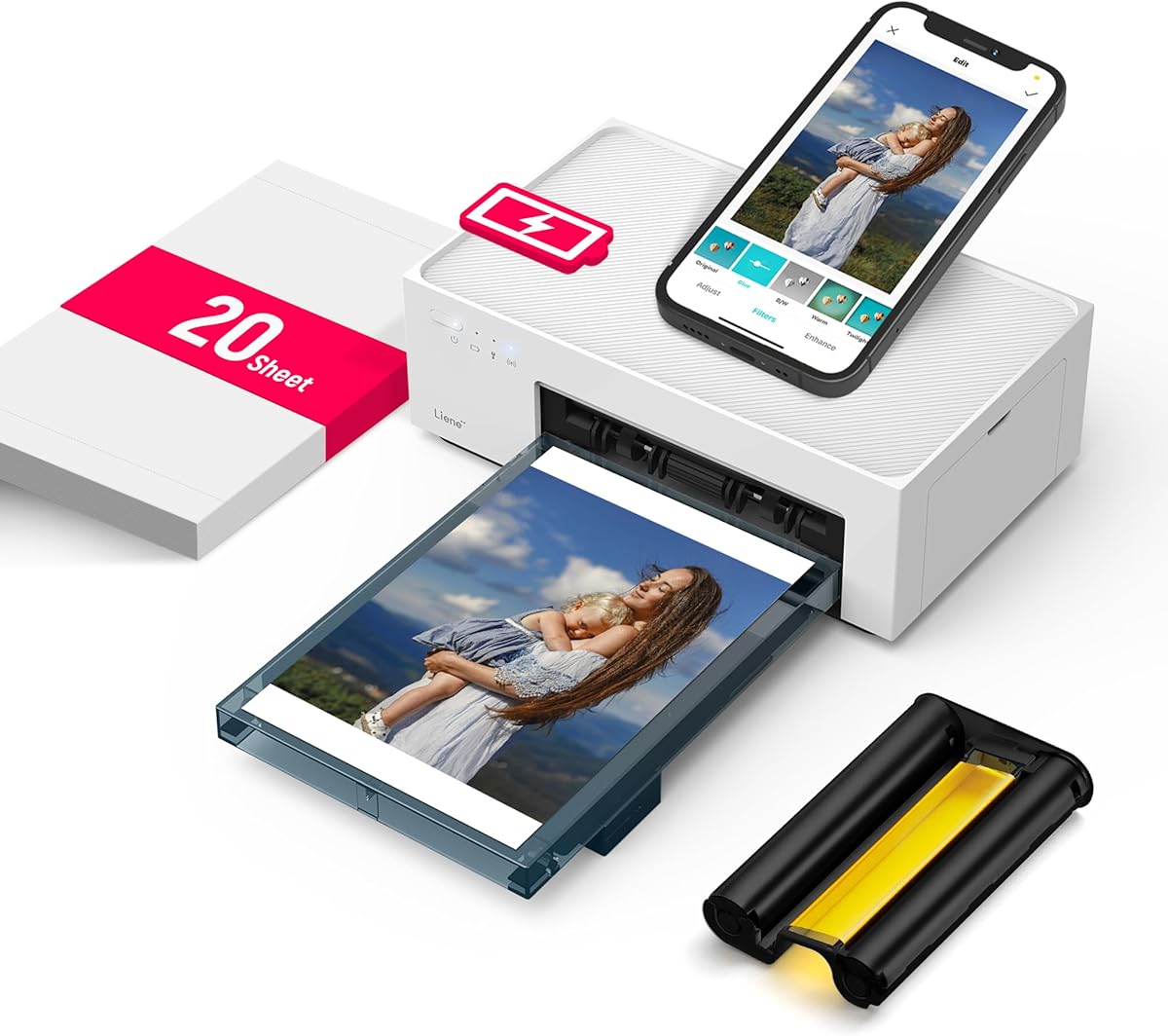
The Liene White M200 specializes in high-quality photo printing with dye sublimation technology. With a 4.5 rating, it is the top choice for anyone wanting to print travel memories or gift photos on the go.
We may earn a commission when you buy through this link, at no additional cost to you.
Its rechargeable battery supports up to 40 prints per charge, allowing you to print pictures without a power source. The prints are protected against water and fading, ensuring they last longer than standard thermal photos.
While it is limited to photo output, the quality is professional for a portable device. The app provides editing tools like filters and borders, making it easy to customize images before printing.
Pick this printer if you need to print high-quality photos while traveling. It is ideal for capturing memories at events or creating personalized gifts anywhere you are.
Use dye sublimation to get vibrant full-color prints that resist fading, water, and scratches.
Add borders and filters to your images before printing for a personalized touch on every photo.
We may earn a commission when you buy through this link, at no additional cost to you.
Selecting the right battery powered portable printer requires understanding your specific needs regarding color, size, and connectivity. This guide outlines the key factors to consider before making your purchase.
Thermal printers do not require ink and are cost-effective for text, while inkjet models offer color capabilities but need cartridges. Consider whether you need color prints or if black-and-white text is sufficient.
Choose thermal for low maintenance and inkjet for vibrant color output.
Battery capacity varies by model, affecting how many pages you can print on a single charge. Check the specs to ensure the battery lasts long enough for your typical usage sessions.
Prioritize models with high mAh ratings for uninterrupted printing while traveling.
Most portable printers support Bluetooth and USB connections, allowing pairing with phones or laptops. Wireless modes like Wi-Fi Direct can simplify the process further without needing a router.
Ensure the printer supports the connection type used by your primary devices.
Some printers are limited to specific sizes like 4×6 for photos or thermal rolls, while others support standard letter paper. Verify the maximum paper size to ensure it fits your document needs.
Look for models supporting US Letter or A4 if you need to print contracts or forms.
A portable printer should fit into a backpack or briefcase without adding excessive weight. Lightweight models make it easier to carry the device during business trips or field work.
Select a compact design that balances portability with necessary printing features.
While thermal printers avoid ink costs, you must buy specific thermal paper which may not be as versatile. Inkjet models require cartridges which can add ongoing expenses to your total budget.
Calculate the long-term cost of paper and ink to find the most economical option.
Some models require driver installation for computers while others use simple app-based setups. User-friendly software can significantly reduce the time needed to get started with printing.
Choose a printer with straightforward setup instructions for hassle-free mobile use.
Mobile printers often face rough handling during travel, so a sturdy build is essential for longevity. Look for features like protective cases or robust casing to prevent damage.
Invest in a well-constructed device to ensure it survives daily travel conditions.
Start by charging the printer fully before your first use to ensure optimal battery performance. Connect to your device via Bluetooth or USB depending on the model instructions and install any necessary drivers.
When loading paper, follow the specific guide for thermal or inkjet models to prevent jams. Use only compatible paper types such as thermal rolls or standard letter sheets to maintain print quality.
Store the printer in a cool dry place when not in use to protect internal components. Clean the print head occasionally if using inkjet models and keep thermal sensors dust-free for best results.
Maintenance needs depend on the technology used. Thermal printers generally require very little maintenance since they lack ink cartridges. Inkjet models need periodic cleaning of print heads and cartridge replacements to prevent clogging and ensure quality.
Most thermal printers print in black and white only using heat-sensitive paper. For color output, you will need an inkjet model that uses liquid ink to create full-color images on standard paper.
It is best to avoid leaving electronics in extreme heat as it can damage the battery and internal parts. If you must leave the printer in a car, store it in a shaded area or insulated bag to protect it.
Battery life varies by capacity and usage. Some models offer around 40 to 360 prints per charge depending on the density of the print. Check the specific battery specifications for expected runtimes.
No, thermal printers require special heat-sensitive paper to produce images. Using regular paper will result in blank pages or potential damage to the printer. Ensure you use the correct thermal roll type.
Most modern portable printers offer apps compatible with both Android and iOS. Check the product details to confirm app support and ensure your device meets any minimum OS requirements for connection.
The ten options reviewed here provide a range of solutions from budget thermal devices to premium color inkjets. Whether you need basic document printing or photo capabilities, there is a model to suit your specific requirements.
Prioritize features like battery life, connectivity, and paper size support to find the best fit. Understanding your specific needs will help you choose a printer that delivers reliable performance on the go.
Remember to check current availability and shipping options before finalizing your purchase. Availability can change quickly so verify the latest details to ensure you get the right product.