
ASUS Vivobook Go 15.6” FHD Slim Laptop
4.3Editor score
AMD Ryzen 3 Processor
8GB DDR5 RAM
Military Grade Durability
Finding a lightweight ASUS laptop means balancing portability with reliable performance for daily tasks. These slim machines often feature modern processors and long battery life to keep you productive anywhere without the bulk of older devices.
We evaluated ten current models focusing on weight, screen quality, processor speed and build durability. Each option offers distinct advantages whether you need a budget student device or a premium ultrabook for professional use on the go.
Every pick below highlights key specs pros and cons to help you decide quickly. Note that availability and pricing may shift over time so verify details before purchasing to ensure you get the best value for your needs.
4.3Editor score

4.8Editor score
3.7Editor score
As an Amazon Associate we earn from qualifying purchases.
This side by side comparison highlights the key specifications of all ten selected models allowing you to quickly identify which device best matches your specific portability and performance requirements.





This ASUS Vivobook Go model stands out as an affordable option for students and budget conscious buyers. It carries a solid 4.3 rating from users who appreciate its lightweight design and reliable performance for basic tasks.
We may earn a commission when you buy through this link, at no additional cost to you.
The AMD Ryzen 3 7320U processor ensures smooth browsing and multitasking with 8GB of DDR5 RAM. Users benefit from the NANOEDGE display which minimizes bezels for a modern look while keeping the chassis compact enough for daily travel.
While storage is limited to 128GB the SSD ensures fast boot times. The laptop also features a privacy shutter on the webcam which adds a layer of security for remote meetings and classes without extra accessories.
Buyers seeking a no fuss entry level machine will find this a strong candidate. It balances cost with essential features well making it a practical choice for those who prioritize portability over high end graphics power.
The slim profile makes it easy to slip into a backpack while the military grade build ensures it survives accidental bumps during commutes.
Fast charging capabilities mean you can quickly top up battery levels before heading out ensuring you stay productive throughout the day.
We may earn a commission when you buy through this link, at no additional cost to you.
This variant of the Vivobook Go offers significantly more storage space which appeals to users needing room for files and media. With a 4.2 rating it is praised for its balanced performance and sleek silver finish.
We may earn a commission when you buy through this link, at no additional cost to you.
The Ryzen 5 7520U processor delivers faster speeds than the base model making light gaming and heavier multitasking more manageable. The 512GB SSD provides ample room for documents and applications without needing external drives.
The design retains the ergonomic keyboard and 180 degree hinge for flexible viewing angles. Despite the extra storage the weight remains reasonable allowing for easy transport between home and office environments.
If you need more internal storage without upgrading to a premium tier this model is an ideal middle ground. It keeps costs low while offering the extra capacity many modern users require for daily workflows.
The 512GB drive allows you to store photos and work documents locally without relying heavily on cloud subscriptions for basic storage needs.
The Ryzen 5 chip handles multiple browser tabs and apps more efficiently reducing lag during busy work sessions.
We may earn a commission when you buy through this link, at no additional cost to you.
This Vivobook 14 represents the future of lightweight computing with its Snapdragon X processor and Copilot+ PC features. It holds a high 4.8 rating reflecting user satisfaction with its speed and battery life.
We may earn a commission when you buy through this link, at no additional cost to you.
The 16GB of RAM ensures smooth multitasking while the Qualcomm Adreno GPU handles visual tasks efficiently. The AI capabilities allow for advanced features like Live Captions and better text generation within supported apps.
Users appreciate the 512GB SSD which balances speed and capacity well. The compact 14 inch form factor makes it highly portable without sacrificing screen real estate for daily work or study sessions.
For those looking to adopt next gen AI features in a portable package this is the top choice. It combines modern silicon with a refined design to deliver a premium experience at a mid range price.
The Snapdragon X processor enables smart features like instant translation and advanced image editing that enhance creative and professional workflows.
Optimized power management means you can work unplugged for extended periods without needing to hunt for an outlet.
We may earn a commission when you buy through this link, at no additional cost to you.
This 16 inch model offers a spacious screen for those who prefer larger visuals for productivity. It maintains a strong 4.4 rating due to its balance of size and performance using the Snapdragon X platform.
We may earn a commission when you buy through this link, at no additional cost to you.
The 1920 x 1200 resolution provides sharp text and vivid colors ideal for media consumption. With 16GB of RAM it handles demanding apps like video editing or data analysis more effectively than smaller variants.
The Snapdragon X chipset ensures that even with a bigger screen battery life remains respectable. The chassis is designed to be sleek despite the larger footprint making it suitable for travel if you need more workspace.
Buyers who want more screen real estate without moving to a heavy workstation will appreciate this option. It brings high end features to a portable form factor that supports serious work tasks comfortably.
The larger display allows for side by side document viewing making it easier to multitask without constantly switching windows.
High brightness and color accuracy make this device excellent for watching movies or reviewing photos on the go.
We may earn a commission when you buy through this link, at no additional cost to you.
This model is positioned as an entry level device for students needing basic computing power. It has a 3.9 rating reflecting its budget nature but remains a viable option for simple tasks like web browsing.
We may earn a commission when you buy through this link, at no additional cost to you.
The Intel Celeron processor supports essential applications and video conferencing well enough for light use. The 15.6 inch screen offers good visibility although the 4GB RAM may limit heavy multitasking capabilities.
Despite the lower specs it includes useful features like a backlit keyboard for typing in dim environments. The 42WH battery with fast charge helps keep you moving during short study sessions without long waits.
For those strictly on a tight budget this laptop delivers core functions without unnecessary extras. It is best suited for users who primarily use cloud apps and do not require heavy local processing power.
This device covers reading assignments and web research efficiently making it a functional tool for online learning environments.
The ability to charge to 60% in under an hour means you can grab power during lunch breaks and continue working.
We may earn a commission when you buy through this link, at no additional cost to you.
This Vivobook utilizes Intel architecture which ensures broad compatibility with standard software. Users rate it at 4.2 for its reliable performance and generous memory capacity that supports smooth multitasking.
We may earn a commission when you buy through this link, at no additional cost to you.
The i3-1215U processor provides solid speed for daily tasks while the 16GB of RAM allows for open applications without slowdowns. The 512GB SSD ensures quick access to files and fast system responses.
Connectivity is enhanced by Wi-Fi 6 support which offers faster speeds and better stability on crowded networks. Ports include HDMI and USB-C giving flexibility for peripherals and external monitors in a workspace.
It serves as a reliable workhorse for users who prefer Intel processors. The combination of high RAM and decent storage makes it versatile enough for both academic and professional environments without breaking the bank.
Intel architecture ensures you can run any standard Windows application without worrying about ARM-specific limitations or emulation layers.
Wi-Fi 6 support keeps you connected quickly even when multiple devices are sharing the network bandwidth at home.
We may earn a commission when you buy through this link, at no additional cost to you.
This Cool Silver variant of the Vivobook 14 offers a modern look that appeals to business professionals. It holds a 4.0 rating for its solid build and impressive display quality powered by Snapdragon X technology.
We may earn a commission when you buy through this link, at no additional cost to you.
The 1920 x 1200 resolution delivers sharp visuals which are beneficial for detailed work like spreadsheets or writing. The Snapdragon X processor ensures long battery life keeping you productive throughout the day without charging.
Features like the Copilot+ PC capabilities add value for users interested in AI tools. The slim chassis fits easily into a bag making it a convenient companion for travel or commutes between meetings.
While the screen is excellent the surface may show fingerprints more easily than matte finishes. However the overall performance and design make it a strong contender for those prioritizing style and portability.
The silver finish provides a professional look that suits corporate environments while resisting visible scratches on the chassis.
The higher resolution screen improves text clarity reducing eye strain during long work sessions on the display.
We may earn a commission when you buy through this link, at no additional cost to you.
This 2026 Edition features the latest 13th Gen Intel processor offering improved performance over previous generations. With a 4.2 rating it is recognized for its balance of speed and portability for daily tasks.
We may earn a commission when you buy through this link, at no additional cost to you.
The 16GB of RAM ensures you can run multiple applications smoothly. The 14 inch screen provides a good balance between portability and usability with a Full HD resolution for clear viewing.
It includes Wi-Fi 6E for faster connectivity which is great for downloading large files or streaming content. The 3.09 lbs weight makes it one of the lighter options in this selection for easy carrying.
Buyers looking for a modern CPU architecture in a slim device will find this appealing. It delivers reliable performance for school or office work while keeping the physical footprint small for travel.
The 13th Gen chip handles multitasking well providing a responsive experience for web apps and office tools.
Wi-Fi 6E support ensures stable and fast internet speeds even in crowded environments like airports or libraries.
We may earn a commission when you buy through this link, at no additional cost to you.
This model is praised for its potential battery life which can last up to 11 hours on a single charge. It holds a 4.1 rating from users who value mobility and endurance during long school or work days.
We may earn a commission when you buy through this link, at no additional cost to you.
The Ryzen 3 processor is efficient enough for standard tasks ensuring you get through a full day without carrying a charger. The 256GB SSD offers enough storage for typical document and media needs.
Features like the numeric keypad make data entry easier compared to models that omit it. The military grade durability ensures the chassis can withstand rough handling which is useful for students or travelers.
If extending your battery runtime is a priority this is a strong choice. It combines practical features like the shutter and sturdy build to offer a well rounded experience for on the go computing.
Efficient power management means you can attend multiple classes or meetings without worrying about finding a power outlet.
Passing rigorous tests ensures the laptop survives drops and temperature changes making it reliable for diverse environments.
We may earn a commission when you buy through this link, at no additional cost to you.
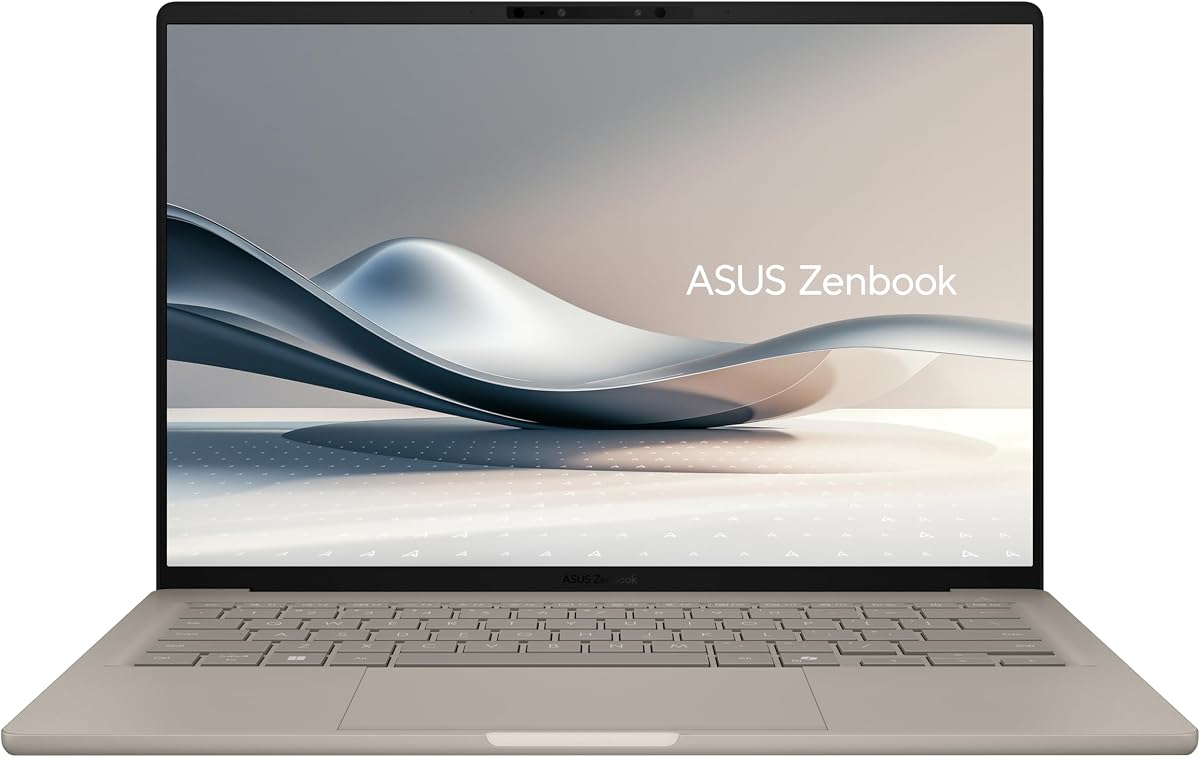
The Zenbook A14 is the lightest laptop in this list weighing just 980g which makes it incredibly portable. It holds a 3.7 rating reflecting its premium build and advanced features despite a higher price.
We may earn a commission when you buy through this link, at no additional cost to you.
The OLED display provides deep blacks and vibrant colors that stand out compared to standard screens. The Snapdragon X processor supports Copilot+ features ensuring high efficiency and performance for demanding tasks.
Users appreciate the Ceraluminum body which is stronger and lighter than standard aluminum. This material choice gives the device a unique texture and better resistance to wear over time.
For those seeking the ultimate in portability and display quality this is the top choice. It is ideal for professionals who prioritize weight and visual fidelity for presentations and creative work on the go.
Weighing under one kilogram this laptop is virtually weightless in a bag allowing you to carry it anywhere effortlessly.
The ceramic aluminum mix offers a durable finish that feels unique and resists scratches better than standard coatings.
We may earn a commission when you buy through this link, at no additional cost to you.
Selecting the right lightweight ASUS laptop involves considering several key factors beyond just weight to ensure the device meets your daily computing needs.
The processor is the brain of the laptop and dictates how well it handles tasks. Intel and AMD processors are common but Snapdragon options offer better battery life. Choose based on whether you need raw power or efficiency.
Prioritize models with at least an i3 or Ryzen 3 for smooth performance in everyday tasks.
RAM determines how many applications you can run simultaneously without slowdowns. 8GB is standard but 16GB is better for multitasking. Check if the RAM is upgradeable for future needs.
Aim for 16GB if you plan to keep the laptop for several years.
Storage holds your files and operating system. SSDs are faster than eMMC but have lower capacities. Ensure there is enough room for your essential documents and media.
Look for at least 256GB to avoid frequent reliance on external drives.
The screen affects how you interact with the device. Look for Full HD resolution and good brightness for outdoor use. OLED screens offer better contrast but cost more.
Choose a display that matches your visual comfort needs.
Battery life is crucial for a lightweight laptop used on the go. Check estimates and real world reviews. Fast charging is a bonus feature that reduces downtime.
Prioritize models with at least 8 hours of real world usage.
Weight and dimensions determine how easy it is to carry. A laptop under 3 pounds is ideal for daily commuting. Also consider the build material for durability.
Select a size that fits comfortably in your bag.
Ports like USB-C and HDMI are essential for peripherals. Ensure there are enough ports for your needs to avoid carrying dongles. Wi-Fi 6E support ensures fast internet speeds.
Check for essential ports before purchasing to avoid inconvenience.
A good keyboard improves typing comfort during long sessions. Look for backlit keys for low light use. The touchpad should be responsive and large enough for navigation.
Test the typing experience if possible to ensure it suits your style.
Always place your laptop on a flat hard surface to ensure proper ventilation. Avoid using it on soft surfaces like beds which can block air intake vents and cause overheating.
Clean the screen with a soft microfiber cloth to remove dust and smudges. Avoid harsh chemicals or alcohol based cleaners that might damage the screen coating or chassis finish.
Keep the battery charged between 20 percent and 80 percent to prolong its lifespan. Avoid letting it drain completely to zero regularly as this can degrade the cells over time.
While they are not designed for high end gaming some models with integrated Radeon graphics can run light games comfortably. For serious gaming you should look for dedicated graphics cards which add weight.
Yes all models featured come pre-installed with Windows 11 Home. This ensures access to the latest security features and interface updates directly from Microsoft.
Battery life varies by model and usage but expect between 8 and 30 hours depending on the processor and screen technology. Light usage will naturally extend the time between charges.
Most modern ultrabooks have soldered RAM so it is not upgradeable after purchase. It is important to choose a model with enough memory for your needs initially.
Copilot+ PC is a new category of laptops powered by Snapdragon X processors that offer advanced AI features. These include tools like Live Captions and Recall for enhanced productivity.
Many models feature military grade durability testing which helps them withstand bumps and drops. However careful handling is still recommended to maintain their condition over time.
This guide reviewed ten top models ranging from budget friendly options to premium ultrabooks like the Zenbook A14. Each device offers unique strengths depending on your balance of performance and portability needs.
When deciding prioritize the factors that matter most to you such as battery life or screen quality. Ensuring you have enough RAM and storage for your daily apps will save frustration later.
Remember that prices and stock change frequently so check current listings before making a purchase. Finding the right fit ensures you get a reliable companion for all your daily tasks.