
Artist Drawing Glove 3-Layer
4.6Editor score
Three layer palm rejection design
Includes two gloves and cloth
Available in three sizes
Discover the top glove for drawing tablet options for digital artists. We compare comfort, palm rejection, and materials to help you choose the right accessory.
Finding the right glove for drawing tablet use is essential for digital artists who want smooth strokes and clean screens. These accessories reduce friction and prevent smudges caused by sweat or oils on your hand.
We compared ten popular options based on material quality, fit, and palm rejection capabilities. Our analysis focuses on real user feedback and technical specifications to ensure you get the best value.
Each pick below highlights unique features like breathability, size options, and durability. Keep in mind that prices may fluctuate over time, so checking current listings is always recommended before purchasing.
4.6Editor score

4.5Editor score
4.4Editor score
This side-by-side comparison highlights the key specifications and features of each top-rated glove option available for digital artists today.


The HUION Artist Drawing Glove stands out as a top choice for digital artists seeking reliable protection and comfort. With a solid 4.5 rating from users, it offers a soft Lycra and nylon blend that ensures flexibility during extended creative sessions.
We may earn a commission when you buy through this link, at no additional cost to you.
Its ambidextrous design allows use on either hand, making it versatile for left or right-handed artists. The anti-fouling feature prevents smudges on your tablet surface, keeping your work area clean while you sketch or ink.
While it does not prevent accidental touches on touch screens, it effectively reduces friction between your hand and the device. This trade-off is acceptable for most users who prioritize smooth movement and screen cleanliness over touch protection.
This glove is ideal for sketching, inking, and coloring on graphics tablets. Its soiling resistant black color means less frequent washing, making it a practical and durable accessory for daily digital art work.
The soft material ensures your hand moves effortlessly across the tablet surface without snagging or resistance.
Designed to work on both left and right hands, it accommodates different user preferences without needing separate purchases.
We may earn a commission when you buy through this link, at no additional cost to you.
This Artist Drawing Glove offers exceptional value with a 3-layer palm rejection design that protects your screen from accidental touches. Rated 4.6 by users, it features moisture-wicking properties that keep hands dry during long drawing sessions.
We may earn a commission when you buy through this link, at no additional cost to you.
The set includes two gloves and a cleaning cloth, available in small, medium, and large sizes to fit various hand dimensions. Its smooth texture reduces friction, ensuring precise strokes without smudges or scratches on your tablet.
While the fabric is stretchy, some users with larger hands might find the fit snug. However, the inclusion of multiple sizes in the purchase helps address this concern effectively for most buyers.
Perfect for iPad and drawing tablet users, this glove enhances grip and control. It is an ideal gift for digital artists who need reliable protection and comfort without spending extra on premium brands.
The 3-layer design actively prevents accidental palm touches, which is crucial for touch-sensitive devices like iPads.
With three size options available, finding a comfortable fit is easier compared to one-size-fits-all alternatives.
We may earn a commission when you buy through this link, at no additional cost to you.
XPPen's Artist Drawing Glove is known for its high elastic material that offers excellent air permeability. Rated 4.5, it keeps your fingers comfortable and cool even during intensive digital art projects.
We may earn a commission when you buy through this link, at no additional cost to you.
The soft skin-friendly texture ensures a smooth glide across your tablet screen, stopping smudges effectively. It is designed to fit both right and left hands, providing flexibility for different artistic habits.
The black color is resistant to dirt, reducing the need for frequent washing. However, it does not prevent accidental touches on touchscreens, which is a standard limitation for this type of glove.
Choose this glove if you prioritize breathability and comfort. It is suitable for sketching and coloring on graphics tablets, offering a reliable barrier between your hand and the device.
The breathable fabric prevents heat buildup, making it suitable for long sessions without discomfort.
High elasticity ensures the glove stretches to fit your hand shape without losing its form over time.
We may earn a commission when you buy through this link, at no additional cost to you.
OTraki offers a 4-pack of artist drawing gloves, providing excellent value for individuals or groups. With a 4.6 rating, these lightweight gloves reduce friction and allow smooth sliding over tablet screens.
We may earn a commission when you buy through this link, at no additional cost to you.
Made of high-elastic lycra fiber, they are soft and breathable, suitable for men, women, and teens. The black color is soiling resistant, which helps maintain cleanliness during use without constant washing.
Note that the 2-finger design does not prevent palm sensing on devices, so you may need to disable palm rejection settings. This is a common limitation for basic drawing gloves that focus on friction reduction.
This pack is perfect for artists who want spares or share gloves with others. It works well for sketching, inking, and digital drawing on various devices like tablets and light boxes.
Buying four gloves at once ensures you always have a backup when one gets worn out or needs cleaning.
The reduced friction design helps your hand glide smoothly, improving efficiency and reducing hand fatigue.
We may earn a commission when you buy through this link, at no additional cost to you.
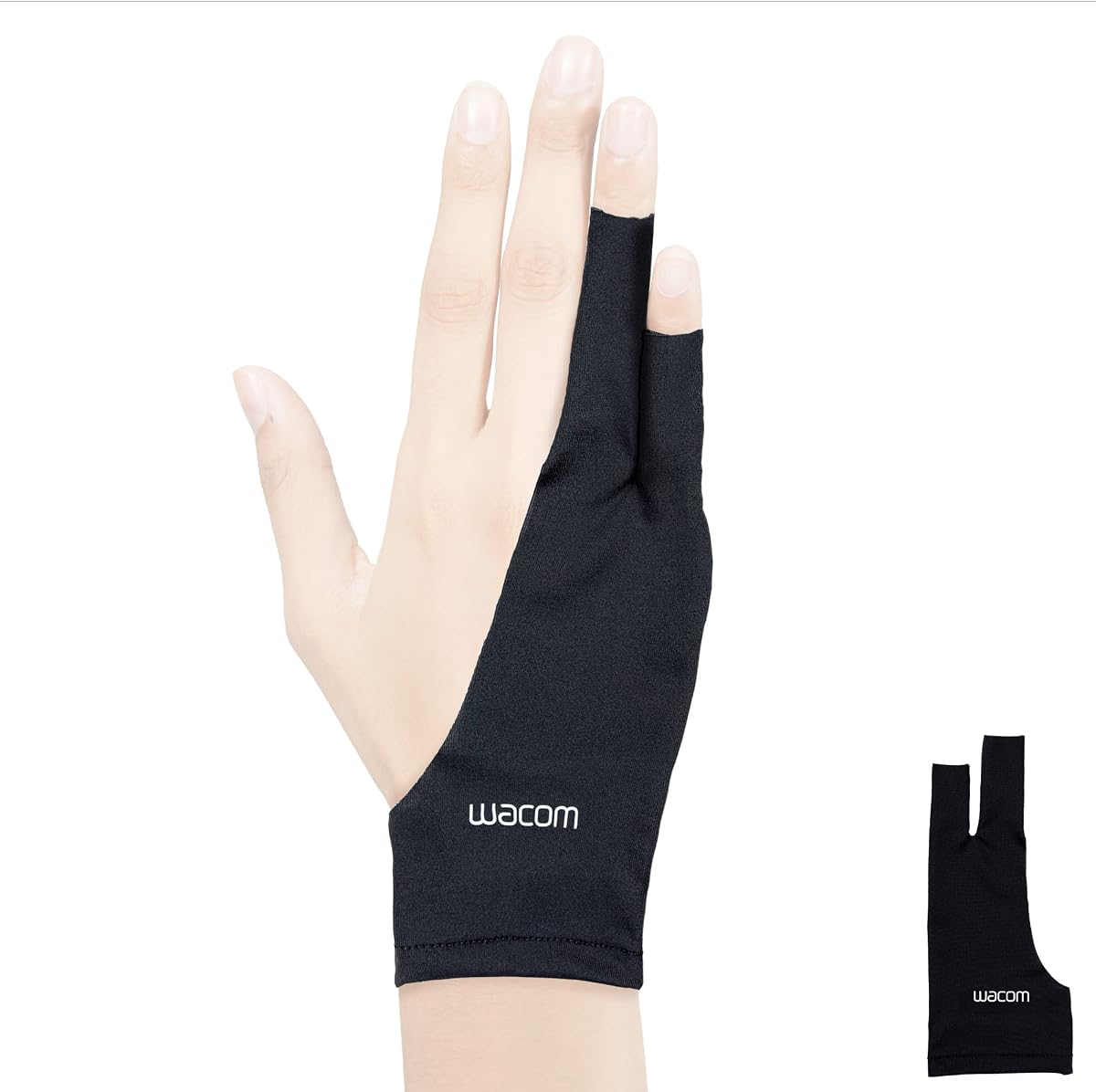
The Wacom Artist Drawing Glove is crafted from 90% recycled materials, making it an eco-friendly choice for conscious artists. It holds a 4.4 rating and offers a comfortable stretch for hours of creative work.
We may earn a commission when you buy through this link, at no additional cost to you.
Its exposed fingertip design allows you to access touchscreen capabilities easily, which is a significant advantage for iPad users. The reduced friction helps you glide over the screen without smudges or sweat marks.
While it is priced slightly higher than basic options, the quality and sustainability features justify the cost. The one-size-fits-most design works for both left and right-handed users effectively.
Choose this glove if you value environmental impact and brand reliability. It is ideal for artists who need touchscreen access while maintaining a clean drawing surface.
Using recycled polyester and spandex reduces environmental waste while maintaining high durability and comfort.
Exposed fingertips allow you to type or use touch features without removing the glove.
We may earn a commission when you buy through this link, at no additional cost to you.
HUION's Skeleton Artist Glove features a unique pattern that adds a stylish touch to your gear. Rated 4.6, it is made from soft Lycra and nylon, providing flexibility and comfort for digital drawing.
We may earn a commission when you buy through this link, at no additional cost to you.
The anti-dust design prevents smudges on your tablet screen, keeping it clean during use. It is suitable for both left and right hands, making it a versatile option for any artist.
While the design is eye-catching, it does not offer accidental touch prevention. However, its comfortable material ensures you can focus on your art without distractions from friction or heat.
This glove is great for artists who want a bit of personality in their accessories. It works perfectly for sketching and coloring on graphics tablets.
The skeleton pattern offers a distinct look compared to plain black gloves, appealing to those who value aesthetics.
The Lycra and nylon mix ensures the glove stretches well to fit various hand shapes comfortably.
We may earn a commission when you buy through this link, at no additional cost to you.
This Artist Drawing Glove set includes two gloves with a fixed strap design that enhances stability. Rated 4.6, it offers 3-layer palm rejection and sweat-wicking properties to keep your hands cool and dry.
We may earn a commission when you buy through this link, at no additional cost to you.
The symmetrical design fits both left and right hands, ensuring versatility. Its smooth fabric reduces friction, allowing you to focus on creating without worrying about accidental screen touches.
While the strap adds stability, it may feel tight on some users. However, the breathable fabric compensates by preventing overheating during long drawing sessions.
This glove is perfect for stylus users who need precision. It works well on digital plates and graphic tablets, providing a smooth and scratch-free drawing experience.
The strap between thumb and index finger ensures the glove does not shift during movement.
Breathable fabric prevents sweat buildup, making it ideal for extended use.
We may earn a commission when you buy through this link, at no additional cost to you.
These gloves feature an upgraded side fabric design with composite silk material to enhance comfort and breathability. With a 4.6 rating, they offer a smooth fit that reduces friction and improves your creative experience.
We may earn a commission when you buy through this link, at no additional cost to you.
The air layer design ensures comfort during extended use, making them suitable for animators and digital artists. They are available in multiple sizes to ensure a perfect fit for various hand dimensions.
While this listing specifies Size M, other sizes are available separately. The material is durable and easy to maintain, though regular washing is recommended to keep it fresh.
Ideal for tablet and iPad users, these gloves facilitate smooth movement and ensure a grease-free drawing surface. They make a perfect gift for anyone interested in digital art.
The composite silk side fabric provides extra breathability to keep hands comfortable for long periods.
Reduced friction ensures your hand moves freely across the screen without dragging or catching.
We may earn a commission when you buy through this link, at no additional cost to you.
This upgraded version features a fixed design for enhanced comfort during use. Rated 4.6, it is made of elastic Lycra, which ensures high elasticity and a soft, breathable texture.
We may earn a commission when you buy through this link, at no additional cost to you.
It effectively eliminates friction between the screen and hand, allowing smooth sliding. The smudge guard keeps your drawing surface clean without leaving grease or scratches.
The glove works for both hands and is available in three sizes to fit various preferences. However, it does not prevent accidental touches on touchscreens, which may be a limitation for iPad users.
Choose this glove for its comfort and smooth performance. It is versatile for sketching, oil painting, and digital drawing on various devices.
The fixed design helps prevent the glove from shifting or rolling during drawing sessions.
Eliminating friction improves work efficiency and makes the drawing process more enjoyable.
We may earn a commission when you buy through this link, at no additional cost to you.
OTraki offers a 4-pack with options in five different sizes to fit various hand dimensions. Rated 4.6, these lightweight gloves reduce friction and allow smooth sliding over tablet screens.
We may earn a commission when you buy through this link, at no additional cost to you.
Made of high-elastic Lycra fiber, they are soft and breathable. The black color is stain resistant, which reduces the need for frequent cleaning. They effectively prevent smudges on your drawing surface.
While the design is consistent across sizes, the variety ensures most users can find a perfect fit. The moisture-wicking fabric ensures comfort during long sessions of drawing.
This pack is ideal for artists who need reliable protection for sketching or coloring. It works well on graphics monitors, tablets, and light boxes.
Five sizes available mean finding a comfortable fit is more likely than with single-size packs.
Moisture-wicking fabric helps keep hands dry, preventing discomfort during long artistic sessions.
We may earn a commission when you buy through this link, at no additional cost to you.
Selecting the right glove involves considering material quality, size, and specific features that match your device needs.
Look for gloves made from soft Lycra or nylon blends. These materials ensure flexibility and comfort during long use while reducing friction against the tablet.
Prioritize breathable fabrics that wick away moisture to keep your hands cool.
Ensure the glove offers the right size for your hand. Options with multiple sizes (S, M, L) provide a better fit than one-size-fits-all designs.
Ambidextrous gloves are versatile if you use both hands or need to share.
If you use touchscreens like iPads, check if the glove has a 3-layer palm rejection design. This prevents accidental touches while you draw.
Standard gloves mainly reduce friction and may not prevent sensing on touch devices.
Choose gloves with strong tensile strength to withstand frequent stretching. High-quality elastic materials last longer and maintain their shape.
Soiling resistant colors like black help keep the glove clean longer without washing.
Some gloves have fixed straps or composite silk fabrics for enhanced comfort and stability. These details can improve your drawing precision.
Exposed fingertips are useful if you need touchscreen access or to type on a keyboard.
Multi-packs offer better value if you need backups or share gloves. Look for sets that include cleaning cloths or extra accessories.
Compare price per unit to ensure you get the best deal for the quality provided.
Before drawing, ensure your glove fits snugly but comfortably. Adjust the fingers so they cover your palm properly without restricting movement.
Wash the glove gently with mild detergent if it becomes dirty. Air dry it completely before the next use to maintain material elasticity.
Store the glove in a clean, dry place away from direct sunlight. This prevents discoloration and keeps the fabric in good condition.
Most standard gloves do not prevent accidental touches. However, models with 3-layer palm rejection design are specifically made to block unintended screen input for iPad users.
Yes, most gloves listed are ambidextrous, meaning they can be worn on either hand comfortably. Always check the product description to confirm this feature.
Hand wash the glove with mild soap and water. Avoid machine washing as it may damage the elastic fibers. Air dry thoroughly before using again.
Options typically include Small, Medium, and Large. Some packs offer one-size-fits-most designs, while others provide multiple sizes to ensure a perfect fit.
While not strictly necessary, they improve comfort by reducing friction. They also keep your screen clean from oils and sweat, which is helpful for touch-sensitive devices.
No, they cover the palm but leave fingertips exposed. This ensures you can still interact with touch controls or keyboards without removing the glove.
With proper care, they can last several months. Durability depends on usage frequency and cleaning habits. Higher quality materials typically offer longer lifespans.
Lycra and nylon blends are generally the most breathable. They allow air circulation to prevent heat buildup during extended drawing sessions.
We have reviewed ten top-rated options that offer comfort, protection, and value. The HUION and Artist Glove 3-Layer models stand out for their balance of features and affordability.
When choosing, prioritize material quality and fit to ensure long-term comfort. If you use a touchscreen, look for models with specific palm rejection technology.
Prices may change, so check current listings for the best deals. Select the glove that matches your specific device needs and artistic workflow.