
Nano V3.0, Nano Board ATmega328P 5V 16M Micro-Controller Board Compatible with Arduino IDE (Nano x 3 with USB Cable)
4.6Editor score
Original ATmega328P chip
Includes three boards and cables
Compatible with main OS systems
This guide compares the top Arduino Nano boards for beginners and pros, covering features like microcontrollers connectivity and IDE compatibility to help you
The Arduino Nano board remains a cornerstone for electronics enthusiasts and professionals alike. Its compact design and robust capabilities make it ideal for a wide range of projects from simple prototypes to complex embedded systems. Choosing the right version ensures your project runs smoothly without unnecessary complications or compatibility issues.
We have carefully evaluated ten distinct Nano offerings available in the market today. Each product was assessed based on its microcontroller type, connectivity options, build quality, and compatibility with standard development environments. This rigorous comparison helps you identify which board aligns best with your specific technical requirements and budget constraints.
Every selection in this list highlights key strengths and potential limitations to guide your decision. Whether you prioritize wireless capabilities, cost efficiency, or raw processing power, there is a suitable option here. Please note that pricing and availability can fluctuate frequently so always check the latest details before purchasing.
4.6Editor score
4.6Editor score

4.6Editor score
Below is a detailed side-by-side comparison of all ten selected Arduino Nano boards. This table outlines the essential specifications for each model so you can quickly identify the one that best fits your project needs without digging through dense technical documentation.


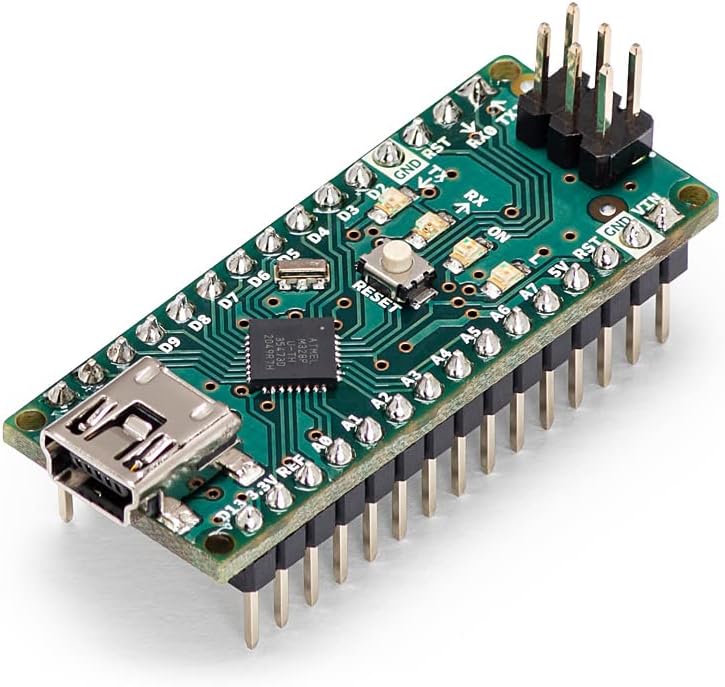
This official Arduino Nano stands out as the most reliable choice for serious developers. It carries a strong community rating and delivers consistent performance across diverse projects. Its reputation stems from rigorous quality control and seamless integration with the official development ecosystem.
We may earn a commission when you buy through this link, at no additional cost to you.
The board features the classic ATmega328P microcontroller which provides ample memory and processing power for most embedded tasks. With fourteen digital input and output pins including six PWM outputs it offers significant flexibility for controlling motors sensors and displays. The eight analog inputs allow for precise sensor data reading making it suitable for environmental monitoring or interactive installations.
While it uses a micro USB port instead of USB-C this design choice ensures compatibility with existing cables and legacy shields. The slightly higher price point compared to third-party alternatives is justified by the guaranteed hardware quality and long-term support. This makes it an excellent investment for professional applications where reliability is paramount.
We recommend this board for anyone seeking a stable foundation for their electronics projects. It is ideal for students learning embedded systems as well as engineers prototyping commercial products. The combination of robust build quality and comprehensive software support makes it the top pick for general use.
Official boards undergo strict testing to ensure every component meets high standards reducing the risk of hardware failures during critical operations.
Being a flagship product it benefits from thousands of tutorials libraries and community projects that accelerate development and troubleshooting.
We may earn a commission when you buy through this link, at no additional cost to you.
This value pack offers three Nano V3.0 boards which is an exceptional deal for bulk projects or classroom settings. The boards maintain compatibility with the Arduino IDE and standard libraries ensuring you can start coding immediately. The included USB cables simplify setup making it accessible for beginners with minimal technical knowledge.
We may earn a commission when you buy through this link, at no additional cost to you.
Each board uses the ATmega328P microcontroller paired with a CH340G USB to serial converter. This combination is widely supported across Windows Mac and Linux operating systems reducing driver installation hurdles. The form factor matches the original design allowing you to drop them into existing circuits without modification.
Quality can vary slightly between batches since these are third-party manufactured. However for most hobbyist projects this does not impact functionality. The lower cost allows you to experiment freely without worrying about damaging expensive components during learning curves or prototyping phases.
Ideal for educational environments or makers working on multiple prototypes simultaneously. If you need several units for distributed sensor networks or group projects this bundle provides the best value proposition on the market today.
Purchasing in a three pack reduces the cost per unit significantly making it accessible for large scale experiments or classroom distributions.
The CH340G chip is recognized by most modern operating systems ensuring quick setup without complex manual driver installations.
We may earn a commission when you buy through this link, at no additional cost to you.
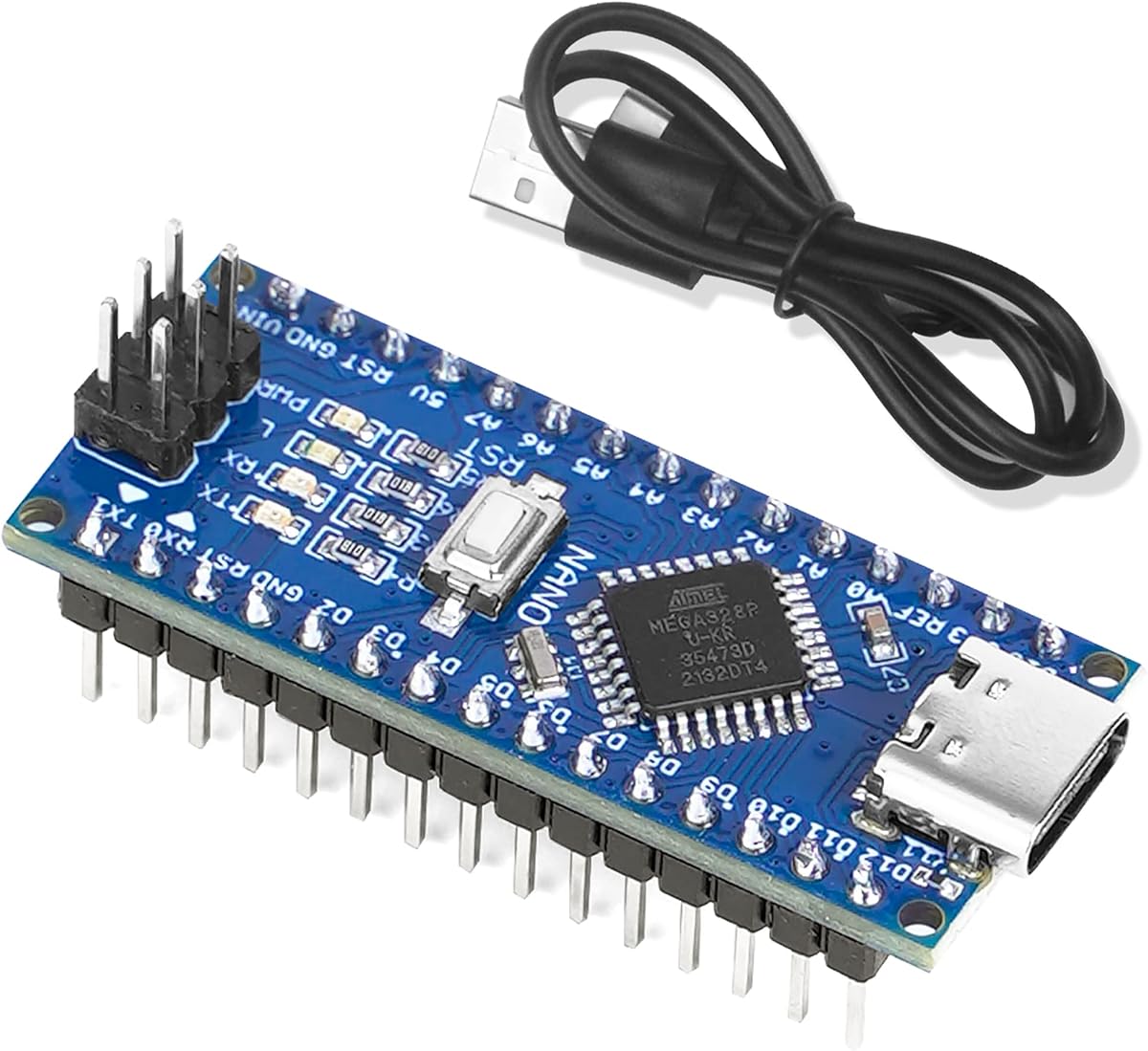
ELEGOO delivers a refined version of the classic Nano with updated USB-C connectivity. This modernization aligns with current trends making it easier to connect to newer laptops without adapters. The presoldered headers save time and effort allowing you to start prototyping right out of the box.
We may earn a commission when you buy through this link, at no additional cost to you.
The board retains the trusted ATmega328P microcontroller ensuring you can run existing code without changes. With fourteen digital pins and six PWM outputs it offers versatile control for LEDs motors and sensors. The compact footprint fits easily on breadboards and custom PCBs alike.
While it lacks wireless capabilities it excels in wired applications where reliability is key. The included USB-C to USB-A cable is convenient but note that USB-C to USB-C host cables are not supported on this specific model. Drivers may need manual installation on some systems.
This is a solid choice for students and hobbyists upgrading from older mini-USB models. The combination of modern connectivity and proven microcontroller logic makes it a practical bridge between legacy designs and new interfaces.
USB-C ports provide faster data transfer and reversible connection convenience improving the overall user experience during development.
Presoldered headers eliminate the need for soldering reducing the barrier to entry for beginners with limited tools.
We may earn a commission when you buy through this link, at no additional cost to you.
The Nano Every brings significant performance improvements over the classic model through its ATmega4809 microcontroller. This chip offers nearly double the flash memory and RAM allowing for more complex sketches and data processing tasks. The USB-C port ensures future-proof connectivity for modern development environments.
We may earn a commission when you buy through this link, at no additional cost to you.
With twenty digital input and output pins and eight analog inputs this board provides extensive connectivity options. The enhanced memory allows you to store larger libraries and datasets locally which is beneficial for data logging applications. It maintains full compatibility with the Arduino IDE simplifying the transition for existing users.
While it is an official product it is often priced competitively against third-party alternatives. The architecture requires updated libraries for optimal performance but the core functionality remains familiar. This makes it a great choice for projects that hit the memory limits of the original Nano.
Recommend this for intermediate to advanced users looking to upgrade their existing designs. The extra memory and faster clock speed enable more sophisticated logic and multitasking capabilities within a familiar form factor.
Increased RAM and flash allow for larger code bases and better data handling without external memory modules.
As an official Arduino product it guarantees consistent quality and long-term software support for critical projects.
We may earn a commission when you buy through this link, at no additional cost to you.
This board represents a significant leap into modern IoT development by integrating the ESP32-S3 chip. It offers dual-core processing power along with built-in Wi-Fi and Bluetooth capabilities making it ideal for connected devices. The Arduino IDE integration allows users familiar with the ecosystem to leverage wireless features easily.
We may earn a commission when you buy through this link, at no additional cost to you.
The ESP32-S3 processor runs at 240 MHz which is substantially faster than the traditional AVR chips. This performance boost enables advanced applications like machine learning at the edge and voice recognition. MicroPython compatibility further broadens accessibility for developers who prefer scripting over compiled code.
USB-C connectivity ensures robust power delivery and fast programming speeds. The Human Interface Device support allows the board to act as a keyboard or mouse expanding its utility beyond standard microcontroller tasks. This versatility makes it a powerful tool for interactive projects.
Best suited for projects requiring internet connectivity or complex processing. If you need to send data to the cloud or control devices remotely this board provides all the necessary features in a compact package.
Built-in Wi-Fi and Bluetooth eliminate the need for external modules simplifying circuit design and reducing overall cost.
MicroPython support allows for rapid prototyping and easier code maintenance for developers comfortable with Python.
We may earn a commission when you buy through this link, at no additional cost to you.
This kit provides two Nano boards with the added convenience of USB-C ports. It is an affordable option for users who want modern connectivity without breaking the bank. The CH340G chip ensures compatibility with most operating systems facilitating easy code uploads.
We may earn a commission when you buy through this link, at no additional cost to you.
The boards feature automatic power switching which allows you to choose between USB power or external voltage sources seamlessly. This flexibility is useful when working with projects that require higher current than USB can provide. The sixteen MHz oscillator ensures consistent timing for standard applications.
While it is a third-party product it performs well for typical hobbyist tasks. The bundle includes cables so you can start testing immediately. Quality is generally acceptable though it may not match the precision of official boards for critical industrial applications.
Great for students needing modern connectivity on a budget. The inclusion of two boards allows for testing and backup without the need to solder headers if they arrive pre-soldered or compatible with standard breadboards.
Automatic detection of power sources simplifies prototyping by allowing you to swap between USB and external batteries easily.
USB-C ports make connecting to laptops much simpler as you no longer need adapters for newer devices.
We may earn a commission when you buy through this link, at no additional cost to you.
This bundle offers three Nano V3.0 boards with USB-C ports at a very competitive price. It is designed for users who need multiple units for distributed projects or bulk learning kits. The boards maintain full compatibility with standard Arduino libraries and IDEs.
We may earn a commission when you buy through this link, at no additional cost to you.
Each board uses the reliable ATmega328P paired with a CH340G for USB communication. The design supports automatic power switching which simplifies connections when moving between USB and external power sources. The compact form factor fits easily into tight spaces in custom enclosures.
As with most third-party boards you may need to install specific drivers for the CH340G chip. However this is a standard procedure that is well documented. The performance is consistent with what you would expect from a classic Nano clone.
Ideal for educational labs or makers working on a fleet of sensors. The low cost per unit makes it feasible to deploy many boards across a project without worrying about component costs.
Buying in a three pack is cost-effective for setting up networks of sensors or robots that require individual controllers.
These boards replicate the standard functionality of the original Nano ensuring code portability and predictable behavior.
We may earn a commission when you buy through this link, at no additional cost to you.
The Nano R4 introduces a new microcontroller architecture with the Renesas RA4M1 chip. It offers significant performance improvements including a faster clock speed and more memory. The Qwiic connector makes it incredibly easy to connect compatible I2C sensors without soldering.
We may earn a commission when you buy through this link, at no additional cost to you.
Features like the programmable RGB LED provide visual feedback without adding extra components to your circuit. This is useful for status indicators or interactive feedback loops. The pre-soldered headers ensure immediate compatibility with breadboards reducing setup time.
While it uses a different processor than the classic Nano the IDE support makes the transition smoother. The performance boost allows for more demanding applications like advanced signal processing. It is a powerful tool for educational and professional prototyping.
Best for users who want the latest features and better performance. If you are building projects that require quick connectivity to multiple sensors this board offers a distinct advantage.
Pre-soldered headers and integrated connectors eliminate assembly steps allowing you to focus on coding and testing.
The onboard RGB LED provides immediate visual status updates which is helpful for debugging and user interaction.
We may earn a commission when you buy through this link, at no additional cost to you.
This version of the Nano R4 ships without soldered headers making it perfect for custom PCB integration. The castellated edges allow you to mount the board directly onto your own circuit board reducing height and complexity. It retains all the powerful features of the R4 series.
We may earn a commission when you buy through this link, at no additional cost to you.
With the Renesas RA4M1 microcontroller it offers robust processing capabilities suitable for advanced tasks. The Qwiic connector remains a key feature for rapid sensor integration. This format is designed for makers who want to create custom enclosures or final products.
Soldering the headers yourself requires some skill and tools but provides the ultimate in customization. If you prefer using a breadboard the mounted version may be more convenient. However for production projects this offers a cleaner and more compact solution.
Best for users building final products where space and mounting are critical. The castellated edges facilitate secure integration into custom designs making it a professional-grade option.
Castellated edges allow the board to be soldered directly to a custom PCB enabling compact and stable final designs.
Unassembled headers give you full control over pin configuration and layout for specialized applications.
We may earn a commission when you buy through this link, at no additional cost to you.
This Nano module offers a compact alternative that maintains full compatibility with the Arduino ecosystem. It uses the ATmega328P-AU microcontroller ensuring reliable performance for standard tasks. The USB-C connection modernizes the interface for current development needs.
We may earn a commission when you buy through this link, at no additional cost to you.
The automatic power sensing feature detects whether you are using USB or external power and switches accordingly. This simplifies wiring and reduces the need for manual jumpers. It is a practical choice for projects where space is at a premium.
While it is sold as a single unit it provides solid value for individual projects. The build quality is consistent with other third-party options in this class. It works well with Windows Mac and Linux systems with standard driver installation.
Recommended for hobbyists needing a single board with USB-C. It balances cost and functionality effectively making it a versatile addition to any maker's toolkit.
The compact module design allows it to fit into smaller enclosures than traditional boards.
Automatic power switching reduces wiring complexity and ensures safe operation across different power sources.
We may earn a commission when you buy through this link, at no additional cost to you.
Selecting the right Nano board involves considering several technical factors that directly impact your project's success. Below are the key elements you should evaluate before making a purchase decision.
The microcontroller determines the processing power memory capacity and speed of your board. Classic models use the ATmega328P which is sufficient for basic logic and control. Newer options like the Nano Every use the ATmega4809 offering more memory for complex tasks. The ESP32 and Nano R4 offer even more advanced capabilities for connectivity and performance.
Choose a microcontroller that matches your project complexity. If you are building simple sensors a classic board works well. For data logging or connectivity look for boards with more memory or wireless chips.
Connectivity ports determine how you power and program the board. Older Nano models use micro USB which may require specific cables. Newer versions often feature USB-C providing faster data transfer and compatibility with modern computers. Ensure the port type aligns with the cables you already own.
Prioritize USB-C if you want a future-proof setup. It simplifies connections and is becoming the standard for most new electronics.
Wireless capabilities like Wi-Fi and Bluetooth are essential for Internet of Things projects. If you need to send data to the cloud or control devices remotely consider a board with integrated wireless modules like the Nano ESP32. This eliminates the need for external shields.
If your project is purely local and does not require internet access a wired Nano is often more cost effective and reliable.
Flash memory and RAM dictate how much code and data your board can store. Boards with higher memory capacities can handle more complex algorithms and larger libraries. If you are using large graphics or data logging you will need a board with more than the standard capacity.
Check the memory specs if you plan to run heavy code. More memory allows for more features without needing external storage.
Official Arduino boards guarantee consistent quality and long-term support but are often more expensive. Third-party clones offer lower prices and often include extra features like USB-C. For learning and casual use clones are usually sufficient. For commercial or critical applications official hardware provides peace of mind.
Weigh your budget against your reliability needs. If you are in a classroom setting clones are great. For critical production builds official hardware is recommended.
The physical size and pin configuration matter for fitting the board into your project. Some boards come with headers soldered while others do not. Pre-soldered headers save time but increase height. Boards with castellated edges are designed to be soldered directly onto custom PCBs.
Consider how you intend to mount the board. If you are using breadboards pre-soldered headers are ideal. For custom PCBs look for castellated edges.
Most boards work with Windows Mac and Linux but driver support can vary. Official boards typically have robust drivers that install automatically. Third-party boards often use chips like CH340 which may require manual driver installation on some systems.
If you work on multiple operating systems ensure the board has universal driver support. This prevents frustration during setup.
Different boards support different power inputs. Some accept regulated 5V while others can handle unregulated voltages like 7V to 12V. Automatic power switching allows the board to select the highest source automatically. Check the specs to ensure the board can power your specific components.
Verify the voltage range before connecting external batteries. Boards with automatic switching make it easier to experiment with different power sources.
Start by downloading and installing the latest Arduino IDE from the official website. Connect your board to your computer using a compatible USB cable. Select the correct board type and COM port from the Tools menu to ensure the software can communicate with the hardware.
Upload a simple test sketch like Blink to verify functionality. If the code uploads successfully the board is working correctly. For third-party boards you may need to install specific USB drivers before this step. Keep your software and drivers up to date for optimal performance.
Handle the board with care avoiding static electricity which can damage sensitive components. Use a breadboard for prototyping to minimize stress on the pins. Store boards in a dry environment away from direct sunlight to prevent component degradation over time.
The Nano Every uses the ATmega4809 microcontroller which offers more flash memory and RAM compared to the ATmega328P in the classic Nano. It also features a USB-C port for modern connectivity. These improvements make the Nano Every better suited for more complex programs.
You must use a data cable and not just a charging cable. For classic models use a micro USB cable. For newer models use USB-C. Ensure the cable is compatible with the specific port on your board to allow both power and data transfer.
If your board uses a CH340 chip you may need to install specific drivers for your operating system. Download the CH340 driver from the manufacturer's website. Install it and then restart your computer. The board should appear as a serial port in the IDE afterward.
Yes as long as you stay within the specified voltage range typically 7V to 12V. Use a voltage regulator if necessary to protect the board. The internal regulator handles conversion to 5V. Ensure the current capacity of your battery is sufficient for your project.
Clone boards are generally reliable for hobbyist and educational projects but quality can vary between manufacturers. For critical or commercial applications official boards are recommended due to stricter quality control. Always test clones thoroughly before deploying them in important projects.
The Arduino Nano [A000005] is excellent for beginners due to its official support and vast community resources. However third-party bundles with multiple boards and USB-C are also great for learning without high costs. Choose based on your budget and access to cables.
Not always. Many boards come with headers pre-soldered which allows them to plug directly into breadboards. If they do not you can use socket headers or press pins into a breadboard. Soldering is only required for custom PCB integration.
The classic Nano with the ATmega328P has 32KB of flash memory. About 2KB is used by the bootloader leaving approximately 30KB for your sketches. This is ample for most standard projects but might be a limit for complex code or large libraries.
We have covered ten distinct options ranging from classic reliable clones to modern wireless variants. The official Nano remains a top choice for stability while the Nano ESP32 offers advanced connectivity for IoT tasks. Each board serves a specific purpose depending on your technical requirements.
When deciding prioritize factors like memory connectivity and power needs. If you need speed consider the Nano Every or R4. For budget projects the clones offer incredible value. Ensure the board supports the operating system you use to avoid compatibility issues during development.
Prices and availability change frequently so always verify current stock before ordering. Keep an eye on bundle deals if you need multiple units. With the right board you can bring any electronics project to life efficiently and effectively.