
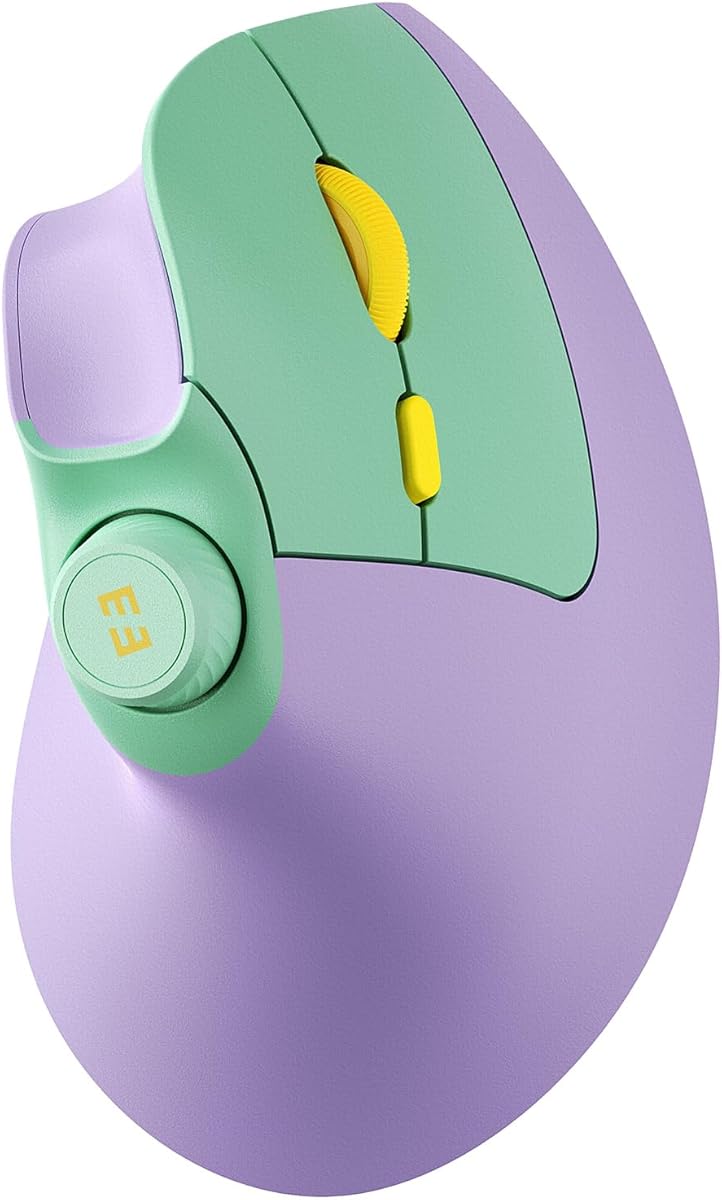
TECKNET Ergonomic Mouse
4.4Editor score
Multi-device switching
Silent click design
Adjustable DPI levels
This comprehensive guide compares the top 10 ergonomic mice designed to alleviate wrist pain, featuring detailed reviews of vertical mice from Logitech, Anker
Finding the right input device is crucial for maintaining hand health during long work sessions. Ergonomic mice are designed to keep your wrist in a natural position, significantly reducing strain and discomfort that can lead to chronic issues like carpal tunnel syndrome.
We evaluated ten highly rated vertical and ergonomic mice based on user feedback, design features, and connectivity options. Our analysis focuses on comfort, build quality, and the ability to maintain productivity without compromising on physical well-being throughout your workday.
Each selection in this list highlights specific strengths such as silent clicks, rechargeable batteries, or multi-device switching. Keep in mind that product specifications and availability may change over time, so verifying current details before purchase is always recommended for the best experience.
4.4Editor score

4.4Editor score

4.4Editor score
The following table provides a side-by-side overview of the key specifications and features for each of the top ten ergonomic mice selected for this guide, helping you quickly identify which model aligns best with your specific needs.



The Logitech Lift Vertical Ergonomic Wireless Mouse stands out as a top choice for individuals seeking relief from wrist strain. With a rating of 4.4 stars, users praise its ability to maintain a natural handshake position throughout the day. The vertical design promotes a neutral wrist posture which can significantly reduce muscle fatigue during extended computer sessions.
We may earn a commission when you buy through this link, at no additional cost to you.
Its ergonomic certification ensures that the design meets strict standards set by leading ergonomists. The mouse features a softly textured grip and a snug thumb rest that enhance comfort and stability. Connectivity is versatile, supporting both Bluetooth Low Energy and Logi Bolt USB connections for seamless integration with Windows, macOS, and other operating systems.
While the device is highly rated, it comes at a premium price point compared to budget options. Additionally, it is specifically designed for small to medium right hands, which may not suit users with larger hands. Despite these minor drawbacks, the focus on comfort and productivity makes it a worthy investment for daily use.
This mouse is ideal for professionals who spend hours typing and navigating spreadsheets. Its SmartWheel allows for smooth scrolling, and the customizable buttons add efficiency to your workflow. For those prioritizing health and comfort, the Logitech Lift offers a reliable solution backed by a reputation for quality and durability in the ergonomic space.
The 57-degree vertical angle helps keep your forearm and wrist in a natural alignment, reducing the pressure typically associated with traditional flat mice.
Whisper-quiet clicks and a precise scroll wheel ensure that your focus remains on your work without distracting noise in shared or quiet environments.
We may earn a commission when you buy through this link, at no additional cost to you.
The Anker 2.4G Wireless Ergonomic Mouse offers a practical solution for users looking for comfort without breaking the bank. With a rating of 4.2 stars, it is recognized for its scientific ergonomic structure that promotes a healthy neutral wrist position. This design helps reduce strain and amplifies productivity by aligning your hand and arm naturally.
We may earn a commission when you buy through this link, at no additional cost to you.
It features 800, 1200, and 1600 DPI resolution optical tracking, ensuring smooth and precise movement across various surfaces. The inclusion of next and previous buttons makes web browsing effortless, which is a significant convenience for internet enthusiasts and workers. Connectivity relies on a 2.4 GHz wireless USB receiver, providing a stable connection without the need for Bluetooth pairing.
One drawback is that it requires two AAA batteries which are not included, adding to the ongoing maintenance costs. Additionally, the key click sounds are unavoidable, which might be disruptive in quiet office environments. However, the power-saving mode that activates after 8 minutes of inactivity helps extend battery life significantly.
This mouse is suitable for those who prefer a straightforward connection method without complex drivers. Its durable design and comprehensive warranty make it a reliable choice for both work and leisure. For budget-conscious buyers seeking ergonomic benefits, the Anker mouse delivers solid performance and essential features.
With multiple DPI settings, you can adjust sensitivity to suit different tasks, from detailed design work to general document navigation.
Dedicated next and previous buttons streamline your web browsing experience, reducing the need to reach for keyboard shortcuts.
We may earn a commission when you buy through this link, at no additional cost to you.
The TECKNET Ergonomic Mouse is an excellent value option for users needing versatile connectivity and comfort. With a rating of 4.4 stars, it stands out for its ability to switch between three devices seamlessly via Bluetooth or 2.4GHz USB. This feature is particularly useful for those managing multiple computers or tablets throughout their workday.
We may earn a commission when you buy through this link, at no additional cost to you.
It supports six adjustable DPI levels up to 4800, allowing for high precision tracking on various surfaces. The silent click design ensures that your work environment remains quiet, which is beneficial in libraries or open offices. The ergonomic shape places your palm at a near-vertical angle to reduce pressure and pain on the wrist.
While it offers many premium features, it still requires AAA batteries which are not included. Some users may also find that side buttons have limited compatibility with macOS systems. However, the low battery warning LED and deep sleep mode help conserve power effectively, extending the time between replacements.
This mouse is a great choice for students and professionals who need flexibility without a high price tag. The 36-month warranty provides peace of mind regarding durability and customer support. For those seeking a balance of cost and performance, the TECKNET mouse delivers reliable ergonomic support.
Connect up to three devices at once or switch easily between them, making it perfect for hybrid work setups with multiple screens.
The high DPI chip ensures smooth cursor movement even on challenging surfaces, providing accuracy for detailed tasks and general use.
We may earn a commission when you buy through this link, at no additional cost to you.
The UGREEN Ergonomic Wireless Mouse is designed to provide natural comfort through a vertical handshake position. With a rating of 4.3 stars, it appeals to users with larger hands or those who spend long hours at a computer. The vertical design reduces wrist rotation and muscle strain, promoting a healthier posture during extended use.
We may earn a commission when you buy through this link, at no additional cost to you.
It features a practical 5-button layout that enhances productivity for navigation and browsing tasks. The PTFE glide feet ensure effortless movement and reduced surface friction, allowing for smoother tracking compared to standard plastic feet. Users can switch between Bluetooth and 2.4G wireless connections with ease, connecting to up to three devices.
While the mouse is versatile, it operates on a single AA battery which may need periodic replacement. The learning curve associated with vertical mice might require a few days of adjustment for full comfort. However, the smart sleep mode helps extend battery life, making it a convenient daily driver.
This mouse is suitable for a wide range of devices including Windows, macOS, and Android. Its quiet clicks make it appropriate for shared workspaces where noise is a concern. For users prioritizing smooth motion and ergonomic design, the UGREEN mouse offers a solid combination of features.
The PTFE glide pads reduce friction, ensuring the mouse glides smoothly across your desk without sticking or dragging.
The 5-button layout provides convenient shortcuts for daily tasks, reducing the need for repetitive clicking and navigation.
We may earn a commission when you buy through this link, at no additional cost to you.
The ProtoArc EM11 NL Wireless Ergonomic Vertical Mouse is specifically designed to fit small to medium hands under 7.5 inches. With a rating of 4.4 stars, it offers a precise fit that reduces wrist strain by aligning with your natural grip. Its rechargeable battery eliminates the need for disposable replacements, adding to its convenience.
We may earn a commission when you buy through this link, at no additional cost to you.
It features dual Bluetooth and 2.4G connectivity, allowing up to three devices to connect simultaneously. The ergonomic shape keeps the wrist naturally straight, which can reduce discomfort and repetitive strain injuries. Adjustable DPI levels provide higher sensitivity for precise optical tracking in various work scenarios.
Users should note that all buttons are not programmable and forward back buttons may not be compatible with all Mac OS systems. There is also a learning curve of 1-2 weeks to get used to the vertical shape. However, the silent clicking for left and right buttons helps maintain focus during work.
This mouse is ideal for users with smaller hands seeking a rechargeable solution. The included Type-C cable ensures easy charging when needed. For those looking for comfort and convenience without disposable batteries, the ProtoArc EM11 NL is a strong contender in the ergonomic market.
Tailored for smaller hand sizes, this mouse ensures a comfortable grip that prevents overextension and promotes natural hand positioning.
A built-in lithium-ion battery allows for easy recharging, reducing waste and saving money on disposable batteries over time.
We may earn a commission when you buy through this link, at no additional cost to you.
The Lekvey Ergonomic Mouse encourages healthy neutral wrist positions with its scientific ergonomic design. With a rating of 4.3 stars, it aims to reduce overall strain and promote smoother movement for daily tasks. Most customers report significant reduction in wrist pain after a short adjustment period of 3-5 days.
We may earn a commission when you buy through this link, at no additional cost to you.
It features advanced Page Back and Page Forward functionality buttons that enhance web browsing convenience. The mouse includes a high-capacity rechargeable battery offering over 150 hours of continuous use per charge. This reduces the need to buy batteries frequently, making it cost-effective and eco-friendly.
The device uses a nano USB receiver for plug and play connectivity without requiring drivers. However, it does not support Bluetooth, limiting connection options to USB wireless. Additionally, the click sounds are not silent, which might be noticeable in quiet environments. The 36-month warranty provides additional assurance of quality.
This mouse is suitable for medium to large hands seeking ergonomic comfort. Its versatile compatibility with various operating systems ensures it works well across different platforms. For users prioritizing a comfortable grip and long battery life, the Lekvey offers a reliable solution.
A high-capacity rechargeable battery ensures long usage times between charges, reducing interruptions and maintenance needs.
Designed to reduce strain, the mouse promotes a neutral position that helps prevent discomfort during prolonged computer use.
We may earn a commission when you buy through this link, at no additional cost to you.
The TECKNET Ergonomic Mouse supports versatile connectivity options including Bluetooth and 2.4G for seamless pairing. With a rating of 4.6 stars, it is known for its natural 52-degree vertical angle that fits small to medium hands well. The built-in 600mAh rechargeable battery offers long-lasting durability and cost savings over time.
We may earn a commission when you buy through this link, at no additional cost to you.
Its silent click technology reduces noise by 99 percent, making it suitable for libraries and open offices. The mouse adapts to any activity with six adjustable DPI levels ranging from 800 to 4800. This allows for precise photo editing or fast-paced gaming with a single button press.
Forward and back buttons are not available on Mac systems, which may limit functionality for some users. However, the mouse is compatible with Windows and various Mac OS versions, ensuring broad usability. It is built to withstand 6 million clicks, demonstrating robust durability for daily use.
This mouse is ideal for professionals seeking efficiency and comfort. The ergonomic design reduces strain while maintaining high performance. For those needing a quiet and reliable mouse with flexible connectivity, the TECKNET model is a highly rated option.
Whisper-quiet clicks allow for a distraction-free environment, perfect for shared spaces where noise can be disruptive.
Multiple DPI levels let you customize cursor speed and accuracy to match your specific task requirements effectively.
We may earn a commission when you buy through this link, at no additional cost to you.
The seenda MOU-302 promotes a natural handshake grip ideal for reducing wrist and forearm strain. With a rating of 4.6 stars, it is particularly beneficial for office workers and anyone dealing with wrist strain. The unique built-in volume control button adds extra convenience for media management without switching windows.
We may earn a commission when you buy through this link, at no additional cost to you.
It allows connection to three devices simultaneously via 2.4G USB or Bluetooth. The mouse features silent clicks to prevent distractions in shared spaces while adjustable DPI ensures smooth control. Its 500mAh battery lasts up to two months per charge, offering reliable performance for busy professionals.
Users need to ensure they have a USB-C cable for charging which is included. The compatibility extends to Windows, macOS, iOS, and Android, making it a universal solution. However, the limited number of devices might restrict power users managing multiple setups. Overall, it balances ergonomics with media control features well.
This mouse is suitable for streamers, remote workers, and music lovers. Its design focuses on efficiency and comfort during long sessions. For those who need quick volume control and ergonomic support, the seenda MOU-302 is a functional and comfortable choice.
Built-in volume buttons let you control audio quickly without needing to interrupt your workflow or switch applications.
Works seamlessly across multiple operating systems and devices, ensuring it fits well in diverse tech environments.
We may earn a commission when you buy through this link, at no additional cost to you.
The Logitech MX Vertical Wireless Mouse is designed to reduce muscular activity by 10 percent compared to standard mice. With a rating of 4.4 stars, it is user-tested and ergonomist-approved for improving posture and lowering muscle strain. The unique 57-degree vertical angle reduces pressure on your wrist and positions the thumb comfortably.
We may earn a commission when you buy through this link, at no additional cost to you.
It features an advanced optical sensor with a cursor speed switch for instant adjustments. The textured rubber surface ensures a natural grip and smooth touch. FSC-certified paper packaging reflects a commitment to environmental responsibility. The mouse supports connectivity via USB receiver included in the box.
As a premium product, it comes at a higher cost than other options. Some users may find the vertical shape requires an adjustment period. However, the reduction in hand movement and improved comfort for extended tasks justify the investment. It remains a benchmark for ergonomic performance in the market.
This mouse is ideal for professionals and designers requiring precision and comfort. Its robust build quality and design standards make it a reliable tool for daily work. For those prioritizing high-end ergonomic features, the MX Vertical is a top recommendation.
Designed to lower muscle activity significantly, this mouse helps prevent fatigue and discomfort over long working periods.
High-precision sensors and speed switches offer detailed control for intricate tasks, enhancing overall productivity.
We may earn a commission when you buy through this link, at no additional cost to you.
The TECKNET 2.4G Wireless Ergonomic Vertical Mouse features a scientific 60-degree vertical grip for a natural handshake hold. With a rating of 4.4 stars, it aims to reduce wrist strain at the source by keeping muscles relaxed. The mouse is built for office productivity with programmable buttons that speed up workflows.
We may earn a commission when you buy through this link, at no additional cost to you.
It uses reliable 2.4GHz wireless technology for a stable interference-free connection up to 10 meters. The quiet operation ensures a focused workspace without distracting noise. Users should allow about three days to adjust to the posture correction it provides. This is a smart investment for long-term wrist health.
The mouse includes a USB-A nano receiver for easy pairing and quick switching between desktops or laptops. While it offers programmable buttons for efficiency, it lacks Bluetooth connectivity which limits multi-device switching. However, the silent design and ergonomic shape offer substantial benefits for daily computer use.
This mouse is suitable for office professionals needing productivity shortcuts. The 36-month warranty offers support if issues arise during use. For those looking to reduce repetitive strain with a reliable wireless option, the TECKNET model is a solid choice.
Programmable buttons allow for shortcuts that reduce repetitive clicking fatigue and speed up daily tasks.
Stable wireless technology ensures uninterrupted work without lag or connection drops during critical tasks.
We may earn a commission when you buy through this link, at no additional cost to you.
Selecting the right ergonomic mouse involves considering several factors that affect comfort and functionality. Understanding these elements will help you find a device that reduces strain and supports your specific work habits.
The vertical angle determines how your hand rests on the mouse. A steeper angle typically promotes a more natural handshake position, reducing forearm rotation. Look for models offering angles between 57 and 60 degrees for optimal wrist alignment.
Choose a shape that matches your hand size to prevent overextension or cramped grip.
Decide between Bluetooth, 2.4G wireless, or wired options based on your system needs. Bluetooth saves USB ports and is great for modern laptops, while 2.4G offers stable connections without pairing. Some users may prefer dual options for flexibility.
Ensure the chosen connection type is compatible with your operating system and devices.
Rechargeable mice reduce waste and offer convenience with USB-C charging. Battery-powered models are easy to replace but require ongoing costs. Consider your preference for maintenance and how often you are willing to charge or change batteries.
Long battery life is essential for uninterrupted work especially if you are away from a charging source.
Dots Per Inch (DPI) determines cursor speed and precision. Higher DPI allows for less hand movement which is ideal for smaller desks or detailed work. Look for adjustable DPI levels to switch between tasks effortlessly.
Adjustable DPI ensures you can fine-tune sensitivity for different applications and surfaces.
Programmable buttons can enhance productivity by allowing shortcuts for navigation or apps. Forward and back buttons are useful for web browsing. Ensure that these buttons work with your operating system especially if you use macOS.
More buttons offer more customization but may require an adjustment period to use comfortably.
Silent click technology reduces noise which is important in quiet offices or home environments. This feature prevents distractions for yourself and others around you. Check if all buttons are silent or just the main left and right clicks.
Quiet mice are often preferred for professional settings where noise is a concern.
A strong warranty indicates manufacturer confidence in product durability. Look for at least 18 to 36 months of coverage to protect against defects. Accessible customer service helps resolve issues quickly without extra cost.
Good support ensures you can get help if the device does not perform as expected.
Ergonomic mice are often designed for specific hand sizes. Measuring your hand length ensures the grip feels natural and supportive. Small hand users might prefer smaller models while large hand users need more room to avoid cramping.
Matching the mouse to your hand size maximizes comfort and reduces the risk of strain.
To get the most out of your ergonomic mouse, allow a transition period of a few days to a week. Start by using the new mouse for short sessions before switching fully to let your muscles adjust to the vertical position comfortably.
Keep your mouse surface clean by wiping it with a soft dry cloth regularly. Ensure that you keep the sensors on the bottom free from dust and debris to maintain accurate tracking performance during use.
Rechargeable models should be plugged in before the battery fully depletes to extend battery life. For battery-powered models, use high-quality alkaline batteries to ensure consistent power and avoid frequent replacements.
Yes, ergonomic mice are designed to align your wrist and forearm in a natural position, which reduces muscle strain and pressure. Many users report significant relief from discomfort when switching from traditional flat mice to these ergonomic alternatives.
Most users adapt to a vertical mouse within a few days to two weeks. During this time, the wrist and forearm muscles adjust to the new posture which may feel slightly awkward at first but becomes natural over time.
Many vertical mice support Mac OS, but some features like side buttons may have limited functionality. It is important to check compatibility details before purchase to ensure full support for your system.
While primarily designed for productivity, some ergonomic mice offer high DPI settings suitable for casual gaming. However, professional gamers may prefer traditional shapes for faster reflexes and precise control in competitive scenarios.
Bluetooth connects directly without a USB receiver saving ports, while 2.4G uses a small USB dongle for a stable connection. Both provide wireless freedom but differ in pairing methods and device compatibility.
Rechargeable mice are eco-friendly and eliminate the need to buy batteries frequently. If you prefer convenience and lower long-term costs, a rechargeable model is often the better choice for daily use.
Most ergonomic mice use optical sensors that work well on various surfaces including wood and fabric. However, using a mouse pad can enhance tracking accuracy and provide a consistent surface for better performance.
Yes, most reputable ergonomic mice come with a warranty ranging from 18 to 36 months. This coverage protects against manufacturing defects and provides peace of mind for your purchase.
The ten products highlighted in this guide offer a wide range of options for reducing wrist pain while maintaining productivity. From budget-friendly choices to premium models, each mouse brings unique features that cater to different needs and preferences.
When selecting a mouse, prioritize comfort and compatibility with your devices. Ensure that the shape fits your hand size and that the connectivity options match your workspace setup for the best experience.
Remember that prices and availability can change frequently so always check current listings before buying. Taking the time to choose the right ergonomic mouse is an investment in your health and long-term computer comfort.