
Pankia Box Physical Click Keyboard
3.6Editor score
Release your hands for screen clicks
Adjustable speed for three ports
Wide compatibility for keyboard mouse
This guide compares the top automated keyboard clicker devices for gaming and work. We review physical tools that prevent idle disconnects and automate
Finding the right automated keyboard clicker can save you hours of manual effort during long gaming sessions or work tasks. These physical devices simulate input without software risks. A good clicker offers adjustable speeds, reliable timing, and sturdy construction to handle daily use. You want a tool that fits your desk setup and meets your specific automation needs efficiently.
We evaluated ten top-rated products based on build quality, customization options, and user feedback. Each device was assessed for its ability to prevent idle disconnects and automate repetitive clicking accurately. Our list includes physical tools that work independently of your operating system. We focused on safety, ease of use, and versatility across different keyboards and mice to help you choose wisely.
Every pick in this guide highlights key features, pros, cons, and real-world performance. You will see how each tool handles speed settings, physical design, and compatibility. Please note that product availability and costs may fluctuate over time. Always check the current listing details before purchasing to ensure you get the exact model and price you expect today.
3.6Editor score

5.0Editor score

4.3Editor score
The following table provides a side-by-side comparison of all ten products reviewed. You can see key specifications like speed options, physical design, and compatibility at a glance. This overview helps you quickly identify which device matches your requirements for automation and reliability.




This physical clicker stands out with a perfect user rating and a focus on hardware-based automation. It avoids software risks by operating independently of your computer system. The device is designed to simulate keyboard and mouse activity to prevent games from going offline. Its random click setup helps mimic human activity more closely than simple timers.
We may earn a commission when you buy through this link, at no additional cost to you.
The build quality is sturdy, ensuring the device does not break easily during use. Users appreciate that the motor does not heat up even with extended operation. You can adjust the height and position of the click head yourself to fit different keyboards or mice. This flexibility makes it suitable for diverse clicking applications without complex configuration.
While it offers random intervals, it lacks detailed speed customization found in programmable software solutions. The physical nature means you must place it correctly on your input device. However, these trade-offs are acceptable for users prioritizing security and ease of setup over granular control. It is a reliable tool for keeping sessions active.
You should buy this if you want a simple, secure solution that requires no coding or installation. It is ideal for gamers who need to prevent disconnects during long sessions. The device ensures consistent performance without risking security software conflicts. Overall, it is a top choice for those seeking a hassle-free physical automation tool.
Unlike software clickers, this device runs independently so it does not trigger security scans or require system permissions.
The click head height and position can be modified by you to ensure it targets the right key or mouse area.
We may earn a commission when you buy through this link, at no additional cost to you.
This budget-friendly option provides basic automation features that meet essential needs without breaking the bank. It allows you to release your hands by placing the arm on the keyboard or mouse. Each of the three ports can adjust speed separately to meet different needs. The design is simple and straightforward for quick deployment.
We may earn a commission when you buy through this link, at no additional cost to you.
The clicking arm has three adjusting parts to make it easier to click the keyboard accurately. It supports both keyboards and mice, making it versatile for various applications. The device is designed to save you time by automating repetitive tasks efficiently. Users appreciate the ability to set different speeds for different ports.
One limitation is the moderate user rating which suggests occasional compatibility issues. The arm may require careful positioning to avoid heat damage if clicked too fast. Despite this, it offers good value for those needing a reliable, low-cost tool. The separate port adjustments add flexibility for diverse tasks.
This product is best for users who want a low-cost entry into physical automation. It works well for basic gaming assistance or keeping computers active. You should ensure the arm is positioned correctly to avoid issues. For the price, it delivers solid functionality for everyday use.
Three ports allow you to set different clicking speeds independently for different tasks or input devices.
You simply place the clicking arm on the keyboard or mouse, and it automatically starts clicking without software.
We may earn a commission when you buy through this link, at no additional cost to you.
This premium model offers advanced physical adjustments that cater to diverse desktop environments. It features adjustable height to fit different keyboards in the market easily. The wide range time allows you to set clicks from 0.1 seconds to 99 seconds. A rubberized cover ensures clicking happens without damaging the keyboard surface.
We may earn a commission when you buy through this link, at no additional cost to you.
The host directly sets the time without programming making it easier to use. It simulates manual clicking with real simulation of manual clicking and irregular patterns. The device works as a gaming accessory for tablet, desktop, and laptop. Users can rely on its consistent performance to prevent online games from going idle.
While the price is higher than budget options, the precision and build quality justify the cost. The lack of software features may limit advanced users but ensures stability for others. It is a robust tool for those prioritizing hardware control over digital scripts. The design focuses on safety and usability.
You should choose this if you need a reliable tool that fits any keyboard height. The rubberized cover protects your expensive keyboards from wear. It is ideal for users who value physical adjustability and simple host-based settings. This device delivers premium performance for automated tasks.
The rubberized cover prevents damage to keyboard keys while the clicker operates continuously over time.
You set the time directly on the host device without needing complex programming or software interfaces.
We may earn a commission when you buy through this link, at no additional cost to you.
This device introduces a digital display that clearly shows the click speed in numbers. It uses ABC configurable content to group tasks like click head travel distance. The product machine is powered by 5V allowing use with mobile phone chargers or power banks. You can arrange the order of timing and executing clicks effectively.
We may earn a commission when you buy through this link, at no additional cost to you.
It supports continuous click up to 6 times in 1 second with precise control. The arbitrary combination of fixed and random time allows any single-use combination with fixed pressing time. This flexibility suits users needing complex repetitive patterns for work or gaming. The settings are button-based for easier access than software.
However, the configuration can be complex due to the many options available in ABC groups. The moderate rating suggests that some users find it difficult to master. It requires careful setup to ensure the timing logic works as expected. But for power users, the control options are valuable.
This product is best for those who need detailed control over clicking patterns. The digital display helps verify settings without guessing. It works well for tasks requiring arbitrary combinations of timing. Ensure you read the manual to understand the group logic before starting.
The built-in digital display clearly shows the click speed in numbers for accurate setup.
Groups execute sequentially allowing you to close or open them to create complex click patterns.
We may earn a commission when you buy through this link, at no additional cost to you.
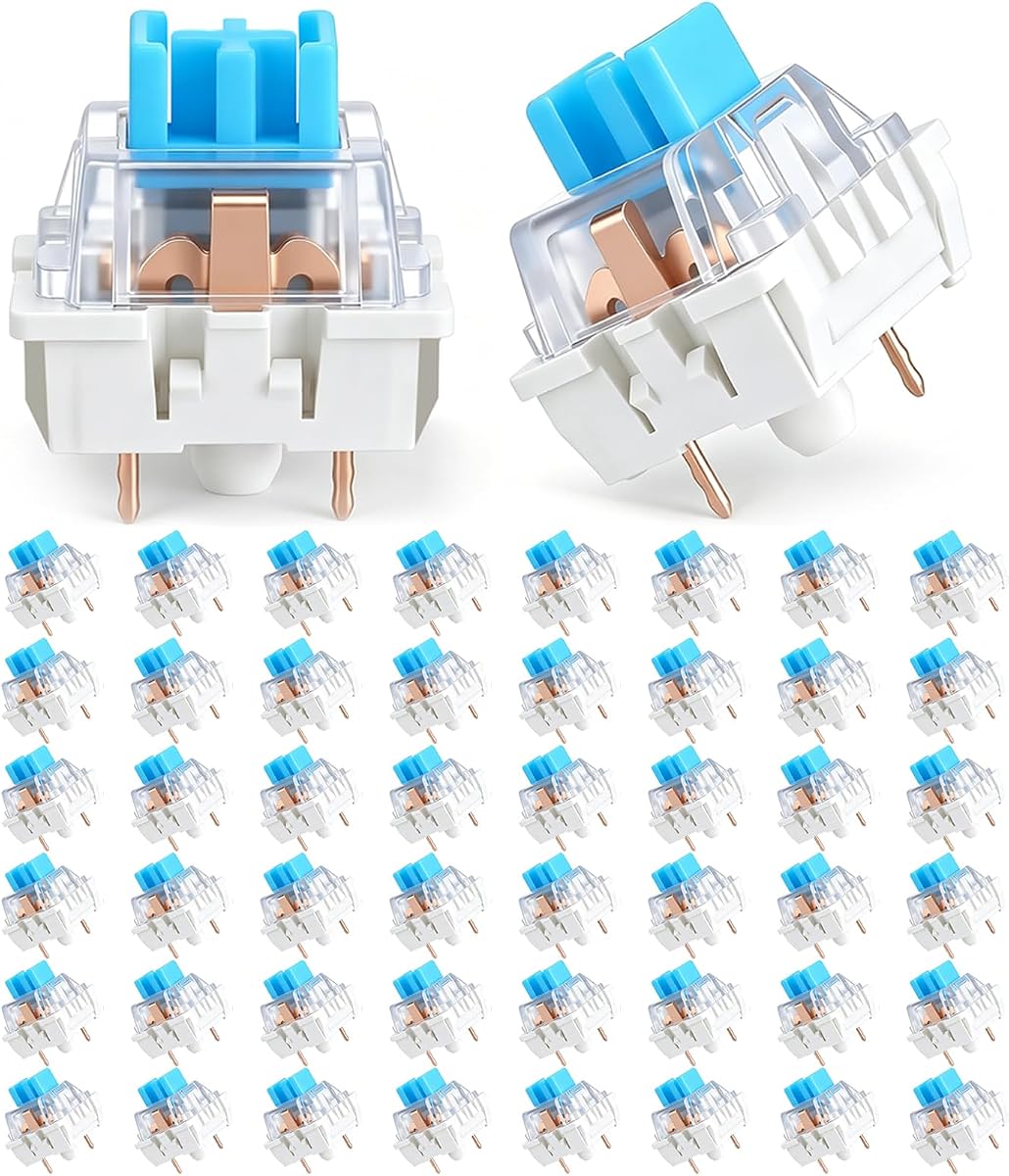
These switches offer a high-quality replacement solution for mechanical keyboard users. They provide a satisfying clicking and tactile feedback that helps relieve stress. With a service life of up to 50 million cycles, they are built to last. The transparent blue casing perfectly complements the LED backlight on your keyboard.
We may earn a commission when you buy through this link, at no additional cost to you.
The switches are waterproof and dustproof, ensuring durability in various environments. They are compatible with most mechanical keyboards and can serve in 3D-printed builds. You receive 50 pieces ready for installation to refresh your typing experience. The blue and white color scheme adds a stylish touch to your setup.
Note that these are switches not standalone automation tools for clicking. They require installation into a mechanical keyboard to function. However, for users wanting better feedback, the quality is excellent. The high rating reflects user satisfaction with the tactile feel and sound.
You should buy this if you want to upgrade your mechanical keyboard switches. The 3-pin design fits standard boards and 3D printed projects. Ensure your keyboard supports clicky switches before installing. These switches enhance the tactile and auditory experience of typing.
Made of copper washers and precision steel springs, these switches are waterproof and dustproof for long life.
The crisp clicky sound provides satisfying tactile feedback for precise keystrokes and stress relief.
We may earn a commission when you buy through this link, at no additional cost to you.
This listing is for the clicking arm component only and not the full unit. You must use this arm with a Pankia Box to activate the clicking function. It can only click the keyboard or mouse when combined with the box. The arm has 3 adjusting parts to make it easier to position correctly.
We may earn a commission when you buy through this link, at no additional cost to you.
Do not buy this without the Pankia Box as it cannot be used alone. If you need to click a phone screen, you may need a clicking head separately. The design meets screen click needs by placing the arm on keys. It supports keyboard and mouse for various applications.
The low rating may stem from confusion about the component nature of this product. Users who understand it is a spare part find it useful. It saves you time when replacing a broken arm. Ensure you check compatibility with your specific box model.
This product is best for replacing a worn arm on a Pankia Box. It allows you to restore functionality without buying a whole new unit. Verify the box works before purchasing the arm. It is a specialized component for existing users.
This is a replacement arm only and must be used with a Pankia Box to function.
The arm features 3 adjusting parts to help you position it correctly for clicking.
We may earn a commission when you buy through this link, at no additional cost to you.
This device offers 15 different random click speeds to choose from for varied tasks. The indicator light flashes once to indicate Mode 1 and switches via button. It extends and adjusts different positions to support clicking most keyboards and mice. The three ports offer 5 random speeds each to select.
We may earn a commission when you buy through this link, at no additional cost to you.
Pressing the button for 3 seconds starts the process with flashes indicating modes. You can select the speed you need to click manually through these ports. It saves you a lot of time by automating repetitive manual clicks. The device is committed to quality with a satisfaction guarantee.
The low rating may indicate mixed experiences with speed selection or build durability. The manual mode switching could be less convenient than automatic systems. However, it provides a physical alternative to software tools. Ensure you check compatibility with your desk setup before buying.
This is a good choice if you need multiple speed options in one tool. The indicator light helps you know your current mode easily. It is suitable for users who prefer physical control. Verify the satisfaction guarantee policy for your region.
Choose from 15 different random click speeds to match your specific game or work needs.
The clicking arm extends and adjusts positions to fit most keyboards and mice.
We may earn a commission when you buy through this link, at no additional cost to you.
This device meets your computer clicking requirements by letting you free your hands. It offers high customization to define loop time, click intervals, and random count. Three ports can have clicking speed adjusted independently to fulfill various needs. The clicking arm has 3 adjustable parts to make it easier to click the keyboard.
We may earn a commission when you buy through this link, at no additional cost to you.
It supports timed operation and rest periods with customize repetitions for precise needs. The clicking arm usage warns not to exceed 5 clicks per second to avoid heat damage. It acts as a simulated finger tapper for game assistance. You save time across various clicking applications.
While it is programmable, the physical interface may lack the flexibility of software. You must stay mindful of the click limit to prevent heat related damage. The adjustable speed allows for diverse use cases. The moderate rating suggests some users find the limits restrictive.
This product is best for users needing a balance between automation and control. The timed rest periods help prevent overheating and fatigue. It is a strong option for repetitive work or gaming tasks. Ensure you stay within the click limit for safety.
You can define loop time, intervals, count, duration, and rest periods for precise clicking needs.
The instructions warn to not exceed 5 clicks per second to avoid heat-related damage to the device.
We may earn a commission when you buy through this link, at no additional cost to you.
This set includes two distinct sound profiles: a quiet pink and a clicky green. Each uses four mechanical-style keys for a familiar finger-pressing feel. The keychain clips allows carrying on keys or bags during commutes. You can choose softer low-noise presses or firmer clicky feedback based on setting.
We may earn a commission when you buy through this link, at no additional cost to you.
The shared and private spaces use allows discreet pressing at office. The louder green clicker is saved for home or places where sound is welcome. It keeps one or share one to provide tactile stress relief during busy moments. The compact design fits in pockets or pouches.
Note this is a fidget toy and not an automated computer input tool. It helps relieve stress rather than automate tasks on a PC. The high satisfaction reflects the quality tactile feel. It is a great gift for keyboard fans and coworkers.
This product is best for managing stress and anxiety during work or travel. Use the quiet one at shared desks and the loud one at home. It offers a satisfying click without damaging keyboards. Ensure you choose the right profile for your environment.
The set offers a quiet pink fidget and a clicky green one to suit different noise environments.
Each toy includes a clip for carrying on keys or bags during breaks and travel.
We may earn a commission when you buy through this link, at no additional cost to you.
This pack offers 108 blue click switches with distinct tactile feedback. The service life reaches 80 million cycles ensuring long-term durability. It features waterproof and durable materials including plastic housing and POM shaft core. The packaging is beautiful PVC that protects pins from bending and damage.
We may earn a commission when you buy through this link, at no additional cost to you.
The distinct click sensation helps minimize fatigue during extended typing or gaming. However, the loud sound makes it unsuitable for quiet environments like libraries. The switches are ideal for gaming, office work, and users who prefer mechanical feel. They can also be used as fingertip toys to relieve stress.
The high rating indicates strong satisfaction among mechanical keyboard enthusiasts. Ensure your environment can handle the audible feedback before installing. The box makes it an excellent gift for hobbyists. Check pin alignment before installation to prevent damage.
This product is best for users needing bulk switches for multiple builds. The tactile and auditory feedback is highly synchronized with key travel. It helps reduce anxiety during stressful moments. Verify compatibility with your mechanical board before purchasing.
These switches offer a service life of about 80 million cycles with waterproof construction.
The satisfying clicky sound can be used as a fingertip toy to help reduce stress and anxiety.
We may earn a commission when you buy through this link, at no additional cost to you.
Selecting the right automated keyboard clicker involves balancing features, build quality, and ease of use. We outline key factors to consider before you purchase a device.
Physical devices operate independently of your operating system and do not require installation. This makes them safer for users concerned about software restrictions or security scans. However, they require desk space and precise placement. Choose physical tools if you prioritize safety over granular software control.
Software solutions offer deeper customization but may trigger security alerts. Physical devices are preferred for stability in restricted environments.
Look for devices that let you set speeds manually or have random options. Some products offer specific ranges like 0.1 to 99 seconds. Others use preset modes with indicator lights. Adjustable speeds help mimic human behavior to avoid detection on platforms.
Ensure the device supports a range that matches your game or work requirements. Too slow may not prevent disconnects while too fast may trigger bans.
Sturdy construction ensures the clicker withstands repetitive use over long periods. Check for motors that do not heat up during extended operation. Durable materials like metal or thick plastic extend service life. A strong arm resists breaking when clicked frequently.
Devices with warnings about heat damage need careful usage. Prioritize build quality to ensure longevity and reliability.
Confirm the device supports both keyboards and mice if needed. Some tools are designed for specific types of keys. Adjustable arms help fit different desk setups. Ensure the tool works with your laptop, desktop, or tablet.
Universal tools save money by adapting to multiple scenarios. Check the manufacturer's compatibility list before purchase.
Simple host-based settings without programming are ideal for most users. Look for devices with clear digital displays or indicator lights. Complex ABC logic groups may require manual reading. Choose tools that allow you to configure settings on the device itself.
User-friendly setups reduce errors and save time. Avoid tools that require external software for basic operation.
Physical tools reduce security risks compared to software that modifies system inputs. Ensure the device does not damage keys with harsh strikes. Rubberized covers protect expensive keyboards from wear. Follow manufacturer guidelines to prevent heat related damage.
Prioritize safety to protect your investment. Tools that minimize physical strain are better for long sessions.
Compare the cost against the features offered. Budget options may lack advanced customization but work for basic needs. Premium models provide better build and wider ranges. Ensure the price matches the expected lifespan and utility.
Evaluate if the device will be used often enough to justify the cost. Good value means balancing price with reliability.
Read user feedback to gauge real-world performance. Ratings reveal common issues like heat, connectivity, or durability. A high rating indicates satisfaction with reliability. Look for mentions of successful gaming assistance.
Use reviews to validate the manufacturer's claims. Consistent positive feedback helps avoid unreliable products.
Start by placing the device on a stable surface near your keyboard or mouse. Position the clicking arm to target the correct key or button. Ensure the arm does not press multiple keys at once. Check that your device is powered on and set to the desired mode.
Adjust the speed and time settings to match your specific task. Use random intervals if you need to mimic human behavior. Keep the device away from direct heat sources to prevent overheating. Monitor the arm regularly to ensure it remains aligned.
Clean the clicking surface regularly to prevent dust buildup. Store the device in a dry place when not in use. Follow the manufacturer's guidelines to avoid heat damage. Regular maintenance ensures the device stays reliable for automation tasks.
Most physical clickers do not require any software installation. They operate independently via USB or internal batteries. This makes them safer for users concerned about security. Always check the product details to confirm if any drivers are needed.
If used correctly with the right pressure, damage is unlikely. However, excessive speed or force can cause wear over time. Use rubberized covers to protect key surfaces. Avoid hitting keys too fast to prevent heat or mechanical stress.
Most devices have a physical switch or button to stop operation. You can also unplug the power source to stop immediately. Some models allow you to set a timer for auto-stop. Always check the manual for specific stop procedures.
Using automation tools may violate terms of service for some games. Always check the game's rules before using any helper tool. Physical tools are less detectable than software but still carry risks. Use discretion to avoid account penalties.
Most devices use standard USB power from a computer or mobile charger. Some internal models use internal batteries for portability. Check the voltage requirements to ensure compatibility with your supply. Avoid using incompatible chargers that may overheat the device.
Yes, most tools work on laptops if the arm fits the key height. Adjustable arms help with different laptop designs. Ensure the device does not block other keys while operating. Test on a spare area first to confirm compatibility.
We have reviewed ten top tools ranging from simple hardware to programmable devices. The Physical Click Auto Keyboard stands out for safety and simplicity. Budget options like Pankia offer basic automation. Premium models provide advanced physical control.
Prioritize physical safety and ease of use when making your decision. Ensure the tool matches your specific automation needs. A device that fits your desk and keyboard height will last longer.
Remember to check current listings for the latest features and availability. Prices and models may change over time. Choose a product that balances reliability with your specific requirements.