
Selore Laptop Docking Station 3 Monitors Triple 4K Display 3 HDMI 2 DP
4.3Editor score
17-in-1 Port Expansion
Smart Weather Display Screen
Privacy Mode Button
Fast 10Gbps Transfer
Discover the top docking stations for 3 monitors in October 2026. We compare connectivity, charging, display support, and reliability for seamless multi-screen
Finding the right docking station for 3 monitors can transform your laptop into a powerful workstation. Whether you are a developer, designer, or analyst, having multiple screens boosts productivity significantly by allowing you to manage different tasks simultaneously without constant window switching or screen clutter.
We evaluated ten leading docking stations based on port selection, display capabilities, charging power, and overall build quality. Our comparison focuses on models that support triple display setups reliably, ensuring stable performance across Windows and macOS environments while offering essential connectivity options for modern peripherals.
Each pick in this guide highlights specific strengths like high-speed data transfer, robust power delivery, or unique features like weather displays. Keep in mind that availability and pricing may fluctuate over time, so verify current details before purchasing to ensure you get the best value for your specific workflow needs.
4.3Editor score

4.4Editor score

4.4Editor score
This side-by-side comparison evaluates ten top-rated docking stations to help you find the perfect match for your multi-monitor workflow. We examine key specifications including video output configurations, charging wattage, data transfer speeds, and special features to provide a clear overview of each model's capabilities.


The Plugable USB-C Triple Monitor Docking Station stands out as a top choice for professionals seeking a reliable multi-monitor setup. It features a robust 13-in-1 design with up to 100W charging to keep your laptop powered while driving three extended displays.
We may earn a commission when you buy through this link, at no additional cost to you.
Its triple HDMI configuration delivers up to 4K at 30Hz on one port and 1080p at 60Hz on others, enabling a flexible workspace for multitasking. The dock supports Windows, macOS, and ChromeOS, though macOS users must install DisplayLink Manager for full functionality.
While it requires drivers for Mac systems and does not support protected content playback, its stability and business-grade compliance make it ideal for enterprise environments. The included power adapter ensures consistent performance without needing third-party chargers.
This dock is best suited for IT departments and power users who prioritize reliability and extensive support over plug-and-play simplicity. If you need a stable base for daily workflow expansion across different operating systems, this model delivers consistent results.
The dock supports up to three extended HDMI displays allowing you to arrange your workspace precisely. It delivers up to 4K 30Hz on the first port and 1080p 60Hz on the others ensuring smooth multitasking without performance drops.
Plugable provides lifetime technical support from a North American team of connectivity experts. This dock meets TAA and NDAA compliance standards making it suitable for government and enterprise deployments that require strict security adherence.
We may earn a commission when you buy through this link, at no additional cost to you.
The Selore Laptop Docking Station offers an impressive array of features at a budget-friendly price point. Its 17-in-1 design consolidates your workstation into a sleek vertical unit that connects via a single USB-C cable for simplicity.
We may earn a commission when you buy through this link, at no additional cost to you.
A standout feature is the built-in smart display showing weather and time without needing your phone. For video output it supports triple monitors with 4K@60Hz on the first two ports and 4K@30Hz on the third for productive multitasking sessions.
However Mac users are limited to mirror mode due to Apple chip restrictions. Additionally you must purchase a separate 87W charger to ensure all functions work properly under heavy load which adds to the total cost.
This dock is ideal for Windows users looking for an affordable triple-monitor solution with unique convenience features. If you value data transfer speeds and want to declutter your desk without breaking the bank this model fits the bill.
The dock includes a built-in LCD screen that syncs weather and time via Wi-Fi for quick glances. This feature eliminates the need to unlock your phone or wake your laptop to check essential daily information efficiently.
Transfer speeds reach up to 10Gbps via USB-C and USB-A ports supporting rapid file exchanges. Combined with SD and microSD card slots this dock handles creative workflows involving large media files with ease.
We may earn a commission when you buy through this link, at no additional cost to you.
The TobenONE DisplayLink Docking Station is a premium powerhouse designed for users who demand maximum connectivity and screen real estate. Its DisplayLink technology enables triple or even quad 4K displays from a single USB-C connection which is rare for this category.
We may earn a commission when you buy through this link, at no additional cost to you.
With 18 ports including multiple HDMI and DisplayPort outputs you can connect virtually any peripheral. The included 120W power adapter ensures your laptop and the dock itself receive stable power to avoid performance drops during heavy multitasking sessions.
While it supports Windows and macOS effectively the need for driver installation on both platforms can be a setup hurdle. Also Linux and Unix systems are not supported limiting its flexibility for some development environments.
This dock is perfect for financial traders content creators or developers needing multiple screens for complex workflows. If you want a high-end solution that pushes display limits and offers extensive port variety this premium model is worth the investment.
The dock supports up to four independent displays on compatible systems allowing for extensive multitasking. This capability is essential for traders monitoring multiple market feeds or video editors managing timelines and renders simultaneously.
With 10Gbps data transfer speeds and 100W laptop charging the dock handles demanding tasks effortlessly. The included adapter simplifies setup by removing the need to hunt for compatible chargers meeting high power requirements.
We may earn a commission when you buy through this link, at no additional cost to you.
The TobenONE 18 in 1 Laptop Docking Station is designed to turn your laptop into a complete desktop powerhouse. It offers a staggering 18 ports including triple 4K HDMI outputs which provide exceptional clarity for creative work and multitasking tasks.
We may earn a commission when you buy through this link, at no additional cost to you.
Nine USB ports ensure you can connect all your peripherals without needing additional hubs. The 100W PD charging keeps your laptop powered during use allowing you to work seamlessly throughout the day without hunting for outlets.
However this dock is optimized for Windows and Chrome OS systems and is not recommended for Mac users. You also need to source a separate power adapter over 65W which adds a small complexity to the initial setup process.
This model is best for power users with extensive peripheral needs who work primarily on Windows. If you want a single docking solution that handles every connection type including high-resolution displays this dock delivers outstanding versatility.
The dock supports triple 4K at 60Hz allowing for ultra-sharp visuals on multiple screens. This performance level is ideal for video editing spreadsheet processing and any task requiring precise color and detail across displays.
With nine USB ports this docking station handles keyboards mice external drives and more simultaneously. The sheer volume of connectivity options eliminates the need for extra adapters keeping your desk tidy and organized.
We may earn a commission when you buy through this link, at no additional cost to you.
The Plugable USB C Triple Display Docking Station is engineered for enterprise environments needing reliable hybrid team support. It enables up to three extended HDMI displays and bypasses single-display limitations on Apple Silicon Macs for a flexible workstation.
We may earn a commission when you buy through this link, at no additional cost to you.
With DisplayLink graphics technology and native USB-C video output it delivers high-performance multi-display support efficiently. The 100W Power Delivery ensures continuous charging even under heavy enterprise workloads maintaining consistent performance all day.
It works across Windows macOS and ChromeOS but lacks Linux compatibility. Also protected content playback is not supported which may limit media consumption but does not affect professional tasks like coding or analysis.
This dock is a strong choice for IT departments managing mixed fleets of devices. If you need a trusted solution with direct engineer support and wide compatibility across modern laptops this Plugable model fits your needs.
This dock bypasses native single-display limitations on M1 M2 M3 MacBooks allowing up to three displays. Optimized for enterprise use it transforms any notebook into a multi-monitor workstation supporting hybrid workforces effectively.
Plugable provides direct access to engineers for deployment assistance and troubleshooting. This support model minimizes downtime and ensures organizations maintain productivity at scale with reliable connectivity solutions.
We may earn a commission when you buy through this link, at no additional cost to you.
This HoDo USB C Docking Station offers a simple and affordable entry point for expanding your laptop connectivity. It supports up to 4K dual or triple display outputs using HDMI DP and VGA ports providing flexibility for older monitors.
We may earn a commission when you buy through this link, at no additional cost to you.
The 100W PD charging port ensures your laptop stays powered while connected to multiple screens. Three USB 2.0 ports allow you to connect keyboards and mice without lag maintaining basic functionality alongside display outputs.
However Mac users only get mirror mode and connecting VGA reduces all displays to 1080p. Also not all laptops are compatible so checking your USB-C port capabilities is essential before purchasing this specific model.
This dock is best for casual users or those on tight budgets needing basic multi-monitor setups. If you prioritize cost-effectiveness over advanced features this adapter provides a straightforward solution for everyday tasks.
The dock offers four video ports including HDMI DP and VGA for versatile monitor connections. It supports 4K dual display configurations ensuring crisp visuals while accommodating older VGA hardware seamlessly.
Up to 100W power delivery keeps laptops charged during use while USB 2.0 handles basic peripherals. This combination supports a clean desktop setup without needing separate power bricks for your laptop.
We may earn a commission when you buy through this link, at no additional cost to you.
The Acer 13-in-1 Laptop Docking Station combines a premium aluminum build with robust functionality for daily workloads. It supports three independent screens via MST technology on Windows laptops providing ample space for financial charts code or research.
We may earn a commission when you buy through this link, at no additional cost to you.
An included 110W power adapter ensures stable charging even under heavy use which is essential for reliable triple-monitor setups. The aluminum body dissipates heat efficiently maintaining peak performance during prolonged multitasking sessions.
Mac users are restricted to mirroring due to system limitations and the extra USB-C port only supports data not video. These constraints do not affect Windows users who benefit from the full potential of the included hardware.
This dock is ideal for professionals seeking a clean and efficient desk with reliable power delivery. If you appreciate build quality and need a versatile hub for Windows laptops this Acer model delivers consistent performance.
The all-in-one aluminum body consolidates everything into a sleek unit that dissipates heat efficiently. This design helps maintain peak performance during prolonged use while keeping your desk clutter free and organized.
Integrated security slots let you lock the dock and laptop to your desk for added safety. This feature provides a crucial layer of physical security for your workspace in offices or public areas.
We may earn a commission when you buy through this link, at no additional cost to you.
The Selore USB C Docking Station transforms your laptop into a triple monitor workstation with a versatile 13-in-1 design. It combines multiple versatile ports including 3 HDMI outputs and 10Gbps USB options for a seamless user experience.
We may earn a commission when you buy through this link, at no additional cost to you.
A dedicated one-touch screen control button simplifies switching between mirror and extend modes without digging into settings. On Windows with MST support you can enable independent displays across all three HDMI ports for maximum productivity.
Mac users are limited to 2 displays due to OS restrictions and triple monitor expand is not supported. Additionally triple display function requires DisplayPort Alt Mode or Thunderbolt 3/4 so compatibility checks are necessary before purchase.
This dock is perfect for Windows users wanting high-speed transfers and easy screen switching. If you need a reliable hub for creative workflows or daily office tasks this Selore model offers a balanced feature set.
The dock delivers blazing 10Gbps transfers via USB 3.1 ports ensuring quick file exchanges. SD and microSD card readers support UHS-I cards letting photographers offload high-res photos instantly.
A dedicated one-touch button allows seamless switching between mirror and extend modes without settings menus. This user-friendly design saves time and enhances workflow efficiency for daily multitasking.
We may earn a commission when you buy through this link, at no additional cost to you.
The Plugable USB-C Triple Display Laptop Docking Station turns compatible laptops into complete workstations through one cable. It uses Multi-Stream Transport to drive a native dual 4K 60Hz setup or a triple display configuration for extensive workflows.
We may earn a commission when you buy through this link, at no additional cost to you.
With 100W charging and 2.5Gbps Ethernet it delivers power and fast networking essential for modern productivity. The driverless Windows compatibility means you can plug it in and start working immediately without software installation delays.
This model is not recommended for Mac or ARM-based systems limiting its versatility. If you work primarily on Windows it offers a streamlined experience with high-speed connectivity that enhances efficiency.
Ideal for financial traders creatives and developers needing stable fast connections this dock excels. If you want maximum video performance without setup hassles this Plugable model is a top choice for Windows users.
This dock enables plug-and-play driverless connectivity for modern Windows laptops. You can expand displays and peripherals instantly without the friction of installing drivers on your operating system.
A 2.5Gbps Ethernet port provides low-latency networking essential for large file transfers and conferencing. This feature ensures your workstation stays connected at high speeds without relying on slower Wi-Fi.
We may earn a commission when you buy through this link, at no additional cost to you.
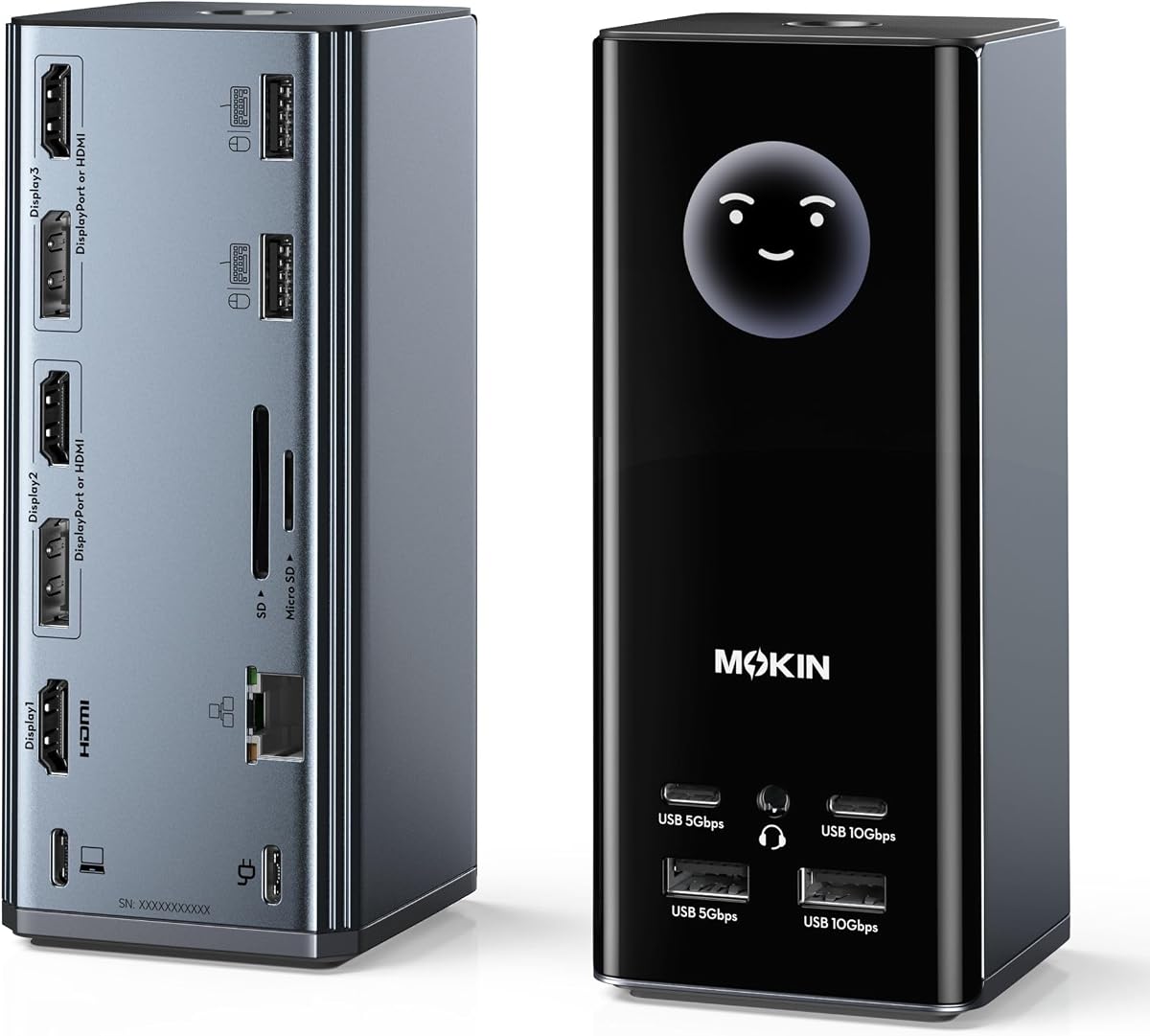
The MOKiN USB C Docking Station offers unique smart features like a real-time weather display and status monitor. Its 17-in-1 design supports three independent 4K monitors providing a stunning visual experience for creative and trading tasks.
We may earn a commission when you buy through this link, at no additional cost to you.
An integrated LCD screen shows charging wattage and connection status allowing you to monitor dock health easily. The privacy lock button lets you turn off screens instantly with a double-tap protecting sensitive information from prying eyes.
Windows users benefit from extended multi-display support but Macs are limited. You also need a separate 100W+ adapter for full-load performance which adds to setup complexity but ensures reliability.
This dock is best for users who appreciate smart convenience features alongside standard connectivity. If you want a hub that keeps you informed about weather and device status while providing strong video output this MOKiN model stands out.
The integrated vivid LCD display provides real-time monitoring of charging wattage and resolutions. This feature ensures you know exactly what your workstation is doing at a glance.
A dedicated privacy button lets you lock all screens instantly with a double-tap. This function protects sensitive information effectively when you step away from your desk during busy work sessions.
We may earn a commission when you buy through this link, at no additional cost to you.
Choosing the right docking station involves evaluating several technical factors to ensure compatibility with your laptop and monitors. This guide breaks down essential considerations to help you select a model that meets your performance and connectivity needs.
Ensure the docking station supports three independent displays at the resolution and refresh rate you need. Check whether it uses MST or DisplayLink technology since MST often has native resolution limits while DisplayLink requires drivers but works across more systems.
Look for models that explicitly state triple 4K output capabilities if you require high resolution on all screens. Verify compatibility with your operating system especially if you use a Mac which often has more restrictions on multi-monitor setups.
Adequate power delivery is crucial to keep your laptop charged while driving multiple displays and peripherals. Look for docks offering at least 100W PD charging to ensure stable performance under heavy loads without draining your battery.
Check if the power adapter is included or sold separately as this impacts total cost. Some docks need specific wattage adapters to function correctly so confirm these details before purchasing to avoid compatibility issues.
Assess the number and type of USB ports available for your peripherals like external drives or keyboards. Ports supporting 10Gbps speeds are ideal for fast file transfers while USB 2.0 suffice for basic input devices.
Consider whether you need USB-A or USB-C ports for your existing equipment. Having a mix ensures flexibility so you can connect both legacy and modern devices without extra dongles cluttering your workspace.
Verify that the docking station works seamlessly with your specific operating system whether Windows macOS or ChromeOS. Some models require driver installation on macOS to enable multiple displays which may affect setup time and stability.
Linux users should check for driver support as many docks do not support Linux fully. Ensuring broad compatibility reduces friction and ensures you get full functionality from the dock across all your devices.
Quality materials like aluminum enclosures help dissipate heat efficiently during prolonged use which prevents performance throttling. A solid build ensures longevity and reliability especially if you plan to leave the dock plugged in for long periods.
Look for docks with stable bases or suction cups to prevent accidental movement. Proper design protects both the dock and your peripherals from physical damage and keeps your desk organized and professional.
Gigabit Ethernet ports provide stable low-latency internet which is often more reliable than Wi-Fi for critical work. This feature is essential for remote workers needing consistent connection speeds for video calls and large cloud uploads.
SD and microSD card readers speed up media workflows allowing quick transfers without extra adapters. If you work with cameras or drones having built-in card support streamlines your data management process effectively.
Some docks include unique features like privacy buttons weather displays or LCD status screens that add daily value. These enhancements can simplify routine tasks and provide useful information without switching windows or devices.
Evaluate whether extra buttons or controls justify the cost. Features like one-touch screen switching or privacy locking can significantly improve workflow efficiency and convenience in professional environments.
Reliable technical support is valuable if you encounter issues during setup or use. Models backed by lifetime support or dedicated engineering teams ensure you can resolve problems quickly without downtime.
Check warranty terms for coverage on defects and hardware failures. A comprehensive warranty protects your investment and gives peace of mind knowing the manufacturer stands behind their product quality and durability.
To start using your docking station connect it to a reliable power source before plugging it into your laptop. Ensure your laptop supports USB-C video output via DisplayPort Alt Mode or Thunderbolt for full functionality.
Connect your monitors to the available HDMI or DisplayPort outputs and power on the dock. Install any necessary drivers if required by your operating system particularly for macOS users needing DisplayLink Manager.
Regularly clean the ports and exterior with a dry cloth to avoid dust buildup. Keep the dock in a well-ventilated area to maintain performance during extended use and protect connected devices.
No only laptops with full-featured USB-C ports supporting DisplayPort Alt Mode or Thunderbolt can connect three external monitors. Some models with DisplayLink technology offer broader compatibility but may require driver installation for proper function.
Most macOS laptops only support one external display without special adapters. Some DisplayLink docks allow multiple displays on Mac but require driver installation and may limit performance compared to native support.
Many docking stations come with power adapters but some require you to source one separately. Always verify the required wattage to ensure stable charging and full functionality during heavy use.
MST splits video signals natively but often limits resolutions while DisplayLink uses software to render screens offering more flexibility. DisplayLink requires drivers but works on systems without native multi-monitor support.
Docked gaming depends on your GPU and latency. While docks support video output high refresh rates may vary so check specs carefully. Dedicated GPUs usually provide better performance for intensive gaming sessions.
Yes USB-C docks generally work with Thunderbolt laptops offering backward compatibility. Some docks may unlock extra features like higher data speeds on Thunderbolt systems providing enhanced connectivity.
This guide has highlighted the top docking stations for 3 monitors offering diverse options from budget-friendly to premium setups. Models like the Plugable USB-C Triple and Selore 17-in-1 provide strong value with reliable video and power.
Prioritize features like PD charging resolution support and OS compatibility to match your specific workflow needs. Ensure the dock supports your operating system fully especially if you use a Mac or require Linux support.
Always check current availability and specifications before purchasing as models may evolve. With the right docking station you can maximize productivity and create a seamless multi-monitor workstation tailored to your tasks.