
Thermalright Trofeo Vision LCD AIO Display
4.3Editor score
USB-C connection
Compact slim build
DIY software themes
Adding an LCD Screen for PC Case transforms your build into a dynamic dashboard. These displays show real-time stats like temperatures and fan speeds while supporting custom images and videos for a unique look.
We evaluated ten leading models based on resolution, compatibility, software features, and mounting flexibility. Our analysis covers universal screens, case-specific kits, and budget-friendly options to suit every enthusiast.
Each pick highlights key strengths and ideal use cases for your setup. Please note that pricing and availability change frequently, so check current listings before making your final purchase decision.
4.3Editor score

4.5Editor score

4.2Editor score
As an Amazon Associate we earn from qualifying purchases.
The following table compares key specifications across all ten models to help you quickly identify the right fit for your case dimensions and software requirements.




The WOWNOVA 8 Inch LCD Screen stands out as the top choice for enthusiasts seeking versatility. With a 4.5 star rating, it balances performance and ease of use effectively for most builders.
We may earn a commission when you buy through this link, at no additional cost to you.
Its standout feature is the added Desktop Mode, allowing the panel to function as an extended secondary screen. This flexibility lets you display system stats or media without hogging your primary monitor.
Setup is remarkably simple with just one USB-C or 9-pin cable needed. The software supports custom dynamic videos and themes, offering a personalized experience that enhances your build aesthetic significantly.
Consider this model if you want a balance of utility and customization. The trade-off is Windows-only software, but for most PC gamers, the performance and features justify the investment.
Unlike standard sensor panels, this screen supports extended display mode, making it useful as a dedicated stats monitor outside your case.
You can upload custom GIFs and videos to create moving themes that change based on system load or time of day.
We may earn a commission when you buy through this link, at no additional cost to you.
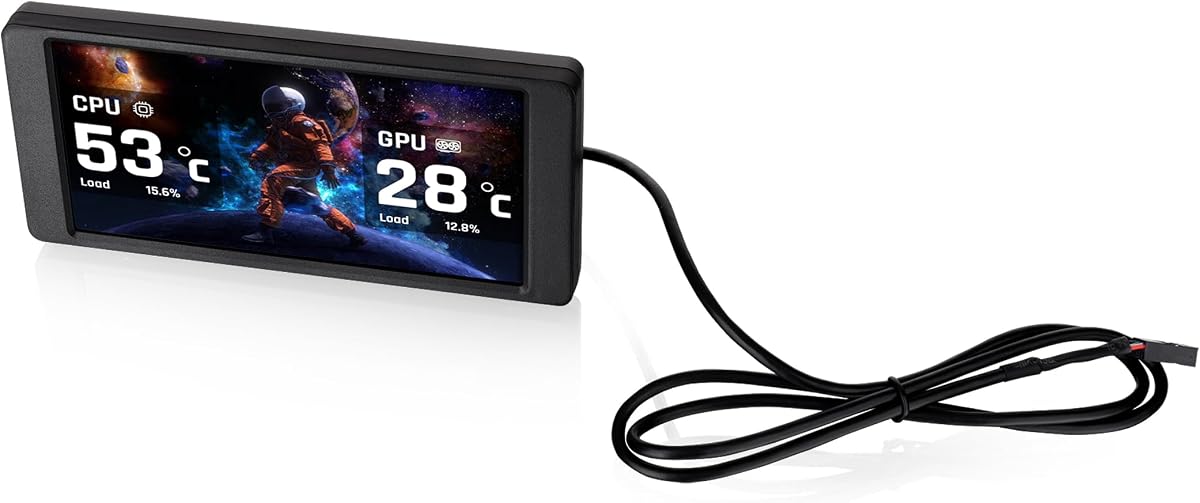
Thermalright Trofeo Vision LCD AIO Display offers exceptional value for budget-conscious buyers. Rated 4.3 stars, it delivers high-quality visuals without the premium price tag of competitors.
We may earn a commission when you buy through this link, at no additional cost to you.
The 9.16 inch wide screen provides ample space for monitoring GPU and CPU temps simultaneously. The USB-C connection ensures a quick plug-and-play experience with minimal driver hassle during setup.
While it lacks specific case fitments, the slim profile allows versatile mounting options inside any chassis. The TRCC software provides decent customization though it may take time to adjust settings.
This is an ideal choice for first-time buyers wanting a wide display without overspending. The combination of affordability and visual clarity makes it a strong contender in the budget segment.
The 1920×480 resolution gives you a cinematic width that fits perfectly in horizontal mounts for better stat visibility.
Measuring only 17mm thick, it fits into tight spaces where bulkier screens would block airflow or components.
We may earn a commission when you buy through this link, at no additional cost to you.
The wisecoco 12.6 Inch Bar LCD Screen brings premium features like HDMI connectivity and integrated speakers. Its 4.2 rating reflects high satisfaction among users seeking a high-end display solution.
We may earn a commission when you buy through this link, at no additional cost to you.
This model is specifically designed for the Hyte Y60 but functions as a versatile HDMI monitor elsewhere. The dual built-in speakers add audio capability without needing extra peripherals in your build.
Setup involves standard HDMI wiring, making it compatible with laptops and other devices beyond PC cases. The larger screen real estate allows for detailed overlays and high-quality video playback.
Choose this if you prioritize size and multimedia features. While pricier, the HDMI flexibility and audio integration justify the cost for users wanting a comprehensive display solution.
Unlike USB-only panels, the HDMI interface allows connection to any device with video output, expanding usage beyond PC monitoring.
Dual speakers eliminate the need for external sound systems, keeping your build tidy while still enjoying system sounds.
We may earn a commission when you buy through this link, at no additional cost to you.
Lian Li SM088X 8.8" Universal LCD Screen is praised for its sleek ARGB frame and versatility. With a 4.4 rating, it integrates well into builds needing aesthetic flair and practical monitoring.
We may earn a commission when you buy through this link, at no additional cost to you.
The diffused ARGB lighting enhances visual appeal without distracting from the display content. L-Connect 3 software allows deep customization of themes and system data layout for personalized views.
Installation requires attention to screw specifications to avoid damage, but the flexible bracket supports various mounting positions. The USB power means it works independently of GPU ports effectively.
This pick suits Lian Li users or those wanting RGB sync. The lighting integration and secondary monitor capability make it a premium universal choice for modern gaming rigs.
The frame lighting syncs with your system, ensuring the screen blends seamlessly with other illuminated components.
Multiple bracket options let you mount horizontally on fan frames or vertically on glass panels for better visibility.
We may earn a commission when you buy through this link, at no additional cost to you.
The darkFlash V92 9.2" PC Case Screen delivers sharp visuals with its ultra-wide IPS panel. Rated 4.1 stars, it is a reliable option for monitoring system stats in real time.
We may earn a commission when you buy through this link, at no additional cost to you.
Connectivity options include external USB-C or internal 9-pin headers, offering flexibility for cable management. The Station Space software supports various widgets like weather and news alongside hardware stats.
Its slim aluminum body measures only 12mm thick, fitting easily into tight case spaces. Check clearance dimensions before purchasing to ensure proper fit for your specific case model.
Choose this if you need a reliable sensor panel with flexible connectivity. The internal connection option makes it a strong candidate for clean build aesthetics and organized cable management.
The 9-pin header support allows for hidden cables, keeping your build clean without visible external wires running to the USB port.
Beyond system stats, you can display dynamic content like weather or stocks using the Station Space plugin system.
We may earn a commission when you buy through this link, at no additional cost to you.
Hosyond 8.8 Inch Touchscreen offers a unique interactive element to your PC case setup. With a 4.0 rating, it appeals to users wanting touch control and broad device compatibility.
We may earn a commission when you buy through this link, at no additional cost to you.
The capacitive touchscreen allows direct interaction without peripherals, great for Raspberry Pi setups or custom control panels. It supports HDMI input, enabling use as a secondary monitor for other devices.
Power efficiency is notable, consuming only 3.8W via USB. Driver-free installation works with Windows and Linux systems, making it accessible across different environments without complex setup.
This model is best for hobbyists and single-board computer enthusiasts. The combination of touch and HDMI versatility makes it a flexible utility screen for various computing tasks.
Interact directly with your system stats using touch gestures, adding a futuristic element to your gaming or workstation setup.
Works with Raspberry Pi, Windows, and Linux systems, making it a universal display solution beyond just PC monitoring.
We may earn a commission when you buy through this link, at no additional cost to you.
Thermaltake 6.0 Inch LCD Screen Kit is designed specifically for Thermaltake View series chassis. Rated 3.8 stars, it offers deep integration for existing Thermaltake ecosystem users seeking customization.
We may earn a commission when you buy through this link, at no additional cost to you.
The TT RGB Plus software provides extensive control over backgrounds and real-time system data. Users can upload custom images or GIFs to personalize the display to match their aesthetic preferences.
Resolution is 1480x720p, which is lower than some ultra-wide panels but sufficient for clear stats. The kit includes necessary adapters for direct USB 9-pin motherboard connectivity.
Ideal if you own a View 370 or 390 case. The seamless integration and software control make it a top choice for maintaining brand consistency in high-end gaming setups.
Engineered to fit the curved glass panels of View series cases perfectly, eliminating the need for complex DIY modifications.
TT RGB Plus 3.0 allows granular control over colors and monitoring data, syncing with your RGB components.
We may earn a commission when you buy through this link, at no additional cost to you.
GeeekPi 12.6 Inch IPS LCD Touch Screen Monitor is a high-resolution panel designed for the Hyte Y60. Rated 4.0 stars, it combines touch capability with integrated audio for a rich experience.
We may earn a commission when you buy through this link, at no additional cost to you.
The 10-point multi-touch allows intuitive navigation of system stats and menus directly from the screen. Dual speakers provide audio output without adding extra hardware clutter to your PC setup.
Setup is plug-and-play compatible with Windows and macOS systems. The high contrast ratio ensures vibrant visuals that remain clear from almost any viewing angle during your gaming sessions.
This is perfect for Y60 owners needing touch and audio features. The combination of resolution and usability makes it a robust secondary display for modern gaming PCs.
Support multi-touch gestures like pinch-to-zoom on your dashboard, making interaction with stats and media smooth and responsive.
Unlike many PC screens, this one works natively with macOS, making it a rare option for Mac users wanting PC hardware monitoring.
We may earn a commission when you buy through this link, at no additional cost to you.
Thermalright TV 9.16 LCD Black Display Screen simplifies installation with its magnetic design. Rated 4.3 stars, it is excellent for modders who want to swap displays without drilling holes.
We may earn a commission when you buy through this link, at no additional cost to you.
The magnetic suction allows easy removal and repositioning of the screen. TRCC software manages monitoring and themes, providing full control over what you see on the display surface.
Built with a metal frame, it offers durability while maintaining a sleek look. Ensure wiring is complete before installing the software to prevent any connection issues during first use.
Choose this for flexible mounting and a clean aesthetic. The magnetic system is a unique advantage for users who frequently change their case layout or interior components.
Mounting is as simple as snapping the frame into place, saving time and preserving case surfaces from screw marks.
Software handles power and theme switching, allowing you to set it to auto-start with Windows automatically.
We may earn a commission when you buy through this link, at no additional cost to you.
Thermalright Trofeo 6.86 LCD Display offers a compact and affordable option for smaller builds. Rated 3.4 stars, it focuses on budget-friendly customization for specific use cases.
We may earn a commission when you buy through this link, at no additional cost to you.
The magnetic panel allows movement across the chassis, letting you place it on water coolers or side panels easily. DIY themes support static and dynamic images to match your PC style.
Resolution is 1280×480, sufficient for basic monitoring but less detailed than larger models. It works well for simple stats or branding displays without significant resource usage.
This is best for budget builds or secondary placement. The magnetic system and affordable price make it accessible for users wanting basic visual enhancements without high costs.
Unlike standard panels, this can mount directly on CPU coolers, keeping your display visible from the top of the case.
Small size ensures it fits into compact ITX cases where standard 9-inch panels would not fit at all.
We may earn a commission when you buy through this link, at no additional cost to you.
Selecting the right LCD screen depends on your case dimensions, software preferences, and desired features. This guide breaks down the key factors to help you make an informed decision.
Screen sizes range from 6 inches to over 12 inches. Larger screens offer better visibility for detailed graphs and videos but require more space. Ensure your case has the necessary mounting area.
Prioritize at least 720p resolution for clear text readability. Higher resolutions like 1080p or wide formats provide sharper visuals for detailed monitoring overlays.
Most screens come with proprietary software like L-Connect, Station Space, or TRCC. Check if these applications support your operating system. Windows is universally supported, but macOS support is limited.
Choose software that offers easy customization. Drag-and-drop editors and preset themes save time and allow you to match your screen style to your build aesthetic effortlessly.
Connectivity options include USB-A, USB-C, and 9-pin headers. USB ports are versatile, while 9-pin headers offer cleaner internal cable management. HDMI connections allow broader device compatibility.
Ensure your motherboard has available headers. If using USB-C, confirm your power supply supports the required amperage to avoid unstable performance or connectivity issues.
Mounting styles vary from screw brackets to magnetic panels. Screw mounts are secure, but magnetic ones offer flexibility for changing positions. Consider case materials for magnetic mounting.
Look for adjustable brackets if you want flexible viewing angles. Some models support vertical or horizontal orientation, giving you flexibility in how you display your stats.
Features like ARGB lighting and touchscreens add unique value. ARGB frames sync with your system lighting. Touchscreens allow interactive control without a mouse or keyboard connection.
Integrated speakers can reduce external cable clutter. If you want sound from your system or media, a screen with built-in audio simplifies your setup significantly.
Some screens are universal, while others fit specific cases like the Hyte Y60. Universal screens offer flexibility but may require custom brackets. Case-specific models ensure perfect fit and alignment.
Check clearance dimensions carefully. Ensure the screen fits behind glass panels or in designated cutouts without obstructing fans or internal components during operation.
Most screens draw power from USB, typically requiring 5V. Low power draw ensures minimal strain on your power supply. Energy-efficient panels help maintain system stability.
Consider power stability for long sessions. Some screens auto-dim or turn off to save power, which helps if you run your PC for extended periods without physical interaction.
Materials like aluminum housings offer better durability than plastic. Metal frames also dissipate heat better. Check reviews for long-term reliability and screen surface durability.
Invest in a model with good protection for the screen. A tempered glass layer or removable film can prevent scratches and fingerprints, keeping your display looking pristine over time.
Start by checking your motherboard headers to identify available USB or 9-pin connections. Plan your cable routing to avoid blocking fans or GPU airflow during installation.
Install the software driver before connecting the hardware. This ensures the system recognizes the display immediately upon connection, preventing driver conflicts during boot.
Clean the screen regularly with a microfiber cloth to remove dust. Avoid harsh chemicals that might damage the coating. Keep the software updated for new themes and features.
Some models like GeeekPi support macOS, but many require Windows for full functionality. Always verify software compatibility before purchasing. Using a VM might work but adds complexity.
Most screens use USB headers or internal motherboard connections, freeing up GPU ports. This is ideal for builds with limited HDMI outputs or dedicated graphics cards.
Each brand provides a dashboard app to upload images or GIFs. You can create layouts with temperature graphs and system metrics. Some even support video playback for dynamic effects.
The impact is minimal as these screens run on USB power and simple software. They use negligible system resources compared to main applications, keeping your gaming performance stable.
IPS panels generally offer wide viewing angles, making them readable from the side. Avoid TN panels if you need consistent color quality from different viewing positions.
If it supports HDMI, yes. You can connect to consoles, Raspberry Pi, or laptops. USB-only screens are typically limited to PC environments due to driver requirements.
We highlighted top picks like the WOWNOVA 8 Inch for versatility and Thermalright Trofeo for budget-friendly value. Each model offers distinct advantages depending on your specific build needs.
Prioritize software compatibility and connection type to ensure seamless integration. A screen that is easy to install and manage provides more long-term satisfaction than one with limited features.
Always verify current availability and pricing before buying. Product listings change, and new models may appear, so check for the latest deals to get the best value for your setup.