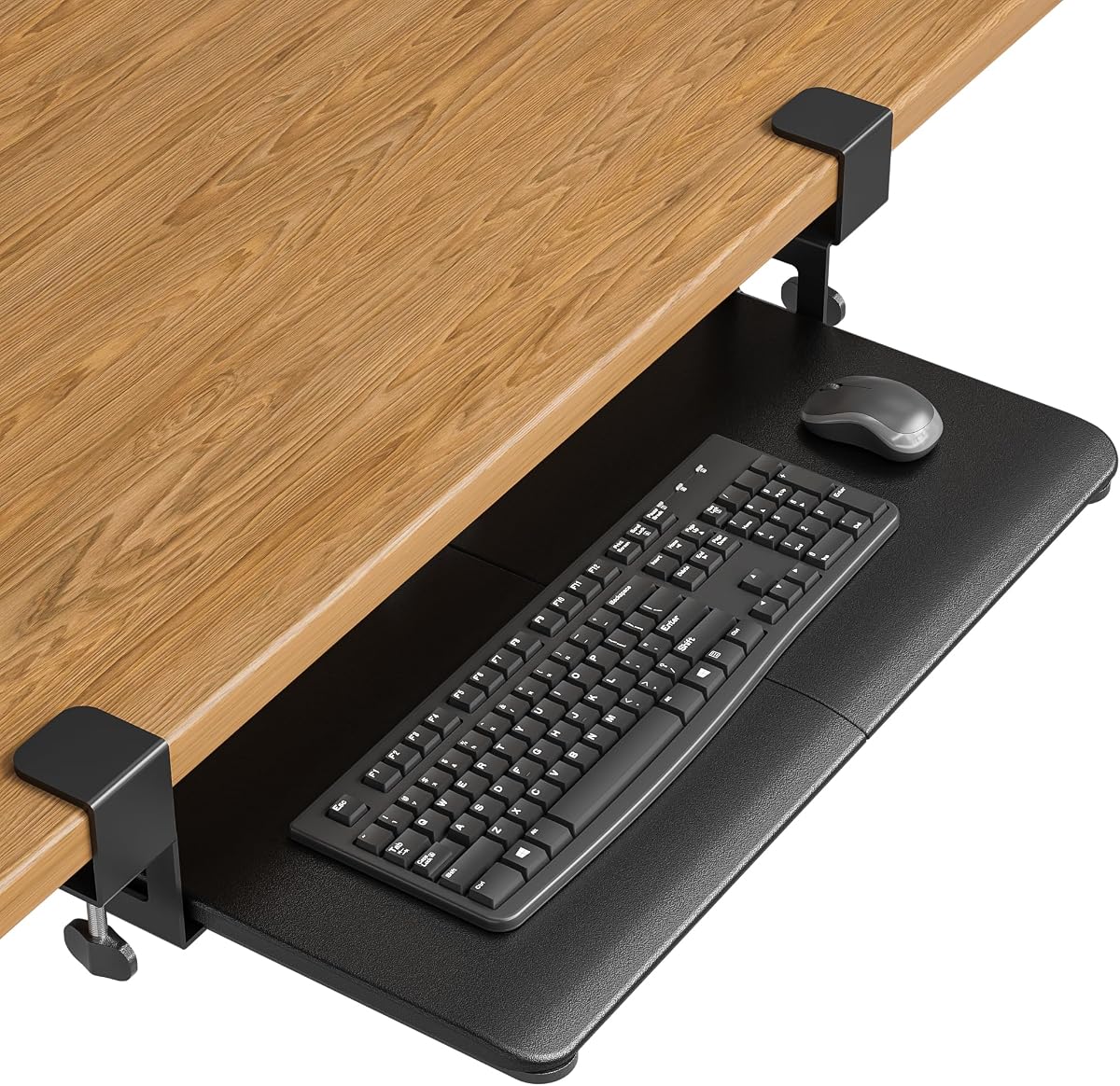
BONTEC Under Desk Keyboard Tray, Pull-Out Keyboard & Mouse Platform
4.4Editor score
No-drill installation process
Maximizes workspace efficiently
Supports up to eleven pounds
Compare the top 10 clamp on keyboard trays for ergonomic comfort and space saving. Our guide reviews features, compatibility, and user ratings to help you
Finding the right clamp on keyboard tray can transform your workstation into a more ergonomic and efficient space. These under-desk solutions free up valuable desktop area while promoting healthier typing positions for long hours.
We compared ten leading models based on installation ease, adjustability, build quality, and user feedback. Our analysis covers standard desks, corner setups, and various thickness requirements to ensure a perfect fit for your office.
Each pick highlights specific strengths like rotation, tilt, or storage options to match different workflow needs. Please note that availability and pricing may change, so verify current details before making your final purchase decision.
4.4Editor score

4.4Editor score

4.3Editor score
This side-by-side comparison evaluates ten top-rated clamp on keyboard trays across key specifications. We examine dimensions, weight capacity, desk thickness limits, and unique features like rotation or storage to help you find the ideal match for your setup.


The VIVO MOUNT-KB05E stands out as a reliable and affordable solution for decluttering your workspace. With a 4.4 rating from numerous users, it offers a solid balance of stability and ease of use for standard desks.
We may earn a commission when you buy through this link, at no additional cost to you.
Its under-desk design frees up room for monitors and documents while keeping your keyboard and mouse accessible. The tray extends smoothly and supports up to eleven pounds, ensuring your peripherals stay secure during intense typing sessions.
While the clamp limits desktop thickness to one point two five inches, this covers most standard office desks. It is also not compatible with beveled edges, so measure your surface carefully to avoid fitment issues.
This tray is ideal for home office workers seeking ergonomic benefits without breaking the bank. Its straightforward installation and dependable construction make it a top recommendation for anyone looking to optimize their desk setup.
By moving input devices below the desktop, you reclaim valuable surface area for essential documents or secondary monitors.
Adjustable angles help reduce wrist strain, promoting healthier posture during long work hours.
We may earn a commission when you buy through this link, at no additional cost to you.
The MOUNT-KBST1 offers exceptional flexibility with width and height adjustments, catering to diverse desk configurations. Its 4.3 rating reflects satisfaction with its robust build and ability to fit desks up to three point four inches thick.
We may earn a commission when you buy through this link, at no additional cost to you.
This model includes a wrist pad and mouse rest, adding immediate ergonomic value to your setup. The split design allows for customized placement, ensuring your peripherals sit comfortably regardless of your desk depth.
While it costs more than simpler trays, the added adjustability justifies the investment for those with non-standard desks. Ensure your desk has enough space for the clamp range before purchasing to guarantee a secure fit.
Ideal for users needing precise positioning, this tray supports both typing comfort and desk organization. Its comprehensive feature set makes it a strong contender for professional environments where ergonomics are a priority.
Adjustable width and height ensure the tray aligns perfectly with your specific workstation dimensions.
Included wrist and mouse rests provide immediate relief during prolonged computer usage.
We may earn a commission when you buy through this link, at no additional cost to you.
Unique for its single clamp rotation, the MOUNT-KB04CB lets you pivot the tray fully under the desk when not in use. This 4.0 rated product is perfect for those needing occasional access to extra desk space.
We may earn a commission when you buy through this link, at no additional cost to you.
The rotating mechanism allows you to shift your keyboard left or right, adapting to different tasks or visitors sharing your desk. Its compact size fits well in smaller areas where a full tray might feel cumbersome.
Ensure you have enough circumference clearance for the rotation to work effectively. The limited surface area may not suit users with multiple input devices, but it excels in minimalist setups.
This tray is best for dynamic workspaces where desk real estate is a premium. Its innovative design offers a clever solution for keeping your workstation tidy while maintaining accessibility when needed.
Pivot the tray out of the way instantly to free up your entire desktop surface.
Single clamp attachment makes setup quicker and requires less hardware than dual-clamp models.
We may earn a commission when you buy through this link, at no additional cost to you.
The BONTEC tray delivers excellent value with a 4.4 rating, offering a no-drill installation that preserves your desk's integrity. It accommodates desks up to one point nine seven inches thick, broadening its compatibility.
We may earn a commission when you buy through this link, at no additional cost to you.
Its pull-out design allows for easy access while keeping the desktop clear. The platform is designed to support standard keyboards and mice, with sufficient surface area to maintain stability during use.
Measure your under-desk depth carefully to ensure smooth sliding. The flat desk requirement means it will not fit rounded or beveled surfaces, so verify your setup beforehand.
For budget-conscious buyers, this tray provides a reliable way to improve ergonomics without overspending. Its straightforward design and protective pads make it a practical choice for home and office use.
Achieve a healthier typing position without investing in expensive adjustable desks.
Clamp clamps secure the tray firmly without drilling or damaging your furniture.
We may earn a commission when you buy through this link, at no additional cost to you.
The MOUNT-KB05HT stands out with nine precise tilt settings, allowing you to lock into the exact angle that relieves wrist strain. With a 4.3 rating, users appreciate the premium build and flexibility offered.
We may earn a commission when you buy through this link, at no additional cost to you.
Height adjustable brackets provide clearance flexibility, while swivel clamps adapt to corner desks seamlessly. The tray supports desks up to three point four inches thick, making it suitable for heavy-duty furniture.
The added adjustability increases the complexity of installation slightly, but the comfort gains are worth the effort. Ensure you have space for the clamp length before purchasing to avoid constraints.
This model is best for professionals seeking advanced ergonomic control. Its robust features justify the investment for those who spend hours typing and need precise posture alignment.
Nine tilt settings let you find the perfect angle to minimize arm and wrist fatigue.
Swivel clamps and adjustable brackets make it fit both corner and standard desks.
We may earn a commission when you buy through this link, at no additional cost to you.
Specialized for L-shaped workstations, the MOUNT-KB10C uses swiveling clamps to secure firmly to corners without damage. Its 4.2 rating highlights its practicality for those using multi-sided desks.
We may earn a commission when you buy through this link, at no additional cost to you.
The tray provides a generous surface for your keyboard and mouse while freeing up your main desk area. Installation is straightforward, with adjustable clamps that tighten securely to prevent slipping.
Verify that your desk thickness does not exceed one point two five inches. The clamp design ensures stability, but it is not compatible with beveled or lipped edges.
This tray is an essential accessory for corner desk users looking to organize their workspace. Its dedicated design simplifies setup and ensures optimal use of awkward angles.
Swiveling clamps adapt to corner angles, ensuring a secure fit on complex furniture.
Slide the tray in and out to maintain a comfortable position for your wrists.
We may earn a commission when you buy through this link, at no additional cost to you.
The MOUNT-KB05-4D combines a keyboard tray with a pencil drawer, offering dual functionality to keep supplies organized. With a 4.4 rating, users love the added storage utility it brings to their desk.
We may earn a commission when you buy through this link, at no additional cost to you.
The tray extends smoothly, and the drawer provides space for pens and small accessories. This combination reduces clutter on your main desk surface, promoting a cleaner workspace.
Ensure your desk has enough length for the combined extension. The tray holds up to eleven pounds, ensuring stability during typing or writing activities.
This model is ideal for those needing extra storage in their typing setup. Its practical design helps maintain order while supporting ergonomic comfort during daily work.
A built-in pencil drawer keeps essential tools close at hand without cluttering the desktop.
Moving input devices and supplies under the desk maximizes usable workspace area.
We may earn a commission when you buy through this link, at no additional cost to you.
This tray accommodates desks up to two point seven six inches thick, making it versatile for heavy furniture. The 4.4 rating reflects user satisfaction with its stability and ease of use.
We may earn a commission when you buy through this link, at no additional cost to you.
A built-in back baffle keeps your keyboard secure, preventing it from sliding off during typing. The smooth slide mechanism ensures effortless extension and retraction for daily tasks.
Check your desk width and length compatibility before buying. The clamps feature non-slip pads to protect your desk surface while maintaining a firm grip.
Ideal for thicker desks or shared workstations, this tray balances functionality and ease. Its design focuses on providing a reliable platform for comfortable typing over long periods.
Adjustable clamps support desks up to nearly three inches thick, fitting more furniture types.
Back baffle ensures your keyboard stays in place, enhancing typing stability and comfort.
We may earn a commission when you buy through this link, at no additional cost to you.
The DESK-EXT24 offers a foldable design that can serve as a keyboard tray or extra storage. With a 4.2 rating, users appreciate its versatility for printers or speakers when not typing.
We may earn a commission when you buy through this link, at no additional cost to you.
It supports up to forty-four pounds, ensuring it can handle heavier devices. The K-shaped brackets provide rigid support, and the clamps fit desks up to three point five inches thick.
Note that it folds when not in use, saving space. It is not compatible with beveled or lipped edges, so verify your desk before purchasing.
This extender is perfect for users needing flexible workspace solutions. Its robust construction and warranty make it a reliable investment for varied home office tasks.
Fold the platform away to reclaim desk space when the extension is not needed.
K-shaped brackets provide strong stability for heavy items like monitors or speakers.
We may earn a commission when you buy through this link, at no additional cost to you.
Mount-It! offers a lifetime warranty and US-based support, giving buyers peace of mind. With a 4.4 rating, users value its durable construction and user-friendly slide-out mechanism.
We may earn a commission when you buy through this link, at no additional cost to you.
The tray helps align wrists and elbows at a neutral height, reducing strain. Its wide platform fits full-size keyboards and mouse movement comfortably, making it suitable for daily use.
Check for glass desk compatibility before installing. The clamp design is straightforward, ensuring your desk remains intact while providing a secure typing surface.
This tray is ideal for long-term office investment seekers. Its warranty and ergonomic focus make it a strong choice for those prioritizing durability and comfort.
A lifetime warranty ensures you can rely on this product for years without worry.
Positioning the keyboard lower helps maintain natural wrist and elbow alignment.
We may earn a commission when you buy through this link, at no additional cost to you.
Choosing the right tray involves considering dimensions, desk compatibility, and ergonomic features. We break down the critical factors to help you make an informed decision.
Clamp trays must fit your desk thickness to ensure a secure hold. Most models support up to 1.25 or 1.97 inches, but some extend to 3.4 inches. Always check your desk specs to avoid fitment issues.
Ensure the tray surface fits your keyboard and mouse with room to spare. Standard sizes are around 27 by 11 inches, but smaller or wider options exist. Measure your peripherals to confirm adequate space.
No-drill clamp installation is ideal for renters or those preserving furniture. Look for trays with adjustable clamps that tighten easily. Verify if your desk edge is flat or beveled for proper clamping.
Some trays offer tilt or rotation for better wrist alignment. Adjustable angles reduce strain during long sessions. Choose models with multiple settings if you need precise comfort positioning.
Most trays support 11 to 20 pounds. Ensure the tray can hold your keyboard, mouse, and accessories securely. Exceeding weight limits may cause instability or damage.
Extra features like pencil drawers or mouse pads enhance utility. Foldable designs save space when not in use. Select features that match your specific workflow needs for maximum benefit.
A good warranty protects your investment against defects. Look for brands offering lifetime or multi-year coverage. Reliable customer support ensures quick resolutions for any installation questions.
Prices vary by features and brand. Basic trays are affordable, while premium options cost more. Balance your needs against your budget to find the best value.
Start by measuring your desk thickness and under-desk space to ensure the tray fits correctly. Read the assembly instructions carefully to avoid missing parts during installation.
Position the clamps securely on flat surfaces and tighten them firmly. Ensure the tray slides smoothly without wobbling. Adjust tilt settings for a comfortable typing angle before daily use.
Clean the surface regularly with a soft cloth to prevent dust buildup. Check clamp tightness periodically to maintain stability. Avoid overloading the tray with items exceeding its weight limit.
Yes, most clamp on trays require no drilling and come with clear instructions. They typically take under 15 minutes to assemble. Just ensure your desk has a flat edge for proper clamping.
Most clamp trays do not support beveled or lipped edges. They require a flat surface to secure the clamps. Check product specs before purchasing to avoid fitment issues.
Yes, positioning the keyboard lower aligns wrists naturally. Many trays offer tilt adjustments to reduce strain. Using one can significantly improve posture over long work sessions.
Most standard trays fit desks up to 1.25 to 1.97 inches. Some premium models support up to 3.5 inches. Always measure your desk before buying to ensure compatibility.
Most clamp trays are not compatible with glass surfaces due to slipping risks. Check the manufacturer's guidelines. Alternative mounting methods may be required for glass desks.
Most keyboard trays support up to 11 to 20 pounds. This covers standard keyboards and mice easily. Ensure your peripherals stay within this limit to avoid sagging.
We reviewed ten top clamp on keyboard trays ranging from budget options to premium adjustable models. Each product offers unique benefits for decluttering your workspace and improving comfort.
Prioritize desk thickness compatibility and ergonomic adjustments to find the right fit for your setup. Whether you need extra storage or rotation, there is a tray to suit your needs.
Remember that prices and stock vary over time. Always check the latest product details before buying to ensure you get the best value and features for your office.