
Canon MegaTank G3270
4.0Editor score
Includes up to two years of ink
Wireless printing and scanning capabilities
High capacity ink tank system
Finding the right printing solution can save you significant time and money over the years. A cartridge free printer eliminates the hassle of replacing tiny ink cartridges regularly. These devices use large refillable tanks that hold enough ink for thousands of pages right from the start.
We evaluated the leading models available on the market to help you make an informed decision. Our analysis focuses on print quality, connectivity options, ink capacity, and overall reliability. We looked at real user feedback and technical specifications to ensure accuracy.
Each selection below highlights specific strengths to match different printing needs and budgets. You will see detailed breakdowns of features and pros and cons for every unit. Please note that product availability and pricing may change over time so check current listings.
4.0Editor score

4.1Editor score

4.3Editor score
As an Amazon Associate we earn from qualifying purchases.
This side by side comparison lists all ten top rated models with their core specifications. Reviewing these details helps you quickly identify which printer fits your workspace and printing volume requirements.




The HP Smart Tank 5003 stands out as a top contender for home offices needing reliable output. It comes with enough ink to last up to three years which significantly reduces long term costs. Users appreciate the consistent print quality and the convenience of its wireless capabilities.
We may earn a commission when you buy through this link, at no additional cost to you.
This model features a mess free refill system that makes adding ink simple without spills. The inclusion of AI capable features allows for smarter printing tasks and better document management. With up to six thousand pages in the box it is ideal for high volume needs.
While the initial setup might take a few minutes to configure network settings it pays off in reliability. The paper tray capacity is standard for home units so large jobs might require refilling midway. Overall it balances cost savings with modern tech effectively.
Home users and small business owners will find this printer delivers value without recurring cartridge expenses. The ability to print scan and copy wirelessly adds versatility to any workspace. We recommend this model for those seeking a long term printing solution.
The inclusion of ink for three years means you rarely need to buy replacements immediately.
The tank design allows you to plug bottles directly in without squeezing or spilling ink.
We may earn a commission when you buy through this link, at no additional cost to you.
The Epson EcoTank ET-2803 offers a solid entry point for those seeking cartridge free technology. It uses Micro Piezo Heat Free technology to produce sharp text and vibrant photos efficiently. The printer comes with enough ink for up to two years of typical home use.
We may earn a commission when you buy through this link, at no additional cost to you.
Connectivity is a strong point with wireless options and voice activated printing support for convenience. You can print from smart devices using AirPrint or the Epson Smart Panel app easily. The EcoFit bottles are designed to fit perfectly into the tanks to prevent mix ups.
Print speeds are modest compared to higher end models which might be a factor for busy offices. The display is functional but lacks the color touch interface found in newer variants. However the reliability and cost savings make it a compelling choice for budget conscious buyers.
Families and students who need to print homework and photos will benefit from the high page count. The reduction in plastic waste aligns with eco friendly goals which is a plus for many users. Consider this model if ease of use and ink savings are top priorities.
This technology reduces energy consumption while protecting the printhead for a longer lifespan.
Hands free printing allows you to send documents to the printer using voice commands.
We may earn a commission when you buy through this link, at no additional cost to you.
The Epson EcoTank ET-2903 is designed for users who want premium features in a home device. It includes a color display that makes navigating menus and settings much easier than basic models. With up to three years of ink included it offers exceptional value over time.
We may earn a commission when you buy through this link, at no additional cost to you.
Print speeds reach eleven pages per minute for black text which is faster than many competitors in this class. The high resolution output ensures that photos look stunning on various paper types. Zero warmup time means you can print your first page immediately after sending the job.
The premium price tag reflects the added features and ink capacity which justify the investment for heavy users. Using genuine ink is recommended to maintain quality and avoid warranty issues. The design fits well in modern home offices due to its sleek white finish.
Photographers and professionals needing high quality prints will appreciate the resolution and color accuracy. The ease of navigation via the screen reduces frustration during setup and daily use. This is a top choice for those willing to pay more for convenience and speed.
The color screen provides visual cues and easier navigation for complex print settings.
Fast speeds and zero warmup time ensure you do not wait around for large documents.
We may earn a commission when you buy through this link, at no additional cost to you.
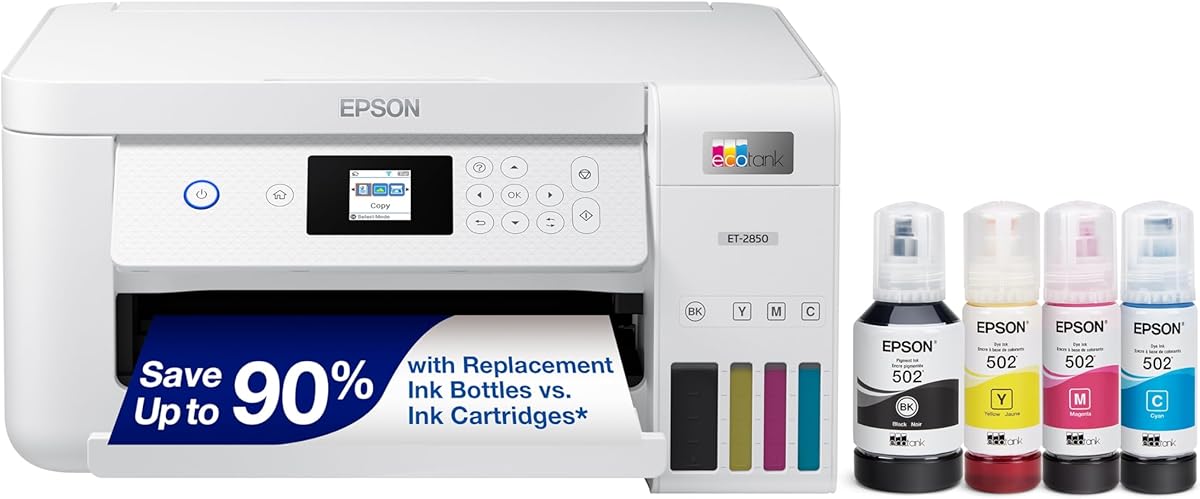
The Epson EcoTank ET-2850 distinguishes itself with auto two sided printing capabilities. This feature saves paper and reduces waste which is perfect for printing reports or booklets. The pigment black ink produces extremely sharp text that looks professional on any document.
We may earn a commission when you buy through this link, at no additional cost to you.
It comes with enough ink to last up to two years reducing the frequency of refills significantly. The EcoFit bottles make the refilling process straightforward and worry-free for any user. Wireless connectivity ensures you can print from laptops and phones without cables.
The lack of a built-in screen means you must rely on your device for settings adjustments. While this keeps costs down it might be less intuitive for some users during initial setup. The performance remains strong for standard home and office printing tasks.
Business users needing double sided documents will find this feature particularly useful and efficient. The balance of price and functionality makes it a strong mid range option. Choose this if paper saving features and sharp text quality are your main concerns.
Auto two sided printing cuts paper usage in half for standard documents and reports.
Pigment ink ensures text remains sharp and resistant to smudging on various media.
We may earn a commission when you buy through this link, at no additional cost to you.
The Epson EcoTank ET-4800 is a standard model that focuses on core printing needs without extra fluff. It utilizes high capacity tanks to deliver low cost per page over extended periods of use. The Micro Piezo Heat Free technology ensures consistent output and printhead longevity.
We may earn a commission when you buy through this link, at no additional cost to you.
Users can enjoy color photo printing and sharp text suitable for most home tasks. The design is compact enough to fit on standard desks without taking up too much space. Wireless connectivity allows for seamless integration with home networks for remote printing.
Performance speeds are moderate which is typical for this class of printer. Basic features mean it might lack some advanced automation found in newer models. However the reliability and ink savings remain strong selling points for budget focused buyers.
This model is ideal for households that print occasionally and want to avoid cartridges. The high page yield ensures you do not need to refill often. Consider this if you prioritize cost efficiency over advanced productivity features.
This model focuses on delivering consistent prints without complex additional features.
The printer fits easily on most desks making it suitable for smaller workspaces.
We may earn a commission when you buy through this link, at no additional cost to you.
The Canon MegaTank G3270 is an excellent choice for those seeking an affordable cartridge free solution. It offers high page yields of up to seven thousand seven hundred color pages with a single ink set. The initial cost is lower than many competitors while maintaining solid performance.
We may earn a commission when you buy through this link, at no additional cost to you.
It comes with enough ink to last up to two years which significantly reduces ongoing costs. The LCD display provides necessary feedback during setup and printing jobs. Wireless connectivity ensures you can print from devices without needing a direct cable connection.
One limitation is the lack of auto duplex printing which means manual flipping for double sided pages. The display is functional but basic compared to color screens on higher end models. Despite this it delivers great value for budget conscious households.
Students and families looking for a low entry cost printer will find this appealing. The ink capacity ensures you can print plenty without worrying about replacements. We recommend this for those prioritizing upfront savings and ease of use.
This model offers one of the lowest entry prices in the cartridge free category.
Ink bottles provide thousands of pages reducing the frequency of refills.
We may earn a commission when you buy through this link, at no additional cost to you.
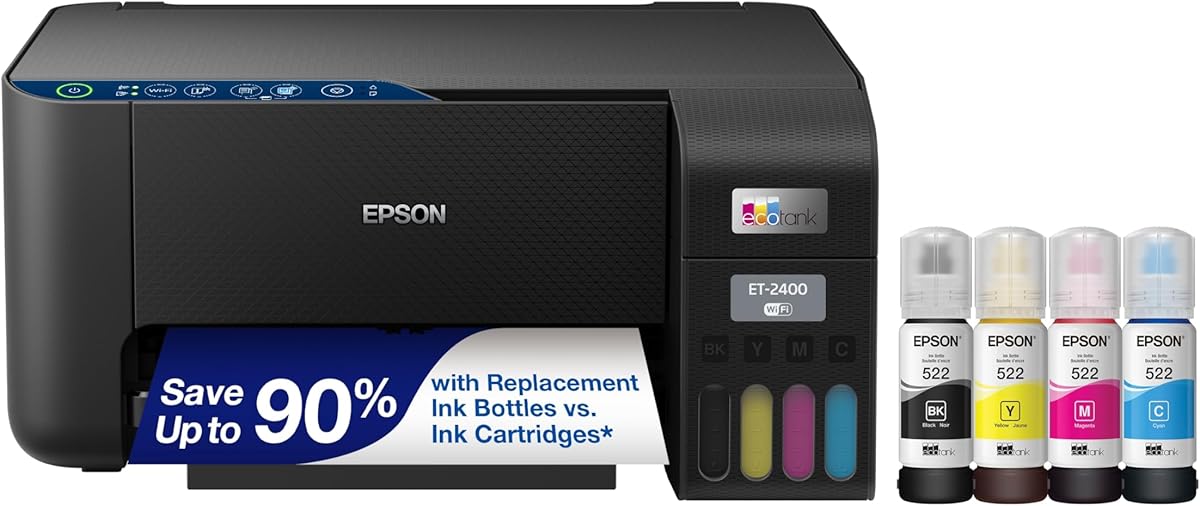
The Epson EcoTank ET-2400 is an essential printer designed for straightforward home use. It comes with up to two years of ink so you can print without interruption. The Micro Piezo Heat Free technology ensures that text and photos look clear and vibrant.
We may earn a commission when you buy through this link, at no additional cost to you.
Its compact design fits well in smaller rooms without obstructing workflow. Setup is simple and wireless options allow for printing from anywhere in the home network. The system is built to minimize maintenance requirements for long term reliability.
Speeds are standard which might not suit users with urgent printing needs. The interface is basic but sufficient for most common tasks like scanning and copying. It remains a solid choice for everyday document and photo needs.
Households needing a dependable workhorse will appreciate the simplicity and ink savings. The reduced waste aligns with modern environmental standards too. Choose this for a no fuss printing solution that gets the job done.
The printer is small enough to fit on shelves or small desk corners.
Designed to require minimal upkeep to keep printing smoothly over time.
We may earn a commission when you buy through this link, at no additional cost to you.
The Epson EcoTank ET-2800 delivers efficient printing for home environments with a focus on reliability. It can print up to ten pages per minute which handles most daily tasks quickly. The ink supply lasts up to two years ensuring fewer interruptions for refills.
We may earn a commission when you buy through this link, at no additional cost to you.
Sharp text quality ensures that documents look professional for school or work. The wireless connectivity supports easy printing from multiple devices around the house. It is designed to reduce cartridge waste significantly compared to traditional printers.
Navigation is handled through standard buttons which are intuitive but not advanced. Features are standard for this class so do not expect specialized productivity tools. The build quality remains robust for regular use in a home setting.
Users needing a balance of speed and cost will find this model suitable. The color capability allows for printing photos when needed without extra hardware. Consider this for a reliable everyday printer that keeps costs low.
Ten pages per minute provides enough speed for typical home and school work.
Epson offers strong support and reliability for their EcoTank series devices.
We may earn a commission when you buy through this link, at no additional cost to you.
The Epson EcoTank ET-2980 is optimized for high volume printing needs in a home setting. It comes with enough ink to last up to three years which is a standout feature. The refill tanks are large and easy to access for quick replenishment.
We may earn a commission when you buy through this link, at no additional cost to you.
Mobile printing support allows you to send documents from smartphones and tablets easily. The device is designed to be reliable for daily use without frequent maintenance. Zero cartridge waste helps maintain an eco friendly footprint in your office.
Navigation is basic compared to models with color screens which might require app use for settings. Auto duplex printing is not included so double sided jobs need manual intervention. However the ink savings make it a great choice for heavy users.
Business owners with moderate to high volume needs will appreciate the capacity. The ease of refilling reduces downtime during busy periods. Choose this if long term ink availability is your most important requirement.
Print directly from your phone using the Epson Smart Panel app for ease.
The unique bottles make filling the tank simple and stress-free for anyone.
We may earn a commission when you buy through this link, at no additional cost to you.
The Epson EcoTank ET-2988 offers premium features at a renewed price point which is great value. It features auto duplex printing and a color screen for easy navigation and setup. Print speeds reach fifteen pages per minute which is faster than most home models.
We may earn a commission when you buy through this link, at no additional cost to you.
The ink supply lasts up to three years ensuring you can print for a long time. This model includes high resolution output for crisp text and vibrant photos. The renewed condition allows buyers to access high end features for less money.
As a renewed item the physical condition may vary slightly from brand new units. Warranty terms might differ so checking the specific seller details is important. However the functionality and performance remain robust for regular printing tasks.
Budget savvy users wanting premium features like auto duplex will find this appealing. The speed and display quality enhance productivity significantly compared to basic models. We recommend this for those comfortable with renewed products seeking top performance.
Buying renewed allows access to high end features while saving on initial cost.
Fifteen pages per minute and auto duplex save time on large document jobs.
We may earn a commission when you buy through this link, at no additional cost to you.
Selecting the right cartridge free printer requires considering several factors to ensure it meets your needs.
The volume of ink included determines how long you can print before refilling. Some models offer up to three years of ink in the box which is ideal for high volume printing. Check the page yield estimates provided by the manufacturer to match your workload.
Look for models that provide at least two years of ink to minimize refill frequency and costs.
Print speed affects how quickly your documents are ready for collection. Faster speeds are important for businesses or households printing large batches of papers. Look for pages per minute ratings that align with your typical job sizes.
Aim for at least ten pages per minute for black text to ensure smooth workflow.
Modern printers should offer wireless connectivity to support printing from various devices. Look for support for AirPrint or mobile apps to simplify remote printing tasks. Voice activated printing can also add convenience to your daily routine.
Ensure the printer supports your specific devices to avoid compatibility issues.
Auto duplex printing allows the printer to print on both sides of a sheet automatically. This feature saves paper and reduces costs for large reports or booklets. Manual duplex requires flipping pages which can be tedious for big jobs.
Choose a model with auto duplex if you print many double sided documents.
A color display screen makes navigating menus and settings easier than buttons alone. It helps you view status updates and error messages clearly on the device. Basic models might require using a mobile app for complex settings adjustments.
Opt for a model with a screen if you prefer on device control.
A mess free refill system prevents spills and ink on your hands and workspace. Look for bottles that fit directly into tanks without squeezing or tools. Keyed bottles prevent mixing up the color tanks during refills.
Ensure the refill design is user friendly to avoid accidental spills during maintenance.
Resolution affects how sharp text and photos appear on paper. High dpi ratings ensure professional looking documents and vibrant images. Micro Piezo or similar technologies often provide better consistency and longevity.
Check sample outputs or reviews to confirm quality matches your standards.
Reliable warranty coverage protects your investment against defects and failures. Manufacturers often require using genuine ink to keep the warranty valid. Check the length of the warranty and support options available in your region.
Prioritize brands with strong service reputations to ensure long term reliability.
Start by following the setup guide included with your printer to configure network settings properly. Install any necessary drivers on your computers to ensure smooth communication. Allow the printer to run an initial calibration to optimize print quality.
Refill the ink tanks when the level indicators show low to prevent print head damage. Use the provided bottles and follow the keying system to ensure correct color placement. Clean the exterior and scan glass regularly to maintain professional results.
Run periodic maintenance tasks like nozzle checks to prevent clogs if not used often. Store extra ink bottles in a cool dry place to maintain their quality. Keep the printer covered when not in use to protect it from dust.
Manufacturers strongly recommend using genuine ink to maintain print quality and warranty coverage. Using non genuine ink may cause damage to the internal components that is not covered. This ensures the longevity of the print head and consistent output quality.
Most cartridge free printers come with ink that lasts up to two or three years. The frequency depends on your printing volume and how many pages you print monthly. Check the level indicators on the device to know when to refill.
Yes all models listed support color printing for photos and documents. Many use high resolution settings to produce vibrant images suitable for home prints. Check specific photo print options in your printer settings for best results.
Ink can dry out if the printer is left unused for extended periods. Run a test print or nozzle check every few weeks to keep the print head clear. Cover the device to protect it from dust and debris during storage.
Speeds are similar but the lack of cartridge changes saves time on maintenance. The warmup times are often faster since the ink system is always primed. Overall the workflow is more efficient due to reduced interruptions.
All featured models support wireless connections including Wi Fi and mobile printing. You can also use apps like AirPrint to print directly from your phone. Ensure your network is properly configured during the initial setup process.
We explored ten top models including the HP Smart Tank 5003 and Epson EcoTank ET-2903. Each offers distinct benefits like long ink supply and easy refill systems for users.
Prioritize your specific needs such as speed and duplex features when making a decision. The right model will save money and effort over time compared to cartridge systems.
Remember to check current listings for the latest availability and pricing details today.