
TP-Link ER605
4.4Editor score
Five Gigabit Ports for WAN
Advanced Security Features
Highly Secure VPN Support
This guide compares the top load balancing routers for businesses and homes, evaluating WAN ports, security, VPN support, and performance to help you choose
Finding a reliable load balancing router is crucial for maintaining stable internet connectivity across multiple devices and locations. These devices optimize bandwidth by distributing traffic across several internet connections, ensuring no single link becomes a bottleneck during peak usage times.
We evaluated ten leading models based on their port configurations, security features, VPN capabilities, and overall network management tools. Our comparison focuses on real-world performance metrics, ease of setup, and the ability to handle diverse business or home networking requirements effectively.
Each selection highlights specific strengths such as budget-friendly options, high-performance enterprise gear, or user-friendly interfaces. Please note that product availability and pricing may vary over time, so checking current listings is recommended before making a final purchase decision.
4.4Editor score

4.7Editor score

4.0Editor score
The following table provides a side-by-side comparison of the ten selected load balancing routers, highlighting their key specifications, ratings, and unique features to help you make an informed decision based on your specific networking needs.


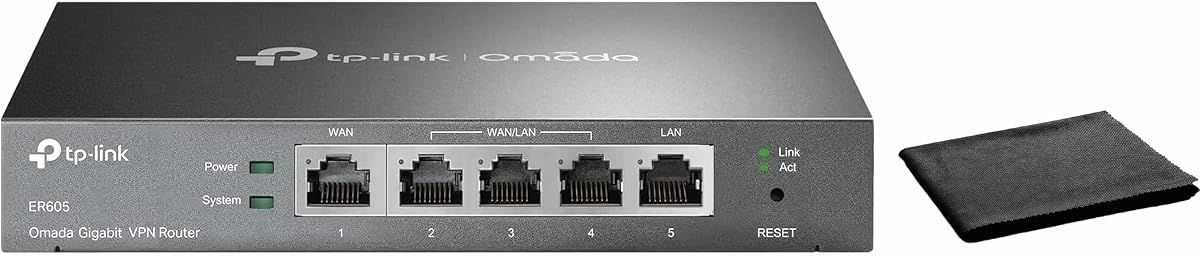

The TP-Link ER605 stands out as a reliable choice for businesses seeking robust load balancing without breaking the bank. With a solid rating of 4.4 stars, it offers five Gigabit ports that optimize bandwidth usage effectively through one device. Its advanced firewall policies and DoS defense ensure your network remains secure against common threats.
We may earn a commission when you buy through this link, at no additional cost to you.
This router supports up to 20 LAN-to-LAN IPsec connections, making it versatile for remote office setups. The USB WAN port allows mobile broadband via 4G/3G modem for WAN backup, ensuring continuous connectivity even if primary lines fail. Speed test functions and IP/MAC/URL filtering add layers of control for network administrators.
While it lacks wireless broadcasting, this wired-focused design reduces complexity and potential interference issues. The compact form factor fits easily into small server racks or office desks. Setup is straightforward, and the interface provides clear options for configuring WAN failover and load balancing rules.
Businesses needing a cost-effective solution for managing multiple ISP connections will find this device meets their core requirements efficiently. It balances performance, security, and ease of use well. For those prioritizing wired stability over wireless convenience, this remains a top contender in the budget category.
The five Gigabit ports allow simultaneous connections to multiple ISPs, ensuring traffic is distributed efficiently to prevent bottlenecks during high-demand periods.
Built-in DoS defense and firewall policies protect against external threats, while VPN support secures remote access for employees working from various locations.
We may earn a commission when you buy through this link, at no additional cost to you.
The TP-Link ER7206 is designed for professional environments requiring high scalability and centralized management. With a 4.5 rating, it supports up to 700 clients and 150,000 associated devices, making it ideal for growing enterprises. The flexible port configuration includes one Gigabit SFP WAN port and up to four WAN ports for optimized bandwidth usage.
We may earn a commission when you buy through this link, at no additional cost to you.
Integrated into Omada SDN, this router offers control options via hardware, software, or cloud controllers. This integration allows seamless management across multiple sites from a single interface. Security features include DoS defense and IP/MAC/URL filtering, while VPN support covers up to 100 IPsec connections for secure site-to-site tunnels.
Cloud access via the Omada app brings centralized management to different sites, enabling administrators to monitor and configure networks from anywhere. The standalone mode ensures flexibility if cloud dependency is not desired. However, SDN compatibility requires specific firmware versions on controllers and other network devices.
For organizations needing robust capacity and multi-site management, this router provides the necessary tools. It balances advanced features with usability. While the initial setup may require more effort, the long-term benefits in network efficiency and security justify the investment for professional IT teams.
Seamlessly integrates with Omada hardware and software controllers, allowing unified management of gateways, access points, and switches across multiple locations.
Handles up to 150,000 associated client devices and 700 simultaneous clients, ensuring reliable performance in high-density network environments.
We may earn a commission when you buy through this link, at no additional cost to you.
The Cudy R700 offers extensive control through OpenWRT support, appealing to advanced users and businesses needing custom network segmentation. With a 4.4 rating, it connects up to five ISPs with automatic failover and load balancing to keep operations running smoothly. Its full OpenWRT support unlocks VLAN segmentation and custom QoS policies.
We may earn a commission when you buy through this link, at no additional cost to you.
As a complete VPN gateway suite, it supports WireGuard, OpenVPN, IPsec, PPTP, and L2TP for both servers and clients. This flexibility allows site-to-site tunnels or remote access setup. Professional security includes SPI firewall and DoS prevention, while DMZ hosting keeps critical services accessible without exposing the entire network.
Deployment options include a web GUI or Cudy App cloud management with TR-069 support. Built-in diagnostic tools like Ping and Traceroute aid rapid troubleshooting. While OpenWRT offers power, it may present a steeper learning curve for novice users compared to proprietary interfaces.
Tech-savvy businesses requiring tailored network management will appreciate the customization options. It balances professional-grade control with affordability. For those comfortable with open-source configurations, this router delivers significant value through its extensive feature set and reliability.
Full OpenWRT support allows VLAN segmentation, advanced firewall rules, and community-developed packages for professional-grade network management.
Supports multiple VPN protocols including WireGuard and OpenVPN, enabling secure remote access and site-to-site connectivity for distributed teams.
We may earn a commission when you buy through this link, at no additional cost to you.
The Alta Labs Route10 delivers high-performance 10 Gigabit wired routing suitable for advanced home or enterprise networks. It does not broadcast Wi-Fi but offers integrated PoE+ output to power network devices directly. With real-time stats and traffic visibility, administrators can optimize flow without complex external tools.
We may earn a commission when you buy through this link, at no additional cost to you.
Powered by a quad-core Qualcomm processor with hardware-accelerated networking, it ensures fast packet processing and low latency. Enterprise-grade routing features include VLAN tagging, QoS prioritization, and firewall rules. Multi-WAN support handles DHCP, static IP, and PPPoE configurations, allowing businesses to maintain uptime through redundant connections.
Real-time network monitoring provides live statistics on bandwidth usage and connected devices. This visibility helps quickly identify issues and maintain stable performance. While the lack of Wi-Fi requires pairing with access points, the focus on wired reliability suits environments where performance and security are paramount.
Advanced users prioritizing throughput and precise traffic control will find this router meets their demands effectively. It balances processing power with essential management features. For networks requiring 10G capability and PoE integration, this model offers a dedicated solution.
A high-performance quad-core Qualcomm processor with hardware acceleration ensures fast packet processing and consistent multi-gigabit performance.
Select Ethernet ports provide PoE+ support to power compatible access points and network devices, reducing the need for additional adapters.
We may earn a commission when you buy through this link, at no additional cost to you.
The Omada ER7412-M2 is built for scalability with two 2.5G RJ45 WAN/LAN ports and ten Gigabit ports including SFP options. Load balancing on up to 11 WAN ports increases utilization rates of multi-line broadband. Security features include DPI and IPS/IDS for enhanced protection against evolving threats.
We may earn a commission when you buy through this link, at no additional cost to you.
High-security VPN protocols include SSL, IPSec, WireGuard, and OpenVPN, enabling secure remote access. DoS/DDoS protection and IP/MAC/URL filtering safeguard network integrity. This device fits well into larger setups where maximizing bandwidth from multiple sources is critical for operational continuity.
While it integrates smoothly with Omada SDN, standalone use is possible. The port density allows diverse connection types without external switches. However, configuration may be complex for smaller offices without dedicated IT support. It balances capacity with advanced security effectively.
Enterprises needing robust multi-gigabit capabilities will find this router supports their growth. It offers flexibility through varied port types. For organizations managing multiple ISP lines, its load balancing capabilities provide significant performance improvements.
Supports load balancing on up to 11 WAN ports, increasing broadband utilization rates and providing redundancy across multiple connections.
Includes high-security VPN protocols like WireGuard and IPSec along with DPI and IPS/IDS to ensure comprehensive network protection.
We may earn a commission when you buy through this link, at no additional cost to you.
The TP-Link TL-R470T+ offers a cost-effective solution for small offices needing multiple WAN connections. With four 10/100M WAN ports equipped with load balance functions, it guarantees maximum bandwidth. Its smaller case makes installation easy in compact spaces like cafes or small retail shops.
We may earn a commission when you buy through this link, at no additional cost to you.
Portal authentication access management provides extensive client account control. The PPPoE server supports administrators in managing network resources for specific clients. Lightning protection ensures durability against electrical surges. IP and MAC binding prevent ARP virus attacks effectively.
Though limited to 100M speeds, it remains suitable for environments not requiring gigabit throughput. DDNS facilitates remote management using domain names. While older than newer models, its reliability and essential features make it a practical choice for basic load balancing needs.
Small businesses with budget constraints seeking straightforward load balancing will appreciate this model. It covers fundamental needs without complexity. For offices prioritizing basic uptime and security, this router delivers consistent performance.
Provides extensive client account and network management for administrators with supported PPPoE server, marshaling bandwidth based on unique application environments.
Built-in lightning protection safeguards the device against electrical surges, ensuring longevity and reliable operation in varying weather conditions.
We may earn a commission when you buy through this link, at no additional cost to you.
The TP-Link TL-R480T+ is a straightforward 5-port load balance broadband router designed for basic networking needs. It includes three configurable WAN/LAN ports plus one LAN and one WAN port. This flexibility allows simple ISP failover or load balancing without complex configuration.
We may earn a commission when you buy through this link, at no additional cost to you.
It provides essential load balancing functionality to ensure maximum bandwidth and backup capabilities. While lacking advanced features, its reliability suits small offices needing multiple lines. Setup is intuitive, making it accessible for users with limited IT expertise.
Though it lacks wireless capabilities, its compact design fits easily into office setups. It handles standard traffic distribution effectively. While newer models offer more speed and features, this router serves basic load balancing requirements well for legacy setups.
Businesses seeking a no-fuss solution for managing two ISP lines will find it practical. It offers value through simplicity. For those not requiring high-speed gigabit performance, this remains a viable option.
Provides essential load balance functionality with three configurable WAN/LAN ports to ensure maximum bandwidth and backup capabilities for small setups.
We may earn a commission when you buy through this link, at no additional cost to you.
The TP-Link ER-605 Gigabit VPN Router features dual WAN ports for seamless load balancing. With an intuitive web interface and Omada app compatibility, network management is simplified significantly. Centralized cloud monitoring provides real-time network status for quick adjustments.
We may earn a commission when you buy through this link, at no additional cost to you.
Robust security includes SPI firewall and DoS defense to protect data. QoS settings ensure optimal performance for critical applications, ideal for small businesses. Its compact design fits various installation environments, providing reliable wired connections for offices or remote setups.
While it limits WAN capacity to two ports, it balances performance and ease of use well. The included cloth for cleaning adds convenience. For users prioritizing straightforward management and security, this model offers a practical solution.
Small to medium businesses needing reliable bandwidth optimization will find it effective. It balances essential features with simplicity. For those not requiring extensive WAN redundancy, this remains a top choice for ease of use.
Simplify your network management with an intuitive web interface, Omada app compatibility, and centralized cloud monitoring for real-time status.
Ensure optimal performance for critical applications with intelligent bandwidth management and QoS settings tailored for business needs.
We may earn a commission when you buy through this link, at no additional cost to you.
The Ubiquiti EdgeRouter 4 is a robust choice for users needing advanced network control. It features three gigabit Ethernet ports plus an SFP port for fiber connections. Its fanless design ensures silent operation, suitable for offices. Mounting options include desk, wall, and rack configurations for flexibility.
We may earn a commission when you buy through this link, at no additional cost to you.
It offers deep customization capabilities for routing and firewall rules. However, advanced setup requires technical expertise. While it does not provide an integrated controller for large networks, it pairs well with UniFi ecosystems for expanded management.
This router provides high performance and reliability for specialized setups. It balances power with flexibility. For those who prioritize granular control and silent operation, it delivers consistent results without requiring constant attention.
Professional IT administrators will appreciate its capabilities. It meets complex networking needs. For users comfortable with technical configuration, this remains a strong option.
Its fanless design ensures silent operation, making it suitable for office environments where noise levels must be kept low.
We may earn a commission when you buy through this link, at no additional cost to you.
The Omada Fusion 2.5G delivers outstanding speed with five 2.5G ports for rock-solid connectivity. It supports up to 4-WAN load balancing and auto failover for uptime. A built-in controller provides license-free cloud management, ensuring all features are available from day one.
We may earn a commission when you buy through this link, at no additional cost to you.
Simplified setup via Bluetooth allows rapid deployment. The touchscreen offers instant on-site insights like speed tests and traffic stats without needing a laptop. A high-performance quad-core CPU ensures lightning-fast processing to overpower lag, making it reliable for demanding networks.
This router balances speed with user-friendly management tools. While it integrates deeply with Omada devices, the ease of adoption saves time. For businesses seeking a blend of high-speed ports and intuitive troubleshooting, it offers significant advantages over competitors.
Organizations needing efficient network monitoring and high throughput will find it ideal. It balances performance with convenience. For those prioritizing speed and ease of troubleshooting, this router stands out as a top recommendation.
Access and manage the network remotely through the Omada Cloud portal, with all advanced capabilities fully available from day one without licensing fees.
The 2.51-inch touchscreen provides instant health scores and traffic stats, reducing on-site work and enabling quick troubleshooting without a laptop.
We may earn a commission when you buy through this link, at no additional cost to you.
Choosing the right load balancing router involves assessing your network's specific demands including bandwidth requirements, security needs, and scalability potential.
The number of WAN ports determines how many internet connections you can utilize simultaneously. More WAN ports offer greater redundancy and better load distribution, which is crucial for businesses needing continuous uptime.
Port speed impacts overall throughput. Look for Gigabit or 2.5G ports to ensure they meet your bandwidth needs. SFP ports add flexibility for fiber connections in enterprise environments.
Robust security is essential to protect data. Features like SPI firewalls, DoS defense, and intrusion prevention systems (IPS) help guard against various cyber threats effectively.
VPN support enables secure remote access and site-to-site connections. Ensure the router supports protocols you use such as IPsec, OpenVPN, or WireGuard for compatible connectivity.
Centralized management tools simplify monitoring and configuration. Cloud-based interfaces or touchscreen controls allow administrators to manage networks remotely without complex setups.
Consider future growth when choosing a router. Models that integrate into SDN ecosystems allow seamless expansion with access points and switches without changing the core router.
Automatic failover ensures continuity if one ISP connection fails. Check if the router supports seamless switching between WAN links to maintain uninterrupted internet access.
While initial cost matters, consider long-term value. Higher-end models may offer more features like better throughput and security that justify the investment over time.
To start using your router, connect each WAN port to a separate ISP modem or gateway using Ethernet cables. Then connect your LAN devices to the designated LAN ports. Power on the router and access the web interface or app to configure initial settings.
A load balancing router distributes internet traffic across multiple ISP connections to maximize bandwidth and prevent bottlenecks. It also provides automatic failover if one connection drops, ensuring continuous uptime for business operations.
Your ISPs do not require special support, but each connection must be active and configured properly. The router handles the aggregation of these lines without needing changes from the providers themselves.
Yes, many models include SFP ports that accept fiber transceivers. Check the specific product specs to ensure the ports support your fiber type and connection requirements.
The router automatically redirects traffic to the remaining active WAN connections. This failover process happens quickly, often without noticeable disruption to users on the network.
Many modern routers offer guided setup wizards and mobile apps that simplify configuration. While some models have advanced features, basic load balancing can be set up using intuitive menus.
Capacity varies by model, ranging from hundreds to tens of thousands of associated devices. Check the maximum client limits to ensure the router fits your office size and device count.
Most dedicated load balancing routers do not broadcast Wi-Fi. They are wired devices that require pairing with separate wireless access points for full coverage in your workspace.
Prioritize SPI firewalls, DoS protection, and intrusion prevention. VPN support is also vital for secure remote access. Ensure the router supports firmware updates to stay protected against new threats.
This guide reviewed ten top load balancing routers ranging from budget-friendly options to high-performance enterprise models. Each product offers unique strengths whether you prioritize port count, security, or advanced management features.
When selecting, match the router's WAN capacity and speed to your business needs. Consider how much control you need and whether SDN integration will help future growth.