
Noctua NA-FC1
4.8Editor score
Compact PWM design
No stop mode
Six year warranty
Explore our expert guide on the best front panel fan controller options for PC builds, comparing features, display types, and cooling performance.
Finding the right cooling solution is crucial for any PC enthusiast. A front panel fan controller allows you to manage fan speeds directly from your chassis, ensuring optimal airflow and reduced noise levels during operation.
We have carefully evaluated ten top-rated models based on user feedback, technical specifications, and ease of installation. Our comparison covers LCD displays, PWM support, and safety features to help you make an informed decision.
Each pick in this list highlights specific strengths like temperature monitoring or silent operation. Please note that product availability and costs may fluctuate over time, so verify current details before purchasing.
4.8Editor score

5.0Editor score

4.2Editor score
The following table provides a side-by-side overview of the top ten models available this month. We highlight key specifications to help you compare functionality at a glance.
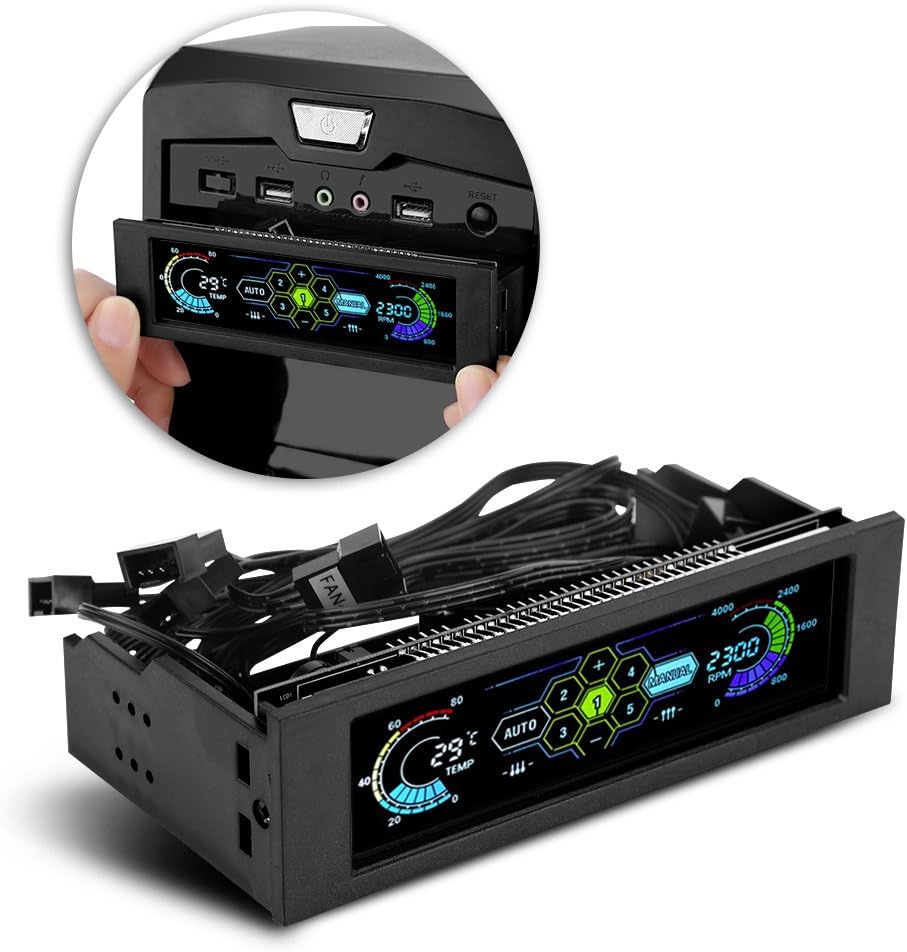


This model leads our list with a perfect rating from users who value precision control. It offers a robust front panel design with a wide LCD screen that displays four sets of fan speeds and temperatures simultaneously.
We may earn a commission when you buy through this link, at no additional cost to you.
The standout quality is its safety system which includes a high temperature alarm and fan anti-seize feature. When the computer temperature exceeds sixty degrees, the display flashes and an alarm sounds to alert you immediately.
While it does not offer RGB lighting, the focus is on reliability and noise reduction through PWM circuit adjustments. The aluminum alloy panel undergoes multiple matte treatments ensuring it fits any chassis aesthetically.
If you need a reliable controller with clear visual feedback and strong safety features this is the top recommendation for most standard PC builds requiring effective thermal management.
The wide LCD screen allows you to see four temperature sets and fan speeds at once.
High temperature alarms and fan anti-seize features protect your hardware from overheating issues.
We may earn a commission when you buy through this link, at no additional cost to you.
This unit stands out for its ability to control the speed of five different fans while monitoring hard disk states. The big LCD screen provides constant visibility into your computer working conditions including fan speed and alarm temperatures.
We may earn a commission when you buy through this link, at no additional cost to you.
Users appreciate the flexibility of switching between automatic and manual modes easily. You can set up the alarm temperature range manually from forty to ninety degrees to prevent hardware damage from overheating effectively.
The fan breakdown alert ensures you are notified immediately if a fan stops cooling properly. However the wiring might require careful planning due to the number of channels supported compared to simpler models.
Choose this if you need detailed monitoring across multiple components including hard drives and prefer a system that warns you about fan failures instantly.
Display options include hard disk state alongside temperature and fan speed metrics.
Switch seamlessly between automatic temperature regulation and manual speed adjustments.
We may earn a commission when you buy through this link, at no additional cost to you.
This affordable option adds a unique date and time display feature to the standard temperature monitoring capabilities. It can control three groups of fans and includes a fan jam alarm that sounds immediately if a fan fails to dissipate heat.
We may earn a commission when you buy through this link, at no additional cost to you.
The large screen keeps you abreast of working status including temperature fan speed and alarm settings. You can manually set the alarm temperature range from fifty to ninety degrees to protect your hardware efficiently.
While the rating is lower than top picks it offers significant value for budget builds. The power supply uses standard interfaces and the output voltage supports typical fan requirements without complex setup.
Consider this model if you need a basic controller with a clock display and want to save money without sacrificing essential safety features.
The LCD display includes date and time features alongside thermal metrics.
Fan jam alarms and adjustable temperature ranges prevent common overheating issues.
We may earn a commission when you buy through this link, at no additional cost to you.
This controller brings premium aesthetics with an RGB LCD screen and six independent voltage control knobs. It is designed for users who want extensive customization over fan speeds and lighting effects in a single unit.
We may earn a commission when you buy through this link, at no additional cost to you.
The inclusion of six temperature sensors allows for detailed thermal mapping across your PC case. It also supports up to two Lumi LED strips ensuring your cooling and lighting needs are met with a unified device.
Safety features include a warning alarm with short circuit protection to protect your components from electrical issues. While the price is higher the feature set justifies the cost for enthusiasts prioritizing looks and function.
Select this if you want high-end RGB integration and maximum channel support without needing external software for basic fan control.
RGB LCD and LED strip support create a cohesive lighting environment.
Six voltage knobs and six temperature sensors offer precise thermal management.
We may earn a commission when you buy through this link, at no additional cost to you.
This model focuses on build quality and safety with an aluminum alloy panel and multiple matte finishes. It controls up to four case fans independently allowing for quick manual adjustments to maintain optimal cooling.
We may earn a commission when you buy through this link, at no additional cost to you.
The automatic temperature control uses four sensors to monitor different areas inside the case. If the temperature exceeds sixty degrees the symbol blinks and an acoustic alarm alerts you to potential risks.
PWM circuitry ensures precise fan control and reduces annoying high-frequency noises for a quieter environment. High-temperature capacitors support a long lifespan and reliable function within the PC case.
Ideal for users who want a solid physical build and reliable safety alerts without complex extra features like hard disk monitoring.
Aluminum alloy panels provide durability and a premium feel in your PC.
Four separate sensors monitor different areas inside the case for accurate temp control.
We may earn a commission when you buy through this link, at no additional cost to you.
Unlike the bay controllers this model supports ten ports with individual PWM control making it ideal for large setups. It centralizes cable management and allows you to optimize airflow without using excessive Y-splitter cables.
We may earn a commission when you buy through this link, at no additional cost to you.
It offers native driver support for Windows and Linux enabling compatibility with a wide range of fan-control software. You can enjoy independent control for every fan moving beyond limited hub signals for customization.
The unit supplies up to two amps per port with a total maximum current of four point five amps ensuring enough power for multiple fans. Magnetic or adhesive mounting offers flexibility in installation locations inside your case.
Choose this if you prefer software-driven control and need to power a high number of fans without physical knobs or displays on the front panel.
Centralized cables eliminate the need for extensions and keep your build cleaner.
Four point five amps total capacity supports large multi-fan configurations efficiently.
We may earn a commission when you buy through this link, at no additional cost to you.
This compact controller is designed for users who value simplicity and silence over visual displays. It works as a manual speed reducer or in tandem with automatic motherboard fan control to achieve truly quiet operation.
We may earn a commission when you buy through this link, at no additional cost to you.
The no stop mode prevents the fan from falling below three hundred rpm to avoid BIOS fan errors. It includes a three-way splitter cable for controlling up to three fans simultaneously without additional hardware.
Built for reliability it comes with a six-year manufacturer warranty reflecting Noctua confidence in quality. The high-quality construction ensures long-term performance even with high-speed PWM fans like industrial PPC series.
Perfect for builds where internal space is limited and quiet operation is the priority over flashy displays or extensive front panel controls.
Works in tandem with motherboard control for optimal noise reduction.
Six-year warranty and no-stop mode ensure consistent fan performance and BIOS safety.
We may earn a commission when you buy through this link, at no additional cost to you.
This versatile unit works with any USB-C charger and offers a digital display for real-time temperature and fan speed. It supports both automatic and manual modes ensuring flexible thermal management for various scenarios.
We may earn a commission when you buy through this link, at no additional cost to you.
The adjustable start and full-speed temperatures provide precise thermal management with a hysteresis setting. If the temperature probe is disconnected the module automatically switches to manual mode for direct control of the PWM duty cycle.
Built-in over-voltage and over-current protection make it safe for long-term use. Its compact size allows for easy integration into various projects beyond standard PC cases such as aquariums or server cabinets.
Ideal for DIY enthusiasts who want a flexible small-footprint controller with robust safety features and USB power options.
Supports USB-C power sources making it easy to use outside standard PC cases.
Digital display and adjustable thresholds allow for fine-tuned temperature management.
We may earn a commission when you buy through this link, at no additional cost to you.
This controller offers basic temperature monitoring with a wide LCD screen displaying fan speeds and dates. It is suitable for any chassis due to the alloy panel which undergoes multiple matt treatments for durability.
We may earn a commission when you buy through this link, at no additional cost to you.
Safety features include high temperature alarms that flash and sound when the system exceeds sixty degrees. It uses PWM circuits to adjust speed reducing high frequency noise and power consumption effectively.
High-specification capacitors provide a longer service life and refuse damages such as electricity running and leakage. While the rating is lower it provides necessary functions for those needing a simple LCD interface.
Consider this for standard cases needing basic thermal oversight and alarm features without advanced monitoring capabilities.
High temperature alarms ensure you are notified when safety limits are reached.
Wide LCD screen provides clear visibility of essential fan and date data.
We may earn a commission when you buy through this link, at no additional cost to you.
This unit stands out for its ability to control the wind speed of five groups of fans simultaneously. The big LCD screen displays temperature fan speed alarm temperature and hard disk state to constantly show working conditions.
We may earn a commission when you buy through this link, at no additional cost to you.
You can manually set up the alarm temperature range from forty to ninety degrees to prevent overheating. When the fan breaks down the system will alert immediately allowing you to address issues before damage occurs.
It offers comprehensive monitoring for larger setups but requires careful installation. The switch between auto and manual modes provides flexibility for managing different cooling profiles.
Choose this if you need to manage five fans and want hard disk state visibility on the front panel despite the higher cost.
Controls up to five fan groups for extensive cooling coverage in larger cases.
Immediate alerts for fan breakdowns ensure timely response to cooling failures.
We may earn a commission when you buy through this link, at no additional cost to you.
Selecting the right front panel fan controller depends on your cooling needs and the features you value most. We explore key factors to help you find the best match for your system.
Front panel controllers come with various display options ranging from simple LEDs to wide LCD screens. Look for units that show essential metrics such as fan speeds and real-time temperatures to monitor system health effectively.
Choose a display that matches your aesthetic and informational needs. High-resolution screens can show hard disk states or dates adding utility beyond basic thermal monitoring.
The number of channels determines how many fans you can control independently. If you have a standard case with three to four fans ensure the controller supports at least that many channels.
For larger setups consider models with five or more channels or hub-style controllers that connect multiple fans without crowding the motherboard.
Some controllers offer automatic mode where fan speeds adjust based on temperature readings. Manual mode allows you to set specific speeds for optimal noise control regardless of temperature.
Select a unit with both options if you want flexibility between automated efficiency and manual precision.
Look for controllers with high temperature alarms and fan anti-seize features. These alerts sound or flash when the system exceeds safe limits protecting your hardware from overheating.
Safety features are critical for ensuring reliability during high-load tasks or long gaming sessions.
Controllers often use aluminum alloy panels for durability and a professional look. Matte treatments help resist fingerprints and scratches over time.
High-quality capacitors and robust circuitry extend the lifespan of the controller ensuring it functions reliably in a PC case environment.
Verify the voltage range and current capacity of the controller to match your fans. Most units support 5V to 12V fans but higher current ratings allow more fans per channel.
Ensure the total amperage capacity can handle your full fan load without overloading the controller.
Bay controllers fit into standard 5.25-inch slots while internal hubs may require adhesive or magnetic mounting. Check if the unit comes with necessary cables like splitters or probe wires.
Ease of installation is important for avoiding cluttered cable management inside your case.
A strong warranty reflects manufacturer confidence in the product. Look for units offering at least one year of coverage with some premium models providing up to six years.
Good support ensures you can resolve issues quickly if the controller malfunctions after purchase.
Connect the controller to your power supply using the provided 4-pin or 3-pin cables. Ensure that the temperature probe is placed in an area with representative airflow inside your case for accurate readings.
Configure your fan speeds and alarm thresholds based on your system needs. If your controller supports auto mode set a base temperature above which fans increase speed to maintain cool operation.
Regularly check the display for any warning signs such as flashing temperature alarms. Clean the LCD screen with a soft cloth to maintain visibility and ensure the vents remain free of dust.
It allows users to control fan speeds directly from the front of the PC case. This helps in managing noise levels and temperatures without entering the BIOS or software.
Yes most automatic controllers require a probe to measure internal temperatures. Place it near heat sources like CPU for accurate thermal management.
Most modern controllers support PWM 4-pin fans allowing for precise speed control. Verify the specifications before purchasing to ensure compatibility.
It depends on the model but many support three to six fans. Check the channel count and current ratings to avoid overloading the unit.
Many units include alarms that alert you when a fan stops spinning. This prevents overheating by notifying you of cooling failures immediately.
Bay controllers are typically plug and play requiring no drivers. Hub models with software support may need driver installation for advanced control.
We have reviewed ten models ranging from budget-friendly options to premium RGB units. Each offers unique strengths like LCD displays or extensive fan channels.
Prioritize safety features and build quality when selecting a controller for long-term reliability. Ensure the number of channels matches your specific fan requirements.
Please check current prices and availability before making your final decision as these values may change frequently.