
SUNLU Filament Dryer Box S1 Plus
4.3Editor score
Fast drying with fan
LCD temperature display
Compatible with 1.75mm
Compare the top filament dryer box models for 3D printing. This guide reviews features, capacity, and drying technology to help you choose the best moisture
A filament dryer box is essential for maintaining print quality by removing moisture from spools before and during use. These devices prevent stringing, bubbling, and adhesion failures caused by hygroscopic materials absorbing ambient humidity over time.
We evaluated ten leading models based on heating technology, capacity, temperature control, and user feedback. Our analysis focuses on how each unit manages airflow, seals against re-absorption, and supports various filament diameters and types for reliable performance.
Each pick highlights key strengths, potential trade-offs, and ideal use cases for different printing needs. Keep in mind that availability and offers may shift, so verify current details before making your final selection for your workshop setup.
4.3Editor score

4.6Editor score

4.6Editor score
This side-by-side comparison highlights the core specifications and capabilities of each model to help you identify the right fit for your specific printing workflow and material requirements.


The SUNLU Filament Dryer Box S1 Plus serves as an accessible entry point for maintaining dry filament. It features a dedicated fan to accelerate moisture removal and offers clear digital monitoring of temperature and humidity levels.
We may earn a commission when you buy through this link, at no additional cost to you.
This model addresses common printing defects like stringing by actively removing excess water from spools. The temperature range of 35°C to 55°C covers most standard materials such as PLA and PETG effectively. Its compatibility with various diameters ensures versatility across different printer setups.
While effective for common filaments, the maximum temperature limit might restrict drying for high engineering materials. Additionally, it holds only one spool at a time which may limit throughput for multi printer environments.
Buy this if you need a reliable and affordable solution for everyday printing needs. It balances essential drying capabilities with ease of use for beginners and hobbyists alike.
The built-in fan design speeds up the discharge of excess water from filaments significantly.
The 2 inch LCD screen accurately displays temperature, time, and humidity for better control.
We may earn a commission when you buy through this link, at no additional cost to you.
The Creality Space Pi X4 stands out for its high capacity and advanced dual chamber design. It allows users to dry multiple spools simultaneously with independent temperature control for different filament types.
We may earn a commission when you buy through this link, at no additional cost to you.
This dryer removes moisture significantly faster than single chamber models due to its 200W PTC heating chambers. The silicone sealed enclosure prevents moisture re-absorption during pauses, maintaining print quality without breaking the seal.
The larger size requires more workspace space compared to single spool dryers. The higher price point reflects its premium features and capacity which may not be necessary for occasional printers.
Choose this unit if you manage high volume printing or multiple printer stations. It delivers professional grade drying performance while serving as a storage solution for your filament investment.
Independent 200W heating chambers remove moisture thirty percent faster than standard single chamber dryers.
Industry first drying scene touch UI allows customization for various filament types from PLA to engineering materials.
We may earn a commission when you buy through this link, at no additional cost to you.
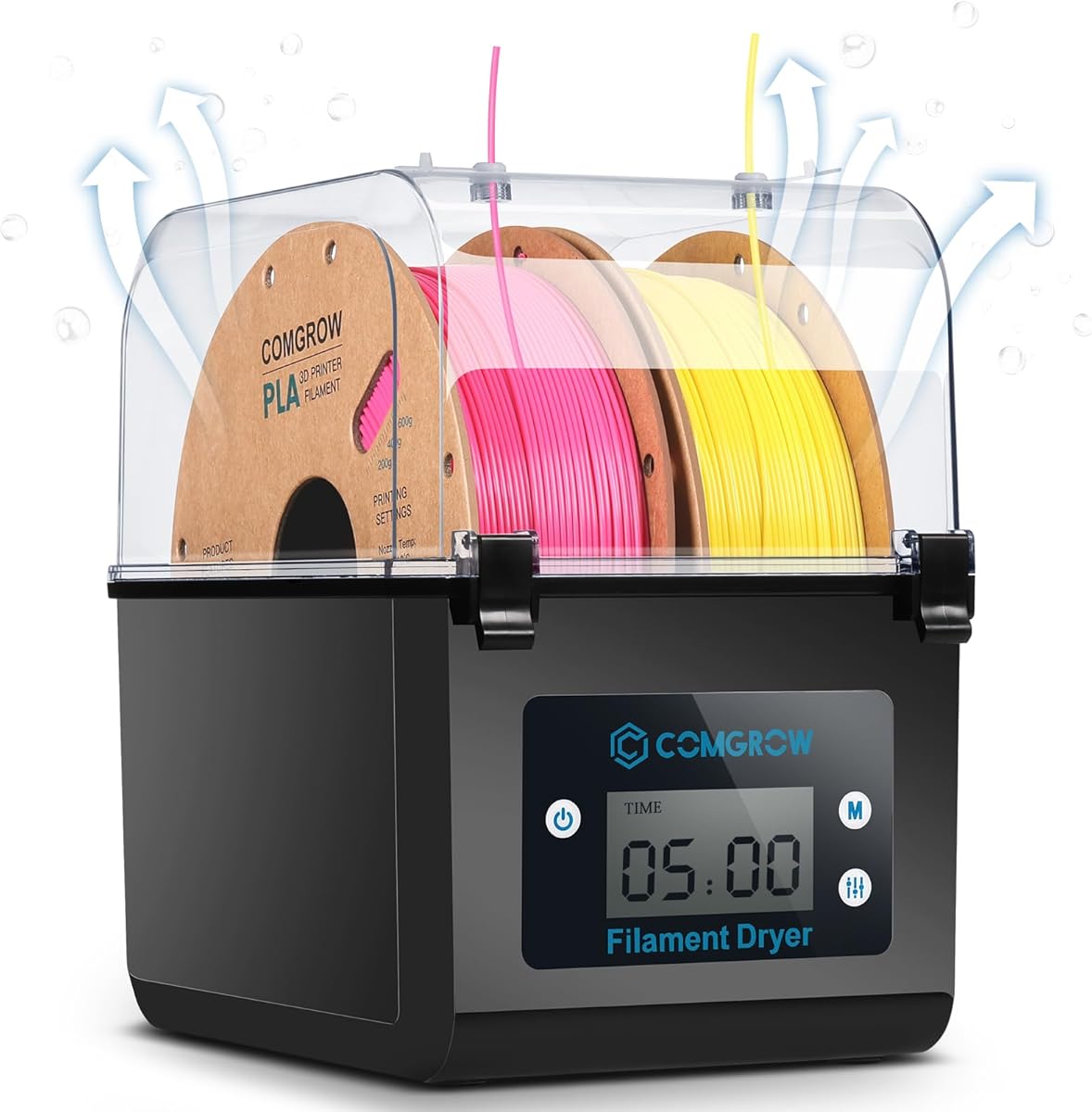
Comgrow SH01 offers a balanced option with capacity for two standard spools at an accessible price. It features internal heating during printing to maintain a dry environment for filament usage.
We may earn a commission when you buy through this link, at no additional cost to you.
The unit allows monitoring of temperature and humidity via a clear display and touch buttons. It includes a silicone cable sheath to ensure smooth outlet feeding without damaging the filament while sealed.
The maximum temperature of 50°C may not suffice for all engineering filaments requiring higher drying heat. The automatic shut down feature after three minutes in idle mode is a safety measure but requires user attention.
This model suits users needing storage for two spools without needing extreme temperature ranges. It provides reliable moisture protection for common materials like PLA and ABS in typical home environments.
A 2 inch LCD screen and touch buttons make it easy to operate and see comprehensive information clearly.
The outlet structure adopts a silicone cable sheath to prevent moisture ingress while printing is in progress.
We may earn a commission when you buy through this link, at no additional cost to you.
The Polymaker Polydryer focuses on passive storage using sealed enclosure design combined with desiccant support. It helps maintain dry conditions between uses to prevent moisture related issues.
We may earn a commission when you buy through this link, at no additional cost to you.
A built-in hygrometer allows you to track humidity without guesswork ensuring the environment remains suitable for sensitive materials. It is designed to let you feed filament without breaking the seal during printing.
Without active heating it cannot dry wet filament but only maintains dryness. Users must manage desiccants separately which adds a consumable requirement to the workflow.
Buy this for long term storage needs rather than active drying sessions. It is ideal for protecting filament investment when not actively printing in controlled environments.
Use it as a humidity control filament box with a built-in hygrometer to track storage conditions easily.
The design supports filament feeding while the spool remains stored inside to protect moisture during pauses.
We may earn a commission when you buy through this link, at no additional cost to you.
SUNLU S2 is designed to revive damp filament and maintain dryness during printing effectively. It uses a built-in spindle to ensure continuous spinning for even drying across the filament surface.
We may earn a commission when you buy through this link, at no additional cost to you.
The translucent lid allows visual checks without opening the unit maintaining the internal environment. Temperature settings are customizable between 35°C and 70°C to handle various material requirements safely.
Lack of humidity feedback makes it harder to track exact moisture removal progress compared to digital units. The single spool capacity limits volume throughput for large projects.
This unit is excellent for restoring old filaments and small to medium workloads. Its simple operation and effective drying make it a practical choice for hobbyists needing reliability.
Specifically designed to remove excess moisture and revive old filament saving time and money.
Heats up quickly to preset temperature while the built-in spindle ensures filament spins continuously for even drying.
We may earn a commission when you buy through this link, at no additional cost to you.
Comgrow SH02 provides dual spool drying with efficient 150W PTC heating for quick and even results. It offers one key temperature settings for nine common filament types simplifying the operation significantly.
We may earn a commission when you buy through this link, at no additional cost to you.
Safety features include automatic heating cut off and fan alarm systems to prevent overheating and component damage. The sealing rings ensure multiple layers of protection against moisture ingress during storage or drying.
Maximum temperature of 70°C may restrict use for some high heat engineering materials like PC. The alarm system requires user intervention if the fan stops which adds a maintenance check.
Select this for efficient two spool drying with preset profiles. It balances speed and safety well for regular users needing a reliable mid capacity solution.
SH02 has one-key temperature setting for 9 different types of 3D Printing filaments for immediate start.
Automatic cut off and alarm systems prevent overheating and burning out if the fan stops rotating.
We may earn a commission when you buy through this link, at no additional cost to you.
Creality Space PI features a large touch screen and advanced PTC technology for uniform heating without hot spots. It includes presets for twelve filament types and a power-off memory function to save settings.
We may earn a commission when you buy through this link, at no additional cost to you.
The 360 degree circulating hot air system ensures moisture removal across the entire spool effectively. Users can switch between Celsius and Fahrenheit easily for convenient operation and monitoring.
Single spool capacity limits throughput for bulk drying tasks. The heating process relies on fan circulation which may produce some operational noise during long drying cycles.
This unit suits users valuing advanced controls and consistent heating. It offers reliable drying for various filaments with user friendly interface for detailed customization.
The Creality Space Pi Filament Dryer comes with a 3.7-inch touch screen for easy operation and tracking.
The device remembers previous material and temperature settings after a power outage saving resetting trouble.
We may earn a commission when you buy through this link, at no additional cost to you.
Creality Space PI Plus combines dual spool capacity with real-time humidity monitoring and uniform 360 degree heating. It supports twelve filament presets and offers a large screen for easy tracking of conditions.
We may earn a commission when you buy through this link, at no additional cost to you.
The sealed design ensures consistent drying for multiple spools without cross contamination. Temperature control ranges from 45°C to 70°C covering most standard and some engineering materials comfortably.
Maximum temperature limits restrict use for very high heat filaments like Polycarbonate. The dual spool design increases size and may require more desk space.
Buy this if you need dual spool drying with feedback on humidity levels. It provides robust control and convenience for intermediate to advanced users.
Track drying conditions with real time humidity monitor and large touch screen for easy operation.
Supports up to 12 types of filaments including high performance composites for precise settings.
We may earn a commission when you buy through this link, at no additional cost to you.
Creality Space Pi X4L supports high volume users with four spool capacity and dual independent heating chambers. It allows simultaneous drying and storage while maintaining moisture protection during printing pauses.
We may earn a commission when you buy through this link, at no additional cost to you.
The unit reaches up to 75°C which unlocks advanced engineering filaments requiring higher heat. Illuminated windows let you monitor spools without breaking humidity control inside the enclosure.
Requires substantial workspace space due to its larger build. The high capacity and temperature performance come with a higher cost compared to standard single spool models.
Choose this for maximum efficiency in multi printer setups. It ensures consistent quality across multiple filaments with powerful independent control.
Holds 4 standard 1kg spools or 2 large 2kg spools for ultimate high-volume user support.
Industry-first drying scene touch UI allows customizing temperatures for different filament types easily.
We may earn a commission when you buy through this link, at no additional cost to you.
Official Creality Space Pi X4 offers top-tier performance with dual independent heating and up to 85°C temperature. It features eight filament holes for simultaneous printing on multiple machines with energy-saving single chamber options.
We may earn a commission when you buy through this link, at no additional cost to you.
The dual 200W PTC heaters significantly improve efficiency for engineering filaments. Single-chamber operation saves up to 40% energy making it eco-friendly and cost effective over time.
Price and size are significant considerations compared to basic models. It assumes you have compatible trays for optimal performance and specific storage requirements.
Invest in this for professional and high-performance printing environments. It delivers unmatched versatility and efficiency for serious users.
Each chamber is equipped with an independent PTC heater allowing simultaneous drying of two types at different temps.
Single-chamber operation saves up to 40% energy for eco-friendly and cost-effective drying options.
We may earn a commission when you buy through this link, at no additional cost to you.
Selecting the right filament dryer box depends on your material variety, print volume, and workspace constraints. This guide outlines the critical factors to evaluate before purchasing.
Heating technology defines how efficiently moisture is removed from spools. PTC heaters provide rapid and even heat distribution compared to simple resistance pads. Active air circulation ensures that heat reaches all parts of the filament evenly.
Look for models with PTC heaters and built-in fans to avoid uneven drying hot spots.
Capacity determines how many spools can be dried simultaneously. Single spool dryers suffice for hobbyists while multi spool units support professional workflows. Consider your printer count and filament rotation needs.
Choose capacity that matches your typical batch size to optimize drying throughput effectively.
Temperature range determines which materials you can dry safely. Standard plastics like PLA require lower heat while engineering materials like PC need higher temperatures. Verify the maximum temperature matches your material list.
Ensure the unit supports at least 70C for common materials and 85C for engineering filaments.
Sealing quality protects filament from humidity during pauses and storage. Silicone seals and tight closures prevent air infiltration that could negate drying results. Good design allows printing without opening the box.
Prioritize models with silicone seals and outlet plugs for continuous moisture protection.
User interfaces vary from simple dials to advanced touchscreens. Clear displays for temperature and humidity simplify monitoring and adjustment. Programmable presets reduce setup time for frequent materials.
Select an interface that fits your workflow complexity and offers clear feedback.
Safety mechanisms like overheat protection and fan monitoring prevent damage to filament and the device. Automatic shut off and alarms alert you to issues before they become critical. Reliable units include these essential safeguards.
Look for thermal cut off and fan alarms to ensure safe operation.
Power efficiency impacts electricity costs and environmental footprint. Units that allow single or dual chamber usage offer flexibility in energy consumption. Energy saving modes reduce waste when full capacity is not needed.
Consider models with energy saving modes to reduce long term costs.
Compatibility ensures the unit fits your printer setup and filament types. Check spool diameters and width limits to accommodate your specific brands. Universal designs support 1.75mm and 2.85mm standard sizes.
Verify dimensions and diameter support before purchase to avoid fit issues.
Insert your spool into the chamber ensuring it sits securely on the spindle or holder. Connect the outlet tube to your printer extruder to allow continuous feeding during operation.
Set the appropriate temperature and time based on your filament manufacturer recommendations. Start the drying cycle and monitor the screen for progress until the timer completes or humidity stabilizes.
Regularly inspect seals and vents to ensure they remain intact and free of dust. Replace desiccants if your model uses them and clean the interior periodically to maintain optimal performance.
Most units support common thermoplastics like PLA PETG ABS and TPU. Higher end models offer higher temperatures for engineering materials like PC and Nylon. Always check the maximum temperature rating before drying specialized filaments.
Drying time varies by material and humidity levels but usually ranges from four to twelve hours. Advanced units with dual chambers can reduce total processing time significantly for multiple spools.
Yes many units allow continuous printing while drying the filament inside. Sealed designs ensure moisture does not re-enter during pauses protecting print quality throughout the process.
Active heating actively removes moisture from damp filament whereas passive storage prevents new moisture absorption. Use active drying to revive old or damp spools and passive for long term storage.
A broken seal allows humid air to enter which reabsorbs moisture quickly. This can lead to print defects such as stringing or bubbling. Ensure seals are closed tightly when not feeding.
Modern dryers with PTC heaters and fan control are relatively efficient. Some offer single chamber modes that save power. Look for energy saving features to reduce operational costs.
This guide covered ten diverse options from simple single spool models to multi chamber systems. Each serves distinct needs depending on your material range and production volume.
Prioritize temperature range and capacity based on your frequent filament types and printer setup. Safety and sealing features are critical for consistent print quality over time.
Current offers and availability can change so verify pricing and stock before purchase. Selecting the right dryer ensures your prints remain free of moisture related defects.