
EPOMAKER Ajazz AK820 Pro Wireless Mechanical Keyboard with TFT Display&Knob
4.7Editor score
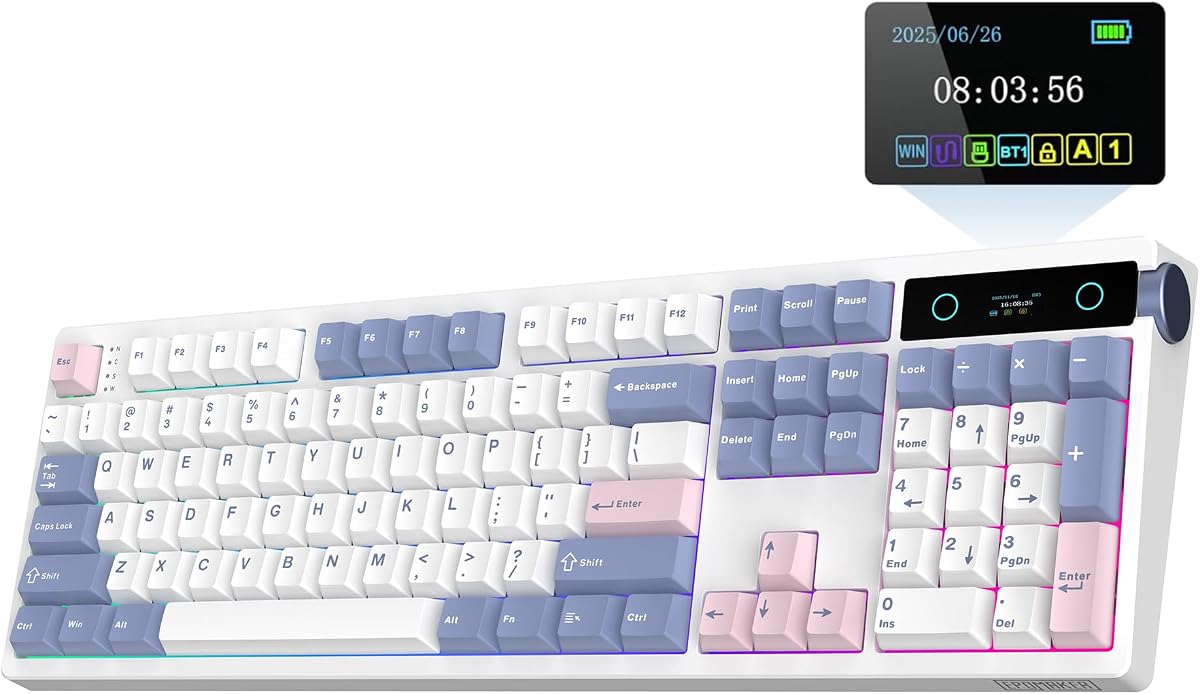
TFT Screen Interface
75 Percent Layout
Tri Mode Connectivity
Explore the top ten Epomaker keyboards compared for build quality wireless performance and customization features to help you choose the perfect mechanical
Epomaker keyboards have become a standout choice for enthusiasts seeking premium features without breaking the bank. Their latest models combine gasket mounting hot swap sockets and vibrant RGB lighting to deliver exceptional typing experiences across various layouts and use cases.
We compared ten flagship models based on connectivity options battery life acoustic tuning and software flexibility. Each entry offers distinct advantages whether you prioritize a full size layout a compact form factor or advanced Hall Effect technology for competitive gaming scenarios.
This guide highlights standout features and tradeoffs for every pick to help you find your ideal match. Please note that prices and availability fluctuate so verify current details before purchasing to ensure you get the best value available today.
4.7Editor score
4.7Editor score

4.7Editor score
This side by side comparison reviews all ten models highlighting their unique specifications layouts and connectivity options to help you quickly identify the best fit for your workflow and gaming preferences.

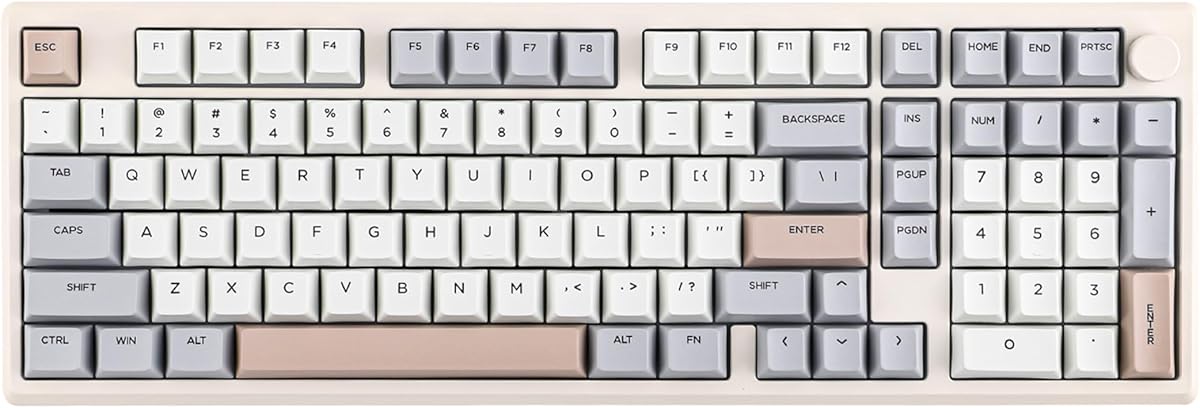


The EPOMAKER TH108 PRO stands out as a top choice for users seeking a full size keyboard with advanced features. It boasts a 4.7 rating and combines a smart screen with a rotary knob to deliver both utility and customization. This model excels in providing a stable typing experience alongside rich multimedia control options for any desk setup.
We may earn a commission when you buy through this link, at no additional cost to you.
Its standout quality is the integration of a smart screen that displays battery status time and even GIFs. The 10000mAh battery ensures long wireless sessions while the gasket mount design offers a creamy acoustic profile. Hot swappable switches allow users to tailor the feel without soldering making it versatile for enthusiasts.
While the weight exceeds 1.1kg which may deter travelers the stability it provides on a desk is unmatched for gaming and office use. The software works well across platforms but relies on Chrome which might be a minor inconvenience for some desktop environments.
This keyboard is ideal for those who want a full size layout with premium features like a screen and massive battery. Whether you are gaming or working the TH108 PRO delivers a satisfying experience that justifies its position as an editor choice pick.
The smart screen lets you upload GIFs and check battery levels instantly without needing to navigate software menus.
Five layers of padding create a thocky sound that reduces fatigue during long typing or gaming sessions.
We may earn a commission when you buy through this link, at no additional cost to you.
The X Aula F75 MAX is a refined compact keyboard that brings premium features to a smaller footprint. With a 4.6 rating it appeals to users who need a functional layout without sacrificing customizability. The TFT screen and knob add a unique touch for managing settings and battery status efficiently.
We may earn a commission when you buy through this link, at no additional cost to you.
Key strengths include its ergonomic design and strong acoustic performance thanks to factory lubricated switches and stabilizers. The hot swappable nature allows for easy experimentation with different switch types. It connects via Bluetooth 2.4Ghz or USB ensuring flexibility for both gaming and productivity tasks.
Although the screen and some software functions might be limited on Mac users will still find robust functionality. The layout saves desk space which is perfect for setups with limited room or multiple monitors.
Buy this if you want a high quality compact keyboard with screen features. It balances size and performance well making it a great choice for daily use in various environments.
The low front height and adjustable kickstand help reduce wrist strain during extended typing sessions.
Sound dampening materials ensure a creamy thocky sound that is pleasing to the ears.
We may earn a commission when you buy through this link, at no additional cost to you.
The Galaxy100 QMK/VIA targets enthusiasts who prioritize deep customization. It carries a 4.5 rating and offers a robust aluminum build alongside QMK VIA support for advanced keymapping. The linear switches are factory lubed for a smooth feel right out of the box.
We may earn a commission when you buy through this link, at no additional cost to you.
Its aluminum shell provides a premium look and feel that is durable and stable. The battery capacity is substantial ensuring reliable wireless performance. South facing LEDs enhance RGB brightness which is visible from all angles.
While VIA software offers incredible power it requires a learning curve for new users. The price is higher than entry level options but the build quality and features justify the cost for serious tinkerers.
This keyboard is perfect for tech savvy users who want control over every aspect of their typing experience. The combination of build quality and software support makes it a strong contender.
Use VIA software to remap keys and create complex macros for maximum efficiency.
The sturdy case ensures stability and adds a premium aesthetic to your desk setup.
We may earn a commission when you buy through this link, at no additional cost to you.
The TH108 V2 PRO is designed for users who need seamless switching between multiple devices. With a 4.7 rating it delivers a stable full size layout with screen and knob features. It excels in productivity scenarios where moving between a PC and a laptop is common.
We may earn a commission when you buy through this link, at no additional cost to you.
Its key strength is the quick switch function allowing effortless transitions between connected systems. The battery lasts for hours of use and the sound profile is rich and satisfying due to gasket padding. The software is web based which simplifies installation.
The weight is a consideration for portability but the stability on a desk is beneficial. The screen provides useful info like time and settings which adds convenience for daily tasks.
Choose this if you need a reliable full size keyboard for multiple systems. It offers a balanced mix of features that suit both work and play.
Switch between devices quickly using FN shortcuts to stay productive across multiple systems.
Enjoy a complete set of keys including a numpad for efficient data entry and gaming.
We may earn a commission when you buy through this link, at no additional cost to you.
The TH99 PRO offers a unique 96% layout that keeps a numpad while saving space. It has a 4.6 rating and includes a screen and knob for added control. This keyboard is ideal for users who need number entry without a bulky full size board.
We may earn a commission when you buy through this link, at no additional cost to you.
Its 10000mAh battery ensures long wireless sessions and the sound is creamy due to internal padding. The hot swappable switches allow for customization which keeps the experience fresh. Connectivity is versatile supporting Bluetooth 2.4Ghz and cable.
While the software is web based and limits some features the performance is solid. The weight provides stability and the RGB lighting adds a nice touch to the setup.
This model is best for those who want a compact layout with full features. It is a great option for office work and gaming alike.
Get the convenience of a numpad without taking up excessive desk space.
The screen displays vital info and lets you control settings without opening apps.
We may earn a commission when you buy through this link, at no additional cost to you.
The TH108 is a solid choice for those wanting a reliable full size keyboard without premium extras. With a 4.5 rating it offers a strong battery and gasket mount sound. It is perfect for users who value practicality over fancy features.
We may earn a commission when you buy through this link, at no additional cost to you.
Its main strength is the balance of cost and performance. The switches are lubricated for a smooth feel and the hot swap feature allows for future upgrades. The battery ensures long wireless sessions without frequent charging.
The design is standard without a screen or knob which keeps it simple. This might be a drawback for those wanting advanced customization but works well for straightforward use.
This keyboard is ideal for budget conscious buyers who still want quality. It delivers a comfortable typing experience and reliable wireless performance.
Enjoy a soft and responsive typing feel that reduces hand fatigue.
The large battery supports days of wireless use before needing a recharge.
We may earn a commission when you buy through this link, at no additional cost to you.
The G84 HE is a top tier gaming keyboard featuring Hall Effect technology. With a 4.7 rating it offers adjustable actuation and fast polling rates. It is perfect for competitive gamers who need precise control and rapid response times.
We may earn a commission when you buy through this link, at no additional cost to you.
Its key strength is the ability to customize actuation points and travel distance. The 8K polling ensures instant input registration which is crucial for fast paced games. The sound profile is still pleasing thanks to gasket padding.
The price is higher than standard mechanical keyboards but the performance justifies it. The setup requires some tuning which might be challenging for beginners.
This keyboard is best for esports players or enthusiasts who want the latest tech. It offers a significant edge in performance and customization for serious gaming.
Experience ultra low latency with 8000Hz polling for instant input response.
Ensure fair movement inputs with Smart On Counter Direction logic.
We may earn a commission when you buy through this link, at no additional cost to you.
The TH99 is a versatile option that balances layout and features well. With a 4.6 rating it provides a compact 96% layout with a numpad. It suits users who need productivity features without the bulk of a full size board.
We may earn a commission when you buy through this link, at no additional cost to you.
Its strength lies in the hot swappable switches and stable wireless connectivity. The battery is long lasting and the build is solid. The software allows for basic customization which is sufficient for most users.
Sound dampening is decent but not as deep as premium models. The layout is compact which saves desk space but might take adjustment for some.
Buy this if you want a reliable mid range keyboard. It is a practical choice for work and casual gaming.
Keep your workflow efficient with a compact layout that includes arrow keys and numpad.
Swap switches easily to tailor the feel to your preference without tools.
We may earn a commission when you buy through this link, at no additional cost to you.
The Ajazz AK820 Pro is an incredible value for budget conscious buyers. With a 4.7 rating it brings a TFT screen and knob to an affordable price. This makes it accessible to users who want modern features without a high cost.
We may earn a commission when you buy through this link, at no additional cost to you.
Its key strength is the balance of cost and features. The screen allows for customization and info display. The layout is compact and wireless connectivity is reliable across multiple devices.
The build feels lighter than premium boards which might be less stable for gaming. Software is basic but functional for most needs.
This keyboard is perfect for anyone wanting a screen keyboard on a budget. It offers a great entry point into modern mechanical keyboards.
Use the screen to display battery time or custom visuals for personal flair.
Save space with a 75% design that keeps essential keys in a smaller footprint.
We may earn a commission when you buy through this link, at no additional cost to you.
The x Aula F99 is a reliable compact keyboard with solid features. With a 4.5 rating it offers a 96% layout and gasket mounting. It is a great choice for those who want a small board without losing essential keys.
We may earn a commission when you buy through this link, at no additional cost to you.
Its strength is the hot swappable design and long battery life. The sound is pleasant due to internal padding. The build quality is durable and the RGB lighting is subtle.
The software is basic but allows for essential customization. The layout saves space but might be tight for some users.
This keyboard is best for users seeking a compact solution. It offers good value and reliable performance for daily tasks.
Keep the numpad and arrow keys for efficiency in a smaller footprint.
Enjoy a soft and quiet typing experience that reduces fatigue.
We may earn a commission when you buy through this link, at no additional cost to you.
Choosing the right mechanical keyboard involves considering layout battery life connectivity and features like screens or hot swap sockets. This guide breaks down the key factors to help you find the perfect match.
Layout determines how much desk space you use and which keys are available. Full size options include a numpad which is essential for data entry but take up more room. Compact layouts like 75% or 96% save space while keeping essential keys like arrows and numpads.
Choose a layout that fits your workspace and task needs. Gamers often prefer compact boards for mouse room while office users might need full size for efficiency.
Wireless keyboards rely on battery capacity for uninterrupted use. Models like the TH108 PRO offer 10000mAh which supports over 200 hours of usage. Smaller batteries require more frequent charging but still provide days of use.
Prioritize larger batteries if you want to avoid frequent recharging. This is crucial for users who rely on their keyboard daily without easy charging access.
Hot swappable switches let you change keys without soldering. This allows you to test different switch types or replace broken ones easily. Models with this feature are ideal for enthusiasts who like to customize.
Look for hot swap sockets if you plan to experiment with switches. It adds longevity and flexibility to your keyboard investment.
Gasket mount designs provide a soft bouncy typing feel and a thocky sound. Layers of foam and silicone reduce harsh vibrations and hollow noise. This makes typing more comfortable during long sessions.
Select a keyboard with sound dampening features if you prefer a quiet and soft feel. This is especially important for open offices or shared spaces.
Smart screens and knobs offer quick access to settings and info. You can display time battery or GIFs without software. These features add convenience and fun to your desk setup.
Choose a model with a screen if you value quick status checks. It enhances functionality without cluttering your screen.
Tri mode keyboards support Bluetooth 2.4Ghz and cable. This allows seamless switching between devices like PC phone and tablet. Ensure the model supports your OS for full compatibility.
Look for tri mode if you use multiple devices. It increases productivity by keeping all your systems connected.
Higher polling rates ensure faster response times which are vital for gaming. Models like the G84 HE offer 8K polling which is top tier. Standard models offer 1000Hz which is sufficient for most users.
Gamers should prioritize high polling rates. It ensures your inputs are registered instantly for better performance.
Software allows for macros remapping and RGB control. Web based software is convenient as it does not require installation. Check if the software supports your OS for full features.
Choose keyboards with user friendly software. This helps you customize the board to your exact preferences.
To get started connect your keyboard via the preferred mode. Use the driver to configure keys and lighting. Download the driver from the official website to access all features.
Clean your keyboard regularly by brushing off dust and using compressed air. Wipe keycaps with a soft cloth to remove oils. Avoid using harsh chemicals that may damage the finish.
Charge the battery before first use to maintain health. Store it in a cool dry place to prevent degradation. Check for updates in the software to ensure optimal performance.
Yes most Epomaker keyboards support Mac with a mode switch. The keys may be labeled for Windows but function correctly on Mac. Software often works across both systems with minor adjustments.
Battery life ranges from 160 to 200 hours depending on the model and lighting. Turning off RGB can extend this significantly. Most users charge once a week or less.
Yes models like the TH108 PRO are hot swappable. This allows you to change switches without soldering. It is easy to customize the feel of your keyboard.
Most models offer tri mode including Bluetooth and 2.4Ghz. This ensures flexibility for different devices and scenarios. Wired mode is also available for reliability.
The web based driver is straightforward for most users. It allows remapping macros and RGB control. Setup is simple with online guides for guidance.
The G84 HE is ideal for competitive gaming due to its Hall Effect switches. It offers low latency and customizable actuation. Most models are suitable for casual gaming.
The ten models reviewed offer a wide range of options for every user. From full size boards to compact designs there is a perfect fit for any desk setup. Prioritize battery and layout to meet your specific needs.
Focus on what matters most to you whether it is sound quality or gaming performance. The hot swap and screen features add value and longevity to your choice. Consider how often you switch devices to pick the right connectivity.
Remember that prices may change so verify current deals before buying. This guide ensures you have the information to make a smart purchase. Happy typing and gaming with your new keyboard.