
4K AI-Powered Conference Webcam with Microphones Speakers
4.1Editor score
Zoom Certified Integration
120 Degree Wide Angle
Physical Privacy Lens Cover
This guide compares the top auto tracking conference camera systems for hybrid meetings, featuring AI framing, optical zoom, and integrated audio for profession
Modern hybrid meetings demand visual clarity and seamless interaction. An auto tracking conference camera ensures active speakers stay centered without manual adjustments. This technology enhances engagement by keeping focus where it matters most during every call.
We evaluated ten leading systems based on tracking accuracy, video quality, and audio integration. Our analysis covers models for small huddle rooms to large lecture halls. Each option balances performance with ease of setup for diverse business environments.
Each pick highlights specific strengths like optical zoom range or AI framing modes. Prices and availability change frequently so verify details before purchasing. These selections represent the current best options for reliable professional video conferencing needs.
4.1Editor score

4.8Editor score

4.6Editor score
This side-by-side comparison highlights key specifications across all ten selected systems. Review optical zoom capabilities, connection types, and AI features to find the right fit for your meeting space requirements.




This system stands out as the top choice for professional meeting environments. It delivers crisp 4K video with seamless AI tracking that keeps speakers centered automatically. The included wireless speakerphone completes the package for full duplex audio needs.
We may earn a commission when you buy through this link, at no additional cost to you.
The camera uses advanced algorithms to recognize humanoids and faces precisely. It offers 3X optical zoom and a 93 degree wide angle lens. HDMI output supports true 4K 30fps which ensures high fidelity video on large displays.
While the USB output maxes out at 1080p the HDMI port handles full resolution. The speakerphone battery lasts six to eight hours which suits most meetings. Some users might prefer longer battery life for all day conferences.
Buy this if you need a complete plug-and-play solution for small to medium rooms. It works with Zoom Teams and Google Meet without extra drivers. The setup is straightforward for immediate use in any conference setting.
The 4K resolution ensures text and faces remain sharp during presentations.
The Bluetooth speakerphone eliminates the need for separate audio devices.
We may earn a commission when you buy through this link, at no additional cost to you.
This webcam is designed specifically for small meeting spaces. It ensures every participant is clearly visible without crowding the frame. The Zoom certification guarantees compatibility for teams relying on that platform.
We may earn a commission when you buy through this link, at no additional cost to you.
AI auto framing detects and frames all attendees automatically. Presenter tracking follows active speakers for training or client sessions. The 120 degree wide angle captures the full room without repositioning.
Audio clarity is supported by dual noise canceling microphones. Voices are captured clearly across the table up to five meters. The physical lens cover adds a layer of security for office environments.
Choose this model if you need an affordable certified solution for hybrid work. It simplifies IT setup with USB connectivity. Ideal for small teams prioritizing simplicity over premium features.
Zoom certification means optimized performance for common meeting workflows.
Wide angle lenses reduce the need for multiple cameras.
We may earn a commission when you buy through this link, at no additional cost to you.
This system delivers smooth motion with 60fps video output. It combines an HD PTZ camera with a Bluetooth speakerphone. The all-in-one design brings professional video conferencing to any meeting space.
We may earn a commission when you buy through this link, at no additional cost to you.
Advanced AI algorithms ensure precise tracking of speakers and presenters. The camera supports HDMI 2.0 and USB3.0 video outputs simultaneously. It captures detailed images with 114 degree wide field of view.
The speakerphone offers full duplex audio with echo cancellation. It picks up voices clearly within a 16.4ft range. While video is capped at 1080p the motion clarity is excellent for active meetings.
Ideal for users who prioritize smooth streaming over ultra high resolution. It works with most conferencing apps including Teams and WebEx. Technical support is responsive for setup assistance.
60fps output prevents stuttering during fast presentations.
Echo cancellation ensures clean voice transmission.
We may earn a commission when you buy through this link, at no additional cost to you.
This camera features innovative gesture controls for hands-free operation. You can activate AI tracking or zoom with simple hand signals. It is ideal for environments where touching devices is inconvenient.
We may earn a commission when you buy through this link, at no additional cost to you.
The 4K sensor delivers full UHD 30fps resolution. It rotates 350 degrees horizontally and 180 degrees vertically. The speakerphone connects via USB or wireless dongle for flexible setup.
Gesture functions include zoom in and out via specific hand signs. The menu allows users to toggle features as needed. Remote control support adds another layer of operational flexibility.
Buy this for interactive sessions or training environments. It ensures participants can adjust views without touching the device. Compatibility with OBS and Teams makes it versatile for various workflows.
Gestures streamline adjustments during active meetings.
Remote and gesture inputs cater to different user needs.
We may earn a commission when you buy through this link, at no additional cost to you.
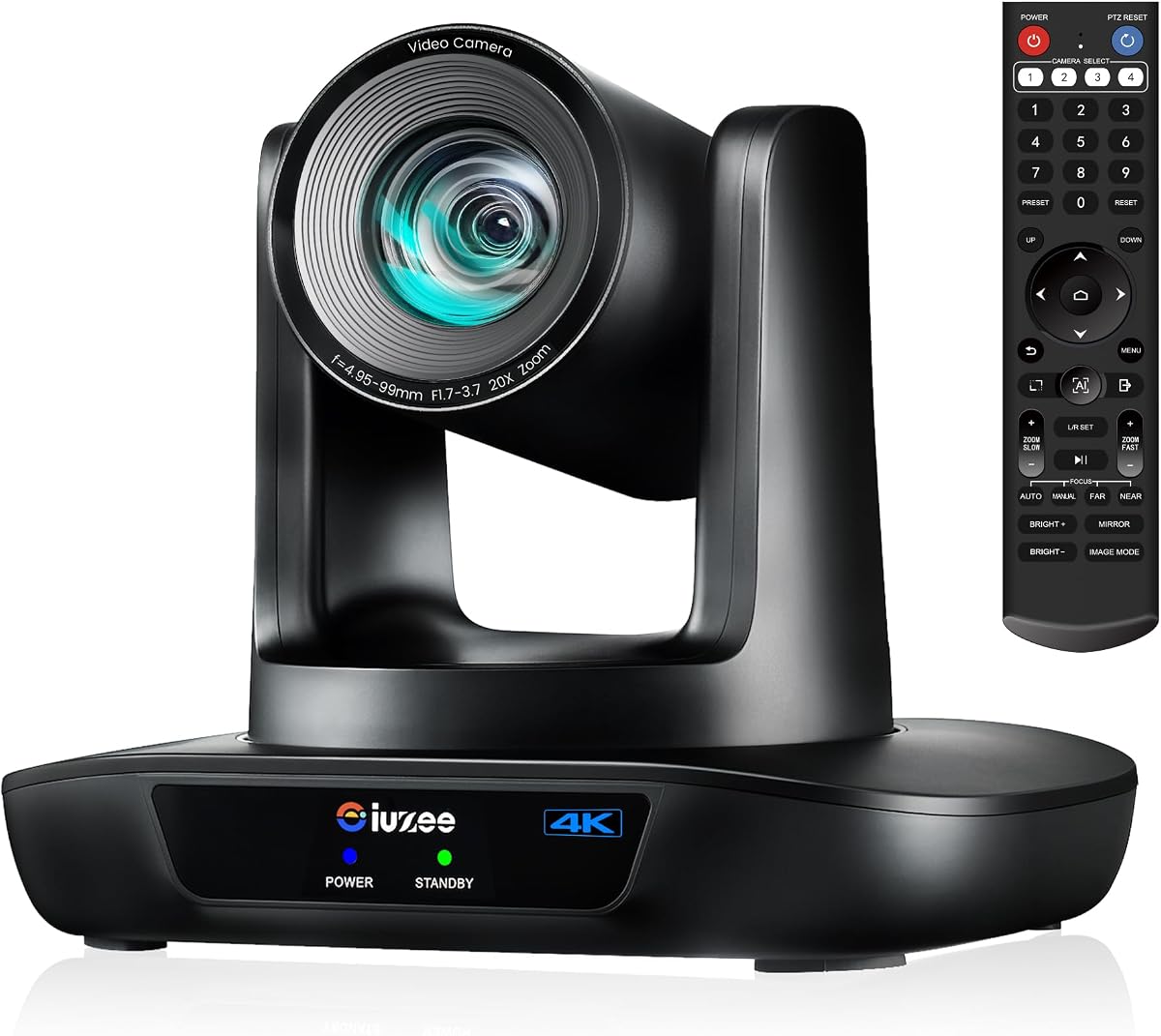
This system combines a powerful PTZ camera with a Bluetooth speakerphone. It automatically follows speakers with smooth pan tilt and zoom. Ideal for churches or large conference rooms where distance matters.
We may earn a commission when you buy through this link, at no additional cost to you.
The 20X optical zoom captures clear close-ups from the back of large rooms. LAN and PoE support simplify cabling for permanent installations. The speakerphone delivers full-duplex audio with noise reduction.
Plug and play setup works with most conferencing software. Compatible platforms include Zoom Teams OBS and Facebook Live. Technical support ensures stable streaming without interruptions.
Choose this for large venues requiring precise framing. The PoE feature reduces hardware clutter significantly. It balances performance and reliability for daily professional use.
High optical zoom maintains clarity over distance.
PoE reduces power cable dependencies.
We may earn a commission when you buy through this link, at no additional cost to you.
This camera offers three simultaneous HD outputs for professional broadcast. It supports MJPEG H.264 and H.265 encoding for smooth performance. No built-in mic means you need external audio solutions.
We may earn a commission when you buy through this link, at no additional cost to you.
AI face and figure tracking ensures precise accuracy. Fast auto-zoom technology makes meetings smoother. You can switch between Presenter Mode and Auto Framing Mode easily.
RTMP RTSP and SRT support allow live streaming to social platforms. Presets help save common camera angles for quick recall. A 30-day money-back guarantee and 3-year warranty add confidence.
Best for production teams needing IP streaming and high fidelity video. External audio integration is necessary. It fits universities and houses of worship perfectly.
Multiple output protocols suit complex production workflows.
Encoding options reduce bandwidth requirements.
We may earn a commission when you buy through this link, at no additional cost to you.
This camera is officially licensed for NDI workflows. It delivers stunning 4K resolution via HDMI and USB connections. Network streaming supports up to 1080P output for seamless live streaming.
We may earn a commission when you buy through this link, at no additional cost to you.
Facial and human body recognition keeps subjects perfectly framed. Even if obscured the system resumes tracking quickly. SDI output supports long cable runs without extra hardware.
Power over Ethernet simplifies installation by delivering power and data. Compatible with popular software like OBS and vMix. Support includes free training and remote assistance.
Ideal for professional production studios and live events. It bridges traditional hardware and IP streaming. The NDI license is included saving extra costs.
NDI support ensures compatibility with modern broadcast software.
SDI and HDMI provide flexible output options.
We may earn a commission when you buy through this link, at no additional cost to you.
This camera is built for reliability and smooth performance. It features durable construction for daily use in classrooms. AI tracking focuses on presenters with face and body recognition.
We may earn a commission when you buy through this link, at no additional cost to you.
HDMI USB and PoE connections offer flexible installation. You can control pan tilt and zoom via remote or software. Compatible with OBS Teams and Zoom for seamless integration.
Note that factory default is 4K at 30Hz. Some monitors may require resolution adjustment for optimal viewing. Support is responsive for troubleshooting any setup hurdles.
Great for schools and remote education setups. It delivers clarity from up to 80 feet. Reliable build ensures long term usage without frequent maintenance.
Durability suits high traffic educational environments.
Software control is intuitive for teachers.
We may earn a commission when you buy through this link, at no additional cost to you.
This all-in-one solution combines camera microphones and speakers. It simplifies setup and reduces cable clutter significantly. Designed for medium to large conference rooms.
We may earn a commission when you buy through this link, at no additional cost to you.
Auto framing detects participants and adjusts in real time. Presenter tracking follows active speakers for dynamic meetings. The 4-mic array reduces background noise effectively.
Built-in dual speakers eliminate external audio devices. It works seamlessly with Teams Google Meet and Zoom. Plug and play functionality ensures immediate usability.
Ideal for hybrid teams needing simplified hardware. It balances audio video quality for client presentations. Reducing devices cuts down on technical issues.
Single unit deployment reduces installation time.
Real-time adjustments maintain focus on key speakers.
We may earn a commission when you buy through this link, at no additional cost to you.
This webcam delivers crisp video with built-in audio. It features a 4K lens with digital zoom. Ideal for individual workstations or small team huddles.
We may earn a commission when you buy through this link, at no additional cost to you.
Voice tracking locates active speakers within three seconds. It supports three adjustable field of view modes for flexibility. Dual omnidirectional mics ensure clear audio from every angle.
The privacy cover protects the lens when not in use. No additional drivers are needed for setup. Works with Windows and Mac without compatibility issues.
Best for home offices or personal desks. It keeps setup minimal while providing professional video quality. Affordable for individual professionals or small business use.
Small footprint fits easily on monitors.
Privacy cover ensures visual security.
We may earn a commission when you buy through this link, at no additional cost to you.
Selecting the right camera involves balancing resolution tracking precision and audio. Consider your room size and connectivity needs before purchasing.
High resolution ensures participants can see facial expressions and documents clearly. 4K offers superior detail compared to 1080p for larger rooms. Lower resolution may suffice for smaller spaces with close proximity.
Prioritize 4K if clarity is critical for your business needs.
AI algorithms detect faces and bodies to keep speakers centered. Precise tracking prevents jarring jumps during presentations. Check if the system supports both face and humanoid recognition.
Verify tracking algorithms handle obstructions smoothly.
Optical zoom provides clearer images than digital zoom. Longer optical ranges are essential for large auditoriums or churches. Digital zoom is acceptable for small huddle rooms.
Opt for optical zoom when possible for better fidelity.
Integrated microphones simplify setup and reduce cable clutter. Dual or array mics capture voices effectively across the room. Speaker inclusion can eliminate the need for separate devices.
Ensure audio pickup covers the full meeting area.
USB 3.0 HDMI and LAN connections offer flexibility. PoE support simplifies power delivery in professional installations. Check compatibility with your conferencing software platform.
Choose ports that match existing infrastructure.
Plug and play setup avoids complex configurations. Mounting options like tripod or wall mounts suit various ceilings. Physical privacy covers add security for shared workspaces.
Select models requiring minimal technical expertise.
Certified systems ensure optimized performance on tools like Zoom. Broad support for Teams Google Meet and WebEx increases versatility. Drivers are usually unnecessary for modern operating systems.
Confirm certification for your primary meeting app.
Start by mounting the camera at eye level. Position it centrally for even coverage of the room. Use USB 3.0 cables for optimal data transfer speeds.
Adjust tracking settings via the remote or web interface. Calibrate the camera to your room dimensions. Regularly update firmware for improved algorithms.
Clean lenses with microfiber cloths. Avoid harsh chemicals that could damage coatings. Ensure speakers and mics are dust-free for clear audio.
Auto tracking uses AI to detect humanoids and faces. It analyzes movement and positions the lens to keep the subject centered. Advanced systems recover tracking even when temporarily obscured.
Optical zoom physically adjusts lenses to magnify images without quality loss. Digital zoom crops and enlarges pixels which reduces clarity. Optical is preferred for professional environments.
Most operate as standard USB devices needing no drivers. Some offer companion apps for advanced settings. Compatibility with major platforms is typically verified.
Yes many models support RTMP and OBS. HDMI and SDI outputs enable integration with switchers. Check for IP streaming capabilities if needed.
Adjust sync settings in your conferencing app. Ensure using high speed USB ports. Separate audio outputs may help reduce lag.
PoE simplifies installations by providing power and data through one cable. It reduces wiring clutter in large rooms. Standard power adapters work well for smaller setups.
Use higher optical zoom to maintain clarity. Position cameras closer to key presentation areas. Consider multiple units for full coverage.
The TONGVEO 4K system leads with balanced performance and audio. Budget buyers should consider the certified compact webcam. Pros need the NDI PTZ for broadcast quality.
Prioritize optical zoom and reliable tracking algorithms. Room size dictates whether a kit or standalone unit fits best. Compatibility with your software stack is essential.
Prices vary based on specs and availability. Check current listings before purchasing. This guide helps match features to your collaboration needs.