
Hearvo USB 3.0 HDMI KVM Switch
4.0Editor score
4K@60Hz video support
Four USB 3.0 ports
Plug and play setup
This comprehensive guide compares the top ten laptop with KVM support options to help you find the ideal solution for sharing monitors and peripherals
Finding a reliable laptop with KVM support is essential for professionals who need to manage multiple systems seamlessly. These devices allow you to control different computers using a single set of peripherals and monitors, streamlining your workflow significantly.
We have evaluated ten leading products based on their compatibility, switching speed, and video quality. Each item offers unique features designed to reduce cable clutter and enhance productivity across various operating systems and hardware configurations.
Every pick highlights key specifications and real-world performance traits to guide your decision. Prices may fluctuate over time so checking the latest listings ensures you get the best value for your specific workspace needs today.
4.0Editor score

4.9Editor score
4.6Editor score
This side-by-side comparison highlights the core capabilities of each model to help you identify the best fit for your specific laptop and monitor setup requirements.


This device offers an affordable entry point for users needing basic laptop with KVM support functionality. It allows control of two computers via a single monitor and shared peripherals without requiring additional software.
We may earn a commission when you buy through this link, at no additional cost to you.
Its four USB 3.0 ports enable fast data transfer while the HDMI input supports crystal-clear 4K visuals. The adaptive EDID feature ensures stable image transmission across different operating systems automatically.
While it lacks multi-monitor support, the compact design keeps desks tidy. The remote switch provides convenience for quick toggling between systems without reaching behind the unit.
Ideal for home offices seeking budget-friendly multi-computer management. It simplifies workflows by reducing cable clutter while maintaining reliable performance for everyday tasks.
Connect keyboards mice and scanners to both systems without physical swapping. The switch detects connected devices automatically for stable operation.
Experience detailed images with 4K@60Hz output. The HDCP 2.2 compliance allows viewing protected content smoothly on your display.
We may earn a commission when you buy through this link, at no additional cost to you.
This model bridges gaps between various PC interfaces offering laptop with KVM support for mixed environments. It accepts combinations like USB-C HDMI and DisplayPort for seamless connectivity across four systems.
We may earn a commission when you buy through this link, at no additional cost to you.
The dual monitor capability enhances productivity by allowing extended screens for each computer. High-speed USB 3.0 ports ensure peripherals respond quickly during active switching sessions.
While setup involves multiple cables, the EDID emulator maintains window stability. The PD port charges laptops efficiently reducing the need for separate power bricks at the desk.
Perfect for complex workspaces requiring diverse hardware connections. Its versatility makes it a strong choice for teams managing laptops and desktops simultaneously.
Compatible with laptops and desktops using different video outputs. This flexibility eliminates the need for multiple adapters in your workspace.
Deliver power to your laptop while using peripherals. The 100W PD port helps keep devices powered without extra plugs.
We may earn a commission when you buy through this link, at no additional cost to you.
Ideal for power users this switch provides laptop with KVM support with triple monitor capabilities. It expands a single laptop screen into three independent displays for enhanced multitasking power.
We may earn a commission when you buy through this link, at no additional cost to you.
High-speed USB 3.1 Gen2 ports ensure peripherals operate smoothly during switching. The 100W Power Delivery maintains battery life while you work through shared devices.
The EDID chip stabilizes the transition between systems. However Mac users should note limitations with multi-stream transport compared to Windows machines.
Best for creators needing vast workspace real estate. It simplifies complex setups by consolidating docking and switching into one reliable unit.
Turn one laptop into a triple monitor workstation instantly. This boosts efficiency for coding trading or media editing tasks.
Transfer large files rapidly with 10Gbps speeds. The ports handle external drives and high bandwidth peripherals effortlessly.
We may earn a commission when you buy through this link, at no additional cost to you.
This docking station delivers robust laptop with KVM support for professional environments. It connects a desktop and laptop to three screens enabling deep multitasking without disconnecting peripherals.
We may earn a commission when you buy through this link, at no additional cost to you.
The 8K resolution support ensures future-proof visuals for demanding content. Shared Ethernet keeps downloads running even while you switch active computers seamlessly.
Built-in card readers and audio jacks replace extra hubs. The high-speed USB ports maintain performance for storage and high-demand accessories during transitions.
Great for studios and engineering teams. It merges docking and switching functions to reduce clutter while delivering high-end video performance.
Supports resolutions up to 8K@60Hz for clear detail. High refresh rates assist gaming and smooth visual editing workflows.
Shared internet access remains active on both computers. Cloud sync and updates proceed uninterrupted regardless of active switch selection.
We may earn a commission when you buy through this link, at no additional cost to you.
Designed for dual laptop workflows this switch simplifies laptop with KVM support efficiently. You can toggle between work and personal machines instantly keeping the same dual monitor setup active.
We may earn a commission when you buy through this link, at no additional cost to you.
The EDID emulation ensures screen stability during switches. Fast wake-up functions mean devices are ready immediately without manual interaction or delays.
Multiple USB and Ethernet ports replace separate hubs. The dual 60W charging keeps both laptops powered while connected to the single docking unit.
Perfect for hybrid workers managing multiple devices. It reduces hardware costs by combining docking capabilities into one comprehensive solution.
Toggle between systems in seconds using front panel. The remote option allows switching from a distance easily.
Access numerous USB Ethernet and audio ports easily. This consolidates connections so you avoid buying extra hubs.
We may earn a commission when you buy through this link, at no additional cost to you.
Rated highest by users this device sets the standard for laptop with KVM support excellence. It connects a laptop and desktop to three displays providing extensive workspace capabilities.
We may earn a commission when you buy through this link, at no additional cost to you.
The 8K resolution ensures sharp visuals for design work. High-speed USB ports maintain data integrity for heavy file transfers during switching sessions.
Shared network connectivity keeps background tasks running smoothly. This prevents interruption to downloads or cloud sync while you focus on the active screen.
A top pick for professional environments. Its reliability and performance justify the investment for serious multi-computer setups.
Delivers 8K@60Hz for precise editing and design. High refresh rates ensure smooth motion for creative workflows.
Multiple 10Gbps ports handle storage needs well. This ensures fast throughput for external drives and large projects.
We may earn a commission when you buy through this link, at no additional cost to you.
This compact docking station offers practical laptop with KVM support for dual laptop setups. It supports two 4K screens making it suitable for detailed work across different systems.
We may earn a commission when you buy through this link, at no additional cost to you.
The shared 1G Ethernet port keeps both laptops online efficiently. The 100W charging port supports high-power laptops maintaining power stability during active use.
EDID emulation maintains screen consistency across switching. The remote control provides added convenience for quick transitions without manual button pressing.
Ideal for developers needing two laptops connected. It consolidates ports and power delivery into one streamlined unit effectively.
Both laptops access the internet through one port. This prevents network interruption when switching active devices.
100W charging keeps laptops powered during work. This reduces cable clutter by removing separate power adapters.
We may earn a commission when you buy through this link, at no additional cost to you.
This model focuses on Displayport compatibility for laptop with KVM support needs. It delivers 8K resolution ensuring high fidelity for detailed monitoring or graphics work.
We may earn a commission when you buy through this link, at no additional cost to you.
The four USB 3.0 ports support standard peripherals well. Wireless remote switching adds a layer of convenience compared to manual button presses.
External power ensures stability for connected devices. This avoids power drop issues that might occur with passive switches under load.
Recommended for users with Displayport monitors. It provides reliable high resolution switching without complex multi-monitor configurations.
Supports up to 8K@60Hz for clarity. Ideal for monitoring detailed graphical interfaces comfortably.
Four USB ports handle mice keyboards easily. The stable power design ensures consistent peripheral performance.
We may earn a commission when you buy through this link, at no additional cost to you.
Designed for USB-C workflows this switch delivers laptop with KVM support with high speed. It supports Thunderbolt 4 docks enabling powerful peripheral sharing for demanding setups.
We may earn a commission when you buy through this link, at no additional cost to you.
The 140W Power Delivery keeps devices charged during operation. High-speed data transfer ensures files move quickly between storage and active systems.
Compact design makes it easy to transport between locations. The wireless remote allows switching without reaching for the unit physically.
Ideal for mobile professionals needing speed. It simplifies dock sharing while maintaining robust performance for USB devices.
20Gbps throughput supports large file transfers. This keeps workflows efficient even with heavy storage needs.
140W charging ensures laptops stay powered. The compact form fits easily in travel bags.
We may earn a commission when you buy through this link, at no additional cost to you.
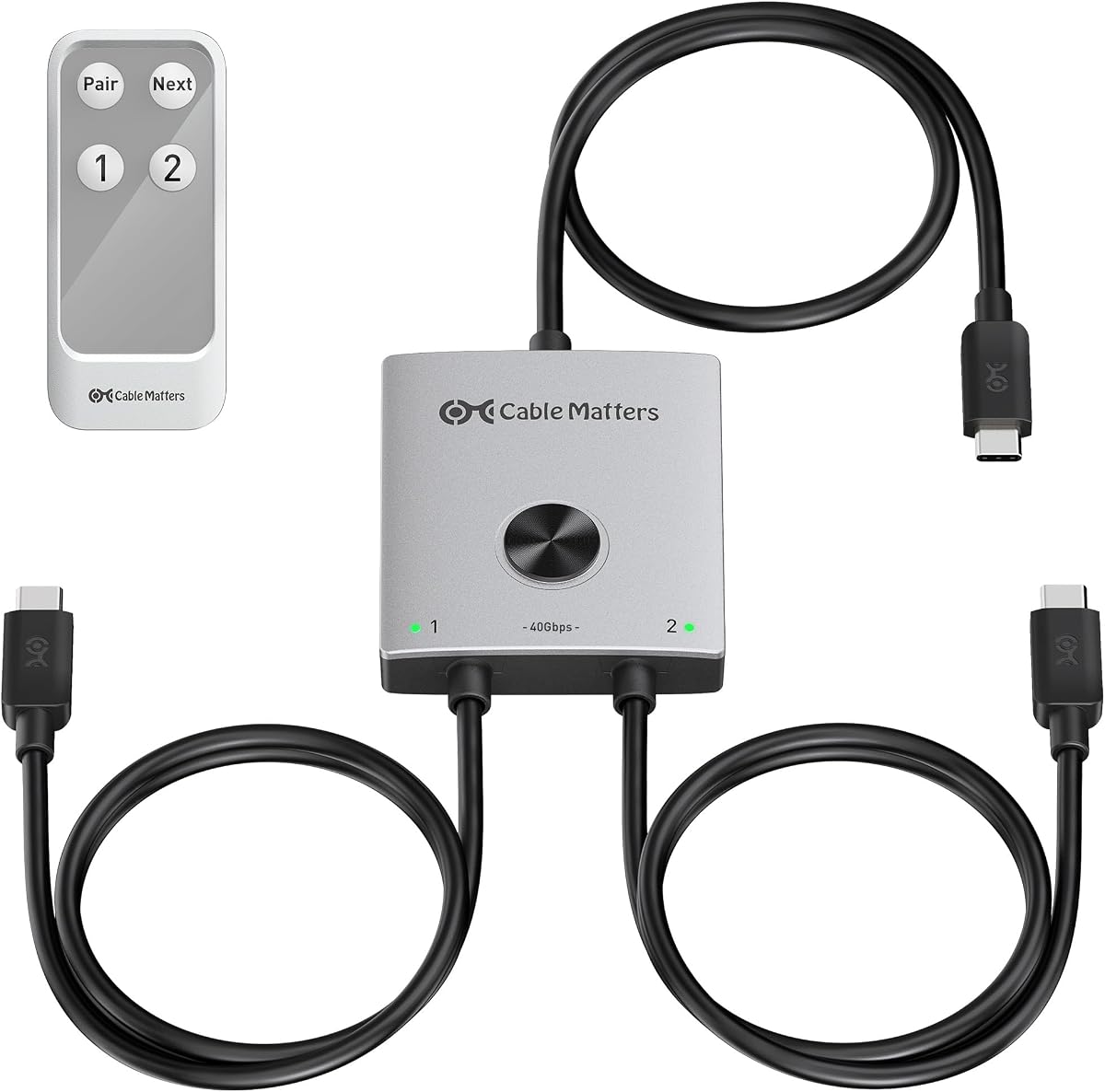
This premium switch sets the bar for laptop with KVM support with 40Gbps bandwidth. It connects to Thunderbolt 4 docks ensuring maximum speed for video and data.
We may earn a commission when you buy through this link, at no additional cost to you.
RF remote switching offers freedom of movement without line of sight. Built-in cables streamline setup removing the need for extra input connections.
The 140W Power Delivery supports high wattage devices effectively. This ensures powerful laptops stay charged without separate power brick interference.
Perfect for professionals needing maximum speed. It delivers top-tier performance for high-end dock and monitor sharing.
40Gbps bandwidth handles heavy data loads. This ensures no bottlenecks for storage or video streams.
RF remote switches without direct visibility. This adds convenience for complex or hidden setups.
We may earn a commission when you buy through this link, at no additional cost to you.
Selecting the right KVM switch involves understanding your monitor laptop and peripheral requirements to ensure seamless performance.
Determine how many screens your setup requires. Basic units support single monitors while premium models offer dual or triple display options.
Choose a switch that matches your physical screen count for optimal workspace efficiency.
Check the maximum resolution and refresh rate the switch supports. 4K@60Hz is standard but 8K options exist for high-end tasks.
Ensure the device handles your preferred visual clarity without flickering or quality loss.
Confirm whether your laptop uses HDMI DisplayPort or USB-C. USB-C often requires DP Alt Mode for video transmission.
Select a switch with ports that match your laptops output capabilities.
USB ports speed affects how fast peripherals and storage devices perform. USB 3.0 offers 5Gbps while Gen2 models reach 10Gbps.
Opt for higher speeds if you transfer large files frequently.
Look for Power Delivery charging to reduce cable clutter. 100W or 140W ratings ensure your laptop stays charged while connected.
This simplifies your desk by combining video data and power into one connection.
Decide between manual buttons wired remotes or wireless options. Wireless remotes offer flexibility but may require batteries.
Choose a method that fits your reach and desk layout.
Verify compatibility with your specific OS such as Windows or macOS. Some features like multi-monitor extend modes may vary by system.
Check product details for any known limitations before purchasing.
Some units include Ethernet ports to share internet connections. This keeps downloads running while you switch active computers.
This feature is useful for keeping background tasks uninterrupted during work.
Connect your computers to the switch using compatible video cables such as HDMI or USB-C. Plug in your peripherals like keyboards and mice to the USB ports on the switch.
Power on the connected devices and use the switch button or remote to toggle between systems. Ensure the active device displays correctly before working.
Clean the unit with a dry cloth to remove dust and avoid liquids. Proper handling ensures long-term reliability for your hardware setup.
Laptop with KVM support refers to a device that allows you to control multiple computers using a single set of peripherals and monitors. It simplifies workspace management by reducing cable clutter and enabling quick transitions between systems.
Most modern laptops with HDMI or USB-C ports work well. Ensure USB-C models support video output via DP Alt Mode. Check compatibility before purchasing for best results.
Many modern switches offer Power Delivery charging. Look for units with 100W or higher ratings to ensure your laptop stays powered during use.
4K@60Hz is the standard for crisp visuals. Higher resolutions like 8K are available for specialized tasks. Select based on your monitor capabilities.
Flickering often occurs due to incompatible video standards or poor cable quality. Ensure you use high-speed cables and verify EDID compatibility.
Yes but you need a switch that supports multi-monitor output. Some models allow dual or triple screens for extended workspaces.
We have explored ten top models ranging from budget-friendly options to high-end docking stations. Each offers unique benefits depending on your specific needs and setup.
Prioritize features like Power Delivery and multi-monitor support to enhance your daily workflow. Matching the switch to your laptops ports is crucial for seamless operation.
Prices can change so check the latest listings before buying to secure the best deal for your professional workspace today.