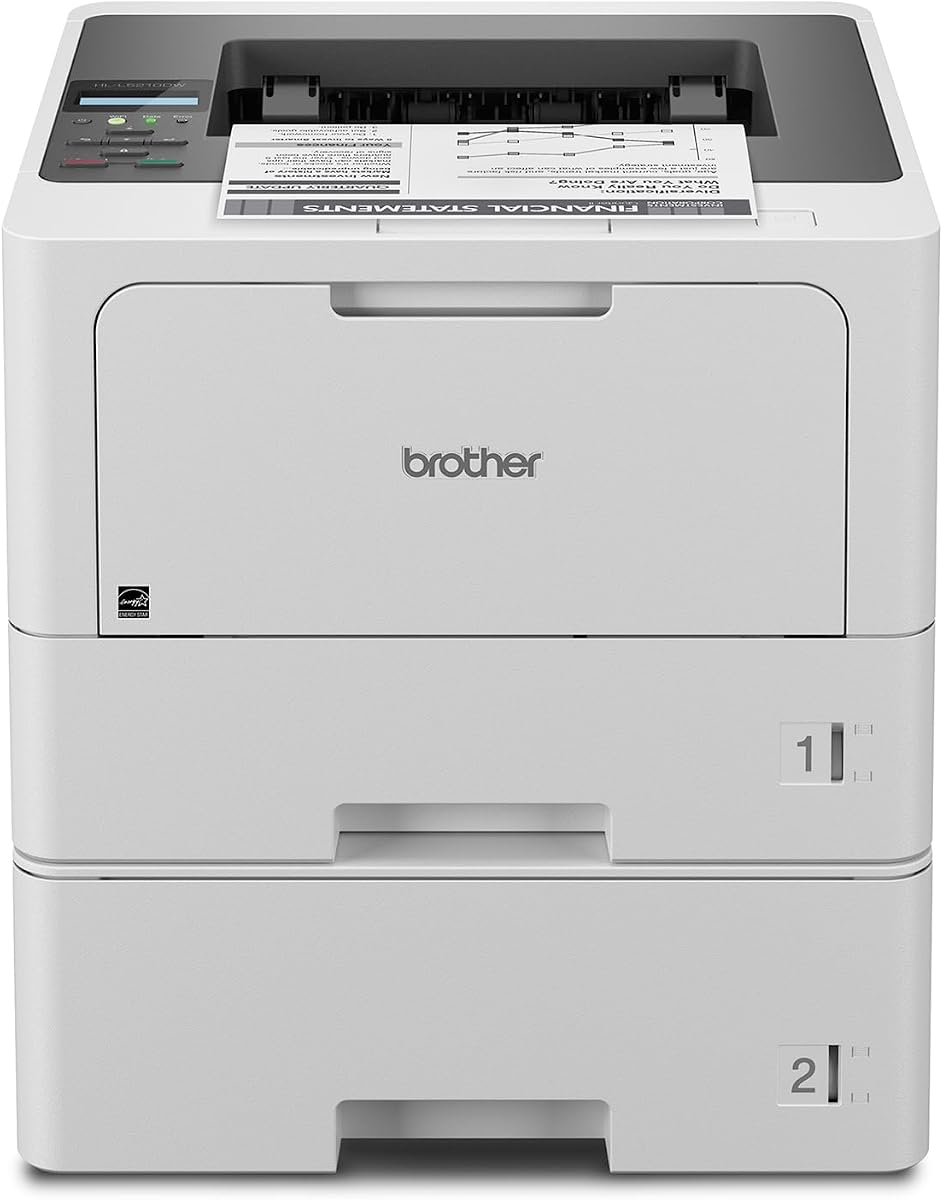
Brother HL-L5210DWT
4.3Editor score
48 ppm monochrome print speed
Dual paper trays for capacity
Gigabit Ethernet connectivity
This guide compares the top laser printers for large workgroups, analyzing speed, security, paper capacity, and total cost of ownership for busy enterprise
Large workgroups require reliable printing solutions that can handle high volumes without slowing down daily operations. A capable laser printer ensures that documents are produced quickly and with professional quality to keep teams productive throughout the day.
We evaluated ten top models based on their print speeds, network connectivity, security features, and paper handling capabilities. Our analysis focuses on devices designed to meet the demands of mid to large-sized offices requiring consistent performance.
Each selection highlights specific strengths such as duplex scanning, mobile support, or energy efficiency to help you find the right fit. Please note that pricing and availability can fluctuate so check current listings before making a final purchase decision.
4.3Editor score

4.4Editor score

4.0Editor score
The following comparison table provides a side-by-side overview of key specifications for each model to help you quickly identify the device that best fits your office workflow and security requirements.


The Brother MFC-L8930CDW stands out as a top choice for workgroups needing reliable color printing. With a strong rating and professional output quality it delivers sharp documents essential for client-facing tasks.
We may earn a commission when you buy through this link, at no additional cost to you.
Its key strengths include fast scanning up to 104 ipm and advanced security layers that protect sensitive data during transit. The built-in NFC card reader simplifies authentication for employees using badge access systems.
While the device is slightly larger than monochrome alternatives it compensates with a multipurpose tray for custom media and energy-efficient operations. The compact design relative to previous models helps it fit in crowded office spaces.
Teams requiring vibrant color prints and secure network integration should strongly consider this model. Its balance of speed and features makes it a versatile addition to any mid to large-sized workgroup environment.
Two-sided scanning at high speeds reduces manual handling and speeds up digitization workflows for legal and compliance teams.
Triple Layer Security and NFC authentication ensure that unauthorized users cannot access or intercept printed documents.
We may earn a commission when you buy through this link, at no additional cost to you.
For offices focused on cost-efficient text printing the Brother HL-L5210DWT offers exceptional value without sacrificing speed. Its high rating reflects reliable performance for daily document processing tasks.
We may earn a commission when you buy through this link, at no additional cost to you.
This model excels with a 48 ppm print speed and dual paper trays that reduce refilling interruptions. The inclusion of super high-yield toner cartridges further lowers the cost per page for high-volume departments.
Users might miss color capabilities or a touchscreen interface but the robust networking and expandable paper capacity make it ideal for general office use. The compact design fits easily into smaller workspaces.
Budget-conscious managers seeking a fast and dependable monochrome printer will find this unit highly suitable. It streamlines workflows by minimizing downtime and offering flexible connection options for various devices.
Using super high-yield toner significantly reduces operational costs over time which is critical for large departments.
Built-in Gigabit Ethernet and dual band wireless ensure seamless integration into existing wired or wireless networks.
We may earn a commission when you buy through this link, at no additional cost to you.
The HP LaserJet Enterprise M406dn is designed for teams that prioritize speed and security in their printing infrastructure. Its high rating indicates consistent performance for entry-level enterprise needs.
We may earn a commission when you buy through this link, at no additional cost to you.
Key strengths include rapid 42 ppm printing and HP Wolf Enterprise Security which actively detects and self-heals from malware threats. This proactive approach keeps sensitive business data protected without user intervention.
Although it lacks built-in Wi-Fi the Ethernet connection provides stable network access. The 2.7-inch color display allows for direct printing tasks without needing a computer which improves overall efficiency.
This printer is best suited for wired environments requiring robust security and reliable speed. Organizations looking to future-proof their setup can benefit from HP FutureSmart firmware updates that optimize the investment.
HP Wolf Enterprise Security uses defense-in-depth layers to protect against threats and ensure data integrity.
Automatic 2-sided printing saves paper and speeds up document processing for internal reports and memos.
We may earn a commission when you buy through this link, at no additional cost to you.
For workgroups needing fast monochrome processing the Brother MFC-L6810DW delivers impressive 52 ppm speeds and high volume scanning. It is rated well for its ability to handle heavy daily workloads.
We may earn a commission when you buy through this link, at no additional cost to you.
Its standout features include single-pass two-sided scanning up to 200 ipm and an expandable paper capacity of up to 1660 sheets. These capabilities minimize downtime and allow staff to focus on core tasks.
The integrated NFC card reader enhances security by requiring badge authentication for print release. While the initial investment is higher the lifetime value from included toner justifies the cost for busy teams.
Mid to large workgroups with high-volume requirements will appreciate this model's efficiency. It is a robust solution for departments that need to produce and digitize documents quickly and securely.
Two-sided scanning at 200 ipm ensures that large contracts are digitized without delay.
Integrated NFC card reader ensures that only authorized personnel can release sensitive print jobs.
We may earn a commission when you buy through this link, at no additional cost to you.
The Brother HL-6210DW offers professional performance with 50 ppm speeds and a robust paper tray suitable for active workgroups. Its rating highlights reliable operation for businesses needing consistent output.
We may earn a commission when you buy through this link, at no additional cost to you.
It stands out with a 520-sheet main tray and a super high-yield toner option that provides up to 18000 pages. This combination reduces the frequency of refills and lowers operational costs significantly.
Users should note that this is a printer-only model without scanning capabilities which limits its role to output tasks. However the advanced security features ensure network safety and document protection during transmission.
Teams seeking a dedicated, high-speed printer for general office documents will find this device effective. It integrates seamlessly via wired and wireless options making it easy to share across the network.
The 520-sheet tray minimizes interruptions allowing uninterrupted professional-grade printing for busy days.
Triple Layer Security features safeguard your network and devices from potential threats during operation.
We may earn a commission when you buy through this link, at no additional cost to you.
The Brother MFC-L5915DW delivers high-quality monochrome output with speeds up to 50 ppm making it suitable for busy offices. Its rating reflects a balance of performance and ease of use.
We may earn a commission when you buy through this link, at no additional cost to you.
Key strengths include a 70-page auto document feeder and a large document glass that supports legal-sized documents. This flexibility allows teams to scan a variety of materials without needing multiple devices.
While it lacks an NFC card reader the dual-band wireless and Gigabit Ethernet options ensure flexible connectivity. The inclusion of ultra high-yield toner cartridges helps keep operating costs low for daily tasks.
Small to mid-sized workgroups looking for a reliable all-in-one solution should consider this model. It provides essential scanning and printing functions with enough speed to keep up with standard office demands.
Single-pass two-sided scanning ensures that multi-page documents are digitized efficiently and accurately.
Ultra high-yield toner options help reduce the overall cost per page for high-volume printing needs.
We may earn a commission when you buy through this link, at no additional cost to you.
Designed for growing businesses the HP LaserJet Enterprise M507n offers consistent high-quality printing with robust security measures. Its rating indicates solid performance for enterprises prioritizing data protection.
We may earn a commission when you buy through this link, at no additional cost to you.
This model features over 200 embedded security features that help protect printer information and thwart malware. Centralized management via HP JetAdvantage Security Manager allows IT teams to maintain control over policies and updates.
Optional mobile printing capabilities add flexibility for staff using smartphones or tablets without needing apps. The toner cartridges are designed to avoid reprints and wasted supplies which contributes to overall operational efficiency.
Enterprises needing a secure and manageable printing environment will find this device valuable. It is best suited for organizations that require centralized control and high-level security for their network devices.
Over 200 embedded security features protect printer information and stop attacks continuously.
HP Web JetAdmin allows easy device addition and policy updates to build business efficiency.
We may earn a commission when you buy through this link, at no additional cost to you.
The HP LaserJet Enterprise MFP M634z is a powerhouse for high-volume enterprise environments needing speed and security. Its rating underscores its ability to combine performance with advanced security features.
We may earn a commission when you buy through this link, at no additional cost to you.
It offers 55 ppm printing and a massive 2300-sheet input capacity with optional trays to minimize downtime. The 9-inch color touchscreen simplifies navigation and allows users to manage complex workflows easily.
While the cost is high the energy efficiency and deep security protections justify the investment for large organizations. It includes features like JetIntelligence that optimize toner usage and reduce overall power consumption.
Large workgroups with demanding printing needs will benefit from this model's productivity features. It is ideal for teams requiring high speed, extensive paper handling, and top-tier security for sensitive documents.
With 55 ppm and fast first page out times business moves forward without printing bottlenecks.
Deepest security in the industry protects sensitive data and helps detect and stop malware attacks.
We may earn a commission when you buy through this link, at no additional cost to you.
For workgroups needing reliable color printing the Brother HL-L8430CDWT provides vibrant output and sharp black results at a reasonable speed. Its high rating reflects strong performance and customer satisfaction.
We may earn a commission when you buy through this link, at no additional cost to you.
It features dual paper trays for mixed media and a super high-yield toner option that helps lower costs. The inclusion of an NFC card reader adds security that is often found only in more expensive models.
Default two-sided printing helps reduce paper use and lower costs which aligns with sustainability goals. The device is designed to support busy offices with a durable build that withstands daily use.
Teams looking for an affordable color solution that does not compromise on security should consider this printer. It balances cost efficiency with essential features to keep office operations smooth and professional.
Reliable performance with print speeds up to 33ppm ensures professional results and high output.
Super high yield replacement toner cartridges provide thousands of pages to reduce overall printing costs.
We may earn a commission when you buy through this link, at no additional cost to you.
The Brother HL-L6310DW delivers enterprise-level performance with 52 ppm speeds and built-in security features for workgroups. Its rating highlights reliable output for mid to large-sized office environments.
We may earn a commission when you buy through this link, at no additional cost to you.
It offers an ultra high-yield toner cartridge that provides up to 18000 pages and significantly reduces operational costs. The integrated NFC card reader ensures that print release is secure and authorized.
Device management solutions allow mass distribution of configurations and firmware updates to simplify IT maintenance. An optional cabinet can turn the printer into a floor-standing configuration for better integration.
Organizations needing a fast and secure monochrome printer with advanced management tools will find this model effective. It is designed for easy deployment and management across large enterprise networks.
High-quality output and print speeds up to 52ppm boost productivity for busy workgroups.
Triple Layer Security features safeguard your network and protect documents in transit.
We may earn a commission when you buy through this link, at no additional cost to you.
Selecting the right printer for a large workgroup requires evaluating several technical and operational factors. This guide breaks down the key considerations to help you make an informed decision that aligns with your office needs.
Print speed is critical for large workgroups to prevent bottlenecks in document production. Look for models with speeds of at least 40 ppm for text and 30 ppm for color to ensure rapid output during peak hours.
Prioritize high-speed devices that match your daily page volume to maintain efficiency and reduce wait times for users.
Large workgroups benefit from printers with high paper capacity to minimize manual refills. Models with expandable trays and multiple input sources ensure continuous operation even with high volume demands.
Choose units with at least 500 sheets of standard capacity to reduce maintenance interruptions throughout the day.
Security is paramount for enterprise environments handling sensitive data. Look for printers with advanced security features such as NFC card readers, secure print protocols, and embedded malware protection.
Ensure the device supports badge authentication and data encryption to protect information during transit and storage.
Versatile connectivity ensures that the printer can be shared across various devices and platforms. Options like Gigabit Ethernet, dual-band Wi-Fi, and mobile printing support are essential for modern offices.
Select a model with both wired and wireless capabilities to integrate smoothly with your existing network infrastructure.
Beyond the initial purchase price consider the cost of toner and maintenance. High-yield cartridges and energy-efficient designs lower the cost per page and reduce long-term operational expenses.
Evaluate the cost of consumables and energy ratings to ensure the printer remains affordable over its lifespan.
Many teams require scanning capabilities to digitize documents efficiently. Look for models with auto document feeders and two-sided scanning to speed up the digitization process.
Choose devices with fast scanning speeds and optical character recognition to convert printed text into searchable files.
A user-friendly interface simplifies navigation and task setup for employees. Touchscreens with customizable shortcuts can improve workflow and reduce training time for new staff.
Ensure the printer supports device management solutions to allow IT teams to easily deploy and update configurations across the network.
Regular maintenance is essential to keep your printer running smoothly. Clean the exterior and interior with a soft cloth to remove dust that can affect print quality or cause mechanical issues.
Monitor toner levels and replace cartridges before they are completely empty to prevent streaks or blank pages. High-yield cartridges reduce the frequency of these changes and ensure consistent performance.
Use the manufacturer recommended settings for paper types to avoid jams and maintain print quality. Updating the firmware regularly also ensures the device has the latest security patches and features.
For large workgroups, a print speed of at least 40 to 50 pages per minute is ideal for monochrome printing. This ensures that large batches of documents are processed quickly without creating long queues for staff.
NFC security is highly important for large workgroups as it prevents unauthorized access to sensitive documents. Users must present an ID badge to release print jobs which adds a vital layer of data protection.
Not every large workgroup needs color printing; monochrome models are often sufficient for internal documents. However if you regularly produce marketing materials or client reports color capabilities may be necessary.
High-yield toner cartridges provide more pages per cartridge which reduces the frequency of replacements. This lowers the cost per page and minimizes downtime for maintenance in busy office environments.
Yes many modern enterprise printers support centralized management tools. These allow IT teams to push updates and configure settings for multiple devices from a single interface.
A workgroup printer should have at least 500 sheets of paper capacity to reduce refill frequency. Larger workgroups should opt for expandable trays to handle thousands of pages efficiently.
Dual-band Wi-Fi is beneficial as it offers better stability and speed compared to standard Wi-Fi. It reduces interference in crowded network environments which is common in busy offices.
We have reviewed ten top laser printers suitable for large workgroups highlighting their unique strengths in speed security and capacity. The Brother MFC-L8930CDW stands out as an all-rounder for color and monochrome needs.
When selecting a printer prioritize security features and paper handling to match your specific team demands. Whether you need high-speed monochrome output or color capabilities there is a model that fits your budget.
Remember that prices and availability can change so verify current listings before making a purchase. Choosing the right device ensures your team remains productive and secure in an evolving business environment.