
AULA WIN68 HE
4.5Editor score
8000Hz Polling Rate
Adjustable Actuation Point
Web-Based Driver Support
This guide compares the best Keyboard for Valorant to help you choose the right gaming keyboard with rapid trigger, magnetic switches, and fast polling for
Finding the right Keyboard for Valorant is crucial for competitive players who need speed and precision. The right keyboard can improve your reaction times and ensure every shot lands exactly when you intend during intense matches.
We evaluated ten top-rated keyboards based on their switch technology, polling rates, and build quality. Each product was analyzed for features like rapid trigger, hall effect sensors, and ergonomic designs to help you make an informed decision.
Every pick in this list highlights unique strengths tailored to different playstyles and budgets. Keep in mind that prices and availability can change frequently, so check the current listings before making your final purchase decision.
4.5Editor score
5.0Editor score

4.6Editor score
The following table provides a side-by-side comparison of all ten keyboards evaluated in this guide. Use this overview to quickly identify key specifications and features that matter most for your Valorant setup.







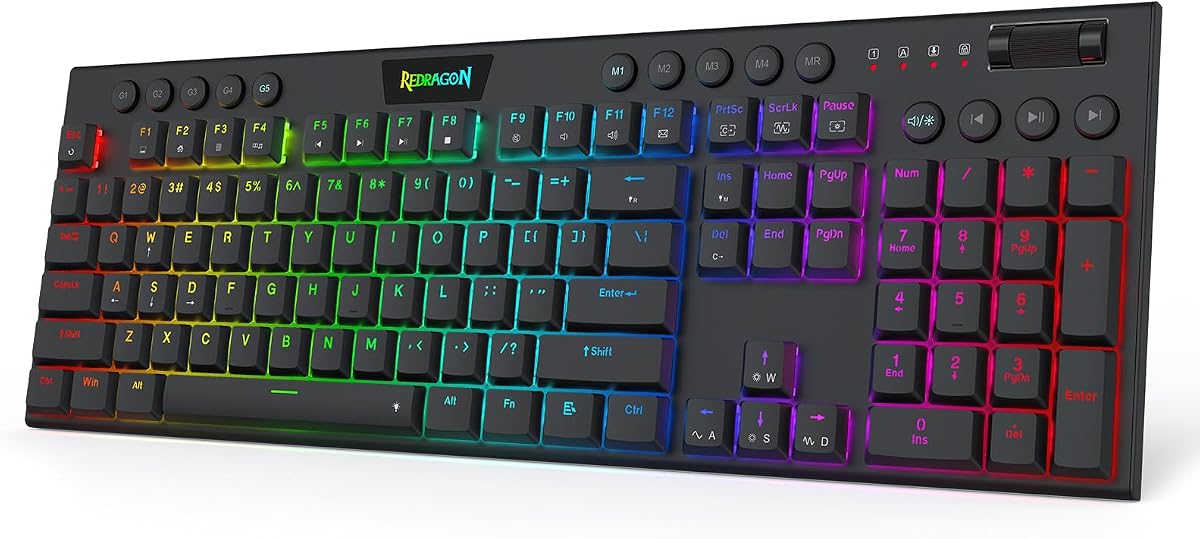
The Redragon K618 HE stands out as a top contender for Valorant players seeking speed and comfort. With its low-profile magnetic switches, it offers rapid actuation without the bulk of traditional keyboards. This model has earned a perfect rating from users who appreciate its precision.
We may earn a commission when you buy through this link, at no additional cost to you.
Its standout feature is the ability to customize actuation points between 0.1mm and 2.8mm. This flexibility allows players to fine-tune their keystrokes for optimal counter-strafing. The dedicated macro keys provide quick access to commands without needing extra software.
While it lacks wireless connectivity, the wired connection ensures stable input during intense matches. The slim design reduces wrist strain over long sessions. These trade-offs are minor compared to the performance gains offered by its magnetic switch technology.
This keyboard is ideal for competitive gamers who prioritize speed and tactile feedback. If you want a reliable tool that enhances your aiming and movement, this is a strong choice. It balances cost and performance better than many competitors in its class.
The low-profile magnetic switches detect presses without physical contact, enabling quicker stops and sharper direction changes.
A single knob manages brightness and volume, freeing you from memorizing complex key combinations during gameplay.
We may earn a commission when you buy through this link, at no additional cost to you.
The AULA WIN68 HE delivers exceptional performance for its price. It features advanced hall effect magnetic switches that allow for adjustable actuation and rapid trigger mode. Gamers looking for a competitive edge without breaking the bank will find this option compelling.
We may earn a commission when you buy through this link, at no additional cost to you.
Its 8000Hz polling rate ensures inputs are registered instantly. This reduces latency significantly compared to standard keyboards. The web driver makes it easy to map keys and adjust settings without installing heavy software on your system.
The lack of wireless connectivity is a limitation for some setups. Additionally, the driver is Windows-only, which may exclude Mac users. However, the wired connection provides stability that is often preferred in competitive gaming scenarios.
This keyboard is perfect for budget-conscious gamers who need reliability and speed. It offers features typically found in more expensive models. For those building a high-performance setup on a tight budget, this is a top recommendation.
With a minimum RT step of 0.02mm, you get lightning-fast reset speeds for quick directional changes.
Access the web driver from any device to remap keys and set macros without worrying about system compatibility.
We may earn a commission when you buy through this link, at no additional cost to you.
The ASUS ROG Strix Scope II combines premium build quality with versatile connectivity. It offers Bluetooth, 2.4GHz wireless, and wired options. This makes it suitable for both gaming and productivity tasks. The 96% layout saves space while keeping the number pad.
We may earn a commission when you buy through this link, at no additional cost to you.
Its ROG NX Snow switches are pre-lubricated for a smooth feel. The hot-swappable design lets you change switches without soldering. Sound dampening foam reduces noise, making it ideal for shared spaces. The battery life is impressive for wireless use.
While it is pricier than other options, the versatility justifies the cost. The larger size might be an issue for smaller desks. However, the ability to connect to multiple devices simultaneously is a valuable feature for multitasking.
This keyboard is best for users who want a high-end experience with flexibility. It suits those who value sound quality and build durability. If you need a keyboard that transitions seamlessly from gaming to work, this is an excellent choice.
Connect via Bluetooth to three devices or use low-latency 2.4GHz wireless for lag-free competitive gaming.
Hot-swappable switches allow you to tailor the tactile feel to your personal preference over time.
We may earn a commission when you buy through this link, at no additional cost to you.
The Redragon K673 HE focuses on providing rapid trigger capabilities at an accessible price. Its magnetic switches detect presses without contact, which reduces wear and increases speed. This model is designed specifically for moments requiring quick stops and precise shots.
We may earn a commission when you buy through this link, at no additional cost to you.
The floating structure and noise dampening layers provide a soft typing feel. You can save multiple actuation profiles for different games. This helps maintain consistency across various titles. The knob simplifies media and lighting adjustments during play.
While the software is functional, it may lack advanced features found in higher-end brands. The build feels less robust compared to premium models. However, for the price, it offers core gaming features that are hard to beat.
This keyboard is suited for gamers who prioritize speed over luxury features. It provides a strong entry point into magnetic switch technology. If you need reliable rapid trigger performance without spending a lot, this is a great option.
Next-gen UltraMag POM switches ensure your fire command registers exactly when you mean it.
Rapid Trigger cuts redundant keystrokes, helping you stay agile during fast-paced movement.
We may earn a commission when you buy through this link, at no additional cost to you.
The Razer Huntsman Mini uses optical switches that actuate at the speed of light. This technology is known for reliability and speed. The compact 60% layout frees up desk space for mouse movement. It includes Razer Chroma RGB for extensive personalization.
We may earn a commission when you buy through this link, at no additional cost to you.
Snap Tap technology allows you to toggle between directional inputs quickly. This is useful for counter-strafing in shooters. The PBT keycaps resist wear and provide a textured feel. Razer Synapse enables deep customization of macros and lighting.
Unlike hall effect boards, it lacks true rapid trigger reset capabilities. This means you cannot reset a key mid-depression for faster movement. However, the optical switches are still very fast and durable for typical gaming loads.
This is a solid choice for fans of the Razer ecosystem. It offers high performance and aesthetic flexibility. If you prefer a well-established brand with extensive software support, this keyboard is a strong contender.
Prioritize the latest input between assigned keys for responsive in-game movement.
Oil-resistant double-shot PBT keycaps ensure longevity and resistance to grime buildup.
We may earn a commission when you buy through this link, at no additional cost to you.
The Corsair Clipper PRO MINI brings robust durability to a compact form factor. Its IP57 rating means it can withstand spills and dust. This is rare for a gaming keyboard. The MGX switches offer adjustable actuation and rapid trigger capabilities.
We may earn a commission when you buy through this link, at no additional cost to you.
Smart Tap and Tap Lock features give you better control over repeated inputs. This helps reduce finger fatigue during long sessions. The sound dampening keeps the noise level down. It is a perfect fit for tight desk setups.
The 60% layout requires using function keys for some inputs. This might take getting used to if you rely on arrow keys. However, the speed of the switches compensates for the reduced space. It is a high-performance tool.
This model is ideal for gamers who value durability and precision. If you want a keyboard that can handle spills and still perform well, this is a great pick. It combines build quality with essential gaming features.
Built to handle intense gameplay with water and dust resistance for long-lasting sessions.
Multi-Action features streamline play and reduce finger fatigue with consistent execution.
We may earn a commission when you buy through this link, at no additional cost to you.
The ATTACK SHARK X68 HE delivers some of the lowest latency on the market. With a theoretical latency of 0.125ms, it ensures almost instantaneous input. The hall effect switches support customizable actuation from 0.1mm to 3.4mm. This makes it a serious option for pros.
We may earn a commission when you buy through this link, at no additional cost to you.
It includes a web driver for easy remapping and macro editing. You do not need to install extra software. The top-mount structure provides stability and a Hi-Fi typing sound. The curved wrist rest adds to the ergonomic design.
The brand is less established than others, which might affect long-term support. The lack of wireless options limits portability. However, the raw performance numbers are hard to ignore for competitive players who demand speed.
This keyboard is best for those seeking the absolute fastest response times. If you want to minimize delay between keypress and action, this fits the bill. It is a high-performance tool for serious gamers.
True 8000Hz polling rates reduce latency to an impressive 0.125ms for faster reactions.
Top-mounted structure with double layer PORON ensures quiet and stable typing.
We may earn a commission when you buy through this link, at no additional cost to you.
The Redragon K686 HE offers a balanced package for gamers and typists. It uses next-gen UltraMag POM magnetic switches for contactless actuation. The dual-module floating structure reduces wobble. This makes typing feel silky smooth compared to standard rigid clacks.
We may earn a commission when you buy through this link, at no additional cost to you.
You can save multiple actuation profiles directly in the keyboard's memory. This is handy for switching between games quickly. The noise dampening ensures a quiet environment. The single knob helps manage media without interrupting gameplay.
It lacks wireless connectivity and advanced RGB customization. However, it provides core magnetic features that are often missing in this price range. It is a solid middle-ground option for those who want performance without luxury.
This keyboard is best for those who want a reliable tool for daily use. It performs well in gaming scenarios requiring speed. If you value comfort and consistency, this is a safe and effective choice.
Anti-wobble design paired with dampening layers gives a soft Hi-Fi bounce.
Software-powered precision tuning keeps your setup consistent across games.
We may earn a commission when you buy through this link, at no additional cost to you.
The AULA WIN60 HE allows for hot-swappable magnetic switches. This means you can change switch types without soldering. It features an 8000Hz polling rate for fast response. The compact 60% layout saves significant desk space.
We may earn a commission when you buy through this link, at no additional cost to you.
The web-based driver makes customization easy and accessible. You can remap keys and set macros online. It is compatible with many devices. The RGB lighting adds a nice visual touch. The self-developed switches offer precise actuation.
The 60% layout lacks dedicated arrow keys. This might be inconvenient for tasks outside of gaming. However, the hot-swap feature makes it future-proof. You can tailor the keyboard to your needs over time.
This is an excellent choice for enthusiasts who like to modify their gear. If you value flexibility and speed in a small package, this keyboard works well. It balances compact design with advanced gaming features.
Change switches easily to tailor sound and feel without needing soldering tools.
Remap keys and customize RGB using a streamlined interface in your browser.
We may earn a commission when you buy through this link, at no additional cost to you.
The AULA F75 Pro offers a blend of wireless freedom and customization. It supports Bluetooth, 2.4GHz, and wired connections. The hot-swappable base lets you change switches easily. The side-printed keycaps add a unique look and feel.
We may earn a commission when you buy through this link, at no additional cost to you.
Pre-lubed stabilizers and switches provide a smooth typing experience. The gasket mount design offers a soft, thocky sound. The multi-function knob allows easy adjustment of media and lighting. Battery life is long enough for extended sessions.
While it lacks magnetic rapid trigger features, it is excellent for general gaming and typing. The lack of hall effect sensors means slightly slower resets than magnetic boards. However, the build quality and versatility are standout features.
This keyboard is best for users who want a versatile, wireless setup. If you want to swap switches and connect to multiple devices, this is a great choice. It is suitable for both gaming and daily work tasks.
Connect to up to five devices and switch between them using shortcut keys or a side button.
Hot-swappable base supports 3-pin or 5-pin switches for a personalized typing experience.
We may earn a commission when you buy through this link, at no additional cost to you.
Selecting the right keyboard involves understanding the features that impact performance and comfort.
Hall effect switches are becoming the gold standard for competitive Valorant. They use magnetic sensing instead of physical contact to register keystrokes. This eliminates mechanical bounce and allows for precise actuation points. This technology supports features like rapid trigger, which resets a key as soon as it is released. Optical switches are also fast but rely on light beams rather than magnets. Mechanical switches are traditional but may lack the speed of newer technologies.
Look for hall effect or optical switches if speed is your priority. Check for adjustable actuation points between 0.1mm and 3mm for customization.
Polling rate determines how often your keyboard sends data to your computer. Standard keyboards often use 1000Hz, meaning inputs are checked every millisecond. High-performance keyboards offer 4000Hz or 8000Hz polling rates. This reduces input delay and ensures smoother tracking of rapid movements. While some argue the difference is subtle, competitive players benefit from the margin.
Choose a keyboard with at least 4000Hz polling for the best responsiveness in fast-paced shooters.
Rapid trigger is a feature that allows a key to reset immediately upon release without fully lifting your finger. This is crucial for games like Valorant where quick direction changes are common. Traditional keyboards require a full press and release cycle. Rapid trigger reduces the time needed to repress a key. This can provide a distinct advantage in movement and aiming.
Ensure the keyboard supports rapid trigger or dynamic key activation for the best movement control.
Form factor affects how much desk space your keyboard takes up. Full-size layouts include a number pad which can limit mouse movement. TKL and 60% layouts save space and allow for larger mouse swipes. Compact layouts like 60% often lack dedicated arrow keys, which might be inconvenient for general use. Choose based on your space and preference for key availability.
Go for a 60% or 65% layout to maximize mouse space and improve aim in shooter games.
Connectivity influences stability and flexibility. Wired keyboards offer the lowest latency and are immune to interference. Wireless keyboards provide flexibility and clean setups but may have slight latency. Look for 2.4GHz wireless for gaming to ensure near-wired performance. Bluetooth is better for casual multi-device switching. Decide if you value convenience over absolute raw input speed.
Prioritize wired or 2.4GHz wireless options to avoid latency issues during competitive matches.
A good keyboard should withstand years of intense use. Look for PBT keycaps which resist wear and shine compared to ABS. Aluminum frames add rigidity and reduce flex. Switch durability is also important; hall effect switches often have longer lifespans. Check for water resistance if you drink near your setup. A solid build ensures the keyboard remains stable during rapid inputs.
Choose a model with PBT keycaps and a sturdy frame to ensure long-term durability and consistent performance.
Software allows you to tailor the keyboard to your playstyle. Look for options to remap keys and create macros. Drivers should support actuation point adjustments. On-the-fly macro support is useful for quick changes without software. Web drivers are convenient as they do not require installation. Ensure the software supports your operating system fully.
Select a keyboard with robust software or web-based drivers for flexible and easy configuration.
The typing sound and feel impact comfort during long sessions. Dampening layers reduce the harsh clack of switches. Gasket mounts provide a softer typing feel. Linear switches are smoother and quieter than tactile ones. Choose a sound profile that suits your environment. Quieter keyboards are better for shared spaces.
Look for noise dampening features and linear switches for a smooth and quiet typing experience.
To get the best performance from your keyboard, start by calibrating the switches using the provided software. Adjust the actuation point to a setting that feels natural for your fingers. Lower points offer faster response but may lead to accidental presses if you rest your fingers heavily on the keys.
Keep your keyboard clean to maintain optimal function. Use compressed air to blow out dust from between the switches regularly. For wired models, ensure the cable is not strained or bent sharply as this can lead to internal wire damage over time.
For wireless models, keep the firmware updated via the manufacturer's software to ensure compatibility. Check battery levels before important gaming sessions to avoid interruptions. Store wireless keyboards in a safe place to prevent physical damage to connectors or cables.
Yes, hall effect keyboards are generally better for Valorant because they support rapid trigger. This allows keys to reset instantly, which is crucial for counter-strafing. Traditional mechanical switches do not offer this feature. If speed and movement precision are your priority, hall effect is the way to go.
A polling rate of 8000Hz is ideal for Valorant as it provides the lowest latency. This ensures that every movement and shot is registered instantly. While 1000Hz is standard, higher rates give a competitive edge in fast-paced situations. Many top players prefer the responsiveness of high polling rates.
While full-size keyboards work, compact layouts like 60% are popular for Valorant. They free up desk space for larger mouse movements which are essential for aiming. However, ensure you can access arrow keys if needed for general tasks. The layout preference is personal but smaller is often better for FPS.
Yes, you can use a wireless keyboard but look for one with 2.4GHz connectivity. Bluetooth may introduce latency which affects gameplay. Wired models generally offer the most stable connection. If you use wireless, ensure the battery is charged to avoid interruptions during matches.
Linear switches are best for Valorant because they are smooth and have no tactile bump. This allows for faster actuation and reset times. Hall effect switches are even better as they offer adjustable actuation. Avoid clicky switches as they are louder and slower to actuate.
To change actuation points, use the driver software provided by the manufacturer. Look for settings related to actuation depth and sensitivity. Most modern gaming keyboards allow you to save profiles for different games. Adjusting this can prevent accidental presses and improve speed.
We have reviewed ten of the best keyboards available for Valorant. Each offers unique features to help you perform better in game. From the Redragon K618 HE to the ASUS ROG Strix Scope II, there is a pick for every need.
Prioritize features like rapid trigger and hall effect switches if speed is your goal. Consider the form factor and connectivity based on your desk setup and preferences. The right tool can make a significant difference in your competitive experience.
Remember to check current prices and availability before buying. Technology and market trends change rapidly. Stay informed to ensure you get the best value and performance for your gaming setup.