
Memory Card Reader, BENFEI 4in1 USB 3.0 and USB-C to SD Micro SD MS CF Card Reader Adapter
4.5Editor score
Reads four card types simultaneously
USB 3.0 and USB-C compatible
18 month warranty included
Compare top compact flash card reader models for speed and compatibility to find the best option for your camera memory cards and devices today.
Finding the right compact flash card reader is essential for photographers and content creators who need reliable data transfer. A good reader should support multiple card types, offer fast USB speeds, and maintain stability during large file transfers to ensure your workflow remains uninterrupted.
We evaluated ten top-rated models based on their compatibility, build quality, transfer speeds, and user feedback. Our analysis focuses on devices that handle CF cards alongside modern formats like SD and Micro SD, ensuring versatility for both legacy and contemporary digital imaging equipment.
Each pick highlights specific strengths such as multi-slot access, dual connector support, or premium aluminum construction. Note that product availability and pricing can change frequently, so verify current details before making a purchase decision to get the best value for your needs.
4.5Editor score

4.6Editor score

4.7Editor score
This side by side comparison details the key specifications and capabilities of the ten selected compact flash card readers to help you identify the model that best fits your specific workflow requirements.


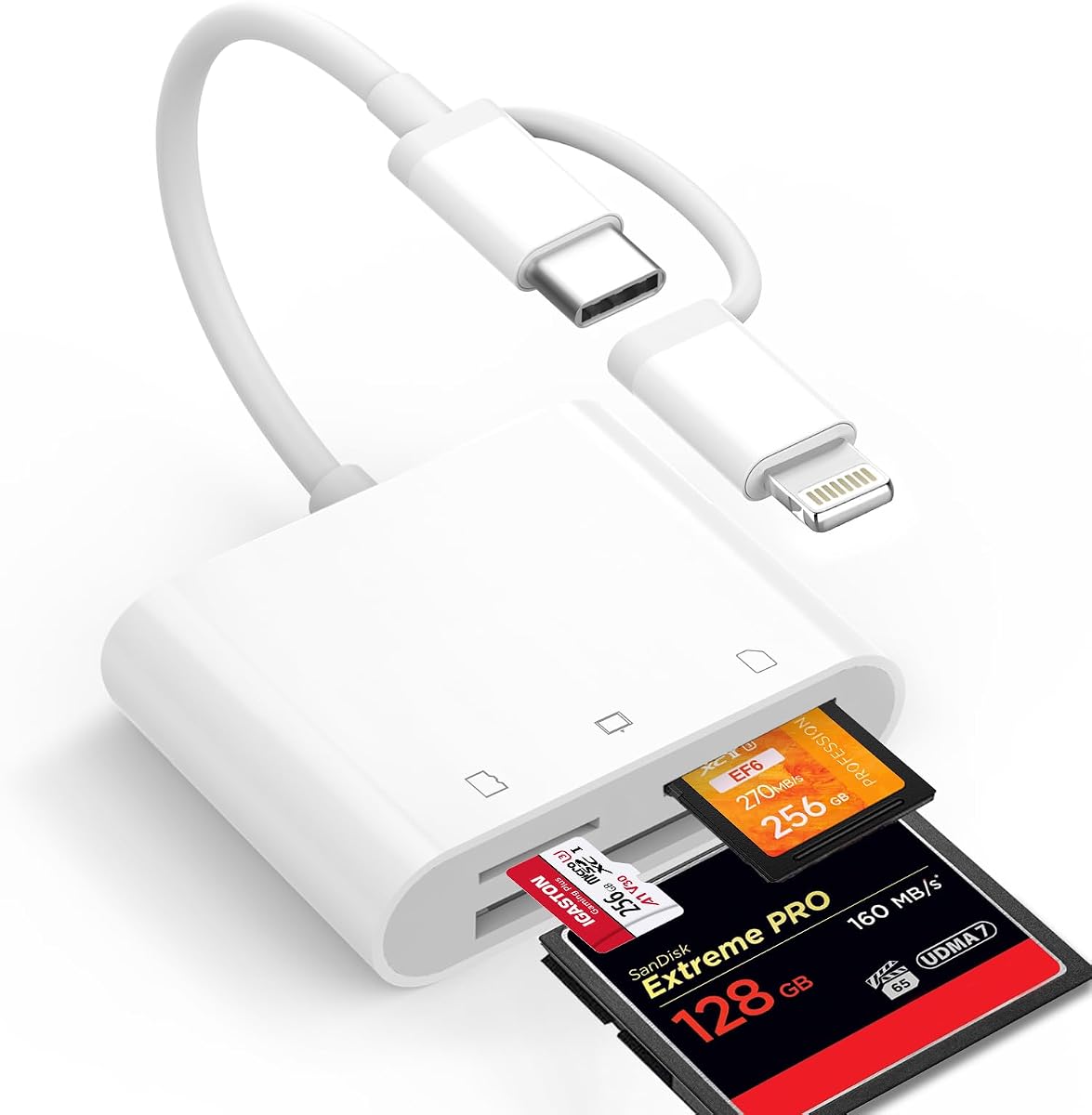

The BENFEI 4in1 card reader stands out as a budget-friendly option that still delivers robust functionality. With a rating of 4.5 stars, users appreciate its ability to handle four different card types at once. It is an excellent choice for those needing basic versatility without spending much.
We may earn a commission when you buy through this link, at no additional cost to you.
Its integrated design supports SD, Micro SD, Memory Stick, and Compact Flash cards. The USB 3.0 and USB-C ports ensure fast data access up to 160MB/sec. This dual connectivity makes it compatible with both older laptops and modern devices like the iPhone 15 series.
While the build is functional, the plastic casing may not feel as durable as metal alternatives. Also, it does not support Memory Stick Standard or CF Type I formats. These trade-offs are acceptable given the low cost and high performance for standard use cases.
Photographers looking for an economical solution will find this reader ideal. It works well with Mac and Windows systems and offers an 18-month warranty. For general data transfers and quick photo access, it remains a top recommendation.
The combination of USB-C and USB 3.0 allows seamless connection to both modern USB-C laptops and legacy USB-A ports without needing extra adapters.
Reading and writing to four cards at once saves significant time when managing footage from multiple camera slots or backup sources.
We may earn a commission when you buy through this link, at no additional cost to you.
The UGREEN SD Card Reader earns top marks for its balance of speed and practicality. Boasting a 4.6 rating, it supports 5Gbps transfer rates which drastically reduce waiting times. Users highlight its ability to handle four cards simultaneously without performance drops.
We may earn a commission when you buy through this link, at no additional cost to you.
Its compatibility spans a wide range of formats including SDXC, Micro SDHC, and Compact Flash. The support for 2TB cards future-proofs the device for high capacity needs. The 1.7 ft cable offers enough length for desktop use while staying compact for travel.
However, the lack of a USB-C port means modern USB-C only devices need an adapter. Additionally, the cable is non-removable which could limit long-term flexibility. Despite these minor issues, the reliability and speed make it a standout option.
This reader is perfect for professionals who value consistency and speed. It works across Windows Mac and Linux systems easily. For everyday photo management and video offloading, it delivers excellent performance at a reasonable price.
Supporting up to 2TB cards ensures compatibility with the latest high-resolution camera formats and large video archives.
No driver installation is required for major operating systems making it ready to use right out of the box.
We may earn a commission when you buy through this link, at no additional cost to you.
The Lexar Multi-Card 3-in-1 is a premium choice for those needing top-tier transfer speeds. With a 4.7 rating, it delivers up to 312MB/s for SD cards and 160MB/s for CF cards. This speed is unmatched in the budget category.
We may earn a commission when you buy through this link, at no additional cost to you.
Its backward compatibility with UHS-I cards ensures it works well with existing equipment. The USB 3.1 interface supports faster throughput than older standards. Lexar's reputation for quality adds confidence to this investment.
The main drawback is the higher price compared to similar multi-slot readers. Also, it only handles three card types at once. For users who prioritize speed over multi-card batching, this is a minor inconvenience worth the performance gain.
Photographers and videographers who move large files daily will appreciate the efficiency. The included two-year warranty provides extra peace of mind. It is an ideal match for pro workflows where time savings are critical.
The 312MB/s read speed ensures large 4K video files are moved to your computer almost instantly.
Built with Lexar quality standards this reader minimizes connection errors and data corruption risks.
We may earn a commission when you buy through this link, at no additional cost to you.
This 6-in-1 reader offers the most versatility by including slots for almost every major memory card format. It supports CFast 2.0 which is crucial for modern cinema cameras. The aluminum body helps dissipate heat during prolonged heavy data transfers.
We may earn a commission when you buy through this link, at no additional cost to you.
The dual USB-C and USB-A connectors allow direct connection to both MacBooks and standard PCs without extra dongles. This design simplifies workflows across different device ecosystems. The 5Gbps speed ensures data moves efficiently even with multiple cards active.
The larger size and complexity might be too much for casual users. Finding the right slot among six options can sometimes be slower than simpler models. However, for archiving legacy formats like XD or CFast it is the only viable choice.
It is highly recommended for users with mixed camera gear or vintage collections. The durable build ensures it can withstand travel demands. If you need to read nearly every card type, this model delivers unparalleled convenience.
Dedicated support for CFast 2.0 makes this reader essential for professional video production workflows.
Dual connectors eliminate the need for extra adapters when switching between USB-A and USB-C ports.
We may earn a commission when you buy through this link, at no additional cost to you.
The ZIYUETEK reader combines solid build quality with useful safety features for everyday use. The aluminum alloy cover helps protect internal components and dissipate heat during intensive transfers. It supports five card types simultaneously for better productivity.
We may earn a commission when you buy through this link, at no additional cost to you.
Its 5Gbps transfer rate ensures that large files are moved quickly. The protection against over-current and voltage fluctuations adds a layer of safety for your connected devices. This makes it a reliable choice for frequent data operations.
While the brand is less known, the performance holds up well against major competitors. Some users might find the online documentation or support slightly limited. However, the plug-and-play nature reduces the need for complex troubleshooting.
This reader is ideal for those wanting a robust solution without paying a premium price. It works well across Windows and Mac systems. For general home or office use it provides consistent results and durability.
Built-in protection against voltage spikes ensures your connected computer and cards remain safe during power fluctuations.
The aluminum housing effectively draws heat away during long sessions to maintain stable performance.
We may earn a commission when you buy through this link, at no additional cost to you.
The UGREEN USB C SD Card Reader is designed with modern Apple devices in mind. It supports SD Micro SD CF and Memory Stick cards directly through its USB-C interface. This makes it perfect for iPhone 15 and MacBook users.
We may earn a commission when you buy through this link, at no additional cost to you.
Users praise its seamless integration with Mac and iPad systems. The transfer rate reaches 5Gbps allowing quick access to photos and videos. It supports simultaneous access so you do not need to remove cards to check files.
Since it relies on USB-C it is not ideal for older laptops without adapters. The price is slightly higher than generic models but justified by the build quality and brand trust. It remains a top choice for iOS ecosystems.
Content creators using iPads or MacBooks will find this reader indispensable. It simplifies the workflow by removing extra conversion steps. For those needing reliable direct USB-C connectivity this model is highly recommended.
Specifically optimized for iPhone 15 iPad Pro and MacBooks to ensure stable connection and power management.
Access all four connected slots at once to browse multiple card contents without physical swapping.
We may earn a commission when you buy through this link, at no additional cost to you.
The SmartQ C368 is a straightforward solution for users who want basic functionality without complications. It supports the four most common card types and offers 5Gbps speeds. The blue LED light provides a clear visual status during use.
We may earn a commission when you buy through this link, at no additional cost to you.
Users appreciate the simplicity and quick setup. The cable organizer helps keep the desk tidy when storing the device. Despite its simple design it performs well with Mac and Windows operating systems without requiring drivers.
The build is mostly plastic which might not suit rugged environments. There are no advanced features like simultaneous card access for more than four types. However, for standard photo transfers it remains efficient and effective.
This reader is a great pick for casual photographers and travelers. It fits easily in a pocket and handles daily tasks well. If you value ease of use over advanced specs this model is a solid choice.
The blue LED lights up when the device is powered helping you confirm active connections instantly.
A dedicated cable organizer is included to prevent tangles and protect the wire during transport.
We may earn a commission when you buy through this link, at no additional cost to you.
This specialized reader stands out by supporting CFast 2.0 alongside standard SD and CF cards. This capability makes it a rare find for those dealing with professional cinema gear. The dual USB-C and USB-A connectors offer flexible connection options.
We may earn a commission when you buy through this link, at no additional cost to you.
The aluminum housing ensures durability during travel and heavy use. Users note that it handles 4K and 8K video transfers efficiently. The 5Gbps speed ensures that high bitrate files move without bottlenecks.
Given its specialized purpose it is priced higher than general readers. If you do not own CFast 2.0 cards this model might be overkill. However for the right user it is an essential tool for video production.
Professional videographers will value the reliability and format support. The two year warranty adds confidence to this investment. It is an excellent choice for those managing high capacity multi-camera shoots.
Dedicated support for CFast 2.0 ensures compatibility with high-end cinema cameras used in film production.
The solid aluminum housing withstands drops and rough handling better than standard plastic alternatives.
We may earn a commission when you buy through this link, at no additional cost to you.
The Denlane reader is optimized for users who want to view photos directly on their iPhones. It features both Lightning and USB-C connectors in a single device. This design allows access to both newer and older Apple models.
We may earn a commission when you buy through this link, at no additional cost to you.
Users find it easy to transfer photos without needing extra apps. The bi-directional feature allows saving phone photos to memory cards as well. It works well for travel or quick backups without relying on cloud storage.
Only three card types are supported and cannot both connectors at once. The fixed cable design limits flexibility but improves stability during transfer. It remains a convenient tool for casual mobile users.
For iPhone and iPad users this reader simplifies content management. It supports CF SD and Micro SD cards easily. If you need to transfer data directly to your phone this model is highly practical.
Connect directly to iPhone 15 and older models to view photos without third party software.
Move photos from your camera to your phone and from your phone to SD cards efficiently.
We may earn a commission when you buy through this link, at no additional cost to you.
The ChiaoPio reader is built for USB-C devices like the iPhone 15 and iPad Pro. Its built-in cord ensures you never lose an adapter when connecting. It supports CF SD and Micro SD cards for basic photography needs.
We may earn a commission when you buy through this link, at no additional cost to you.
Users appreciate that it requires no external power source. The direct connection ensures stable data access even during long transfers. It works seamlessly with macOS and iPadOS to allow instant viewing of images.
The built-in cord is non-removable which might be a drawback if the cable breaks. It is also not compatible with older Lightning devices. For those with USB-C hardware this model offers solid value and ease of use.
It is an excellent choice for iPad Pro users looking for a compact solution. The price is reasonable for the functionality provided. If you need to move CF or SD files to your tablet this reader works well.
The built-in USB-C cord is fixed to prevent loss and simplify connection to modern devices.
Draws power directly from the host device meaning no batteries or extra adapters are needed.
We may earn a commission when you buy through this link, at no additional cost to you.
Selecting the right reader involves understanding compatibility speed and build quality. This guide breaks down the key factors to consider before purchasing to ensure you get a device that meets your professional or personal needs.
Ensure the reader supports the specific memory cards you use. Some readers handle only SD and Micro SD while others support Compact Flash CFast and XD cards. Always check if your camera's card type is listed in the specs.
Verify that your card format is supported to avoid buying a device that cannot read your existing media.
Look for USB 3.0 or higher interfaces which offer speeds up to 5Gbps. Faster speeds reduce the time needed to move large video files. Check if the product specifies actual read/write rates to avoid false claims.
Choose a reader with USB 3.0 speeds to ensure quick data access and avoid long waiting times.
Decide whether you need USB-A USB-C or both. USB-C is standard for modern Macs and phones while USB-A is found on older laptops. Dual connector readers offer flexibility but may come at a higher price.
Select a connector type that matches your current devices to avoid the need for extra adapters.
Aluminum housings dissipate heat better and resist physical damage compared to plastic. If you travel often a metal chassis will likely last longer. Consider the thickness and port protection if you carry it daily.
Opt for an aluminum build to ensure longevity and better heat management during heavy transfers.
Multi-slot readers allow you to read multiple cards at once. This saves time when managing footage from two card slots in a camera. Ensure the product explicitly states simultaneous read/write capabilities.
Choose a multi-slot reader if you want to transfer data from multiple cards without swapping them manually.
Verify that the device supports your OS without extra drivers. Most modern readers work with Windows macOS and Linux out of the box. This plug-and-play feature is essential for quick setup and trouble-free use.
Ensure cross-platform compatibility to avoid driver installation issues on your specific computer system.
A longer warranty indicates confidence in product quality. Look for at least an 18-month coverage to protect against defects. Check customer support availability to resolve any connection issues quickly.
Prioritize models with strong warranty terms to secure your investment against potential hardware failures.
Consider the size and whether the cable is detachable. Fixed cables are convenient but non-removable ones can be fragile. A short cable is better for travel but ensure it is long enough for your desk setup.
Evaluate the physical dimensions and cable style to match your usage scenario for optimal convenience.
Always insert memory cards until they click into place before plugging the reader into your computer. This ensures a stable connection and prevents data corruption during the initial handshake.
Use the provided cable to connect the reader to a USB port that matches its interface. If using a hub ensure the hub is powered adequately to prevent voltage drops during large file transfers.
Eject the memory card safely through the operating system before unplugging the reader. Store the device in a dry cool place to avoid damage to the ports and internal components.
Only specific models like the 6-in-1 CFast Adapter and the dedicated CFast 2.0 reader support this format. Standard readers typically handle Compact Flash but not CFast. Check the product specs to confirm compatibility with your camera's card type.
Yes many of the recommended readers support simultaneous access to two or four cards at the same time. This feature saves time when transferring data from dual-slot cameras. Look for 'simultaneous read' in the product details.
Most modern readers are plug and play and require no driver installation. They work directly with Windows macOS and Linux. However checking the manufacturer site for the latest firmware can ensure best compatibility.
Speed depends on both the card's rating and the computer's USB port. Even with a fast USB 3.0 reader an older card or port will limit performance. Use high-rated UHS cards for the best results.
Models with USB-C connectors like the Denlane or ChiaoPio work directly with the iPhone 15. Older models require a Lightning adapter. Ensure the reader supports the Photos app for easy viewing on iOS.
Aluminum dissipates heat more efficiently and is more durable against drops. This is particularly useful for long transfers or travel. Plastic may be lighter but risks cracking or overheating under heavy use.
Some readers support bi-directional transfer allowing you to save phone files to the memory card. Check if the product specifies write capability for your device's operating system before buying.
Most reliable brands offer between 18 months to 2 years of warranty. This covers manufacturing defects and ensures customer support is available. A longer warranty often indicates higher build quality.
The BENFEI UGREEN and Lexar models lead our list with a balance of price and performance. They offer the most value for general photography and content creation needs. Selecting the right one depends on your specific device and card requirements.
Prioritize speed and connector types that match your current workflow. If you use professional CFast cards ensure compatibility before purchasing. For standard SD use any of the top three will serve you well.
Always verify current availability and pricing before finalizing your purchase. Technology changes rapidly so checking the latest specs ensures you get the most up-to-date version available today.