
SSK Portable SSD 1TB External Solid State Hard Drive
4.5Editor score
Affordable pricing
Heat efficient case
Lightweight portable build
This guide compares the top 10 external SSDs for Linux users, focusing on speed, compatibility, durability, and value to help you choose the best drive.
Finding the right external SSD for Linux can be challenging due to varied file systems and hardware requirements. You need a drive that works seamlessly without constant reformatting or driver issues.
We evaluated ten top-rated models based on speed, build quality, encryption, and Linux compatibility. Each option offers unique strengths for developers, creatives, and general users.
This list highlights standout features and real-world performance notes for every pick. Prices fluctuate often so check current deals before purchasing your next storage solution.
4.5Editor score

4.7Editor score

4.6Editor score
This side-by-side comparison highlights key specifications across all ten models. Use it to quickly identify which drive matches your speed and budget needs.





This model stands out with exceptional speed and reliable Linux compatibility. It consistently handles large file transfers without stuttering.
We may earn a commission when you buy through this link, at no additional cost to you.
Its PCIe NVMe technology delivers near top-tier performance in a small frame. The build quality protects your data from accidental drops.
While it does not include a protective pouch, the aluminum casing is quite resilient. The firmware may require updates for peak Linux integration.
It is an ideal pick for professionals who need speed and reliability on the go.
Read and write speeds reach up to 1050MB/s and 1000MB/s respectively ensuring smooth workflow during data heavy tasks.
The solid aluminum unibody design withstands daily wear and shock protection up to six feet making it suitable for travel.
We may earn a commission when you buy through this link, at no additional cost to you.
This drive shines for outdoor or industrial use due to its high protection rating. It works seamlessly with Linux file systems without extra steps.
We may earn a commission when you buy through this link, at no additional cost to you.
The updated firmware improves stability and speed across various host devices. The included software helps manage storage efficiently.
Its durability adds slight weight compared to ultralight models. Heat dissipation is adequate but could be better for sustained transfers.
Choose this if you need a tough drive that can survive harsh environments while maintaining strong speeds.
IP65 rating ensures resistance against water and dust while drop protection up to three meters keeps your data safe from impacts.
The Memory Zone app helps organize files and free up space automatically adding value for users with large media libraries.
We may earn a commission when you buy through this link, at no additional cost to you.
The T9 offers top-tier speeds ideal for heavy data workflows. Its thermal guard ensures consistent performance even during long sessions.
We may earn a commission when you buy through this link, at no additional cost to you.
It supports USB 3.2 Gen 2×2 for doubled bandwidth potential. The Magician software provides health monitoring and encryption tools.
To get the full speed, you need a matching USB host port. The cost is higher but justified for professional needs.
This is the best choice for users who prioritize maximum throughput and advanced features.
Read speeds reach up to 2000MB/s allowing rapid transfers of large datasets or 4K video files with minimal wait times.
Advanced thermal solutions control heat efficiently maintaining ideal operating temperatures even under sustained heavy usage conditions.
We may earn a commission when you buy through this link, at no additional cost to you.
This drive delivers strong speeds at a very accessible price point. It handles standard Linux tasks efficiently without overheating.
We may earn a commission when you buy through this link, at no additional cost to you.
SLC caching ensures consistent performance during large file transfers. The slim design makes it easy to carry daily.
It lacks sophisticated software tools found in higher models. The materials feel durable but not as robust as top-tier brands.
Buy this if you need reliable storage without breaking your budget for everyday Linux work.
Read speeds up to 1050MB/s let you access files instantly while write speeds reach 1000MB/s for quick backups and saves.
At just 36.6 grams with compact dimensions it fits easily in pockets and bags for effortless travel with data.
We may earn a commission when you buy through this link, at no additional cost to you.
This model offers an ultra-slim profile ideal for users prioritizing form factor. It boots quickly on Linux without extra configuration.
We may earn a commission when you buy through this link, at no additional cost to you.
The DataShield software adds strong AES encryption for sensitive files. USB 3.2 Gen 2 ensures fast performance across devices.
Its thinness may make it feel less sturdy against rough handling. You might want an additional protective pouch.
It is a great option for users who need a compact and secure drive for light to moderate work.
At just 10.5mm thick it slips into pockets easily making it one of the smallest portable SSDs available on the market.
Included DataShield software offers 256-bit AES encryption to protect your personal files from unauthorized access or theft.
We may earn a commission when you buy through this link, at no additional cost to you.
This rugged model handles outdoor or workshop use with ease. It connects to Linux systems directly and performs reliably.
We may earn a commission when you buy through this link, at no additional cost to you.
The IP65 rating and 9.8ft drop resistance provide excellent physical security. Magician software aids in firmware updates.
Its thicker design makes it slightly less portable than slim rivals. The price reflects the added protection and capacity.
Opt for this if you work in tough environments and need maximum durability alongside good speeds.
Designed to withstand elements it features IP65 water and dust resistance plus drop protection up to 9.8 feet for safety.
Samsung Magician software helps monitor drive health and ensure firmware stays updated for optimal performance and security.
We may earn a commission when you buy through this link, at no additional cost to you.
This drive focuses on security without sacrificing speed. It works with Linux distributions out of the box for simple setup.
We may earn a commission when you buy through this link, at no additional cost to you.
Password protection and AES encryption keep your data safe. The shock resistance adds durability for daily use.
The plastic casing feels less premium than metal alternatives. Software requirements might limit some open source preferences.
It is a solid choice for users needing extra security layers on portable storage.
Password enabled 256-bit AES hardware encryption ensures that only authorized users can access your files on the drive.
The design resists shock and vibration with drop protection up to 6.5 feet helping prevent data loss from accidents.
We may earn a commission when you buy through this link, at no additional cost to you.
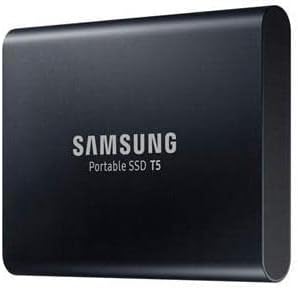
The T5 offers robust performance with older USB ports making it versatile. It mounts easily on Linux systems without issues.
We may earn a commission when you buy through this link, at no additional cost to you.
Its full metal design protects internal components well. The included cables cover both USB C and USB A connections.
Speeds are lower compared to Gen 2 rivals but sufficient for most tasks. It is heavier and bulkier than modern options.
Consider this if you need broad device compatibility and strong build quality over top speed.
Top to bottom metal construction provides superior durability and heat dissipation protecting the drive during extended use.
Optional password protection with AES 256-bit hardware encryption keeps your data secure from unauthorized access attempts.
We may earn a commission when you buy through this link, at no additional cost to you.
This red model delivers the same speed as the T7 in a lighter package. It is ideal for students and casual Linux users.
We may earn a commission when you buy through this link, at no additional cost to you.
Dynamic thermal guard prevents overheating during sustained transfers. The color stands out in your bag for easy finding.
The capacity might be tight for large media projects. Fingerprint visibility on the red case could be a minor annoyance.
Pick this if you want a fast portable drive in a distinctive color without extra bulk.
Dynamic Thermal Guard automatically slows data transfer to prevent overheating ensuring safety and long term reliability.
Weighing little and fitting in your hand it makes moving files between systems effortless without added weight or bulk.
We may earn a commission when you buy through this link, at no additional cost to you.
This compact drive is a reliable starting point for portable storage on Linux. It mounts automatically and transfers data smoothly.
We may earn a commission when you buy through this link, at no additional cost to you.
The V-NAND technology ensures fast performance within its class. Dual cables make it easy to connect to many devices.
Speeds are lower than newer models but adequate for common tasks. The blue color may show wear over time.
Choose this if you need a trustworthy and portable option with a strong warranty for basic file storage.
Read and write speeds up to 540MB/s offer fast transfers of photos and documents compared to traditional hard drives.
It comes with a 3-year limited warranty providing peace of mind for your investment against defects or failures.
We may earn a commission when you buy through this link, at no additional cost to you.
Selecting the right external SSD requires checking compatibility, speed, build, and encryption features tailored for Linux workflows.
Ensure the SSD works with Linux-native file systems like ext4 or btrfs without needing reformatting. Check if the vendor supports exFAT or NTFS out of the box if shared with other OSs.
Look for drives recognized immediately by Linux desktop environments like GNOME or KDE to avoid mounting issues.
Select drives with USB 3.2 Gen 2 or higher to achieve 1000MB/s+ speeds. Confirm your laptop or desktop has matching USB-C ports.
Faster interfaces reduce wait times for backups or data transfers which matters for large files.
Hardware encryption like AES 256-bit adds a strong layer of data protection. Ensure the encryption software works on Linux or supports open standard tools.
Password protection features should integrate seamlessly with your workflow to avoid extra login steps.
Aluminum cases dissipate heat better than plastic and offer more protection. Check for shock resistance ratings suitable for travel or field work.
A robust build prevents physical damage that could corrupt data over time.
Evaluate how much data you typically store and move daily. 1TB suits general use while 2TB helps with media or development tasks.
Larger capacities cost more but reduce the need for multiple drives.
Portable SSDs draw power from the USB port. Lower consumption ensures better compatibility with older ports or USB hubs.
Efficient power use prevents throttling and extends device battery life during transfers.
A minimum 3-year warranty protects your investment from defects. Verify the manufacturer offers support accessible to Linux users.
Reliable customer service helps resolve connectivity issues quickly.
Active or passive thermal guards prevent overheating during long transfers. This keeps speeds consistent and extends drive lifespan.
Look for models that manage heat without requiring external cooling fans.
When connecting the SSD to a Linux machine wait for the system to recognize the drive and mount it automatically. If needed mount manually with appropriate file system permissions.
Use secure ejection procedures to avoid data corruption before unplugging. Sync any pending writes using your file manager terminal or eject utility.
Keep firmware updated using vendor tools or open source utilities. Store the drive in a cool dry place and avoid extreme temperatures or humidity to maintain reliability.
Yes most modern external SSDs work with Linux through standard USB mass storage drivers. Plug and play functionality is typical though firmware updates may improve performance or compatibility.
ext4 or btrfs are native Linux file systems offering best performance and features. exFAT is useful if you also connect the drive to Windows or macOS systems.
Use tools like smartmontools to monitor drive health and wear indicators. These utilities support most SSDs and provide detailed diagnostic data via the terminal.
Yes but ensure the hub provides enough power especially for larger drives. Active hubs with external power sources are recommended for stable performance.
Gen 1 supports up to 5Gbps while Gen 2 supports up to 10Gbps. Gen 2 drives deliver faster read and write speeds essential for large file transfers.
Hardware encryption works independently of OS but vendor software may not support Linux. Some drives allow access without software using password protected volumes.
Allow the SSD space to breathe and avoid enclosing it in cases. Let it rest between large file batches and ensure good airflow around the drive.
Some SSDs can boot Linux with the right configuration though speed varies by interface and system support. Check boot mode compatibility before using for OS installation.
The Samsung T7 leads with strong speeds and durability while the SSK offers great value for budget-conscious users. The Samsung T9 is the premium pick for top throughput and thermal management.
Prioritize compatibility with Linux file systems and interface speed to match your workflow needs. Security features like hardware encryption are essential for sensitive data.
Prices change often so check current deals on each model before buying. With the right SSD you can boost productivity and safeguard your data seamlessly.