
ARCTIC P9 PWM PST
4.5Editor score
Wide 200-3000 RPM range
High static pressure design
Includes cable splitter
This guide compares the top 92mm case fans for quiet cooling and high performance across compact cases, NAS, and CPU coolers to help you choose the right model.
Finding the right airflow for small form factor builds requires precision. A high quality 92mm case fan ensures your system stays cool without excess noise. These units fit tight spaces where standard thirteen sizes simply cannot go.
We evaluated ten top rated models based on acoustic performance, static pressure, and build longevity. Each product offers unique benefits for specific use cases ranging from silent HTPCs to high throughput server racks and budget builds.
Every pick highlights key strengths and ideal applications for that specific unit. Prices and availability fluctuate frequently so check current listings before purchasing. Our goal is to help you find the perfect match for your cooling needs.
4.5Editor score

4.8Editor score

4.8Editor score
This comparison table displays the essential technical specifications for each model side by side. Review the speed ranges, noise levels, and bearing technologies to determine which fan fits your specific airflow and acoustics requirements best.


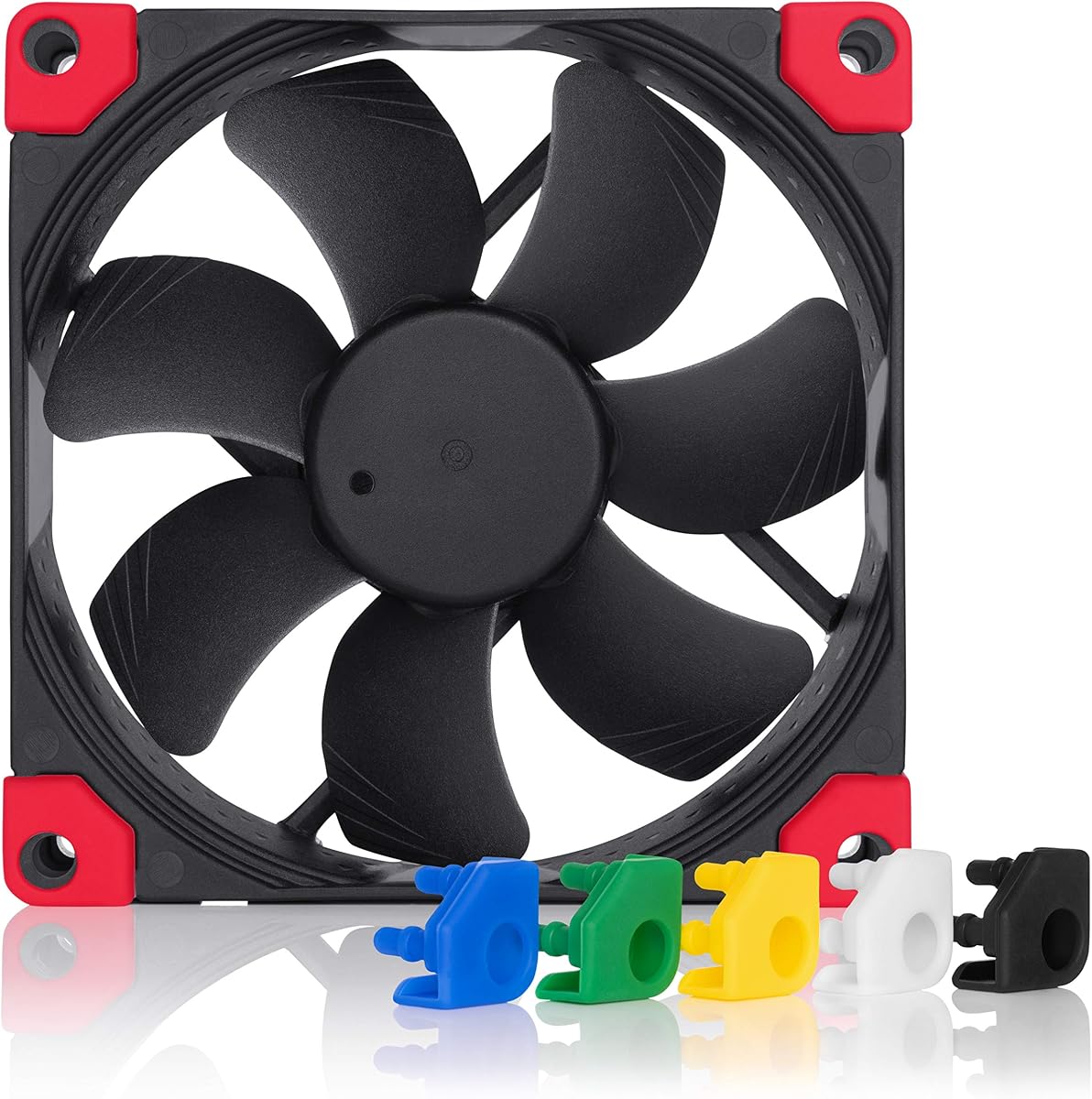


This Noctua fan stands out as a top performer in the compact 92mm category. With a high user rating and decades of engineering excellence, it delivers quiet yet powerful cooling. The included Low-Noise Adaptor gives you precise control over RPMs for maximum acoustic comfort.
We may earn a commission when you buy through this link, at no additional cost to you.
The Flow Acceleration Channels in the blades optimize air pressure significantly. This design minimizes turbulence while maximizing static pressure for heat sinks and radiators. The SSO2 bearing ensures smooth operation and extends the total operational life well beyond standard expectations.
While the price is higher than budget alternatives, the longevity and acoustic performance justify the cost. You may find the brown color scheme limits build aesthetics for some enthusiasts, but the swap edition solves this issue for black preferred builds.
Buy this if you need reliable silent cooling for a compact PC or NAS. It is ideal for systems where noise is a primary concern and where budget allows for premium components that will last years.
The frame design reduces noise frequencies for a smoother audible profile.
Anti-vibration mounts and extension cables simplify installation in tight cases.
We may earn a commission when you buy through this link, at no additional cost to you.
This ARCTIC model offers incredible performance per dollar. It delivers a massive RPM range and high static pressure suitable for radiators. The included cable splitter allows you to connect two fans to one header easily.
We may earn a commission when you buy through this link, at no additional cost to you.
The motor technology ensures quiet operation at low speeds thanks to the 0dB mode. This feature stops the fan completely when cooling needs are minimal. The alloy lubricant bearing reduces friction effectively for long term use.
While it lacks the premium finish of Noctua, it performs similarly in airflow tests. The higher noise at maximum speed is manageable since most users run these fans at lower RPMs for silence.
Select this for budget builds or NAS servers needing multiple fans. It is perfect for cases where cost matters more than brand prestige and where you want to control speed silently.
Simplifies wiring by allowing two fans on one PWM header without external hubs.
Ensures effective cooling even when pushing air through dense heatsink fins.
We may earn a commission when you buy through this link, at no additional cost to you.
This slim variant of the A-series fan is built for low profile CPU coolers and compact cases. It maintains Noctua's renowned quiet performance despite the reduced thickness. The chromax.black.swap edition fits modern black and white builds seamlessly.
We may earn a commission when you buy through this link, at no additional cost to you.
The HS-PWM control allows the fan to stop completely at low load for silent standby. The Flow Acceleration Channels maintain efficient airflow within the thin form factor. Anti-vibration pads reduce transmission to the case chassis effectively.
Airflow is lower than standard 25mm fans due to physical limits. However for tight spaces this trade-off is necessary. The premium price reflects the engineering precision and material quality used in manufacturing.
Buy this if you have a thin cooler that cannot accept a full depth fan. It is ideal for ITX builds where every millimeter counts and aesthetics matter alongside thermal performance.
Fits on coolers like the NH-L9 series where standard fans would interfere with RAM.
Color options let you match the pads to your build theme or motherboard.
We may earn a commission when you buy through this link, at no additional cost to you.
This standard version offers the same slim 14mm profile as the chromax variant. It is engineered for stability and quiet operation in tight server chassis or coolers. The PWM interface ensures seamless speed changes based on system load.
We may earn a commission when you buy through this link, at no additional cost to you.
The SSO2 bearing reduces friction significantly for smooth operation. It maintains the same high quality standards as other Noctua models. The packaging ensures the unit arrives safe for immediate installation into your system.
The frame color might clash with black builds but performance remains excellent. You sacrifice a bit of airflow compared to 25mm versions but gain space for other components.
Choose this when you need a slim profile without the swap features. It is suitable for ITX systems where the brown frame is acceptable or hidden from view.
Allows your motherboard to manage speed automatically for optimal cooling.
Perfect for low clearance areas inside modern compact computer cases.
We may earn a commission when you buy through this link, at no additional cost to you.
The TL-P9 delivers strong cooling capabilities at a very competitive price. Its S-FDB bearing reduces noise effectively while the 7-blade design maximizes airflow. Vibration damping pads ensure the fan does not transmit noise to the chassis.
We may earn a commission when you buy through this link, at no additional cost to you.
The automatic speed control via PWM allows the fan to adapt to temperature changes. It works well as a case fan or on CPU coolers. Installation is straightforward with included screws and clear instructions.
Build quality feels less premium than established brands but performance is strong. The noise level remains low even at higher speeds due to the optimized blade shape and rubber mounts.
Select this if you want a balance of cost and silence. It is a great choice for budget gaming PCs or office machines needing quiet efficient airflow.
Increases air volume while keeping turbulence and noise levels down.
Soft feet absorb vibrations to protect the case and reduce audible hum.
We may earn a commission when you buy through this link, at no additional cost to you.
This P9 variant focuses on low noise at a fixed rotational speed. It uses high static pressure to force air through restrictive heat sinks. The alloy lubricant bearing ensures smooth operation with minimal friction noise.
We may earn a commission when you buy through this link, at no additional cost to you.
While it lacks PWM connectors, you can still control speed via voltage regulation. The design is optimized for efficiency and long term stability. Users praise its ability to keep components cool without audible intrusion.
Fixed speed might not suit systems with variable thermal loads but the noise is excellent. It is a simple plug and play solution for steady cooling needs in compact cases.
Buy this if you prefer set and forget simplicity. It works best in environments where consistent low noise is more important than dynamic speed changes.
Allows speed reduction if your motherboard supports voltage fan regulation.
Engineered specifically for silent operation at rated speeds.
We may earn a commission when you buy through this link, at no additional cost to you.
This chromax edition combines the proven A-series performance with a modern black frame. It delivers exceptional airflow and noise control for black builds. The swappable pads let you match your motherboard colors or build theme exactly.
We may earn a commission when you buy through this link, at no additional cost to you.
The Flow Acceleration Channels ensure high efficiency in tight spaces. It stops at zero percent PWM for semi-passive systems to eliminate noise during idle. The anti-vibration mounts absorb all mechanical vibrations effectively.
The blades retain the classic brown hue but are hidden in dark cases. This is the best choice for enthusiasts who want premium performance without brown aesthetic distractions.
Choose this if you need a black high-performance fan. It is perfect for modern black and white PC builds that demand top cooling and silence.
Black frame blends seamlessly with modern black components and cases.
Fans stop at low RPM for zero noise when system is idle.
We may earn a commission when you buy through this link, at no additional cost to you.
This unit offers a slim 15mm thickness with a higher max RPM than many competitors. It is designed for tight spaces needing high speed airflow. The vibration damping pads ensure smooth quiet running even at higher speeds.
We may earn a commission when you buy through this link, at no additional cost to you.
The PWM interface allows precise control over speeds to match your thermal needs. The 2700 RPM limit provides a headroom for extreme cooling scenarios in small enclosures. The 42 CFM airflow is respectable for such a compact unit.
It may lack the premium bearing tech of other brands but performs reliably. The noise levels remain low thanks to the soft feet and optimized motor design.
Select this if you have a 15mm clearance limit needing high speed. It is ideal for small form factor builds with limited cooling capacity.
Fits in very tight spaces where 25mm fans cannot be mounted.
Optimized to stay quiet even at high rotational speeds.
We may earn a commission when you buy through this link, at no additional cost to you.
This FLX variant connects via a 3-pin Molex header for broader compatibility. It includes adaptors to lower the speed to 1250 or 1050 RPM for near silent operation. The acoustic optimization ensures smooth airflow without rattling.
We may earn a commission when you buy through this link, at no additional cost to you.
The lower max speed compared to PWM versions prioritizes silence. It is perfect for passive systems where dynamic speed changes are not needed. The adaptor kit gives you three fixed speed options for tuning.
Lack of PWM means you cannot automate speed changes via software. However for steady state loads this simplicity reduces complexity and keeps noise extremely low.
Choose this if your case has only 3-pin headers and you need silence. It is ideal for home theater PCs where noise is critical.
Included adaptors let you choose from three preset RPM settings easily.
Optimized for silent environments like living rooms and offices.
We may earn a commission when you buy through this link, at no additional cost to you.
The P9 Max delivers raw performance with a massive RPM range and CFM. It is built for pushing air through dense radiators or restrictive cases. The 0dB mode allows the fan to stop at low load for complete silence.
We may earn a commission when you buy through this link, at no additional cost to you.
Fluid Dynamic Bearings ensure longevity and smooth motion. Even at high speeds the pressure remains consistent for cooling hot components. The black frame fits modern builds well.
Full speed may exceed noise tolerance in quiet rooms. However you can easily throttle it down via PWM to balance noise and cooling when needed.
Buy this if you need maximum cooling power in a small size. It is perfect for high performance ITX systems or mini PC water cooling.
Allows flexibility to run at full power for cooling or low power for silence.
Moves air effectively through tight radiators and heatsinks.
We may earn a commission when you buy through this link, at no additional cost to you.
Choosing the right fan requires balancing size speed and noise. Consider your case limits airflow needs and budget when making your final selection.
Standard 92mm fans come in 25mm thickness. Low profile cases need 14mm or 15mm models. Always measure available space on coolers and case mounts before buying to ensure fit.
Verify dimensions to avoid clearance issues with RAM or shrouds.
Noise is measured in decibels. Lower dB ratings mean quieter fans. Look for features like rubber mounts or fluid bearings to reduce vibration noise inside your PC.
Prioritize lower dB for silent builds over maximum airflow.
PWM fans offer automatic speed control via 4-pin headers. FLX uses adaptors for fixed speeds. DC uses voltage control. Ensure your motherboard supports your chosen control method for best results.
PWM offers the most flexibility for balancing heat and noise.
Static pressure moves air through resistance like radiators. Airflow moves air through open spaces like cases. Choose high pressure for heatsinks and airflow for general case ventilation.
Match the rating to your cooling setup type.
Long life bearings reduce friction and noise. Fluid Dynamic or Double Ball bearings last longer than sleeve bearings. Check MTTF ratings to ensure the fan lasts for years.
Higher MTTF means better reliability.
Brown fans suit classic builds while black suits modern cases. Chromax options offer black frames with custom pads. Choose a color that matches your case and motherboard.
Frame color affects the overall look of the build.
Premium fans come with screws and anti-vibration mounts. These reduce noise transmission to the case. Budget fans may only include basic screws.
Mounting accessories improve quietness and stability.
Established brands often offer better warranties and support. Check warranty length and support policies before purchasing. This ensures you get help if the fan fails.
Reliable brands reduce risk and improve support.
Mount the fan carefully using the included screws or rubber pads to prevent vibration. Ensure the arrow on the frame points in the direction of airflow for correct cooling.
Connect the cable to a motherboard header. Use PWM headers for speed control or Molex connectors for simple power. Configure fan curves in BIOS to balance noise and heat.
Clean dust from blades regularly to maintain airflow. Use a soft brush or compressed air gently to remove dirt. This prevents noise and maintains performance over time.
92mm fans often spin faster to move air which can increase noise. However modern models with optimized blades and bearings stay very quiet at low RPMs. Choose models with high static pressure to reduce noise in tight spaces.
PWM fans are recommended for automatic control. They allow your motherboard to adjust speed based on temperature. This saves power and reduces noise when full speed is not needed.
Not usually. Most coolers are designed for 120mm size. Using a smaller fan will reduce cooling significantly. Stick to the size specified for your cooler or case.
MTTF stands for Mean Time To Failure. It is an estimated operational life in hours. Higher numbers indicate a more durable bearing system and longer expected lifespan.
Most models do not include RGB lighting. Focus is on noise and cooling. If you need lighting look for separate RGB fans or LED strips inside the case.
Use a PWM fan with 0dB mode or manual BIOS curve. Set the fan to stop or slow down below 40 percent load. This ensures silence when your PC is not under heavy load.
Fluid Dynamic bearings are excellent for quiet operation. They reduce friction effectively. Double ball bearings are durable but may be slightly louder. Sleeve bearings are quiet initially but wear faster.
Yes if your header supports enough current. Use a splitter cable like the PST included with some models. Ensure the combined current draw does not exceed the header limit.
This guide reviewed ten top performers in the 92mm category. Noctua leads with premium build and acoustic performance while ARCTIC offers strong value and high RPM options.
Prioritize static pressure for radiators and airflow for open cases. Select PWM for automatic control and check thickness limits to ensure fit.
Prices change frequently so verify current listings before purchasing. The right fan will keep your compact system quiet and cool for years.