Flipper Big Button TV Remote for Seniors
4.2Editor score
Color-coded buttons for clarity
Customizable favorite channel slots
Slide-out hidden buttons available
This guide compares the top easy to use TV remote for seniors options focusing on button size setup simplicity and compatibility to help you choose the right
Finding a simple remote can be challenging when dexterity or vision changes. This guide highlights devices designed specifically for ease of use. Clear labeling and large buttons reduce frustration during daily entertainment routines for everyone.
We evaluated ten universal remotes based on button layout, programming ease, and brand compatibility. Our focus remains on models that simplify TV control without sacrificing essential functions. Each product offers unique benefits for different household needs.
Every review below details specific strengths and potential limitations found in real-world scenarios. You will see how each model handles power, volume, and channel changes. Please note that availability and terms may shift over time.
4.2Editor score

4.3Editor score

4.4Editor score
This side-by-side comparison highlights key specifications across all ten selected models. Each entry lists core features to help you quickly identify which remote aligns with your specific TV brand and user needs.


This remote stands out with its fully backlit keypad and white body that is easy to spot in a living room. It offers a clean layout designed specifically for seniors who need clear visibility and simple controls without confusion.
We may earn a commission when you buy through this link, at no additional cost to you.
The colorblind-friendly design uses a distinct blue button for volume and an orange one for channels, making adjustments intuitive. Preset buttons for Samsung LG Vizio Sony and Roku TVs eliminate the need for complex code entry during initial setup.
While it lacks advanced streaming navigation it covers essential power and volume functions reliably. The U.S.-based technical support adds peace of mind for users who might need help troubleshooting pairing issues.
This model is ideal for households with standard cable or broadcast setups where simplicity is key. Its ergonomic build and high contrast colors ensure daily use remains comfortable and frustration-free for elderly users.
The fully backlit buttons ensure users can find controls easily even when lights are dimmed for evening viewing.
Preset buttons for top brands mean users do not need to memorize codes or navigate complex menus.
We may earn a commission when you buy through this link, at no additional cost to you.
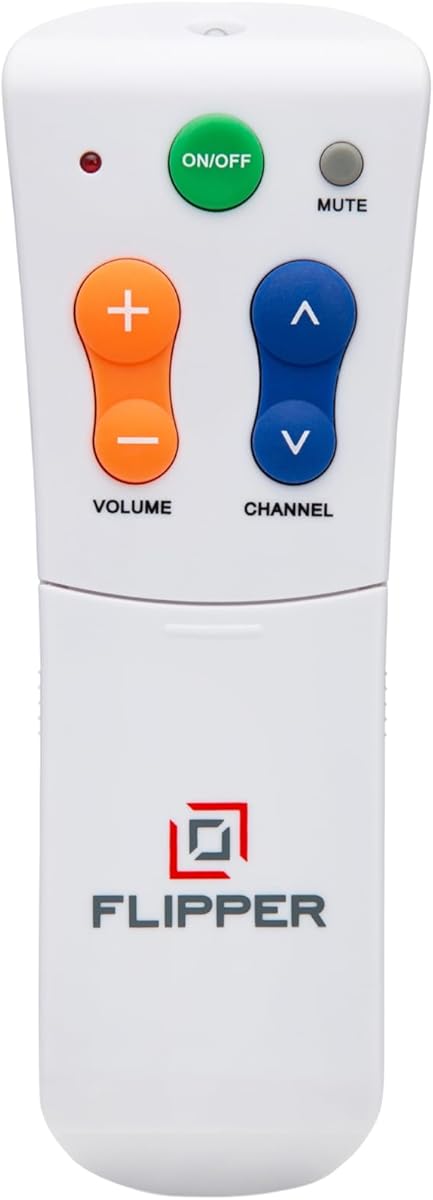
Flipper is engineered to restore independence for seniors and those with dementia by reducing cognitive load. Its face shows only four essential buttons with color coding that guides users intuitively through power volume and channel changes.
We may earn a commission when you buy through this link, at no additional cost to you.
Caregivers can pre-program up to twenty-five favorite channels so users can cycle through content without searching. A slide mechanism reveals hidden buttons for customizing favorites further while keeping the main interface simple and uncluttered.
The ability to control both the TV and cable box on one device reduces clutter and confusion. However it does not support navigation within streaming apps which may limit use for households relying heavily on on-demand content.
This remote is a premium solution for families prioritizing simplicity and accessibility over advanced features. It excels in traditional broadcast environments where straightforward control is the primary goal for elderly users.
Limiting visible buttons to four essential functions helps prevent overwhelm for users with memory challenges.
Pre-programmed favorites allow users to access favorite shows instantly without memorizing channel numbers.
We may earn a commission when you buy through this link, at no additional cost to you.
This remote offers an accessible entry point for seniors seeking a no-fuss replacement without complex setup steps. It works right out of the box with most major TV brands allowing immediate use after inserting batteries.
We may earn a commission when you buy through this link, at no additional cost to you.
The extra-large enter button and tactile feedback help users confirm selections with confidence. Its universal compatibility covers a wide range of manufacturers ensuring it fits most households without needing brand-specific pairing.
While it lacks lighting features for dark rooms the clear labeling and large buttons remain effective for daytime use. The ninety-day warranty provides additional security for buyers concerned about durability or initial performance.
Ideal for budget-conscious buyers who need reliable basic control this model delivers value without unnecessary complexity. It is best suited for users who prioritize ease of setup and straightforward operation over advanced features.
Users can start using the remote immediately after battery insertion without any pairing or coding.
Support for major brands ensures this remote works with most TVs found in typical homes.
We may earn a commission when you buy through this link, at no additional cost to you.
The EZclicker model focuses on a lightweight compact form factor that is easy for arthritic hands to manage. Its large enter button and tactile cues provide clear feedback when inputs are registered during use.
We may earn a commission when you buy through this link, at no additional cost to you.
Setup involves holding mute and volume buttons together until the remote syncs with the TV. This process is quick and does not require navigating deep menus or entering numerical codes manually.
While effective for TVs it does not control cable boxes or streaming sticks which may limit its utility in integrated setups. The black casing may be harder to locate in low light compared to lighter colored options.
This remote suits users who want a simple dedicated TV controller without extra bells or whistles. Its portability and ease of handling make it a practical choice for daily entertainment control.
The lightweight seven-inch build reduces hand fatigue during extended use sessions.
Synchronization happens with a simple button hold rather than complex code entry.
We may earn a commission when you buy through this link, at no additional cost to you.
This version emphasizes an extra simple layout that strips away unnecessary buttons to reduce confusion. It is designed for users who need the most straightforward way to control basic TV functions without distractions.
We may earn a commission when you buy through this link, at no additional cost to you.
The six-inch size makes it smaller and lighter than many alternatives which helps users with limited grip strength. Tactile feedback ensures that every press is felt clearly aiding those with reduced sensory perception.
It works well for basic TV control but excludes cable boxes and streaming devices from its range. Users relying solely on broadcast or cable channels will find it sufficient and intuitive for daily use.
Best for those who prioritize minimalism over feature richness this remote delivers on simplicity and ease of handling. It is a solid choice for environments where a basic controller meets all needs.
Fewer buttons mean less chance of accidental presses or confusion for new users.
A lighter build reduces strain on hands and wrists during repeated daily use.
We may earn a commission when you buy through this link, at no additional cost to you.
This remote offers a classic layout with clearly marked large buttons that reduce misclicks and improve visibility. Its ergonomic shape and lightweight body make it comfortable to hold for extended periods without hand fatigue.
We may earn a commission when you buy through this link, at no additional cost to you.
The design focuses on essential functions like power volume and channels ensuring users are not overwhelmed by extra options. Compatibility with most major TV brands provides broad utility across different household setups.
While it does not include advanced smart features it excels at reliable traditional TV control. The sturdy construction ensures durability for everyday use in busy living rooms or care environments.
It is a practical choice for seniors who want a dependable replacement that mirrors the simplicity of older remotes. Its focus on visibility and comfort makes it suitable for low-vision users seeking confidence in operation.
Oversized buttons provide a larger target area reducing accidental presses during operation.
Ergonomic shaping ensures the remote fits naturally in the hand for steady control.
We may earn a commission when you buy through this link, at no additional cost to you.
The Philips model brings a OneTouch setup method that aims to simplify the pairing process significantly. It includes a backlit keypad and colorblind-friendly blue and orange buttons for quick identification of key controls.
We may earn a commission when you buy through this link, at no additional cost to you.
Users can operate their TV along with a set-top box or soundbar using a single remote. The inclusion of directional pad controls allows for basic navigation on smart TVs or streaming devices when needed.
Some users report variability in setup success depending on the specific TV model which may require patience. Technical support is available to assist with these variations ensuring most users can get the remote working.
This remote is a strong contender for those needing both TV and auxiliary device control with minimal fuss. Its visual design features make it accessible for users with varying levels of vision or dexterity.
OneTouch setup reduces the steps required to connect the remote to the television.
Distinct colors for volume and channels aid quick recognition without relying on text labels.
We may earn a commission when you buy through this link, at no additional cost to you.
This remote aims to serve seniors and dementia patients with a simplified layout and large tactile buttons. It focuses on essential functions to avoid confusing menus or unnecessary features during daily use.
We may earn a commission when you buy through this link, at no additional cost to you.
Compatibility with major brands ensures it can replace many standard remotes without requiring complex programming. The tactile feedback helps users confirm their inputs which is crucial for those with reduced dexterity.
However lower reliability ratings suggest consistency may vary across different TV models or usage scenarios. Buyers should consider this a basic option for straightforward control rather than a premium long-term investment.
For budget-focused households needing a quick replacement this model provides a functional solution with essential accessibility features. It works best where basic TV control is the sole requirement and simplicity is valued over advanced functionality.
By limiting buttons to core controls the remote reduces the risk of user confusion.
Simplified layout supports users with memory challenges by removing unnecessary options.
We may earn a commission when you buy through this link, at no additional cost to you.
This remote is optimized for Samsung users with backlit buttons that stay lit for thirty seconds to aid night viewing. It requires no setup so users can start using it immediately after inserting batteries into the compartment.
We may earn a commission when you buy through this link, at no additional cost to you.
A soft silicone protective cover and mount hook are included to prevent damage and keep the remote accessible. The responsive chip ensures a quick reaction time reducing lag when changing channels or adjusting volume.
It does not support cable boxes or other brands which limits its universality but maximizes performance for Samsung owners. The ergonomic shape and textured buttons provide a secure grip which is helpful for users with motor challenges.
For Samsung households this model offers an excellent balance of accessibility features and practical accessories. Its focus on visibility and ease of handling makes it a top choice for those seeking reliable late-night control.
Buttons remain illuminated for thirty seconds allowing users to navigate in low light without glare.
A protective cover and mount hook add value and help maintain organization and device safety.
We may earn a commission when you buy through this link, at no additional cost to you.
The Anderic remote features glow-in-the-dark keys that allow visibility in dark rooms without needing lights. It includes a learning function that copies signals from existing remotes enabling custom buttons for input or streaming apps.
We may earn a commission when you buy through this link, at no additional cost to you.
For LG owners it arrives pre-programmed for immediate use while other brands may need brief initial setup. The layout sticks to core functions like power volume and channels to reduce confusion for elderly users.
The learning feature requires a clear line of sight which can be tricky for users with limited mobility or vision. Additionally it only works with infrared systems so Bluetooth or RF remotes cannot be copied.
This remote offers a unique balance of simplicity and customization for households that need basic control with specific extras. It is a practical choice for those who want a few extra functions without compromising overall ease of use.
Learning technology allows users to add specific inputs from their old remote for convenience.
Glow-in-the-dark keys ensure buttons can be found easily without turning on room lights.
We may earn a commission when you buy through this link, at no additional cost to you.
Selecting the right remote involves considering button layout compatibility and physical ergonomics. This guide outlines key factors to ensure the chosen device meets daily needs and enhances comfort for elderly users.
Large clearly spaced buttons reduce accidental presses and make navigation easier for those with limited dexterity. Look for models where essential keys like power and volume are prominently placed and distinct from other functions to prevent confusion.
Prioritize remotes with oversized tactile keys that provide feedback when pressed to confirm actions are registered.
High contrast colors and backlit options help users see controls in low-light environments without straining their eyes. Color-coded buttons can further assist those with color vision deficiencies by using distinct hues for different functions.
Choose a remote with clear labeling and sufficient illumination to support evening viewing routines comfortably.
Ensure the remote supports your specific TV brand and any connected devices like cable boxes or soundbars. Universal models that handle multiple device types reduce clutter and simplify control for a whole entertainment setup.
Verify compatibility lists before purchasing to avoid frustration if the remote does not pair with your existing hardware.
Simple setup processes such as auto-detection or one-touch pairing save time and reduce technical barriers for users. Avoid remotes that require entering long codes or navigating complex menus during initial configuration.
Select models that work out of the box or offer straightforward programming to ensure immediate usability after unboxing.
A lightweight and ergonomic build prevents hand fatigue during repeated use and makes the remote easier to grip securely. Consider the size and shape to ensure it fits comfortably in the hand without requiring excessive pressure to press buttons.
Look for textured surfaces or rounded edges that improve hold stability and reduce the risk of slipping during operation.
Standard AA or AAA batteries are common but check expected life to minimize frequent replacements which can be inconvenient. Some remotes may include rechargeable options or low battery indicators to help users plan changes in advance.
Opt for a remote that offers reliable power efficiency to ensure consistent performance without constant maintenance.
Sturdy construction and protective materials ensure the remote withstands drops and daily wear especially in busy living areas. Reinforced button mechanisms and quality casings contribute to a longer lifespan for the device.
Consider models that offer warranties or protective covers to extend usability and safeguard against accidental damage.
Features like learning functions or customizable favorites can enhance usability by adapting the remote to specific viewing habits. Ensure any advanced features do not complicate the interface but rather streamline daily interactions for the user.
Balance essential simplicity with useful extras that genuinely improve convenience without overwhelming the primary control experience.
Begin by inserting the required batteries into the compartment while ensuring correct polarity to power the remote. Most models will activate immediately and you can test basic functions like power or volume to confirm pairing success.
If your remote requires pairing follow the included instructions to press the designated setup buttons until the device syncs with your TV. Keep the remote pointed directly at the TV during this process to ensure a strong signal connection.
Clean the remote regularly with a soft dry cloth to remove dust or debris that could affect button responsiveness. Store it in a dedicated holder or hook when not in use to prevent loss and protect it from spills or drops.
Most of the listed remotes are designed for basic TV functions and may not support navigation within streaming apps. Some models include limited support for certain streaming boxes but you should check the compatibility details before purchasing to ensure it fits your setup.
Ensure you are pointing the remote directly at the TV and that there are no obstacles blocking the signal. Check that the batteries are fresh and correctly inserted then try the setup instructions again. If issues persist consult the product's technical support or try a different battery source.
Yes many of these models feature lightweight ergonomic designs and large buttons that require less force to press. The tactile feedback and comfortable grips help reduce strain on joints making them accessible for users with limited hand mobility.
Some remotes come preset with common brand codes so you do not need to enter codes manually. Others offer auto-detection or simple button holds to sync automatically which simplifies the setup process significantly for most users.
Battery life varies based on usage frequency but most standard alkaline batteries can last several months with normal daily use. To maximize longevity avoid pressing buttons unnecessarily and replace them promptly if the remote starts to respond slowly.
Certain models support multi-device control allowing you to manage both the TV and cable box or soundbar from one unit. Check the product specifications to confirm if it covers your specific cable provider or box type before buying.
Yes several remotes offer backlit buttons high contrast colors or glow-in-the-dark keys to aid visibility in dim environments. These features make it easier to locate and press controls without straining the eyes during evening use.
First check the batteries and replace them if they are weak or old. Clean the battery contacts and button surfaces to remove any dust or residue that might interfere with signal transmission or mechanical function.
The top picks in this guide offer a range of features tailored to simplify entertainment control for seniors. Whether you need basic layout or advanced customization there is a model designed to meet your specific household needs.
Focus on button visibility setup ease and compatibility to ensure the chosen remote provides reliable daily performance. Prioritizing ergonomics and clear labeling will help reduce frustration and enhance the overall viewing experience.
Please verify current availability and terms before purchasing to ensure you select the most suitable option for your setup. Checking product details regularly can help you find the best value and features available at any given time.