
Hyperkin Trooper 2 Premium
4.1Editor score
Premium USB game controller
Ergonomic design with grips
Quiet movement joystick
This guide compares the top ten Mac game joysticks for flight sims arcade fighting and general gaming to help you find the perfect controller for your Mac
Finding the right Mac game joystick can transform your gaming experience by offering precision control and ergonomic comfort. Whether you prefer flight simulation fighting arcade or retro gaming the right controller matters greatly for performance.
We compared ten top rated joysticks based on compatibility build quality sensor technology and user feedback. Our list covers various categories including flight sticks arcade sticks and wireless controllers designed to work seamlessly with macOS.
Each pick highlights key features pros and cons to help you decide quickly. Keep in mind that prices change frequently so check current listings before purchasing to ensure you get the best value available today.
4.1Editor score
4.6Editor score

4.0Editor score
Below is a side-by-side comparison of all ten joysticks including their key specifications and compatibility details to help you choose the right option for your needs.


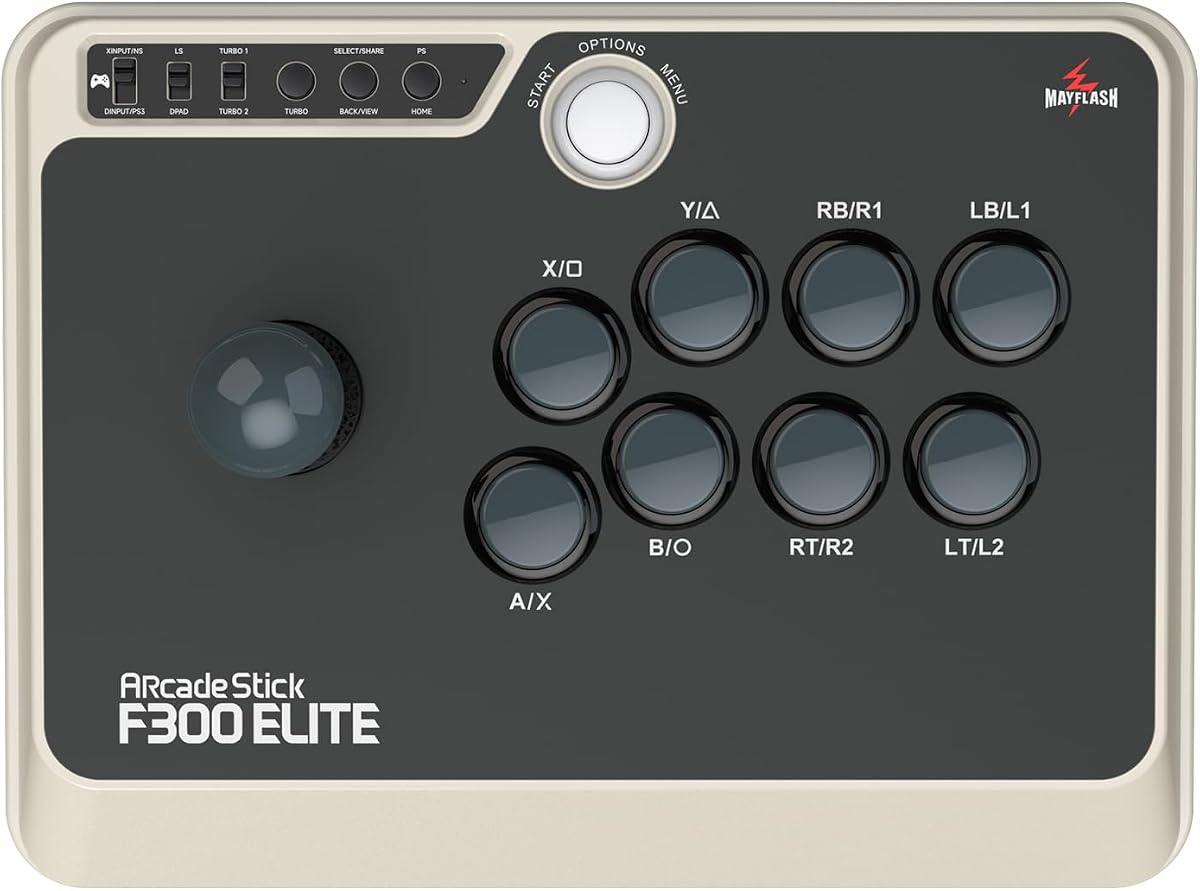
The MAYFLASH F300 Elite stands out as the top choice for Mac gamers seeking arcade precision. With a 4.6 rating it delivers exceptional performance using premium Sanwa buttons and joystick for responsive inputs.
We may earn a commission when you buy through this link, at no additional cost to you.
Its compatibility with macOS ensures seamless integration for gaming enthusiasts. The Elite version supports XINPUT and DINPUT on PC making it versatile for various gaming setups and emulation scenarios.
While the price is higher than standard models the build quality justifies the investment. The platform is accessible for modding allowing users to customize buttons and joystick to suit personal playstyles.
Gamers looking for tournament grade performance should consider this Elite model. It balances durability with customization options making it a robust long term solution for serious fighting game players.
Sanwa buttons and joystick ensure high responsiveness and durability for competitive play.
The accessible platform allows enthusiasts to switch joystick and buttons easily.
We may earn a commission when you buy through this link, at no additional cost to you.
The Hyperkin Trooper 2 offers an affordable entry point for Mac gamers needing a dedicated controller. Rated 4.1 it provides a classic Atari feel with modern upgrades like a long USB cable.
We may earn a commission when you buy through this link, at no additional cost to you.
Its ergonomic design includes chamfered corners for comfort during long sessions. The quiet movement joystick ensures smooth inputs without excessive noise which appeals to casual and retro gamers.
Although it uses a plastic joystick the durability is sufficient for regular use. It lacks advanced features like programmable buttons but delivers reliable performance for emulation and arcade style games.
Budget conscious users will find this controller a solid value. It combines comfort with basic functionality making it a great secondary controller for Mac users interested in retro gaming.
Designed to complement classic Atari experiences with modern cable length.
Soft rubber grommet and grips enhance comfort during extended play.
We may earn a commission when you buy through this link, at no additional cost to you.
The Logitech G X56 represents the pinnacle of flight simulation control for dedicated enthusiasts. Rated 4.0 it offers extensive customization with 189 programmable controls and a 4 spring system.
We may earn a commission when you buy through this link, at no additional cost to you.
It includes twin throttles and a main joystick for precise command over your aircraft. RGB lighting enhances immersion matching your gaming rig aesthetics while providing functional feedback.
The system requires two USB ports which may limit setups with few connections. However the adjustable stick force allows fine tuning to match specific pilot preferences and comfort levels.
Aspiring combat pilots should consider this premium set for its realism. It places controls under fingers perfectly aiding navigation in complex VR and flight simulation environments.
Hall-effect sensors ensure accurate 16-bit aileron and elevator axis control.
Adjustable stick force via Advanced 4-Spring System for preferred tension.
We may earn a commission when you buy through this link, at no additional cost to you.
The Thrustmaster T-Flight Stick X delivers instant plug and play setup for Mac users wanting flight simulation control. Rated 4.2 it features adjustable resistance for fine tuning stick tension.
We may earn a commission when you buy through this link, at no additional cost to you.
Its weighted base prevents tipping during aggressive inputs in turbulent scenarios. The built in throttle and rudder twist eliminate need for separate pedals saving valuable desk space.
Twelve programmable buttons allow customization for different aircraft types via internal memory. While it may lack advanced flight systems it offers reliable command for entry to intermediate simmers.
Gamers needing a simple flight controller will appreciate its reliability. The ergonomic design ensures comfort while providing total command over maneuvers in space or flight sim adventures.
Ergonomic throttle lever allows smooth speed management without extra gear.
Adjustable resistance lets you match tension to your flying style.
We may earn a commission when you buy through this link, at no additional cost to you.
The abxylute C6 brings wireless freedom with Hall Effect joysticks for Mac gamers. Rated 4.3 it features a 1000Hz polling rate ensuring ultra low latency for competitive gaming.
We may earn a commission when you buy through this link, at no additional cost to you.
Hall Effect sensors prevent drifting and extend lifespan significantly compared to traditional sticks. Dual Turbo modes allow rapid fire attacks with single press freeing fingers for dominance.
Gyro is available in Switch games adding motion sensing options. The 600mAh battery delivers up to 18 hours of continuous gameplay on a single charge for marathon sessions.
Wireless seekers should note dongle is recommended for lowest latency. This controller balances versatility with precision making it ideal for diverse gaming scenarios across multiple platforms.
Hall Effect joysticks provide extended lifespan and no drifting issues.
1000Hz polling rate ensures precise and prompt responses in wired mode.
We may earn a commission when you buy through this link, at no additional cost to you.
The MAYFLASH F300 is a versatile arcade stick supporting macOS and multiple consoles. Rated 4.5 it supports Turbo functions with different speed settings for varied gaming styles.
We may earn a commission when you buy through this link, at no additional cost to you.
It allows use of Sanwa Denshi buttons and joystick for easy customization. This makes it a great platform for hobbyists wanting to upgrade components later without new costs.
For Mac users the DINPUT and XINPUT support ensures broad PC compatibility. While basic buttons come standard the platform is solid for fighting games on various systems.
Fighting game enthusiasts should consider this stick for its flexibility. It offers a reliable entry point into arcade style gaming with room to grow via customization.
Compatible with Sanwa buttons and joystick for perfect customization options.
Supports turbo functions with different speed settings for varied combat.
We may earn a commission when you buy through this link, at no additional cost to you.
The Thrustmaster SimTask FarmStick delivers specific control for Farming Simulator 25 on PC. Rated 3.7 it features up to 33 programmable inputs for managing machinery without keyboard.
We may earn a commission when you buy through this link, at no additional cost to you.
Hall Effect magnetic sensors eliminate drift ensuring precise operation of tractors. The realistic 3-axis joystick provides smooth control for loaders and construction equipment realistically.
Ambidextrous design supports flexible setups with racing wheels or dual joysticks. While niche for general gamers it provides total control for serious farming simulation players.
Farming sim devotees will find this essential for immersive play. Pairing with a racing wheel completes the cockpit setup tailored to personal playstyle on PC.
Designed specifically for Farming Simulator 25 with no setup required.
H.E.A.R.T technology ensures long-term precision and reliable control.
We may earn a commission when you buy through this link, at no additional cost to you.
The 8Bitdo Ultimate 2 brings wireless reliability to Mac users needing broad platform support. Rated 4.5 it uses TMR Joysticks for higher sensitivity and enhanced durability.
We may earn a commission when you buy through this link, at no additional cost to you.
Exclusive 2.4G connection delivers ultra low latency under 1ms for seamless gaming. The trigger mode switch allows switching between linear and non-linear triggers for varied control.
Customizable 6-Axis Motion Control adds depth for compatible games. Back paddle buttons and tactile bumpers enhance response and control for faster gameplay actions.
Multi-platform gamers will appreciate its seamless switch between devices. The included dock and USB-C adapter ensure convenient connectivity and charging for Mac users.
Offer higher sensitivity, greater precision, and enhanced durability over standard sticks.
Switch between linear Hall Effect and non-linear tactile triggers for control.
We may earn a commission when you buy through this link, at no additional cost to you.
The Moonag Wireless PC Controller combines anti-drift Hall Effect sticks with RGB lighting. Rated 4.3 it supports 1000Hz polling for ultra-low latency in wired and wireless modes.
We may earn a commission when you buy through this link, at no additional cost to you.
Dual vibration feedback enhances immersion during racing and shooting games. The ergonomic shape and non-slip grip reduce fatigue for extended gaming sessions comfortably.
RGB lighting around joysticks creates an immersive gaming atmosphere. The 800mAh battery supports long playtime and playing while charging via cable for convenience.
Gamers wanting visual flair will love this dynamic lighting feature. It balances performance with style offering responsive control for competitive games.
Features dynamic RGB lighting around joysticks to create immersive atmosphere.
Hall Effect joystick prevents drift and extends durability significantly.
We may earn a commission when you buy through this link, at no additional cost to you.
The SPEEDLINK SL-650212 brings nostalgic design from original Competition Pro machines. Rated 3.9 it works as a digital USB joystick for PCs and Android devices.
We may earn a commission when you buy through this link, at no additional cost to you.
Perfect for arcade and retro games it captures the classic look and feel. The Anniversary Edition includes a games collection with 20 retro games for download.
While digital sticks differ from analog modern users seeking retro authenticity may prefer them. It provides a dedicated control for vintage style gaming sessions.
Retro enthusiasts should consider this for its authentic aesthetic. It is a great choice for collectors wanting a dedicated stick for classic arcade titles.
Design taken from the Original Competition Pro's Arcade Machine Stick.
Anniversary Edition includes Games Collection with 20 Retro Games.
We may earn a commission when you buy through this link, at no additional cost to you.
Selecting the right joystick depends on your gaming genre budget and desired features. Here are key factors to consider.
Ensure the joystick supports macOS directly or through drivers. Many modern controllers work plug and play but check system requirements carefully.
Prioritize controllers explicitly listing macOS or Mac support in their specs.
Decide between wired and wireless options based on your setup. Wired offers stability while wireless provides flexibility.
For competitive gaming wireless with low latency is essential.
Hall Effect sensors offer better longevity and precision than traditional potentiometers. They reduce stick drift over time.
Look for Hall Effect joysticks if you plan heavy usage.
Comfortable grips and balanced weight reduce fatigue during long sessions. Ergonomic shapes fit naturally in the hand.
Test grip feel if possible or check reviews for comfort notes.
More buttons allow mapping complex commands for flight sims or fighting games. Internal memory saves profiles.
Check if buttons can be remapped for your preferred game.
Durable materials ensure the joystick withstands intense gameplay. Check if joystick or buttons are replaceable.
Higher quality builds last longer and maintain performance over time.
Additional features like RGB lighting vibration or turbo modes add immersion. Decide which features matter to your playstyle.
Extra features should justify cost and not distract from performance.
Strong manufacturer support ensures help with drivers or defects. Warranty period indicates confidence in product.
Check if software is available for Mac to configure settings.
Connect your joystick to a USB port or pair via Bluetooth as instructed. Mac usually detects the device automatically. Install any required drivers if prompted.
Calibrate your controller in system settings if needed to ensure accurate movement. This helps eliminate dead zones and alignment issues before playing.
Store the joystick in a cool dry place to prolong sensor life. Clean buttons and sticks gently with a soft cloth to remove dust and debris.
Most modern joysticks listed work natively with macOS via USB or Bluetooth. However some may require drivers for full functionality. Always check product details for specific OS support.
Yes Hall Effect sensors use magnetic fields for positioning. They offer longer lifespan and less drift compared to traditional contact sensors. Ideal for competitive or heavy use.
You can use flight sticks for general gaming but they may be overkill. Some games map flight controls to general inputs. Check compatibility for specific titles.
Drift occurs when worn potentiometers fail to register center position. Hall Effect controllers reduce this risk. Calibrating may help but replacement is needed for worn parts.
XINPUT is used for Xbox controllers while DINPUT is generic. PC games often prefer XINPUT. Ensure your joystick supports the mode your game requires.
Modern low latency wireless like 1000Hz polling minimizes delay. It is generally unnoticeable for casual gaming. For competitive use wired or high speed wireless is recommended.
Use compressed air to clear debris from buttons. Wipe the surface with a slightly damp cloth. Avoid liquids entering openings to protect electronics inside.
Some models allow swapping parts like the MAYFLASH Elite. Others have fixed components. Check if the platform is open for customization before buying.
Our top picks highlight the MAYFLASH F300 Elite for fighting games Hyperkin Trooper 2 for budget and Logitech G X56 for premium flight sim.
Prioritize compatibility and sensor technology when making your choice. Hall Effect controllers provide long-term reliability for serious gamers.
Remember to check current prices and availability as deals change. Choosing the right joystick enhances your Mac gaming experience significantly.