
CyberPower CP1500PFCLCD PFC Sinewave UPS Battery Backup and Surge Protector
4.5Editor score
PFC Sinewave output for active PFC
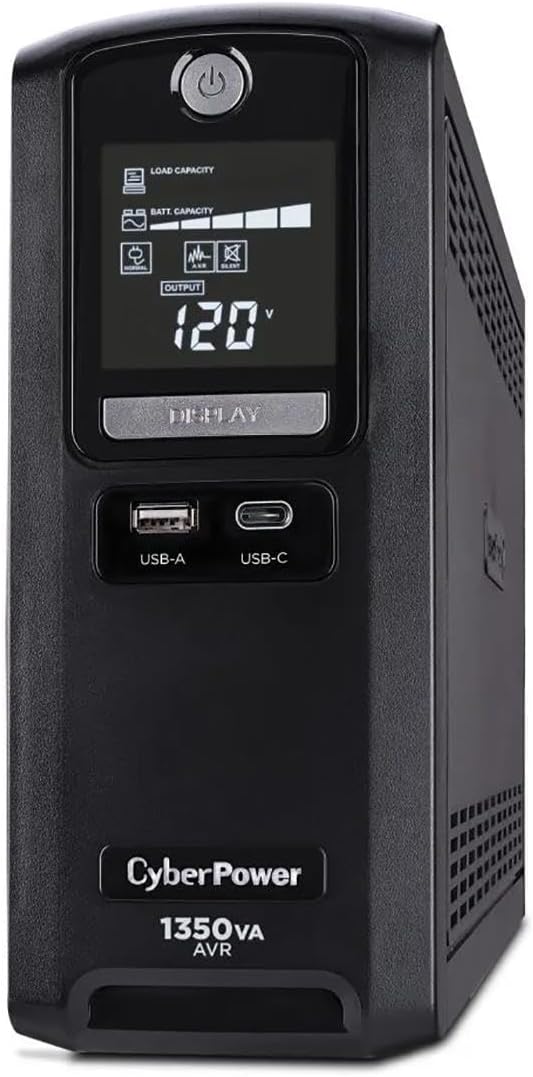
Twelve outlets total with USB ports
Color LCD panel with detailed alerts
Discover the top battery backup for small office solutions compared by experts for reliability, surge protection, and uptime during power outages.
A reliable battery backup for small office setups ensures uninterrupted work during unexpected outages. Protect your critical hardware and maintain productivity with the right uninterruptible power supply designed for modern workspaces.
We evaluated ten top-rated models based on performance, features, and reliability. This guide compares key specs to help you find the ideal power solution for your specific business needs and equipment load.
Each selection highlights unique strengths and ideal use cases for small teams. Please note that availability and pricing can change frequently, so verify current details before making your final purchase decision today.
4.5Editor score
4.9Editor score

4.5Editor score
This side-by-side comparison breaks down the essential specifications and features of the ten leading battery backup units suitable for small office environments and home workstations.


This model leads our list for small offices needing robust power protection. With a strong rating of 4.5 stars from users, it delivers dependable performance for critical workstations and network devices.
We may earn a commission when you buy through this link, at no additional cost to you.
Its standout quality lies in the PFC Sinewave output which ensures compatibility with active power supplies often found in modern servers and workstations. The color LCD panel offers immediate insight into battery and power conditions, allowing you to address issues before they cause downtime. You also get twelve outlets total, six with full backup and surge protection, and six with surge protection only, giving you flexibility to connect peripherals and essential gear simultaneously.
While the price is higher than entry-level options, the investment pays off through superior power quality and the extensive equipment guarantee. The Automatic Voltage Regulation corrects minor fluctuations without using battery power, extending the battery life significantly. Some users note the physical size is larger than compact units, but this is expected for this capacity and power output level.
Small office managers handling sensitive data and high-end computing equipment should prioritize this unit. It is the ideal choice when power quality and equipment safety are non-negotiable. If you need a reliable guardian for your entire setup, this is the top recommendation in this category.
The PFC Sinewave technology ensures that active power supplies receive the clean power they need without overheating or failing during transitions.
With twelve outlets and two USB charge ports you can connect your computer, monitor, router, and mobile devices all at once without extra adapters.
We may earn a commission when you buy through this link, at no additional cost to you.
This unit earned the highest user rating on our list, making it a standout choice for reliability and value. It combines powerful capacity with energy efficiency features that suit daily office operations perfectly.
We may earn a commission when you buy through this link, at no additional cost to you.
The extended runtime at half load is a key strength, providing ample time to save work and shut down systems gracefully during outages. It includes ten outlets with five protected for backup and surge, plus dual USB charge ports for mobile devices. Network and coax data protection shields your internet connection and equipment from surges traveling through communication lines, which is often overlooked in basic models.
While it uses simulated sine wave instead of pure sine wave, this is sufficient for most standard office computers and networking gear. The Energy Star certification means it consumes less power when idling, reducing your energy footprint. The only real trade-off is the standard warranty period which is shorter than some premium rivals.
This is the best all-around pick for small offices looking for top-rated performance without overspending. It balances protection, runtime, and connectivity very well. If you want a high-performing system that users love and trust, this is the one to choose.
You get up to ten minutes of runtime at half load giving you plenty of time to close programs and turn off hardware safely.
Protect your network gear from power surges on phone and cable lines with built-in EMI and RFI filtration features.
We may earn a commission when you buy through this link, at no additional cost to you.
This model is the most cost-effective choice in our guide without sacrificing essential performance features. It comes with a solid 4.5 rating and is designed specifically for keeping computers and routers online during short interruptions.
We may earn a commission when you buy through this link, at no additional cost to you.
The standout feature is its impressive runtime at lower loads, allowing up to twenty-three minutes of power at a hundred watt load. This is great for maintaining connectivity and finishing urgent tasks. It offers seven outlets with full backup and surge protection, plus two surge-only outlets for less critical gear. The included USB port keeps your phone charged even during an outage, which is a convenient practical touch for small offices.
The trade-off is lower total power capacity compared to higher models, meaning it may not support high-draw equipment like large servers. Also it does not offer dual USB-C and USB-A ports like some newer rivals. However for basic computing needs the simplicity and long runtime make it an excellent value.
Small offices with standard desktop setups and essential networking gear will find this model perfectly adequate. Prioritize this if budget is a key factor and you need reliable protection for essential devices. It is the best way to get professional-grade protection without breaking the bank.
The extended runtime ensures you can finish critical work or reboot systems properly even when power is cut unexpectedly.
You can replace the internal battery in minutes without tools which keeps long-term ownership costs lower than sealed units.
We may earn a commission when you buy through this link, at no additional cost to you.
This model offers a powerful alternative with strong capacity and a user-friendly intelligent LCD panel. It provides excellent monitoring capabilities to keep you informed about your power environment in real time.
We may earn a commission when you buy through this link, at no additional cost to you.
The Intelligent LCD color panel displays detailed information on battery and power conditions, alerting you to issues before equipment is affected. With twelve outlets and USB ports you can connect a full office setup easily. Automatic Voltage Regulation corrects minor fluctuations without switching to battery, which saves battery cycles. It also includes PowerPanel software for remote monitoring and control which adds a layer of professional management.
The main trade-off is that it uses simulated sine wave technology which might not be ideal for very sensitive active PFC supplies. Also, while the features are great, the price is close to pure sine wave models, so value depends on your specific device needs.
This is a strong choice for offices that need clear status monitoring and extensive connectivity. It fits well if you have multiple devices and want to manage them via software. If you value display clarity and management tools, this unit is a smart pick.
The color LCD panel gives you instant visual feedback on system health and battery status at a glance.
Use the included software to monitor and manage power settings remotely ensuring your team stays connected and productive.
We may earn a commission when you buy through this link, at no additional cost to you.
This unit stands out for its focus on energy efficiency, making it a great choice for cost-conscious small offices. It balances essential protection features with tools designed to lower overall power usage.
We may earn a commission when you buy through this link, at no additional cost to you.
The ECO Mode is its standout feature, automatically turning off power to peripherals when the computer is off or in sleep mode. This reduces waste and lowers energy costs over time. With twelve outlets total, you have ample space to connect various devices. The multifunction LCD panel keeps you updated on status. It is an excellent option for offices looking to reduce their environmental footprint.
The trade-off is lower output power compared to higher capacity models, which limits heavy-duty use. Also it lacks USB ports for direct mobile charging which are common in newer models. However, for standard setups, the savings and efficiency are significant advantages.
Choose this if you prioritize energy efficiency and want to reduce electricity bills without compromising protection. It fits well in environments with many peripherals that are not always in use. If green features matter to your business, this is a solid option.
The system detects when your computer is off and cuts power to connected peripherals to save energy automatically.
With twelve outlets you can plug in multiple monitors and routers without needing extra power strips or extension cords.
We may earn a commission when you buy through this link, at no additional cost to you.
This model is perfect for offices with limited desk space but a need for multiple connections. Its slim profile allows it to fit easily in tight corners without sacrificing connectivity options.
We may earn a commission when you buy through this link, at no additional cost to you.
The slim profile is its biggest advantage, making it easy to place on a desk or shelf without cluttering the workspace. It offers twelve outlets with well-spaced design to accommodate large plugs easily. GreenPower efficiency technology reduces power consumption while delivering reliable backup power. UL safety certification ensures it meets strict safety standards for peace of mind in professional settings.
The trade-off is simulated sine wave output and lack of data line protection, which limits compatibility with very sensitive active PFC systems or line surges. However for standard office gear this is often acceptable. It is a great space-saving solution.
Small offices needing a compact backup system with many outlets should consider this model. It is ideal for home offices or workspaces where physical space is at a premium. If saving space is your priority, this unit delivers well.
The slim profile allows for flexible placement in tight spaces without interfering with your existing office setup.
Efficient power conversion reduces energy waste and lowers overall power consumption when the unit is idle.
We may earn a commission when you buy through this link, at no additional cost to you.
This mini UPS is designed for small setups needing basic protection without bulk. It offers a simple and quiet backup solution for essential devices like routers and small workstations.
We may earn a commission when you buy through this link, at no additional cost to you.
Its compact size makes it highly portable, and silent operation ensures it does not distract during calls. Eight outlets provide basic coverage for peripherals, and it includes tabs for wall-mount installation to save desk space. It is an affordable option for entry-level backup needs.
The trade-off is low overall capacity and limited runtime, meaning it only supports brief outages for low-power devices. It may not be suitable for high-performance computers or large arrays. However for basic connectivity protection it serves well.
Small offices or home workers with minimal equipment should pick this model for basic protection. It is best for routers and small PCs needing short-term uptime. If you need a quiet small backup, this is a good choice.
Operates silently in both line and battery modes so it does not disturb work or meetings.
Bottom mounting tabs allow for easy wall installation to free up valuable desk real estate.
We may earn a commission when you buy through this link, at no additional cost to you.
This model is ideal for basic retail and small office needs where simple and reliable power protection is the main requirement. It features an extremely simple setup process for immediate use.
We may earn a commission when you buy through this link, at no additional cost to you.
Its compact design and VESA wall mount pattern make it easy to install out of the way. The internal battery is easy to replace, extending the unit life. Audible alarms alert you to low battery or fault conditions clearly. It is perfect for kiosks, food service, and light industrial environments where simplicity is key.
The trade-off is low power output which restricts use to very low-wattage devices. It lacks advanced monitoring features but provides essential surge protection and backup. This fits perfectly in settings where only a short runtime is needed.
Small offices with very basic computer needs can use this for essential protection. If you need a simple and reliable backup for small devices, this is the right pick.
Set up in minutes by plugging into a wall outlet, pressing power, and connecting devices.
The internal battery is easily replaced with an AG-075C cartridge to keep costs low over time.
We may earn a commission when you buy through this link, at no additional cost to you.
This entry-level model provides essential protection for very small setups needing reliable backup without advanced features. It delivers basic performance with a straightforward design.
We may earn a commission when you buy through this link, at no additional cost to you.
Eight outlets provide sufficient space for standard office peripherals. LED status lights indicate power-on and wiring faults clearly. High efficiency design reduces power consumption, making it cost-effective. UL safety certification ensures it meets required standards for business environments. It is perfect for small networks or home offices.
The trade-off is low power capacity and limited runtime. It is not suitable for high-power devices but is great for basic routers and PCs. This fits where simplicity is valued over performance.
Small offices with minimal power needs can choose this for basic protection. If you need a simple and certified backup, this is a good pick.
LED lights quickly show power status and wiring faults without needing complex displays.
High efficiency design minimizes power consumption to keep energy costs low during regular operation.
We may earn a commission when you buy through this link, at no additional cost to you.
This model is excellent for offices needing data protection alongside power backup. It combines intelligent monitoring with essential surge prevention for lines.
We may earn a commission when you buy through this link, at no additional cost to you.
The Intelligent LCD panel provides clear insights into power and battery status. Data line protection prevents surges from traveling through telephone lines to damage electronics. Automatic voltage regulation stabilizes power without using the battery. Twelve outlets and USB ports provide broad connectivity options.
The trade-off is simulated sine wave technology which may not be ideal for all active PFC systems. It is slightly higher in price but offers valuable data line protection. This fits well for network-heavy small offices.
Choose this if you need to protect both power and data lines in your office. It is a balanced choice for networking gear. If data protection is a priority, this unit is a strong option.
Protects connected electronics from surges traveling through phone or cable lines which can cause hardware damage.
Corrects minor power fluctuations automatically to extend battery life and improve overall system stability.
We may earn a commission when you buy through this link, at no additional cost to you.
Selecting the right battery backup for small office depends on understanding power needs, equipment types, and desired protection features for your workspace.
Power capacity is measured in Volt-Amps (VA) and Watts (W). You need to calculate the total wattage of all devices you plan to connect and ensure the UPS can handle that load. Choose a model with at least twenty percent higher capacity than your total load to avoid overloading the unit.
Always check the actual wattage rating rather than just the VA rating to ensure your UPS can support your devices properly.
Waveform type refers to the type of AC output the UPS provides. Pure sine wave models are best for sensitive electronics like servers and Active PFC power supplies. Simulated sine wave models are sufficient for most consumer PCs and networking gear at a lower cost.
If you have Active PFC devices, always choose a pure sine wave UPS to avoid potential damage or shutdown issues.
Check the number and type of outlets available on the unit. Some models offer twelve or more outlets while others have fewer. Ensure enough battery backup outlets are provided for critical devices while surge-only outlets serve less essential peripherals.
Look for widely spaced outlets to accommodate large plugs without blocking adjacent sockets for easier cable management.
Runtime varies significantly based on the load connected. A UPS might run a low load for thirty minutes but only five minutes at full load. Check runtime charts to ensure you have enough time to save work and shut down safely.
Prioritize units with longer runtimes at half load to ensure safety and flexibility during unexpected outages.
USB ports allow you to charge phones and tablets during outages which keeps communication lines open. Data line protection safeguards networking equipment from surges traveling through Ethernet or coaxial cables.
Always confirm if the UPS includes USB charging ports and network protection to cover all essential connections fully.
LCD panels and management software help you monitor battery health and power status in real time. This allows you to respond quickly to issues and manage multiple devices remotely.
Look for models with intuitive displays and compatible software to simplify power management across your office.
A warranty that includes the battery ensures you have protection for the main component. An equipment guarantee adds financial coverage for connected devices in case of surge damage.
Prioritize brands offering strong warranties and equipment guarantees to protect your investment and minimize risk.
Small offices often have limited desk or floor space. Consider the dimensions and mounting options like wall-mount tabs or VESA patterns to save room.
Choose a compact model if space is tight to maintain a tidy and organized workspace without clutter.
To start using your unit properly, plug it into a grounded wall outlet first and then connect your devices. Press the power button to switch it on and wait for the indicators to confirm normal operation.
Regularly test your battery by simulating a power outage to ensure it functions correctly. Replace the internal battery according to manufacturer instructions to maintain reliable performance over time.
Keep the unit in a cool, dry place away from direct sunlight or heat sources. Clean dust from vents using compressed air to prevent overheating and ensure long-term reliability.
Typically, a UPS battery lasts between three to five years depending on usage and environmental conditions. Regular testing and proper ventilation help extend its lifespan. If runtime drops significantly or the unit signals a low battery alert, it is time to replace the battery.
Yes, most quality battery backup models include surge protection built-in to shield connected electronics from power spikes. This protects sensitive equipment like computers and routers from damage caused by surges during storms or grid fluctuations.
VA stands for Volt-Amps and represents the apparent power capacity, while Watts measure real usable power. The Watts rating is typically lower due to power factor, so always match your device wattage to the UPS Watts rating for safe operation.
Yes, using a UPS for your router and modem keeps internet connectivity alive during outages. This allows you to continue working and ensures you can shut down your computer safely without losing connection.
Yes, choosing energy-efficient UPS models with energy-saving features like eco modes reduces electricity consumption and environmental impact. Also, proper battery recycling at end-of-life is important for reducing electronic waste in your area.
If you have Active PFC power supplies in servers or high-end computers, a pure sine wave UPS is required for safe operation. For standard office PCs and routers, a simulated sine wave UPS is usually sufficient and more affordable.
Yes, it is safe and recommended to leave your battery backup plugged in constantly so the battery stays charged and ready for an outage. Modern units have built-in charge management to prevent overcharging and extend battery life.
Look for sufficient capacity to support all devices, adequate outlet count, USB charging ports, data line protection, and LCD displays. Ensure the unit offers a good warranty and equipment guarantee for peace of mind.
Our top picks highlight the best options available including the CyberPower CP1500PFCLCD for premium performance and the APC BE600M1 for budget-friendly needs. Each model offers unique strengths tailored to different office sizes and power requirements.
When making your decision, prioritize capacity, waveform type, and essential features like USB charging and monitoring tools. Ensure the unit supports all your devices comfortably with room for growth over time.
Prices and availability change frequently, so verify current details on Amazon before purchasing. Invest in a reliable battery backup now to protect your small office from unexpected power issues and downtime today.