
SteelSeries Apex 3 Gaming Keyboard
4.6Editor score
Whisper quiet switches
IP32 water resistant
Magnetic wrist rest
Explore our comprehensive guide to the best Mac gaming keyboard options available in October 2026, comparing top models for performance and comfort.
Choosing the right Mac gaming keyboard can transform your entire gaming experience. Whether you are playing on macOS or Windows, a quality board offers precision, comfort, and style that enhances your gameplay significantly.
We compared ten top-rated mechanical and membrane keyboards specifically for Mac compatibility and gaming performance. Our analysis focuses on switch type, connectivity, build quality, and user feedback to help you find the perfect match.
Each pick below highlights key features and real-world performance insights. Note that prices and availability can change frequently, so always check the latest details before making your final purchasing decision today.
4.6Editor score
4.3Editor score

4.0Editor score
This side-by-side comparison highlights the most critical specifications for each keyboard to help you make an informed decision based on your specific gaming needs.


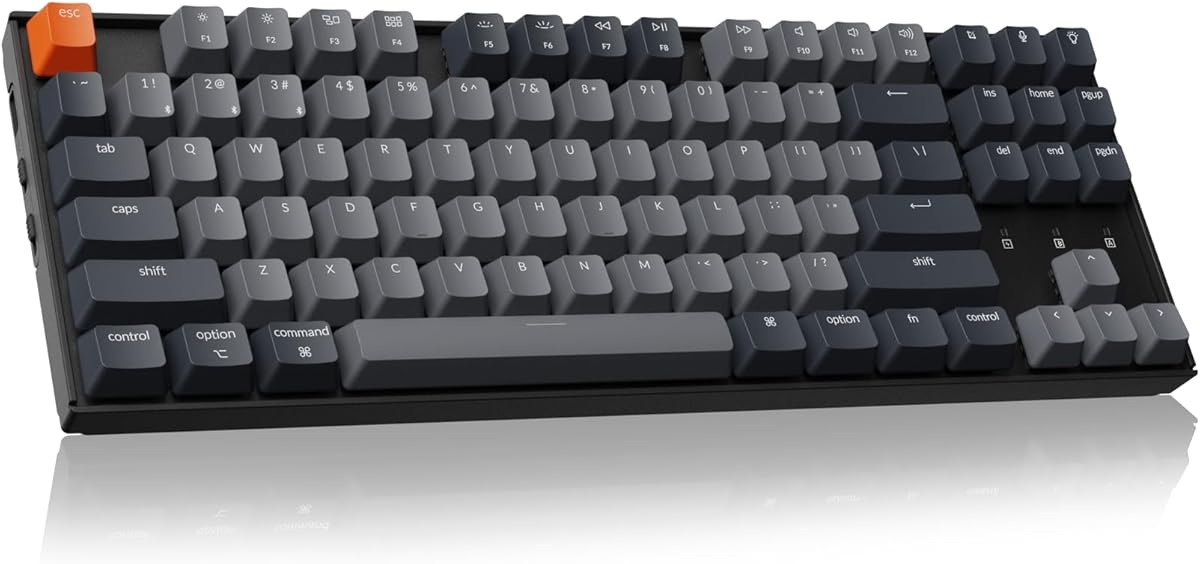
The Keychron K8 stands out as a top choice for Mac users seeking a mechanical gaming keyboard. It offers a robust mix of wireless flexibility and wired reliability. Its tactile switches provide satisfying feedback for both gaming and typing tasks.
We may earn a commission when you buy through this link, at no additional cost to you.
Its dual connection modes allow you to pair up to three devices via Bluetooth 5.1. You can switch between your Mac, iPad, and PC with ease. The battery life is impressive, lasting up to 200 hours without backlight usage.
While the wireless mode is convenient, some competitive gamers might notice slight latency compared to wired setups. However, for most users, this trade-off is acceptable given the convenience of a clutter-free desk setup.
This keyboard is ideal for users who value versatility and a premium typing experience. If you need a reliable board for gaming and productivity across multiple devices, the K8 is a strong recommendation.
The K8 allows you to connect up to three devices simultaneously and switch between them effortlessly. This feature is perfect for hybrid setups involving a Mac and a PC.
It includes specific keycaps for macOS ensuring all function keys work correctly. This level of attention to detail makes it feel native to Apple users.
We may earn a commission when you buy through this link, at no additional cost to you.
The SteelSeries Apex 3 offers incredible value for gamers on a budget. It features whisper-quiet membrane switches that are gentle on the ears. The IP32 water resistance provides peace of mind against accidental spills.
We may earn a commission when you buy through this link, at no additional cost to you.
This keyboard includes dedicated multimedia controls for adjusting volume on the fly. The 10-zone RGB illumination adds a touch of style to any desk setup. A magnetic wrist rest ensures comfort during long sessions.
Because it uses membrane switches instead of mechanical ones, the tactile feedback is less distinct. However, the low-friction design still delivers reliable performance for gaming tasks without the noise.
This is the perfect choice for casual gamers or students who need durability and affordability. If you prioritize budget and spill resistance over mechanical switch precision, the Apex 3 delivers excellent value.
The IP32 rating prevents liquid spills from damaging the internal components. This makes the keyboard much more durable in shared or messy environments.
The switches are designed to be nearly silent, which is great for shared spaces. You can play late at night without disturbing others around you.
We may earn a commission when you buy through this link, at no additional cost to you.
The Logitech G915 X brings next-gen engineering to a sleek full-size design. Its low-profile mechanical switches provide incredible speed and precision for competitive play. The aluminum top plate adds a touch of elegance to your setup.
We may earn a commission when you buy through this link, at no additional cost to you.
You can remap up to 15 functions per key using KEYCONTROL software. This level of customization turns the keyboard into a powerful command center. The LIGHTSYNC RGB system offers millions of colors to match your style.
While the design is stunning, the high price tag may be out of reach for some users. Additionally, it lacks wireless connectivity which limits flexibility compared to other models in this review.
This keyboard is best for enthusiasts who demand premium materials and performance. If you want a high-end aesthetic and advanced customization without compromise, the G915 X is a top-tier choice.
KEYCONTROL allows you to set up to 15 functions per key. This deep customization helps streamline complex commands for specific games or workflows.
Measuring only 23 mm high, the keyboard offers a modern aesthetic. The low-profile keys reduce finger travel for faster and more comfortable typing.
We may earn a commission when you buy through this link, at no additional cost to you.
The EPOMAKER X Aula F75 MAX introduces a unique TFT screen for customization. This feature allows you to display gifs or custom icons directly on the keyboard. It brings a new level of personalization to your gaming setup.
We may earn a commission when you buy through this link, at no additional cost to you.
Its gasket mount structure separates the PCB from the shell for a soft touch. The creamy switches and foam dampening provide a satisfying thocky sound. This focus on acoustics sets it apart from other standard boards.
Customization requires some time to master the software for remapping and effects. Additionally, the screen features add complexity that might overwhelm users who want simple plug-and-play functionality.
This keyboard is perfect for hobbyists who enjoy tweaking their setup. If you want a unique visual element and superior sound quality, the F75 MAX offers an unforgettable experience.
The customizable screen can show gifs, battery status, and indicators. This adds a fun and functional layer to your keyboard customization options.
Factory-lubed switches and foam dampening create a rich sound. Each keystroke feels smooth and produces a pleasant acoustic experience.
We may earn a commission when you buy through this link, at no additional cost to you.
The Logitech G413 TKL SE is built to withstand intense gaming sessions. Its PBT keycaps are highly resistant to heat and wear. The brushed aluminum top case provides a rigid structure that minimizes flex.
We may earn a commission when you buy through this link, at no additional cost to you.
Tactile switches ensure uncompromising performance when you press keys. The six-key rollover anti-ghosting ensures your inputs are always registered accurately. Media controls allow you to manage audio without interrupting your game.
The white LED backlight is functional but lacks the color variety of RGB. Also, the wired connection limits your desk flexibility compared to wireless models. However, the build quality makes up for these limitations.
This keyboard is ideal for gamers who prioritize durability and simplicity. If you need a robust board that can handle daily wear and tear, the G413 TKL SE is a reliable investment.
The brushed aluminum magnesium alloy top case serves as a sturdy backbone. This design ensures minimal flex and a premium feel during use.
PBT keycaps resist heat and wear better than standard plastic. They maintain their texture and clarity over long periods of heavy use.
We may earn a commission when you buy through this link, at no additional cost to you.
The Redragon K742 offers advanced features at a competitive price point. It supports QMK and VIA for deep customization of macros and layers. The gasket structure provides a quiet and smooth typing experience.
We may earn a commission when you buy through this link, at no additional cost to you.
It allows tri-mode connectivity to switch between Bluetooth and USB-C easily. A dedicated volume knob saves desk space while maintaining full functionality. The battery lasts up to 53 hours with backlighting turned off.
Setting up the customization software requires an initial learning curve. Some users might find the brand less familiar than established gaming giants. However, the feature set rivals much more expensive options.
This keyboard is best for tech-savvy users who want customization options. If you need a versatile board for work and play with strong software support, the K742 is a fantastic value.
Endless possibilities exist for remapping keys and editing macros. This makes the keyboard highly adaptable to your specific workflow needs.
The 98% layout saves ten percent of desk space without losing a numpad. It is perfect for minimalist setups where every inch matters.
We may earn a commission when you buy through this link, at no additional cost to you.
The Keychron K4 packs a full numeric keypad into a compact frame. This 96% layout saves desk space while keeping essential keys accessible. It includes specific Mac function keys for seamless integration with macOS.
We may earn a commission when you buy through this link, at no additional cost to you.
Connectivity is reliable via Bluetooth 5.1 with the ability to pair three devices. The large battery lasts up to 240 hours without backlight usage. Super Brown switches offer a tactile bump suitable for gaming.
It uses a white LED backlight rather than full RGB color options. The fixed function row might feel limiting compared to programmable keys on other boards. Still, the utility of the layout is high for productivity.
This keyboard is perfect for users who want a compact layout with a numpad. If you need to save space but require number keys for data or gaming, the K4 is an excellent choice.
It includes all necessary Mac function keys and extra keycaps. This ensures full compatibility with macOS specific shortcuts.
The 4000 mAh battery supports weeks of use without charging. This long runtime is rare in mechanical keyboards of this size.
We may earn a commission when you buy through this link, at no additional cost to you.
The Logitech MX Mechanical blends productivity with a refined mechanical feel. Its smart illumination lights up only when your hands approach to save power. The tactile quiet switches provide feedback without annoying noise.
We may earn a commission when you buy through this link, at no additional cost to you.
Low-profile keys reduce strain during long typing sessions. It connects to up to three devices across different operating systems easily. The Flow feature allows for seamless cross-computer control and file sharing.
This keyboard is more geared towards productivity than hardcore gaming. The price is higher than many dedicated gaming models. However, for users who switch between work and play, it offers unmatched utility.
It is ideal for professionals who need a comfortable mechanical keyboard. If you value ergonomics and smart features over pure gaming speed, the MX Mechanical is a premium solution.
Backlit keys adjust automatically to changing lighting conditions. This feature ensures visibility without wasting battery life unnecessarily.
It pairs effortlessly with devices on nearly any operating system. This versatility makes it a great tool for multi-platform users.
We may earn a commission when you buy through this link, at no additional cost to you.
The GravaStar Mercury K1 stands out with its unique aluminum alloy exoskeleton. This futuristic design combines strength and lightness in flowing curves. It offers symmetrical stability for both intense gaming and comfort.
We may earn a commission when you buy through this link, at no additional cost to you.
Custom linear switches ensure smooth and responsive reactions during gameplay. The gasket-mounted structure absorbs impact vibrations for a soft typing feel. Sound dampening foam enhances acoustics for a pleasant experience.
Software personalization allows tailoring of appearance and function to your style. However, the unique software might require time to set up properly. The price reflects the premium materials used in its construction.
This keyboard is perfect for gamers who prioritize aesthetics and build quality. If you want a board that looks as good as it performs, the Mercury K1 is a standout choice.
The flowing curves and gradient finish create a unique look. This design offers symmetrical stability that enhances the user experience.
A flexible polycarbonate plate absorbs impact vibrations effectively. This reduces noise and softens each keystroke for comfort.
We may earn a commission when you buy through this link, at no additional cost to you.
The Logitech G213 Prodigy is designed for gamers of all levels. Its durable construction repels liquids and dirt for easy cleanup. The anti-ghosting gaming matrix keeps you in control during intense sessions.
We may earn a commission when you buy through this link, at no additional cost to you.
Each key is tuned to enhance the tactile experience with quick feedback. Dedicated media controls allow instant play and pause functionality. An integrated palm rest ensures comfort during long gaming marathons.
It uses membrane switches which are less responsive than mechanical alternatives. Customization is limited to lighting and basic macros. However, its low price and reliability make it a great entry point.
This keyboard is best for new gamers on a tight budget. If you need a dependable board with comfort features, the G213 Prodigy is a solid starting point.
The anti-ghosting gaming matrix is tuned for optimal performance. It ensures that all your inputs are registered accurately during play.
The built-in palm rest keeps your wrists supported during play. This design element helps reduce fatigue over extended gaming sessions.
We may earn a commission when you buy through this link, at no additional cost to you.
Selecting the right keyboard requires understanding your specific needs regarding layout connectivity and switch type. This guide helps you navigate the key factors to make the best choice.
Ensure the keyboard supports macOS specifically. Some models include keycaps or switches for Mac function keys while others default to Windows layouts.
Always verify that the product includes Mac specific keycaps or software support to avoid missing shortcuts.
Mechanical switches provide tactile feedback and durability while membrane switches are quieter and more budget-friendly. Choose based on your preference for feel and noise.
Select switches that match your gaming style whether you need speed or a satisfying click.
Wired connections offer zero latency which is ideal for competitive gaming. Wireless options provide a clean setup but may introduce slight delays.
Consider tri-mode keyboards that support Bluetooth and wired connections for maximum flexibility.
Full-size boards include a numpad for productivity while TKL or 75 layouts save desk space. Choose based on how much room you have.
Compact layouts are better for mouse movement in gaming setups.
Look for materials like aluminum frames and PBT keycaps that resist wear and tear. A sturdy build ensures longevity over years of heavy use.
Investing in durable materials prevents the need for frequent replacements.
RGB lighting and programmable macros allow you to tailor the keyboard to your style. Software support varies by brand so check compatibility.
Good software makes it easier to set up macros and lighting profiles.
Adjustable feet and wrist rests help maintain healthy posture during long sessions. Comfort is key for avoiding strain over time.
Prioritize boards with ergonomic features if you play for hours daily.
Prices range from affordable entry-level options to premium models. Determine your maximum spending limit before comparing features.
You can find reliable options at various price points without overspending.
Start by connecting the keyboard to your Mac via Bluetooth or USB. Install any manufacturer software if available to map keys correctly to macOS.
Keep the keyboard clean by regularly wiping the keycaps with a soft cloth. Avoid eating or drinking directly over it to prevent spills and debris.
Store it in a dry place when not in use to protect the internal electronics. Using a cover can also help maintain its appearance and extend its lifespan.
Yes many mechanical keyboards are fully compatible with macOS. Look for models that offer Mac specific keycaps or software to ensure all function keys work correctly.
Wireless latency is minimal on modern Bluetooth 5.1 keyboards. For competitive play a wired connection is still preferred but wireless is sufficient for most users.
Tactile or linear switches are popular choices depending on preference. Tactile switches offer a bump while linear switches are smooth and quiet.
Yes but you may need to remap keys to fit macOS shortcuts. Many modern keyboards include extra keycaps to make this transition seamless.
Mechanical keyboards often last for millions of keystrokes. High quality switches can support years of daily use without wearing out.
RGB control usually requires specific software from the manufacturer. Some models allow hardware level customization without additional software.
We reviewed ten top options including the Keychron K8 and SteelSeries Apex 3. Each model offers unique strengths for different needs and budgets.
Prioritize compatibility and switch type to match your gaming style. A good keyboard enhances performance and comfort significantly.
Always check current prices and stock before purchasing. Deals can change quickly so keep an eye on the latest offers for the best value.