
Large Aluminum Heat Sink
4.7Editor score
Passive cooling fins
Pre-applied adhesive tape
Large surface area
This guide compares the top GPU backplates for cooling and protection including aluminum heatsinks support brackets and memory coolers for various graphics
GPU backplates are essential components for modern graphics cards that provide structural support and improved heat dissipation. They protect the PCB from bending and help maintain stable temperatures during intensive gaming or rendering sessions.
We evaluated ten distinct GPU backplate solutions focusing on material quality thermal performance and compatibility with popular graphics card models. Our analysis considers passive coolers active fan models and structural support brackets for different build requirements.
Each selection highlights specific strengths such as precision fit thermal conductivity or anti-sag capabilities for your specific setup. Please note that product availability and pricing may change so verify current details before purchasing.
4.7Editor score

4.2Editor score

4.7Editor score
This comparison table provides a side-by-side overview of all ten GPU backplates evaluated in this guide helping you quickly identify the best fit for your specific graphics card and cooling needs.


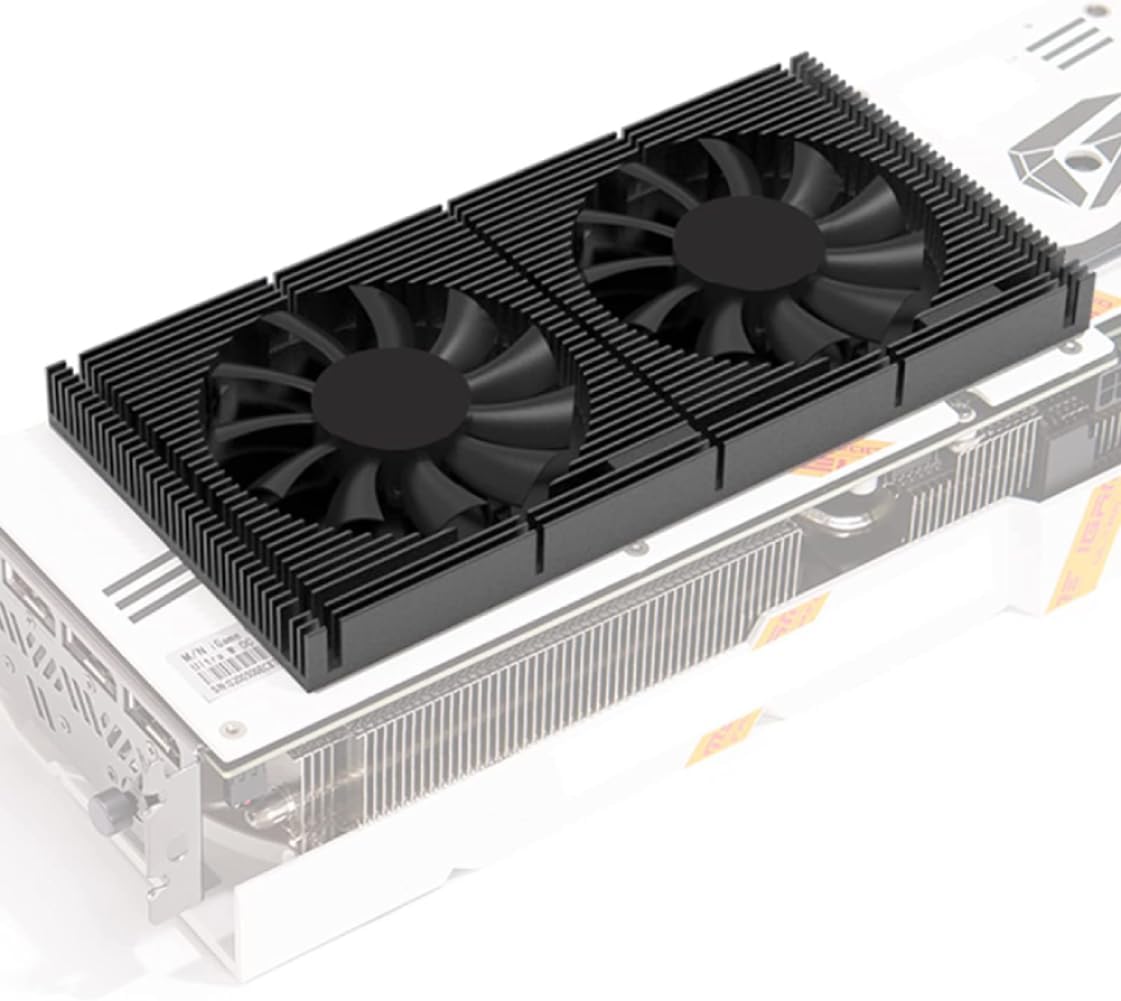


This large aluminum heat sink serves as an effective passive cooling solution for GPU backplates and other electronic components. With a high rating of 4.7 it delivers reliable heat dissipation without consuming power or generating noise from fans.
We may earn a commission when you buy through this link, at no additional cost to you.
The design features 294 fins that significantly increase the surface area available for heat transfer. Its pre-applied thermal conductive adhesive tape simplifies installation by eliminating the need for additional thermal paste or mounting hardware in many scenarios.
While it excels at passive cooling the lack of active fans means it relies on case airflow to move heat away from the component. This trade-off is acceptable for users prioritizing silence and cost over maximum thermal performance.
Ideal for budget builds or secondary workstations this heatsink provides solid protection and cooling for RTX 3090 GPUs and similar high-power cards. It is a practical choice for those seeking basic thermal management without complexity.
The passive design ensures silent operation while effectively drawing heat away from critical PCB components during operation.
Pre-applied thermal tape allows for quick and secure attachment to the GPU backplate without tools or adhesives.
We may earn a commission when you buy through this link, at no additional cost to you.
The GOWENIC GPU backplate combines an aluminum alloy heatsink with a 4-pin cooling fan to deliver active thermal management for graphics cards. It carries a solid 4.0 rating from users who appreciate its balance of cooling power and structural integrity.
We may earn a commission when you buy through this link, at no additional cost to you.
Its aluminum alloy construction ensures durability while the standard fan design connects to a motherboard fan socket for controlled cooling. The included thermal pad facilitates efficient heat transfer between the memory modules and the heatsink surface.
The main limitation is the dependency on an available motherboard fan header which may be scarce in compact builds. Additionally the fan can introduce some noise under heavy load though it remains acceptable for most gaming scenarios.
This backplate is well-suited for users seeking active cooling for RTX 3090 3080 or 3070 cards without complex modifications. It offers a straightforward upgrade path for improving memory temperatures during extended workloads.
The 4-pin fan interface allows for precise speed control via motherboard headers optimizing cooling and noise levels.
Supports vertical mounting configurations which are increasingly common in modern PC cases for better aesthetics and airflow.
We may earn a commission when you buy through this link, at no additional cost to you.
Designed specifically for GIGABYTE GeForce RTX 5060 and RTX 5050 Low Profile graphics cards this aluminum backplate offers a precision fit that standard universal plates cannot match. Its rating of 3.6 reflects niche applicability but high satisfaction among compatible users.
We may earn a commission when you buy through this link, at no additional cost to you.
The CNC-cut design aligns perfectly with the PCB layout ensuring no interference with ports or brackets. It adds structural rigidity to prevent sag and protects rear components from dust and accidental impacts during transport or installation.
Because it is tailored to specific models it may not fit other brands or non-low profile versions of similar GPUs. This limitation restricts its audience but ensures a seamless factory-like installation for those with the correct hardware.
Ideal for small form factor builders using compatible Gigabyte cards this backplate enhances stability and protection without requiring any modding. It is a targeted solution for maintaining system reliability in compact PC configurations.
Precision CNC cuts ensure the backplate aligns exactly with mounting points and ports on specific Gigabyte Low Profile cards.
Reinforced aluminum construction adds rigidity to reduce PCB flex and prevent long-term sag in compact cases.
We may earn a commission when you buy through this link, at no additional cost to you.
The Hilitand GPU backplate radiator delivers consistent active cooling for RTX 3090 3080 and 3070 graphics cards. Its anodized black CNC machining provides a professional look while the aluminum alloy body ensures long-lasting durability in demanding environments.
We may earn a commission when you buy through this link, at no additional cost to you.
Equipped with a standard fan design and 4-pin interface it connects to motherboard fan sockets for controlled thermal performance. The 15mm thickness and included thermal pad facilitate efficient heat dissipation from memory and VRM components.
While functionally similar to other active cooling backplates it maintains reliability across various cases including vertical mounting setups. The primary consideration is ensuring your motherboard has an available fan header for the backplate fan.
This backplate is a solid choice for users needing active cooling memory heat management without investing in custom solutions. It balances performance and ease of installation for standard desktop configurations.
The anodized black CNC finish provides a sleek professional appearance that complements modern GPU designs.
Active fan cooling ensures memory temperatures remain stable during long gaming or rendering sessions.
We may earn a commission when you buy through this link, at no additional cost to you.
This alloy radiator backplate boasts a 4.5 rating for its ability to dissipate heat quickly from graphics card memory and VRMs. The aluminum alloy construction and anodized black finish provide durability and a clean aesthetic in open case builds.
We may earn a commission when you buy through this link, at no additional cost to you.
Its 4 pin fan interface allows connection to the motherboard for low noise operation while maintaining effective cooling. The 15mm thickness combined with a thermal pad ensures rapid heat transfer from the components to the heatsink.
While the fan introduces some operational noise it remains within acceptable limits for most users. The design supports vertical mounting of graphics cards making it versatile for modern case configurations.
Ideal for gamers and workstation users seeking reliable active cooling this backplate offers a balance of performance and style. It is a recommended upgrade for reducing memory temperatures without complex hardware changes.
The thick aluminum base and thermal pad ensure heat moves quickly from components to the finned radiator surface.
Connecting to a motherboard socket allows the fan to operate at low noise while providing necessary cooling.
We may earn a commission when you buy through this link, at no additional cost to you.
The California JOS GPU Support Bracket stands out as a premium structural solution preventing graphics card sag with its all-aluminum build. With a high 4.7 rating it offers robust protection for your GPU and motherboard against long-term damage from weight.
We may earn a commission when you buy through this link, at no additional cost to you.
Its height adjustable design accommodates various GPU sizes and case configurations ensuring a secure fit for ATX M-ATX and ITX cases. The tool-free setup makes installation quick and hassle-free without requiring additional hardware or modifications.
Unlike cooling backplates this bracket focuses purely on structural support and does not dissipate heat from components. This trade-off is acceptable when sag prevention is the priority and active cooling is handled by the card itself.
Perfect for users with heavy GPUs or vertical mounts this bracket ensures stability and extends the lifespan of your hardware. It is a worthwhile investment for maintaining system integrity over years of use.
High-quality aluminum alloy ensures superior strength and resistance to wear compared to plastic alternatives.
Adjustable height settings allow it to support different GPU sizes and case configurations universally.
We may earn a commission when you buy through this link, at no additional cost to you.
This high power aluminum heat sink offers a large passive cooling solution for GPU backplates and other electronic components. Rated at 4.6 it features 294 fins that maximize surface area for heat dissipation in quiet silent computing environments.
We may earn a commission when you buy through this link, at no additional cost to you.
Its dimensions of 150x93x15mm provide ample coverage for graphics card PCBs while the black anodized finish adds a professional touch. The passive design reduces hardware failure risks by minimizing overheating without active cooling power.
Since it relies on case airflow to move heat away performance case ventilation is crucial for optimal performance. This limitation makes it best suited for builds with strong overall airflow rather than restricted enclosures.
Ideal for users prioritizing silent operation this heatsink delivers reliable passive cooling for RTX 3090 3080 GPUs and more. It is a cost-effective choice for enhancing thermal performance without adding noise.
The passive design ensures zero operational noise while effectively drawing heat away from critical components.
294 fins provide a large surface area to maximize heat transfer to the surrounding air passively.
We may earn a commission when you buy through this link, at no additional cost to you.
This GPU bracket is designed specifically for EVGA RTX 3060ti 3070 3080 and 3090 FTW3 XC3 graphics cards providing secure external protection. Made from sturdy black zinc alloy it ensures long-lasting durability for the graphics card slot.
We may earn a commission when you buy through this link, at no additional cost to you.
Its precise size dimensions of 12×3.8cm ensure a perfect fit for the card slot without gaps. Installation requires only screws making it quick and hassle-free to safeguard the graphics card slot against dust and damage.
Because it is tailored to EVGA models it may not fit other brands even if dimensions are similar. This specificity limits its market but guarantees a precise fit for owners of the compatible EVGA series.
Ideal for EVGA users seeking to protect their graphics card slot this bracket offers reliable durability and ease of installation. It is a practical accessory for maintaining the integrity of external GPU components.
Designed precisely for EVGA RTX 30 series models ensuring a secure fit without gaps or interference.
Constructed from sturdy black zinc alloy for long-lasting durability and resistance to wear and tear.
We may earn a commission when you buy through this link, at no additional cost to you.
Engineered specifically for ZOTAC RTX 5060 Solo 8GB and RTX 5050 Solo 8GB graphics cards this aluminum backplate delivers a seamless factory-like fit. Its perfect 5.0 rating reflects outstanding satisfaction among users with these specific models.
We may earn a commission when you buy through this link, at no additional cost to you.
Precision CNC-machined construction ensures the holes and ports align exactly with the PCB layout without interference. Strategic ventilation cutouts improve airflow and assist heat dissipation while the anti-sag support prevents long-term PCB bending.
Installation is beginner-friendly with pre-drilled holes and a complete kit requiring no drilling or modifications. This convenience makes it accessible for users of all skill levels looking to enhance their ZOTAC card.
Ideal for ZOTAC Solo card owners this backplate combines perfect fit with structural reinforcement and improved airflow. It is the top recommendation for those seeking a reliable upgrade for their specific graphics card.
Strategic ventilation cutouts assist heat dissipation and maintain stable performance during intensive workloads.
Precision CNC cuts ensure zero interference with ports and perfect alignment with mounting points.
We may earn a commission when you buy through this link, at no additional cost to you.
This premium memory heatsink features dual 70mm PWM fans for superior cooling capacity compared to standard single fan designs. Rated at 4.2 it balances high performance with acceptable noise levels using 4pin connector and automatic speed adjustment.
We may earn a commission when you buy through this link, at no additional cost to you.
The aviation aluminum 6061 construction offers a lightweight and sturdy build with a 1.5mm thickness for better dissipation. A 1.2mm 7W thermal pad is included to ensure optimal heat transfer from memory components to the cooler.
While it requires installation on a flat surface the upgraded elastic latch makes operation flexible and straightforward. The dual fans allow for adjustable speeds between 1500 and 2800 RPM depending on the working temperature needs.
Ideal for users seeking top-tier active cooling for RTX 3090 and similar cards this heatsink delivers exceptional thermal performance. It is the best choice for maximizing memory stability during high-performance gaming or workstation tasks.
Two 70mm fans provide superior cooling capacity compared to smaller single-fan alternatives for better stability.
The included 1.2mm 7W thermal pad ensures efficient heat transfer from components to the aluminum heatsink.
We may earn a commission when you buy through this link, at no additional cost to you.
Selecting the right GPU backplate requires understanding your specific needs regarding cooling performance structural support and case compatibility.
Determine whether you need passive cooling which relies on airflow to move heat or active cooling with fans for higher performance. Passive options are quieter and simpler while active options provide better thermal management for memory and VRMs.
Choose passive if silence is a priority and active if maximum heat dissipation is needed.
Look for aluminum alloy or aviation aluminum construction which offers a balance of durability and thermal conductivity. Thicker materials generally provide better heat spread and structural rigidity to protect the PCB from damage.
Prioritize aluminum alloys for a strong reliable build that resists wear and corrosion over time.
Ensure the backplate matches your specific graphics card model and form factor. Some plates are universal while others are tailored to brands like Gigabyte or ZOTAC requiring precise fitment for proper mounting.
Verify exact dimensions and mounting holes to avoid interference with ports or brackets.
Check if the backplate requires motherboard fan headers or screws for installation. Passive plates often use adhesive tape or pre-drilled holes while active ones need fan connections which may limit options in compact builds.
Select a mounting method that aligns with your motherboard capabilities and case space.
Consider if the backplate provides structural rigidity to prevent GPU sag over time. This is critical for heavy cards or vertical mounting setups where gravity can cause bending and damage to the motherboard.
Choose plates with reinforced designs if your card is prone to sagging in your case.
Look for features like pre-applied adhesive tape or pre-drilled holes that simplify installation. DIY-friendly plates reduce the need for tools or modifications making the upgrade accessible to all users.
Prioritize options that require no drilling or permanent changes for a smoother setup process.
For active coolers check ventilation cutouts or fan placement to ensure it doesn't block case airflow. Proper airflow design helps maintain consistent cooling without creating hotspots inside the case.
Ensure cutouts align with your case fan setup for optimal thermal performance.
Assess the finish quality such as anodized coatings which protect against corrosion and wear. Sturdy constructions ensure the backplate withstands vibrations and impacts during transport or use.
Invest in durable finishes to maintain appearance and function over the long term.
Install the backplate after removing your graphics card from the PC case ensuring the PCB is clean and free of debris. Align the pre-drilled holes or adhesive tape with the mounting points to secure it firmly against the back of the card.
For active cooling models connect the fan to a motherboard fan header using the provided cable. Verify that the fan spins freely and does not obstruct internal airflow or other components inside the case.
Regularly inspect the backplate for dust accumulation or loosened screws every few months. Clean with compressed air and tighten mounting hardware as needed to maintain structural integrity and cooling efficiency.
Yes GPU backplates help dissipate heat from memory modules and VRMs through conductive materials like aluminum. They increase surface area for passive cooling or work with fans for active cooling reducing overall temperatures during high loads.
Aluminum alloy is the most common material due to its excellent balance of thermal conductivity weight and durability. Aviation aluminum is often used for premium models offering higher strength and corrosion resistance.
Not all backplates fit every card since mounting points and dimensions vary by model and manufacturer. Always check compatibility with your specific GPU model before purchasing to ensure proper fitment.
Active backplate fans typically use a 4-pin connector that plugs into a motherboard fan header. This allows the motherboard to control fan speed based on temperature settings reducing noise when full cooling isn't needed.
Yes many backplates add structural rigidity to the card to prevent sag over time. Some dedicated brackets also provide support without cooling functionality to stabilize heavy graphics cards.
Most quality backplates include necessary hardware such as screws or adhesive tape for installation. Always check product details to confirm that mounting accessories are provided before starting the setup process.
We explored ten GPU backplates ranging from passive aluminum heat sinks to active cooling solutions with dual fans. The California JOS bracket stands out for structural support while the Gpu Backplate Memory Heatsink offers top-tier thermal performance.
When choosing prioritize your specific needs such as silence compatibility or maximum cooling. Ensure the material and mounting method align with your build constraints for a reliable long-term upgrade.
Please check current availability and pricing on Amazon before purchasing as these can fluctuate regularly. Verify compatibility with your exact GPU model to ensure a seamless installation experience.