
iFFALCON 65" 4K MiniLED Smart TV
4.3Editor score
4K at 144Hz gaming
Dolby Vision Gaming support
Four HDMI 2.1 ports
Choosing the right display for next-gen gaming is crucial for immersive experiences. The best TVs offer high refresh rates and low input lag to ensure smooth gameplay without motion blur or stuttering.
Our team analyzed ten leading models focusing on HDMI 2.1 support, VRR compatibility, and HDR performance. We evaluated each TV's ability to handle demanding titles like GTA 6 on modern consoles.
Each pick highlights specific strengths tailored to gamers seeking premium visuals. Prices and availability fluctuate often, so verify current listings before purchasing to ensure you get the best deal available.
4.3Editor score

4.6Editor score

4.1Editor score
As an Amazon Associate we earn from qualifying purchases.
This side-by-side comparison evaluates all ten models based on critical gaming specs including refresh rate, HDR formats, connectivity, and smart features to help you decide.

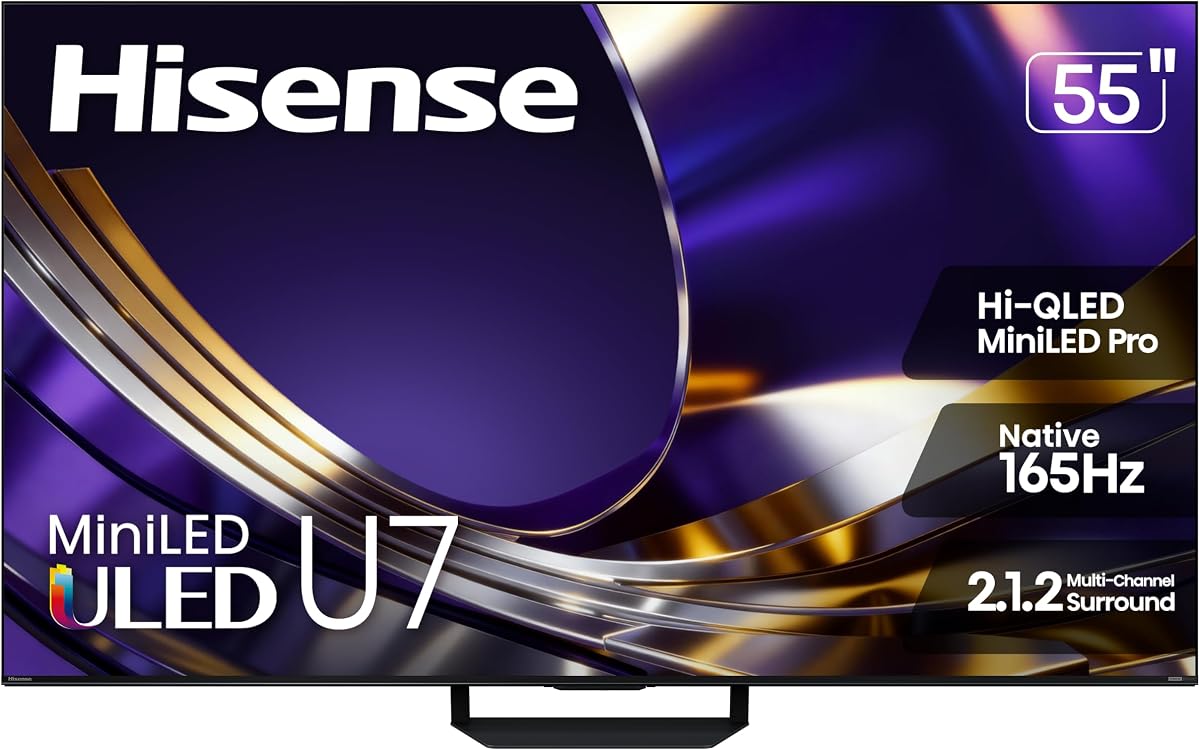




This Hisense model stands out with its Mini-LED technology and high refresh rate capabilities. It scores highly for handling fast-paced action without introducing motion blur. The combination of brightness and contrast makes it suitable for both bright rooms and dark gaming sessions.
We may earn a commission when you buy through this link, at no additional cost to you.
The native 165Hz refresh rate ensures fluid gameplay even in demanding titles. Anti-reflection coating significantly reduces glare from windows or lights. Variable Refresh Rate up to 330Hz keeps frames synchronized to prevent tearing. The AI engine adjusts picture settings automatically for optimal viewing.
While the smart platform occasionally lags when navigating menus, the gaming performance compensates well. Some users might prefer a more responsive OS for streaming tasks. The build quality is solid with a premium feel.
Gamers seeking premium visuals without OLED pricing should consider this. It balances color accuracy and motion clarity effectively. Ideal for those playing on PS5 or Xbox Series X who need HDMI 2.1 support.
The high refresh rate and low input lag make this ideal for competitive multiplayer sessions where split-second reactions matter.
Anti-reflection technology and high peak brightness ensure the image remains clear even when daylight enters the room.
We may earn a commission when you buy through this link, at no additional cost to you.
The iFFALCON TV offers exceptional value with Mini-LED technology at a lower price point. It supports high refresh rates essential for next-gen console gaming. The inclusion of four HDMI 2.1 ports allows multiple devices to connect simultaneously without compromising performance.
We may earn a commission when you buy through this link, at no additional cost to you.
VRR support reaches 288Hz ensuring smooth visuals across different frame rates. Dolby Vision Gaming optimizes HDR for supported games automatically. The 144Hz panel handles motion well. Google TV provides access to all major streaming services effortlessly.
Audio performance is average compared to picture quality. You may want an external sound system for immersive sound. The remote control is basic but functional for daily use.
Budget-conscious gamers looking for high specs should prioritize this model. It delivers critical gaming features at a fraction of the cost. Perfect for building a high-performance setup without overspending.
Having four HDMI 2.1 ports means you can connect a console, PC, and soundbar without using a switch.
Dolby Vision Gaming ensures that supported titles look their best with optimized dynamic tone mapping.
We may earn a commission when you buy through this link, at no additional cost to you.
Sony's BRAVIA series is renowned for its picture processing and gaming features. This model includes Auto HDR Tone Mapping which simplifies setup for PS5 users. The XR processor optimizes content in real-time for sharp details.
We may earn a commission when you buy through this link, at no additional cost to you.
Motionflow XR keeps fast action clear in sports and games. The interface integrates Google TV with Gemini for smart assistance. Picture quality emphasizes natural colors and filmic modes. It supports 4K at 120Hz effectively.
Brightness levels are lower than Mini-LED alternatives which might impact HDR impact in bright rooms. The 50-inch size is compact for a premium TV. Sound quality is decent for a thin profile.
Gamers prioritizing picture accuracy and console features should choose this. It delivers a cinematic experience suitable for single-player story modes. Ideal for those wanting a premium brand reputation.
Auto Genre Picture Mode switches automatically to game settings when a console is detected.
Google Gemini integration allows voice queries and control over smart home devices directly from the TV.
We may earn a commission when you buy through this link, at no additional cost to you.
This 55-inch variant shares the same impressive specs as the larger model. It offers a compact form factor with high-performance gaming capabilities. The brightness levels ensure vivid HDR highlights in any lighting condition. Anti-reflection coating helps maintain visibility during the day.
We may earn a commission when you buy through this link, at no additional cost to you.
The AI engine adjusts settings to optimize contrast and color dynamically. Local dimming zones deliver deep blacks without halos. VRR support prevents tearing during high frame rate gaming. Google TV offers extensive app availability.
Smart TV navigation can be inconsistent depending on software updates. Some users report minor menu lag. The audio system includes Dolby Atmos support but external speakers are preferred.
Gamers looking for a smaller size without sacrificing features should consider this. It fits well in medium-sized rooms. A strong contender for console gaming enthusiasts.
Peak brightness reaches 3000 nits ensuring highlights stand out clearly in high dynamic range content.
Precision lighting zones control brightness area by area for accurate contrast in dark scenes.
We may earn a commission when you buy through this link, at no additional cost to you.
Samsung's M70H brings Mini-LED to an affordable range. It focuses on motion clarity and contrast enhancement. The Gaming Hub allows cloud gaming access without a console. Color Booster enhances vividness for entertainment.
We may earn a commission when you buy through this link, at no additional cost to you.
Motion Xcelerator ensures smooth visuals during sports and action. The upscaling tech improves lower resolution content. Brightness is sufficient for HDR but not as high as premium models. The interface is intuitive.
Only select ports support higher refresh rates which might limit connection flexibility. The system lacks full HDMI 2.1 on every input. Still, it performs well for casual gaming.
Users wanting Mini-LED at an entry price will find this appealing. It suits those who stream as much as they game. A solid mid-range choice for modern setups.
Access cloud games directly without needing a physical console attached to the TV.
Mini LED precision delivers accurate color reproduction across the full spectrum for realistic images.
We may earn a commission when you buy through this link, at no additional cost to you.
The U8000H is an entry-level option with standard features. It offers decent picture quality for its class. The Crystal Processor enhances color and detail. Motion Xcelerator adjusts transitions to reduce blur during action scenes.
We may earn a commission when you buy through this link, at no additional cost to you.
It handles 4K at 60Hz which is adequate for less demanding games. The upscaling tech helps older content look sharper. The design is slim with minimal bezels. The interface is simple.
Gaming performance is limited to 60Hz which might not satisfy pro gamers. High refresh rate features are absent. Still, it serves well for general viewing and casual gaming.
Budget buyers needing a functional TV will appreciate this. It provides reliable performance for streaming and occasional gaming. A safe choice for secondary rooms.
Enhances color and sharpens details for a vibrant 4K viewing experience across all content.
Motion Xcelerator estimates frame transitions in real time for smoother motion in games and sports.
We may earn a commission when you buy through this link, at no additional cost to you.
LG's QNED technology combines LED with quantum dots for wide color. The A7 processor improves sound and brightness. FreeSync Premium supports PC gaming. Filmmaker Mode preserves director intent.
We may earn a commission when you buy through this link, at no additional cost to you.
Gaming features include AMD FreeSync and ALLM for smoother play. Picture quality focuses on accuracy and natural tones. The interface is responsive. WebOS offers easy navigation.
Peak brightness is lower than Mini-LED rivals. This affects HDR impact in bright rooms. The price point is higher for similar specs. The design is gallery-ready.
Gamers focused on PC titles with FreeSync might prefer this. It delivers accurate colors for content creators. A good fit for dark rooms.
FreeSync Premium and ALLM provide low latency and synchronized refresh for fluid gameplay.
Certified 100% Color Volume ensures vibrant colors even at high brightness levels.
We may earn a commission when you buy through this link, at no additional cost to you.
TCL's QM6K pairs Mini LED with quantum dots for vivid images. It supports high refresh rates for smooth action. The Halo Control System reduces blooming in dark scenes. Brightness levels are impressive.
We may earn a commission when you buy through this link, at no additional cost to you.
Google TV integration is seamless. The 144Hz rate ensures minimal blur. Onkyo Audio adds decent sound. Motion Rate 480 enhances fast moving visuals. It handles HDR well.
Sound output is adequate but not immersive. A soundbar helps for cinematic audio. The remote is basic. The design is sleek.
Gamers wanting bright images and motion clarity should consider this. It competes with pricier models. A strong choice for sports and action titles.
Advanced local dimming eliminates haloing and enhances shadow detail for sharper picture accuracy.
Motion Rate 480 keeps fast-paced action with incredible clarity and minimal motion blur.
We may earn a commission when you buy through this link, at no additional cost to you.
This model brings 144Hz gaming to a 50-inch panel. AI Picture optimizes scenes automatically. FALD ensures high contrast. Dolby Vision IQ adapts to ambient light.
We may earn a commission when you buy through this link, at no additional cost to you.
AI Smooth Motion enhances fast scenes. The Fire TV platform offers popular apps. Voice control is integrated. The design is minimalist. Picture quality is sharp.
Ads on the home screen can be intrusive. Some prefer Google TV for cleaner interface. The refresh rate is high for gaming.
Gamers preferring Fire TV will find this ideal. It balances performance and price well. Great for smaller spaces needing high specs.
Advanced AI processing analyzes content scene by scene to optimize brightness and color automatically.
High refresh performance keeps fast movement fluid and sharp reducing blur during gameplay.
We may earn a commission when you buy through this link, at no additional cost to you.
Roku offers a straightforward smart TV with 4K QLED. The interface is easy to navigate. HDR10 creates bright accurate colors. Roku Smart Picture optimizes signals for better viewing.
We may earn a commission when you buy through this link, at no additional cost to you.
Apps launch quickly and updates are automatic. The remote includes a lost remote finder. Sound quality is clear for casual use. The design is sleek.
It lacks advanced gaming features like VRR. Suitable for casual gaming but not competitive play. Streaming experience is top tier.
Those prioritizing ease of use will love this. It fits well in living rooms needing simplicity. Ideal for casual viewers and gamers.
Setup takes minutes and the home screen is simple to navigate for quick access.
Enhanced voice remote allows searching across thousands of apps easily.
We may earn a commission when you buy through this link, at no additional cost to you.
Selecting a TV for next-gen consoles requires attention to technical specs that directly impact gameplay and visual fidelity.
A high refresh rate such as 120Hz or higher ensures smooth motion during fast-paced action in games like GTA 6. Look for TVs with native high refresh panels to avoid artificial motion smoothing.
Prioritize models with native high refresh rates to ensure fluid gameplay without motion blur.
HDMI 2.1 ports are essential for 4K at 120Hz output. Ensure the TV has enough 2.1 ports to connect all your devices like consoles and PCs.
Verify the TV has multiple HDMI 2.1 ports to avoid needing switches for your consoles.
VRR prevents screen tearing by synchronizing the TV's refresh rate with the console's frame rate. It is critical for a seamless gaming experience.
Look for VRR support to keep frames synchronized and reduce tearing during gameplay.
High brightness ensures HDR highlights pop even in bright rooms. Aim for peak brightness above 500 nits for good contrast and color depth.
Opt for high peak brightness to maintain HDR impact in various lighting conditions.
Low input lag ensures your commands register instantly on screen. Games mode is essential to reduce processing delay.
Choose a TV with a dedicated Game Mode for minimal input lag.
Mini-LED and QLED offer high brightness and contrast. OLED provides perfect blacks but may be less bright. Decide based on your room lighting.
Select panel tech based on your room lighting needs.
Integrated sound quality varies. Dolby Atmos support helps create immersive sound. External soundbars are recommended for better audio.
Expect to add an external sound system for immersive audio.
User-friendly interfaces make navigating apps easier. Platforms like Google TV or Roku offer wide app support and voice controls.
Choose a platform that supports your favorite streaming apps.
Set your console to output 4K at 120Hz in settings to match the TV's capabilities. Enable Game Mode to reduce input lag and ensure VRR is active for smooth frames.
Clean the screen with a microfiber cloth to avoid scratches. Avoid harsh chemicals that could damage the anti-reflection coating. Ensure the TV has proper ventilation to prevent overheating.
Update firmware regularly for performance improvements and bug fixes. Calibrate picture settings if needed for accurate colors. Use streaming apps to access exclusive content without a console.
No, only specific models support 120Hz. Look for HDMI 2.1 specs to confirm 120Hz capabilities for PS5 and Xbox Series X.
Variable Refresh Rate keeps the TV's refresh rate synchronized with the console. This prevents screen tearing and makes gameplay smoother especially in high action scenes.
Mini-LED offers better contrast and brightness control than standard QLED. This can improve HDR gaming but both are suitable depending on your room lighting conditions.
Most TVs have average built-in audio. A soundbar provides better immersion and clarity especially for cinematic games and dialogue.
Google TV and Roku offer broad app support. Gaming Hub consoles let you stream cloud games directly on the TV for variety.
Enable Game Mode or Auto Low Latency Mode on your TV. This disables post-processing to speed up response time for better control.
50-inch is suitable for smaller spaces but larger sizes provide more immersion. Choose based on your room size and viewing distance preferences.
Yes, HDMI 2.1 models work well with gaming PCs. Ensure your graphics card supports 4K at high refresh rates for best results.
The Hisense U7 Mini-LED leads with high refresh rates and excellent brightness. The iFFALCON model offers great budget value with four HDMI 2.1 ports. Sony's BRAVIA delivers premium processing for accurate visuals.
Prioritize refresh rate and HDMI 2.1 support to match next-gen console power. VRR and low input lag are critical for competitive gaming. Brightness matters for HDR impact.
Verify current availability and specs before purchasing as models update frequently. Investing in the right display ensures your next-gen gaming setup is future-proof for titles like GTA 6.