
TP-Link Nano AC600 USB WiFi Adapter
4.5Editor score
Nano size for portability
Dual Band 2.4G and 5G
2-year free technical support
Discover the top 5GHz WiFi dongle options for desktops and laptops. We compare speed, range, and features to help you find the perfect wireless adapter today.
Finding a reliable 5GHz WiFi dongle is essential for modern computing needs. Whether you stream video or game online, a quality adapter ensures stable connections.
We evaluated ten top-rated USB adapters based on speed, range, and compatibility. Our list covers various budgets and technical requirements for all users.
Each pick highlights key strengths and ideal use cases. Note that availability and pricing may change, so check current listings before buying.
4.5Editor score

4.4Editor score

4.1Editor score
This side-by-side comparison highlights the key specifications of the ten best 5GHz WiFi dongles available. Use it to quickly identify the right adapter for your setup.


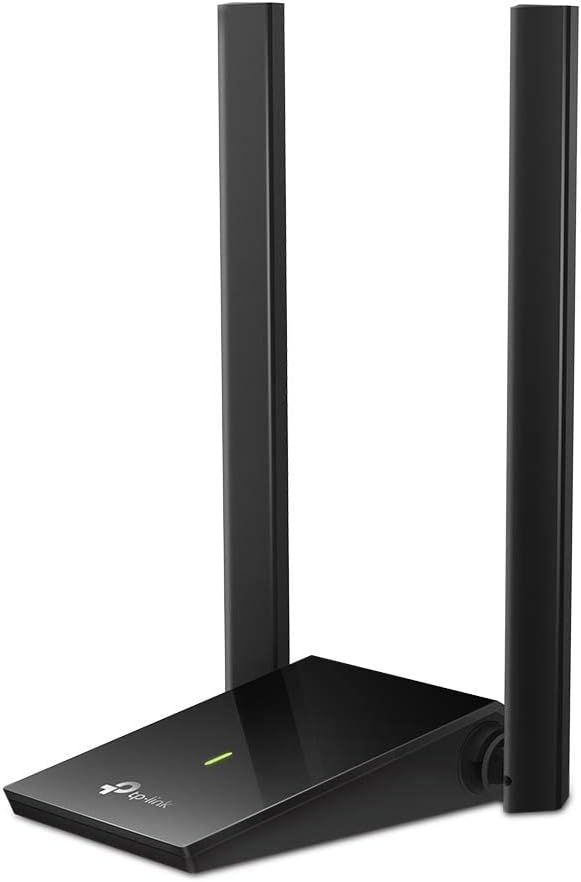


The TP-Link AC1300 USB WiFi Adapter stands out as a top choice for desktop PCs. It offers dual band connectivity with strong speeds on both 2.4GHz and 5GHz bands. The rating reflects reliable performance for everyday tasks.
We may earn a commission when you buy through this link, at no additional cost to you.
Its USB 3.0 interface ensures faster data transfers compared to older USB 2.0 models. MU-MIMO technology allows efficient handling of multiple devices, reducing lag during streaming or gaming. This makes it ideal for busy home networks.
While performance is excellent, users may need to install drivers manually on some systems. The antenna is not adjustable, which limits positioning flexibility. However, the compact size helps minimize desktop clutter.
Buy this if you need balanced performance and Mac support. It suits users wanting a reliable upgrade from older wireless cards without overspending.
MU-MIMO technology ensures smooth connections even when multiple devices are using the network simultaneously.
Support for Mac OS allows seamless integration for users who prefer Apple ecosystems alongside Windows PCs.
We may earn a commission when you buy through this link, at no additional cost to you.
The TP-Link Nano AC600 USB WiFi Adapter is perfect for users needing a discreet solution. Its tiny size means it stays plugged in without obstructing nearby ports. The rating shows satisfaction with its basic performance.
We may earn a commission when you buy through this link, at no additional cost to you.
It supports dual band 2.4G and 5G connections, offering flexibility for different network conditions. The design allows users to plug it in and forget it. Support includes a two-year warranty and free technical help.
Due to its small form factor, range may not match larger adapters with external antennas. It works best in environments where the router is relatively close. This limits use in large homes or offices.
Choose this for basic needs or travel. It fits those wanting a low-cost way to add dual band WiFi to a laptop or desktop.
The nano design lets you leave the adapter plugged in without blocking adjacent USB ports.
Industry leading support provides peace of mind with a two-year warranty and free technical assistance.
We may earn a commission when you buy through this link, at no additional cost to you.
The BrosTrend AX1800 USB WiFi 6 Adapter brings advanced WiFi 6 capabilities to desktops. It delivers higher speeds and better efficiency than older models. The rating indicates solid performance despite some limitations.
We may earn a commission when you buy through this link, at no additional cost to you.
Two 5dBi high gain antennas ensure strong signal reception through walls and floors. Beamforming technology targets signals directly to your device. The included USB 3.0 extension cable helps position the adapter for optimal signal.
It is priced higher than AC adapters and supports only Windows 10 and 11. Users with older systems or Macs will need to consider alternatives. The focus is on future-proofing for WiFi 6 networks.
Invest in this if you have a WiFi 6 router and need top speeds. It suits power users prioritizing range and performance over cost.
WiFi 6 support offers faster speeds and better performance in crowded network environments.
High gain antennas and a USB extension cable help overcome distance and wall interference.
We may earn a commission when you buy through this link, at no additional cost to you.
The Nineplus Wireless USB WiFi Adapter delivers strong dual band performance for Windows users. It offers AC1300 speeds with two external antennas for better range. The rating suggests it meets user expectations for stability.
We may earn a commission when you buy through this link, at no additional cost to you.
With 5dBi antennas, it captures signals effectively even in areas with weak coverage. USB 3.0 ensures the adapter keeps pace with network speeds. Online setup support is available for Windows 7 users.
It does not support macOS or Linux, limiting its use to Windows environments. Driver installation might require manual steps on some systems. The lack of cross-platform support is a key trade-off.
Pick this if you run Windows and need range on a budget. It suits users upgrading older PCs with stable WiFi needs.
Dual external antennas ensure better capture of WiFi signals for long-range connectivity.
Support includes video call guidance and online setup assistance for easier installation.
We may earn a commission when you buy through this link, at no additional cost to you.
The UGREEN WiFi Adapter AX900 introduces WiFi 6 to desktop PCs at an accessible level. Built-in drivers simplify setup for Windows 10 and 11 users. The rating reflects ease of use and reliable performance.
We may earn a commission when you buy through this link, at no additional cost to you.
It supports AP mode, allowing you to turn your PC into a Wi-Fi hotspot. Encryption is strong with WPA-PSK and WPA2-PSK options. Low latency makes it suitable for video calls and streaming.
It is restricted to Windows 10 and 11 systems with X86/X64 architecture. Range is best within 30 feet of the router. Users with older systems or longer distances should consider other options.
Choose this for modern Windows setups needing simple installation. It fits users prioritizing convenience and basic WiFi 6 features.
Built-in drivers eliminate the need for CD-ROMs or manual downloads on supported Windows systems.
Turn your PC into a hotspot to share internet with other devices easily.
We may earn a commission when you buy through this link, at no additional cost to you.
The Tenda AX900 WiFi Adapter combines WiFi 6 with an external high gain antenna. It offers 38% faster 5GHz speeds compared to AC600 adapters. The rating points to solid performance for the price.
We may earn a commission when you buy through this link, at no additional cost to you.
An external 6dBi omnidirectional antenna improves weak signal reception. Preloaded drivers mean you can get online quickly. AP mode allows connection of up to eight devices on the 5GHz band.
It supports Windows 11, 10, and 7 but lacks Mac or Linux options. The antenna is external but lacks adjustability. This design focuses on raw range rather than positioning flexibility.
Select this if you need better range and WiFi 6 on a budget. It works well for users with compatible Windows systems.
An external 6dBi antenna helps overcome interference and boost signal strength.
Preloaded drivers enable instant connection without technical skills or manual downloads.
We may earn a commission when you buy through this link, at no additional cost to you.
The BrosTrend AX1800 USB WiFi 6 Adapter delivers high speeds with two external antennas. It uses Beamforming to target signals and reduce buffering. The rating shows satisfaction with its range and stability.
We may earn a commission when you buy through this link, at no additional cost to you.
Features include OFDMA and UL/DL MU-MIMO for efficient connections. A 3.3-foot USB 3.0 extension cable helps place the adapter near windows. It supports streaming and gaming without lag.
It is compatible only with Windows 10 and 11. Linux is not supported. The price is higher than AC models but justified by WiFi 6 performance.
Opt for this if you want maximum range and modern tech. It suits enthusiasts with a WiFi 6 router and Windows PC.
Beamforming delivers targeted signals for reliable connections regardless of where your PC is located.
An included extension cable lets you place the adapter in spots with optimal signal reception.
We may earn a commission when you buy through this link, at no additional cost to you.
The TP-Link USB WiFi Adapter AC1300 features dual high gain antennas for better range. It supports AC1300 speeds on both 2.4GHz and 5GHz bands. The rating highlights reliable performance and compatibility.
We may earn a commission when you buy through this link, at no additional cost to you.
USB 3.0 ensures faster data transfers. Antennas are multi-directional and adjustable for flexible deployment. It works on Windows 11/10 and macOS X 10.9 to 10.14.
It is larger than compact models which may clutter smaller desks. Users should ensure drivers are updated via the TP-Link site. Despite this, it offers a balanced feature set.
Buy this if you value adjustable antennas and Mac support. It is a strong choice for desktop setups.
Multi-directional antennas allow flexible deployment for the best reception on your desk.
AC1300 speeds ensure smooth gaming and streaming on both frequency bands.
We may earn a commission when you buy through this link, at no additional cost to you.
The UGREEN AX1800 WiFi Adapter uses WiFi 6 for fast and reliable connectivity. It includes advanced WPA3-SAE encryption for secure browsing. The rating reflects good performance and security focus.
We may earn a commission when you buy through this link, at no additional cost to you.
Built-in drivers simplify installation for Windows systems. Back ventilation holes help with heat dissipation during long sessions. AP mode allows easy sharing of internet with other devices.
It is limited to Windows 10 and 11. Linux and older systems are not supported. The security features are strong for privacy-conscious users.
Choose this if security and WiFi 6 are priorities. It fits Windows users needing stable and secure connections.
WPA3-SAE encryption ensures secure browsing for better online privacy and safety.
Back ventilation holes provide superior heat dissipation to maintain reliable performance.
We may earn a commission when you buy through this link, at no additional cost to you.
The BrosTrend AX900 Mini USB WiFi 6 Adapter offers compact design with modern tech. It delivers 38% faster 5GHz speeds than AC600. The rating shows users appreciate its size and performance.
We may earn a commission when you buy through this link, at no additional cost to you.
WiFi 6 tech like OFDMA and MU-MIMO ensures fast performance. It comes with pre-loaded drivers for easy setup on Windows 7, 10, or 11. The mini size makes it highly portable.
It uses a USB 2.0 port instead of 3.0 which may limit peak throughput. macOS and Linux are not supported. This limits use to Windows environments.
Select this for portability and WiFi 6 on a budget. It fits users needing a small adapter for laptops.
A tiny design ensures portability and a clutter-free workspace for your laptop.
OFDMA and MU-MIMO technologies enable fast and reliable connectivity on your PC.
We may earn a commission when you buy through this link, at no additional cost to you.
Selecting the right 5GHz WiFi dongle depends on your specific needs and setup. This guide outlines key factors to consider.
Check if the adapter supports WiFi 6 or WiFi 5. WiFi 6 offers better speed and efficiency for crowded networks.
Choose the latest standard if you have a compatible router for future-proofing.
Ensure the dongle supports dual band 2.4GHz and 5GHz. 5GHz offers faster speeds with less interference.
Dual band ensures flexibility for different devices and network conditions.
External antennas usually provide better range than built-in ones. Look for adjustable high gain antennas if distance is an issue.
High gain antennas help maintain strong signals through walls and obstacles.
USB 3.0 ports allow faster data transfer compared to USB 2.0. Ensure your PC has a USB 3.0 port for best performance.
USB 3.0 ensures the adapter can handle high-speed network connections effectively.
Verify compatibility with your OS like Windows or macOS. Some adapters are limited to Windows 10 and 11 only.
Check driver support to avoid installation issues after purchase.
AP Mode allows you to share your internet as a hotspot. This is useful for connecting other devices wirelessly.
Look for adapters that include AP mode functionality for added flexibility.
Strong encryption like WPA3 keeps your data safe. Ensure the dongle supports modern security protocols.
Prioritize security features to protect your network from unauthorized access.
Set a budget based on your performance needs. Basic tasks may not require expensive WiFi 6 adapters.
Balance cost with features to get the best value for your setup.
Plug the dongle into a USB 3.0 port for best performance. Ensure drivers are installed either automatically or from the manufacturer website.
Position the antenna away from interference like microwaves or cordless phones. If possible, use an extension cable to place it near a window.
Keep firmware updated for security and performance. Avoid bending cables or exposing the dongle to excessive heat.
Yes, most adapters are backward compatible with older routers. However, you will get the best speeds with newer dual band routers.
Check your router settings or the label on the device. Dual band routers usually broadcast two separate SSIDs for 2.4GHz and 5GHz.
If you have a WiFi 6 router and need faster speeds or better stability in crowded networks, it is worth the upgrade.
Some models support macOS but many only work with Windows. Check compatibility before buying to ensure Mac support.
Some adapters come with built-in drivers. Others may require manual installation from the manufacturer website.
Use an external antenna if available or position the dongle closer to the router. Avoid physical barriers like thick walls.
AP mode lets you turn your PC into a hotspot to share internet with other devices wirelessly.
You generally use one dongle at a time unless managing multiple networks. Windows handles multiple adapters by prioritizing one.
The TP-Link AC1300 and BrosTrend AX1800 offer top performance for most users. Budget options like the TP-Link Nano provide basic reliability.
Prioritize WiFi 6 and USB 3.0 for modern setups. Consider OS compatibility and antenna needs before buying.
Verify current availability and details before purchasing. Specs and compatibility can change with new product updates.