
ASUS ProArt PA32QCV
3.9Editor score
6K IPS Display
Thunderbolt 4 Connectivity
Factory Calibrated Color
Selecting the right display for professional workflows requires balancing resolution with color fidelity and connectivity options. A 6K monitor offers exceptional pixel density that sharpens text and images significantly. This guide helps you find a model that enhances productivity without compromising visual quality.
We evaluated each product based on panel technology, color gamut coverage, and port selection. Real-world usage scenarios informed our comparisons to ensure relevance for editors and designers. Each entry includes detailed specifications and verified performance metrics for accurate decision making.
Every pick highlights specific strengths such as touch support or high refresh rates. Prices fluctuate frequently so verify current listings before purchasing. Our goal is to provide clear insights that match your technical needs and budget constraints.
3.9Editor score

4.1Editor score

4.6Editor score
As an Amazon Associate we earn from qualifying purchases.
The following table provides a side by side comparison of all ten monitors evaluated in this guide. Each entry lists key specifications to help you quickly identify the model that fits your workspace requirements.



The ASUS ProArt PA32QCV enters the market as a strong contender for budget conscious professionals seeking 6K resolution. Its 3.9 rating reflects early adoption feedback but the hardware specs remain compelling. The focus on Mac compatibility makes it a unique choice for Apple users.
We may earn a commission when you buy through this link, at no additional cost to you.
This monitor delivers 98 percent DCI-P3 coverage and factory calibration with Delta E less than two. The included M-P3 preset ensures seamless workflow between MacBook and external display. Thunderbolt 4 connectivity supports up to 96W power delivery for single cable docking.
While the rating is lower than competitors the trade-off involves price and specific feature sets. The Light Sync technology helps maintain color consistency under varying ambient conditions. It remains a solid option for those prioritizing color fidelity over high refresh rates.
Buy this model if you need accurate colors for design work without exceeding a moderate budget. The warranty coverage and Adobe subscription add significant value. It stands out as a practical solution for entry level 6K adoption.
The M-P3 color preset mode matches MacBook display performance for seamless task switching.
Dual Thunderbolt 4 ports enable daisy chaining and high power delivery for connected devices.
We may earn a commission when you buy through this link, at no additional cost to you.
The Dell 52-Inch 6K 120Hz offers an expansive viewing experience ideal for multitasking. Its 4.1 rating highlights user satisfaction with the panoramic display and smooth motion handling. The curved design enhances immersion for content creation and media consumption alike.
We may earn a commission when you buy through this link, at no additional cost to you.
Key strengths include the IPS Black panel delivering 2000 to 1 contrast ratio for deep blacks. The 120Hz refresh rate ensures smooth scrolling and motion clarity which is rare for static productivity monitors. Thunderbolt connectivity provides power delivery up to 140W for connected laptops.
Trade-offs involve the physical footprint and cost required to accommodate such a large unit. The curved screen may not suit every workflow but benefits wide aspect ratio workflows. Eye comfort features like low blue light mitigate strain during extended use.
This monitor is best for professionals needing maximum screen real estate without multiple panels. The hub functionality streamlines peripheral connections effectively. It earns our Editor's Choice for balancing size performance and connectivity innovation.
The 21:9 aspect ratio and 52-inch curve create a cinematic and productive environment.
Picture-by-Picture and KVM support allow efficient management of multiple connected PCs.
We may earn a commission when you buy through this link, at no additional cost to you.
The G32P 32 inch UHD 6K monitors as a premium choice with a strong 4.6 rating. Its glossy panel delivers vibrant visuals with deep blacks and HDR performance suitable for editing work. The high PPI ensures fine details remain sharp across the entire screen.
We may earn a commission when you buy through this link, at no additional cost to you.
Standout features include 10-bit color depth and factory calibration delivering Delta E under two. The CNC machined aluminum body with honeycomb cooling ensures durability and sleek aesthetics. Ergonomic adjustments provide comfort for long sessions without compromising visual quality.
Glossy screens can reflect light in bright environments which may be a drawback. The 60Hz refresh rate limits gaming use but suits creative workflows better. Power delivery and connectivity options support modern peripherals effectively.
Recommend this unit for professionals prioritizing build quality and color precision. The anti-glare coating helps mitigate reflections though a controlled environment is ideal. It represents a high end standard for dedicated workstation displays.
223 PPI pixel density renders text and graphics with exceptional sharpness and detail.
99 percent sRGB and DCI-P3 coverage ensures consistent colors across all projects.
We may earn a commission when you buy through this link, at no additional cost to you.
Samsung's Odyssey G8 introduces industry first 6K gaming capabilities with a 3.7 rating. Its Dual Mode allows switching between 6K visuals and high refresh 3K for action games. The Fast IPS panel delivers vibrant colors and wide viewing angles essential for competitive play.
We may earn a commission when you buy through this link, at no additional cost to you.
Key strengths include NVIDIA G-Sync compatibility reducing screen tearing and lag significantly. The HDR10+ gaming optimization enhances brightness and contrast for immersive experiences. Multiple input options simplify connectivity for various consoles and PCs.
The rating reflects early adoption challenges and price sensitivity among gamers. High refresh rates are limited by 6K bandwidth demands requiring specific setups. It is a niche choice for those prioritizing resolution over raw speed.
This monitor suits hybrid users needing high resolution for work and gaming. The 3K mode offers lightning fast action support when needed. Consider it if you value detail and compatibility in a single display.
Switch between 6K at 165Hz and 3K at 330Hz to match your workflow needs.
Fast IPS response time reduces ghosting and blur during dynamic scenes.
We may earn a commission when you buy through this link, at no additional cost to you.
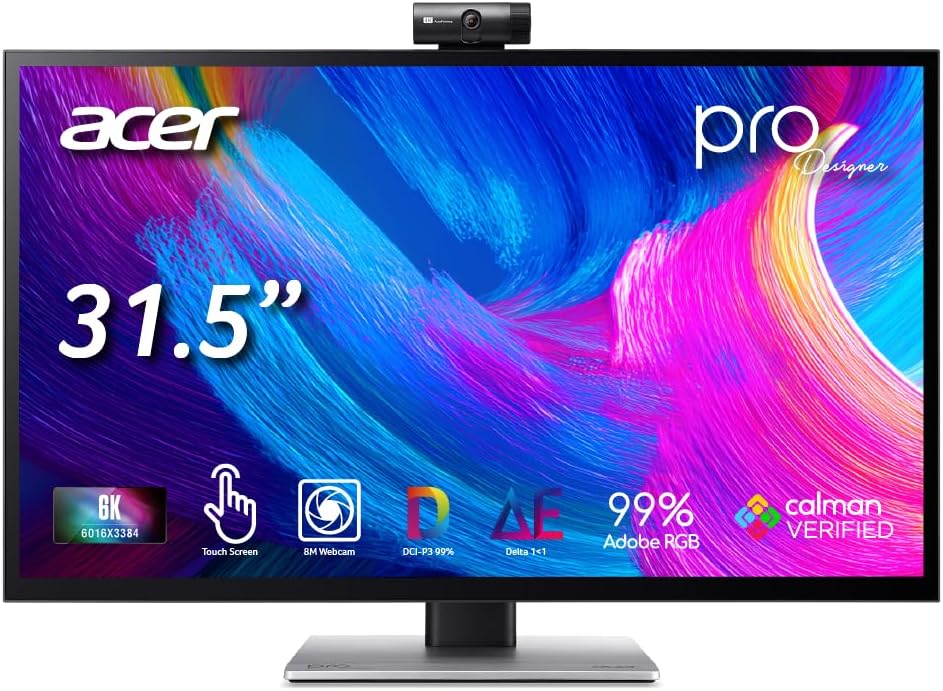
The Acer ProDesigner PE320QXT combines 6K resolution with touch capability for a 4.0 rating. It supports MPP 2.0 styluses enabling natural sketching and annotation directly on the screen. This eliminates the need for separate drawing tablets in a studio setup.
We may earn a commission when you buy through this link, at no additional cost to you.
Factory calibration delivering Delta E less than one ensures precise color reproduction for print and video. The built-in 8MP webcam and microphone array simplify remote collaboration. DisplayHDR 600 certification allows accurate preview of HDR content before delivery.
Trade-offs include the lack of a stylus in the box and software learning curve. The QD-IPS panel offers richer colors but may require adjustments for color critical tasks. Connectivity via USB-C simplifies docking for Mac and Windows machines.
Buy this if you need integrated touch and video capabilities for client work. The single cable solution reduces desk clutter effectively. It stands out as a versatile tool for modern creative professionals.
Ten-point touch and active stylus support let you retouch photos directly on screen.
Integrated 8MP webcam and noise reduction microphones facilitate clear remote meetings.
We may earn a commission when you buy through this link, at no additional cost to you.
The G32X 32 inch UHD 6K earns a rare perfect 5.0 rating from users. Its minimalist design focuses on core performance and reliability for daily work tasks. The stand includes full ergonomic adjustments ensuring comfort during extended usage periods.
We may earn a commission when you buy through this link, at no additional cost to you.
Strengths include high pixel density and anti-reflective coating reducing eye strain over time. The 100W power delivery supports modern laptops effectively. Build quality uses machined aluminum for durability and sleek aesthetics that fit modern offices.
Trade-offs involve fewer ports compared to premium hubs which limits peripheral options. The panel is standard IPS without advanced HDR certifications. It serves as a reliable workhorse rather than a feature rich workstation.
Choose this for balanced performance and aesthetic appeal in home or office settings. The rating suggests high satisfaction with stability and build. It is ideal for users wanting simplicity without sacrificing resolution.
Anti-glare screen and flicker-free backlighting minimize fatigue during long sessions.
CNC-machined aluminum body provides premium durability with a clean minimalist look.
We may earn a commission when you buy through this link, at no additional cost to you.
The Dell 52 inch Thunderbolt Hub U5226KW offers massive screen real estate with a 3.0 rating. Its 6144×2560 resolution at 120Hz delivers smooth visuals for complex workflows. The Thunderbolt 4 hub supports up to 140W power delivery for connected devices.
We may earn a commission when you buy through this link, at no additional cost to you.
Key strengths include dual HDMI and DisplayPort ports providing flexible connectivity options. Remote control and KVM functionality simplify switching between systems. Dell Color Management software helps maintain consistency across your workspace.
Lower rating indicates potential complexity or reliability issues during setup. The high power delivery is beneficial for demanding laptops but requires compatible cables. It suits specialized workstations needing extensive input options.
Consider this for multi-system environments requiring centralized management. The software tools enhance color accuracy but need initial configuration. It remains a powerful option despite early adoption feedback.
Integrated USB hub and dual Thunderbolt 4 ports streamline peripheral connections.
KVM and Picture-by-Picture modes allow seamless switching between multiple PCs.
We may earn a commission when you buy through this link, at no additional cost to you.
LG UltraFine evo 32U990A combines Nano IPS Black with Thunderbolt 5 for a 4.5 rating. The 6K resolution and high density deliver sharp text and fine image detail. VESA DisplayHDR 600 certification enhances tonal transitions for professional editing.
We may earn a commission when you buy through this link, at no additional cost to you.
Strengths include 98 percent DCI-P3 and 99.5 percent Adobe RGB coverage. Thunderbolt 5 connectivity provides up to 80 gigabits per second transfer speeds. Integrated USB-C hub supports daisy chaining for expanded setups.
Trade-offs involve limited availability and potential high cost for Thunderbolt 5 ports. The 60Hz rate suits productivity but limits gaming. It is a top choice for forward looking creators.
This monitor is best for those needing high speed data transfer and color accuracy. The KVM support simplifies multi-system workflows effectively. It sets a new benchmark for professional connectivity.
Thunderbolt 5 delivers up to 80 Gbps transfer speeds for high data demands.
Nano IPS Black enhances contrast ratio to 2000 to 1 for deeper blacks.
We may earn a commission when you buy through this link, at no additional cost to you.
The Dell U3224KB UltraSharp bundle includes a protection plan for a 3.3 rating. Its 31.5 inch 6K display offers striking clarity for media and productivity. Fast response times make it excellent for action films and casual gaming.
We may earn a commission when you buy through this link, at no additional cost to you.
Key strengths include 450 nit brightness and multiple input ports in the box. The 2 year service plan adds dependability for business environments. USB-C allows quick data transmission for modern laptops.
Trade-offs involve lower color gamut compared to professional monitors and the price of the bundle. The response time is fast but not optimized for competitive gaming. It serves well for general office tasks.
Choose this for reliability and support in a corporate setting. The protection plan reduces risk for business buyers. It balances utility with service assurance effectively.
Includes a 2 year Premium Extended Service Protection Plan for added dependability.
450 nit brightness ensures visibility even in well lit office areas.
We may earn a commission when you buy through this link, at no additional cost to you.
The Dell U5226KW Renewed offers a large curved experience without the standard stand. It provides 6K UHD resolution and 120Hz refresh rate for smooth visuals. This renewed unit serves as a cost-effective entry point for large scale productivity.
We may earn a commission when you buy through this link, at no additional cost to you.
Strengths include Thunderbolt 4 hub support and high power delivery for connected devices. The 21:9 aspect ratio maximizes real estate for multitasking workflows. It fits well into environments where mounting is already planned.
Trade-offs involve the lack of a stand and uncertain warranty coverage. Renewed condition may have cosmetic variations not visible in photos. Buyers should verify return policies carefully.
Recommend this for those seeking a large screen on a tighter budget. Ensure mounting is available before purchasing. It offers substantial value for flexible workspace setups.
Renewed condition allows access to high-end features at a lower investment cost.
Mount only design supports VESA arms for custom desk configurations.
We may earn a commission when you buy through this link, at no additional cost to you.
Choosing the right 6K monitor depends on your workflow needs and budget. We break down key factors to help you make an informed decision.
6K resolution provides around 20 million pixels which sharpens text and details. Higher pixels per inch reduces pixelation and improves clarity for design work. Look for panels with at least 200 PPI for best visual fidelity.
Prioritize high PPI panels to maximize the benefits of 6K resolution.
Professional work requires accurate colors and wide gamut coverage. Look for 99 percent DCI-P3 or Adobe RGB for print and video. Factory calibration ensures consistency out of the box.
Verify color gamut specs match your industry standards before buying.
IPS panels offer wide viewing angles and color consistency. IPS Black improves contrast for deeper shadows. OLED and Nano IPS provide richer blacks but may vary by brand.
Select IPS variants for professional color fidelity and viewing angles.
Modern setups rely on USB-C and Thunderbolt for single cable docking. Check power delivery wattage to match your laptop requirements. Multiple ports help manage peripherals without adapters.
Ensure enough high speed ports for your workflow and power needs.
Most 6K monitors run at 60Hz for productivity. Gaming options may reach 120Hz or higher but cost more. Higher refresh rates reduce motion blur for dynamic content.
Choose higher rates only if you edit video or game.
Adjustable stands prevent strain during long work sessions. Look for height tilt pivot and swivel adjustments. Sturdy builds and VESA mounts support flexible setups.
Invest in ergonomic stands to improve posture and comfort.
Extended warranties protect your investment from defects. Business bundles may include service plans. Check return policies especially for renewed or refurbished units.
Verify warranty terms to ensure long term reliability.
32 inch models balance desk space and detail. Larger 52 inch units offer immersive panoramic workflows. Consider desk depth and viewing distance before buying.
Match size to your workspace to maintain comfort.
Start by connecting via USB-C or Thunderbolt for best performance and power delivery. Use the included cable management tools to reduce clutter. Calibrate colors using built-in software to match your content requirements.
Clean the screen with a microfiber cloth and approved cleaning solutions. Avoid using harsh chemicals that may damage coatings. Dust the stand and ports regularly to maintain airflow and connection integrity.
Adjust brightness and color temperature to match ambient light conditions. Use presets for specific workflows like video editing or print. Monitor software updates to maintain security and feature access.
For general office work 4K is usually sufficient but 6K sharpens text and supports multi-window layouts better. It is best for designers or video editors who need finer detail and more screen real estate without panning.
Yes driving 6K requires strong graphics processing especially at high refresh rates. Ensure your GPU supports 6K output via DisplayPort or Thunderbolt to avoid bottlenecks and performance issues.
Thunderbolt 5 offers higher data transfer speeds up to 80 Gbps compared to Thunderbolt 4. It allows better support for high resolution multi-monitor setups and faster peripheral connections.
Most models support Mac via USB-C or Thunderbolt with color presets to match macOS. Some have specific macOS color matching modes for seamless integration and accurate workflows.
Lower ratings often stem from early adoption issues driver compatibility or price sensitivity. They may still offer high specs but require careful setup or firmware updates to reach full potential.
Glossy screens deliver vibrant colors and deeper blacks but reflect light more easily. Matte screens reduce glare and are better for bright environments. Choose based on your lighting conditions and content needs.
Our top picks highlight diverse strengths from budget friendly options to premium creative displays. The Dell 52-inch 120Hz model leads with versatility and the G32P offers robust build quality.
Prioritize resolution and color accuracy if you work in design. For multitasking consider larger sizes with hub functionality to streamline workflows and reduce cable clutter.
Prices and stock change frequently so verify current listings before purchasing. Always check warranty terms and return policies to ensure satisfaction with your investment.