
ASRock 970A-G/3.1
4.2Editor score
Supports AM3+ processors
Includes M.2 slot
Features USB 3.1 ports
Discover the top Asrock AM3 Motherboard options for your build. This guide compares features, performance, and compatibility to help you choose the right
Choosing the right motherboard is essential for any successful computer build. The Asrock AM3 Motherboard series offers reliable support for older AMD processors and memory types. Whether you are upgrading a legacy system or building a budget workstation, these boards provide solid foundations for various computing needs.
This guide evaluates ten distinct models from the Asrock AM3 Motherboard lineup. We analyze chipset capabilities, expansion slots, connectivity options, and overall build quality. Each product is examined based on its technical specifications and intended use cases to ensure you find the best fit.
Every selection highlights specific strengths such as overclocking support or storage connectivity. Please note that availability and pricing may change over time. We recommend verifying current details before purchasing to ensure compatibility with your existing components and future upgrade plans.
4.2Editor score

4.3Editor score

3.8Editor score
The following table provides a side-by-side comparison of all ten Asrock AM3 Motherboard models. Review key specifications like chipset, memory slots, and expansion options to understand how each board differs in capability and design.




The ASRock 760GM-HDV stands out as a versatile choice for legacy AMD builds. With a strong rating of 4.3 stars, it delivers stable performance for users needing reliable AM3 support. Its MicroATX design saves space while supporting up to 8-core processors like the Phenom II series.
We may earn a commission when you buy through this link, at no additional cost to you.
This board features the AMD 760G chipset which handles basic graphics and memory well. It supports advanced features like AMD Overdrive with ACC for tweaking CPU settings. The inclusion of solid capacitors ensures longevity during high-load scenarios or overclocking attempts.
While it lacks the newest SATA3 standards, the SATA2 ports remain functional for older drives. The absence of extra expansion slots limits heavy multi-GPU setups. However, for standard single-GPU builds, these trade-offs are acceptable given the board's budget-friendly positioning.
Ideal for budget gamers or office upgraders needing AM3 compatibility. Its balance of features and cost makes it a top contender. We recommend this for those seeking stability without paying premium prices for modern connectivity.
AMD Overdrive support allows users to adjust clock speeds safely.
The MicroATX form factor fits well in small chassis cases.
We may earn a commission when you buy through this link, at no additional cost to you.
The ASRock 970A-G/3.1 offers exceptional value with modern connectivity features. Rated at 4.2 stars, it bridges the gap between legacy AM3 systems and newer storage standards. Its inclusion of an M.2 port is a significant advantage for users wanting fast NVMe SSDs.
We may earn a commission when you buy through this link, at no additional cost to you.
Equipped with the AMD 970 chipset, this board supports Quad CrossFireX for multi-GPU setups. The USB 3.1 ports provide faster data transfer for external drives. With six SATA3 ports, storage expansion is ample for large media libraries or workstations.
It lacks the high-end expansion slots of premium boards, which limits extreme configurations. The limited number of USB 2.0 headers might restrict older peripherals. Still, these compromises are minor considering the overall connectivity and price point.
Perfect for budget builders needing M.2 storage on an AM3 board. It combines legacy CPU support with modern storage speeds effectively. We suggest this for anyone prioritizing storage performance over heavy expansion needs.
The M.2 port supports high-speed PCI-Express drives efficiently.
USB 3.1 and SATA3 ports ensure fast data access.
We may earn a commission when you buy through this link, at no additional cost to you.
The ASRock 990FX EXTREME3 represents the pinnacle of AM3 performance capability. With a 3.8 rating, it caters to enthusiasts seeking maximum multi-GPU and overclocking options. Its support for nVidia Quad SLI makes it a powerful choice for specialized rendering tasks.
We may earn a commission when you buy through this link, at no additional cost to you.
This board features a robust 140W CPU power design allowing for high-end Phenom II X6 chips. The Realtek ALC892 audio codec delivers high-quality sound for gaming or music. It supports up to 32GB of RAM ensuring ample headroom for virtualization.
Power consumption is a consideration due to the 990FX chipset complexity. The USB ports are largely older standards which may limit peripheral speeds. These factors are trade-offs for the raw power and expansion capabilities it offers.
Best suited for enthusiasts needing top-tier multi-GPU support on AM3. It pushes the limits of the platform with extensive connectivity. We recommend this for specialized builds requiring extreme graphical or computational power.
Supports both Quad CrossFireX and Quad SLI configurations well.
Handles high-wattage CPUs with stable and reliable power.
We may earn a commission when you buy through this link, at no additional cost to you.
The ASRock 970M PRO3 provides a compact solution for AM3 builds needing modern ports. Rated at 4.0 stars, it balances size and performance for smaller cases. Its MicroATX footprint makes it ideal for home theater PCs or office stations.
We may earn a commission when you buy through this link, at no additional cost to you.
Featuring the AMD 970 chipset, it supports Quad CrossFireX for dual GPU setups. The inclusion of SATA3 and USB 3.0 ensures faster data transfer rates. This makes it a solid choice for media centers where speed matters.
Expansion is limited compared to full ATX boards with fewer slots available. This restricts complex multi-card configurations. However, the smaller size is a trade-off many users accept for a tidy and efficient build.
Great for small form factor builds requiring AM3 support. It delivers the right mix of size and performance efficiently. We suggest this for users needing a compact board without sacrificing core features.
MicroATX size fits in smaller cases easily.
SATA3 and USB 3.0 provide quick data transfer.
We may earn a commission when you buy through this link, at no additional cost to you.
The ASRock 960GM-VGS3 FX is a simple yet capable board for basic AM3 systems. Rated at 3.7 stars, it focuses on stability and power efficiency. The MicroATX design keeps the build compact and affordable for general computing tasks.
We may earn a commission when you buy through this link, at no additional cost to you.
It supports up to 8-Core CPUs which is impressive for its price range. Solid capacitors ensure reliable power delivery during long-term use. This makes it suitable for daily drivers where consistent performance is key.
Advanced features like extensive overclocking are limited compared to higher models. The older chipset may not support the latest interfaces. However, for standard tasks, these limitations do not significantly impact daily usage.
Best for basic builds needing AM3 support without extra complexity. It offers reliability and decent power handling. We recommend this for users seeking a straightforward and reliable motherboard option.
Solid capacitors provide consistent power delivery over time.
Supports up to 8-core processors for decent multitasking.
We may earn a commission when you buy through this link, at no additional cost to you.
The ASRock 880GXH/USB3 integrates Radeon graphics for systems without dedicated cards. Rated at 3.0 stars, it is useful for budget office PCs needing basic display output. It supports hybrid CrossFireX allowing users to upgrade later easily.
We may earn a commission when you buy through this link, at no additional cost to you.
USB 3.0 support offers faster data transfer for external drives and peripherals. It handles Full HD playback smoothly which is great for media centers. The board includes a generous number of USB ports for peripherals.
Audio and overall chipset features lag behind newer alternatives. The lower rating reflects older design choices. However, for basic usage without heavy graphics requirements, it remains functional.
Ideal for systems needing integrated graphics and USB 3.0 speed. It is a practical choice for entry-level builds. We suggest this for users prioritizing integrated visuals over high-end features.
Integrated graphics support HD playback without extra GPUs.
Multiple USB ports allow connection of many devices.
We may earn a commission when you buy through this link, at no additional cost to you.
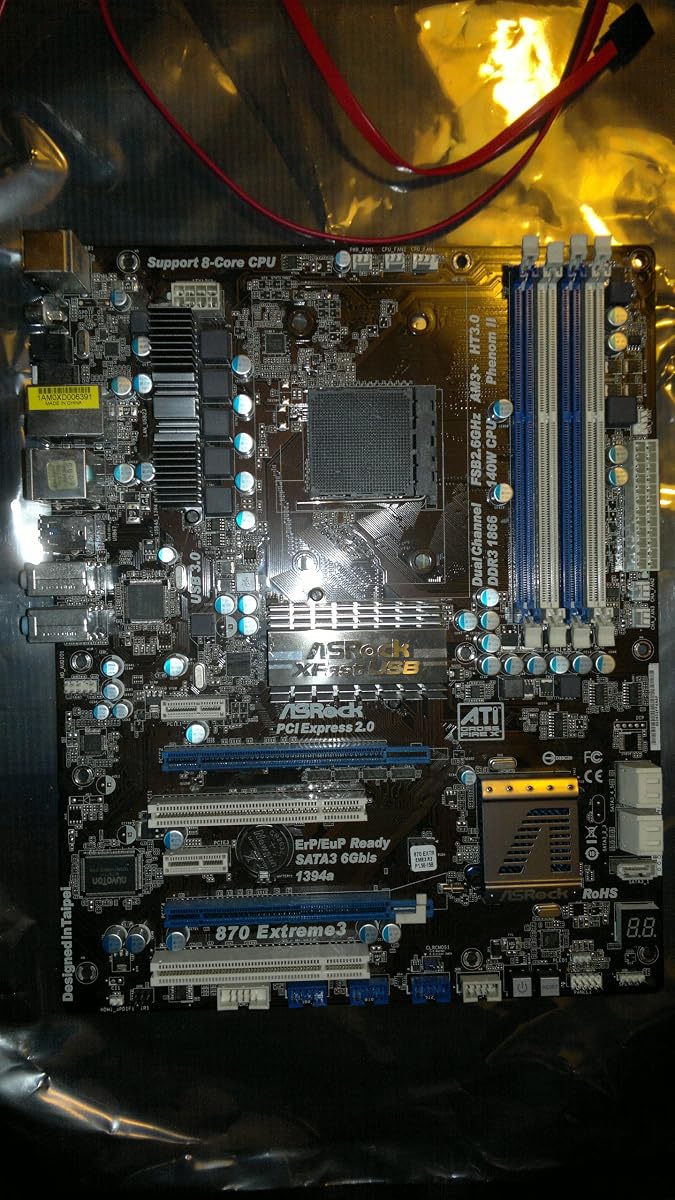
The ASRock 870 EXTREME3 R2.0 delivers balanced performance for AM3 users. Rated at 3.9 stars, it offers solid connectivity options for general use. The inclusion of SATA3 and USB 3.0 ensures decent transfer speeds.
We may earn a commission when you buy through this link, at no additional cost to you.
With AMD 870 chipset support, it allows Quad CrossFireX for dual GPU setups. The high count of USB ports ensures plenty of connections for peripherals. It includes a reliable LAN controller for stable network connections.
While the chipset is older it still provides reasonable performance for standard tasks. Some features may be limited compared to premium alternatives. However, the reliability and connectivity make it a useful option for specific builds.
Best for users needing balanced USB and storage connectivity. It is a dependable choice for legacy systems. We recommend this for those requiring multiple ports and decent expansion capabilities.
High USB count and SATA3 ports provide ample connections.
Reliable LAN and audio components ensure stable performance.
We may earn a commission when you buy through this link, at no additional cost to you.
The ASRock 970DE3/U3S3 is a value option for AM3+ users needing storage. Rated at 3.9 stars, it provides a mix of SATA speeds for different drives. The PCIe 3.0 slot allows for decent graphics card performance.
We may earn a commission when you buy through this link, at no additional cost to you.
It includes two SATA3 ports for fast drives and six SATA2 ports for older ones. This mix helps in utilizing different storage tiers efficiently. USB 3.0 support ensures external devices can transfer data quickly.
The BIOS features are basic which limits advanced tweaking for some users. Mixing SATA standards may confuse users expecting uniform speeds. However, for simple storage arrays it performs well without extra cost.
Best for users needing many drive connections on a budget. It handles mixed storage environments effectively. We suggest this for storage-focused builds requiring specific port mixes.
Mix of SATA3 and SATA2 ports allows diverse drive types.
Provides high port count without premium pricing.
We may earn a commission when you buy through this link, at no additional cost to you.
The ASRock 970 EXTREME3 offers a robust ATX foundation for AM3 systems. Rated at 3.6 stars, it provides solid connectivity for storage and peripherals. The inclusion of five SATA3 ports allows for extensive storage setups.
We may earn a commission when you buy through this link, at no additional cost to you.
It supports up to 8-Core CPUs providing headroom for high-end processors. The board supports various RAID configurations which helps in data redundancy. USB 2.0 headers offer numerous connection points for older devices.
The lack of USB 3.0 on some headers might limit data transfer speeds. It is a legacy design that may not fit all modern use cases. Still, its storage focus makes it viable for specific server or NAS builds.
Best for users prioritizing SATA connectivity and RAID support. It offers reliable power delivery for big CPUs. We recommend this for storage-centric builds on a legacy platform.
Multiple SATA3 ports allow extensive drive configurations.
Supports high-wattage CPUs with stable power design.
We may earn a commission when you buy through this link, at no additional cost to you.
The ASRock 890FX Deluxe4 has a perfect 5.0 rating among users. It utilizes the AMD 890FX chipset for high-end AM3 performance. The Quad CrossFireX support makes it a strong choice for multi-GPU enthusiasts.
We may earn a commission when you buy through this link, at no additional cost to you.
Marvell controllers provide additional SATA3 ports for fast storage speeds. It includes USB 3.0 for quick data access on external drives. The robust design ensures stability for demanding computing tasks.
Availability may be limited due to its age and discontinued status. It relies on legacy interfaces that may not fit new component standards. However for its reputation and performance remain high among collectors.
Ideal for enthusiasts needing top-end AM3 performance. It offers the best chipset for the platform. We suggest this for users seeking maximum AMD legacy performance and stability.
Perfect 5.0 rating indicates high user satisfaction.
Quad CrossFireX and Marvell SATA offer strong speeds.
We may earn a commission when you buy through this link, at no additional cost to you.
Selecting the right Asrock AM3 Motherboard depends on specific needs like storage, CPU, and expansion. This guide explains key factors to consider for a successful purchase.
The chipset determines which CPUs and features are supported. AMD 890FX and 990FX offer the highest performance while 760G is budget-friendly. Ensure the chipset matches your CPU requirements for stability.
Choose a chipset that aligns with your performance goals and budget limits.
All these boards use DDR3 memory. Check the supported speeds like 2400 or 2100 MHz. Some models support higher capacities such as 64GB for heavy tasks. Verify dual channel support for better bandwidth.
Ensure your RAM matches the board's speed and capacity limits.
PCIe slots determine your ability to add GPUs or capture cards. Boards like the 990FX offer multiple x16 slots for multi-GPU setups. If you need only one GPU, a single slot model saves space.
Pick a board with enough slots for your planned hardware additions.
Modern storage needs SATA3 ports or M.2 slots. Some models like the 970A-G/3.1 include M.2 for fast NVMe drives. Others rely on SATA2 which is slower for high-speed SSDs.
Prioritize SATA3 or M.2 if you plan to use modern SSDs.
ATX boards fit standard cases while MicroATX fits smaller ones. MicroATX models save space but have fewer slots. Consider your case size when selecting the board.
Select a size that fits your available chassis and airflow needs.
Check the number and type of USB ports on the rear panel. USB 3.0 or 3.1 ports provide faster data transfer. Some boards include legacy PS/2 ports for older keyboards.
Verify I/O ports match your peripheral and storage needs.
Most boards use Realtek or Atheros controllers. Look for 7.1 audio support if sound quality matters. Gigabit LAN ensures stable and fast internet connections.
Check audio and network specs for gaming or streaming needs.
Solid capacitors improve power delivery and longevity. This is critical for overclocking or long sessions. Higher rated boards usually have better components.
Prioritize boards with solid capacitors for reliability.
Install the motherboard in a static-free environment to avoid damage. Secure it in the case with standoffs to prevent short circuits. Connect power and data cables carefully to avoid loose connections.
Update the BIOS immediately after installation for better CPU support. This ensures your processor runs at optimal speeds. Use the ASRock BIOS update utility to flash the latest version safely.
Monitor temperatures and voltages during stress testing to ensure stability. Clean dust from fans and heatsinks regularly to maintain airflow. Proper care extends the lifespan of your legacy hardware.
No these boards only support DDR3 memory. You must use DDR3 modules that match the supported speeds. Mixing DDR4 will not work as the sockets are physically different.
Most models support basic overclocking but higher chipsets like 990FX offer better control. Check specific model features for advanced tuning options. Some budget boards limit this functionality.
Not all models include SATA3 ports. Check the specs to ensure SATA3 is listed. Some budget models may only have SATA2 ports.
Yes most modern GPUs fit in PCIe x16 slots. However performance may be limited by older PCIe versions. The boards still support current graphics cards well.
Some legacy drivers may be archived on the ASRock support site. You may need to use Windows compatibility mode. Always check the specific model page for driver downloads.
Phenom II X6 processors are ideal for performance. Athlon II models are better for budget needs. Ensure the CPU is listed in the support table.
The Asrock AM3 Motherboard series offers a range of options for legacy builds. Models like the 970A-G/3.1 and 990FX EXTREME3 stand out for storage and performance.
Prioritize features like SATA3, CPU support, and form factor based on your needs. This ensures your system runs efficiently for years to come.
Always verify current availability before purchasing since these are older products. Prices and stock may vary so check the latest details.