
ASUS Pro WS W890E-SAGE SE
5.0Editor score
Ready for Intel Xeon 600 Processors
Dual Intel 10Gb LAN ports
NitroPath DRAM technology support
This guide compares the top ASUS Server Motherboard models for workstations and servers, evaluating connectivity, power design, and remote management features.
Building a reliable workstation or server requires a foundation built on quality. The right motherboard ensures stability, speed, and expandability for your most critical computing tasks. ASUS offers a wide range of server-grade solutions designed to handle demanding workloads.
We have evaluated ten top ASUS Server Motherboard options to help you find the perfect fit. Our analysis covers power delivery, connectivity options, remote management capabilities, and overall build quality. Each product is selected based on its ability to support modern high-performance processors.
This guide provides a detailed look at each model, highlighting strengths and potential trade-offs. You will find specifications, key features, and our expert insights for every choice. Please note that availability and costs may vary over time.
5.0Editor score

3.7Editor score
4.3Editor score
The following table offers a side-by-side comparison of all ten selected ASUS Server Motherboard models. This overview helps you quickly identify key differences in sockets, connectivity, and form factors.


This ASUS Server Motherboard stands out as a powerhouse for professional workstations. It supports the latest AMD Ryzen Threadripper PRO 7000 WX-Series processors. The board is designed for high-end tasks like rendering and AI training.
We may earn a commission when you buy through this link, at no additional cost to you.
The seven PCIe 5.0 x16 slots offer unparalleled expansion potential. You can connect multiple GPUs or high-speed storage arrays without bottlenecks. The 32 power-stage design ensures stable power delivery even under heavy loads.
While it excels in performance, it demands careful planning for cooling and power. The EEB form factor means you need a compatible case. This limits its use to enterprise or advanced workstation setups.
Buy this if you need top-tier multi-threaded performance and massive I/O bandwidth. It is ideal for engineers, data scientists, and content creators who push hardware limits.
With seven full x16 slots running at PCIe 5.0 speeds, this board allows for serious multi-GPU configurations and extensive peripheral expansion.
The IPMI implementation provides hardware-level remote access, making it easier to manage headless systems without physical intervention.
We may earn a commission when you buy through this link, at no additional cost to you.
The W890E-SAGE SE is a premium choice for Intel-based workstations. It is built to handle the new Xeon 600 series processors. The board brings server-grade reliability to a professional desktop environment.
We may earn a commission when you buy through this link, at no additional cost to you.
Its power delivery system is impressive, featuring 16+(2+2)+1+2 stages. This ensures consistent performance during overclocking or sustained high-load tasks. The NitroPath DRAM technology optimizes memory speeds effectively.
Connectivity is a major strength here. Dual 10Gb LAN ports and USB4 support make it future-proof. However, the EEB form factor limits case choices and increases overall system cost.
This is the best pick for users who prefer Intel architecture. It suits professionals who need robust networking and memory stability for critical workloads.
NitroPath DRAM technology enhances signal integrity and timing, resulting in faster data throughput for memory-intensive applications.
Two 10Gb LAN ports eliminate the need for add-in network cards, streamlining the build and reducing potential points of failure.
We may earn a commission when you buy through this link, at no additional cost to you.
The W890-SAGE offers a balanced approach to workstation building. It supports Intel Xeon 600 processors efficiently. The CEB size provides more case options than EEB boards.
We may earn a commission when you buy through this link, at no additional cost to you.
Power delivery is solid with 12+(2+2)+1+2 stages. This handles overclocking and high-demand applications well. The board also supports NitroPath DRAM for better memory performance.
While it lacks onboard IPMI, it supports expansion cards for remote management. This gives you flexibility based on your budget. The connectivity options remain strong with USB4 and multiple LAN speeds.
Choose this board if you want high performance without the EEB cost. It is a practical choice for engineers and architects needing reliable hardware.
The CEB design allows for installation in a wider range of chassis, offering more cooling and cable management options.
Users can add specific IPMI capabilities later, allowing for cost savings initially while keeping future options open.
We may earn a commission when you buy through this link, at no additional cost to you.
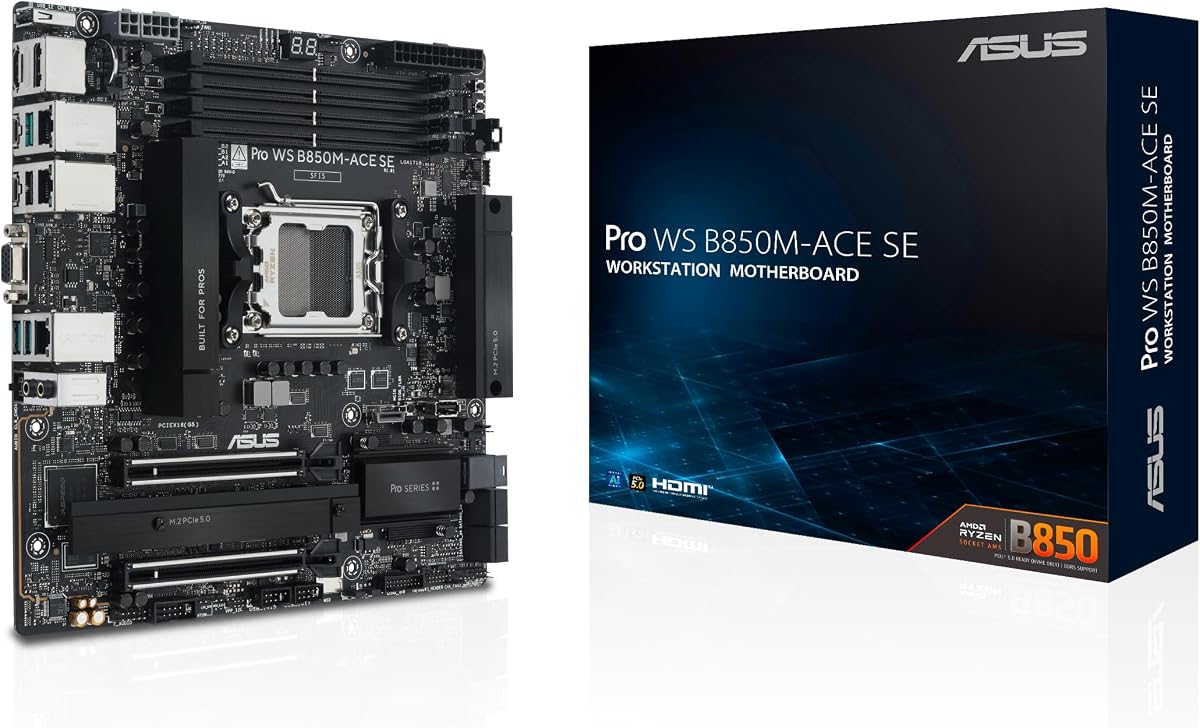
This model brings server features to a smaller form factor. It supports the latest AMD Ryzen 9000 and EPYC 4005 processors. The MicroATX size saves space in rack mounts or small workstations.
We may earn a commission when you buy through this link, at no additional cost to you.
The onboard BMC provides immediate remote management without extra cards. This is crucial for unattended servers. Connectivity includes 10G LAN and MCIO for fast storage speeds.
Expansion is more limited compared to full-size boards. You get fewer RAM slots and PCIe slots. This makes it best for single-GPU or entry-level server tasks.
It is perfect for SMEs needing reliable infrastructure. It balances cost and performance well for general-purpose compute tasks.
Despite its size, it retains essential server features like BMC and 10G LAN, making it efficient for space-constrained environments.
Compatible with upcoming Ryzen chips, ensuring your build remains relevant for several years of updates.
We may earn a commission when you buy through this link, at no additional cost to you.
This board merges high-end computing with modern wireless convenience. It supports AMD Threadripper PRO 7000 WX-Series effectively. The inclusion of WiFi 7 ensures ultra-fast wireless data transfers when needed.
We may earn a commission when you buy through this link, at no additional cost to you.
Power delivery is robust with 36 stages. This supports heavy overclocking and sustained workloads. The board also offers substantial memory capacity up to 1TB.
Wireless capabilities might add slight interference risks in dense environments. However, the convenience is useful for mobile workstation users. It maintains full server features like IPMI support.
Buy this for flexible workspace setups. It suits designers who need both heavy compute and wireless mobility.
Enjoy the latest wireless speeds and lower latency directly on the motherboard, reducing the need for separate adapters.
Support up to 1TB of ECC R-DIMM memory for massive datasets and virtualization tasks.
We may earn a commission when you buy through this link, at no additional cost to you.
This motherboard offers a balance of power and features. It supports AMD Threadripper 9000 and 7000 series. The 20 power-stage design ensures efficient energy delivery to the CPU.
We may earn a commission when you buy through this link, at no additional cost to you.
Connectivity includes USB4 ports for ultra-fast data transfer. This is useful for external storage or peripherals. The board is also ready for multiple GPUs.
While it lacks some PRO features, it delivers strong performance. The CEB size makes it easier to fit than EEB boards. It is a solid choice for general workstations.
Ideal for users needing robust power and modern I/O. It fits well in creative studios and rendering farms.
USB4 ports provide up to 40Gbps throughput, accelerating workflows involving large external drives.
The 20 power stages deliver clean electricity, ensuring longevity and stability under constant heavy load.
We may earn a commission when you buy through this link, at no additional cost to you.
This board targets secure business workstations. It supports 13th Gen Intel Core processors. The ATX form factor fits standard cases easily. IPMI capabilities are included out of the box.
We may earn a commission when you buy through this link, at no additional cost to you.
Security is enhanced with advanced controls. You can manage ports and blacklist software via software. Thunderbolt 4 headers add flexibility for high-speed peripherals.
PCIe 5.0 support is limited compared to newer boards. However, it is stable for enterprise needs. The bundled IPMI card saves extra costs.
Choose this for secure office environments. It is reliable for data-heavy business tasks requiring control.
Software blacklisting and USB port management help protect sensitive data from unauthorized access.
Thunderbolt 4 support ensures compatibility with future high-speed external storage and display devices.
We may earn a commission when you buy through this link, at no additional cost to you.
This is a reliable server motherboard for legacy systems. It supports Xeon E-2300 series processors. The MicroATX form factor fits small server racks. It is built for stability over flashy features.
We may earn a commission when you buy through this link, at no additional cost to you.
The chipset offers standard server performance. It handles basic virtualization tasks well. I/O is simpler, focusing on essential ports. This reduces potential points of failure.
Modern features like WiFi or USB4 are absent. It is best for dedicated tasks where simplicity matters. The architecture is proven and trustworthy.
Ideal for small offices needing basic server functions. It is cost-effective for straightforward computing needs.
Older chipsets often offer longer compatibility windows for legacy software and drivers.
The MicroATX size ensures it fits in 1U or 2U server chassis easily.
We may earn a commission when you buy through this link, at no additional cost to you.
This board is designed for heavy-duty server environments. It supports two 5th Gen Intel Xeon CPUs. The memory capacity reaches up to 4TB for massive data handling.
We may earn a commission when you buy through this link, at no additional cost to you.
Storage is fast with dual M.2 slots at PCIe 5.0. Network speed is high with dual 10Gbps ports. This makes it suitable for database or virtualization servers.
The dual-socket requirement adds complexity. You need compatible CPUs and cooling. It is not for casual use. It is strictly for enterprise servers.
Buy this for high-availability clusters. It is best for businesses requiring maximum computational density.
With 16 DIMM slots, you can scale RAM to 4TB, essential for massive database queries.
Two CPUs on one board doubles the core count available for parallel processing tasks.
We may earn a commission when you buy through this link, at no additional cost to you.
This board provides basic server features in standard size. It supports 13th Gen Intel Core processors. IPMI expansion is ready for remote management. It fits standard cases well.
We may earn a commission when you buy through this link, at no additional cost to you.
Connectivity includes multiple video outputs like HDMI and VGA. This is useful for legacy displays. PCIe 5.0 support is available but limited.
It is a straightforward choice for basic needs. Cooling is adequate with standard fans. It lacks some premium features of higher models.
Use this for small business setups. It balances features with standard form factors effectively.
Multiple video ports allow you to connect different monitor types without extra adapters.
SlimSAS support ensures compatibility with existing enterprise storage backplanes.
We may earn a commission when you buy through this link, at no additional cost to you.
Selecting the right server motherboard involves balancing performance, form factor, and management features.
Ensure the motherboard socket matches your CPU. Options include LGA 1700, LGA 4710-2, and sTR5. Mismatched sockets prevent installation entirely.
Choose the socket that supports your processor generation.
Form factors like ATX, MicroATX, EEB, and CEB determine case fit. Server cases often require EEB or CEB boards for cooling.
Verify your chassis supports the board size before buying.
IPMI is crucial for headless server management. Some boards have onboard BMC, while others need an expansion card.
Onboard IPMI saves cost and reduces failure points.
Check the number and speed of PCIe slots. High-performance needs require multiple PCIe 5.0 x16 slots.
Ensure you have enough lanes for GPUs or network cards.
Look for ECC R-DIMM support for data integrity. Server boards support high RAM capacities like 1TB or more.
Choose boards with enough DIMM slots for your future needs.
Robust power stages ensure CPU stability. Higher power counts help with overclocking or sustained workloads.
Look for boards with 20+ power stages for reliability.
Fast LAN ports like 10Gb are essential for servers. Dual ports allow teaming or redundancy.
Integrated 10Gb Ethernet reduces the need for add-in cards.
M.2 slots with PCIe 5.0 provide fast storage. SlimSAS supports enterprise backplanes.
Prioritize boards with multiple M.2 slots for OS and cache.
Install the motherboard in a compatible case with adequate airflow. Secure all power connectors properly to avoid electrical issues.
Update the BIOS immediately after installation. This ensures compatibility with newer CPUs and fixes early bugs.
Monitor system temperature and fan speeds regularly. Use ASUS Control Center Express to automate alerts and manage hardware health.
The ASUS Pro WS WRX90E-SAGE SE is ideal due to its seven PCIe 5.0 x16 slots. It supports high-end AMD Threadripper PRO processors required for deep learning.
Yes, EEB boards are larger than standard ATX. You need a server chassis or workstation case designed specifically for EEB dimensions.
IPMI allows remote management of server hardware. You can reboot or install OS remotely, which is vital for headless server maintenance.
Most are designed for server CPUs like Xeon or Threadripper PRO. Some support consumer Ryzen or Core CPUs if the socket matches.
Yes, but many require expensive server CPUs. The B850M-ACE SE is more affordable for home lab use due to standard socket support.
Use the bundled IPMI software like ASUS Control Center Express. It allows you to monitor temperatures and reboot without physical access.
The ASUS Pro WS WRX90E-SAGE SE and W890E-SAGE SE offer top-tier performance for workstations. They support modern CPUs and offer excellent expansion.
For smaller setups, the B850M-ACE SE provides great value. It packs server features into a compact MicroATX board.
Always check your specific CPU and case requirements. Prices fluctuate, so compare current availability before making a final decision.