
Bluetooth 1D&2D Barcode Scanner, 3-in-1 Bluetooth & USB Wired & 2.4G Wireless QR Barcode Reader
4.3Editor score
2600mAh battery capacity
Supports QR and Data Matrix
Multiple wireless connection modes
Discover the top barcode scanners for iPad that offer seamless Bluetooth connectivity and reliable performance for retail and inventory management tasks.
Finding the right barcode scanner for iPad can transform how you manage inventory or track sales. A good device offers reliable connectivity and fast scanning speeds.
We compared ten top models based on compatibility and battery life. Our list covers handheld and desktop options suitable for various professional environments today.
Each pick shows key features and real-world performance insights. Please note that product prices and availability change frequently across online retailers.
4.3Editor score
4.9Editor score

4.5Editor score
This side by side comparison highlights the key specifications and capabilities of each featured barcode scanner for iPad to help you make an informed decision.


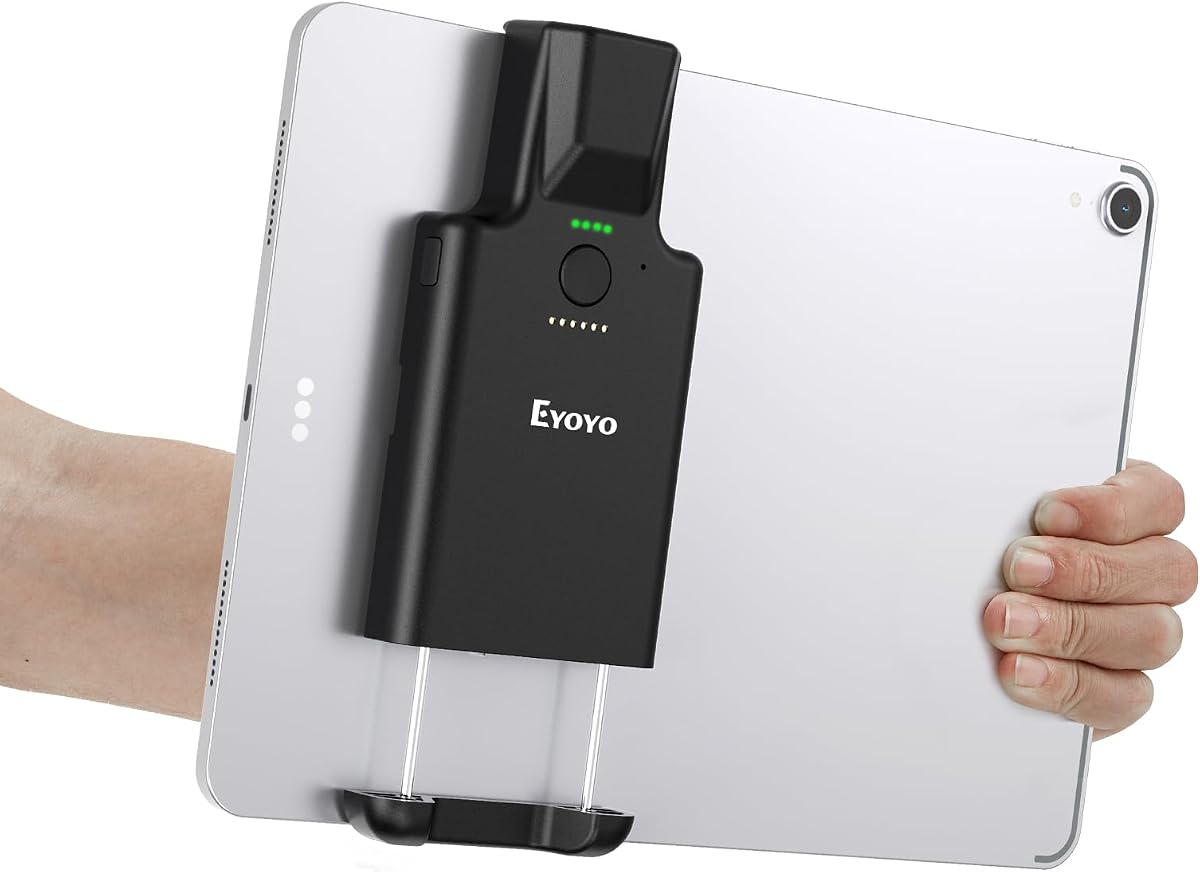
This Eyoyo scanner stands out as a top choice for iPad users needing reliable performance. It holds a high rating due to its versatile scanning capabilities and robust build quality.
We may earn a commission when you buy through this link, at no additional cost to you.
The advanced 2D CMOS imaging technology allows it to read paper labels and digital screen codes alike. Users appreciate the flexible clip that secures the scanner to the tablet during use.
While it lacks a 2.4G wireless option the Bluetooth connection is stable. The higher price point is justified by the durable construction and extensive battery life offered.
Ideal for retail staff or inventory managers using iPads this device simplifies workflow. It balances portability with powerful scanning features for daily professional tasks.
The vertical retractable clip ensures the scanner stays attached to your iPad for hands free scanning.
With a 3000mAh battery you can scan for hours without needing to recharge between shifts.
We may earn a commission when you buy through this link, at no additional cost to you.
This PecuMecu model offers impressive features at a budget friendly price. It supports both 1D and 2D codes which is rare for scanners in this range.
We may earn a commission when you buy through this link, at no additional cost to you.
The ability to switch between Bluetooth USB and 2.4G provides great flexibility. Scanning speed reaches 350 times per second making it efficient for high volume tasks.
Some users may find the build quality less robust than premium options. The lack of specific iPad specific accessories might be a minor drawback for some.
Best for startups or small businesses needing an affordable solution. It delivers solid performance for tracking inventory with iPads and other devices.
Switch easily between Bluetooth USB and 2.4G wireless modes to suit your workspace needs.
Store up to 130000 barcodes offline if you are far from your receiver temporarily.
We may earn a commission when you buy through this link, at no additional cost to you.
The Inateck BCST-70 is designed for professionals needing reliability and long range. Its 115 foot range ensures connectivity even in large warehouses or stores.
We may earn a commission when you buy through this link, at no additional cost to you.
With 180 days standby life you rarely need to charge it when idle. The rugged design withstands drops up to 6 feet ensuring durability in tough environments.
It lacks 2D scanning capabilities which limits its use for QR codes. The price is higher than average but justified by the industrial grade build quality.
Ideal for logistics or large retail chains using iPads. It provides stable performance for tracking items over vast distances.
Connect up to 115 feet away from your iPad ensuring you never lose signal.
Built to withstand 6 foot drops onto concrete floors for reliable use in warehouses.
We may earn a commission when you buy through this link, at no additional cost to you.
This NETUM model offers flexibility with three connection methods. It uses a high resolution CCD sensor to read codes even through glass surfaces.
We may earn a commission when you buy through this link, at no additional cost to you.
The storage mode allows you to collect up to 100000 barcodes when out of range. This is perfect for offline inventory checks in remote areas.
Configuration requires scanning specific barcodes from the manual which adds initial setup time. The lack of compatibility with Square POS is a limitation for some users.
Good for warehouse staff needing offline capabilities. It balances performance with affordability for general barcode scanning tasks.
Store thousands of scans locally when Bluetooth signal is unavailable and upload later.
Read barcodes printed on labels behind glass or plastic shrink wrap effectively.
We may earn a commission when you buy through this link, at no additional cost to you.
The Eyoyo Mini is designed for portability weighing only 35 grams. It fits easily in a pocket for on the go scanning without bulk.
We may earn a commission when you buy through this link, at no additional cost to you.
It offers 2.4G and Bluetooth connections for flexibility in various environments. The vibration mode ensures silent operation in libraries or quiet zones.
It does not support 2D codes which limits usage for QR tracking. Battery life is decent but requires more frequent charging compared to larger units.
Perfect for bookkeepers or mobile workers carrying an iPad. It provides a convenient way to check codes without heavy gear.
At just 35 grams this scanner adds minimal weight to your mobile setup.
Switch to vibration mode for silent scanning in quiet environments like libraries.
We may earn a commission when you buy through this link, at no additional cost to you.
This desktop scanner is ideal for checkout counters or fixed desks. It reads barcodes from any angle without needing to hold it.
We may earn a commission when you buy through this link, at no additional cost to you.
The auto sensing feature activates scanning automatically when an item is placed on it. This speeds up transactions and reduces manual effort significantly.
It is not portable so it cannot be used with a tablet on the move. The anti shock design ensures it survives accidental drops in busy environments.
Great for retail stores using iPads as terminals. It enhances efficiency at the point of sale.
Scan items without holding the device allowing both hands to manage products.
Items placed on the base trigger scanning automatically for seamless workflow.
We may earn a commission when you buy through this link, at no additional cost to you.
This NetumScan model comes with a convenient base that charges the device. It is optimized for iOS devices making setup simple for iPad users.
We may earn a commission when you buy through this link, at no additional cost to you.
The compact size makes it easy to carry during shifts. It supports 2D codes including QR which expands its use cases beyond basic barcodes.
Battery life is adequate but not exceptional compared to larger units. Users should ensure they place it in the dock regularly for full power.
Suitable for retail employees needing reliable portable scanning. The dock ensures you never run out of power unexpectedly.
The included base keeps your scanner charged and ready whenever you need it.
Seamless integration with iPad and iPhone systems reduces setup time.
We may earn a commission when you buy through this link, at no additional cost to you.
This version of the NetumScan adds durability with a 2 meter drop rating. The smart button layout prevents accidental power offs during heavy use.
We may earn a commission when you buy through this link, at no additional cost to you.
It comes with a charging dock to manage power easily. The vibration mode ensures quiet operation in sensitive environments like offices.
The price reflects the added build quality and accessories. Battery life supports full shifts for typical usage rates.
Excellent for warehouse workers needing tough equipment. It combines durability with modern connectivity features for reliability.
Withstands 2 meter drops onto concrete for tough industrial use.
Dual button design avoids accidental shutdowns during critical scanning moments.
We may earn a commission when you buy through this link, at no additional cost to you.
This scanner offers both Bluetooth and 2.4G wireless with a base. It supports many 2D formats including PDF417 for diverse tracking needs.
We may earn a commission when you buy through this link, at no additional cost to you.
The offline storage allows collecting 50000 codes before syncing. Its lightweight design reduces fatigue during long scanning sessions.
User feedback varies regarding connection stability and build quality. Setup may require patience compared to plug and play units.
Good for users needing extensive format support. Ensure you check compatibility before purchase for your specific system.
Store up to 50000 QR codes locally for later upload without connection.
Reads PDF417 Data Matrix and QR codes for varied applications.
We may earn a commission when you buy through this link, at no additional cost to you.
KUIIYER offers an affordable 2D scanning solution with good specs. The 800×600 sensor ensures clear reads even on poor quality labels.
We may earn a commission when you buy through this link, at no additional cost to you.
Its IP54 rating protects against dust and water spills. The auxiliary light helps in dark environments like warehouses.
The price is competitive but quality may not match premium industrial units. Connection range is standard but sufficient for most small setups.
Great for small businesses starting their inventory systems. It balances cost with essential 2D scanning capabilities.
IP54 rating keeps the scanner safe from dust and light water splashes.
Use the auxiliary light to scan in low light or dark areas.
We may earn a commission when you buy through this link, at no additional cost to you.
Choosing the right scanner involves considering connection types battery life and barcode support.
Bluetooth connectivity is essential for iPad integration ensuring wireless freedom. Look for models supporting SPP or BLE protocols for stable pairing with iOS.
Prioritize Bluetooth scanners with long range to avoid signal drops in larger spaces.
Ensure the scanner reads both 1D and 2D codes if you need QR or Data Matrix. Some budget units only support standard UPC or EAN codes.
Choose 2D capability if you scan digital coupons or digital loyalty cards regularly.
Battery capacity determines how long you can work without charging. Models with 2000mAh or more support full shifts without interruptions.
Check standby times to ensure the device stays ready even when not in use.
Retail and warehouse environments require rugged builds that withstand drops. Look for IP ratings like IP54 for dust protection.
A durable casing reduces replacement costs and keeps operations running smoothly.
High scanning speeds improve efficiency in busy checkout lines or warehouses. Aim for models with fast decoding capabilities.
Faster scanners reduce wait times and increase overall throughput during peak hours.
Comfort is key when using handheld scanners for long periods. Lightweight models reduce hand fatigue over shifts.
Ergonomic designs allow better grip and easier access to trigger buttons.
Verify the scanner works with your specific POS or inventory apps. Some models may conflict with certain systems like Square.
Universal compatibility ensures seamless integration with your existing iPad ecosystem.
Offline storage allows saving scans when connection is lost. This is vital for remote locations or warehouses with dead zones.
Choose models with high storage capacity to avoid data loss during connectivity issues.
Connect the scanner to your iPad via Bluetooth settings by pairing the device code. Once linked test scanning by pointing at a barcode and triggering the read.
Keep the sensor lens clean from dust and dirt to ensure accurate reads. Use a soft cloth to wipe the front of the scanner regularly.
Recharge the battery fully when low and avoid leaving it unused for months. Store the device in a cool dry place to extend its lifespan.
Yes the scanners listed in this guide are compatible with iPadOS. They use standard Bluetooth protocols supported by Apple devices. Ensure your iPad is updated to the latest OS version for best performance.
Most models listed support 2D QR codes but some budget options only read 1D barcodes. Check the product description for QR capability before purchasing if this is critical.
If the battery runs out you will not be able to scan until charged. To prevent this choose a model with long battery life or carry a spare charged unit if available.
Several models offer offline storage modes where you can save scans locally. This allows you to work without a connection and upload data once back online.
Enable Bluetooth on your iPad and turn on the scanner. Press the pairing button on the scanner then select it from the list on your iPad to connect.
Most advanced models can scan barcodes displayed on phone screens. Ensure the scanner supports screen scanning as some older types do not.
The Eyoyo 1D 2D Portable Bluetooth Scanner tops our list with its secure clip and 3000mAh battery. It balances features and performance perfectly for iPad users.
Consider your budget and need for 2D codes when selecting. The PecuMecu model offers great value for those needing 2D scanning at a lower price.
Always check current pricing and availability as deals change often. Investing in the right tool improves your workflow significantly.