
LG 24U411A-B
4.5Editor score
120Hz refresh rate
Full HD IPS panel
Slim bezel design
Finding a monitor that performs well in bright sunlight is essential for professionals working outdoors. These displays need high brightness and anti-glare coatings to remain visible under direct sun without compromising image quality or color accuracy for critical tasks.
We evaluated ten top-rated monitors based on brightness, resolution, color gamut, and build quality. Our comparison includes portable options for field work and desktop screens for office environments to ensure you find the right tool for your specific lighting conditions.
Each pick highlights key strengths and trade-offs to help you decide quickly. Note that prices change frequently, so check current listings before purchasing. We focus on factual specs and verified user feedback to provide reliable guidance for your next monitor upgrade.
4.5Editor score
4.8Editor score

4.4Editor score
As an Amazon Associate we earn from qualifying purchases.
This side-by-side comparison outlines the key specifications and features of all ten monitors to help you choose based on your specific needs for brightness, resolution, and portability.


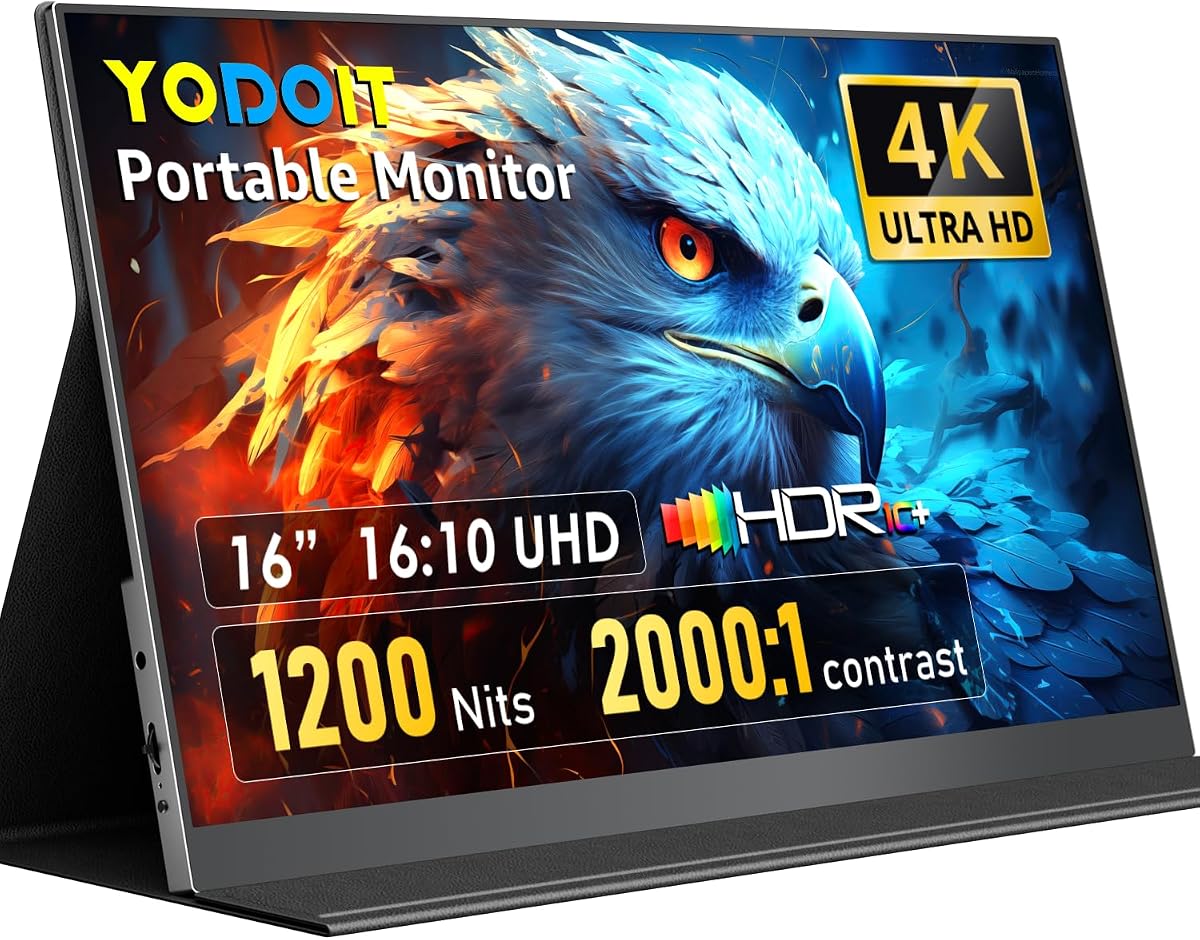
This portable monitor stands out for its 1200 nit brightness, making it highly visible in direct sunlight. It is designed for outdoor photographers and digital nomads who need reliable display performance in bright environments. With a 4K resolution and high sRGB coverage, it ensures accurate color reproduction for professional tasks.
We may earn a commission when you buy through this link, at no additional cost to you.
The 16 inch screen offers a 16:10 aspect ratio which provides extra vertical space for timelines and panels. Its IPS panel maintains consistent color accuracy from wide viewing angles. The matte coating eliminates reflections effectively, enhancing readability outdoors. Connectivity includes USB-C and Mini HDMI with necessary cables provided in the box.
While it delivers professional-grade visuals, it requires a USB-C power connection to sustain peak brightness on many laptops. The Mini HDMI port carries video and audio only so a separate power cable is mandatory. Users should be prepared to manage extra cables for optimal performance in field conditions.
It is ideal for outdoor workers needing high brightness and color precision. Photographers video editors and field inspectors will appreciate its portability and screen quality. This monitor effectively bridges the gap between indoor editing and outdoor workflow needs with its robust specifications.
The 1200 nit peak brightness and matte anti-glare coating ensure clear visibility even in direct sunlight without causing eye strain or washout effects.
With 145% sRGB coverage and a 2000:1 contrast ratio, this display delivers rich and accurate colors essential for photo retouching and color grading tasks.
We may earn a commission when you buy through this link, at no additional cost to you.
This Dell monitor combines a 144Hz refresh rate with a 1ms response time to deliver fluid motion for work and gaming. Its IPS technology ensures consistent colors across wide viewing angles. TÜV certification reduces harmful blue light making it comfortable for extended daily use.
We may earn a commission when you buy through this link, at no additional cost to you.
The 23.8 inch FHD screen features ultra-thin bezels that maximize your viewing experience. AMD FreeSync support helps eliminate screen tearing during dynamic tasks. The tilt adjustment allows for ergonomic positioning to reduce neck strain. Its compact design fits well in office setups.
While it offers excellent motion handling it lacks the high brightness needed for direct sunlight environments. Users relying on bright ambient light may find the screen less visible outdoors. This model is best suited for indoor or controlled lighting conditions.
It is a solid choice for budget-conscious users seeking smooth visuals and eye care features. Gamers and office workers will benefit from the fast refresh rate and comfortable design. Consider this model if sunlight readability is not a primary requirement.
The 144Hz refresh rate and 1ms MPRT response time create smooth tear-free motion ideal for fast-paced gaming and video playback applications.
TÜV Rheinland 3-star certification reduces harmful blue light while preserving stunning color quality for all-day visual comfort.
We may earn a commission when you buy through this link, at no additional cost to you.
The Dell S2725QS offers a 27 inch 4K UHD IPS display for immersive visuals. Its 120Hz refresh rate and AMD FreeSync Premium support provide a smooth experience for work and entertainment. ComfortView Plus reduces blue light emissions without compromising color accuracy.
We may earn a commission when you buy through this link, at no additional cost to you.
Vivid colors with 99% sRGB and a 1500:1 contrast ratio create excellent depth. HDR readiness enhances detail in high-dynamic-range scenes. The re-engineered audio delivers detailed sound with greater output power. Ultra-thin bezels and an ash white finish contribute to a minimalist design.
While excellent for indoor 4K content the 5ms response time may show minor lag in fast-paced gaming. It also lacks specific high-brightness features for sunlight visibility. This model is best suited for users prioritizing resolution and color over sunlight readability.
It is recommended for creative professionals needing detailed screens in controlled environments. Video editors and designers will appreciate the color accuracy and 4K resolution. Users requiring sunlight performance should consider the portable options available in this guide.
The 27 inch 4K UHD IPS panel delivers breathtaking visuals with vibrant colors and excellent depth for all content creation tasks.
ComfortView Plus reduces harmful blue light emissions by up to 35% ensuring all-day comfort without sacrificing color quality.
We may earn a commission when you buy through this link, at no additional cost to you.
The Dell S2425HSM offers extensive adjustability including height tilt pivot and swivel for ergonomic comfort. Its 144Hz refresh rate and 1ms response time deliver smooth tear-free viewing. Integrated dual 3W speakers provide sound without external devices.
We may earn a commission when you buy through this link, at no additional cost to you.
This model prioritizes visual comfort with 4-star TÜV certification reducing harmful blue light emissions. The ash white finish and ultra-thin bezels fit modern aesthetics. Dell Display and Peripheral Manager optimizes performance across the workspace. It suits users needing flexible positioning.
While versatile it uses standard brightness which is not ideal for direct sunlight exposure. FHD resolution is suitable for general tasks but lacks high detail. This monitor is best for office workers who value ergonomics and built-in features over outdoor performance.
It is a great choice for multitasking professionals needing a flexible and comfortable setup. The ergonomic adjustability and audio integration make it a complete package. Consider this model for indoor work environments with variable lighting needs.
Height tilt pivot and swivel adjustability allows you to customize your view throughout the day reducing strain and improving posture.
Dual 3W speakers deliver a wider range of frequencies so you can enjoy sound for media and calls without extra peripherals.
We may earn a commission when you buy through this link, at no additional cost to you.
This LG monitor delivers smooth motion with a 120Hz refresh rate and 1ms Motion Blur Reduction. Its Full HD IPS panel covers up to 99% sRGB for vivid colors. Reader Mode and Flicker Safe options enhance comfort during long sessions.
We may earn a commission when you buy through this link, at no additional cost to you.
The ultra-slim bezels and borderless design create a clean look for multitasking. Dynamic Action Sync minimizes input lag for responsive gameplay. Black Stabilizer helps spot details in dark scenes. The tilt-adjustable stand offers basic ergonomic flexibility.
While it offers great value the brightness level is standard and may struggle in direct sunlight. Users relying on outdoor visibility may find it insufficient. This model is best for indoor gaming and productivity with moderate lighting.
It is ideal for budget-conscious users seeking solid performance and eye comfort features. Gamers and casual users will enjoy the smooth visuals and vibrant colors. Choose this monitor for home office setups where sunlight is not a major factor.
A 120Hz refresh rate paired with 1ms Motion Blur Reduction ensures sharp fast-paced gameplay with minimal motion blur and ghosting.
Reader Mode lowers blue light levels and Flicker Safe technology reduces screen flicker for comfortable viewing during extended periods.
We may earn a commission when you buy through this link, at no additional cost to you.
The Acer SB273 G0bi offers a 27 inch Full HD screen with a zero-frame design for maximum visibility. Its 120Hz refresh rate and Adaptive-Sync support provide smooth tear-free motion. The IPS panel ensures consistent colors across wide viewing angles.
We may earn a commission when you buy through this link, at no additional cost to you.
Fast response times reduce smearing and ghosting in dynamic scenes. The design maximizes edge-to-edge visibility which is helpful for multitasking. It fits well in office environments needing a larger display without excessive footprint. The stand is basic with tilt only.
While the screen size is large the brightness remains at standard 250 nits which is not sufficient for direct sunlight. Users working outdoors may find the image washed out. This model is best for indoor office work and general media consumption.
It is a solid option for users needing a large affordable office display. Professionals requiring more screen real estate will appreciate the zero-frame design. Consider this model if sunlight visibility is not your primary priority.
The zero-frame design provides maximum visibility of the screen from edge-to-edge for a clean modern look and improved multitasking.
Adaptive-Sync matches the monitor refresh rate with your graphics card to deliver a smooth tear-free experience during gaming and video playback.
We may earn a commission when you buy through this link, at no additional cost to you.
This 32 inch QHD IPS monitor delivers vibrant true-to-life color reproduction for immersive viewing. The 100Hz refresh rate and 5ms response time ensure smooth motion. USB-C multi-device connection supports video transmission and charging for desktop efficiency.
We may earn a commission when you buy through this link, at no additional cost to you.
HDR10 enhances contrast between light and dark areas while 99% sRGB coverage ensures vivid colors. Reader Mode reduces blue light to alleviate eye strain during extended viewing. Triple-sided micro-bezel design enhances screen immersion. The slim base design keeps the desktop clean.
While it offers a large immersive display it lacks high brightness required for direct sunlight visibility. Users in bright outdoor settings may experience visibility challenges. This monitor is best for creative professionals in controlled lighting environments.
It is recommended for users needing a large screen for multitasking and content creation. Video editors and gamers will appreciate the QHD resolution and smooth performance. Consider this model for indoor setups where sunlight is not a primary concern.
A 32 inch QHD panel with triple-sided micro-bezel and slim base design create a cleaner desktop while enhancing screen immersion.
Video transmission and up to 15W device charging via USB Type-C allows a single cable connection to enhance desktop organization.
We may earn a commission when you buy through this link, at no additional cost to you.
The Dell S2725DSM combines QHD resolution with a 144Hz refresh rate for smooth visuals. Its 1ms MPRT response time delivers tear-free viewing. Integrated dual 3W speakers offer sound without external devices. The ash white finish fits modern setups.
We may earn a commission when you buy through this link, at no additional cost to you.
This model prioritizes visual comfort with 4-star TÜV certification reducing harmful blue light emissions. Height tilt pivot and swivel adjustability allow customized positioning. Dell Display and Peripheral Manager optimizes workspace performance. It suits professionals needing flexibility.
While versatile it maintains standard brightness not ideal for direct sunlight exposure. Users working outdoors may find visibility challenging. This model is best for indoor work environments requiring ergonomic adjustments and high detail.
It is ideal for office professionals valuing ergonomic flexibility and sound integration. Creative and general users will appreciate the QHD resolution and smooth performance. Consider this model for indoor setups where sunlight readability is secondary.
The 27-inch QHD resolution paired with 144Hz refresh rate and 1ms MPRT delivers astounding depth and smooth tear-free motion.
Prioritize visual comfort with this 4-star TÜV-certified display that reduces harmful blue light emissions without compromising colors.
We may earn a commission when you buy through this link, at no additional cost to you.
The Acer KB242Y G0bi offers a 23.8 inch Full HD screen with a zero-frame design. Its 120Hz refresh rate and Adaptive-Sync support provide smooth tear-free motion. The IPS panel ensures consistent colors across wide viewing angles for reliable visuals.
We may earn a commission when you buy through this link, at no additional cost to you.
Fast response times reduce smearing and ghosting in dynamic tasks. The design maximizes edge-to-edge visibility which is helpful for multitasking. It fits well in office environments needing a compact display without excessive footprint. The stand offers basic tilt adjustment.
While compact the brightness remains at standard 250 nits which is not sufficient for direct sunlight. Users working outdoors may find the image washed out. This model is best for indoor office work and general media consumption.
It is a solid option for users needing a compact affordable office display. Professionals requiring multitasking space will appreciate the zero-frame design. Consider this model if sunlight visibility is not your primary priority.
The zero-frame design provides maximum visibility of the screen from edge-to-edge for a clean modern look and improved multitasking.
Adaptive-Sync matches the monitor refresh rate with your graphics card to deliver a smooth tear-free experience during gaming and video playback.
We may earn a commission when you buy through this link, at no additional cost to you.
The Newsoul monitor delivers 1200 Nit ultra-high brightness making it suitable for bright light conditions. Its 4K resolution offers four times the detail of Full HD. The 145% sRGB coverage and matte screen reduce reflection and protect eyes for long use.
We may earn a commission when you buy through this link, at no additional cost to you.
Aluminum alloy shell provides stylish appearance and better heat dissipation. VESA mountable design allows customizable viewing angles for landscape or portrait modes. Plug and play compatibility works with Mac and consoles without drivers. A magnetic protective case doubles as a stand.
While brightness is high note that peak levels require white background and power connection. Some users may experience variability in sustained brightness without proper power. This model is best for portable outdoor work needing high visibility.
It is ideal for users needing a portable high-brightness display for travel. Photographers and field workers will appreciate the screen quality and build. Consider this model if you prioritize sunlight visibility for field tasks.
1200 Nit ultra-high brightness displays more clear and delicate content even in strong light conditions with 4X brightness over ordinary monitors.
Matte screen effectively reduces reflection and protects the eyes even for using long time ensuring comfortable extended viewing sessions.
We may earn a commission when you buy through this link, at no additional cost to you.
Selecting the right monitor for bright sunlight requires attention to specific features beyond standard office specs. Here are the key factors to consider for optimal performance.
Brightness measured in nits determines how visible your screen is under light. Standard monitors range from 250 to 400 nits which may wash out in sunlight. Aim for at least 1000 nits for direct outdoor work.
High brightness ensures content remains readable and vibrant even in bright conditions.
Matte anti-glare coatings diffuse reflections from surrounding light sources. Glossy screens reflect environmental light which reduces readability outdoors. Look for matte finishes for best results in sun.
Matte surfaces significantly improve visibility by eliminating distracting reflections.
Resolution affects detail clarity especially when viewing small text in bright environments. Larger screens offer more workspace but may need higher brightness to maintain quality. Balance size with brightness for best visibility.
Choose 4K or QHD resolution to maintain sharp details under light.
Color accuracy ensures content appears true-to-life regardless of lighting. High sRGB or Adobe RGB coverage is vital for creative work. Accurate colors reduce eye strain during prolonged use.
Look for high color gamut coverage like 145% sRGB for precision.
Portable monitors are essential for field work and outdoor setups. Lightweight designs under 3 lbs make carrying easier. Check for included stands or covers to support outdoor positioning.
Lightweight portable builds enable flexible use across locations.
Ensure the monitor supports your devices with USB-C or HDMI. USB-C provides power delivery which simplifies portable setups. Verify cable availability for stable connections outdoors.
USB-C connectivity reduces cable clutter and powers devices easily.
Extended viewing under bright conditions strains the eyes. Features like TÜV certification reduce harmful blue light. Flicker-free technology maintains stable image output.
Eye care features protect vision during long working hours.
Field environments demand robust build quality. Aluminum alloy chassis offer better heat dissipation and protection. Check for impact resistance or protective cases.
Rugged materials ensure longevity in outdoor conditions.
Keep the screen clean with microfiber cloths to avoid scratches. Avoid abrasive chemicals that damage coatings. Regular dust removal improves image clarity and performance.
Use protective covers or cases when traveling to prevent damage. Mount securely using VESA or magnetic stands. Ensure stable positioning to reduce movement risks.
Manage power connections carefully to maintain peak brightness. Use quality adapters and avoid extension cords with insufficient power. Proper power delivery extends device life and performance.
For direct sunlight exposure aim for monitors with at least 1000 nits brightness. Standard monitors at 250 to 400 nits will appear washed out in outdoor conditions. Higher brightness ensures content remains readable.
Yes matte anti-glare coatings diffuse reflections and improve outdoor readability. Glossy screens reflect surrounding light which hinders visibility in bright settings. Matte finishes are ideal for field work.
Yes portable monitors designed for outdoor use work well. Ensure they have high brightness and protective features. Check power requirements and connectivity options for compatibility with your setup.
4K resolution offers sharper details which helps readability in bright conditions. However FHD is sufficient for general tasks if paired with high brightness. Balance detail with brightness needs.
Use protective magnetic cases or covers designed for the model. Avoid leaving the screen exposed to extreme temperatures. Store safely when not in use to prevent damage.
High brightness often requires additional power beyond USB-C alone. Check product specs for external power adapter needs. Proper power ensures stable high-brightness performance.
This guide highlights ten monitors balancing brightness portability and performance. Top picks include the Yodoit and Newsoul portable models for extreme sunlight visibility. Desktop options offer ergonomic benefits for controlled environments.
Prioritize brightness and anti-glare features if working outdoors. Ensure compatibility with your devices and power sources. Consider ergonomics and adjustability for long sessions.
Prices and availability change frequently so check current listings before buying. Verify specs to match your specific outdoor needs.