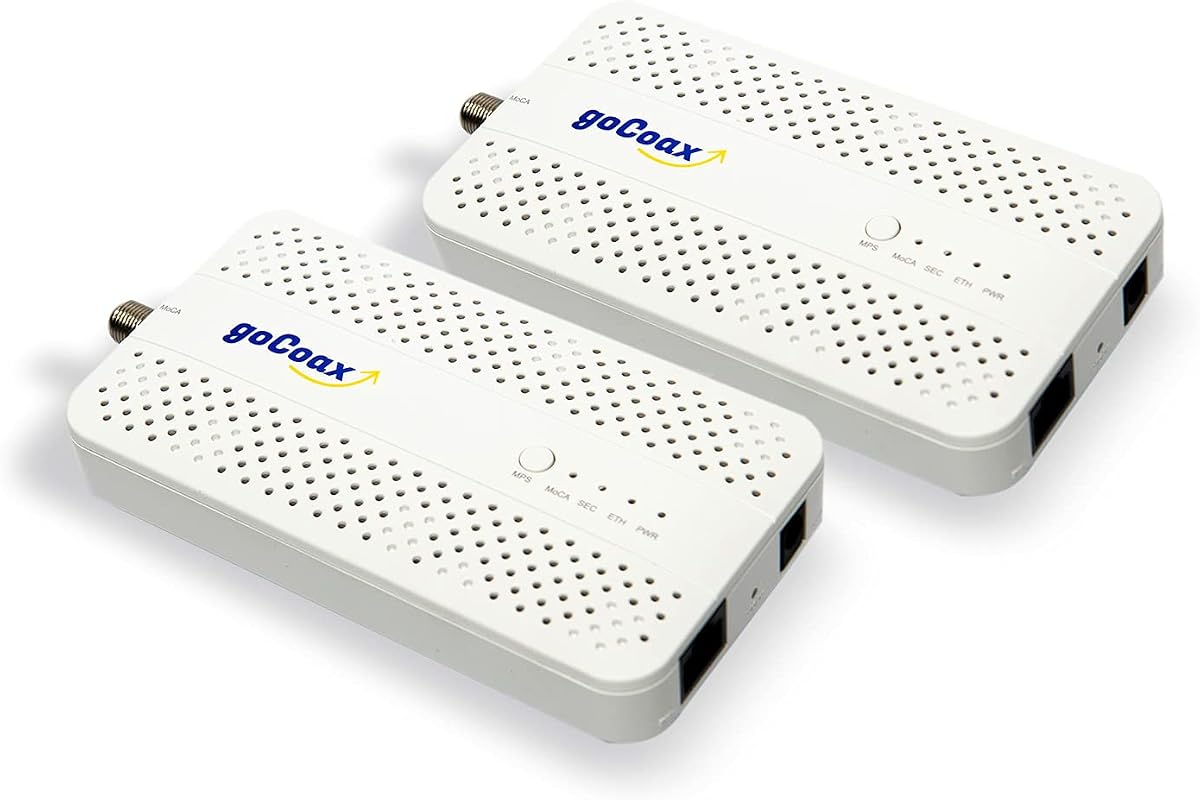
goCoax MoCA 2.5 Adapter (2-Pack) with 2.5GbE Ethernet Port
4.6Editor score
Zero configuration needed
Supports up to 16 nodes
Works with major cable providers
This guide compares the top coax to Ethernet adapters for home networking, highlighting MoCA 2.5 speed, compatibility, and reliability for gamers and streamers.
Finding a reliable coax to Ethernet adapter is crucial for modern home networks that demand high speed and low latency. These devices transform existing coaxial wiring into powerful wired connections, eliminating Wi-Fi dead zones without new cabling.
We analyzed ten top-rated adapters based on speed, compatibility, ease of setup, and user feedback. Our comparison covers MoCA 2.5 kits, budget-friendly options, and specialized units for PoE and dark coax networks to help you choose wisely.
Each pick in this list shows key specs, pros, cons, and detailed usage notes based on real product data. Keep in mind that prices and availability change frequently, so always check the latest offers before making your final purchase decision today.
4.6Editor score

4.4Editor score

4.8Editor score
This side-by-side comparison evaluates all ten adapters on critical factors like max speed, port count, included accessories, and network compatibility to help you find the perfect fit for your home setup.


The ScreenBeam ECB7250K02 stands out as a top choice for users seeking a robust coax to Ethernet adapter solution. With a solid 4.4 rating from verified buyers, this kit delivers up to 2.5 Gbps speeds, making it ideal for high-bandwidth needs like 4K streaming and online gaming.
We may earn a commission when you buy through this link, at no additional cost to you.
Its standout quality lies in the complete starter kit, which includes two adapters, coax cables, Ethernet cables, splitters, and power adapters. This all-in-one package simplifies installation significantly, allowing you to leverage existing home coax wiring for a stable wired network without buying extra components.
However, there are some limitations to consider. It is not compatible with satellite TV systems like DirecTV or Dish, nor does it work with AT&T internet services. Additionally, DOCSIS 3.1 modems might conflict due to frequency overlap, so checking with your ISP is crucial before purchasing.
Overall, this adapter is perfect for households using FiOS or major cable providers who want to eliminate Wi-Fi dead zones. If you need reliable, fast wired internet in multiple rooms without new cabling, this ScreenBeam kit offers excellent performance and value.
MoCA 2.5 technology ensures faster speeds than Wi-Fi, ideal for streaming and gaming simultaneously without buffering.
Everything needed for setup is included, from cables to splitters, reducing the hassle of sourcing extra parts.
We may earn a commission when you buy through this link, at no additional cost to you.
The goCoax MoCA 2.5 Adapter offers exceptional value for those needing a budget-friendly yet high-performance coax to Ethernet adapter. Rated 4.6 by users, this kit delivers the full 2.5 Gbps bandwidth of MoCA 2.5, ensuring fast speeds for 4K streaming and gaming without buffering.
We may earn a commission when you buy through this link, at no additional cost to you.
Key strengths include its true plug-and-play design with zero configuration required. The kit comes with coax and Ethernet cables, making it ready to use out of the box. With under 3ms latency, it outperforms Wi-Fi, providing a rock-solid connection for competitive gaming and video conferencing.
On the downside, you will need to purchase a PoE filter separately for optimal security, and it does not work with satellite TV systems. While the price is attractive, ensure your home has interconnected coax wiring, as isolated lines will not support this adapter.
This adapter is ideal for cable internet homes seeking a cost-effective wired backbone. If you want fast, reliable internet across multiple rooms without spending on premium gear, goCoax delivers excellent performance and ease of use.
Under 3ms latency makes this perfect for competitive gaming, avoiding the lag often found in Wi-Fi networks.
No complex configuration is needed; simply connect the adapters and enjoy a fully automated MoCA network.
We may earn a commission when you buy through this link, at no additional cost to you.
The TRENDnet 2.5Gbps Ethernet Over Coax Adapter earns a premium spot with a 4.8 rating, highlighting its reliability and performance. Designed for high-demand environments, it delivers consistent voice and 4K HD video bandwidth, making it a top choice for professional and home setups.
We may earn a commission when you buy through this link, at no additional cost to you.
Its standout features include NDAA and TAA compliance, which is vital for government or secure installations. The improved packet error rate technology ensures stable streaming and gaming, reducing disconnects and latency. The compact design fits well in desktops or entertainment centers without taking up much space.
While it offers premium reliability, it is not compatible with satellite TV systems, and you may need to buy a PoE filter separately for certain cable setups. The price reflects its higher performance tier, which might be steep for casual users not needing enterprise-grade compliance.
This adapter is perfect for users needing robust, secure, and fast wired connections. If you prioritize quality, compliance, and consistent high-speed performance over cost, TRENDnet delivers a trustworthy solution for modern home networking.
NDAA and TAA compliant for secure installations required by government customers in the U.S. and Canada.
Improved packet error rate technology ensures clear voice and 4K video streaming without interruptions.
We may earn a commission when you buy through this link, at no additional cost to you.
The Kiwee Broadband MoCA 2.5 Adapter is unique for offering dual 2.5GbE ports on each unit, allowing multiple devices to connect at full speed without additional switches. Rated 4.6 by users, it provides ultra-fast wired LAN speeds up to 2.5 Gbps for gaming, streaming, and work-from-home setups.
We may earn a commission when you buy through this link, at no additional cost to you.
Key strengths include its exclusive dual-port design and future-proof high-grade components. With MoCA 2.5 technology, it offers ultra-low latency and interference-free networking. The kit includes coax and Ethernet cables, making it ready for plug-and-play installation in minutes.
However, like other MoCA adapters, it may face compatibility issues with certain DOCSIS 3.1 modems due to frequency overlap. It is also strictly limited to coaxial wiring, so it won't work in homes with isolated satellite or phone lines.
This adapter is ideal for users needing multiple wired connections per room without buying extra hubs. If you want to connect multiple gaming consoles or PCs directly, Kiwee's dual-port solution offers unmatched flexibility and speed in its category.
Connect two devices at full 2.5Gbps speed to each adapter, saving money on extra switches.
Engineered with high-grade components for years of reliable performance in demanding home networks.
We may earn a commission when you buy through this link, at no additional cost to you.
The Hitron HTEM5 MoCA 2.5 Network Adapter stands out for its clear documentation on compatibility requirements, helping users avoid costly mistakes. With a 4.3 rating, it delivers up to 2.5 Gbps speeds over existing coax wiring, perfect for extending networks without running new cables.
We may earn a commission when you buy through this link, at no additional cost to you.
Key strengths include detailed warnings about incompatible setups like AT&T Fiber or satellite TV wiring. The kit includes adapters, cables, and power adapters, making it easy to set up. Free technical support is available to help troubleshoot any connection issues you might face.
On the downside, it does not include a PoE filter for high-split DOCSIS systems, which you may need to buy separately. Also, it is strictly not a modem or router, so you must have an existing internet connection to use this product.
This adapter is perfect for users with existing interconnected coax wiring who want fast speeds. If you verify your wiring first and need a reliable, straightforward solution, Hitron offers excellent support and performance for most cable and fiber providers.
Detailed warnings prevent buying errors, especially for homes with satellite or isolated coax wiring.
Technical support team helps verify your coax network and optimize performance for better results.
We may earn a commission when you buy through this link, at no additional cost to you.
The LNOVISION LongReach PoE over Coax EoC Converter is a specialized unit designed for upgrading analog surveillance systems to IP networks using existing coaxial wiring. Rated 4.4, it supports PoE standards and offers reliable indoor transmission without the need for configuration or expertise.
We may earn a commission when you buy through this link, at no additional cost to you.
Its standout quality lies in its industrial design with a built-in heat sink for reliability in demanding setups. It can transmit over coax or twist pair cables, reaching distances up to 1,485 feet for lower speeds. This makes it ideal for elevator shafts or CCTV upgrades.
However, it requires a PoE switch or injector for the receiver, and it only supports point-to-point connections, not full mesh networks. If you need a full home internet solution, this unit is better suited for specific security or industrial applications.
This adapter is perfect for security integrators needing to extend PoE cameras over long distances. If you have analog CCTV systems you want to upgrade without new cabling, LNOVISION offers a durable and efficient solution for your needs.
Delivers both power and data to devices like IP cameras, reducing the need for additional electrical outlets.
Built-in heat sink ensures stable operation even in enclosed spaces or long-running surveillance setups.
We may earn a commission when you buy through this link, at no additional cost to you.
The G.hn Ethernet Over Coax Adapter Kit is a specialized solution for homes with unused or dark coax wiring. Rated 4.3, it transforms these empty lines into a secure network offering speeds up to 1.2Gbps over distances of 800 meters without any cable TV interference.
We may earn a commission when you buy through this link, at no additional cost to you.
Key strengths include its use for dark coax networks, avoiding the conflicts that arise with active cable internet or TV. The easy setup process ensures you can extend your network to hard-to-reach rooms without running new cables, providing a stable wired connection for streaming and gaming.
However, it will not work with active cable TV or internet services, limiting its use to homes with isolated coax lines. It is also less versatile than MoCA adapters if your main coax line is already in use by your ISP.
This adapter is ideal for users with dark coax wiring who need extra network points. If your home has unused outlets and you want to avoid Wi-Fi, G.hn offers a dedicated, high-speed solution for your specific wiring situation.
Turns unused coax cables into a powerful network backbone without interfering with your cable TV service.
Reaches up to 800 meters, making it perfect for large homes or areas far from your router.
We may earn a commission when you buy through this link, at no additional cost to you.
The MoCA 2.5 Adapter Kit KB-M3-03 distinguishes itself by providing integrated PoE+ power over its Ethernet ports. With a 4.4 rating, this kit supports up to 30W, allowing you to power devices like Wi-Fi 6E/7 access points or cameras without additional outlets.
We may earn a commission when you buy through this link, at no additional cost to you.
Key strengths include the combination of true multi-gig speeds and PoE+ capabilities. It offers a single Ethernet cable solution for both data and power, simplifying installations for large homes or offices. The setup is hassle-free with plug-and-play design and stable connectivity.
On the downside, it comes at a higher price point, which may not suit all budgets. If you don't need PoE+ power, this might be overkill compared to standard adapters, but it is essential for specific smart home hardware.
This adapter is ideal for users needing to power devices over Ethernet while maintaining high speeds. If you want to simplify wiring for modern access points or cameras, this kit offers a unique and efficient solution for your network.
Delivers power and data over one cable, simplifying installations for access points and IP cameras.
Supports MoCA 2.5 for ultra-fast data transfer, perfect for streaming and high-demand applications.
We may earn a commission when you buy through this link, at no additional cost to you.
The TRENDnet TMO-312C offers a cost-effective entry point into MoCA networking as a single adapter unit. With a 4.3 rating, it delivers gigabit speeds up to 1Gbps, which is sufficient for HD streaming and gaming. It comes with a three-year manufacturer protection plan.
We may earn a commission when you buy through this link, at no additional cost to you.
Key strengths include its compact design and extensive warranty support from TRENDnet. English-speaking tech support is available for setup issues, ensuring you can troubleshoot effectively. The unit is backwards compatible with older MoCA standards for wider usability.
However, it maxes out at 1Gbps, which may not be enough for the fastest MoCA 2.5 plans. It is also a single unit, so you must buy another adapter for a complete two-point connection, unlike the starter kits.
This adapter is ideal for users needing to extend their network to one additional room at a lower cost. If you don't need 2.5Gbps speeds and want reliable support, TRENDnet offers a straightforward solution.
Backed by three years of manufacturer protection, ensuring peace of mind for long-term use.
Delivers up to 1Gbps for smooth HD streaming and gaming without buffering or lag.
We may earn a commission when you buy through this link, at no additional cost to you.
The ScreenBeam ECB6200S02 is designed as an add-on unit for existing MoCA 2.0 networks, making it a cost-effective way to expand your wired connections. With a 4.2 rating, it delivers up to 1Gbps speeds, which is sufficient for 4K streaming and daily tasks.
We may earn a commission when you buy through this link, at no additional cost to you.
Key strengths include its compatibility with FiOS routers and existing ECB kits, allowing you to add more nodes without replacing your current setup. The kit includes an adapter, power supply, and cables, simplifying installation for additional rooms.
However, it is strictly an add-on and not a standalone starter kit, so you need existing MoCA equipment to use it. Also, it uses MoCA 2.0, which is slower than newer 2.5 options for high-speed households.
This adapter is ideal for users who already own MoCA gear and need to connect more devices. If you want to expand your network without buying a new starter kit, ScreenBeam offers a reliable upgrade path.
Perfect for adding more wired connections to an existing MoCA network without buying a new full kit.
Works seamlessly with FiOS routers and most existing MoCA setups for straightforward expansion.
We may earn a commission when you buy through this link, at no additional cost to you.
Choosing the right adapter requires careful evaluation of your home's wiring, internet provider, and performance needs.
MoCA 2.5 adapters offer up to 2.5 Gbps speeds and are ideal for high-bandwidth households. If your plan is slower, MoCA 2.0 might suffice but check compatibility with your ISP and existing equipment.
Always prioritize MoCA 2.5 for future-proofing your network performance.
Different ISPs have specific MoCA requirements. Comcast, Spectrum, and FiOS typically support MoCA well, while AT&T and satellite providers often block these signals. Verify your provider's policy before buying.
Check your ISP's MoCA compatibility list or support page.
You need existing coax wiring in every room where you want wired internet. Isolated or satellite TV wiring may block signals. Ensure outlets are interconnected to a central splitter.
Use a coax tester to confirm connectivity before purchasing.
Match the adapter's max speed to your internet plan. A 2.5Gbps adapter is ideal if you have a fast plan, but 1Gbps may be enough for standard streaming needs.
Buy an adapter that matches your current plan.
Kits usually come with coax and Ethernet cables. Some require separate purchases for power adapters or PoE filters. Check what is included to avoid extra costs.
Verify the complete list of items included in the package.
If you need to power devices like Wi-Fi access points or cameras, look for PoE or PoE+ support. This avoids needing extra power outlets near your devices.
Choose a unit with PoE if you plan to power devices over Ethernet.
Some adapters offer dual ports per unit, allowing multiple wired devices in one room. Others support up to 16 nodes on one network, ideal for large homes.
Count your needed connection points before selecting a kit.
Most adapters offer plug-and-play setups without configuration. However, some may need router settings adjustments. Review the manual for steps before installing.
Look for zero configuration if you prefer simple setup.
To use an adapter, connect one end to your router and the other to your device using the provided Ethernet cables. Plug the coax cable into the coaxial wall outlet and ensure the adapter is powered on.
For optimal performance, place adapters near coax outlets and avoid physical obstructions. Check that all cables are securely connected and the LEDs indicate active signals for a stable connection.
To care for your adapter, keep it in a cool, dry area. Regularly inspect cables for damage and avoid bending coax connectors sharply. Ensure firmware updates are applied if your ISP offers them for better compatibility.
No, you do not need to replace your router. MoCA adapters extend existing networks by connecting to your current router via Ethernet. Just ensure your router has available Ethernet ports for the adapter to connect to.
No, most MoCA adapters are not compatible with satellite TV systems like DirecTV or Dish. These systems use different frequencies and often block MoCA signals, so they may not work with your existing coax wiring.
A MoCA PoE filter is recommended for optimal performance and security. It helps prevent signal leakage and interference. While not always mandatory, it improves reliability, especially for high-speed MoCA 2.5 setups.
No, these adapters generally improve speed and reliability compared to Wi-Fi. By using wired coax connections, they reduce latency and signal interference, providing more consistent speeds for your devices.
Yes, you can use adapters like the G.hn units specifically for dark coax wiring. However, standard MoCA adapters may not work on isolated lines unless they are connected to a main active network.
Yes, you need two adapters for a complete MoCA network. One connects to your router and the other to your device. Single units can be used as add-ons if you already own one starter kit.
Use a coax tester to ensure outlets are interconnected. Check for screw-on connectors in multiple rooms that link to a main splitter. If outlets are isolated, they may not support MoCA signals.
MoCA stands for Multimedia over Coaxial and handles data over coax. PoE stands for Power over Ethernet, delivering power along with data. Some adapters combine both, useful for powering devices like cameras.
In summary, the top picks include the ScreenBeam ECB7250K02 for overall performance, goCoax for budget-friendly speeds, and TRENDnet for premium compliance. These offer a great range of features for various household needs.
Prioritize MoCA 2.5 versions and verify your provider compatibility before purchasing. If you need multiple wired devices, look for dual-port adapters or PoE support to maximize convenience.
Prices for these adapters can vary over time, so always check current deals on Amazon before buying. Ensuring your home's coax wiring is interconnected will guarantee the best results for any adapter you choose.