
Behringer WING
4.2Editor score
48 channel capacity
28 bus options
Motorized faders included
Discover the top digital mixing consoles for live sound and studio recording. This guide compares features, specs, and performance to help you choose the right
Digital mixing consoles have revolutionized how audio professionals manage sound for live events and studio recordings. These advanced units offer unprecedented control over audio signals, allowing for precise adjustments and complex routing that analog mixers simply cannot match. Whether you are a sound engineer for a touring band or managing audio for a house of worship, selecting the right console is crucial for achieving professional results.
This comprehensive guide evaluates ten of the most capable digital mixing consoles available on the market today. We have analyzed technical specifications, user feedback, and real-world performance to identify the strengths and weaknesses of each model. Our goal is to provide you with a clear understanding of what each console offers so you can make an informed decision based on your specific audio needs and budget constraints.
Each product selection includes detailed specifications, pros and cons, and expert insights into how the console performs in various scenarios. You will find information about input counts, bus configurations, connectivity options, and software integration capabilities that define modern digital mixing workflows. Please note that pricing and availability can fluctuate, so we recommend checking the current listings for the most up-to-date information before making your purchase.
4.2Editor score

4.7Editor score

5.0Editor score
The following comparison table provides a side-by-side overview of the key specifications for each digital mixing console featured in this guide. This will help you quickly assess which model aligns with your technical requirements and workflow preferences.



The Behringer X32 stands out as a powerhouse in the world of digital mixing consoles. With a rating of 4.7 stars from numerous users, it has proven itself to be a reliable choice for professionals and enthusiasts alike. This console offers a robust set of features including forty input channels and twenty-five buses, making it ideal for complex audio setups in live and studio environments.
We may earn a commission when you buy through this link, at no additional cost to you.
One of the standout qualities of the X32 is its use of MIDAS-designed mic preamps. These preamps are fully programmable and deliver audiophile sound quality that enhances the clarity and presence of every input source. The console also features twenty-five fully automated motorized faders which allow for instant overview and powerful scene management. This level of control is essential for managing dynamic performances where quick adjustments are necessary.
While the X32 is highly capable, it does come with some trade-offs. The sheer number of features can present a steep learning curve for those new to digital mixing. Additionally, the setup process may require a computer for initial configuration which can be a hurdle in rapid deployment scenarios. However, these issues are generally acceptable given the professional-grade performance and versatility the console provides.
This console is best suited for sound engineers, church audio teams, and recording studios that need extensive routing and control. If you require a console that can handle large input counts and complex signal flow without compromising on sound quality, the X32 is a top recommendation. It represents a significant investment in audio quality and operational efficiency for serious audio professionals.
The inclusion of thirty-two MIDAS-designed mic preamps ensures that every vocal or instrument is captured with precision and low noise. This technology is a major differentiator that elevates the sonic quality above many competitors in this price range.
Motorized faders and dynamic LCD Scribble Strips provide intuitive channel distinction and easier assignment. These features streamline the mixing process allowing operators to focus on creative decisions rather than technical navigation.
We may earn a commission when you buy through this link, at no additional cost to you.
The Yamaha DM3 brings renowned Yamaha sound quality to a smaller package making it accessible for a wider range of users. It features a twenty-two channel configuration that includes mono and stereo inputs allowing for flexible mixing setups. The console operates at a 96kHz sample rate which ensures high fidelity audio capture and reproduction. This makes it an excellent choice for applications where space is limited but quality cannot be compromised.
We may earn a commission when you buy through this link, at no additional cost to you.
A key strength of the DM3 is its best in class nine-inch touchscreen. This interface allows for intuitive control and quick access to various mixing parameters. The console also includes professional Yamaha pre-amps that provide clean gain and low noise. Additionally, the built-in eighteen by eighteen USB audio interface enables direct recording and playback which simplifies the workflow for streamers and podcasters.
Despite its strengths the DM3 has some limitations. With only twenty-two channels it may not be suitable for very large events with many microphones. The touchscreen although useful can sometimes be sensitive to unintended touches which might require careful operation in dynamic environments. These factors are acceptable given the compact nature of the unit and the value it provides.
This console is ideal for mobile sound engineers, schools, and small venues. If you need a reliable and portable mixing solution that does not sacrifice sound quality, the DM3 is a strong contender. It balances functionality with portability making it a versatile addition to any audio setup.
The 96kHz sample rate ensures that audio is captured with exceptional detail. This is particularly beneficial for applications that require high-resolution recordings or precise monitoring.
The included USB audio interface allows for seamless connection to computers for recording. This eliminates the need for external interfaces and keeps the setup clean and efficient.
We may earn a commission when you buy through this link, at no additional cost to you.
The Behringer WING represents a premium offering in the digital mixing console category. With forty-eight channels and twenty-eight buses it is designed for large-scale productions that demand extensive routing capabilities. The console features award-winning MIDAS PRO mic preamps and outputs which ensure top-tier audio performance. This makes it a preferred choice for touring sound engineers and large fixed installations.
We may earn a commission when you buy through this link, at no additional cost to you.
One of the key strengths of the WING is its flexible physical layout with twenty-four motorized faders in three separate sections. This allows for customized control surfaces that can be configured to fit the specific workflow of the operator. The large main display with capacitive touch screen provides a comprehensive view of the mixing environment. Additionally the unique touch-sensitive channel editing section allows for precise adjustments without navigating through deep menus.
The WING is an investment that comes with a higher price tag. Its complexity may also be overwhelming for users who do not need such extensive capabilities. However for those who require the power of forty-eight channels and advanced remote I/O connectivity the console delivers professional results. The trade-offs are minimal considering the performance it offers.
This console is best for large touring bands, major venues, and professional audio companies. If you need a console that can handle massive input counts and complex signal routing with high fidelity, the WING is unmatched. It provides the tools necessary for large-scale audio production.
The inclusion of MIDAS PRO preamps and outputs ensures that audio signals are amplified cleanly with minimal noise. This is critical for maintaining high fidelity in demanding live environments.
Plug and play remote I/O connectivity via AES50 ports allows for expansion up to 144 signals. This flexibility is essential for large stages where inputs are scattered across different locations.
We may earn a commission when you buy through this link, at no additional cost to you.
The Yamaha MGX12 is a compact digital mixing console that has achieved a perfect rating of 5.0 stars. It offers eighteen channels of mixing with tactile faders and a four point three inch touchscreen. The console includes a built-in DSP processor that ensures professional sound and latency-free monitoring. This makes it a highly reliable tool for small to medium size audio applications.
We may earn a commission when you buy through this link, at no additional cost to you.
A key strength of the MGX12 is its versatile I/O options. It includes new MGX preamps with a high gain range and Bluetooth audio input for wireless streaming. The USB-HDMI interface featuring 4K video capture and pass-through is a unique feature that sets it apart from other mixers. This allows users to integrate audio mixing into video production workflows seamlessly.
The only notable trade-offs are the limited input count and compact size. While sufficient for small gigs it may not support large stage setups. However given the price and features these limitations are acceptable for the target audience. The included software bundle further adds value to the purchase making it a comprehensive solution.
This console is ideal for content creators, podcasters, and small event organizers. If you need a portable mixer that handles both audio and video integration well the MGX12 is an excellent choice. It delivers high-quality performance in a manageable package.
The USB-HDMI interface allows for 4K video pass-through which is rare in audio mixers. This feature simplifies live streaming setups by keeping audio and video signals connected through one device.
The built-in DSP processor ensures consistent sound quality across all channels. This reduces the need for external processors and keeps the signal chain simple.
We may earn a commission when you buy through this link, at no additional cost to you.
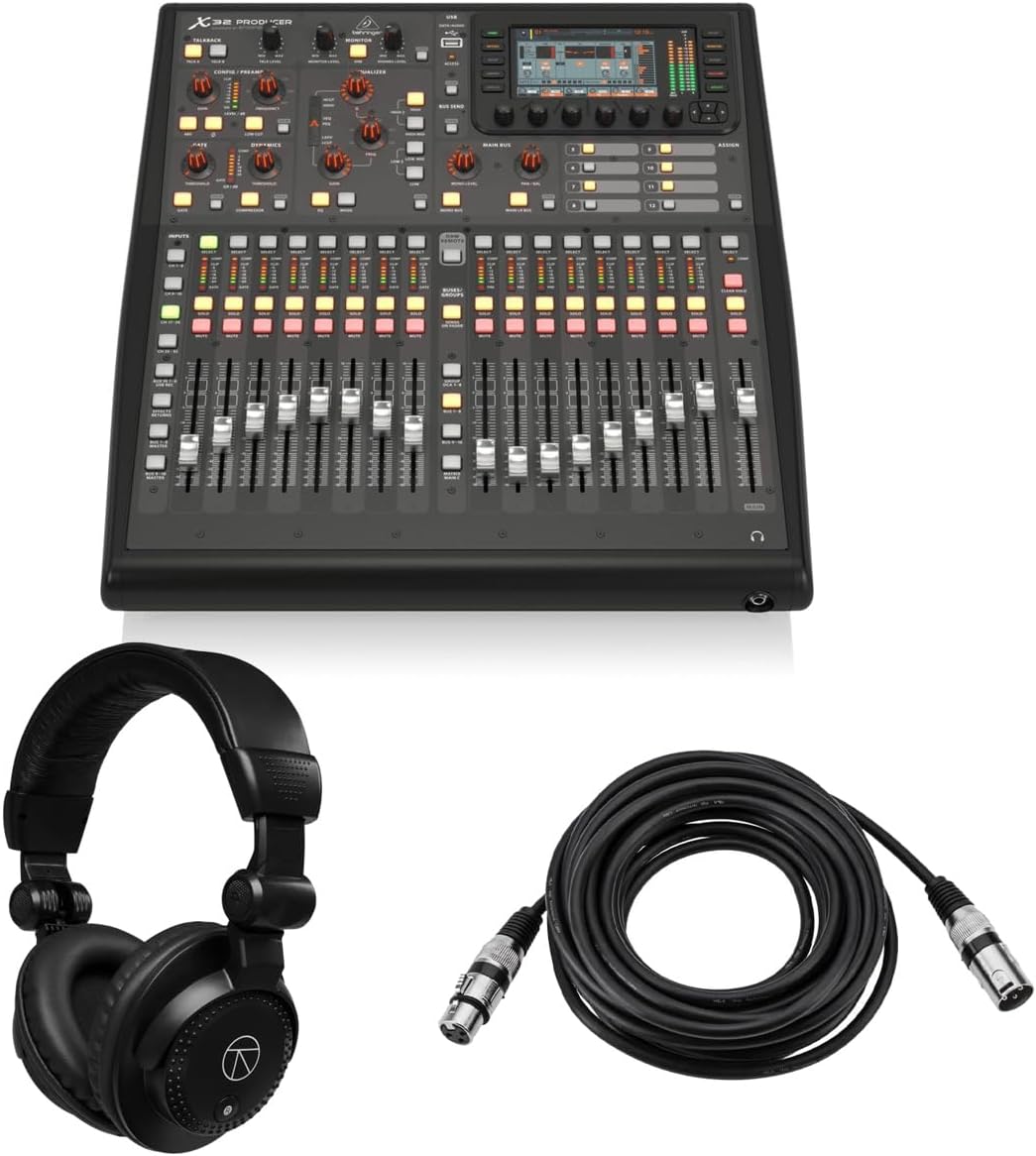
The Behringer X32 Producer brings the full power of the X32 platform to a smaller, rack-mountable form factor. It offers forty input channels and twenty-five buses with a perfect 5.0 rating from users. The console features sixteen programmable MIDAS Preamps and delivers professional-grade sound. This makes it a versatile choice for both live sound and studio recording environments.
We may earn a commission when you buy through this link, at no additional cost to you.
One of the key strengths of the Producer is its robust durability and space-saving design. It fits into standard equipment racks making it ideal for venues where floor space is at a premium. The inclusion of seventeen motorized faders ensures that you retain precise control over your mix. Additionally the five-inch color TFT display allows for easy viewing of workflow components.
The trade-offs include less physical control compared to the full-sized X32 and a smaller display screen. While these are minor concessions they do limit the speed of operation slightly. However for most applications the features provided are sufficient. The bundle with headphones and cables adds significant value to the purchase.
This console is best for broadcast studios, houses of worship, and compact mobile rigs. If you need the power of a large digital console in a smaller package, the Producer is the right choice. It balances performance with space efficiency effectively.
The rack-mountable form factor allows for permanent integration into equipment racks. This saves valuable floor space and protects the console in rugged environments.
Included accessories like headphones and XLR cables provide a ready-to-use solution. This reduces the initial setup time and cost for new users.
We may earn a commission when you buy through this link, at no additional cost to you.
The Behringer X32 Compact is a streamlined version of the popular X32 console. It retains forty input channels and twenty-five buses but in a more space efficient chassis. Users have rated it 4.7 stars for its reliability and sound quality. This console is designed for live applications where physical space is limited but audio performance is not compromised.
We may earn a commission when you buy through this link, at no additional cost to you.
A key strength of the Compact model is its use of sixteen MIDAS-designed mic preamps. These provide audiophile sound quality that is consistent with larger models. The seventeen fully automated motorized faders allow for instant overview and powerful scene management. Additionally the LCD Scribble Strips on all channels make it easy to assign and distinguish inputs during busy mixes.
Trade-offs include fewer XLR outputs compared to the full X32 which may limit complex setups. The complexity of the digital interface can also be challenging for those new to mixing. However these are acceptable trade-offs for the size savings offered. The console remains a top contender in its class.
This console is ideal for touring bands, schools, and mobile sound engineers. If you need a reliable digital console that is easy to transport but still offers professional features, the X32 Compact is a strong choice.
The compact chassis does not sacrifice critical controls. This design allows for professional workflows in smaller spaces.
The MIDAS preamps ensure high-quality audio capture across all inputs. This consistency is key for professional sounding mixes.
We may earn a commission when you buy through this link, at no additional cost to you.
The PreSonus StudioLive Classic 16.0.2 is a USB digital console mixer designed for both live and recording applications. It features sixteen channel inputs with Class A XMAX solid-state mic preamplifiers. The console includes a Fat Channel signal processing on all channels which provides EQ and dynamics control. This makes it a versatile tool for home studios and small live venues.
We may earn a commission when you buy through this link, at no additional cost to you.
A key strength of this mixer is its integration with PreSonus Studio One Artist DAW. The included software library allows for seamless recording of all channels and main L/R mix. The eighteen-in/16-out USB 2.0 audio interface ensures accurate tracking of live performances. This combination of hardware and software creates a comprehensive recording solution.
Trade-offs include an older design compared to newer touchscreen models and a lower user rating. The interface may feel less intuitive to those accustomed to modern controls. However for the price the processing power and software bundle are valuable. These factors make it a cost-effective option for entry-level professionals.
This console is best for home recordists, podcasters, and small bands. If you need a mixer that functions well as an audio interface for recording, the StudioLive 16.0.2 is a practical choice.
The Fat Channel EQ and compressor on every channel allow for deep sound shaping. This ensures that every input is processed professionally without external gear.
The USB interface enables recording of all channels simultaneously. This is essential for capturing multi-track performances accurately.
We may earn a commission when you buy through this link, at no additional cost to you.
The Behringer X AIR XR18 is an eighteen-channel digital mixer designed for control via iPad or Android tablets. It features sixteen award-winning MIDAS-designed mic preamps for audiophile sound quality. The built-in tri-mode Wi-Fi router allows for direct operation without external routers. This design makes it an ideal choice for touring sound engineers who need to mix from the crowd.
We may earn a commission when you buy through this link, at no additional cost to you.
A key strength of the XR18 is its portable nature combined with high-quality audio processing. The eighteen by eighteen bidirectional USB interface supports direct recording on iPad or computers. The integration with the X AIR app provides a comprehensive mixing experience on a mobile device. This flexibility allows for precise mixing in various environments without a physical desk.
Trade-offs include dependence on a tablet which can be risky if the device fails. There is also less physical feedback compared to faders and knobs. However for mobile applications these are acceptable compromises. The console remains a top choice for remote mixing.
This console is best for touring bands, churches with remote mixing, and podcasters. If you need a small mixer that can be controlled wirelessly, the XR18 is an excellent option.
The ability to mix from the audience ensures the sound is perfect for listeners. This remote control is essential for modern live sound.
The MIDAS preamps ensure that audio quality remains high even in a compact unit. This ensures professional sound regardless of size.
We may earn a commission when you buy through this link, at no additional cost to you.
The Allen & Heath Qu-5 is a digital mixer that leverages 96kHz XCVI FPGA processing. This delivers exceptional audio quality with ultra-low latency. The mixer supports up to thirty-eight inputs to mix and includes twelve configurable mixes. This makes it suitable for professional live sound and installed audio applications where timing is critical.
We may earn a commission when you buy through this link, at no additional cost to you.
A key strength of the Qu-5 is its extensive connectivity options. It includes sixteen XLR/TRS combi inputs and twelve XLR outputs along with AES3 digital output. The built-in recording capabilities via USB and SD card support provide convenient multitrack capture. This versatility ensures that the console can handle complex audio environments with ease.
Trade-offs include a higher price point and a workflow that requires technical knowledge. The complexity may not suit all users. However for those who require high-speed processing, the console delivers professional results. The performance justifies the investment for serious engineers.
This console is best for professional live sound, recording studios, and installed audio systems. If you need high sample rates and low latency, the Qu-5 is a top-tier choice.
The FPGA processing ensures that audio is processed instantly. This is essential for live applications where timing cannot be compromised.
Multiple digital and analog outputs ensure the mixer fits into any infrastructure. This flexibility is key for installed systems.
We may earn a commission when you buy through this link, at no additional cost to you.
The QSC TouchMix-16 is a compact digital mixer that focuses on simplicity and ease of use. It offers twenty full function inputs and six aux outputs. The interface is designed for intuitive operation which reduces setup time. This makes it a great choice for churches and event planners who need reliable sound without complex setups.
We may earn a commission when you buy through this link, at no additional cost to you.
A key strength of the TouchMix-16 is its built-in auto-mixing capabilities. This feature manages microphone gain sharing automatically allowing for consistent levels. The outputs drive wired In Ear Monitors directly which eliminates the need for additional hardware. Additionally the included bag protects the console during transport.
Trade-offs include limited advanced routing compared to larger digital consoles. The compact size also means fewer physical faders. However for straightforward applications these limitations are acceptable. The user-friendly design ensures quick results even for non-experts.
This console is best for small venues, volunteer sound teams, and mobile performers. If you need a mixer that is easy to set up and use, the TouchMix-16 is a solid choice.
The auto-mixing feature ensures that active microphones are prioritized. This simplifies mixing for operators with less experience.
The direct drive for IEMs simplifies monitoring setups. This is crucial for stage sound quality in live events.
We may earn a commission when you buy through this link, at no additional cost to you.
Choosing the right digital mixing console requires careful consideration of your specific audio needs and technical requirements.
The number of inputs and outputs you need will depend on the size of your venue and the number of microphones you plan to use. A larger production will require more channels to accommodate all the audio sources.
Always choose a console with enough inputs for your current setup plus room for growth to avoid future obsolescence.
Look for consoles that offer comprehensive channel strip features including EQ, dynamics processing, and gate. These tools allow you to shape sound effectively for each input.
Prioritize models with high-quality EQ and compression to ensure professional sound quality in every mix.
Flexible routing options are essential for complex audio setups. Ensure the console supports the number of aux sends and main buses you require.
Check the matrix output options to see if you can create custom mixes for different zones or monitors.
Connectivity options including USB, MIDI, and expansion ports determine how the console integrates with your other equipment. A multi-channel USB interface is vital for recording capabilities.
Ensure the console supports the necessary digital protocols for your audio interface or networked devices.
The physical control surface affects how quickly you can operate the console during live performances. Consider whether motorized faders or touch screens fit your workflow best.
Look for well-placed controls and clear labeling to reduce the risk of errors during critical moments.
Many digital consoles come with companion software for remote control and scene management. Check the features of these apps and their compatibility with your devices.
Regular firmware updates are important for long-term support and feature improvements over time.
Since these consoles often travel, build quality is a critical factor. Look for rugged chassis and reliable components that can withstand frequent transport.
Check if the console is rack-mountable if space and stability are concerns in your venue.
Balance your budget with the features you need. A higher price does not always mean better performance if you do not need the extra capabilities.
Consider long-term value by looking at the support and reputation of the manufacturer.
Start by properly grounding your equipment and connecting inputs securely. Ensure all cables are in good condition to avoid signal loss or noise interference.
Use the console's software to configure your input gain and EQ settings before the live session. This preparation helps in identifying issues early and ensures a smoother show.
Store the console in a climate-controlled environment and use protective cases during transport. Regularly update firmware to maintain stability and access new features.
Digital mixing consoles offer advanced processing, recallable settings, and flexible routing that analog consoles lack. They also typically provide built-in effects and recording capabilities. These features make digital consoles more versatile for modern applications.
While many digital mixers can operate independently, a computer is often needed for setup or recording. Some consoles come with software for remote control or scene management. Check the specific model's requirements before purchasing.
For a small venue, sixteen to twenty-four inputs usually suffice. This covers vocals, instruments, and playback sources. Ensure the console supports enough outputs for your monitor and main PA systems.
Many modern digital mixers include multi-channel USB interfaces for direct recording to a computer or storage device. This feature allows for capturing each channel individually for post-production. Check the specific model's recording capabilities.
A DCA group is a virtual grouping of channels used for centralized control of volume or mute. It simplifies the mixing process for managing multiple sources. This feature is common on professional digital consoles.
Touchscreens offer flexibility and more display options but knobs and faders provide tactile feedback. Many professional consoles offer a combination of both for optimal control. Choose based on your workflow preference.
Motorized faders allow for instant overview of channel levels and quick scene changes. They are particularly useful for complex setups with many active channels. They enhance workflow efficiency significantly.
AES50 is a digital audio protocol that enables high-speed, low-latency communication between consoles and stage boxes. It is commonly used by Behringer and similar brands for networked audio. This technology expands input options efficiently.
We have reviewed ten exceptional digital mixing consoles that cater to a wide range of audio needs. From the powerful Behringer X32 to the compact Yamaha MGX12, there is a model for every budget.
Prioritize input count and processing capabilities to ensure the console meets your technical requirements. Consider the control interface and software support for long-term usability.
Prices and availability can change frequently so always check the latest listings before making a purchase decision. We hope this guide helps you find the perfect mixer for your audio projects.