
TERRAMASTER D8 Hybrid
3.5Editor score
Hybrid HDD and NVMe support
152TB total capacity
Intelligent cooling system
Direct Attached Storage offers a powerful way to expand your computer capabilities storage without the overhead of a full network setup. These devices connect directly via USB or Thunderbolt, providing fast access to massive amounts of data for backups and media production workflows.
We evaluated ten leading DAS enclosures based on transfer speeds, build quality, compatibility, and ease of use. Our analysis focuses on models that support multiple drives, offer reliable cooling, and ensure data safety through robust hardware designs or software tools included.
Each selection highlights specific strengths for different needs, from budget-friendly options to high-performance hybrid setups. Prices fluctuate often so always verify current listings before purchasing to ensure you get the best value for your specific storage requirements today.
3.5Editor score

4.2Editor score

4.3Editor score
As an Amazon Associate we earn from qualifying purchases.
This table provides a side-by-side overview of the top ten Direct Attached Storage units, highlighting key specifications like drive bays, interface types, and unique features to help you make an informed decision quickly.


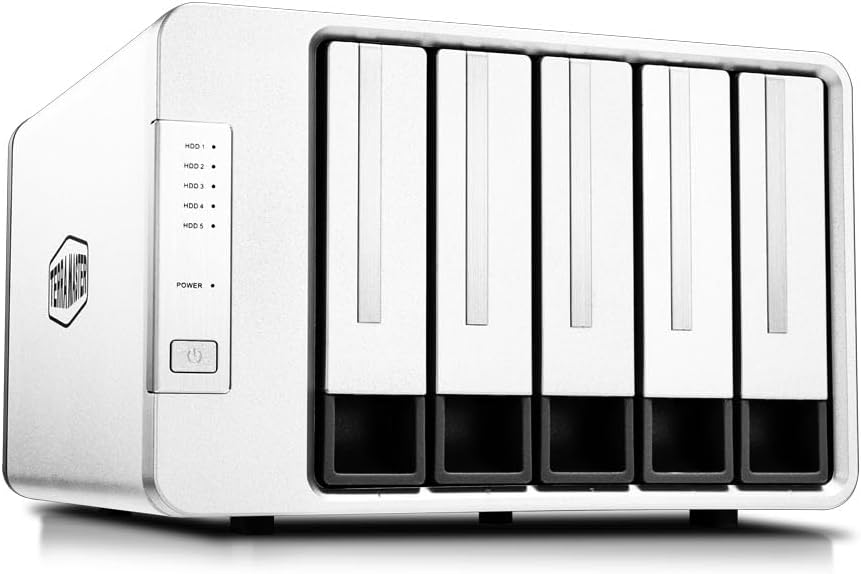


The TERRAMASTER D4-320 stands out as a reliable choice for users needing high-speed external storage without network complexity. It achieves excellent ratings through its robust build and efficient thermal management system that keeps drives cool.
We may earn a commission when you buy through this link, at no additional cost to you.
Its USB 3.2 Gen2 interface ensures data moves rapidly, reaching up to 10Gbps bandwidth. The tool-free push-lock design makes swapping drives simple and secure, enhancing workflow efficiency significantly.
While it lacks hardware RAID, the individual drive access simplifies data recovery. Noise levels are managed well but might be noticeable during intensive transfers in quiet rooms.
This unit is ideal for content creators needing quick access to large media libraries. It balances performance and ease of use effectively for most desktop setups.
With 10Gbps transfer rates, you can move massive files quickly without bottlenecks during editing sessions.
Intelligent fans adjust speed based on temperature ensuring drives stay safe during prolonged usage periods.
We may earn a commission when you buy through this link, at no additional cost to you.
The QNAP TR-004 offers robust data protection through hardware RAID support which is rare in standard DAS units. It is highly rated for users integrating it into existing QNAP ecosystems seamlessly.
We may earn a commission when you buy through this link, at no additional cost to you.
RAID modes 0 1 and 5 provide flexibility for balancing speed and redundancy. The USB Type-C connection ensures fast data throughput while maintaining compatibility with modern laptops.
However its utility is restricted by specific firmware requirements for NAS expansion. Lockable bays add physical security but setup requires checking system compatibility first.
Best suited for QNAP owners needing extra secure storage locally. It provides peace of mind through redundancy without needing a full network server.
Hardware RAID ensures data safety even if a single drive fails during critical operations.
Seamlessly expands your QNAP storage pool when running compatible QTS versions for unified access.
We may earn a commission when you buy through this link, at no additional cost to you.
The TERRAMASTER D8 Hybrid is a powerhouse for those needing both massive capacity and high speed in one unit. It scores well for its unique ability to house both HDDs and NVMe SSDs simultaneously.
We may earn a commission when you buy through this link, at no additional cost to you.
You can store cold data on HDDs and active projects on NVMe drives optimizing workflow efficiency. The 10Gbps interface ensures that fast drives perform at their peak potential without bottlenecks.
Setup might seem complex due to mixed drive types but the tool-free design mitigates this. The power recovery feature ensures you don't lose progress after unexpected power outages.
Ideal for advanced users managing large media libraries and active projects. It offers a premium solution that bridges the gap between storage types effectively.
Separate hot and cold data efficiently by leveraging the speed of SSDs and bulk of HDDs.
Auto reboot on power loss protects your work ensuring continuity after accidental interruptions.
We may earn a commission when you buy through this link, at no additional cost to you.
The CENMATE Aluminum 4 Bay offers exceptional value for those needing basic external storage without breaking the bank. It is highly rated for its solid build quality and simple plug-and-play functionality.
We may earn a commission when you buy through this link, at no additional cost to you.
The aluminum chassis helps dissipate heat effectively which is crucial for multi-drive setups. Dual USB options ensure you can connect to older computers or modern laptops without adapters.
While transfer speeds are capped at 5Gbps it is sufficient for most backup tasks. The fan can be noisy under load so keep it away from quiet workspaces.
Perfect for home users or small businesses needing reliable storage. It balances cost and performance well for everyday file management tasks.
Provides a reliable multi-drive solution at a fraction of the cost of high-end units.
Aluminum alloy construction ensures durability and effective passive cooling alongside active fans.
We may earn a commission when you buy through this link, at no additional cost to you.
The SABRENT 5-Bay excels in providing dedicated connections for every drive which maximizes stability. Users appreciate the reliable performance and the ability to chain another dock for even more expansion.
We may earn a commission when you buy through this link, at no additional cost to you.
The PWM controlled fan ensures drives stay cool without creating excessive noise. A locking key prevents accidental drive removal which is a thoughtful security detail for busy environments.
While it lacks internal power switching it remains a solid choice for desktop use. The 10Gbps speed ensures fast transfers even with five drives running simultaneously.
Great for professionals needing massive local storage reliability. The daisy-chain feature makes it a scalable option for growing data needs.
Dedicated controllers per bay reduce data bottlenecks and improve access speeds for all drives.
Chain multiple docks to expand storage capacity further without needing extra ports on your PC.
We may earn a commission when you buy through this link, at no additional cost to you.
The TERRAMASTER D8 Hybrid 2 improves upon the original with better power management features. It receives high praise for its efficiency and the ability to wake up quickly from sleep modes.
We may earn a commission when you buy through this link, at no additional cost to you.
TPM technology optimizes power use which extends drive life and reduces heat generation. The Thunderbolt 4 support ensures it works seamlessly with modern high-performance laptops and desktops.
While it handles complex setups well it requires some knowledge to utilize both drive types effectively. The fast wake up times make it more responsive than many competitors.
Best for users with modern devices needing quick access to large datasets. It combines efficiency with high performance for a premium experience.
TerraMaster Power Management optimizes energy use reducing heat and extending hardware lifespan.
Support for Thunderbolt 4 ensures you can leverage the fastest possible interfaces available today.
We may earn a commission when you buy through this link, at no additional cost to you.
The TERRAMASTER D5-310 stands out with its physical knob for changing RAID modes which simplifies setup significantly. It is valued for its hardware RAID capabilities and broad OS compatibility.
We may earn a commission when you buy through this link, at no additional cost to you.
You can switch between RAID levels easily without entering complex menus. The hot spare feature adds a layer of security by automatically replacing a failed drive if configured.
Transfer speeds are lower than some competitors which might slow large file transfers. However the ease of use makes it a strong choice for non-technical users.
Ideal for general users needing reliable redundancy. The physical controls make managing storage settings much more accessible than software-based alternatives.
Physical knobs let you switch RAID modes quickly without needing deep technical knowledge or apps.
Hot spare support ensures continuous operation even if one drive fails unexpectedly during critical use.
We may earn a commission when you buy through this link, at no additional cost to you.
The WAVLINK 4-Bay adds unique multimedia capabilities with its HDMI output allowing direct connection to displays. This makes it highly rated for users needing to view media stored directly on the drives.
We may earn a commission when you buy through this link, at no additional cost to you.
The USB 3.2 port supports fast data transfers for large video files. Independent power switches give you granular control over which drives are active at any given time.
Note that HDMI requires host support so it works best with compatible modern computers. The aluminum shell ensures efficient heat dissipation during prolonged usage periods.
Great for media centers or presentation setups. It combines storage with display capabilities for a versatile multi-function device.
HDMI 4K output lets you connect directly to TVs for immediate access to your stored media files.
Independent switches allow you to power specific drives on or off for better energy management.
We may earn a commission when you buy through this link, at no additional cost to you.
The ORICO 5 Bay is a popular choice for its magnetic cover which simplifies access to internal components significantly. Users appreciate the quick drive recognition and simple plug-and-play installation process.
We may earn a commission when you buy through this link, at no additional cost to you.
Its honeycomb rear panel enhances airflow which helps keep drives cool during heavy usage. The USB Type-C interface ensures you can connect to modern systems without adapters.
Linux users should note that only one drive may be recognized at a time. Despite this limitation it remains a solid option for standard Windows and Mac environments.
Perfect for home storage expansion. It provides a user-friendly way to access large amounts of data efficiently.
Magnetic chips on the cover allow for fast and easy access without tools for drive maintenance.
Honeycomb vents on the rear panel improve natural airflow and keep internal components cool.
We may earn a commission when you buy through this link, at no additional cost to you.
The QNAP TR-002 offers a compact solution for users needing just two drives without sacrificing RAID protection. It is well rated for its small footprint and ease of integration into existing workflows.
We may earn a commission when you buy through this link, at no additional cost to you.
Hardware RAID support provides data redundancy which is essential for protecting critical files. The USB Type-C port ensures reliable and fast connections to modern computers.
While it has fewer bays it is more space efficient than larger models. Lockable bays add a nice touch of physical security for office environments.
Ideal for small offices needing basic redundancy. It balances capacity and size effectively for limited desk spaces.
The two-bay design saves valuable desk space while still providing critical data redundancy.
Hardware RAID ensures that you do not lose data if one drive fails during critical operations.
We may earn a commission when you buy through this link, at no additional cost to you.
Choosing the right Direct Attached Storage requires balancing speed capacity and specific needs like RAID support. This guide breaks down the critical factors to help you select a device that fits your workflow and budget.
The connection type determines how fast you can move files between your computer and the enclosure. Look for USB 3.2 Gen 2 or USB-C 10Gbps for faster transfers which are crucial for video editing.
Prioritize interfaces that match your computer's ports to avoid bottlenecks during large file transfers.
Consider how many drives you need to install now and in the future. Most units support between two and eight drives offering flexibility for expansion without buying new enclosures.
Choose a model with enough bays to accommodate your long-term storage goals.
RAID support allows you to protect data across multiple drives. Hardware RAID is faster and more reliable than software RAID but often comes at a higher price.
Decide if data redundancy is worth the extra cost based on your needs.
Multiple drives generate significant heat which can lead to failures if not managed. Look for enclosures with intelligent fans or high-quality aluminum bodies for better heat dissipation.
Ensure cooling is effective without creating excessive noise in your workspace.
Ensure the device works with your operating system. Most support Windows and Mac but some Linux or NAS specific models have restrictions or require driver updates.
Check system requirements before purchasing to avoid connectivity issues.
A sturdy build ensures the device withstands physical wear and tear. Aluminum cases offer better protection and heat management than plastic alternatives.
Invest in a unit with strong construction for longevity and safety.
Prices vary significantly based on features like RAID and interface speed. Determine your must-have features to find a balance between cost and performance.
Set a clear price range before shopping to narrow down options quickly.
Features like tool-free installation simplify the process of swapping drives. This is crucial if you plan to change drives frequently or have limited technical skills.
Look for designs that prioritize accessibility and user convenience.
Start by installing hard drives into the bays before connecting the enclosure to your computer. Ensure the power adapter is connected properly to avoid interruptions during data transfers.
Use the provided USB cable to connect to your system. If you have multiple drives enable disk formatting if needed using your operating system tools to prepare them for use.
Regularly check drive health and replace units showing signs of wear. Keep the enclosure in a well-ventilated area to maintain optimal temperature levels and extend drive life.
Direct Attached Storage is generally faster and simpler to set up since it connects directly to your computer. NAS is better for multi-user access over a network. Choose DAS for high-speed local backup and NAS for shared team storage.
Yes most enclosures support both standard HDDs and SSDs. Ensure you check the specific bay dimensions and power requirements as some models are optimized for 3.5 inch drives primarily.
If drives are new or were used in another system you may need to format them. This erases existing data so back it up first before proceeding with formatting steps.
Yes most modern enclosures support hot swapping. However you should safely eject the drive from your system first to prevent data corruption during removal.
Fans are designed for the lifespan of the drives but dust can accumulate over time. Regularly clean the vents to maintain airflow and ensure the fan operates efficiently.
RAID 0 splits data across drives for speed but offers no protection. RAID 1 mirrors data for safety but reduces capacity. Choose based on whether speed or security is your priority.
We highlighted ten reliable models ranging from budget to premium including the TERRAMASTER D4-320 and QNAP TR-004. Each offers unique strengths for different needs from raw speed to RAID protection.
Consider your budget and workflow requirements when deciding on features like interface speed or drive bays. Matching the device to your specific tasks ensures the best performance and value.
Prices change regularly so always check current listings before buying. This ensures you get the most up-to-date offers for the storage solution you choose today.