
Epson LQ-590II Dot Matrix Printer
4.3Editor score
24-pin print head
USB and Parallel ports
584 mono speed
Dot matrix computer printers remain essential for businesses requiring multi-part forms and durable output. These impact printers deliver reliable performance where inkjet or laser models fall short. Choosing the right model ensures seamless integration with your existing workflows and hardware.
We evaluated ten leading models based on print speed, connectivity options, and durability. Our analysis focuses on real-world performance metrics like characters per second and duty cycle ratings. This comparison highlights the strengths and weaknesses of each machine for informed decisions.
Each pick below showcases specific capabilities ranging from budget-friendly options to heavy-duty industrial units. Ratings and specifications reflect current market data to ensure accuracy. Please note that pricing and availability can change frequently on retail platforms.
4.3Editor score
4.2Editor score

5.0Editor score
As an Amazon Associate we earn from qualifying purchases.
The following table provides a side-by-side overview of specifications and key features across all ten models to simplify your selection process.



The Epson LQ-590II stands out as a top choice for budget conscious buyers seeking high performance. With a rating of 4.3 stars it delivers consistent results for various business applications. Its 24 pin head ensures crisp text output suitable for invoices and forms.
We may earn a commission when you buy through this link, at no additional cost to you.
This model supports both USB and Parallel connections making it compatible with legacy and modern systems. The print speed of 584 characters per second allows for efficient workflow management. Users appreciate its robust build quality which handles daily heavy use without issues.
While the machine is effective it does produce noise during operation which might be distracting in quiet offices. Additionally it is limited to monochrome printing which restricts use for color specific needs. These trade-offs are acceptable given the value and reliability provided.
Businesses needing a reliable workhorse for forms and invoices should consider this printer. Its balance of speed and affordability makes it a strong candidate for small to medium enterprises. We recommend checking compatibility with your specific software before purchase.
The 584 characters per second speed ensures documents are produced quickly to reduce wait times.
Support for both USB and Parallel ports allows flexible integration with diverse hardware setups.
We may earn a commission when you buy through this link, at no additional cost to you.
The Epson LQ-590II NT earns our Editor's Choice for its balance of energy efficiency and performance. Rated 4.2 stars it is ideal for environmentally conscious businesses requiring robust printing capabilities. The Energy Star certification highlights its optimized power consumption without sacrificing speed.
We may earn a commission when you buy through this link, at no additional cost to you.
With 584 characters per second speed and both Serial and Parallel ports it adapts well to various network environments. Users benefit from its durable design which maintains print quality over extended periods. The monochrome focus ensures sharp text for all document types.
This model comes at a higher price compared to basic versions which might be a concern for tight budgets. Noise levels are typical for impact printers but can be mitigated with proper placement. The investment pays off through long term reliability and lower energy costs.
Organizations prioritizing sustainability and speed will find this model highly beneficial. It is particularly suited for offices with legacy systems needing modern efficiency. We suggest evaluating your specific connectivity needs to maximize its potential.
Energy Star certification ensures reduced power usage helping lower operational costs over time.
Both Serial and Parallel ports provide flexibility for integrating older computer systems seamlessly.
We may earn a commission when you buy through this link, at no additional cost to you.
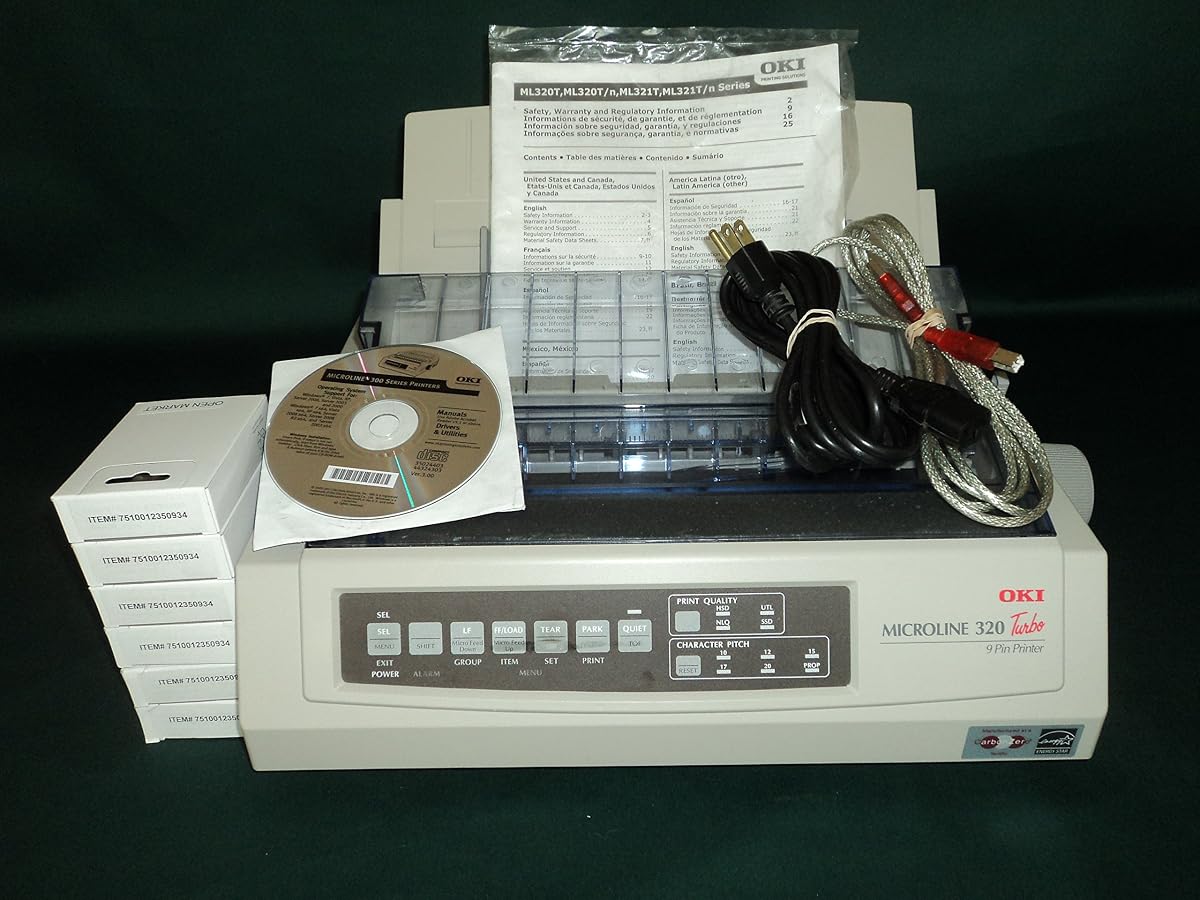
The Oki Microline 320 Turbo is a premium choice known for its exceptional reliability and build quality. With a 4.7 star rating it is trusted by users for consistent high volume printing tasks. Its impact technology ensures durability in demanding environments.
We may earn a commission when you buy through this link, at no additional cost to you.
This printer excels in producing sharp precise text suitable for critical business documents. The standard model configuration offers straightforward operation without unnecessary complexity. Users report fewer maintenance issues compared to other brands in this category.
While the specifications are not fully detailed in some listings the performance speaks for itself. The higher cost reflects the superior engineering and longevity of the device. It is an investment for businesses where downtime is not an option.
For enterprises needing a dependable workhorse this model is highly recommended. Its reputation for reliability makes it a standout in the premium segment. We advise confirming specific interface requirements before finalizing the purchase.
Robust engineering ensures the printer withstands heavy daily use with minimal maintenance.
Impact technology delivers sharp and clear text essential for professional document output.
We may earn a commission when you buy through this link, at no additional cost to you.
The OKI MICROLINE 320 Turbo is a solid performer for businesses needing fast and reliable output. Rated 4.5 stars it offers a 9 pin head capable of 435 characters per second. This speed supports efficient document processing in busy office settings.
We may earn a commission when you buy through this link, at no additional cost to you.
It features both USB and Parallel ports allowing for flexible connectivity options. The duty cycle of 20000 pages indicates it can handle significant workload without strain. Users appreciate the consistent print quality and ease of setup.
Like many impact printers it generates noise which may require placement in a dedicated area. It is also limited to monochrome printing which may not suit all design needs. These factors are minor given the overall performance and durability.
Businesses with high volume printing needs should consider this model for its efficiency. Its balance of speed and connectivity makes it a practical choice for various industries. We recommend verifying interface compatibility with your current network.
435 characters per second speed ensures quick completion of large print jobs.
A high duty cycle of 20000 pages supports demanding daily printing requirements.
We may earn a commission when you buy through this link, at no additional cost to you.
The OKI MICROLINE 420 is designed for speed and efficiency in high volume environments. With a rating of 4.5 stars it delivers 570 characters per second which is among the fastest in its class. This makes it ideal for large scale document production.
We may earn a commission when you buy through this link, at no additional cost to you.
It includes Energy Star certification ensuring reduced energy consumption during operation. The duty cycle of 24000 pages supports heavy use without frequent maintenance. Connectivity includes both USB and Parallel options for versatile integration.
Users note that while fast it still operates with typical impact printer noise. Monochrome printing limits color use but is sufficient for text based documents. The performance justifies the cost for organizations prioritizing throughput.
This model is highly suitable for industries requiring rapid processing of invoices or reports. Its energy efficiency adds long term value to the purchase. We suggest assessing your power and connectivity requirements before buying.
570 characters per second speed minimizes wait times for large batches of documents.
Energy Star certification helps reduce electricity costs while maintaining high performance levels.
We may earn a commission when you buy through this link, at no additional cost to you.
This Oki MICROLINE 320 Turbo variant boasts a perfect 5.0 star rating highlighting exceptional user satisfaction. It offers 435 characters per second speed suitable for steady workflow demands. The inclusion of Serial and USB ports ensures broad compatibility with different systems.
We may earn a commission when you buy through this link, at no additional cost to you.
Users praise its reliability and consistent output quality over long periods. The duty cycle of 20000 pages indicates it can handle heavy business loads effectively. Setup is straightforward and maintenance requirements are minimal for most users.
While the price point is higher than entry level models the performance justifies the investment. Noise levels are manageable but should be considered for quiet office spaces. This printer is a top choice for reliability focused businesses.
For organizations seeking a dependable printer with strong connectivity this model is excellent. Its perfect rating reflects a high level of trust and performance. We recommend checking specific interface requirements to ensure seamless integration.
A 5.0 star rating indicates high trust and consistent performance among current users.
Serial and USB ports allow connection to both legacy and modern computer systems.
We may earn a commission when you buy through this link, at no additional cost to you.
The Epson LQ-2090II is an energy efficient model with a 24 pin head for clear output. While its rating is 3.7 stars it offers 550 characters per second speed for reasonable throughput. The Energy Star certification ensures reduced power consumption during operation.
We may earn a commission when you buy through this link, at no additional cost to you.
It features a Parallel port which may limit connectivity for modern systems without adapters. Users report reliable performance though some experience occasional issues with software integration. The monochrome focus is suitable for standard business document needs.
This model is best for environments where energy savings are a priority. The lower rating suggests checking compatibility carefully before purchase. It remains a viable option for specific legacy network configurations.
Organizations with older systems might find this printer beneficial for its stability. The energy efficiency adds value over long term usage. We suggest verifying driver support for your operating system before buying.
Energy Star certification helps minimize power usage and reduce environmental impact.
550 characters per second speed supports efficient processing of standard documents.
We may earn a commission when you buy through this link, at no additional cost to you.
This Oki MICROLINE 320 Turbo includes Zero-tear and Auto-park technology to reduce paper waste. With a 4.2 star rating it offers 435 characters per second speed for reliable output. It supports multiple emulations making it versatile for different legacy systems.
We may earn a commission when you buy through this link, at no additional cost to you.
The feed rate of 5 inches per second ensures smooth paper handling during high volume tasks. Users appreciate the reduced maintenance due to better paper control. Setup can be detailed but the long term benefits are significant.
Noise levels are typical for impact models and should be managed with proper placement. The advanced features may require some time to configure fully. However these enhancements improve overall workflow efficiency substantially.
Businesses focused on waste reduction and high volume printing will benefit greatly. The emulation support makes it adaptable for specialized applications. We recommend reviewing setup guides to maximize functionality.
Zero-tear technology minimizes paper waste by ensuring proper feeding through the printer.
Multiple emulation support allows compatibility with various legacy software systems.
We may earn a commission when you buy through this link, at no additional cost to you.
The Oki Microline 620 is designed for high volume versatility and reliable performance. Its 4.8 star rating reflects strong user confidence in its consistent output quality. The printer delivers sharp precise text suitable for critical business documents.
We may earn a commission when you buy through this link, at no additional cost to you.
It features simplified media loading which reduces setup time and user frustration. Users report stable operation even during extended printing sessions. The build quality supports long term use in demanding environments.
Specific technical specifications are less detailed in some listings but performance remains high. The cost is higher but aligns with its robust construction and reliability. It is a strong candidate for heavy duty office needs.
Businesses requiring consistent high volume printing should consider this model for its ease of use. Its high rating suggests it meets expectations for quality and durability. We recommend checking specific paper handling requirements.
Designed to handle high volume tasks without compromising output quality or speed.
Simplified media loading makes setup and maintenance easier for all users.
We may earn a commission when you buy through this link, at no additional cost to you.
The Epson LQ-590 is a standard impact printer suitable for legacy system integration. With a 3.7 star rating it offers basic reliability for consistent document production. It supports USB and ESC/P IBM PPDS protocols for broad compatibility.
We may earn a commission when you buy through this link, at no additional cost to you.
Users appreciate its simplicity and ease of integration with older software. The 24 pin head ensures decent print quality for text based documents. While not the fastest it serves its purpose well for specific applications.
This model may lack some advanced features found in newer versions. The rating suggests occasional issues but it remains functional for many use cases. It is a practical choice for basic networking needs.
Businesses with existing infrastructure needing minimal upgrades will find this useful. Its compatibility with legacy systems makes it valuable for certain industries. We suggest verifying software support before purchasing.
Supports ESC/P and IBM PPDS protocols ensuring compatibility with legacy systems.
Straightforward setup makes it easy to integrate into existing office networks.
We may earn a commission when you buy through this link, at no additional cost to you.
Selecting the right impact printer involves evaluating several key factors to match your operational needs.
Print speed measured in characters per second determines how quickly documents are processed. Higher speeds benefit high volume environments reducing bottlenecks in workflows. Look for models offering at least 500 cps for efficient business operations.
Prioritize speed based on your daily volume requirements to maintain productivity.
The duty cycle indicates the maximum pages a printer can handle per month without damage. A higher duty cycle ensures longevity under heavy use conditions. Check the monthly page limit to avoid overworking the machine.
Choose a printer with a duty cycle exceeding your expected monthly print volume.
Connectivity options like USB, Parallel, or Serial ports determine system integration. Modern setups may require USB while legacy systems often need Parallel or Serial. Ensure the printer supports the interfaces available in your network.
Verify all connection types match your existing computer and network configurations.
Print quality depends on the number of pins in the print head and resolution. 24-pin heads generally offer sharper text than 9-pin heads for professional documents. Consider whether your documents require detailed output or standard text.
Select a pin count that aligns with your document quality standards.
Energy efficiency features like Energy Star certification reduce power consumption over time. Lower energy costs contribute to long term savings for your business. Prioritize models with energy saving modes if power usage is a concern.
Opt for energy efficient models to minimize operational costs.
Paper handling features such as auto-park and tractor feeds affect ease of use. Models with advanced paper control reduce jams and waste during operation. Check supported paper thickness and types to ensure compatibility with your forms.
Choose features that simplify media loading and reduce paper waste.
Software emulations allow the printer to mimic specific command sets used by legacy systems. This ensures compatibility with existing applications without needing software updates. Verify supported protocols like IBM or Epson standards before buying.
Ensure emulations match your current software requirements.
Durability is critical for impact printers used in harsh environments. A robust build and warranty cover potential mechanical failures and downtime. Check user reviews for reliability and warranty terms before investing.
Prioritize robust build quality and strong warranty terms for long term value.
Set up the printer on a stable surface to prevent vibration during operation. Connect the appropriate cables such as USB or Parallel securely to your computer system. Ensure the printer is properly grounded to avoid electrical issues.
Load paper carefully using the tractor feed or friction mechanism as needed. Align the paper correctly to avoid jams and ensure clean output. Use high quality paper that matches the printer's thickness specifications.
Perform regular maintenance by cleaning the print head and platen with a soft cloth. Check ribbon levels regularly and replace them when print quality fades. Schedule routine checks to prevent dust accumulation on internal components.
Dot matrix printers are ideal for multi-part forms and high volume text printing. They handle carbon copies that other printers cannot and are durable in harsh environments. Their impact technology ensures reliability where other technologies might fail.
Yes dot matrix printers generate noise due to the impact mechanism of the print head. This noise can be disruptive in quiet offices but is typical for this technology. Proper placement in a dedicated room can mitigate the issue.
Many models support USB connections making them compatible with modern computers. Others may require adapters for Parallel or Serial ports on newer systems. Check connectivity options before purchasing to ensure seamless integration.
Duty cycle is the maximum number of pages a printer can print per month reliably. Exceeding this limit may cause wear or damage to the internal components. Select a printer with a cycle higher than your monthly needs.
Regularly clean the print head and platen to remove dust and debris. Replace ribbons when print quality fades to maintain sharp text. Ensure paper paths are clear to prevent jams during operation.
Most dot matrix printers only support monochrome output using black or blue ribbons. Some specialized models may offer limited color via multiple ribbons but this is rare. They are best suited for text based business documents.
Common emulations include IBM Proprinter and Epson ESC/P which are used in legacy systems. These allow the printer to work with old software without requiring updates. Verify your software requirements before buying a model.
They work well with continuous form paper that has tractor feed holes. Some models support friction feed for single sheet paper but check the specs. Ensure paper thickness matches printer specifications to avoid jams.
We have reviewed ten top models ranging from budget options to high end solutions. Each printer offers distinct strengths in speed, connectivity, and reliability for various needs. The Epson LQ-590II and Oki Microline series stand out as top contenders.
Prioritize factors like duty cycle and connectivity when selecting your ideal printer. Match the model's capabilities to your specific business volume and system requirements. A well chosen printer ensures seamless workflow efficiency and long term reliability.
Remember to check current prices and availability before finalizing your purchase. Retailers often update stock and deals which may affect your decision. Regular monitoring ensures you get the best value for your investment today.