
PC Power Button, Desktop Power Button PC External Power Switch ON Off LED PC Power Supply Button SW Extension for Computer Motherboard
4.6Editor score
1.7M cable included
Splitter board for dual use
Adhesive mounting sticker
Finding the right external PC power button can transform how you interact with your desktop setup. Whether your case is hidden under a desk or your original switch is broken, a reliable external switch offers convenience and peace of mind for any user.
We evaluated ten top-rated models based on compatibility, cable length, installation ease, and build quality. Each product was assessed for its ability to connect securely to standard ATX motherboards and provide consistent performance across various computer environments and use cases.
Each pick below highlights specific strengths like splitter support, USB integration, or wireless control. Prices may fluctuate frequently, so always verify current deals before purchasing. Our goal is to help you choose the perfect switch for your unique desktop configuration needs.
4.6Editor score

4.8Editor score

4.5Editor score
As an Amazon Associate we earn from qualifying purchases.
The following table provides a side-by-side comparison of all ten products evaluated in this guide. Use it to quickly compare key specifications like cable length, included accessories, and unique features across every model available.
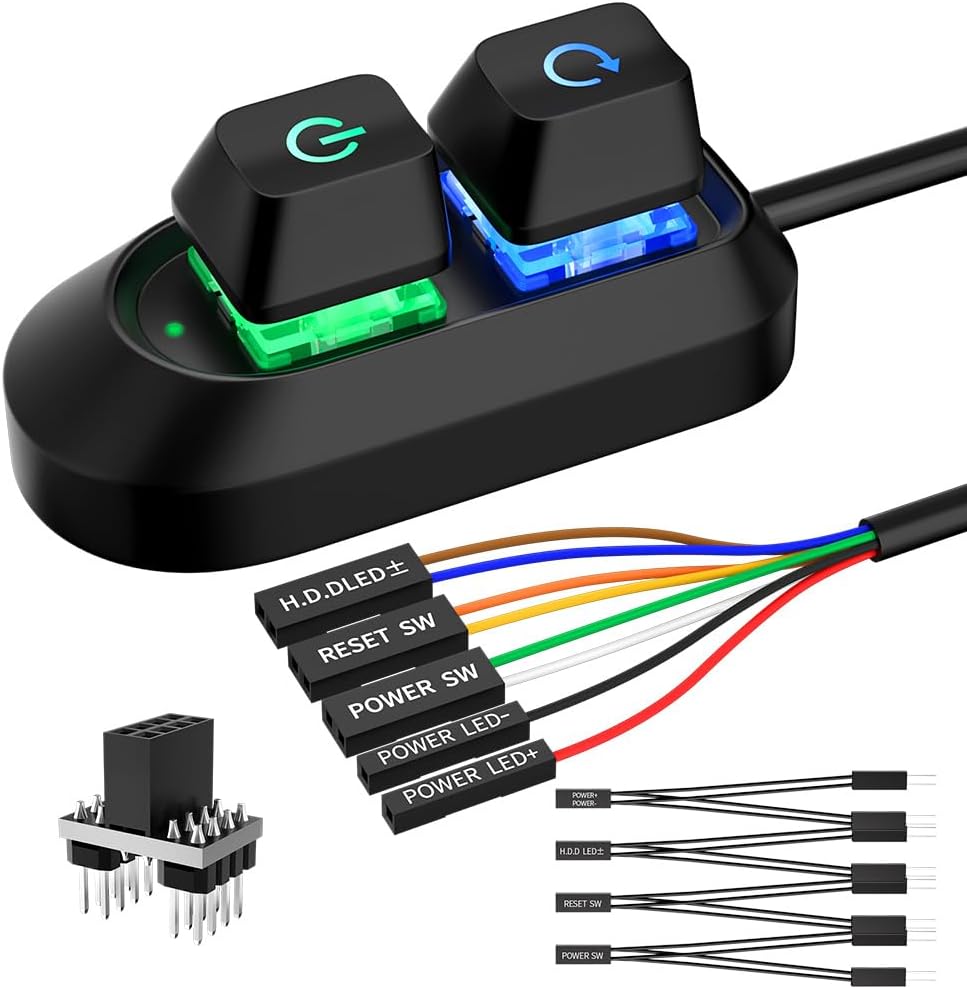


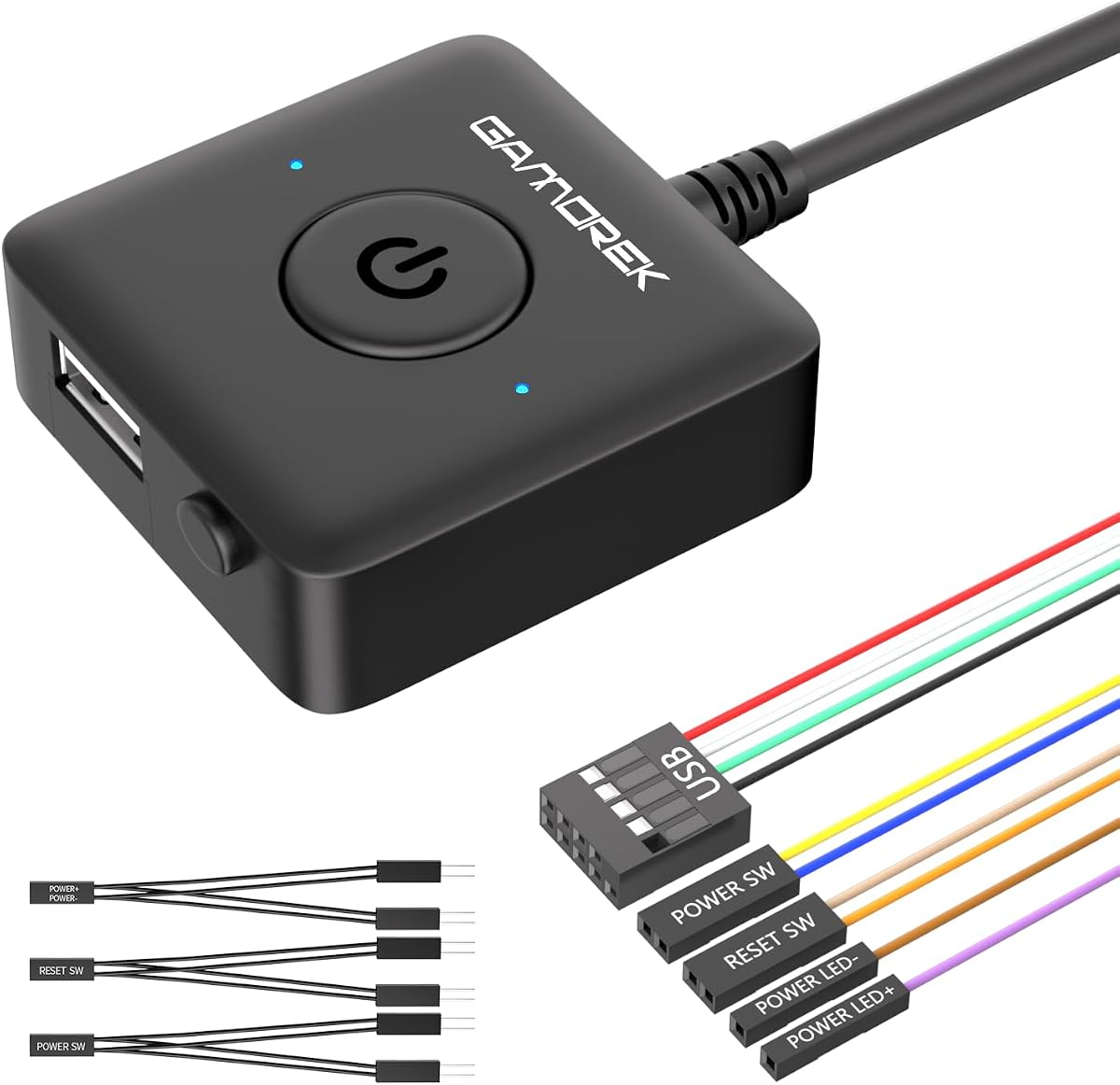


This model offers a straightforward solution for extending your PC power switch to a more accessible location. With a 4.6 rating, users appreciate its reliable functionality and ease of setup. It stands out as a budget-friendly option for those who need basic power control without extra features.
We may earn a commission when you buy through this link, at no additional cost to you.
The 1.7M cable provides sufficient length for most desktop configurations, whether your tower is under a desk or in a remote corner. The included 1 to 2 splitter board allows the new switch to work alongside your original one, ensuring you do not lose existing functionality. This flexibility makes it ideal for temporary setups or dual control needs.
While the build is primarily plastic, it holds up well for occasional use. Some users note that the adhesive stickers may not stick permanently to all surfaces, so choosing a smooth area is key. These trade-offs are acceptable given the low cost and functional simplicity of the design.
Anyone looking for an affordable way to relocate their power button should consider this model. It is perfect for home users, computer rooms, or DIY builds where the original switch is damaged or hard to reach. For its price, it delivers excellent value and reliable operation.
The included splitter board allows you to use both the original and external switch simultaneously, ensuring no loss of functionality.
No drilling is required since the package comes with adhesive stickers for secure placement on desks or panels.
We may earn a commission when you buy through this link, at no additional cost to you.
This external switch enhances your PC setup by adding both power and reset functionality. With a 4.5 rating, it appeals to users who want more control over their system. The inclusion of an HDD LED indicator adds a layer of visual feedback during operation.
We may earn a commission when you buy through this link, at no additional cost to you.
The 2M cable offers greater reach than many competitors, suitable for large cases or complex desk layouts. You get both a splitter board and a splitter cable, giving you options based on your available space. This versatility ensures you can integrate the switch without sacrificing your original controls.
The added features like reset and HDD LED mean more wiring to manage inside your case. However, this is a minor inconvenience for the extra functionality provided. Some users may find the price point slightly higher than basic models, but the added value justifies it.
Ideal for home labs or office setups where system restarts are frequent, this switch offers comprehensive control. It is perfect for those who have lost their original reset button or want enhanced visibility into drive activity. The extra length and features make it a robust choice.
With both a splitter board and cable included, you can choose the best method to integrate the switch into your setup.
The 2M cable ensures you can place the button exactly where needed, even in large or awkward spaces.
We may earn a commission when you buy through this link, at no additional cost to you.
For setups where the PC is far from the user, this model provides unmatched cable length. With a 4.6 rating, it is trusted for reliability. The 118-inch cable allows placement anywhere in a room, making it a top choice for hidden installations or large rooms.
We may earn a commission when you buy through this link, at no additional cost to you.
It connects via a standard 4-pin connector compatible with 90% of ATX motherboards, ensuring broad usability. The included splitter enables dual control, so you can still use the case button if needed. Clear labeling for POWER SW and LED pins makes installation straightforward.
The main drawback is managing such a long cable, which can look messy if not routed carefully. Without a reset button, users relying on quick reboots might find it limiting. However, for power control alone, its length and reliability are exceptional.
This switch is ideal for test benches or floor-mounted PCs where standard lengths fall short. If your setup requires significant distance between the button and the tower, this model offers the best solution on the market. Its compatibility and length make it a standout.
With 118 inches of cable, you can place your power button anywhere, regardless of PC placement.
Standard 4-pin connectors ensure it works with almost any modern desktop motherboard out of the box.
We may earn a commission when you buy through this link, at no additional cost to you.
This model stands out with its premium acrylic construction and highest rating of 4.8. Users praise its elegant look and reliable performance. It combines power and reset functions with an HDD indicator, offering a complete control solution for desktop enthusiasts.
We may earn a commission when you buy through this link, at no additional cost to you.
The acrylic casing gives it a sophisticated look compared to standard plastic switches. The 1.6m cable is sufficient for most desk setups. Having both power and reset buttons plus an HDD LED provides full functionality often missing in cheaper alternatives.
The cable is slightly shorter than some competitors, and the price is higher, but the build quality justifies it. Some users prefer longer cables for flexibility, but for desk-based setups, this length is adequate. The design is durable and visually appealing.
Best for those who value aesthetics and full functionality, this button is a top choice for custom builds. If you want a switch that looks great and offers every essential feature, this is the ideal pick. Its high rating confirms its quality and reliability.
The acrylic material offers a sleek, premium look that enhances any desktop setup visually.
Power, reset, and HDD LED indicators ensure you have all necessary controls in one place.
We may earn a commission when you buy through this link, at no additional cost to you.
This switch adds style with its RGB LED breathing effect, enhancing the visual appeal of your setup. With a 4.5 rating, it offers reliable power control. The low-voltage design ensures safe operation without risking system components during installation.
We may earn a commission when you buy through this link, at no additional cost to you.
The 2M cable allows flexible routing for large cases or standing desks. The RGB lighting works without any software configuration, making it plug-and-play. This is perfect for users who want to match their lighting theme without extra drivers.
However, the RGB may not suit minimalistic setups, and the button function is basic. Some users might miss a reset switch or HDD LED. Still, the aesthetic upgrade and solid performance make it a strong contender for gaming or themed builds.
Ideal for gaming enthusiasts who prioritize looks, this button brings color to your control. If you want a switch that doubles as a lighting element, this is the choice. Its simplicity and style balance well for casual users.
The breathing LED effects require no configuration, offering instant visual enhancement to your desk.
Engineered for safety, the low-voltage design protects your system while ensuring consistent performance.
We may earn a commission when you buy through this link, at no additional cost to you.
This model doubles as a USB hub, providing extra connectivity alongside power control. With a 4.7 rating, it is highly valued for versatility. The added USB ports mean you do not have to reach behind the PC for drives or peripherals.
We may earn a commission when you buy through this link, at no additional cost to you.
The included PCI bracket keeps the setup organized in ATX and MATX cases. Connecting to the 9-pin USB 2.0 header is straightforward, and the reset switch adds more functionality. This makes it a comprehensive solution for desktop users needing extra ports.
Wiring is more complex due to the USB header requirement. If your motherboard lacks a free USB header, installation becomes harder. However, the utility gained from extra accessible USB ports usually outweighs the extra effort required.
Best for office setups or users who frequently plug in devices, this switch is incredibly practical. It saves desk space by combining functions into one unit. If you need more USB access and power control, this is an excellent investment.
Built-in USB support adds accessible ports for drives, mice, and keyboards without extra dongles.
The included PCI bracket helps keep your desktop build cleaner and more organized.
We may earn a commission when you buy through this link, at no additional cost to you.
This switch integrates a 4-port USB 3.0 hub for high-speed data transfer. With a 4.3 rating, it appeals to power users needing quick access to storage. The 5Gbps speed ensures fast file transfers without compromising power control.
We may earn a commission when you buy through this link, at no additional cost to you.
The compact design fits well in industrial or home office settings. Connecting via the USB header is simple, and the adhesive mount keeps it secure. It replaces old drives while adding convenient, high-speed ports to your desktop.
The 1.2M cable is shorter than other options, which might limit placement. Additionally, hubs can slow down when all ports are active, though this is rare. These are minor limitations compared to the speed and convenience offered.
Ideal for workstations or industrial use where data speed matters, this hub is perfect. If you need to move files quickly and control power remotely, this is the tool. The high-speed USB makes it a unique and practical choice.
Supporting 5Gbps speeds, this USB 3.0 hub ensures fast access to external drives and peripherals.
Combining power and four USB ports in one unit saves space while increasing utility.
We may earn a commission when you buy through this link, at no additional cost to you.
This model is designed for portability, weighing only 1 ounce. With a 4.7 rating, users trust it for quick, temporary, or permanent setups. Its small size makes it easy to place anywhere without cluttering the desk.
We may earn a commission when you buy through this link, at no additional cost to you.
The 2M cable allows flexible placement, and the 3M adhesive ensures it stays put on smooth surfaces. The included splitter cable helps you keep your original switch intact. It is a no-frills solution that gets the job done efficiently.
The small size might be too light for some users who prefer a heavy tactile feel. Also, it lacks advanced features like USB or RGB. However, for pure power control, it delivers consistent performance and reliability.
Best for users needing a lightweight, movable switch, this fits temporary or minimal setups. If you want something that does not take up space and works well, this is ideal. Its simplicity and quality make it a great pick.
Weighing just 1 ounce, this switch is easy to relocate or reposition as needed.
3M adhesive stickers ensure the switch stays secure without damaging your desk or panel.
We may earn a commission when you buy through this link, at no additional cost to you.
Built with aluminum, this switch offers superior durability compared to plastic models. With a 4.6 rating, it is favored for robust builds. The inclusion of a reset switch and HDD LED adds significant utility for power users.
We may earn a commission when you buy through this link, at no additional cost to you.
The 2M cable gives enough range for most setups. The 1-to-2 splitter board and cable provide flexibility to use both original and external switches. This ensures you never lose your original case functionality.
Metal construction is durable but may conduct heat or feel cold to touch. Some users may find the price higher than plastic alternatives. Still, for a long-term solution, the aluminum build justifies the cost and investment.
Ideal for custom chassis builds or gaming lounges, this switch stands up to heavy use. If you want a button that lasts and offers full control, this is the choice. Its durability makes it a reliable long-term option.
The aluminum casing ensures the switch withstands frequent use and offers a premium tactile feel.
With power, reset, and HDD LED indicators, this unit covers all essential PC control needs.
We may earn a commission when you buy through this link, at no additional cost to you.
This is the ultimate choice for wireless control, offering freedom from cables. With a 4.5 rating, it simplifies powering on or off from anywhere in the room. The PCIe receiver ensures a stable connection without software hassles.
We may earn a commission when you buy through this link, at no additional cost to you.
You can operate the PC from up to 50 feet away, perfect for media centers or hidden setups. The single button allows short press for on and long press for shutdown. It is designed for busy environments where convenience is key.
Installation requires an available PCIe slot, which might not be free on all systems. The price is higher than wired options, but the convenience is unmatched. Some setups may not support PCIe easily, so check compatibility first.
Best for home theaters or advanced studios, this switch offers unparalleled convenience. If you hate crawling under desks and want remote control, this is the tool. Its wireless nature makes it a standout premium choice for any setup.
Control your PC from up to 50 feet away, eliminating the need to physically access the case.
The PCIe receiver ensures strong, interference-free signals for reliable operation in busy rooms.
We may earn a commission when you buy through this link, at no additional cost to you.
Choosing the right external power button depends on your specific setup and needs. Consider compatibility, cable length, and extra features like USB or reset switches.
Ensure the switch connects to your motherboard via the standard POWER SW header. Most models use a 4-pin connector compatible with 90% of ATX boards. Always check your manual to confirm header locations before buying.
Look for a standard 4-pin connector to ensure broad compatibility with modern desktop motherboards.
Cable length determines how far you can place the button from your PC. Models range from 1.6m to 118 inches depending on your setup. Measure your distance first to avoid needing extensions.
Choose a cable length that allows flexible placement without creating cable clutter.
Some buttons include reset switches, HDD LEDs, or USB hubs for added utility. Decide if you need these extras or just basic power control. Features increase functionality but also add complexity.
Prioritize buttons with features like USB or reset switches only if you need them.
Most switches use adhesive stickers for quick mounting. Others come with brackets for PCI slots or metal frames. Adhesive is easiest for desk use while brackets suit permanent case installation.
Use adhesive mounts for temporary setups and brackets for permanent clean installations.
Plastic models are affordable but may wear over time. Aluminum or acrylic builds offer durability and style. Check reviews for long-term durability before committing.
Invest in metal or acrylic builds for long-term reliability and a premium look.
LEDs provide visual feedback for power status or drive activity. Some models offer RGB lighting for aesthetic customization. Decide if you want utility or style in your indicator.
Pick switches with relevant LEDs like HDD indicators for monitoring drive activity.
Installation usually involves connecting wires to motherboard headers. Check if manuals are clear and all connectors are labeled. Some models come with split boards for easier setup.
Look for clear instructions and labeled cables to simplify the installation process.
Prices vary widely based on materials and features. Basic buttons cost less while premium ones add RGB, wireless, or hubs. Balance your budget with the functionality you truly need.
Choose a model that fits your budget without sacrificing essential features.
First, ensure your PC is powered off before connecting the switch wires to the motherboard headers. Match the POWER SW pins exactly to avoid shorts or system issues.
Secure the button on your desk or panel using the provided adhesive or bracket. Make sure the cable is routed neatly to prevent snagging or damage.
Test the button after installation by pressing it briefly to power on. Clean the surface occasionally with a dry cloth to maintain appearance and function.
Most external buttons work with standard ATX motherboards via the POWER SW header. Check your manual for the specific pin layout. If your board is non-standard, you might need an adapter.
No, these are plug-and-play hardware components that connect directly to the motherboard. They do not require software or drivers to function. Simply connect the wires and use them immediately.
Many switches come with splitters so both the original and external button can work together. This lets you keep your original controls while adding convenience without losing functionality.
Yes, these external switches are designed to repair damaged chassis buttons. Route the wires through the case openings to bypass the broken switch entirely. It is a cost-effective repair solution.
These switches use low-voltage signals safe for your motherboard. Always power off your PC before installation to avoid electrical issues. Following the manual ensures safe and reliable setup.
The power button turns the PC on or off, while the reset button restarts the system. Some external switches offer both for complete control over your desktop operations.
We reviewed ten top options ranging from budget basic switches to premium wireless units. Each offers distinct features suited to different needs like cable length or extra ports.
Prioritize compatibility and cable length to ensure the switch fits your setup perfectly. Consider additional features like USB hubs if you need more connectivity.
Prices fluctuate often so check current deals before buying. We hope this guide helps you select the perfect external power button for your desktop.