
Samsung T7 Portable SSD 1TB
4.7Editor score
Made for the Makers
Share Ideas in a Flash
Always Make the Save
Compare the top external SSD for Mac Mini M4 drives for speed and compatibility. This guide reviews ten options to help you choose the best storage solution.
Choosing the right external SSD for Mac Mini M4 is essential for expanding your storage without compromising performance. With powerful M4 chips handling demanding tasks, you need reliable fast and durable storage to keep your workflow smooth and uninterrupted.
We evaluated ten top-rated external SSDs based on speed, compatibility, durability, and value. Each product was analyzed for its ability to work seamlessly with macOS and the M4 architecture, ensuring you get the best performance for your specific needs.
Every pick highlights key features, pros, and cons to help you decide quickly. Keep in mind that prices and availability change frequently, so check current listings before purchasing to ensure you get the best deal available today.
4.7Editor score
4.5Editor score

3.9Editor score
This side-by-side comparison helps you quickly identify the best external SSD for Mac Mini M4 based on key specifications and features. We have organized the data to highlight speed, capacity, and durability for easy decision making.






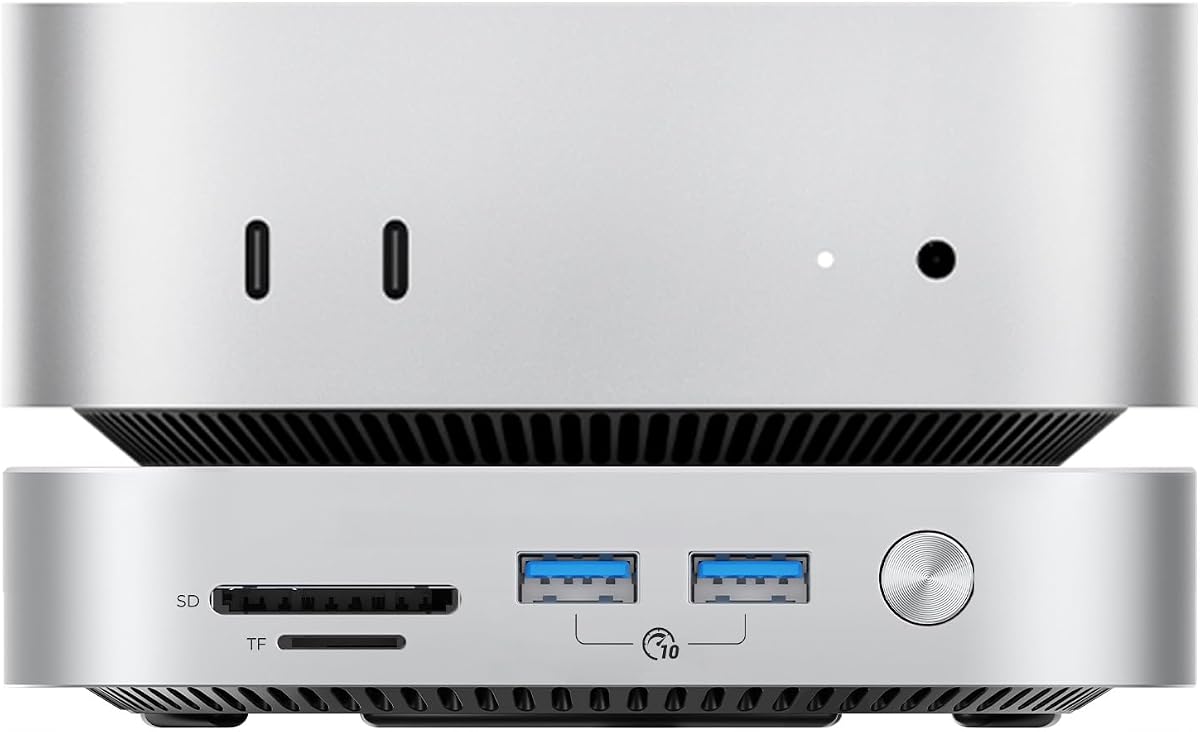
The ORICO 2TB External SSD is specifically designed to expand storage for Mac Mini M4 systems. It offers seamless integration and high performance for creative workflows.
We may earn a commission when you buy through this link, at no additional cost to you.
With a 2TB NVMe SSD running at 3200MB/s, it provides double the storage while maintaining desktop elegance. The pro-grade port multiplier includes multiple USB 3.0 ports and card readers.
The aerospace-grade aluminum body ensures intelligent cooling with thermal channels. While it targets specific Mac Mini models, its plug-and-play setup and Time Machine compatibility make it a top choice.
This SSD is ideal for creative professionals and developers needing reliable expansion. It includes everything needed for out-of-the-box use with a solid 3-year warranty.
Seamlessly attaches to Mac Mini M6 with 2TB NVMe SSD for 4K/8K workflows doubling storage.
3x USB 3.0 ports plus SD/TF 4.0 card reader expand connectivity for peripherals.
We may earn a commission when you buy through this link, at no additional cost to you.
The Samsung T7 Portable SSD 1TB is a reliable budget choice for Mac Mini M4 users. It delivers fast speeds and durable features to back up any endeavor effectively.
We may earn a commission when you buy through this link, at no additional cost to you.
With PCIe NVMe technology, it achieves speeds up to 1,050MB/s making file transfers quick. The compact design allows you to save large working files easily in a sturdy unibody.
Shock resistance and fall protection up to 6 feet ensure durability during travel. Although not as fast as premium options, its value for money is significant.
This drive is perfect for creators on a budget who need reliable storage. It supports heavy-duty application usage and file-saving across various devices seamlessly.
Create; Explore; Store; The T7 Portable SSD delivers fast speeds and durable features.
Embedded with PCIe NVMe technology that brings fast read and write speeds.
We may earn a commission when you buy through this link, at no additional cost to you.
The Lexar 2TB ES3 External SSD offers significant speed improvements for Mac Mini M4 systems. It delivers fast file transfers with its USB-C connectivity.
We may earn a commission when you buy through this link, at no additional cost to you.
With up to 1050MB/s read speeds, backups are super-fast. The drive features double layer graphite sheets to enhance heat dissipation effectively.
Despite its speed, it remains drop-resistant up to 2 meters for protection. The sleek and sturdy design makes it suitable for everyday use.
This SSD is recommended for users needing instant storage expansion. Its compatibility with various devices ensures seamless usage across different platforms.
9.5X faster than hard disk drives with up to 1050MB/s read speed.
Double layer graphite sheets quickly conduct heat to keep the drive cool.
We may earn a commission when you buy through this link, at no additional cost to you.
The SanDisk 1TB Extreme Portable SSD is designed for users needing near twice as fast as previous gen. It moves files efficiently with transfer speeds up to 2000MB/s.
We may earn a commission when you buy through this link, at no additional cost to you.
With an IP65 rating, it protects against spills and drops up to 3 meters. The pocket-sized design fits easily in small bags for on-the-go use.
256-bit AES encryption helps keep private files secure with password protection. It is ideal for storing high-res clips and photo edits securely.
This SSD is perfect for professionals prioritizing speed and security. Its durability and protection make it a reliable choice for demanding environments.
Move 1,000 high-res photos in under 60 seconds with up to 2000MB/s speeds.
Protects against spills and drops with IP65 rating and 3m drop protection.
We may earn a commission when you buy through this link, at no additional cost to you.
The Lexar ES3 1TB Portable SSD Silver combines high-speed data transfer with a thin, stylish design. It supports USB 3.2 Gen 2 for efficient work.
We may earn a commission when you buy through this link, at no additional cost to you.
With read speeds up to 1050MB/s and write up to 1000MB/s, it transfers files fast. It is widely compatible with various devices including Mac and PC.
The drive weighs only 42g and fits easily in a pocket. Data Safety First is ensured with Lexar DataShield encryption software.
This SSD is ideal for users seeking a balance of style and performance. It offers on-the-go convenience with robust data protection features.
Supports USB 3.2 Gen 2 up to 1050MB/s read and 1000MB/s write.
Compatible with iPhone, Android, laptops, cameras, and more devices.
We may earn a commission when you buy through this link, at no additional cost to you.
The SSK Portable SSD 1TB allows instant access to files with blazing-fast speeds. It supports read speeds up to 1050MB/s and write up to 1000MB/s.
We may earn a commission when you buy through this link, at no additional cost to you.
With SLC caching, it delivers steady 10Gbps for transfers within cache capacity. The case temperature peaks at 105.58°F ensuring reliable performance.
Weighing just 36.6g, it offers impressive portability. Both USB-C and USB-A cables are included for seamless file transfers.
This drive is recommended for users needing lightweight storage. Its adaptive TRIM optimizes data block management for longevity.
Instantly access files with blazing-fast 10Gbps read up to 1050MB/s.
Solid state drives S.M.A.R.T. health diagnostics and adaptive TRIM.
We may earn a commission when you buy through this link, at no additional cost to you.
The Crucial X10 2TB Portable SSD delivers ultra-fast speeds up to 2,100MB/s. It is designed for creators, students, and PC gamers.
We may earn a commission when you buy through this link, at no additional cost to you.
With IP65 dust and water resistance, it is built to last in various weather conditions. The drive is drop resistant up to 9.8 ft.
It connects effortlessly with Mac, Windows, and gaming consoles via USB-C and USB-A. Bonus software like Mylio Photos and Acronis True Image is included.
This SSD is perfect for storing all your photos and backups securely. Its ultimate storage capacity ensures you have space for everything.
Designed for creators, students and PC gamers, this external SSD delivers fast data access.
Perfect for travel and all types of weather with IP65 dust and water resistance.
We may earn a commission when you buy through this link, at no additional cost to you.
The Samsung T9 Portable SSD 1TB offers nonstop speed with sustained read and write speeds up to 2,000MB/s. It stays cool with dynamic thermal guard.
We may earn a commission when you buy through this link, at no additional cost to you.
It adapts to every need whether you are using a desktop or camera. The T9 gives you longevity to last through heavy use with one convenient drive.
Works like magic with Magician Software for firmware updates and monitoring. It is the world's #1 flash memory brand since 2003.
This SSD is ideal for those needing consistent high-speed performance. It supports iPhone 15 Pro Res 4K at 60fps video capture.
Race through projects with our fastest SSD for creators. Sustained speeds up to 2000MB/s.
Advanced thermal solution withstands and controls heat to keep the SSD at ideal temps.
We may earn a commission when you buy through this link, at no additional cost to you.
The SABRENT Rocket Nano XTRM 2TB delivers Thunderbolt 3 speeds up to 2700 MB/s. It is compact and perfect for professionals on the move.
We may earn a commission when you buy through this link, at no additional cost to you.
The aluminum chassis includes a silicone sleeve for protection. Both Thunderbolt and USB-C to USB-A cables are included for convenience.
With 3-year standard coverage extendable to 5 years free, it offers peace of mind. The US-based support team ensures hassle-free claims.
This SSD is recommended for those needing fast uninterrupted transfers. Its bus-powered design requires no extra power adapter.
Intel Thunderbolt 3 delivers up to 2700 MB/s for uninterrupted 4K/6K video editing.
2TB in one of the most compact Thunderbolt 3 portables. Shirt-pocket sized.
We may earn a commission when you buy through this link, at no additional cost to you.
The SanDisk Professional 4TB PRO-G40 SSD offers super-fast Thunderbolt 3 speeds up to 3000MB/s. It is designed for professional-grade durability and storage.
We may earn a commission when you buy through this link, at no additional cost to you.
With IP68 dust and water resistance, it can withstand harsh conditions. The 4000lb crush resistance ensures protection in demanding environments.
The cool aluminum core pulls heat away from internal drives. It is Mac ready (APFS) for seamless integration with Apple systems.
This SSD is ideal for users needing massive storage and ruggedness. Despite the price, its performance and protection are unmatched.
Super-fast speeds up to 3000MB/s read and 2500MB/s write with Thunderbolt 3.
High-level IP68 dust/water resistance, 4000lb crush resistance, and 3m drop resistance.
We may earn a commission when you buy through this link, at no additional cost to you.
Choosing the right external SSD requires understanding your specific needs and how the drive will integrate with your Mac Mini M4 setup.
Consider how much data you need to store regularly. For video editing or large file sets, 2TB or more is recommended to avoid constant management.
Higher capacity drives usually offer better value per gigabyte over time.
Look for SSDs with speeds matching your workflow demands. Thunderbolt 3 models offer the fastest speeds while USB-C offers balanced performance.
Ensure your Mac Mini supports the interface for optimal speed performance.
IP ratings and drop resistance matter for portable drives used in various environments. Water and dust resistance protects against common hazards.
Choose rugged models if you travel frequently or work in harsh conditions.
Check if the drive comes with necessary cables like USB-C or USB-A. Some models lack adapters requiring extra purchases for compatibility.
Multiple ports help connect more devices without using dongles.
Ensure the SSD is formatted for macOS or supports APFS natively. Mac-specific models often offer plug-and-play simplicity without reformatting.
Windows formatted drives may require reformatting which erases data.
A longer warranty provides peace of mind against hardware failures. Look for brands offering extendable warranty options for added security.
US-based support teams can resolve issues more quickly for local users.
Lightweight and compact designs make it easier to carry the drive. Heat dissipation features ensure the drive stays cool during use.
Aluminum bodies offer durability and style while aiding cooling.
Balance your budget with the features you truly need. Higher-end models offer more speed but may not be necessary for all users.
Consider total cost including cables and adapters when comparing prices.
Connect your SSD to a USB-C or Thunderbolt port on your Mac Mini M4. Ensure the connection is secure to avoid data corruption during transfers.
Safely eject the drive through Finder before unplugging to prevent data loss. Use the Eject icon next to the drive name in the sidebar.
Keep the drive in a cool, dry place when not in use. Avoid exposing it to direct sunlight or extreme temperatures to maintain performance.
Yes, all listed SSDs are compatible with Mac Mini M4. Most support USB-C or Thunderbolt interfaces which are standard on the M4.
Some drives are pre-formatted for Mac but others may need reformatting. APFS is recommended for optimal performance with macOS.
Capacity depends on usage. For heavy creative work 2TB is ideal. Light users may prefer 1TB to save cost.
Yes, all SSDs support Time Machine. You may need to enable it in System Preferences for the drive.
Most drives come with USB-C cables. If your Mac uses Thunderbolt 3 ensure you have matching cables.
Use Migration Assistant or manually drag files via Finder. Ensure the drive is connected and recognized before starting.
The ORICO 2TB External SSD stands out as a top choice for dedicated Mac Mini expansion. Samsung T7 and SanDisk PRO-G40 are excellent for budget and premium needs.
Prioritize speed and compatibility for your specific workflow. Ensure the drive matches your Mac Mini M4 port type for best results.
Always check current prices and availability before buying. Promotions may offer better value on these models.