
RedThunder One Handed Gaming Keyboard
4.4Editor score
35 Anti-Ghosting Keys
RGB Backlit Modes
Compact Ergonomic Design
Discover the top gaming keypads for 2026. Our expert guide compares ten models for performance, ergonomics, and customization to help you choose the right one.
Gaming keypads offer a specialized solution for players seeking enhanced control and ergonomics. These devices focus on delivering precise inputs and customizable layouts tailored to specific gaming genres.
We evaluated ten top models based on switch quality, customization options, and ergonomic design. Each product was assessed for its ability to improve gameplay efficiency and comfort during extended sessions.
Every pick highlights unique strengths and potential trade-offs for different user needs. Please note that availability and pricing may vary over time, so always check the latest listings before purchasing.
4.4Editor score

4.3Editor score

4.2Editor score
This side-by-side comparison highlights the key specifications and features of all ten reviewed models to help you make an informed decision quickly.




The AZERON Gaming Keypad stands out as a top-tier option for gamers seeking advanced control and customization. With a rating of 4.3, it offers a unique blend of analog thumbstick functionality and programmable keys designed for precision.
We may earn a commission when you buy through this link, at no additional cost to you.
Its Hall Effect thumbstick eliminates drift and supports analog movement for compatible games. The keypad features 30 mappable inputs that can be configured for keyboard, mouse, or controller actions independently.
While the price is higher than average, the ergonomic adjustability and modular design justify the investment. The 3D printed shell ensures a personalized fit for various hand sizes ranging from 6.3 to 7.5 inches.
This keypad is ideal for serious gamers who want to replace their keyboard with a specialized tool. It excels in FPS, MOBA, and RPG genres where complex commands and movement control are crucial.
The thumbstick allows for WASD or 360-degree analog movement depending on game compatibility and user preference.
Future software updates and enhancements can be supported through the redesigned main board architecture.
We may earn a commission when you buy through this link, at no additional cost to you.
The RedThunder One Handed Gaming Keyboard provides excellent value for budget-conscious gamers. With a 4.4 rating, it delivers essential features like macro recording and RGB lighting in a compact package.
We may earn a commission when you buy through this link, at no additional cost to you.
Its 35 keys are anti-ghosting, ensuring accurate inputs during intense gameplay. The macro recording function allows users to bind complex commands to single keys for faster execution.
While it lacks advanced software features, its plug-and-play compatibility makes it accessible for all users. The ergonomic design includes a wrist rest to reduce fatigue during long sessions.
This model is perfect for casual gamers or those new to keypads. It offers a reliable entry point into one-handed gaming without breaking the bank.
Recording macros is straightforward with FN combinations and requires no additional software installation.
The small size saves desk space and is ideal for portable setups or limited desk areas.
We may earn a commission when you buy through this link, at no additional cost to you.
The Keychron C0 HE 8K is a high-performance keypad designed for competitive FPS players. It boasts an 8K polling rate and Hall Effect magnetic switches for instant response times and adjustable actuation.
We may earn a commission when you buy through this link, at no additional cost to you.
The web-based configurator eliminates the need for installing software, making customization seamless across Windows and macOS. Each key supports 0.01 mm precision for fine-tuned inputs.
Its Rapid Trigger technology allows for instant key reset on lift-off, which is critical for competitive gaming. The per-key RGB lighting adds a personalized touch to your battlestation.
This keypad is best suited for enthusiasts who demand precision and speed. It is an investment in competitive edge and long-term performance for serious gamers.
Rapid Trigger ensures that keys reset immediately when lifted, allowing faster counter-strafing and movements.
Beyond gaming, it serves streamers and editors by triggering OBS scenes and editing shortcuts efficiently.
We may earn a commission when you buy through this link, at no additional cost to you.
The Redragon K585 offers a tactical layout with 42 keys ideal for MMO and MOBA gamers. It features onboard macro keys that allow binding multiple commands for instant ability rotations.
We may earn a commission when you buy through this link, at no additional cost to you.
A standout feature is the ability to swap switches without soldering, giving users customization over the switch feel. The USB pass-through port helps keep the desk organized by allowing peripherals to connect through the keypad.
The detachable wrist rest ensures comfort, and the RGB lighting can match your setup. However, the wired connection may limit flexibility for some users compared to wireless options.
This model is perfect for gamers who need extensive key options and customization. It balances performance and comfort with robust software support for deeper configuration.
Upgraded sockets accept 3-pin or 5-pin switches for easy personalization without technical skills.
USB pass-through allows direct connection of mouse or headset reducing cable clutter.
We may earn a commission when you buy through this link, at no additional cost to you.
The Redragon K585 PRO brings wireless freedom to the tactical 42-key layout. With BT and 2.4GHz connectivity, it offers untethered placement flexibility backed by solid battery life for daily gaming.
We may earn a commission when you buy through this link, at no additional cost to you.
Like its wired counterpart, it allows switching without soldering and features 7 onboard macro keys for instant command binding. The magnetic wrist rest clips off to save space when needed.
The wireless capability enhances setup versatility but may introduce slight latency compared to wired alternatives. However, for most gamers, the convenience outweighs minimal differences in speed.
Ideal for users who want a clean desk setup without sacrificing customization. This model merges the benefits of wireless tech with the tactical depth of the K585 series.
Choose between Bluetooth or 2.4GHz to optimize for connection stability or power savings.
A single charge supports 15-20 hours of continuous gameplay ensuring uninterrupted sessions.
We may earn a commission when you buy through this link, at no additional cost to you.
The Razer Tartarus V2 combines mechanical feedback with membrane comfort through its mecha-membrane switches. Its 32 programmable keys and 8-way thumbpad provide extensive control options for gaming.
We may earn a commission when you buy through this link, at no additional cost to you.
Full macro support via Razer Hypershift allows complex commands to be executed with single presses. The Chroma RGB system integrates with other hardware and games for a synchronized immersive experience.
While the switches are designed for soft touch, some users may prefer traditional mechanical feel. The reliance on Razer Synapse software for customization is standard but requires installation.
This keypad is great for Razer ecosystem users and those who prefer a thumbpad. It offers a robust balance of comfort and programmability for immersive gameplay.
The 8-way directional thumbpad improves natural movement control for console-oriented players.
Sync lights with Philips Hue and other gear creating a cohesive visual environment.
We may earn a commission when you buy through this link, at no additional cost to you.
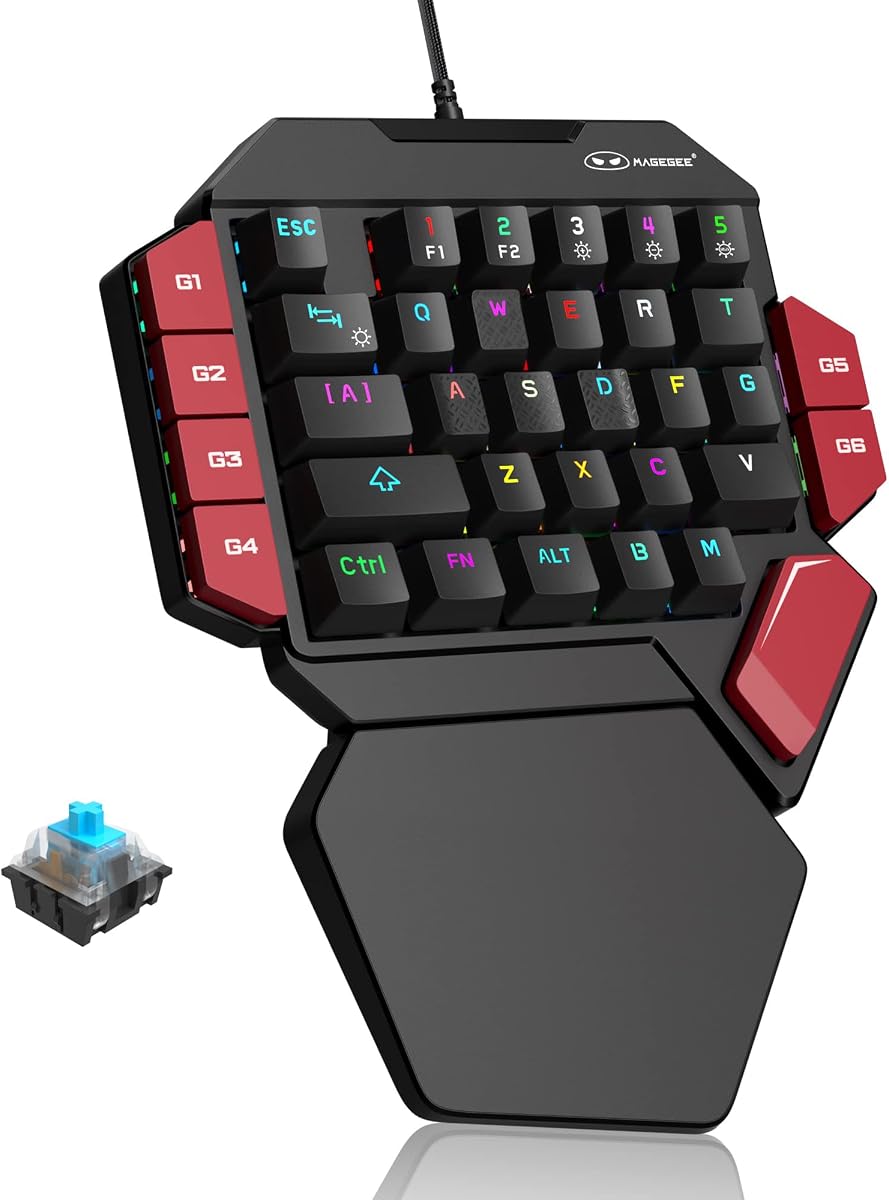
The MageGee One Handed features blue mechanical switches that provide a crisp click and strong tactile feedback. Its 35 keys support non-conflict inputs ensuring accuracy during fast-paced gaming.
We may earn a commission when you buy through this link, at no additional cost to you.
Six macro recording keys let users create and clear macros easily with function combinations. The RGB lighting offers both static and dynamic modes to match your battlestation vibe.
The loud click may not suit quiet environments but satisfies those who enjoy mechanical switches. Ergonomic design with a large palm rest helps reduce fatigue over extended use.
This model is ideal for mechanical keyboard enthusiasts wanting a dedicated mini layout. It delivers solid performance and customization at an accessible price point.
Blue switches offer long service life with clear feedback for every keypress.
Brightness and color adjustments are handled through intuitive keyboard shortcuts without software.
We may earn a commission when you buy through this link, at no additional cost to you.
The AJAZZ AK029 saves 60% desk space with its 29-key layout ideal for FPS gamers. Hall Effect magnetic switches provide zero dead zone performance and adjustability for actuation points.
We may earn a commission when you buy through this link, at no additional cost to you.
An 8KHz polling rate delivers tournament-grade response times while SOCD cleaning improves competitive edge. The aluminum-reinforced build and gasket mount ensure a stable and responsive feel.
With web-based customization, there are no drivers to install. This convenience makes it easy to switch between computers without losing your profile settings.
This keypad is perfect for players who prioritize space and speed. It combines premium features in a compact form factor for intense gaming sessions.
SOCD and DKS features enable flawless counter-strafing and advanced combo moves.
Full driver access via browser allows quick remapping without admin rights.
We may earn a commission when you buy through this link, at no additional cost to you.
This variant of the Razer Tartarus V2 focuses on RGB immersion with Chroma support for syncing with games and peripherals. The mecha-membrane switches offer a soft yet responsive typing experience.
We may earn a commission when you buy through this link, at no additional cost to you.
Its 32 programmable keys and thumbpad allow for detailed macro and movement control. Chroma lighting can react to in-game events enhancing immersion and visual feedback.
While it lacks mechanical stiffness, the cushioned design reduces hand strain over time. It is best suited for those prioritizing aesthetics and ecosystem features over raw switch feel.
Ideal for Razer users seeking visual integration. This model delivers a polished look and functional layout for varied gaming styles.
Lighting reacts to games and apps creating a dynamic and engaging setup.
Soft cushioned keys reduce pressure during long gaming marathons.
We may earn a commission when you buy through this link, at no additional cost to you.
The Redragon RM104 includes a smart control knob for volume and RGB adjustments enhancing usability. Its tri-mode wireless connectivity supports seamless switching between Bluetooth and 2.4GHz connections.
We may earn a commission when you buy through this link, at no additional cost to you.
With a 4000mAh battery it offers extended wireless use without frequent charging. The RGB backlighting can sync with other Redragon devices for a unified aesthetic look.
While not a full 42-key gaming layout, its smart knob adds versatility for streamers and creators. The internal structure ensures smooth rotation and precise tactile feedback for reliability.
This model is perfect for users needing multifunction control and wireless freedom. It blends gaming and productivity features in a stylish compact package.
Rotate to adjust volume or hold to cycle RGB modes quickly.
Works flawlessly with keyboards and multiple devices for clutter-free setup.
We may earn a commission when you buy through this link, at no additional cost to you.
Selecting the right gaming keypad depends on your specific gaming needs and preferences.
Switch types like mechanical, mecha-membrane, and Hall Effect impact feel and durability. Mechanical offers tactile feedback while membrane is softer and quieter.
Choose Hall Effect for adjustable actuation and zero debounce in competitive titles.
Key counts range from 29 to 42 keys affecting command access. Higher counts suit MMOs requiring many abilities while lower counts save desk space.
Ensure the layout includes essential keys and movement controls like thumbpads if needed.
Wired options provide stable connection and no battery worries while wireless offers desk flexibility. Bluetooth and 2.4GHz modes vary in latency and convenience.
Select wireless if cable management is a priority and battery life meets your usage.
Software allows macro creation and key remapping which is vital for game efficiency. Web-based configurators eliminate installation steps and support cross-platform use.
Look for software that supports profile storage and game-specific customization.
Ergonomic design includes wrist rests and contoured shapes to prevent fatigue. Adjustable parts ensure a better fit for different hand sizes.
Comfort is crucial during long sessions so prioritize padding and adjustability.
RGB lighting adds personalization and can sync with other peripherals or game events. Per-key lighting offers more control than zone lighting.
Choose models with customizable modes if aesthetics matter to your setup.
Materials like aluminum plates and gasket mounts improve stability and longevity. Detachable parts like wrist rests enhance versatility and portability.
A sturdy build ensures the device withstands intense gaming without wear.
Prices vary widely from affordable to premium depending on features and materials. Determine which features are essential versus optional for your needs.
Balance cost with performance to get the best value for your gaming style.
Begin by connecting the keypad via USB or wireless mode depending on model support. Install any required software to enable macro and lighting customization features.
Familiarize yourself with key functions and macros through practice sessions. Adjust thumbpads or switches to suit your comfort and control preferences.
Clean the device regularly with a soft cloth and avoid liquid spills. Store it properly when not in use to prevent damage to switches and keycaps.
Gaming keypads excel in ergonomics and specialized control for specific genres like MMOs and FPS. They save desk space and allow customization but lack full typing capability. For gaming, they offer focused efficiency over general use keyboards.
Most gaming keypads are compatible with PC games through standard HID protocols. Some advanced features require game support for analog movement or specific APIs. Check software documentation for compatibility with your favorite titles.
Many keypads support PC and console setups but depend on USB or wireless compatibility. Some models include mode switches for console use. Always verify console compatibility before purchasing.
Macros are typically programmed using companion software or function keys on the device. Assign key combinations to execute multiple commands. Save profiles to the device for easy access across sessions.
Hall Effect switches provide adjustable actuation and zero debounce for faster response. They reduce wear by avoiding physical contact. Ideal for competitive players needing precise control and durability.
Battery life varies but generally lasts 15 to 20 hours per charge for active gaming. Some models include power-saving modes to extend usage. Recharge via USB-C or standard ports as supported.
The top picks highlight diverse options from budget-friendly to high-performance models. AZERON leads with advanced analog control while RedThunder offers great value for beginners.
Prioritize features like switch type and connectivity based on your gaming preferences. Comfort and customization should drive your final decision for long-term satisfaction.
Always check current availability and features before purchasing to ensure the best match for your setup.