
Guermok Video Capture Card
4.4Editor score
4K HDMI input support
1080p 60fps output
Plug and play setup
Finding the right HDMI recorder can transform how you capture and archive video content. Whether you need to record gameplay or preserve analog tapes, a good device offers reliability and ease of use.
We compared ten leading models based on resolution support, latency, storage options, and compatibility. This list covers standalone units and USB capture cards to suit different workflows and budgets.
Each pick highlights key strengths and trade-offs to help you decide. Remember that prices and availability change frequently, so check the latest listings before making your final purchase decision.
4.4Editor score
4.0Editor score

4.1Editor score
As an Amazon Associate we earn from qualifying purchases.
The following table provides a side by side comparison of all ten HDMI recorders evaluated in this guide to help you quickly identify the best fit for your needs.





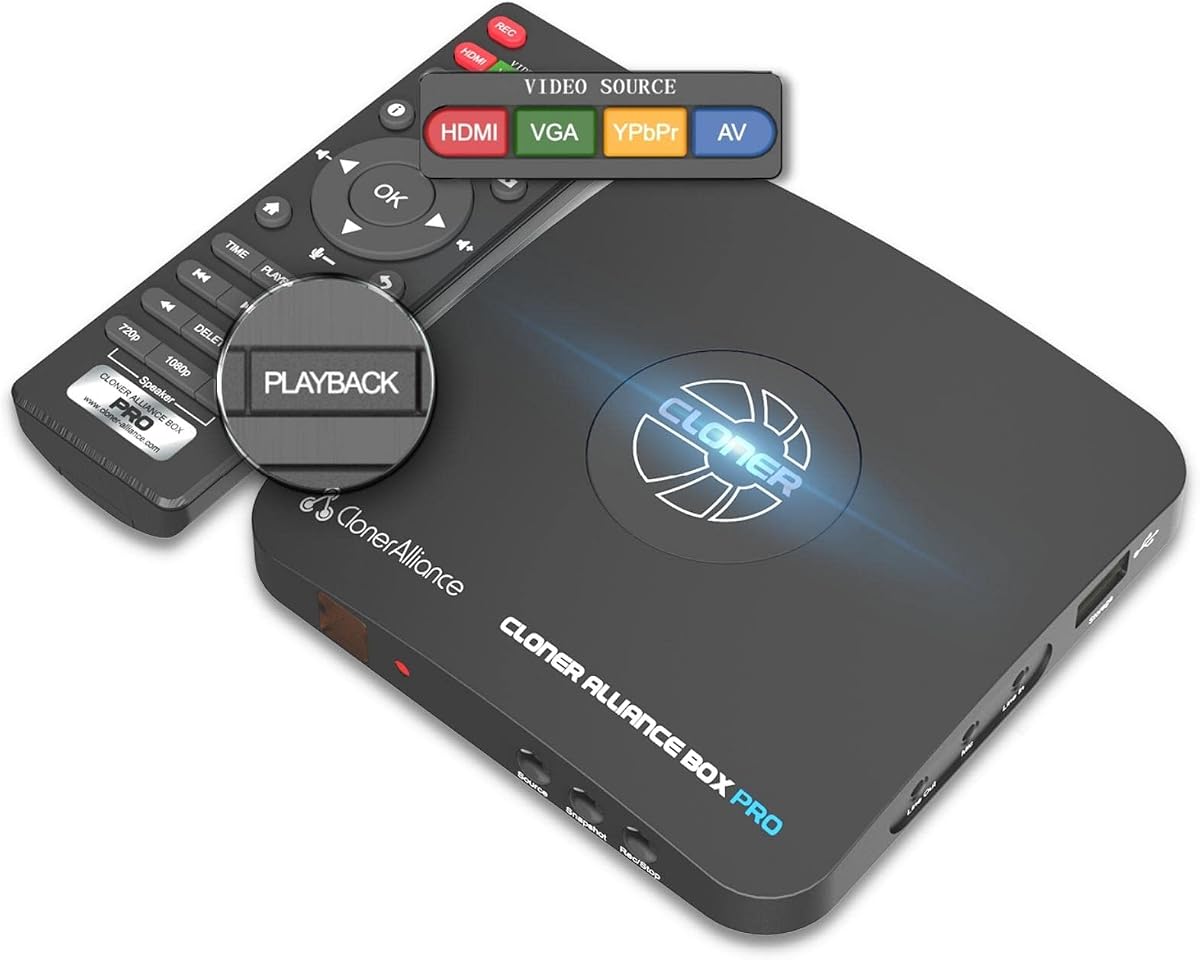
The ClonerAlliance Box Pro stands out as a versatile standalone HDMI recorder that handles both digital and analog sources. With a rating of 4.0 stars it offers reliable capture capabilities for users who want to record without relying on a computer. Its ability to accept HDMI RCA and VGA inputs makes it a comprehensive solution for archiving old VHS tapes or capturing modern console gameplay.
We may earn a commission when you buy through this link, at no additional cost to you.
This device excels in ease of use. You can connect it directly to your TV and record to a USB drive while watching the live feed. The included remote control simplifies navigation and playback directly on the screen. Additionally the schedule recording feature ensures you never miss a program or game session by automating the capture process based on your preferred times.
One limitation is the lack of support for HDCP protected content meaning some streaming devices may not work. Also the included software only supports Windows which might inconvenience Mac users. However these trade-offs are acceptable given the device focuses on hardware independence and broad input compatibility which appeals to many home users and archivists.
If you need a reliable recorder that functions independently of your PC the ClonerAlliance Box Pro is a strong choice. It is ideal for those who want to preserve analog videos or capture gaming sessions without the complexity of computer software. Its friendly interface and robust input options make it accessible even for less technical users.
The Box Pro handles analog signals from VHS or camcorders converting them to digital MP4 files for modern storage and playback. This dual capability extends its lifespan and utility as you migrate from older media formats to digital archives.
By eliminating the need for a PC this device simplifies your setup. You can connect it between your source device and TV allowing for seamless recording and playback without occupying a computer slot or requiring specific drivers.
We may earn a commission when you buy through this link, at no additional cost to you.
The Guermok Video Capture Card offers an excellent entry point for users seeking high quality capture without spending much. Rated at 4.4 stars it provides smooth 1080p recording at 60 frames per second which is ideal for gaming and live streaming. Its compact design and USB 3.0 connectivity ensure fast data transfer and minimal latency during use.
We may earn a commission when you buy through this link, at no additional cost to you.
This card works seamlessly with popular software like OBS Studio making it easy to integrate into existing streaming setups. The aluminum alloy build helps with heat dissipation during extended sessions. It supports various operating systems including Windows and Linux ensuring broad compatibility across different computer environments.
However the device requires you to use capture software to function as it does not output directly to a monitor. Some users might experience adapter issues if the USB 2.0 port is used instead of USB 3.0. Despite these minor setup considerations the value proposition is strong for budget conscious creators.
For those looking to start recording or streaming without a large investment the Guermok card is a reliable option. It balances performance and affordability well allowing you to capture crisp video and audio. Just ensure you have the necessary software ready to utilize its full potential effectively.
This card supports major streaming platforms like Twitch and YouTube through standard capture software. Its low latency ensures that your viewers see your gameplay in real time which is crucial for interactive live broadcasts and online gaming.
Its small size makes it easy to carry for on the go streaming. You can pack it in a laptop bag and set up quickly anywhere you have a computer with a USB port. This portability is great for creators who travel frequently.
We may earn a commission when you buy through this link, at no additional cost to you.
The ClonerAlliance UHD Pro delivers premium performance with true 4K recording capabilities. With a rating of 4.1 stars it is designed for users who demand high resolution archives. The support for H.265 codec ensures efficient storage without sacrificing visual quality which is essential for long recording sessions of 4K content.
We may earn a commission when you buy through this link, at no additional cost to you.
A standout feature is the pause and resume functionality allowing you to keep important moments in a single file. This is particularly useful for live events or long gaming sessions where you want to avoid multiple files. The 4K passthrough ensures you experience zero lag while recording on your display.
While it is more expensive than standard 1080p units the investment pays off for future proofing. The device does not support HDCP protected content which limits streaming from certain devices. However for capturing unprotected sources like consoles or PCs it remains a top tier standalone option.
If you are serious about high quality video archiving the UHD Pro is worth considering. Its cinematic 24fps option gives a movie-like look to your recordings. The ability to operate without a PC makes it perfect for setups where minimizing computer dependency is a priority.
The H.265 codec compresses video more efficiently than older formats. This means your 4K files take up less space on your USB drive allowing for longer recording times without needing to change storage media frequently.
You can record up to 4K 30fps or use 24fps for a cinematic feel. This flexibility allows you to match your recording style to the source content. Whether it is action footage or a movie style capture you have control over the output.
We may earn a commission when you buy through this link, at no additional cost to you.
This capture card is built for gamers who want reliable 1080p 60fps recording. Rated at 4.3 stars it connects easily via USB 3.0 and is recognized as a webcam by your system. The inclusion of a microphone input lets you add commentary directly without needing external hardware.
We may earn a commission when you buy through this link, at no additional cost to you.
The HDMI loop out ensures you can play on your monitor with no delay while the card captures the signal. This is vital for competitive gaming where lag can affect performance. It supports major consoles like PS5 and Xbox making it a versatile hub for your gaming setup.
However the output is limited to 2K 30Hz which might not be sufficient for high refresh rate needs. Also audio settings require attention in software to avoid noise or volume issues. Despite these points it remains a solid choice for entry level streamers.
For users wanting a simple way to record gameplay with commentary this card works well. It requires no drivers and works with OBS immediately. The portability and ease of use make it a convenient tool for streaming or archiving your gaming moments.
The 3.5mm mic input allows you to plug in a headset or mic directly. This simplifies your streaming setup by combining video and audio capture into one device without needing extra sound cards or mixers.
The loop out feature sends the video to your screen instantly. This ensures that your gameplay experience remains smooth even while recording. It is essential for games where timing and reaction speed are critical.
We may earn a commission when you buy through this link, at no additional cost to you.
The Audio Express AXHDCAP is a budget friendly option for basic video capture needs. Rated 4.4 stars it offers a simple way to connect cameras or consoles to your computer. The anti static design helps protect internal components and the device works without requiring any drivers to be installed.
We may earn a commission when you buy through this link, at no additional cost to you.
It supports 4K input but outputs at 1080p 30fps which is sufficient for meetings or casual recording. The ultra low latency ensures your video preview matches reality in real time. This is helpful for video calls or teaching scenarios where immediate feedback is needed.
The USB 2.0 connection may be a bottleneck for high resolution work compared to USB 3.0. You also need to use OBS or similar software to manage the stream. Despite this it is a great choice for users who need an inexpensive and reliable capture solution.
If you want a small card for travel or occasional use this fits well. It integrates easily with Zoom and Twitch. Just ensure your USB port is functional to avoid recognition issues. It provides a solid foundation for starting your content creation journey.
This card works well for connecting high quality cameras to Zoom or Teams. It transforms a DSLR into a webcam with rich visuals and audio. This can significantly improve your professional video calls.
Its small footprint makes it easy to carry in a bag. You can attach it to a laptop for on the go streaming or recording. This is useful for travelers who want to capture content anywhere.
We may earn a commission when you buy through this link, at no additional cost to you.
This capture card prioritizes speed with its USB 3.0 interface. Rated at 4.4 stars it is engineered for smooth video capture up to 1080p 60fps. The USB 3.0 connection ensures stable data transfer which is important for high frame rate recording and streaming without drops.
We may earn a commission when you buy through this link, at no additional cost to you.
It is compatible with major streaming tools like OBS and Streamlabs. The design is compact making it easy to pack for events or travel. It supports pass through so you can play games without lag while capturing the stream for your audience.
There are no dedicated audio inputs so you might need to manage audio separately if you need commentary. It also requires software to run as it is a pass through device. These points are minor for users focused on video quality and bandwidth.
For gamers needing reliable 60fps capture this card is a good pick. The USB 3.0 speed is a significant advantage over older standards. It simplifies your setup by being plug and play and offers a professional look to your content creation workflow.
USB 3.0 provides enough bandwidth for high resolution video streams. This reduces the risk of dropped frames during intense recording sessions. It ensures your final video is clean and smooth for viewing.
Built for creators it supports easy setup on laptops and desktops. The lightweight design means you can carry it to LAN parties or conferences. It is a versatile tool for mobile content creation.
We may earn a commission when you buy through this link, at no additional cost to you.
This capture box distinguishes itself with two HDMI inputs and a built in 7 inch screen. Rated at 3.8 stars it offers a standalone experience with visual feedback. The ability to switch between sources or use picture in picture makes it ideal for managing multiple video streams.
We may earn a commission when you buy through this link, at no additional cost to you.
It supports battery power which is rare for recorders. This allows for portable recording at events where power outlets are scarce. The high resolution output ensures your recorded content looks sharp on modern displays. You can save to USB drives or SD cards directly.
Like other devices it does not support HDCP protected content. The size is larger than a USB card which might make transport slightly less convenient. However the screen and dual inputs add functional value for professional setups.
If you need a portable recorder with on board monitoring this is a strong candidate. The battery operation is a key benefit for field use. It provides versatility for switching inputs quickly without needing a monitor connected constantly.
With two inputs you can connect two cameras or consoles. You can switch between them or use PIP to show both at once. This is useful for interviews or multi angle gaming setups.
Using a battery allows you to take the device anywhere. You are not tied to a wall outlet during recording. This is perfect for outdoor events or mobile production work.
We may earn a commission when you buy through this link, at no additional cost to you.
The ZowieREC 4K HDMI Recorder features a sleek premium aluminum design. Rated at 3.3 stars it offers standalone recording without a PC. The build quality ensures durability for regular use and it supports 4K passthrough for smooth viewing during capture.
We may earn a commission when you buy through this link, at no additional cost to you.
It includes a schedule feature for automatic recordings which is convenient for capturing shows or events. You can use both USB and TF cards for storage options. The pause and resume button adds editing flexibility directly on the device.
The device does not support HDCP protected sources limiting streaming content capture. It also lacks dedicated audio inputs for commentary. Despite this the build and standalone capabilities make it appealing for users prioritizing hardware quality.
For those who want a standalone recorder with a premium look this is a good choice. It simplifies your setup by removing the need for a computer. Ensure you check compatibility with your source devices before purchasing to avoid issues.
You can set automatic recording times so you never miss content. This feature turns the device into a personal DVR. It is convenient for archiving broadcasts without manual intervention.
You can view recorded videos directly on your TV without a computer. This makes reviewing footage quick and easy. It enhances the user experience by keeping the workflow hardware focused.
We may earn a commission when you buy through this link, at no additional cost to you.
The ClonerAlliance ViewPro is a portable recorder featuring a 7 inch LCD screen. Rated at 4.3 stars it allows you to preview and playback without a TV. It handles 1080p 60fps and includes analog inputs for capturing older devices like camcorders.
We may earn a commission when you buy through this link, at no additional cost to you.
Its portability is a key strength allowing you to use it anywhere. The included remote control simplifies navigation during use. You can also stream content to platforms using bundled software. This flexibility makes it a hybrid solution for recording and streaming.
The unit is somewhat heavy which may reduce ease of transport compared to smaller cards. Audio input is not directly supported for commentary. These limitations are minor given the screen and portable functionality it provides for on the go use.
If you need a portable recorder with a screen this is an excellent choice. It removes the need for a monitor entirely. The analog support ensures you can digitize old tapes conveniently making it a versatile archival tool.
The built in screen lets you frame your shots without external gear. This is perfect for live events or field recording. It simplifies the setup by keeping everything in one unit.
Analog inputs let you capture VHS or older camcorders. This bridges the gap between old and new technology. It is useful for digitizing family archives easily.
We may earn a commission when you buy through this link, at no additional cost to you.
This device offers professional SDI connectivity for high end recording. While rating is not specified it is trusted by video production teams. It connects to cameras and mixers via SDI which is standard for broadcast. The included audio inputs allow direct capture of sound.
We may earn a commission when you buy through this link, at no additional cost to you.
It works with professional software like DaVinci Resolve ensuring high quality workflows. The loop output lets you monitor the signal while recording. This device is designed for reliability and longevity in demanding environments.
You need an SDI source to use it fully which limits it for home use. The setup requires technical knowledge compared to plug and play USB cards. It is a specialized tool for pros rather than casual users.
If you need professional SDI capture this is a solid choice. It ensures signal integrity and high quality output. For broadcasters and production houses it provides the reliability needed for critical recording tasks.
SDI ensures stable video over long cables without compression. This is vital for professional studios. It guarantees your content meets industry broadcast standards.
Designed for use with NLE software it fits into complex editing pipelines. It supports color grading and editing directly on capture. This streamlines post production workflows effectively.
We may earn a commission when you buy through this link, at no additional cost to you.
Choosing the right HDMI recorder involves understanding your specific needs and technical requirements. This section outlines the key factors to consider to ensure you get the best performance for your money.
Determine if you need 1080p or 4K recording. Higher resolutions offer better detail but require more storage and processing power. Ensure the device supports the frame rates you need for smooth motion.
Look for devices that match your source quality for a best results.
Decide if you want a standalone recorder that works without a computer or a USB card for PC use. Standalone units are simpler for quick recording while cards offer more control via software.
Standalone units are best for simplicity while cards are best for streaming.
Check if the device supports HDMI RCA or VGA inputs depending on your sources. Some units offer loop out so you can watch without lag. Ensure all your devices can connect properly.
Verify the inputs match your existing equipment before purchasing.
Look for support for USB drives or SD cards. Formats like MP4 and codecs like H.265 are efficient for storage. Ensure the file system supports large files if you record long sessions.
Choose a device with sufficient storage capacity for your needs.
Many recorders cannot record protected content from streaming services due to HDCP. Check if your sources are protected if you need to record them. This affects which services or devices you can capture.
Be aware of HDCP limitations to avoid recording issues.
Low latency is critical for gaming to avoid lag. Look for devices with pass through capabilities to watch in real time. High latency can disrupt gameplay or live streams significantly.
Prioritize low latency if you play competitive games.
Ensure the device captures audio properly or has inputs for commentary. Some units rely on software for audio which might be complex. Check if audio is embedded in the video file.
Check for audio input options if you need commentary.
Consider how often you will move the device. Portable cards are great for travel while boxes are stable for desk setups. Aluminum builds often dissipate heat better during long sessions.
Match the build to your usage environment.
Connect your source device to the recorder via HDMI and connect the recorder to your display or computer. Make sure you select the correct input mode on the device if applicable. Ensure all cables are secure to prevent signal drops during recording.
For standalone units insert a formatted USB drive or SD card before starting. Press the record button or schedule a task to begin capturing. Check your storage periodically to ensure enough space remains for your sessions.
Keep the device clean and free of dust to avoid overheating. Avoid exposing it to moisture or extreme temperatures. If using a capture card ensure your software is updated for best performance. Always unplug devices carefully to protect ports.
No most HDMI recorders cannot record content protected by HDCP like Netflix or Hulu. These services encrypt their signal to prevent unauthorized recording. You may see a black screen or error message when connecting these sources.
No standalone recorders work without a computer. They save video directly to USB drives or SD cards. You can play back recordings on any device that supports the file format.
4K recorders capture higher resolution video with more detail. They require more storage space and compatible displays. 1080p is sufficient for most web streaming and standard viewing needs.
Choose a capture card if you need streaming control and software features. Choose a standalone recorder if you want simplicity and no computer dependency. Consider your workflow needs.
Check that your HDMI cable is working and your storage has space. Ensure your source is not HDCP protected. Verify your device settings match your input resolution and format.
Most devices embed audio into the video file. Some have inputs for external mics to capture commentary. Check specific specs to confirm audio capture capabilities.
Most modern cards are plug and play on Windows and Mac. They usually require capture software like OBS. Drivers are rarely needed unless specified by the manufacturer.
Simply connect the USB drive or SD card to your computer. Drag and drop the files to your desired folder. Ensure your format is compatible with your editing software.
We have reviewed ten top HDMI recorders ranging from budget capture cards to premium standalone units. The ClonerAlliance Box Pro offers great all round performance while the Guermok Card is perfect for budget users.
Prioritize resolution needs and standalone capability when making your choice. Ensure the device supports your source inputs and storage preferences. A good recorder helps you capture content without hassle or technical issues.
Prices and availability change so verify current listings before buying. Check the latest reviews and specs to confirm compatibility. With the right device you can preserve memories and share content effortlessly.