
HDMI Tester Portable High Definition Network Cable Tester Checker
4.4Editor score
Supports HDMI versions 1.2 to 2.0
Includes remote unit for easy testing
Tests network cables with RJ45 connector
This guide compares ten top HDMI signal testers for professionals and enthusiasts, evaluating features like 4K support, cable continuity checks, and ease of
HDMI signal testers are essential tools for anyone installing home theaters or commercial AV setups. They ensure cables transmit high definition video and audio without errors or signal loss. Choosing the right model helps prevent costly troubleshooting and guarantees reliable performance across your display devices.
We evaluated ten top ranked models based on their testing capabilities, build quality, and user feedback. Our analysis covers basic continuity check alongside advanced signal generation features. This list provides a clear overview of what each device offers for different budget levels and technical requirements.
Each pick highlights key strengths and limitations to help you decide which tester fits your workflow. Remember that availability and specific features may vary over time. Always verify current specifications before purchasing to ensure the device meets your exact installation needs.
4.4Editor score

4.0Editor score

The following table compares the core specifications and capabilities of all ten HDMI signal testers featured in this guide. Use this side by side view to quickly identify which device matches your specific testing requirements and budget constraints.


This Monoprice model serves as both a signal generator and a display emulator, making it versatile for various AV installation tasks. With a solid rating and comprehensive features, it stands out for users needing reliable testing without breaking the budget.
We may earn a commission when you buy through this link, at no additional cost to you.
The device supports 4K at 60Hz with various color formats including 4:4:4 and 4:2:0. It also handles HDCP 1.4 and 2.2 outputs, which is crucial for modern content playback. Users can select test patterns and resolutions via simple DIP switches.
While powerful, the unit requires careful setup of DIP switches to match desired output settings. The lack of an integrated screen means you need an external display to view the signal quality directly. These trade-offs are acceptable given the price point.
Installers and enthusiasts who need a reliable generator for 4K content will find this device valuable. It bridges the gap between basic continuity testers and expensive benchtop analyzers, making it a strong recommendation for general use.
The ability to generate specific resolutions and HDCP versions helps verify display compatibility before final installation.
Compared to high end analyzers, this unit offers critical 4K testing capabilities at a fraction of the cost.
We may earn a commission when you buy through this link, at no additional cost to you.
The Parts Express tester is a straightforward tool designed to quickly identify connectivity issues in HDMI cables. With a high rating for ease of use, it is ideal for homeowners or technicians needing to verify cable health without complex equipment.
We may earn a commission when you buy through this link, at no additional cost to you.
This device connects directly to cables and displays the status of each signal component. It helps diagnose common issues like color shifts or missing pictures by indicating which wires are failing. The design allows testing at the source or display end.
It does not generate video signals or support advanced resolutions like 4K. Its primary function is checking continuity and basic signal integrity. While limiting for high end installations, it is sufficient for most standard home theater setups.
Users looking for an affordable way to confirm cable functionality will appreciate this model. It saves time by isolating faulty cables quickly, preventing unnecessary equipment swaps. It is a practical choice for basic maintenance and troubleshooting.
By pinpointing specific signal failures, it reduces guesswork when replacing cables or adjusting connections.
Its small form factor makes it easy to carry in a toolbox for on-site repairs.
We may earn a commission when you buy through this link, at no additional cost to you.
This tester combines HDMI and network cable testing into a single portable unit. It is well rated for its versatility, making it a useful addition for technicians who deal with both audio video and networking setups.
We may earn a commission when you buy through this link, at no additional cost to you.
The device includes a main unit and a remote unit that stores on the side for easy transport. It scans up to 19 wires to detect shorts or open circuits. Users can also test RJ45 network cables with the same interface.
The main unit can be powered by batteries or a USB charger, adding flexibility for field work. However, the remote unit attaches to the main body and cannot be separated for very long cable runs. It is also limited to basic continuity checks.
Technicians who need a dual purpose tool for quick checks will find this value. It covers the essentials for most residential installations where full signal analysis is not required. It is a practical all in one solution.
Combining HDMI and LAN testing reduces the need to carry multiple tools for different cable types.
The ability to use USB power ensures you can test cables even when batteries are depleted.
We may earn a commission when you buy through this link, at no additional cost to you.
The STEREN handheld tester features an integrated HD LCD screen, allowing technicians to verify video and audio signals independently. Its robust build and high rating make it suitable for demanding environments where durability is a priority.
We may earn a commission when you buy through this link, at no additional cost to you.
Users can connect devices directly to the tester to confirm functionality before connecting to a display. The screen resists dust, water, and scratches thanks to tempered glass and a protective housing. It also includes three HDMI ports for flexible testing setups.
The built-in battery provides several hours of operation, though it is heavier than non-screen models. While the price is higher, the convenience of carrying less equipment is often worth it for professionals. It simplifies the verification process significantly.
Professional installers who value mobility and durability will find this unit practical. It eliminates the need to find a TV to test a signal, saving time on jobsites. It is a solid investment for consistent performance.
The integrated screen allows you to confirm signal quality without needing an external display device.
The shockproof and water-resistant design ensures longevity even in harsh installation conditions.
We may earn a commission when you buy through this link, at no additional cost to you.
This advanced generator and analyzer is designed for professionals who need to validate the latest HDMI 2.1 specifications. With support for 8K resolution and high bandwidth, it covers the full range of modern high performance display requirements.
We may earn a commission when you buy through this link, at no additional cost to you.
The device offers 64 resolutions and 33 test patterns, allowing detailed analysis of signal integrity. It supports HDCP 2.3, CEC control, and EDID management, which are essential for complex home theater and commercial installations. A rechargeable battery makes it portable.
The high cost and technical depth may not be necessary for basic home installations. Users need familiarity with HDMI standards to fully utilize features like timing analysis. However, for advanced setups, it provides unmatched verification capabilities.
Specialized AV integrators working with high end displays will benefit most from this tool. It ensures that complex systems meet rigorous standards and function reliably. It is a top tier choice for professional-grade testing needs.
Full support for 8K at 60Hz ensures compatibility with the latest premium display devices.
Features like EDID read/write and CEC control allow for precise system configuration and debugging.
We may earn a commission when you buy through this link, at no additional cost to you.
This unit provides a blend of signal generation and cable testing capabilities for high resolution content. It supports 18Gbps bandwidth and 4K outputs, making it suitable for verifying modern display systems and cabling integrity.
We may earn a commission when you buy through this link, at no additional cost to you.
Features include source video analysis and timing checks to ensure signal stability. The ability to scale 4K to 1080p helps test compatibility across different device generations. HDCP compliance ensures you can test protected content streams accurately.
The interface may require technical knowledge to utilize fully, especially for timing and EDID settings. It is not as plug-and-play as basic continuity testers. However, the depth of testing makes it valuable for complex troubleshooting.
Professionals who need to verify compliance with high bandwidth standards will find this useful. It helps identify issues that simple testers miss, such as timing errors or insufficient bandwidth. It is a robust choice for AV integration work.
The 18Gbps support allows for reliable testing of high speed cables required for 4K content.
Scaling capabilities let you test how devices handle resolution changes and signal adaptation.
We may earn a commission when you buy through this link, at no additional cost to you.
This multi-function tester covers basic needs for HDMI and network cable verification. It is designed for quick checks to identify shorts or open circuits in cables. The auto shut-down feature helps preserve battery life during storage.
We may earn a commission when you buy through this link, at no additional cost to you.
It includes two test modes: fast scan for quick checks and full display for comprehensive details. Users can identify connection issues by looking at LED indicators for each wire. It is a lightweight tool for quick on-site checks.
The overall rating is slightly lower than similar models, which may reflect durability or sensitivity issues. It lacks advanced signal generation capabilities, focusing strictly on continuity. For basic troubleshooting, it remains a viable option.
Users needing a budget-friendly option for cable continuity checks will find this adequate. It is best suited for situations where full signal analysis is not required. It serves as a reliable backup tool for standard cable testing.
The choice between fast scan and full display allows users to balance speed and detail.
Auto shut-down after ten minutes ensures the device conserves power when left idle.
We may earn a commission when you buy through this link, at no additional cost to you.
Jonard Tools offers a reliable cable tester focused on precision for standard HDMI connections. It is rated well for its ease of use and ability to handle both full-size and mini connectors in one unit.
We may earn a commission when you buy through this link, at no additional cost to you.
The device includes a detachable remote unit, which allows testing cables that are installed in hard to reach places. Users can choose between scan mode to see connections sequentially or full display mode for all wires at once. It simplifies locating faults.
It does not provide video or audio signal generation, limiting it to continuity checks. The unit relies on a standard 9V battery for power. While practical, users must ensure they have spare batteries for field work.
Technicians who need a dependable tool for wire verification will find this useful. It provides clear feedback on which wires are failing, aiding in fast repairs. It is a straightforward choice for general cable maintenance tasks.
The detachable remote unit makes it easy to test long cables without crawling through conduits.
LED indicators give immediate visual confirmation of each wire's status for quick diagnostics.
We may earn a commission when you buy through this link, at no additional cost to you.
This UT681 model is highly rated for its ability to quickly diagnose connection issues. It supports multiple HDMI variations including Micro and Mini, making it a flexible option for various consumer electronics setups.
We may earn a commission when you buy through this link, at no additional cost to you.
The device scans all 19 wires to identify shorts or open circuits efficiently. It includes a low battery warning indicator to prevent unexpected shutdowns. Users can view results via synchronized LED lights for quick interpretation.
It does not generate video signals or check bandwidth, focusing on physical connectivity. The unit is lightweight and portable, ideal for technicians carrying multiple tools. The battery warning ensures you are aware when replacement is needed.
Users looking for a reliable continuity tester for different HDMI types will appreciate its design. It offers a good balance of features and portability for general troubleshooting. It is a strong choice for daily use in repair work.
Support for Micro and Mini HDMI extends its usefulness to a wider range of devices.
LED lights that sync with wire status make it easy to spot faults immediately.
We may earn a commission when you buy through this link, at no additional cost to you.
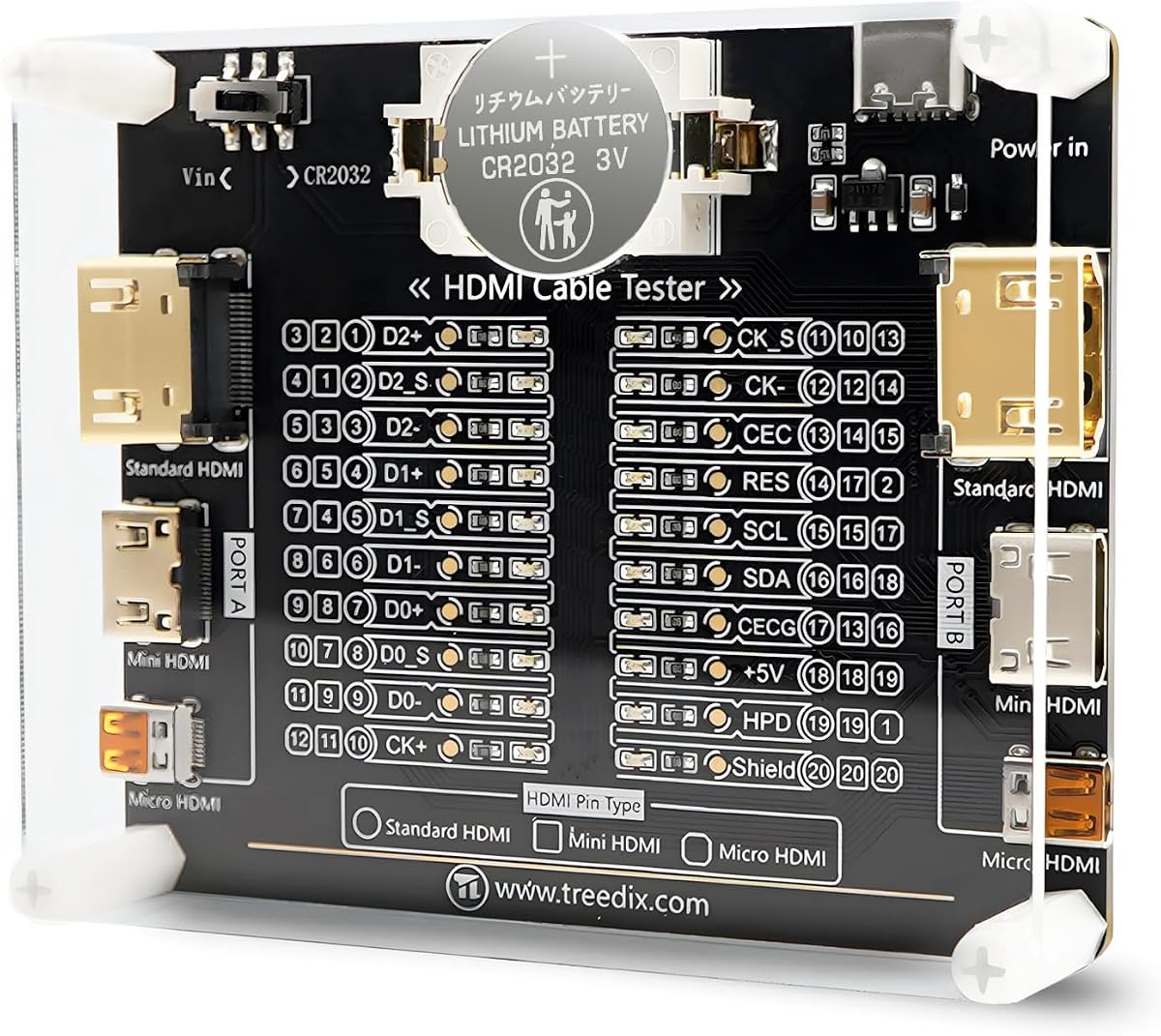
This tester board offers a compact solution for checking HDMI cable continuity. It is rated highly for its clear LED indicators and flexible power options. The acrylic housing helps protect the unit during transport and use.
We may earn a commission when you buy through this link, at no additional cost to you.
It detects shorts and open circuits quickly, mapping each pin to an LED indicator. Users can choose between battery or external power to suit their environment. It supports standard Mini and Micro interfaces for versatility.
The board design is lightweight but less rugged than handheld cases. It does not offer signal generation, focusing purely on connection verification. Users should handle it with care to avoid damaging the board traces.
Technicians who need a lightweight tool for quick checks will find this useful. It provides clear visual feedback on cable integrity without requiring bulky equipment. It is a practical choice for general maintenance and repair tasks.
Each LED corresponds to a specific pin, allowing precise identification of connection faults.
Support for both battery and external power ensures the device can be used in many situations.
We may earn a commission when you buy through this link, at no additional cost to you.
Selecting the right HDMI signal tester depends on your specific installation needs and budget. Below are key factors to consider before making a purchase decision.
Determine whether you need basic continuity checks or advanced signal generation. Basic testers verify wire connections and are sufficient for standard repairs. Advanced units can generate 4K signals and validate HDCP compliance for high end displays.
Choose a device that supports the highest resolution your clients or projects typically require.
If you work on-site frequently, consider the size and durability of the tester. Handheld units with rugged cases offer better protection during transport. Lightweight board designs are useful for bench work but may be fragile in the field.
Prioritize models that fit easily in your toolbox and can withstand daily handling.
Check how the device is powered to ensure uninterrupted use. Battery operated testers offer mobility but require carrying spare batteries. USB powered models allow connection to power banks or wall adapters for long sessions.
Select a power source that matches your typical work environment and availability of outlets.
Look for clear visual indicators like LED lights or an LCD screen. An integrated display allows independent verification without an external monitor. LED maps simplify finding specific wire faults quickly.
Clear feedback mechanisms reduce guesswork and speed up the troubleshooting process.
Ensure the tester supports the HDMI connector types you encounter. Some devices only test Type A ports, while others include Mini and Micro support. Versatility is essential if you work with cameras and portable devices.
Choose a model that covers all the interfaces present in your typical installation scenarios.
Balance the cost against the features offered. Simple testers cost less but lack advanced analysis. Premium units offer more capabilities but at a higher investment. Check if manufacturer support or warranties are included.
Consider long term value when selecting a device that may be used frequently over years.
Complex devices may require training to operate effectively. Simpler models with intuitive interfaces reduce the risk of user error. Look for features like auto shut down to conserve battery life.
A user-friendly device helps you complete tasks efficiently without confusion.
Reliable customer support can be crucial for complex issues. Check if the manufacturer provides technical resources or warranty replacement options. Quality tools often come with better service backing.
Opt for brands with a reputation for responsive support and clear documentation.
To begin testing, connect the source device to the tester's input port and the cable to the output or remote unit. Ensure all connections are secure to avoid false readings due to loose contact.
Observe the LED indicators or display screen to interpret results. If all lights activate in sequence, the cable is likely intact. Any unlit or flickering lights indicate faults that may require cable replacement or repair.
Store the device in a protective case to prevent physical damage. Keep it away from moisture and extreme temperatures. Regularly check batteries and clean the connector ports to maintain reliable performance.
An HDMI signal tester is used to verify the integrity of HDMI cables and connections. It helps identify faults like short circuits or missing pins that could cause display issues. This ensures reliable transmission of video and audio data.
No, only advanced testers support 4K resolution and high bandwidth checks. Basic models focus on continuity and wire mapping. To test 4K content, choose a device explicitly listing 4K or 18Gbps support.
Many modern testers include ports for Mini and Micro HDMI in addition to standard Type A. Check the product specifications to confirm compatibility with smaller connector types. Some units may require adapters for specific formats.
A failing cable will typically show missing or unlit LEDs corresponding to specific wires. Some units also display error codes or specific fault messages. If any indicator does not activate, the cable may need replacement.
Most basic testers do not require calibration as they rely on simple electrical checks. Advanced units with signal generation may need initial setup but typically self-calibrate. Always follow the manufacturer's startup instructions.
An LCD screen allows you to view video and audio directly without an external monitor. This is helpful when testing set-top boxes or gaming consoles on-site. It simplifies the verification process significantly for technicians.
Battery life varies by model and usage but generally lasts several hours of continuous use. Units with auto shut-down features help conserve power during idle periods. Carrying spare batteries is recommended for long jobs.
We reviewed ten top HDMI signal testers ranging from budget-friendly continuity tools to advanced 8K generators. Each offers unique features suited to different skill levels and installation requirements.
For most general users, a basic tester that supports multiple connector types provides the best value. Professional installers may benefit from units with integrated screens and advanced signal analysis capabilities.
Prices and availability may change over time, so verify current specs before purchasing. Choosing the right tool ensures accurate diagnosis and reliable AV system performance.