
HP Smart Tank 5003
4.1Editor score
Three years ink included
Mess free refill system
Mobile wireless printing support
Ink tank printers have revolutionized how we handle document and photo printing at home. These devices replace expensive cartridges with large refillable bottles that provide thousands of pages per set. Users save significantly on ongoing costs while enjoying consistent high-quality output for every job.
We evaluated ten leading models based on print speed connectivity options and ease of maintenance. Our analysis focuses on real-world performance metrics and user feedback to ensure accurate recommendations. Each product offers unique strengths suited for different household needs and workflows.
Every pick highlights key specifications and practical benefits to help you decide quickly. We include detailed reviews and a comparison table for side-by-side feature analysis. Remember that availability and terms may shift so verify details before purchasing your new device.
4.1Editor score

4.1Editor score

4.2Editor score
As an Amazon Associate we earn from qualifying purchases.
The following table presents a side-by-side overview of all ten models analyzed in this guide. Each entry lists core specifications and direct links to verify current details and availability online.




The Canon MegaTank G3270 earns our Editor's Choice award for delivering exceptional value and performance. It holds a 4.1 rating from users who praise its reliability and cost efficiency. This all-in-one wireless color printer simplifies document management with minimal setup effort.
We may earn a commission when you buy through this link, at no additional cost to you.
Its standout feature is the massive ink capacity which supports up to six thousand black and white pages or seven thousand seven hundred color pages. This means you can print for nearly two years without replacing ink. The included supply covers extensive household needs effortlessly.
Trade-offs include single-sided printing which may slow high volume batch jobs. The display is also modest compared to larger models. However these limitations are acceptable given the low initial investment and long-term savings on ink purchases.
Ideal for home users seeking a reliable printer that handles everyday documents and photos. It reduces waste and maintenance while maintaining sharp output. We recommend this model for anyone wanting a hassle-free printing experience without breaking the bank.
The G3270 includes enough ink to last up to two years in typical home use. This reduces frequent purchases and interruptions to your workflow.
Its compact build fits easily on desks or shelves without crowding your workspace. You gain full functionality without sacrificing room.
We may earn a commission when you buy through this link, at no additional cost to you.
The HP Smart Tank 5003 stands out as the best budget option with an impressive three years of ink included right out of the box. Users rate it highly for its straightforward setup and consistent output quality. It delivers reliable performance for home offices and study areas.
We may earn a commission when you buy through this link, at no additional cost to you.
Its mess-free refill system allows you to plug bottles directly into the tank without spilling ink. This design minimizes waste and keeps your workspace clean during maintenance. The AI-capable features guide you through configuration steps quickly and accurately.
While the display is basic and you rely on mobile apps for advanced settings the convenience outweighs these minor drawbacks. You save significantly on maintenance costs over time. The borderless printing option adds versatility for photo and document projects.
Perfect for households prioritizing low ongoing costs and ease of use. It supports wireless and mobile printing for seamless connectivity. We recommend this model for budget-conscious buyers who want high volume printing without constant cartridge changes.
The mess-free refill system ensures no squeezing or spilling when adding ink. Bottles drain naturally into the tank for a clean process.
Built-in AI features help users configure the printer quickly and resolve issues efficiently. This reduces setup time and frustration.
We may earn a commission when you buy through this link, at no additional cost to you.
The Epson EcoTank ET-2903 represents the premium tier with stunning photographic print quality and faster speeds. It carries a 4.2 rating for its reliability and advanced features that exceed basic needs. This model handles professional documents and vibrant photos effortlessly.
We may earn a commission when you buy through this link, at no additional cost to you.
Its Heat-Free technology ensures a permanent printhead designed to last the printer's lifetime. The 1.44 inch color screen simplifies navigation and settings adjustments. You benefit from zero warmup time and robust duty cycles for continuous printing.
While the upfront cost is higher the value lies in performance and longevity. The large paper tray and color display justify the investment for serious users. Ink savings remain significant despite the initial price tag.
Recommended for users needing high-quality output and frequent printing tasks. It supports wireless and mobile printing for versatile access. We suggest this model for those prioritizing image fidelity and speed over the initial expense.
With 5760 x 1440 dpi resolution this printer delivers exceptional image quality. Photos and graphics appear vivid and detailed.
The 11 ppm speed and large paper tray minimize interruptions. High volume jobs complete faster with less manual handling.
We may earn a commission when you buy through this link, at no additional cost to you.
The Canon Megatank G3290 earns a strong 4.2 rating for its user-friendly interface and duplex printing. It includes up to two years of ink and supports high volume output. The color touchscreen makes navigation intuitive for all users.
We may earn a commission when you buy through this link, at no additional cost to you.
Auto two-sided printing saves paper and reduces manual flipping during large jobs. The large display provides clear menus for copying and scanning tasks. Wireless connectivity ensures seamless integration with smart devices and networks.
While the price is higher than basic models the added features justify the cost. Duplex printing adds efficiency to your workflow. The included ink supply offers long-term value for regular printing needs.
Ideal for users who want convenience and professional features. It handles documents and photos with consistent quality. We recommend this model for home offices needing automated duplex and easy control.
The 2.7 inch LCD color touchscreen simplifies complex settings. Users navigate menus quickly without external devices.
Auto two-sided printing reduces paper usage by half for double-sided documents. This supports sustainability and lowers material costs.
We may earn a commission when you buy through this link, at no additional cost to you.
The Epson EcoTank ET-4800 delivers sharp text and impressive color photos thanks to Micro Piezo Heat-Free technology. It supports refillable tanks to reduce waste and save money. Users appreciate the built-in scanner and color display for simple operations.
We may earn a commission when you buy through this link, at no additional cost to you.
Its high-resolution flatbed scanner captures detailed images and documents accurately. The wireless options allow printing from smartphones and tablets easily. Ink refilling remains simple with the EcoFit bottle design.
While user ratings are lower the technology ensures consistent output. The design is robust for daily tasks. Consider it if photo quality and scanner performance are priorities over speed.
Perfect for households needing reliable scanning and printing. It handles mixed media well. We suggest this model for those who value Eco-friendly features and text clarity.
Unique Micro Piezo Heat-Free technology produces sharp text and vivid colors. This maintains quality across various paper types.
The high-resolution flatbed scanner handles documents and photos efficiently. It integrates into the all-in-one workflow smoothly.
We may earn a commission when you buy through this link, at no additional cost to you.
The Epson EcoTank ET-2803 offers dramatic savings with ink bottles equivalent to eighty cartridges. It holds a 4.2 rating for consistent output and ease of use. Users enjoy two years of ink included with minimal out-of-ink frustrations.
We may earn a commission when you buy through this link, at no additional cost to you.
Hands-free voice-activated printing works with smart devices for convenient access. The built-in scanner and copier simplify document management. EcoFit bottles make filling easy and worry-free without spills.
Trade-offs include a basic control panel and single-sided printing. However these do not hinder daily performance. The cost savings and reliability remain strong selling points for most buyers.
Ideal for budget and eco-conscious users. It reduces landfill waste significantly. We recommend this model for those wanting a clean refill process and solid performance.
Voice activated printing allows hands-free operation via smart devices. This speeds up tasks in busy environments.
Replacing cartridges with bottles eliminates tiny expensive parts. You save money and reduce plastic waste simultaneously.
We may earn a commission when you buy through this link, at no additional cost to you.
The HP Smart Tank 5003 D06BKA focuses on reliable printing and simple maintenance. It includes up to three years of ink and features a mess-free refill system. Users praise its easy setup and consistent color output.
We may earn a commission when you buy through this link, at no additional cost to you.
Borderless prints enhance photo and document quality for professional results. The AI-capable features guide configuration and reduce troubleshooting. Wireless and mobile printing ensure flexibility across devices.
While ratings vary the core functionality remains solid. The refill process is intuitive for all skill levels. This model suits users who want minimal maintenance and steady supply.
Perfect for home users needing consistent volume. It supports a clean workspace. We suggest this model for those prioritizing hassle-free refilling and long-term ink savings.
Borderless prints remove margins for full-page photos. This adds creative freedom to standard documents.
AI capabilities help optimize settings for your specific needs. This ensures better results with less manual tuning.
We may earn a commission when you buy through this link, at no additional cost to you.
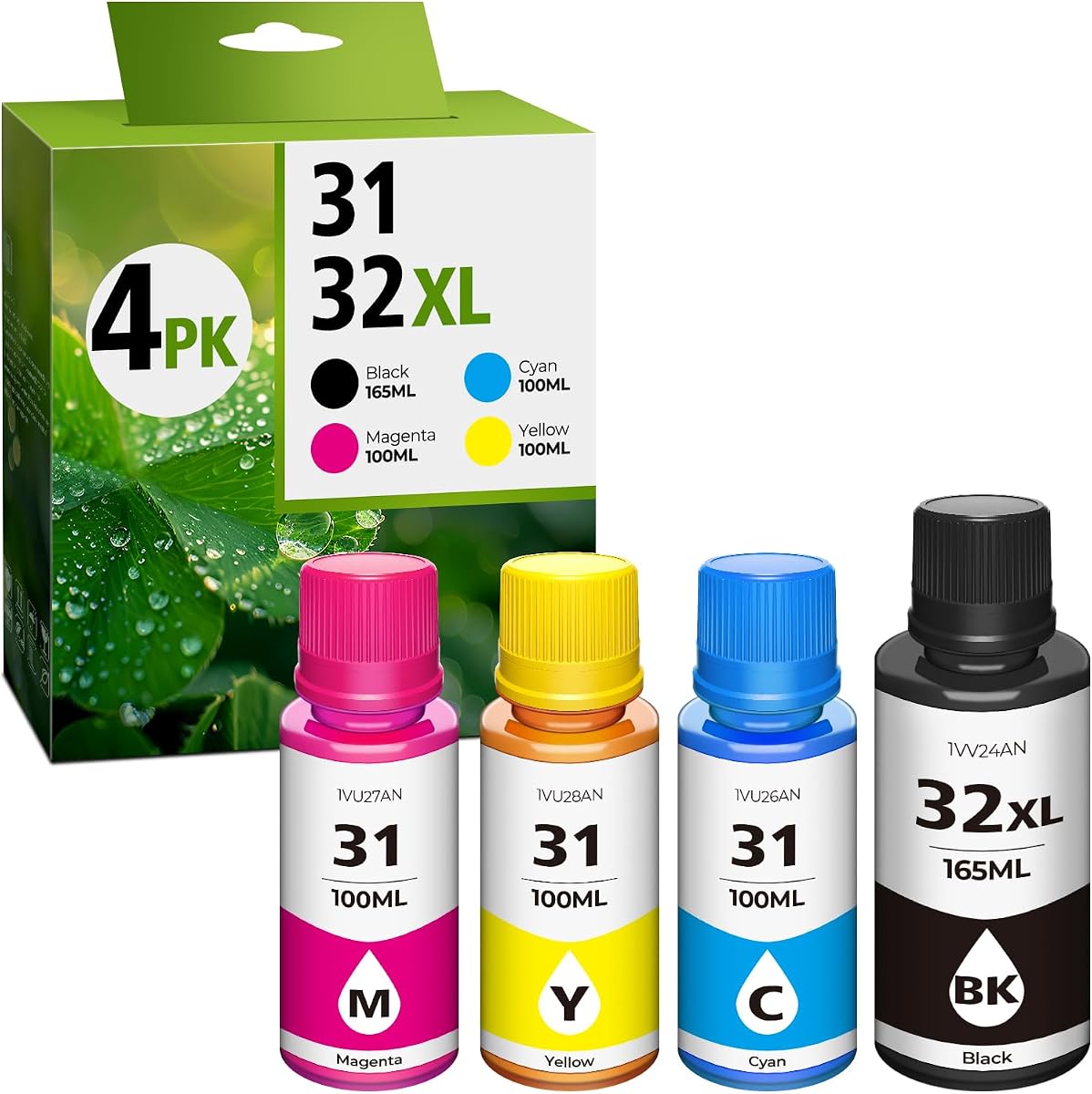
The 31 Ink 32XL Black Ink Bottle Set offers a high yield alternative for Smart Tank printers. It holds a 4.4 rating for seamless refilling and minimal effort. Users find it effective for extending printer life economically.
We may earn a commission when you buy through this link, at no additional cost to you.
Each bottle provides up to 9,500 pages at 5 percent coverage. The large capacity reduces replacement frequency. The design ensures no leakage when refilling the tank.
Note that these are dye inks which differ from OEM black pigment ink. Cleaning print heads before switching is essential for quality. This trade-off is acceptable for cost savings.
Ideal for users needing affordable refills quickly. It supports a wide range of HP Smart Tank models. We recommend this set for those comfortable maintaining their own ink levels.
With 9500 pages per bottle this set delivers exceptional value. You print more per dollar compared to standard options.
These bottles fit many HP Smart Tank series models. They ensure flexibility across different printer generations.
We may earn a commission when you buy through this link, at no additional cost to you.
The Epson EcoTank ET-2980 supports high volume printing with 6600 black pages and 5500 color pages. It includes up to three years of ink for worry-free operation. Users appreciate the easy refilling and mobile connectivity options.
We may earn a commission when you buy through this link, at no additional cost to you.
Smart Panel app integration allows convenient control from smartphones. The EcoFit bottles prevent drying out and simplify maintenance. This model balances cost and capacity well for busy households.
While speed is standard the ink capacity makes up for it. The design ensures fewer interruptions during jobs. Consider it for frequent printing without constant refills.
Perfect for users needing substantial ink reserves. It reduces supply anxiety. We suggest this model for those prioritizing volume and long-term usability.
Enhanced mobile printing via Smart Panel app enables quick scans. You manage tasks from anywhere.
Each set replaces ninety cartridges and supports three years. This minimizes replacements and maximizes uptime.
We may earn a commission when you buy through this link, at no additional cost to you.
The Epson EcoTank ET-2800 delivers vivid detailed prints thanks to Micro Piezo Heat-Free Technology. It fires 10 ISO pages per minute for steady output. Users value the two years of ink included and zero cartridge waste.
We may earn a commission when you buy through this link, at no additional cost to you.
Its reliability suits standard home printing tasks without complexity. Wireless connectivity supports basic printing from various devices. The compact design fits into tight spaces easily.
While speed is limited the quality remains consistent. It avoids frequent cartridge changes which reduces hassle. This model works well for general document printing needs.
Ideal for users seeking simplicity and reliability. It handles everyday tasks without fuss. We recommend this model for those needing a dependable printer for school and work.
Micro Piezo Heat-Free Technology preserves printhead life and reduces energy. This extends the printer's operational lifespan significantly.
With two years of ink you minimize supply purchases. This keeps printing costs low over time.
We may earn a commission when you buy through this link, at no additional cost to you.
Selecting the right ink tank printer involves evaluating several factors that impact your workflow and savings.
The most critical factor is the number of pages you can print before needing a refill. Most models offer enough ink for two to three years. Look for high page yields for both black and color to ensure true savings over time.
Prioritize models that include ink in the box. This ensures immediate use and long-term value without extra purchases.
Print speed affects how quickly large documents or photo batches finish. Look for ISO pages per minute that match your typical job size. Faster speeds reduce wait times during high-volume sessions.
Choose a printer with a robust duty cycle if you print regularly. This prevents overheating and extends the machine's lifespan.
Modern printers should support wireless connections for printing from smartphones and laptops. AirPrint and mobile apps allow seamless integration with your devices. Ensure the model supports your preferred network protocols.
Wireless features enable multi-user access without cables. This flexibility is essential for home offices and shared spaces.
A mess-free refill system ensures clean maintenance. Bottles that plug directly into tanks reduce spills and waste. Look for keyed designs that prevent incorrect ink mixing.
Simple refills save time and keep your workspace tidy. Avoid models that require complex maintenance steps.
Many ink tank printers are all-in-one devices with scanners and copiers. High-resolution scanners are essential for digitizing documents. Verify resolution and paper handling for your scanning needs.
All-in-one functionality centralizes tasks into one device. This reduces desk clutter and simplifies your workflow.
A color touchscreen simplifies navigation and settings adjustments. Larger screens provide clearer menus for complex tasks. Models with voice activation offer hands-free operation.
Intuitive controls reduce the learning curve. Users should be able to set up the printer without extensive manuals.
High resolution is vital for photos and detailed graphics. Look for DPI specifications that match your output needs. Micro Piezo or thermal inkjet technologies affect sharpness and color accuracy.
Ensure the model handles various paper types well. This versatility supports both standard documents and premium media.
Established brands often provide better warranties and customer support. Check reviews for durability and long-term performance. Reliable printheads reduce repair costs.
Consider models with proven track records for minimal maintenance. Support availability matters for troubleshooting and updates.
Begin by connecting the printer to your Wi-Fi network using the provided app or screen interface. Ensure ink bottles are fully inserted and sealed to prevent leaks during initial setup. Run a test print to confirm alignment and color accuracy before regular use.
Regularly print a test page to keep the printhead clogs-free. If the device sits idle for days, run a cleaning cycle via the settings menu. Clean the exterior with a soft dry cloth to avoid scratches and dust buildup.
Store ink bottles upright in a cool dry place. Use genuine ink for optimal performance and warranty coverage. Replace ink bottles when the indicators signal low levels to avoid interruptions and potential damage to the printer.
An ink tank printer uses large refillable ink reservoirs instead of disposable cartridges. This design allows users to refill bottles directly reducing cost and waste. It supports higher print volumes without frequent cartridge replacements.
Yes, ink tank printers save significantly on ink costs over time. The initial investment pays off with each refill covering thousands of pages. You avoid the high per-page cost of traditional ink cartridges.
Most ink tank printers provide ink for two to three years with typical use. High-capacity models include enough ink to print thousands of pages right out of the box. This duration minimizes supply interruptions.
Yes, most models support wireless mobile printing via apps or AirPrint. You can send documents and photos from your phone to the printer. This offers convenient access without connecting cables.
Many ink tank printers are all-in-one units with built-in scanners and copiers. They feature flatbed designs for digitizing documents and photos. Check specifications for resolution and scanning features.
Refilling is done by inserting bottles into the tank ports. The ink drains automatically without squeezing or spilling. Ensure bottles are keyed correctly to avoid mixing colors.
Yes, ink tank printers reduce plastic waste by avoiding disposable cartridges. The refillable bottles decrease landfill contributions significantly. Using fewer cartridges also reduces manufacturing and disposal impact.
Most ink tank printers handle various paper types including plain bond and photo paper. They often support borderless printing for photo projects. Check manufacturer limits for paper weight and size.
Choosing the best ink tank printer depends on your specific needs and budget. Models like the Canon MegaTank G3270 and HP Smart Tank 5003 offer excellent value. The Epson EcoTank ET-2903 stands out for premium quality and speed.
Prioritize ink capacity and connectivity features that match your workflow. Consider print speed and maintenance requirements for your environment. Ensuring a seamless setup helps you enjoy consistent performance.
Remember that availability and features may change over time. Always verify current specifications and reviews before purchasing. Investing in a reliable ink tank printer ensures long-term printing success.