
2 in 2 Out USB 3.0 Switch
4.6Editor score
Simple one-button switching
Includes two USB cables
Supports up to 5Gbps
Discover the top keyboard and mouse switch for 2 computers to share peripherals easily. Our guide compares features, speed, and compatibility for dual setups.
Managing two computers often requires constant cable swapping to share keyboards and mice. A dedicated switch simplifies this process, allowing seamless transitions between work and personal systems without physical hassle. These devices enhance productivity by centralizing peripheral access efficiently.
Our team evaluated ten leading USB switches based on port count, data transfer speeds, and build quality. We prioritized models supporting USB 3.0 for faster file transfers and those offering flexible switching modes like buttons or remote controllers for user convenience across diverse operating systems.
Each pick highlights specific strengths such as budget friendliness, premium features, or specialized connectivity options. Prices and availability fluctuate regularly, so verify current details before purchasing. This guide ensures you select the right solution for your dual computer environment effectively and reliably.
4.6Editor score

4.0Editor score

4.3Editor score
This comparison table lists every selected switch with key specifications side by side. Review each model carefully to find the one matching your specific connectivity needs and budget constraints accurately.


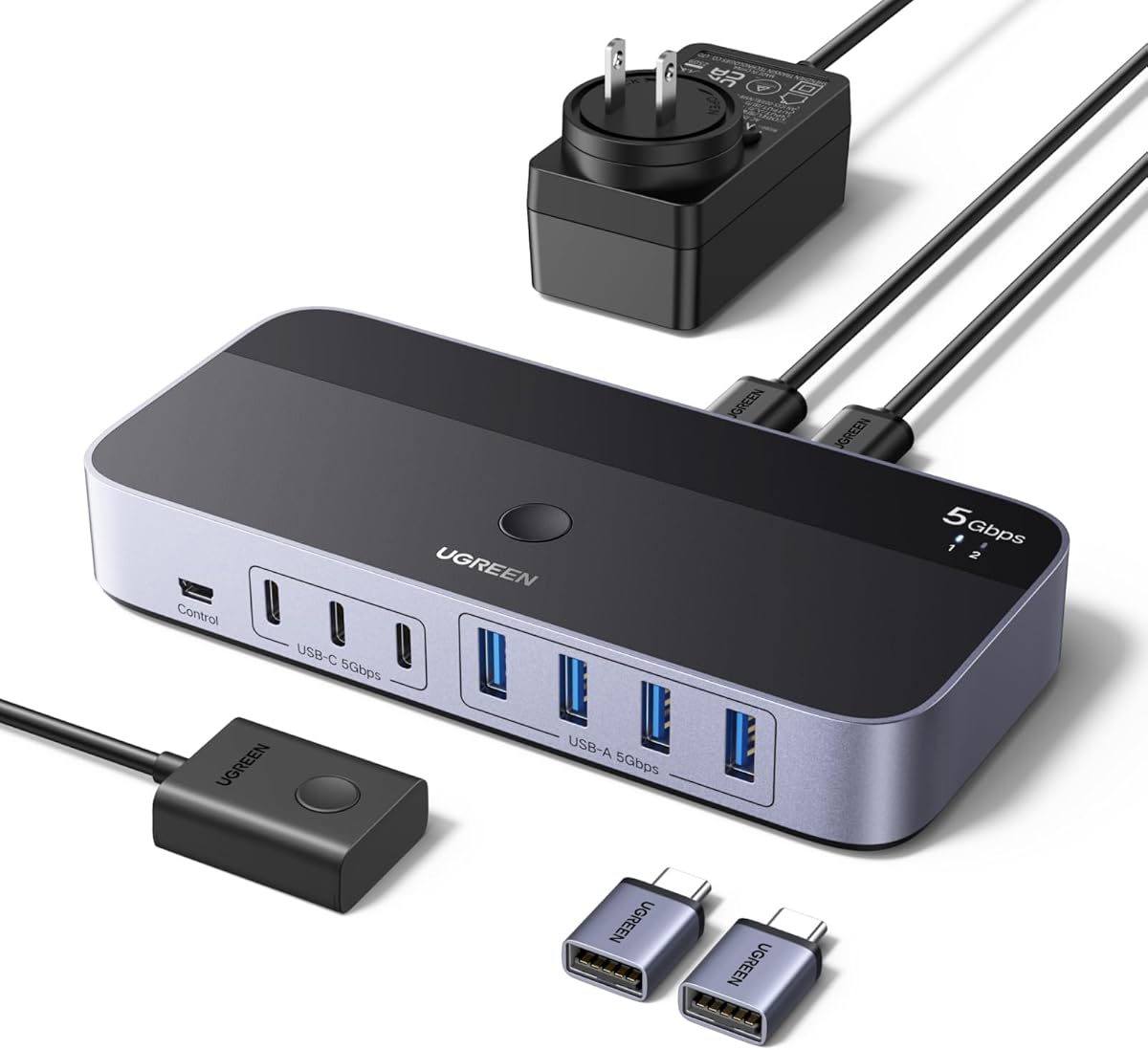

The UGREEN USB 3.0 Switch stands out as a versatile choice for sharing peripherals between two computers. With a 4.0 rating, it balances performance and flexibility effectively. Its inclusion of both USB C and A ports addresses the needs of modern laptops alongside traditional desktops.
We may earn a commission when you buy through this link, at no additional cost to you.
This switch supports data transfers up to 5Gbps, ensuring quick file moves between systems. The optional power supply port stabilizes high-power devices like external drives or headsets. Users appreciate the dual switching modes allowing either a button or a hidden controller for convenience.
While it lacks video support typical of KVM switches, it excels at peripheral sharing. The USB C port requires adapters for some inputs but remains future-proof. Potential buyers should note that charging is not recommended through these ports to avoid issues.
Ideal for professionals managing work and personal machines, this switch streamlines workflows. It is best for those needing more than two output ports. Overall, its adaptability makes it a strong recommendation for diverse dual computer setups.
Supporting both USB C and A ensures compatibility with the latest laptops and older peripherals without extra dongles.
Users can switch devices via a physical button or an external controller, keeping desks clutter-free.
We may earn a commission when you buy through this link, at no additional cost to you.
BENFEI offers a reliable USB 3.0 switch designed for easy sharing between two computers. Rated at 4.1, it emphasizes file transfer speed and stability. The 5Gbps capability ensures users spend less time waiting for data to move across devices.
We may earn a commission when you buy through this link, at no additional cost to you.
The LED indicator clearly shows which computer is active, preventing confusion during use. An extra USB power slot allows connecting high-power peripherals without overloading the PCs. This model is particularly useful for offices where printers and scanners are shared frequently.
While the warranty is generous at 18 months, the lack of a power adapter might require extra steps for some setups. Users must ensure they have the right cables for stable operation. It remains a solid choice for budget-conscious buyers needing reliability.
This switch is recommended for those prioritizing data speed and device count over video needs. It works well with Windows, Mac, and Linux systems seamlessly. Consider this if you need a straightforward solution for sharing multiple peripherals efficiently.
With 5Gbps speeds, large files move quickly between computers, saving valuable work time daily.
Customers report consistent performance with multiple devices, though power management requires attention.
We may earn a commission when you buy through this link, at no additional cost to you.
This switch delivers exceptional value for users needing a basic two-port solution. With a 4.6 rating, it is highly rated for simplicity and build quality. The aluminum shell provides better heat dissipation and longevity compared to plastic alternatives.
We may earn a commission when you buy through this link, at no additional cost to you.
It supports 5Gbps data transfers and comes ready out of the box with all necessary cables. The one-button toggle with LED feedback makes switching intuitive for all users. This model is perfect for home offices sharing just a keyboard and mouse.
The main trade-off is the lack of expansion beyond two ports, limiting flexibility. Additionally, it lacks a remote controller for users who prefer hidden switching options. Despite these limits, it remains the top choice for budget-focused setups.
Buyers looking for a no-fuss, cost-effective way to share peripherals should consider this option. It works seamlessly across Windows, macOS, and Linux without driver installs. Ideal for anyone needing a simple, reliable switch today.
This model offers premium build quality at a budget price, making high-speed switching accessible to everyone.
No software is needed as the switch works immediately after plugging in the included cables.
We may earn a commission when you buy through this link, at no additional cost to you.
UGREEN provides a solid two-port switch ideal for sharing keyboards and printers efficiently. Rated at 4.1, it focuses on stable connections and ease of use. The five-foot cables offer flexibility in positioning computers and peripherals within a workspace.
We may earn a commission when you buy through this link, at no additional cost to you.
Data transfers reach up to 5Gbps ensuring files move quickly between systems. The button switch with LED feedback helps users track active devices easily. It requires no drivers, working immediately with Windows, Mac, and Linux operating systems.
While it does not support video output, it excels at handling standard peripherals without issues. The two-port limit means it is not suitable for expanding beyond basic setups. Still, it is a trustworthy option for focused sharing needs.
This switch is recommended for users needing a straightforward USB solution without complexity. It ensures peripherals work smoothly across two computers simultaneously. Consider it for home setups or small offices sharing essential tools.
Included cables are five feet long, allowing flexible placement of the switch on your desk.
Compatible with Windows, macOS, and Linux, making it versatile for mixed environments.
We may earn a commission when you buy through this link, at no additional cost to you.
Hearvo stands out by offering full KVM capabilities with both keyboard and mouse plus video sharing. This switch supports 4K at 60Hz, ensuring crisp visuals across two computers on one monitor. It is perfect for users wanting to save space on screens.
We may earn a commission when you buy through this link, at no additional cost to you.
With four USB ports, it handles various peripherals like cameras and printers alongside input devices. The remote control allows switching without reaching behind the desk. Its adaptive EDID feature optimizes display settings automatically for smooth operation.
While more expensive, it delivers added value for video-dependent workflows. Setup involves HDMI cabling which adds complexity compared to USB-only switches. However, the reduction in hardware footprint justifies the effort for many professional users.
Choose this if you need to share a monitor in addition to peripherals. It is ideal for designers or developers needing high resolution on dual systems. The comprehensive package ensures you have everything needed for setup.
Supports 4K resolution at 60Hz, providing smooth and detailed visuals for high-demand tasks.
A wired remote switch is included, enabling easy access to switching without reaching cables.
We may earn a commission when you buy through this link, at no additional cost to you.
This model caters to users with older peripherals relying on USB 2.0 technology. Rated 4.4, it provides reliable switching for keyboards, mice, and printers. The four ports allow sharing multiple devices without needing extra hubs on your desk.
We may earn a commission when you buy through this link, at no additional cost to you.
It features a one-button swap mechanism that keeps operations simple. A micro USB power port ensures stability for devices requiring extra power. While speeds are slower than USB 3.0, they suffice for basic input tasks effectively.
The lower data rate limits file transfer efficiency compared to modern switches. However, its simplicity and compatibility make it a practical choice for specific legacy environments. Users should ensure they do not need high-speed transfers.
Ideal for home offices with older hardware, this switch prevents cable clutter. It works across Windows and macOS without software installs. Consider it if you prioritize simplicity and compatibility over raw speed.
USB 2.0 compatibility ensures older devices continue to work without requiring new hardware.
A dedicated power port helps stabilize power-demanding devices like external drives.
We may earn a commission when you buy through this link, at no additional cost to you.
UGREEN delivers a robust four-port switch designed for productivity across two computers. With a 4.3 rating, it balances speed and convenience well. The USB 3.0 technology ensures peripherals like cameras and drives perform efficiently without lag.
We may earn a commission when you buy through this link, at no additional cost to you.
An extra USB C power port enhances stability for high-demand devices during operation. The button switch offers immediate control over active systems with clear visual feedback. This model is excellent for users needing more than basic two-port options.
While it lacks video capabilities, it covers all standard USB tasks effectively. Some users might miss an included power adapter for certain setups. Still, its flexibility makes it a strong contender for versatile environments.
This switch is recommended for workstations with multiple USB devices needing sharing. It works seamlessly across modern operating systems. Consider it if you need a reliable four-port solution today.
USB 3.0 ensures 5Gbps speeds for quick data access and efficient file transfers.
Four output ports allow connecting more peripherals without cluttering computer USB ports.
We may earn a commission when you buy through this link, at no additional cost to you.
This switch provides maximum connectivity with seven output ports for two computers. Rated 4.3, it supports both USB C and A devices, eliminating the need for adapters. It is ideal for setups requiring many peripherals simultaneously.
We may earn a commission when you buy through this link, at no additional cost to you.
An included power adapter ensures stable operation for external hard drives and printers. The external controller offers discreet switching options to keep desks organized. With 5Gbps speeds, file transfers remain efficient across systems.
The price is higher than simpler models, reflecting its advanced capabilities. Setup involves managing multiple cables which may require planning. Still, for power users, this flexibility offers unmatched utility in a single device.
Buyers with complex setups will appreciate the extensive port options. It supports diverse operating systems without drivers. Consider this if you need to connect seven devices across two systems.
Seven ports accommodate mixed USB types ensuring compatibility with various modern and older devices.
An included power adapter reduces disconnects when using high-power peripherals.
We may earn a commission when you buy through this link, at no additional cost to you.
A straightforward solution for sharing input devices between two computers. Rated 4.2, it prioritizes simplicity and ease of setup. The external controller allows switching without reaching behind the computer, enhancing accessibility.
We may earn a commission when you buy through this link, at no additional cost to you.
It draws power from the computers USB ports removing the need for adapters. The two output ports limit usage to a mouse and keyboard primarily. Despite limitations, it serves small offices needing basic connectivity well.
Data speeds may not be as fast as USB 3.0 models, but are sufficient for typing. It works seamlessly across all major operating systems. Users should check port compatibility before purchasing to ensure a fit.
This switch is best for budget users needing a quick sharing solution. It reduces cable clutter effectively. Consider it for home setups where simplicity is key.
Plug and play functionality means no drivers are needed for immediate use.
An external switch allows discreet device switching without accessing the main unit.
We may earn a commission when you buy through this link, at no additional cost to you.
This switch delivers top-tier performance with 10Gbps transfer speeds for demanding users. Rated 4.3, it supports a mix of USB A and C ports effectively. It is ideal for professionals transferring large files frequently between systems.
We may earn a commission when you buy through this link, at no additional cost to you.
An included power adapter and converter ensure all devices connect smoothly without extra purchases. Seven ports provide ample room for expansion and shared peripherals. It supports multiple operating systems seamlessly without installing drivers.
The speed and port count come at a premium cost compared to standard switches. For basic typing tasks, this may be unnecessary. However, it remains unmatched for speed and connectivity in a single solution.
Ideal for power users needing fast file transfers and many devices. It reduces setup complexity with included accessories. Consider this if performance and connectivity are your top priorities.
USB 3.2 offers 10Gbps speeds, cutting file transfer times significantly compared to older models.
Adapters and power cables included reduce setup time and additional costs for users.
We may earn a commission when you buy through this link, at no additional cost to you.
Selecting the right switch involves considering port counts, data speeds, and video needs. This guide explains key factors to ensure you choose a device that meets your specific workflow requirements efficiently.
Determine how many devices you need to share between computers. Models with four or seven ports allow sharing printers and drives while two-port units focus on input. Also check if you need USB C support for modern laptops.
Choose a port count matching your current needs to avoid paying for unused capacity or lacking connectivity.
USB 3.0 switches support speeds up to 5Gbps which is crucial for file sharing. USB 2.0 options are slower but cheaper if only inputs are needed. Higher-end models offer 10Gbps for large dataset transfers.
Prioritize USB 3.0 or higher to ensure smooth file access and peripheral performance.
If you also want to share a monitor, a full KVM switch with HDMI or DisplayPort is required. Standard USB switches handle data only and do not transmit video signals. Check specifications to distinguish between USB and KVM.
Buy a KVM model if reducing monitor count is part of your setup goal.
Buttons on the device are simple but may clutter desks. Remote controllers allow discreet switching away from the box. Some models offer automatic switching based on active USB signals for convenience.
Select a switching method that aligns with your workspace organization preferences.
High-power devices like external hard drives may need extra power from the switch. Some units have dedicated power ports requiring an adapter. Others draw power from the host PC which may limit stability.
Check if a power adapter is included if you plan to connect demanding peripherals.
Ensure the switch works with your operating systems like Windows, macOS, or Linux. Most modern switches are plug-and-play without drivers, but older models may need setup. Verify compatibility before purchase to avoid issues.
Stick with driver-free models for the smoothest experience across different systems.
Metal casings dissipate heat better than plastic ones during extended use. Look for sturdy construction to ensure longevity with frequent switching. Durability often correlates with better signal stability and fewer connection errors.
Invest in a unit with solid build materials for reliable long-term performance.
Budget models cover basic sharing while premium units offer high speeds and extra ports. Assess your actual needs to avoid overspending on unused features. Balance cost with the features you truly require for daily work.
Choose a model that offers the best value for your specific usage scenario.
To set up, connect the switch to both computers using the provided USB cables. Ensure the power adapter is plugged in if your model requires it. Then connect your peripherals like keyboard and mouse to the switch ports.
Switch between computers by pressing the button on the switch or using the remote. Use the LED indicator to confirm which computer is active. Wait for peripherals to initialize before typing or using the mouse.
Care for the switch by keeping it in a well-ventilated area to prevent overheating. Regularly check cable connections for damage and replace as needed. Avoid touching USB ports with wet hands to prevent electrical shorts.
Most USB switches do not support video output. To share a monitor, you need a KVM switch with HDMI or DisplayPort inputs. Always check the product description to see if video is supported before purchasing.
No, most switches are plug-and-play compatible with modern operating systems. Drivers are typically not required as the hardware works immediately upon connection. However, check the manual for any specific OS requirements.
If the switch supports USB C, connect directly. Otherwise, you may need an adapter. Some switches include adapters, but others require separate purchases. Verify port types before connecting to avoid compatibility issues.
It depends on the model and devices connected. Some switches draw power from the computer while others need an adapter for high-power devices. Check the product specs and include power if using external hard drives.
Yes, most switches are compatible with both macOS and Windows without configuration. Switching allows access to peripherals on either system instantly. Ensure the drivers-free feature is supported for your OS versions.
USB 3.0 switches support 5Gbps which is standard speed. If you use USB 2.0 switches, speeds will be lower. Always match the switch speed to your fastest peripherals for optimal performance.
Yes, these switches work with laptops and desktops equally well. Just ensure the laptop has USB ports to connect the switch. This setup is ideal for sharing peripherals between mobile and stationary machines.
The top picks cover a wide range of needs from budget-friendly two-port options to advanced KVM solutions. Each model offers unique benefits depending on your specific setup. Selecting the right one can streamline your workflow significantly.
Prioritize port count and data speed based on your daily tasks. If video sharing is needed, a KVM switch is essential. For simple input sharing, standard USB switches provide better value.
Remember to check current prices and availability before buying as offers may change. Verify compatibility with your devices to ensure a smooth installation. With the right switch, managing multiple computers becomes effortless and efficient.