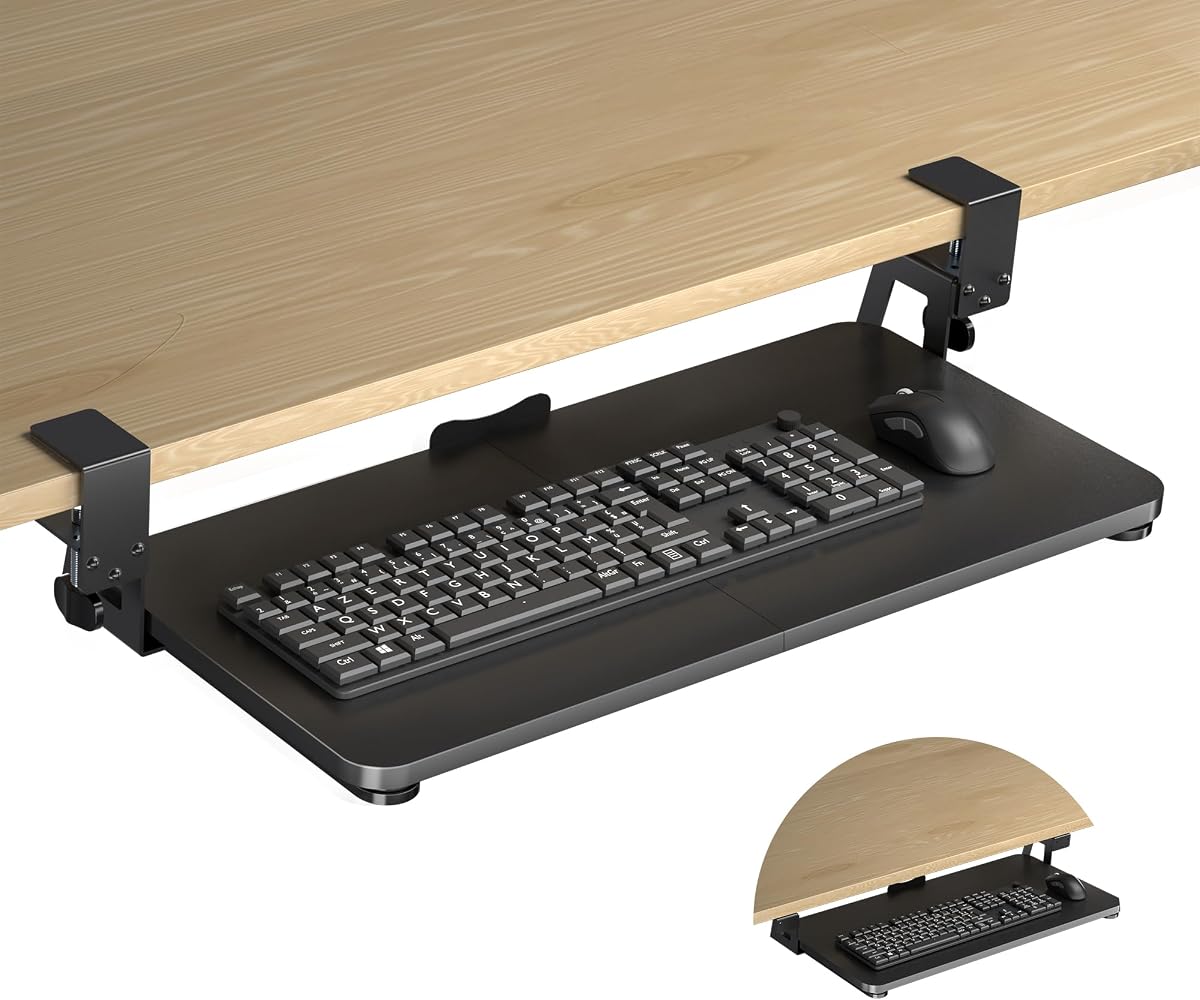
XINLEI Keyboard Tray Under Desk
4.4Editor score
Affordable price point
Large C-clamp design
Smooth sliding rails
Finding the right keyboard tray for your standing desk is essential for maintaining proper posture and reducing strain during long work sessions. A well-designed tray allows you to position your input devices at the ideal height and angle, promoting comfort and productivity throughout the day.
We have carefully evaluated ten leading keyboard trays based on their build quality, adjustability, ease of installation, and compatibility with various desk types. Our analysis focuses on real-world performance metrics and user feedback to ensure you receive reliable recommendations for your specific workspace needs.
Each selection in this guide highlights unique features and potential trade-offs to help you make an informed decision. Please note that product availability and pricing may fluctuate, so we recommend verifying current details before finalizing your purchase to ensure you get the best value.
4.4Editor score

4.4Editor score

4.2Editor score
As an Amazon Associate we earn from qualifying purchases.
The following table provides a side-by-side comparison of the top ten keyboard trays, highlighting key specifications and unique features to help you quickly identify the best option for your standing desk setup.
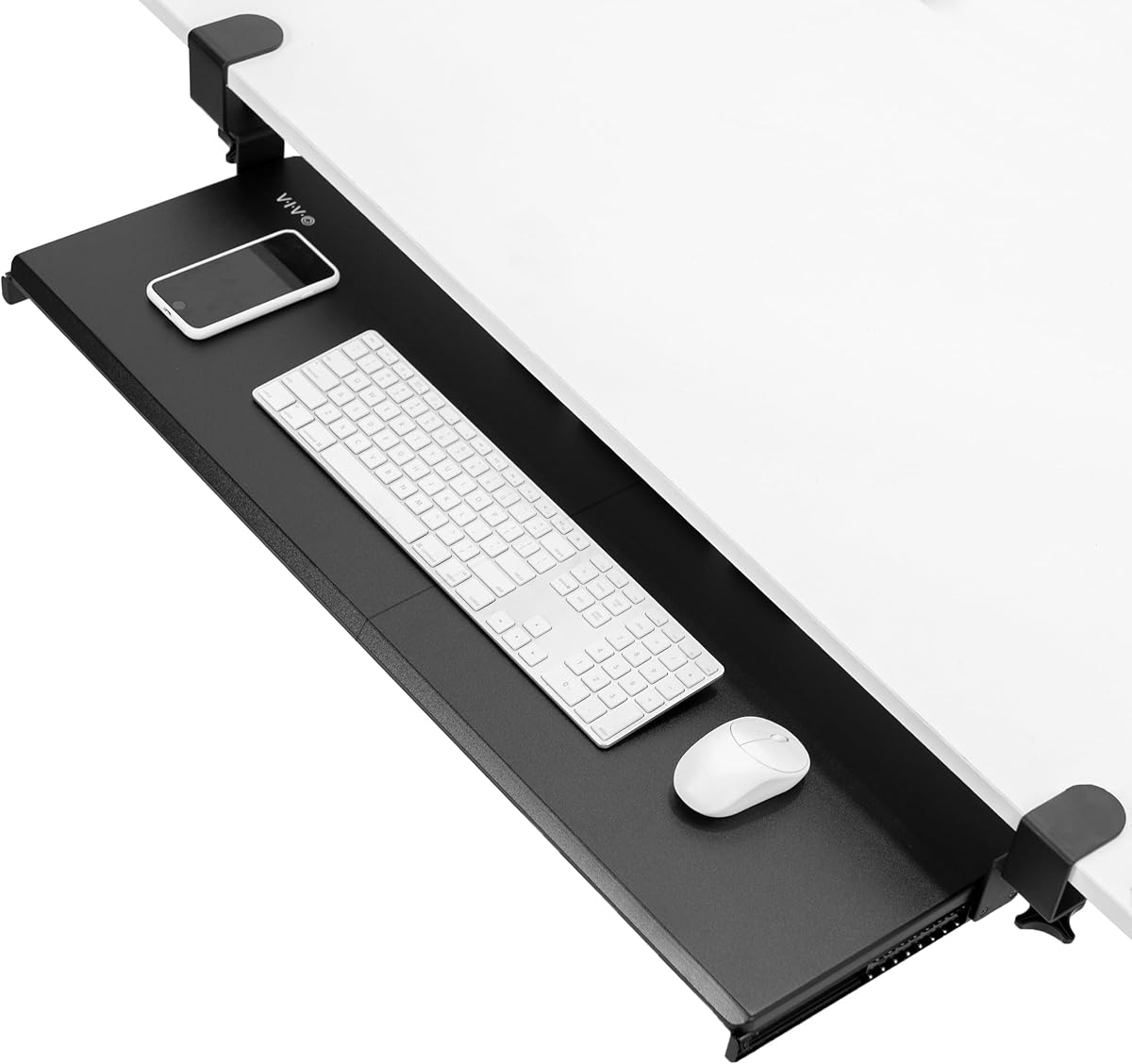


The Mount-It! Standing Keyboard Tray stands out as a top contender for those seeking exceptional versatility in height adjustment. With a range extending from 1.7 inches to 15.6 inches, it accommodates both seated and standing positions effortlessly. The product boasts a robust 4.4 rating, reflecting user satisfaction with its build quality and ergonomic benefits.
We may earn a commission when you buy through this link, at no additional cost to you.
One of its most impressive features is the scissor-lift mechanism that ensures smooth transitions across the full height range. This design allows users to find their optimal typing height without compromising stability. Additionally, the tray supports up to 11 lbs, making it suitable for full-size keyboards and mice or even larger laptops.
While the price is higher than some alternatives, the lifetime manufacturer warranty and US-based product support provide significant long-term value. The lack of required assembly is another major plus, saving users time and effort upon delivery. However, ensure your desk has enough clearance to accommodate the full extension.
This tray is ideal for professionals who frequently switch between sitting and standing throughout the workday. Its ability to position input devices at eye level and elbow height reduces strain on wrists and shoulders. For those prioritizing ergonomic flexibility and durability, this model is a highly recommended choice.
The wide adjustment range ensures comfort for users of various heights and seating preferences.
Arrives ready to use right out of the box, saving valuable setup time.
We may earn a commission when you buy through this link, at no additional cost to you.
The XINLEI Keyboard Tray offers an excellent balance of affordability and functionality for budget-conscious buyers. It features a spacious 25.6 by 11.8 inch platform that comfortably holds most keyboard and mouse combinations. Users appreciate its smooth sliding mechanism and sturdy construction that maintains stability during active typing sessions.
We may earn a commission when you buy through this link, at no additional cost to you.
A key advantage of this model is its dual installation options, allowing for both C-clamp and screw mounting methods. This flexibility makes it compatible with a wider range of desk thicknesses and materials. The high-quality metal sliding rails ensure silent operation, which is crucial for quiet office environments or home offices.
While it lacks some premium features found in more expensive models, its performance and reliability make it a standout value. The back baffle design prevents the keyboard from falling off, adding an extra layer of safety and usability. However, verify your desk thickness does not exceed the limit for clamp installation.
This tray is perfect for individuals seeking a cost-effective ergonomic upgrade without compromising on essential features. It frees up valuable desktop space while promoting better posture through under-desk positioning. For those on a tight budget, this model delivers significant ergonomic benefits at a fraction of the cost.
Choose between clamp or screw mounting to suit your specific desk type.
Metal sliding rails ensure quiet and effortless movement for distraction-free work.
We may earn a commission when you buy through this link, at no additional cost to you.
The Klearlook Upgraded Adjustable Keyboard Tray offers a comprehensive solution for users seeking maximum flexibility and advanced ergonomic features. It allows for both above-desk and under-desk installation, adapting to diverse workspace needs and personal preferences. The design includes a built-in drawer and phone slot to keep your area organized and clutter-free.
We may earn a commission when you buy through this link, at no additional cost to you.
One of its standout capabilities is the extensive range of motion, including 360-degree horizontal rotation and significant vertical arm adjustment. This allows you to position your keyboard and mouse precisely where needed, reducing strain on your neck, wrists, and shoulders. The included wrist rest and mouse pad further enhance comfort during extended use.
Despite its premium features, the complexity of installation may be a consideration for some users. The assembly process involves multiple adjustments to ensure proper positioning and stability. However, the durability and robust construction justify the investment for those who value long-term ergonomic support and organizational tools.
This model is ideal for power users or professionals who require a highly customizable workstation setup. The combination of storage, adjustability, and ergonomic support makes it a versatile addition to home offices or gaming stations. For those seeking a premium all-in-one solution, this tray delivers exceptional functionality.
Integrated drawers and slots keep your workspace tidy and efficient.
Rotate and tilt freely to find the most comfortable typing angle.
We may earn a commission when you buy through this link, at no additional cost to you.
The VIVO Black Extra Large Clamp-on Keyboard Tray is designed for users who need ample space for their input devices. Its 34 by 11-inch surface comfortably accommodates full-size keyboards, mice, and additional accessories. The tray is built to hold up to 11 lbs, ensuring stability even during heavy typing sessions.
We may earn a commission when you buy through this link, at no additional cost to you.
Installation is straightforward thanks to the solid C-clamps that secure the tray tightly without damaging the desk surface. The adjustable clamps allow for quick setup and easy repositioning if needed. The smooth sliding mechanism enables effortless extension and retraction, enhancing accessibility and workspace flexibility.
While the large size provides significant utility, it requires a desk with sufficient width and thickness. Ensure your desk thickness does not exceed 1.25 inches for optimal clamp compatibility. Additionally, beveled edges may prevent secure attachment, so verify your desk's edge profile before purchasing.
This tray is perfect for gamers or professionals using oversized keyboards or multiple peripherals. Its generous surface area allows for a comfortable layout without crowding the desk. For those needing extra room for their setup, this model offers a reliable and spacious ergonomic solution.
Extra wide surface accommodates large keyboards and accessories with ease.
Solid C-clamps provide a stable base without requiring drilling or permanent modification.
We may earn a commission when you buy through this link, at no additional cost to you.
The HUANUO Under Desk Keyboard Tray is uniquely designed to fit both flat-bottom desks and those with cross beams, such as electric standing desks. This versatility makes it an excellent choice for modern office setups where standard trays might not fit. The included brackets allow for secure installation on beams up to 2 inches in height.
We may earn a commission when you buy through this link, at no additional cost to you.
Equipped with a high-quality metal roller track system, this tray ensures smooth and durable sliding even after thousands of cycles. The advanced technology behind the mechanism enhances usability and longevity, making it suitable for frequent use. Additionally, the 6.3-inch height adjustment supports both seated and standing typing positions.
Before purchasing, it is crucial to verify your desk dimensions, particularly depth and thickness, to ensure compatibility. The tray requires at least 17 inches of desktop depth and specific screw clearance for optimal installation. Users should also ensure enough under-desk width for full swivel if required.
This model is ideal for those with standing desks that feature cross beams underneath. Its ability to adapt to different desk structures without compromising stability is a major advantage. For users seeking a durable and highly adjustable option for complex desk setups, this tray offers significant value.
Specially designed brackets allow secure mounting on desks with cross beams.
High-quality tracks ensure silent and durable performance over time.
We may earn a commission when you buy through this link, at no additional cost to you.
The VIVO Black Clamp-on Adjustable Keyboard Tray offers flexibility with its width and height adjustment capabilities. The tray can be set between 23 to 30 inches wide, adapting to different desk sizes and user preferences. The split design allows for separate placement of keyboard and mouse pads, enhancing ergonomic positioning.
We may earn a commission when you buy through this link, at no additional cost to you.
With 2.4 inches of height adjustment across five set points, users can customize the tray to their specific ergonomic needs. This flexibility helps in reducing wrist and shoulder strain during extended typing sessions. The sturdy C-clamps ensure the tray remains secure without damaging the desk surface.
However, the split tray design might not be suitable for those who prefer a continuous surface for their input devices. Additionally, ensure your desk does not have beveled edges, as this can interfere with clamp installation. Verify thickness compatibility before purchasing to ensure a secure fit.
This tray is perfect for users who require adjustable width and height to suit their unique setup. The included wrist pad and mouse rest add value and comfort to the package. For those seeking a customizable ergonomic solution, this model provides excellent versatility and support.
Customize width and height to match your specific desk and ergonomic needs.
Separate keyboard and mouse pads for better ergonomic positioning and comfort.
We may earn a commission when you buy through this link, at no additional cost to you.
The BONTEC Under Desk Keyboard Tray provides a straightforward solution for ergonomic positioning without the need for drilling. It features a spacious 25.6 by 11.8 inch platform that supports keyboards and mice effectively. The no-drill installation with sturdy C-clamps makes it ideal for renters or those who wish to avoid permanent modifications.
We may earn a commission when you buy through this link, at no additional cost to you.
Protective pads are included to prevent scratches and improve grip on the desk surface. This attention to detail ensures that the installation process is clean and safe for your furniture. The tray supports up to 11 lbs, providing stable support during active use without wobbling.
Before ordering, measure your desk dimensions carefully to ensure the required width and depth are available. The tray requires at least 31.3 inches of width and 11.8 inches of depth underneath for smooth operation. Ensure your desk has a flat, unobstructed underside for clamp installation.
This model is ideal for users seeking a quick and damage-free setup for their standing desk. Its simplicity and reliability make it a great choice for home offices or shared workspaces. For those who prioritize ease of installation and preservation of desk surfaces, this tray is highly recommended.
Install quickly without damaging your desk, perfect for renters and temporary setups.
Protective pads prevent scratches and ensure a secure grip on your desk.
We may earn a commission when you buy through this link, at no additional cost to you.
The VIVO Black Under Desk Keyboard Tray offers full side-to-side rotation for enhanced flexibility in positioning your input devices. This feature allows you to easily switch between typing and other tasks without removing the tray. The 5-inch height adjustment helps in achieving a comfortable ergonomic posture for various seated positions.
We may earn a commission when you buy through this link, at no additional cost to you.
Comfort is enhanced with supportive rubber padding on the tray surface, reducing pressure on your wrists. The deluxe universal design fits most standard keyboards and mice, making it a versatile choice for different setups. Simple assembly process ensures you can start using it quickly after delivery.
For height-adjustable desks, a spacer bracket may be required to fit the track over the frame crossbar. This additional accessory is not included and must be purchased separately. Verify your desk's thickness meets the minimum requirement for secure installation.
This tray is perfect for users who need to frequently adjust the position of their keyboard and mouse. The combination of rotation and height adjustment provides a high degree of ergonomic flexibility. For those seeking a simple yet effective solution, this model delivers reliable performance and comfort.
Rotate freely to switch between typing and other desk tasks easily.
Rubber padding on the tray surface reduces wrist pressure during long sessions.
We may earn a commission when you buy through this link, at no additional cost to you.
The HUANUO Under Desk Keyboard Tray features a 360-degree adjustable mouse platform for maximum flexibility during use. This allows users to rotate the tray to any angle needed for comfortable typing or gaming. The full motion under-desk computer keyboard platform tilts up and down for improved working comfort.
We may earn a commission when you buy through this link, at no additional cost to you.
With 6.3 inches of height adjustment, this tray supports both sitting and standing positions for better ergonomics. The space-saving design ensures the tray disappears under the desk when not in use, freeing up valuable desktop space. An included wrist rest provides added comfort during extended typing sessions.
Installation requires sufficient clearance under the desk, so verify your desk dimensions before purchase. Ensure there are no legs or obstacles on either side of the desk to allow for smooth rotation. The assembly process involves tightening knobs to secure the tray in position.
This model is ideal for users who require extensive mobility for their keyboard and mouse setup. The ability to rotate and tilt freely enhances productivity and reduces physical strain. For those seeking a versatile and space-saving ergonomic solution, this tray offers significant benefits.
Rotate and tilt freely to achieve the most comfortable typing angle.
Slide the tray under the desk to maximize desktop workspace when not needed.
We may earn a commission when you buy through this link, at no additional cost to you.
The Mount-It! Keyboard Tray Under Desk stands out for its ability to fit thicker desks, accommodating up to 1.77 inches in thickness. With a 30-inch wide surface, it provides ample space for full-size keyboards and mice without crowding. The no-drill installation ensures a damage-free setup suitable for various desk types.
We may earn a commission when you buy through this link, at no additional cost to you.
Premium steel gliding rails deliver quiet and wobble-free pull-out action even during heavy typing sessions. The tray extends fully and stays locked in position, preventing any creeping or drifting while in use. A lifetime warranty and US-based support add significant value to this investment.
While the rating is lower than some competitors, its unique ability to handle thicker desks and wider surfaces fills a specific niche. Ensure your desk has at least 12 inches of clearance underneath for secure mounting. Verify that your desk does not have beveled edges or crossbars.
This model is ideal for users with thicker or more robust desks that standard trays cannot accommodate. The extra width provides comfort for those who need more room for their peripherals. For those seeking a durable and wide ergonomic solution, this tray is a strong contender.
Designed to securely fit desks up to 1.77 inches thick.
30-inch tray accommodates full-size keyboards with room to spare.
We may earn a commission when you buy through this link, at no additional cost to you.
Selecting the right keyboard tray involves considering various factors that impact ergonomics and functionality. This guide outlines the key aspects to evaluate to ensure you find a model that suits your specific standing desk and needs.
Ensure the tray fits your desk dimensions, including thickness, width, and depth. Check for any obstructions like crossbars or beveled edges that might hinder installation. Verify the clamping mechanism works with your desk material and structure to guarantee stability.
Always measure your desk carefully before purchasing to avoid compatibility issues and ensure a secure fit.
Choose a tray with enough surface area to accommodate your keyboard and mouse comfortably. Consider if you need space for additional accessories or larger peripherals. A spacious tray allows for better organization and reduces clutter on your desktop.
Opt for a size that matches your input devices to prevent crowding and enhance comfort.
Look for trays offering height and angle adjustments to suit your ergonomic needs. Adjustable trays allow you to switch between seated and standing positions easily. The ability to tilt or swivel can reduce strain on your wrists and shoulders.
Prioritize models with multiple adjustment points to achieve the optimal typing position.
Decide between clamp-on or screw-in installation based on your preferences. Clamp-on options are damage-free and reversible, while screw-in may provide more stability. Ensure you have the necessary tools and space for the installation method you choose.
Select an installation type that balances ease of setup with long-term stability.
Check the build quality and materials used for the tray and sliding mechanism. Metal rails and sturdy frames ensure longevity and smooth operation over time. Read user reviews to gauge real-world performance and durability.
Invest in a model with high-quality materials to ensure it withstands daily use.
Ensure the tray can support the weight of your keyboard, mouse, and any additional accessories. Standard trays usually support up to 11 lbs, but heavier setups may require more robust models. Overloading a tray can lead to instability or damage.
Verify the weight limits match your equipment to maintain stability and safety.
Consider the warranty coverage and customer support offered by the manufacturer. A longer warranty indicates confidence in the product's durability and provides peace of mind. US-based support can be helpful for troubleshooting installation or usage issues.
Choose a product with reliable warranty terms to protect your investment.
Look for added features like wrist rests, storage drawers, or built-in headphone hangers. These extras can enhance comfort and organization within your workspace. Prioritize features that align with your specific workflow and ergonomic needs.
Select a tray with useful add-ons to maximize comfort and productivity.
Start by installing the tray according to the manufacturer's instructions, ensuring all clamps or screws are tightened securely. Position the tray at a comfortable height where your elbows are at a 90-degree angle while typing. Adjust the angle to keep your wrists straight and supported.
Regularly clean the tray surface and sliding rails with a soft, dry cloth to remove dust and debris. Lubricate the sliding rails occasionally if you notice any resistance or noise during movement. This maintenance ensures smooth operation and prolongs the life of the tray.
Periodically check the clamps or screws to ensure they remain tight and secure. Over time, vibrations from typing may cause fasteners to loosen, so a quick check every few months is recommended. Adjust the height or angle as needed when you change your sitting or standing posture.
Yes, you can install a keyboard tray on a standing desk, but you must ensure compatibility with the desk's structure. Check if the desk has crossbars or specific thickness limits that might affect clamp installation. Some models offer adapters or specific designs for standing desks to ensure stability.
A keyboard tray can significantly help with wrist pain by allowing you to position your hands at the optimal ergonomic angle. Proper height and angle adjustments reduce strain on your wrists and shoulders, promoting better posture. Consistent use of an ergonomic tray can alleviate discomfort over time.
The ideal height for a keyboard tray is where your elbows are at a 90-degree angle and your wrists are straight while typing. This position minimizes strain and promotes a neutral posture. Adjust the tray so your hands are slightly below elbow level when standing or sitting.
No, many keyboard trays are designed for no-drill installation using sturdy C-clamps or brackets. These systems secure the tray without damaging your desk surface. Always verify your desk thickness and structure to ensure the clamp method works effectively for your setup.
A typical keyboard tray can hold up to 11 lbs, which is sufficient for most standard keyboards and mice. However, some models are designed to support heavier peripherals. Check the weight capacity specifications before purchasing if you have bulky equipment.
Most keyboard trays work with wood, plywood, and particle board desks. However, some models may not be compatible with glass, metal, or beveled edges. Always check the compatibility details provided by the manufacturer to ensure it works with your desk material.
Choosing the right keyboard tray can transform your workstation by improving ergonomics and saving valuable desk space. The Mount-It! Standing Keyboard Tray leads with exceptional adjustability and warranty, while the XINLEI offers great value for budget-conscious buyers. For premium features, the Klearlook tray provides unmatched versatility.
When selecting a model, prioritize factors like desk compatibility, adjustability, and build quality to ensure long-term satisfaction. Consider your specific needs such as weight capacity or additional features like storage. Balancing these elements will help you find the perfect fit for your standing desk.
Please remember that prices and availability can change frequently, so verify current details before purchasing. We recommend checking user reviews and manufacturer specifications to confirm the best option for your setup. With the right keyboard tray, you can enjoy a more comfortable and productive work experience.