
Redragon K512 RGB Membrane Gaming Keyboard, 6 Macro Keys & Easy Media Wheel
4.5Editor score
No software required macros
26 anti-ghosting keys
Detachable wrist rest
This guide compares the best keyboards with macro keys for gaming and productivity, reviewing ten top models based on features, build quality, and user ratings.
Finding the right keyboard can transform your workflow or gaming setup significantly. Keyboards with macro keys allow you to automate complex sequences with a single press. This feature is essential for gamers who need quick access to combos and professionals seeking efficiency.
We evaluated ten distinct models ranging from budget-friendly membrane options to high-end mechanical switches. Our analysis focuses on macro functionality, build durability, customization software, and overall typing experience. Each product was selected based on user feedback and feature sets.
Each pick below highlights specific strengths to help you match a keyboard to your needs. Whether you want onboard recording or deep software integration, these options cover the spectrum. Keep in mind that availability and stock levels may vary by region over time.
4.5Editor score

4.1Editor score
4.3Editor score
This table provides a side-by-side overview of the top ten keyboards featuring macro capabilities. It summarizes key specifications like switch type, connectivity, and special features to help you compare options quickly.


The VSD K1 Pro stands out as a versatile option combining a mechanical keyboard with a streaming deck. It received strong user feedback for its ability to record macros directly on the board without needing external tools. The integrated LCD keys provide a unique way to visualize and control complex workflows.
We may earn a commission when you buy through this link, at no additional cost to you.
Its hot-swappable design allows you to change switches easily, which is great for customizing the feel. The gasket mount and sound-dampening foam offer a premium typing experience that reduces noise and vibration. Additionally, the TFT display allows real-time updates and GIF customization via software.
While the keyboard offers extensive features, you will need to install the VSD Craf software to unlock the full potential of the LCD keys and date-time calibration. This dependency might be a slight drawback for users who prefer plug-and-play simplicity for visual customization tasks.
This keyboard is ideal for streamers and power users who want to consolidate their desk setup. If you need a device that handles gaming macros and media control with visual feedback, the K1 Pro offers a compelling blend of performance and utility.
The built-in LCD keys let you assign actions and visualize them with animations for easier workflow management.
Advanced dampening and gasket mount deliver a softer, more stable feel during long gaming or typing sessions.
We may earn a commission when you buy through this link, at no additional cost to you.
The Redragon K512 is a fantastic choice for those seeking an affordable keyboard with macro capabilities. It allows you to record and reassign keys on the fly, making it perfect for gamers who want quick access to combos without driver installation.
We may earn a commission when you buy through this link, at no additional cost to you.
Its membrane design provides a quiet typing experience, and the dedicated media wheel adds convenience for volume control. The 26 anti-ghosting keys ensure that your inputs are registered accurately even during intense gaming moments. The detachable magnetic wrist rest offers extra comfort.
One trade-off is that it uses membrane switches rather than mechanical ones, which might feel less responsive to enthusiasts. However, for casual gamers and general use, it offers excellent value. The RGB lighting adds a nice aesthetic touch without compromising usability.
If you are on a tight budget but still need reliable macro functionality, the K512 is a top contender. It delivers essential features like media control and anti-ghosting while keeping the setup simple and effective for everyday tasks.
You can record macros directly on the keyboard using the G keys without needing to install any drivers or apps.
The included wrist rest and dedicated media wheel help reduce strain and streamline your media playback experience.
We may earn a commission when you buy through this link, at no additional cost to you.
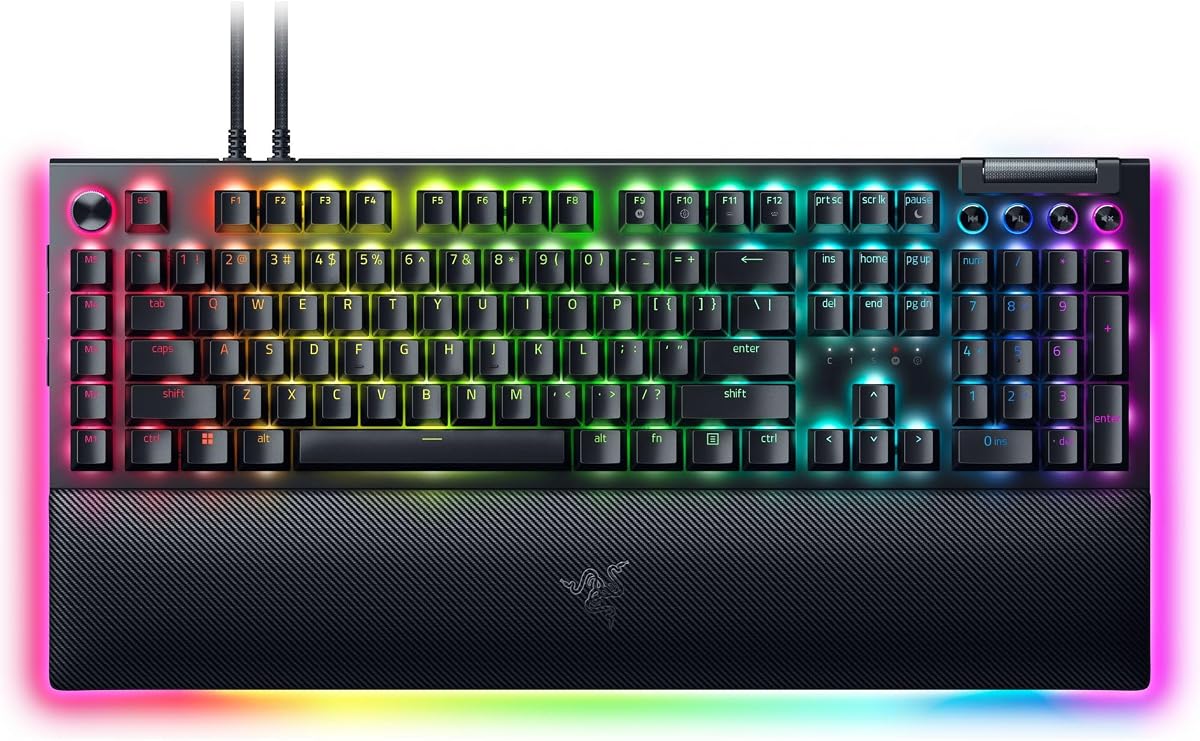
The Razer BlackWidow V4 Pro offers a premium experience with advanced macro capabilities and visual flair. It includes eight macro keys and a command dial, giving you extensive control over shortcuts and settings. The tactile Green switches provide satisfying feedback for typing and gaming.
We may earn a commission when you buy through this link, at no additional cost to you.
Its immersive underglow and Chroma RGB lighting sync with your battlestation, creating a stunning visual setup. The magnetic plush leatherette wrist rest is designed for long sessions, ensuring comfort and stability. Doubleshot ABS keycaps ensure durability and legibility over time.
While it excels in features, the price is higher than other options, and maximizing its potential requires using the Razer Synapse software. If you are deeply invested in the Razer ecosystem or want the best build quality, this is a strong choice.
For users who demand top-tier materials and advanced programmability, the V4 Pro is an excellent investment. It balances performance with luxury features like the command dial and underglow to elevate your desk setup.
The programmable command dial and eight macro keys allow for deep customization of complex workflows and game actions.
Underglow and per-key lighting create a vibrant environment that enhances the gaming and typing experience.
We may earn a commission when you buy through this link, at no additional cost to you.
The Corsair K55 RGB PRO is a practical keyboard designed for durability and ease of use. It features six macro keys that work with iCUE software or Elgato Stream Deck software for streamlined control. The IP42 rating protects against spills, making it suitable for messy environments.
We may earn a commission when you buy through this link, at no additional cost to you.
Its RGB lighting zones add a vibrant look to your desk, and the dedicated media keys ensure you can adjust volume without interruption. The detachable palm rest helps maintain comfort during extended use. The membrane switches provide a quiet and smooth typing experience.
One limitation is that it relies on a membrane design which might not offer the tactile feedback some gamers prefer. However, the spill resistance is a significant advantage for those who drink at their desk. It is a solid choice for reliability and basic macro needs.
If you need a durable keyboard that can withstand accidental spills while still offering macro functionality, the K55 is a great pick. It combines essential features like RGB and media controls with a robust build to handle daily wear.
The IP42 rating ensures that accidental spills will not damage the internal components, prolonging the keyboard lifespan.
Dedicated macro keys allow you to activate shortcuts or functions easily using iCUE or Stream Deck software.
We may earn a commission when you buy through this link, at no additional cost to you.
The Redragon K580 offers a unique mix of budget-friendly pricing and hot-swappable functionality. You can record combos directly on the fly using five dedicated macro keys. The quiet tactile Brown switches provide a gentle bump without the loud noise of clicky options.
We may earn a commission when you buy through this link, at no additional cost to you.
Hot-swapping allows you to change switches easily if you want to modify the feel. The double-shot keycaps ensure that legends won't fade over years of use. Full anti-ghosting ensures accurate input for fast-paced games. The media wheel adds utility for volume adjustments.
While it lacks advanced visual features like per-key RGB, its focus on core functionality is refreshing. The ability to swap switches makes it a great starting point for beginners interested in custom keyboards. It balances cost and performance effectively.
For users who want mechanical quality and customization without breaking the bank, the K580 is an excellent choice. It delivers reliable macro recording and a durable build that stands up to heavy daily use.
The upgraded socket accepts most switches allowing you to swap them without soldering for a personalized feel.
Double-shot keycaps and a rating for 50 million keystrokes ensure long-term reliability and fade resistance.
We may earn a commission when you buy through this link, at no additional cost to you.
The Redragon K550 provides extensive macro capabilities with twelve onboard G keys that are programmable on the fly. The aluminum top plate adds a premium feel and stability to the board. Custom purple switches offer a strong tactile feedback suitable for gaming.
We may earn a commission when you buy through this link, at no additional cost to you.
Extra USB pass-through lets you connect a mouse or other peripherals directly to the keyboard, keeping your desk organized. The dedicated media controls help manage audio without interrupting gameplay. RGB lighting adds a dynamic look to your setup.
While the keyboard offers many features, it is bulkier than compact options. Some users may find the weight an asset for stability but a challenge for portability. The purple switches can be loud, which might not suit quiet environments.
If you need a feature-rich keyboard with a high number of macro keys at a reasonable price, the K550 is a strong contender. It is designed for gamers who want a comprehensive tool for productivity and gameplay.
The solid aluminum top plate provides a premium look and steady presence on your desk during use.
A built-in USB pass-through port allows for convenient device connection without reaching for your PC.
We may earn a commission when you buy through this link, at no additional cost to you.
The Razer BlackWidow V4 X offers a balanced experience with six dedicated macro keys and fast linear switches. The Yellow switches are designed for rapid-fire inputs with minimal noise. Chroma RGB per-key lighting allows deep customization of your setup's aesthetic.
We may earn a commission when you buy through this link, at no additional cost to you.
A multi-function roller adds convenience for adjusting volume and brightness on the fly. Doubleshot ABS keycaps ensure the labeling remains clear even after years of use. The acoustic foam improves the sound of keystrokes for a more satisfying feel.
While it lacks the command dial of the Pro model, it provides essential macro tools at a lower cost. The linear switches are great for gaming but may take time to adjust to for typists used to tactile feedback. Software is needed for full customization.
If you want a reliable mid-range keyboard with robust macro support and Razer software integration, the V4 X is a smart buy. It delivers performance and style for both gaming and productivity tasks.
Per-key lighting with 16.8 million colors allows for deep customization to match your setup or game.
Yellow switches provide rapid inputs with zero reset distance, ideal for fast-paced gaming scenarios.
We may earn a commission when you buy through this link, at no additional cost to you.
The Redragon K618 PRO is designed for users who need wireless flexibility with extensive macro support. It features twenty on-the-fly macro keys that allow you to record combos instantly. The tri-mode connectivity switches between Bluetooth, 2.4GHz, and USB-C seamlessly.
We may earn a commission when you buy through this link, at no additional cost to you.
The low-profile design reduces travel distance for faster actuation and lighter typing. You can toggle between Windows and Mac systems instantly with a dedicated switch. The media scroll wheel helps you adjust volume and track skipping easily.
Wireless connectivity is great for reducing cable clutter but introduces battery dependency. While it works without software for macros, deeper customization requires the Pro software. The low-profile switches may not appeal to fans of tall mechanical keyboards.
If you need a wireless keyboard that can handle multiple devices and extensive macros, the K618 PRO is a great solution. It combines portability with essential gaming features for a versatile setup.
Switch between USB-C, Bluetooth, and 2.4GHz wireless to jump between devices without re-pairing.
Toggle instantly between operating systems with one touch for streamlined use across different computers.
We may earn a commission when you buy through this link, at no additional cost to you.
The Logitech G213 Prodigy is a full-sized keyboard designed for comfort and control. It offers five customizable lighting zones that can sync with other Logitech devices. The integrated palm rest helps reduce wrist strain during long sessions.
We may earn a commission when you buy through this link, at no additional cost to you.
Dedicated media controls let you play or pause music without interrupting your game. The anti-ghosting gaming matrix ensures that every keypress is registered accurately. It is built to repel liquids and dirt for easy cleanup after spills.
While it offers comfort and media controls, it relies on software for macro programming rather than onboard recording. The rubber dome feel is less tactile than mechanical switches. However, it is a reliable choice for casual users.
If you prefer a keyboard with a built-in rest and solid media controls, the G213 is a great option. It balances performance with comfort features that help maintain usability during long periods of use.
The integrated palm rest ensures hands are supported to reduce fatigue during long gaming sessions.
Five lighting zones can sync with other Logitech G devices for a unified aesthetic across your setup.
We may earn a commission when you buy through this link, at no additional cost to you.
The Razer BlackWidow V4 combines performance with premium features like a magnetic plush leatherette wrist rest. It includes six macro keys and a multi-function roller for control. The yellow linear switches offer fast and quiet inputs ideal for gaming.
We may earn a commission when you buy through this link, at no additional cost to you.
Two-side underglow and per-key lighting enhance immersion when paired with integrated games. The doubleshot ABS keycaps provide durability. The magnetic rest ensures it stays secure during intense gameplay. This model is a step up from the X version with better build quality.
While it is more expensive, the underglow and plush rest add significant value. You will need Synapse software to fully customize macros and lighting. It is designed for those who want a premium experience with deep integration.
For users seeking a high-end mechanical keyboard with comfort and macro utility, the V4 is a top recommendation. It balances style and function to create a comprehensive tool for serious gamers.
Magnetic wrist rest and doubleshot keycaps ensure long-lasting durability and comfort for users.
Underglow and per-key lighting sync with integrated games to enhance the visual immersion of gameplay.
We may earn a commission when you buy through this link, at no additional cost to you.
Choosing a keyboard with macro keys involves considering how you want to program shortcuts and what type of switches you prefer.
Decide whether you want onboard recording without software or deep customization via software. Onboard macros allow you to save combos directly on the keyboard which is useful for quick setup. Software-based macros offer more complex options like conditional logic and streaming integration.
Look for dedicated macro keys that are easy to access and program.
Mechanical switches offer durability and tactile feedback. Linear switches provide smooth rapid inputs which are great for gaming. Tactile switches give a bump that helps confirm keypresses. Membrane switches are quieter and more affordable but may lack feedback.
Choose a switch type that matches your preference for sound and feedback.
Wired connections provide zero lag which is crucial for competitive gaming. Wireless options reduce cable clutter and offer flexibility. Tri-mode connectivity lets you switch between Bluetooth and wired modes easily. Consider if you need to connect multiple devices.
Ensure the connection type supports your workflow needs for stability.
Look for keyboards with a sturdy frame such as aluminum top plates or ABS cases. Spill resistant designs can protect against accidental liquid damage. Keycaps made with doubleshot molding are more durable and resist fading over time.
Check for features like anti-ghosting and robust keycaps for long-term use.
Software integration allows you to customize lighting, macros, and key remapping. Some boards come with companion apps that sync with other devices or games. Ensure the software is user-friendly and compatible with your operating system.
Consider if you are willing to install software for full customization.
Comfort features like wrist rests help reduce strain during long sessions. Adjustable feet and ergonomic keycap designs can improve typing posture. A well-designed keyboard should fit comfortably on your desk without causing fatigue.
Prioritize keyboards with palm rests or ergonomic shapes if you type frequently.
Price ranges vary from affordable membrane models to high-end mechanical ones. Determine which features are essential for your needs versus nice-to-haves. Budget models often offer solid macro capabilities but may lack premium build quality.
Focus on value by identifying the features that matter most to you.
To maximize the utility of your macro-enabled keyboard start by recording frequently used sequences on the dedicated macro keys. This could include game combos or productivity shortcuts. For software-enabled models use the provided tools to design complex flows and bind them to your favorite keys.
Keep your keyboard clean by using compressed air to remove dust from the key switches. If you have a spill resistant design wipe down the surface promptly after accidents. Regular maintenance helps ensure the longevity of the switches and prevents debris from interfering with key travel.
Update your keyboard software periodically to access new features or bug fixes. Reassign macros as your workflows change to keep your setup efficient. By following these steps you can ensure your keyboard remains a reliable and comfortable tool for both gaming and work.
Many keyboards offer onboard macro recording that allows you to record sequences directly on the hardware. This is ideal for users who want quick setup without drivers. However, software usually enables more complex macros and customization options.
Mechanical keyboards are preferred for macros because of their durability and tactile feedback. They allow for precise inputs and often have dedicated macro keys. Membrane keyboards also support macros but may lack the responsiveness of mechanical switches.
To record a macro press the record key usually labeled G or M and enter the key sequence. Repeat the steps you want to automate and then save to the key. Onboard recording allows you to do this without software installation.
Yes, many keyboards support multiple profiles that can be switched easily. If your keyboard supports wireless connectivity you can pair it with different devices and store macros separately. This allows you to use specific macros for games or software on each device.
Yes, macros can be programmed to automate tasks in word processors or browsers. They can simulate keyboard shortcuts like copy and paste to speed up productivity. Ensure your keyboard software supports application-specific profiles for best results.
Macro keyboards typically have a lifespan of 50 million keystrokes or more for mechanical switches. Membrane models also offer long durability but may feel different. Regular cleaning and proper handling can extend the life of your keyboard significantly.
We reviewed ten top keyboards with macro keys ranging from budget membrane options to premium mechanical models. The VSD K1 Pro stands out for its integrated streaming deck while the Redragon K512 offers great value. The Razer BlackWidow V4 Pro leads in premium features.
When choosing prioritize the recording method and switch type that best suit your workflow. Consider ergonomics and durability for long-term comfort. A reliable keyboard should be a versatile tool for gaming and productivity.
Please check current stock levels and pricing as these may change. We hope this guide helps you find the perfect macro keyboard for your setup.