
E1000 Heat Shrink Label Maker, Wire Label Maker Waterproof-Labels
4.4Editor score
Includes heat shrink and flexible tapes
QWERTY keyboard for fast typing
USB C and battery power options
This guide compares the top label maker for network cables for professional and home use, evaluating durability, print quality, and compatibility with various
Choosing the right label maker for network cables is essential for maintaining organized and safe wiring systems. Whether you are managing a data center or organizing a home office, clear identification prevents costly errors and downtime. A good device offers durability, precise printing, and compatibility with heat shrink or laminated tapes designed for industrial environments.
We evaluated ten leading label makers based on print resolution, battery life, tape compatibility, and ease of use. Our analysis focuses on models that meet industry standards like TIA/EIA-606-B for electrical and datacom labeling. We considered factors such as screen clarity, keyboard layout, and resistance to harsh conditions to ensure reliable performance.
Each product in this list includes detailed specifications, pros, cons, and real-world application notes to help you decide. Prices and availability may fluctuate, so checking current listings is recommended before purchase. Our goal is to provide a comprehensive resource for professionals and DIY enthusiasts seeking efficient cable management solutions.
4.4Editor score

4.6Editor score

4.8Editor score
This side-by-side comparison highlights the key specifications of each label maker to help you quickly identify the best fit for your specific networking or electrical labeling needs.


The Makeid P31S is a robust industrial label maker designed for professionals who need reliable, high-quality labeling for network cables. It features 300 DPI thermal transfer technology that produces sharp, smudge-proof text and barcodes suitable for harsh environments. With a rating of 4.6, it stands out for its durability and compliance with ANSI and TIA standards.
We may earn a commission when you buy through this link, at no additional cost to you.
This device supports over 30 label sizes including vinyl, self-laminating wraps, and heat shrink tubing. Its 2600 mAh rechargeable battery offers up to 90 days of standby use making it ideal for extended jobsite projects. The ability to connect to PC software allows for creating complex schedules and importing bulk data efficiently.
While the price is higher than entry-level options the investment pays off in long-term reliability and compliance. Some users may find the PC software requirement a minor hurdle for quick field tasks without connectivity. However the build quality and battery performance justify the cost for serious network technicians.
For network engineers and IT professionals requiring standardized labels the Makeid P31S is the top recommendation. It balances portability with industrial strength ensuring your cable management meets safety and organization standards. This device is best suited for those who prioritize compliance and durability over minimal cost.
Meets ANSI and TIA/EIA-606-A standards essential for electrical and datacom labeling in professional environments.
The 2600 mAh battery provides up to 90 days standby allowing for uninterrupted work on large projects.
We may earn a commission when you buy through this link, at no additional cost to you.
The E1000 Heat Shrink Label Maker is an excellent choice for those seeking a budget-friendly solution without sacrificing essential features. It comes with heat shrink and flexible ID tapes suitable for creating secure wraps and flags on network cables. Users appreciate the QWERTY keyboard which speeds up the labeling process significantly.
We may earn a commission when you buy through this link, at no additional cost to you.
This model offers three cable modes and one-touch keys for common labeling tasks like fixed-length or breaker labels. It can print 20 labels at a time reducing waste and saving time. The option to use USB C or 6 AAA batteries ensures you can keep working regardless of power availability.
The main trade-off is that batteries are not included and font selection is more limited than high-end models. However for basic home or small office network organization this device performs reliably. The waterproof and abrasion-resistant tapes ensure labels last in challenging conditions.
If you need a cost-effective tool to label network cables the E1000 delivers strong value. It is particularly suitable for DIY enthusiasts or small business owners who do not require complex industry compliance features. Its ease of use and included tape packs make it ready to work out of the box.
Includes 2 packs of heat shrink and flexible tapes allowing for immediate cable labeling without extra purchases.
Narrower settings reduce tape waste by 42mm per label saving material and improving efficiency over time.
We may earn a commission when you buy through this link, at no additional cost to you.
The DYMO Rhino 5200 is a classic industrial label maker known for its durability and ease of use in demanding environments. With a high rating of 4.8 it has proven itself over time as a reliable tool for electrical and datacom professionals. The five-line display allows for more complex label layouts than many competitors.
We may earn a commission when you buy through this link, at no additional cost to you.
Its exclusive hot keys automatically size space and format label text reducing the chance of errors during creation. The device prints Code 39 and Code 128 barcodes on 3/4 inch labels which is vital for asset tracking and compliance. The large two-line backlit display ensures visibility in low-light areas.
While it commands a premium price and lacks some modern connectivity features like Bluetooth it remains a powerhouse for standalone labeling. Users who need precise formatting and barcoding will find this device indispensable. It is less suitable for those seeking wireless connectivity or the latest mobile app integration.
For professionals who value reliability and proven performance the Rhino 5200 is a top choice. It excels in creating standardized industrial labels that meet strict requirements. This model is ideal for organizations that prioritize long-term dependability and clear label readability over cutting-edge tech.
The five-line display allows for more text on each label making it suitable for detailed network documentation.
Prints Code 39 and Code 128 barcodes essential for asset tracking and regulatory compliance in data centers.
We may earn a commission when you buy through this link, at no additional cost to you.
This Label Maker Machine with 4 Tapes is designed for versatility and ease of use in various settings from home offices to workshops. It features a backlit LCD screen that makes it easy to see what you are doing even in dimly lit areas. The device comes ready to use with four packs of waterproof laminated tapes.
We may earn a commission when you buy through this link, at no additional cost to you.
With a 203 DPI print resolution it produces clear text suitable for general cable identification. The laminated tapes withstand water oil and abrasion ensuring labels remain legible in harsh conditions. Its user-friendly interface and lightweight design make it comfortable for extended use without fatigue.
The main limitation is the print resolution compared to higher-end industrial tools which may be less sharp for very small text. Additionally it is limited to specific tape types which might not support heat shrink options without additional purchases. However for standard cable wrapping this device performs well.
If you need a straightforward tool for labeling network cables and home systems this option is highly practical. It offers a complete kit right out of the box saving time on purchasing extra supplies. The backlit screen and waterproof tapes make it a solid choice for organized spaces.
The backlit LCD screen ensures you can clearly view your labels while working in dark server closets or basements.
Includes four packs of waterproof tapes so you can start labeling your network cables immediately after unboxing.
We may earn a commission when you buy through this link, at no additional cost to you.
The Brother Genuine P-touch PTH111 is a specialized tool designed for electrical and general workspace labeling. It includes one-touch keys specifically for cable wrap and flag creation which streamlines the process for network technicians. The device allows you to preview labels before printing to avoid costly errors.
We may earn a commission when you buy through this link, at no additional cost to you.
With a capacity of up to two lines per label it handles most cable tagging needs efficiently. It is compatible with various Brother TZe tapes in widths up to 12mm providing flexibility for different wire sizes. The lightweight design and detachable wrist strap make it easy to carry around a job site.
One consideration is that the AC adapter is sold separately and battery life can vary based on usage patterns. However the build quality and ease of use are highly rated by users. The ability to access 300 symbols helps in creating clear and detailed identification for complex setups.
For professionals who frequently work with electrical panels and network cables this label maker offers a balanced feature set. It is particularly useful for those who need quick and accurate labeling without complex programming. The Brother brand reputation for reliability adds to its appeal for consistent performance.
Cable wrap and flag one-touch keys simplify electrical identification tasks reducing manual effort during setup.
Preview functionality allows you to check label content before printing ensuring accuracy and reducing waste.
We may earn a commission when you buy through this link, at no additional cost to you.
The Epson LW-PX700 is a versatile industrial label maker that stands out for its comprehensive warranty and included accessories. It features a large and clear print preview screen that helps you visualize the final label before printing. The device supports tape widths up to 1 inch making it suitable for broad labeling tasks.
We may earn a commission when you buy through this link, at no additional cost to you.
This model comes with an AC adapter and a cartridge of industrial tape ensuring you can start using it right away. The auto rewind feature helps save costs by preventing tape waste during printing. Its robust construction is designed for use in data centers and worksites where reliability is key.
While the lifetime warranty is only available in the US and Canada it offers significant peace of mind for users in these regions. The higher price point is justified by the durability and the included complete kit. It is a solid choice for organizations that prioritize long-term service support.
For businesses needing a dependable labeling solution the Epson LW-PX700 provides excellent value through its warranty and features. The ability to preview labels and save on tape costs improves efficiency over time. This device is well-suited for industrial applications where label clarity and device longevity are crucial.
Includes AC adapter and industrial tape so users do not need to buy essential accessories separately.
Auto rewind feature saves time and money by preventing unnecessary tape consumption during printing.
We may earn a commission when you buy through this link, at no additional cost to you.
The Brady M211 Portable Bluetooth Label Printer Kit is a modern solution designed for professionals who need to label on the go using their smartphones. It connects via Bluetooth to the Express Labels Mobile App allowing for flexible label creation. The device is built to withstand harsh conditions with military-grade drop and crush resistance.
We may earn a commission when you buy through this link, at no additional cost to you.
Included in the kit is a hard case to protect the printer and accessories during transport. Features like an attachable magnet and belt clip enable hands-free operation which is convenient when both hands are needed for cable management. The robust design ensures it can survive tough jobsite environments.
The main trade-off is the higher cost and reliance on a smartphone for full functionality. Users must ensure their phone has sufficient battery to support the printing process. However for field workers who value connectivity and durability this device offers a unique combination of features.
For IT technicians and network installers who prioritize mobility this kit provides an efficient way to label. The ability to use a phone for complex formatting without a physical keyboard speeds up the workflow. This is an excellent choice for teams that are always on the move and need robust gear.
Use your phone to create complex labels via the Express Labels Mobile App for greater flexibility in the field.
Resistant to 250-lb crushes and 6-foot drops ensuring reliability in demanding industrial settings.
We may earn a commission when you buy through this link, at no additional cost to you.
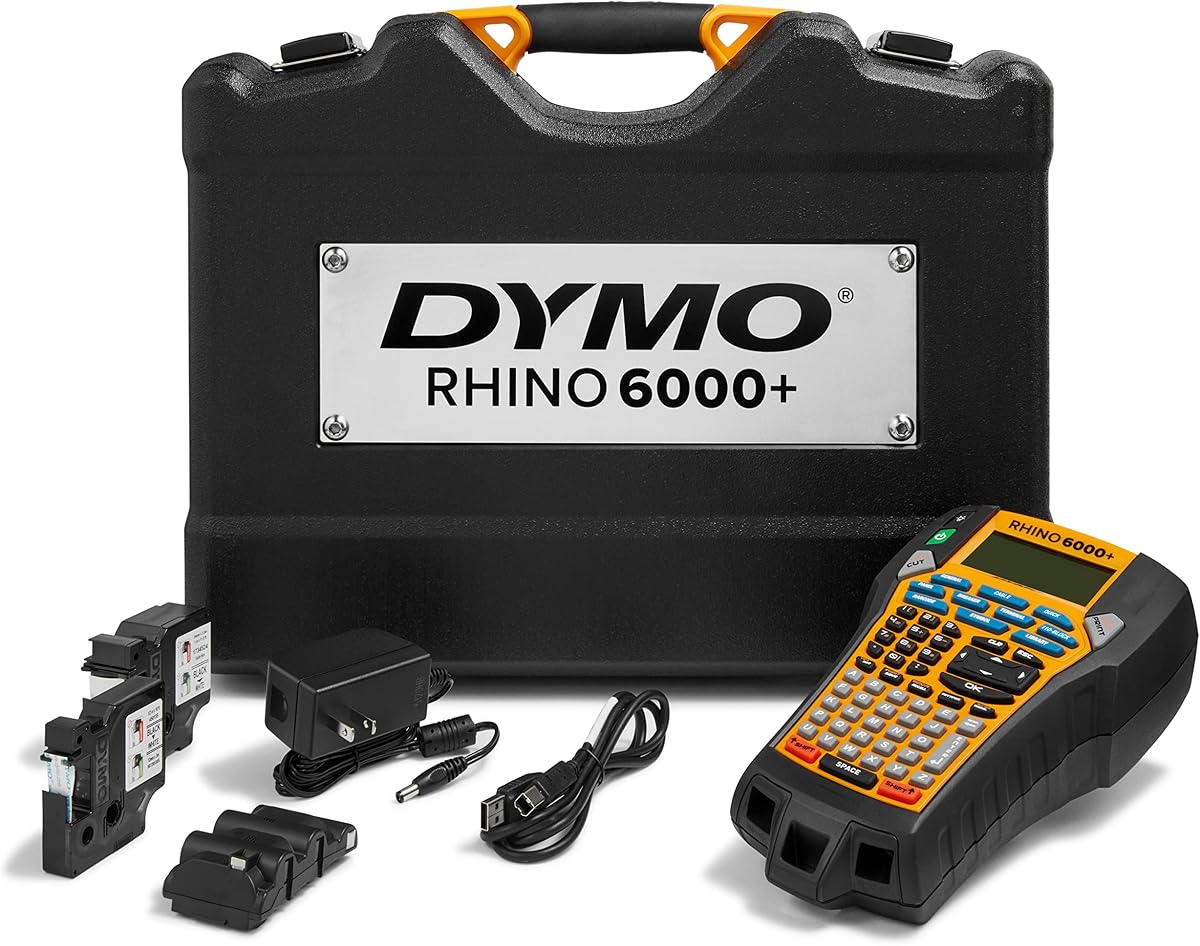
The DYMO Rhino 6000 is a powerful industrial label maker that bridges the gap between PC software and portable field use. It connects to DYMO ID software on a PC to create complex label layouts and then prints them on the device. This hybrid approach ensures high precision and compliance with industry standards.
We may earn a commission when you buy through this link, at no additional cost to you.
Exclusive hot keys automatically size space and format text making on-device editing quick and intuitive. The device comes with a rechargeable lithium ion battery and a hard carry case for secure transport. It is designed to meet key ANSI and TIA/EIA labeling standards for professional data centers.
While it is more expensive than basic models the ability to integrate with PC software for complex data is a major advantage. Users must ensure they have access to a computer for full functionality which might not be ideal for all field scenarios. However for those needing detailed asset tags it is superior.
For network engineers who need to generate detailed schedules and asset tags the Rhino 6000 is highly effective. The combination of software power and handheld convenience allows for efficient large-scale labeling projects. This device is best suited for professionals who require standardized and complex label formats.
Create complex label layouts on PC using DYMO ID software and then print seamlessly on the Rhino 6000.
Includes a rechargeable lithium ion battery reducing the need for disposable batteries during daily work.
We may earn a commission when you buy through this link, at no additional cost to you.
The Brady M210 Handheld Label Maker is a professional-grade tool designed for use in industrial worksites and electrical panels. With a solid rating of 4.6 it has gained trust among users for its durability and ease of use. The handheld design ensures it is easy to carry around busy environments.
We may earn a commission when you buy through this link, at no additional cost to you.
While specific features are not detailed in the provided data the Brady brand is known for high-quality labeling solutions that withstand harsh conditions. Its compact size allows technicians to access tight spaces where cable identification is critical. The durable casing protects the device from drops and daily wear.
Users should be aware that detailed specifications may require checking the official product page for full compatibility. Despite this the reputation of the M210 suggests it is a reliable choice for essential labeling tasks. It is less suitable for those needing advanced connectivity features without confirmation.
For industrial workers who need a trusted device for quick labeling the Brady M210 is a solid option. Its portability and brand reputation make it valuable for consistent on-site performance. This model is best for professionals who prioritize proven reliability over flashy features.
Designed to withstand the demands of worksites ensuring your labels remain legible and your device operational.
The handheld and compact form factor allows for easy transport between different work areas and projects.
We may earn a commission when you buy through this link, at no additional cost to you.
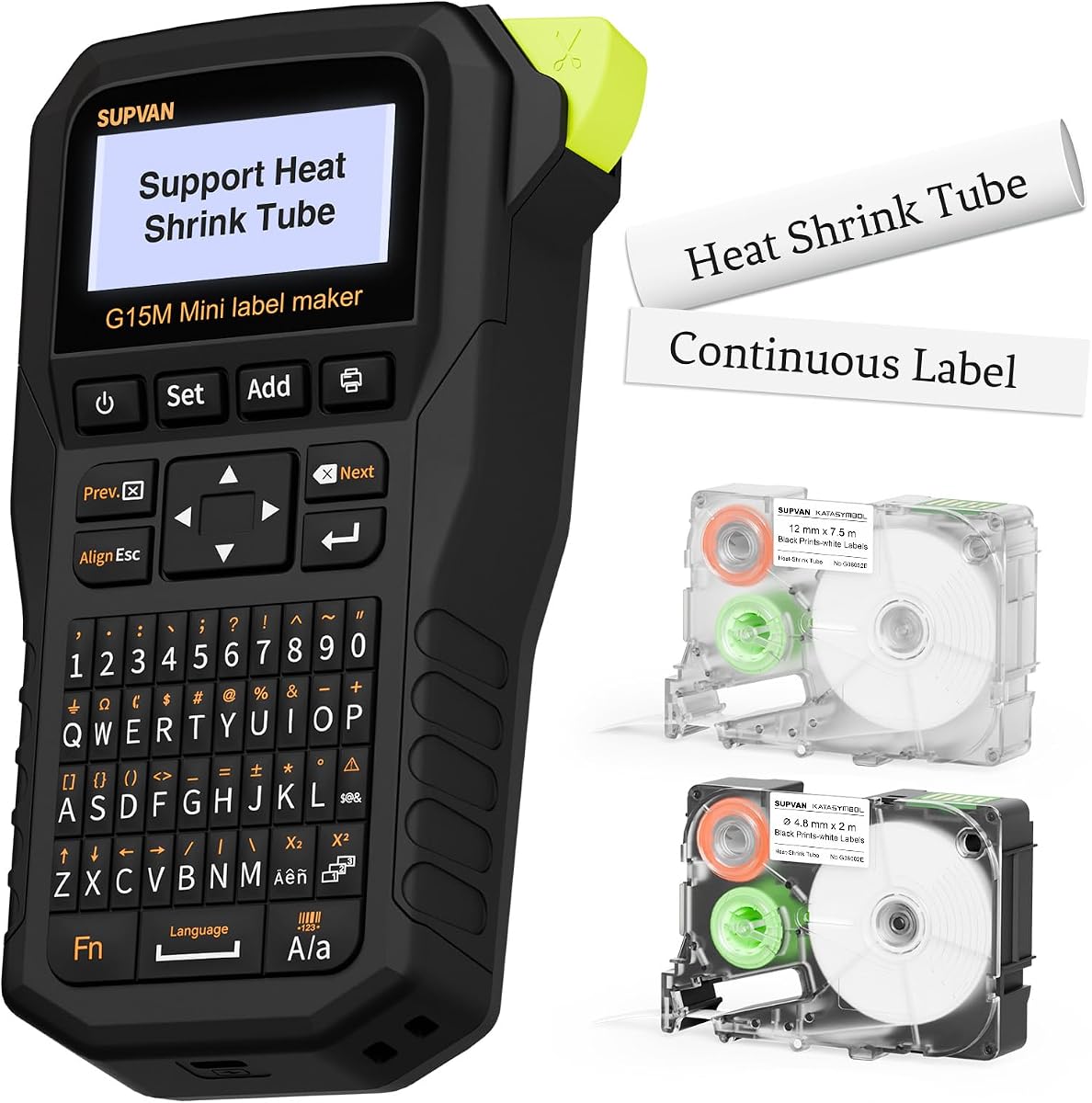
The SUPVAN G15M Mini Portable Label Maker is designed for efficiency and portability for small tasks and home use. It features a 1200 mAh rechargeable battery that can last up to 3 months on a single charge. The device supports heat shrink tubes making it versatile for various cable types.
We may earn a commission when you buy through this link, at no additional cost to you.
One standout feature is its minimal margin printing which uses only 0.19 inch margin to save tape material. It allows for four lines of text and over 400 icons for personalization. The lightweight design of 0.88 lb makes it easy to carry in a tool bag or pocket.
The small size may result in a smaller screen which can be challenging for some users to read clearly. Additionally it is limited to four lines of text which might not suit complex labeling needs. However for basic cable identification it offers significant value and convenience.
For users who need a compact tool for occasional labeling the SUPVAN G15M is an excellent choice. Its ability to save tape and offer rechargeable power makes it eco-friendly and cost-effective. This device is best suited for home offices or quick repairs where portability is key.
Minimal margin printing reduces tape waste improving efficiency and lowering costs over time.
Up to 3 months of use on a single charge reduces the need for frequent recharging during projects.
We may earn a commission when you buy through this link, at no additional cost to you.
Selecting the right label maker requires understanding your specific environment and labeling needs to ensure efficiency and compliance.
Print resolution determines the clarity and sharpness of your labels which is crucial for small text on thin wires. Higher DPI models like 300 DPI ensure that barcodes and fine details remain legible even in low light or harsh conditions. For professional network cables look for thermal transfer technology which offers superior durability over standard thermal printing. This ensures labels do not fade when exposed to heat, oil, or abrasion in server rooms or outdoor settings.
Higher resolution and thermal transfer technology provide long-lasting legibility for critical network infrastructure labeling.
Different labeling tasks require different tape types such as heat shrink, self-laminating wraps, or vinyl. Ensure the device you choose supports the specific tapes needed for your project including heat shrink for cable identification. Some models include tapes in the kit while others require separate purchases. Compatibility with industry-standard tape widths helps you find replacements easily when running out on a job site.
Verify the device supports the specific tape types required for your application to avoid compatibility issues.
For professional environments, compliance with ANSI and TIA/EIA-606 standards is often mandatory for safety and maintenance. Devices that meet these standards ensure your labels use the correct format and information for electrical and datacom setups. This helps in maintaining a uniform labeling system that can be understood by all technicians. Choosing a compliant device prevents costly rework or safety hazards in regulated facilities.
Check for explicit compliance with ANSI and TIA/EIA-606 standards to ensure safety and standardization in professional settings.
Reliable power sources are essential for field work where access to outlets may be limited. Look for devices with rechargeable lithium-ion batteries that offer long standby times and charging capabilities. Some models also support USB or standard batteries as a backup to ensure you can keep working without interruption. Consider how often you use the device and choose a power solution that matches your workflow intensity.
Opt for long-lasting rechargeable batteries and multiple power options to ensure uninterrupted labeling during long projects.
A clear display screen is vital for previewing labels before printing to avoid errors. Backlit screens allow for visibility in dark server closets or under desks where network cables are often found. A QWERTY keyboard can significantly speed up text entry compared to multi-function keypads. Consider how much text you need to display and whether multi-line preview capabilities are necessary for your tasks.
Prioritize a clear backlit screen and intuitive keyboard layout to improve accuracy and efficiency during labeling.
Industrial label makers must withstand drops, dust, and moisture to remain functional in demanding environments. Look for ruggedized casings and resistance ratings such as military-grade drop protection for field use. High-quality materials ensure the device lasts longer and reduces the risk of failure during critical tasks. Investing in a durable device minimizes downtime and maintenance costs over time.
Choose a model with ruggedized construction and resistance ratings suitable for the environment where it will be used.
For network technicians who move between rooms or sites, a lightweight and compact design is essential. Features like wrist straps or belt clips help keep the device accessible while working with both hands. A slim profile allows for easy storage in tool bags or pockets without taking up valuable space. Consider the weight and size to ensure comfortable handling during extended use.
Select a lightweight model with convenient carrying features like straps to enhance mobility and comfort on the job.
Some advanced models offer Bluetooth connectivity or PC software integration for creating complex schedules and barcodes. These features are useful for large-scale projects requiring consistent and detailed labeling across many devices. However, they may require extra equipment or learning time to set up. Evaluate if these advanced features align with your typical labeling needs before investing in them.
Consider whether advanced features like software connectivity or barcode support are necessary for your specific labeling requirements.
To get started, install the batteries or charge the device fully to ensure reliable operation. Select the appropriate tape cassette for your cable type whether heat shrink or vinyl and load it according to the manufacturer's instructions. Use the screen to type your label text and preview it before printing to avoid waste. Once satisfied press the print button to create your label and carefully apply it to the wire.
When applying labels, ensure the surface is clean and dry for best adhesion. For heat shrink tapes use a heat gun to shrink the label securely around the wire without touching the label directly. Store the device in a dry place away from extreme temperatures to prolong battery life and protect the screen. Regularly clean the print head with a soft cloth to maintain print quality over time.
Perform regular maintenance by checking tape levels and cleaning the exterior of the device. If you notice any print issues replace the tape cassette or clean the print head immediately. Keep the device updated if it requires software or firmware updates via PC to access new features. Proper care ensures consistent performance and a longer lifespan for your labeling tool.
For network cables, an industrial label maker with heat shrink tape support and high resolution is ideal. Devices that meet TIA/EIA-606 standards ensure professional and safe labeling. Look for models with durable tapes that can withstand heat and moisture in server environments.
Yes, you need heat shrink tube tapes specifically designed to shrink around wires when heated. Ensure your label maker is compatible with the width of the shrink tube you are using. These tapes are usually provided separately or in kits depending on the model.
Yes, you can use self-laminating wraps or vinyl labels for cable identification. These tapes are easier to apply and work well for general labeling where heat shrink is not required. Choose tapes that are waterproof and oil resistant for long-lasting results.
You should clean your label maker every few months or whenever print quality decreases. Use a soft cloth to wipe the exterior and clean the print head to remove dust. Regular cleaning ensures consistent output and extends the device's lifespan.
Yes, battery-operated label makers are reliable for field work if they have good battery life. Look for models with rechargeable batteries or easy battery replacement to avoid downtime. USB power options add extra convenience when working near outlets.
A resolution of 300 DPI is generally best for network labels to ensure text and barcodes are sharp. Lower resolutions may work for simple text but can be less legible in small print. Thermal transfer printers offer higher durability for harsh environments.
No, most handheld label makers do not require a computer to print labels. However, some industrial models benefit from PC software for creating complex data and barcodes. If you need advanced formatting, consider models with software integration.
Check the product description for ANSI and TIA/EIA-606 compliance mentions. Manufacturers often state compliance in the specs or about section. Using compliant devices ensures your labels are recognized and safe for professional electrical and datacom use.
Choosing the right label maker for network cables depends on your specific needs for durability, compliance, and portability. The Makeid P31S offers excellent industrial features while the E1000 provides a budget-friendly alternative with essential functions. Each device in this guide has been selected for its ability to create clear and lasting labels for network cables.
Prioritize features like print resolution, tape compatibility, and compliance standards to ensure your labels remain effective over time. Consider your power needs and whether battery life or connectivity is important for your workflow. Investing in a quality label maker will save time and prevent errors in your network management.
Remember to check current prices and availability before purchasing to get the best deal. Product specifications may vary slightly by region or seller so review the details carefully. We hope this guide helps you find the perfect labeling solution for your network cable needs.